2023 FORD SUPER DUTY remote control
[x] Cancel search: remote controlPage 125 of 738
Note:Make sure you switch your vehicle on,with the vehicle in accessory mode orrunning.
Note:The spot lamps turn off after 6 mph(10 km/h).
Note:The spot lamps illuminate the areain front of and to the side of your vehicle.
SWITCHING WELCOME LIGHTINGON AND OFF
Welcome lighting turns on the exteriorlamps when you approach your vehiclewith an authenticated device or unlock thedoors.
1.Press Settings on the touchscreen.
2.Press Vehicle Settings.
3.Press Lighting.
4.Switch Welcome Lighting on or off.
EXTERIOR LAMPS ON AUDIBLEWARNING
Sounds when you open the driver door andthe exterior lamps are on.
EXTERIOR ZONE LIGHTING (IF
EQUIPPED)
WHAT IS EXTERIOR ZONELIGHTING
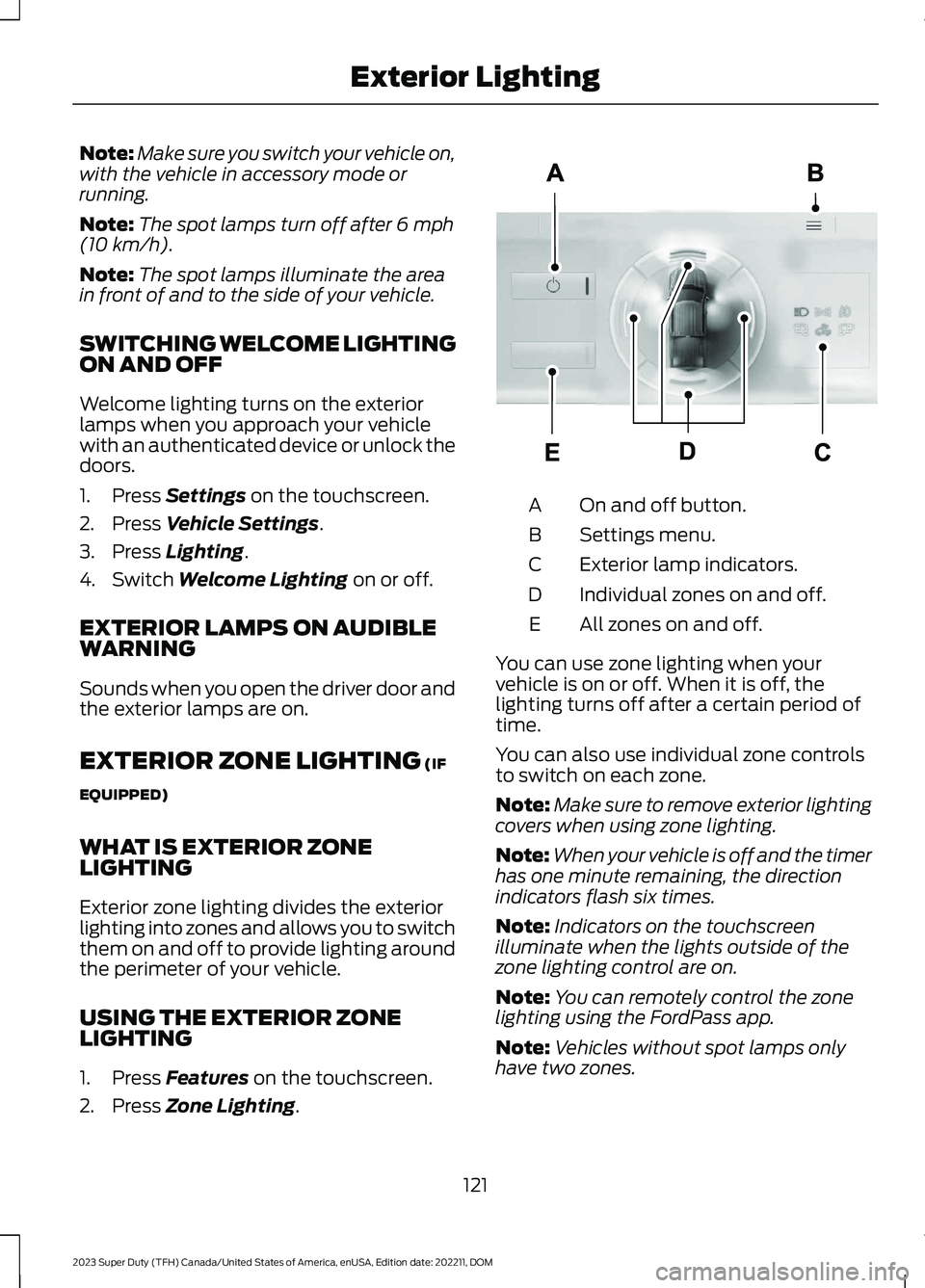
Exterior zone lighting divides the exteriorlighting into zones and allows you to switchthem on and off to provide lighting aroundthe perimeter of your vehicle.
USING THE EXTERIOR ZONELIGHTING
1.Press Features on the touchscreen.
2.Press Zone Lighting.
On and off button.A
Settings menu.B
Exterior lamp indicators.C
Individual zones on and off.D
All zones on and off.E
You can use zone lighting when yourvehicle is on or off. When it is off, thelighting turns off after a certain period oftime.
You can also use individual zone controlsto switch on each zone.
Note:Make sure to remove exterior lightingcovers when using zone lighting.
Note:When your vehicle is off and the timerhas one minute remaining, the directionindicators flash six times.
Note:Indicators on the touchscreenilluminate when the lights outside of thezone lighting control are on.
Note:You can remotely control the zonelighting using the FordPass app.
Note:Vehicles without spot lamps onlyhave two zones.
121
2023 Super Duty (TFH) Canada/United States of America, enUSA, Edition date: 202211, DOMExterior LightingE339129
Page 130 of 738
SWITCHING ALL OF THE
INTERIOR LAMPS ON AND OFF
The lamps turn on under the followingconditions:
•You open any door.
•You press a button on the remotecontrol.
•You press the all lamps on button onthe overhead console.
Press to switch all interior lampson or off.
SWITCHING THE FRONT
INTERIOR LAMPS ON AND OFF
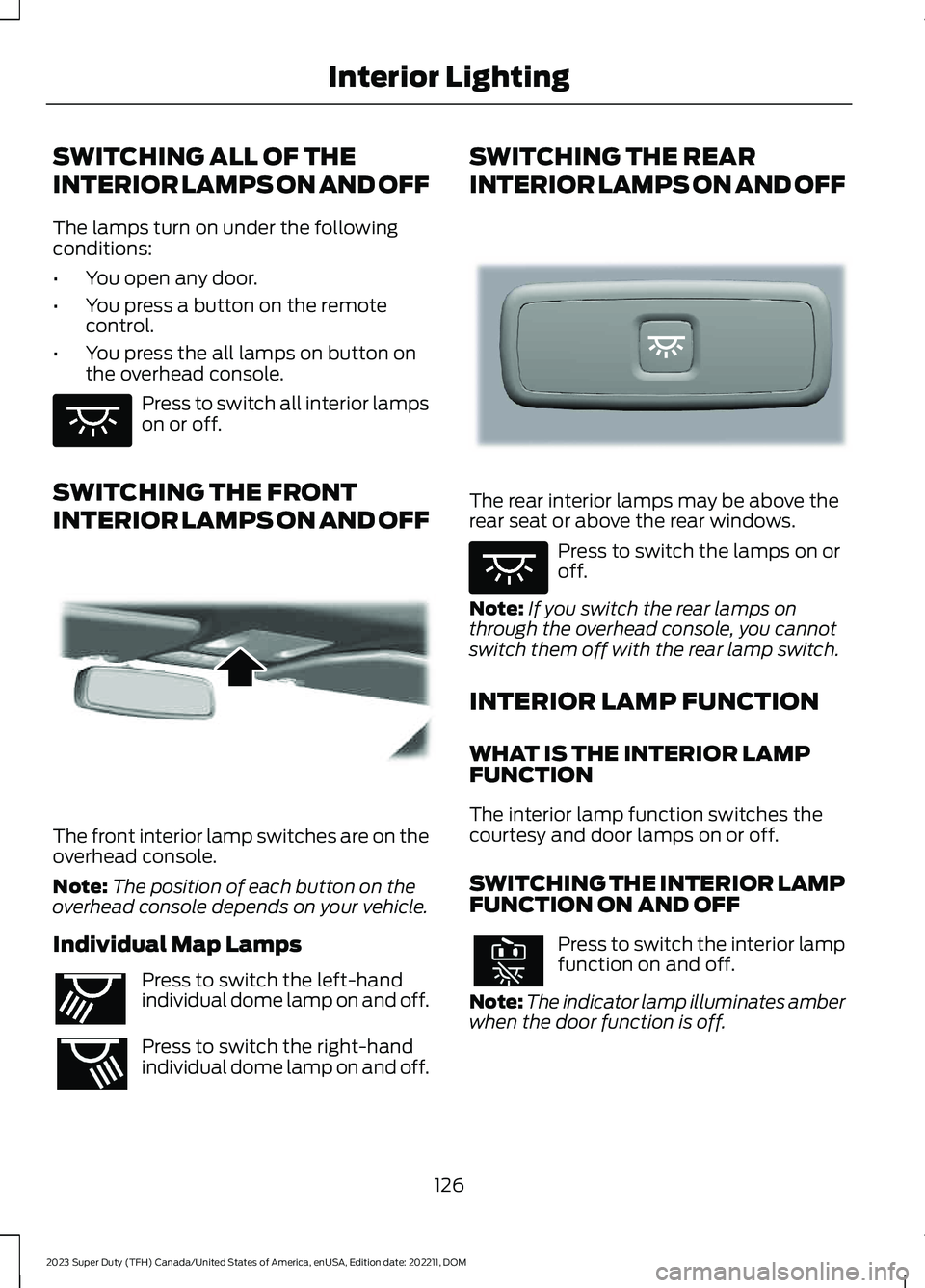
The front interior lamp switches are on theoverhead console.
Note:The position of each button on theoverhead console depends on your vehicle.
Individual Map Lamps
Press to switch the left-handindividual dome lamp on and off.
Press to switch the right-handindividual dome lamp on and off.
SWITCHING THE REAR
INTERIOR LAMPS ON AND OFF
The rear interior lamps may be above therear seat or above the rear windows.
Press to switch the lamps on oroff.
Note:If you switch the rear lamps onthrough the overhead console, you cannotswitch them off with the rear lamp switch.
INTERIOR LAMP FUNCTION
WHAT IS THE INTERIOR LAMPFUNCTION
The interior lamp function switches thecourtesy and door lamps on or off.
SWITCHING THE INTERIOR LAMPFUNCTION ON AND OFF
Press to switch the interior lampfunction on and off.
Note:The indicator lamp illuminates amberwhen the door function is off.
126
2023 Super Duty (TFH) Canada/United States of America, enUSA, Edition date: 202211, DOMInterior LightingE259649 E262162 E262193 E281231 E259649
Page 132 of 738
OPENING AND CLOSING THE
WINDOWS
WARNING: Do not leave childrenunattended in your vehicle and do notlet them play with the power windows.Failure to follow this instruction couldresult in personal injury.
WARNING: When closing thepower windows, verify they are free ofobstruction and make sure that childrenand pets are not in the proximity of thewindow openings.
Press the window control switchto open the window. Lift thewindow control switch to closethe window.
Note:The power windows operate with theignition on, and for several minutes after youswitch the ignition off or until you open afront door.
To reduce wind noise or pulsing noise whenone window is open, slightly open theopposite window.
One-Touch Open
Fully press the window control switch andrelease it. Press again or lift it to stop thewindow.
One-Touch Close
Fully lift the window control switch andrelease it. Press again or lift it to stop thewindow.
Resetting One-Touch Close
Carry out all steps within 30 seconds ofstarting the sequence.
1.Close the window.
2.Press and hold the window controlswitch until the window is fully open.Keep the window control switchpressed for a few seconds.
3.Lift and hold the window control switchuntil the window is fully closed. Keepthe window control switch held for afew seconds.
4.Press and hold the window controlswitch until the window is fully open.Keep the window control switchpressed for a few seconds.
5.Lift and hold the window control switchuntil the window is fully closed. Keepthe window control switch held for afew seconds.
Note:Repeat the procedure if the windowdoes not close when you use one-touch.
GLOBAL OPENING
WHAT IS GLOBAL OPENING
You can use the remote control to openthe windows with the ignition off.
USING GLOBAL OPENING
1.Press and release the unlock button onthe remote control.
2.Press and hold the unlock button onthe remote control.
3.Release the button when the windowsstart to open.
Press the lock or the unlock button on theremote control to stop global opening.
Note:You can use global opening for ashort period of time when you unlock yourvehicle using the remote control.
128
2023 Super Duty (TFH) Canada/United States of America, enUSA, Edition date: 202211, DOMWindows
Page 133 of 738
SWITCHING GLOBAL OPENING ONAND OFF
1.Using the information display controlson the steering wheel, select Settings.
2.Select Vehicle.
3.Select Windows.
4.Switch Remote Open on or off.
WINDOW BOUNCE-BACK
WHAT IS WINDOW BOUNCE-BACK
The window stops and reverses if it detectsan obstruction when closing.
OVERRIDING WINDOW BOUNCE-BACK
WARNING: If you overridebounce-back, the window does notreverse if it detects an obstacle. Takecare when closing the windows to avoidpersonal injury or damage to yourvehicle.
1.Close the window until it reaches thepoint of resistance and let it reverse.
2.Lift and hold the window control switchwithin two seconds to overridebounce-back and close the window.Bounce-back is now disabled and youcan close the window manually.
Note:The window goes past the point ofresistance and you can fully close it.
Note:If the window does not close, haveyour vehicle checked as soon as possible.
LOCKING THE REAR WINDOW
CONTROLS
Press the window control switchto lock or unlock the rear windowcontrols. It illuminates when youlock the rear window controls.
OPENING AND CLOSING THE
SLIDING WINDOWS (IF EQUIPPED)
WARNING: When closing thepower windows, verify they are free ofobstruction and make sure that childrenand pets are not in the proximity of thewindow openings.
WARNING: Do not leave childrenunattended in your vehicle and do notlet them play with the power windows.Failure to follow this instruction couldresult in personal injury.
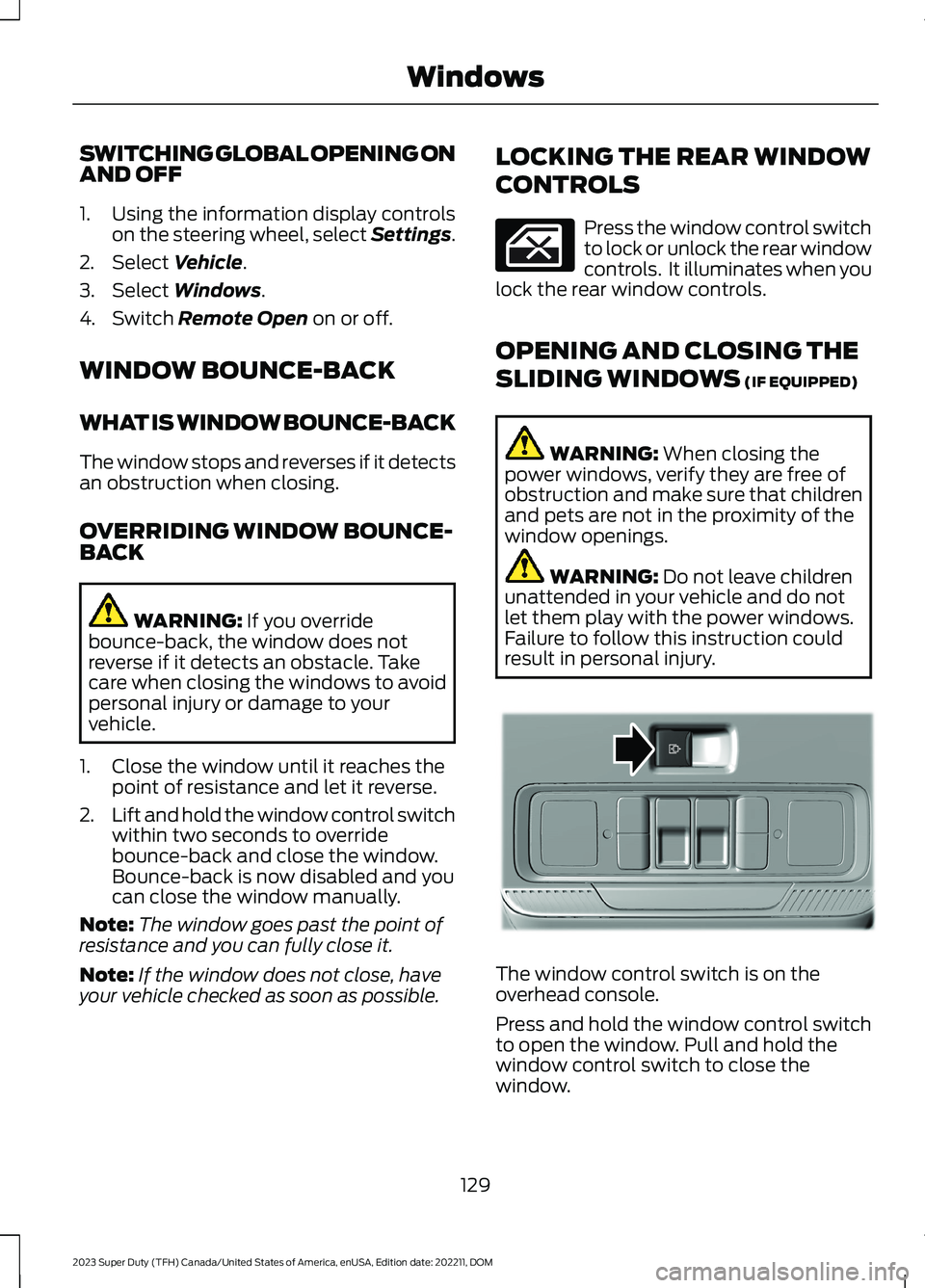
The window control switch is on theoverhead console.
Press and hold the window control switchto open the window. Pull and hold thewindow control switch to close thewindow.
129
2023 Super Duty (TFH) Canada/United States of America, enUSA, Edition date: 202211, DOMWindows E311430
Page 138 of 738
OPENING AND CLOSING THE
SUNSHADE
WARNING: Do not leave a key orremote control unattended in the vehicle.Children or pets could operate thesunshade and get caught in a closingsunshade. Failure to follow thisinstruction could result in personal injury.
WARNING: Do not leave childrenor pets unattended in your vehicle anddo not let children play with thesunshade. Failure to follow thisinstruction could result in personal injuryor death.
The controls are on the overhead console.
Opening the Sunshade
Press and release the switch toactivate the one-touch openfeature. To stop movement,press the switch a second time. Thesunshade also opens when you open themoonroof.
Note:The sunshade stops short of its fullyopened position for the comfort of rearpassengers. To fully open the sunshade,press the switch again.
Closing the Sunshade
WARNING: When closing thesunshade, verify that it is free ofobstructions and make sure children andpets are not in the proximity of thesunshade. Failure to follow thisinstruction could result in personal injury.
WARNING: If an obstruction isdetected, press the switch a second timeand reverse the sunshade immediately.Failure to follow this instruction couldresult in personal injury.
Press and release the switch toactivate the one-touch closefeature. To stop movement,press the switch a second time.
Note:If fully open, the sunshade stops aftercovering the rear glass panel. Press andrelease again to fully close the sunshade.
OPENING AND CLOSING THE
MOONROOF
WARNING: Do not leave childrenor pets unattended in your vehicle anddo not let children play with themoonroof. Failure to follow thisinstruction could result in personal injuryor death.
WARNING: Do not leave a key orremote control unattended in the vehicle.Children or pets could operate themoonroof and could become trapped ina closing moonroof. Failure to follow thisinstruction could result in personal injuryor death.
The controls are on the overhead console.
Opening the Moonroof
Press and release the switch toactivate the one-touch openfeature. To stop movement,press the switch a second time.
134
2023 Super Duty (TFH) Canada/United States of America, enUSA, Edition date: 202211, DOMMoonroof (If Equipped)E312249 E312250 E312251
Page 153 of 738
WHAT IS REMOTE START
The system allows you to remotely startyour vehicle and to adjust the interiortemperature according to the settings thatyou chose.
REMOTE START
PRECAUTIONS
WARNING: Do not start the enginein a closed garage or in other enclosedareas. Exhaust fumes are toxic. Alwaysopen the garage door before you startthe engine. Failure to follow thisinstruction could result in personal injuryor death.
REMOTE START LIMITATIONS
Remote start does not work under thefollowing conditions:
•The alarm horn is sounding.
•The hood is open.
•The transmission is not in park (P).
•The ignition is on.
•The battery voltage is below theminimum operating voltage.
•Remote start is not enabled.
Note:Do not use remote start if the fuellevel is low.
ENABLING REMOTE START
1.Press Settings on the touchscreen.
2.Press Vehicle.
3.Press Remote Start Setup.
4.Switch Remote Start on or off.
Note:To remote start with FordPass, makesure that the modem is enabled. SeeConnecting FordPass to the Modem(page 548).
REMOTELY STARTING AND
STOPPING THE VEHICLE
Remotely Starting the Vehicle
Press the button on the remotecontrol.
Within three seconds, press thebutton on the remote control.
Within three seconds, press thebutton again.
Note:You can also use FordPass to startthe vehicle.
Note:The vehicle doors lock when yousuccessfully remote start your vehicle.
Note:The turn signal lamps flash twice.
Note:The parking lamps turn on when thevehicle is running.
Note:The horn sounds if the system failsto start.
Note:All other vehicle systems remain offwhen you have remotely started the vehicle.
Note:The vehicle remains secured whenyou have remotely started the vehicle. Avalid key must be inside your vehicle toswitch the ignition on and drive your vehicle.
Remotely Stopping the Vehicle
Press the button on the remotecontrol.
149
2023 Super Duty (TFH) Canada/United States of America, enUSA, Edition date: 202211, DOMRemote Start (If Equipped)E138623 E138625 E138625
Page 154 of 738
EXTENDING THE REMOTE
START DURATION
To extend the remote start duration duringremote start, do the following:
Press the button on the remotecontrol.
Within three seconds, press thebutton on the remote control.
Within three seconds, press thebutton again.
If the duration is set to 15 minutes, theduration extends by another 15 minutes.This provides a total of 30 minutes.
Note:Remote start can only be extendedonce.
Note:A maximum of two remote starts, orone remote start with an extension, areallowed. To reset the restart procedureswitch the vehicle to on, then to off.
REMOTE START REMOTE
CONTROL INDICATORS
Remote Control Feedback
An LED on the remote control providesstatus feedback of remote start or stopcommands.
StatusLED
Remote startsuccessful.Solid green.
Remote stopsuccessful.Solid red.
Request failed orstatus not received.Blinking red.
Status incomplete.Blinking green.
REMOTE START SETTINGS
Climate Control Settings
1.Press Settings on the touchscreen.
2.Press Vehicle Settings.
3.Press Remote Start Setup.
4.Press Climate Control.
5.Press Auto or Last settings.
Note:If you switch the auto mode on, thesystem attempts to heat or cool the interiorto 72°F (22°C). When you switch the vehicleon, the climate control system returns tothe last used settings.
Note:If you switch the last settings on, thesystem remembers the last used settings.
Heated Seat Settings (If Equipped)
1.Press Settings on the touchscreen.
2.Press Vehicle Settings.
3.Press Remote Start Setup.
4.Press Seats.
5.Press Auto or Off.
Note:If you switch the heated seat settingson, the heated seats turn on during coldweather.
Note:You cannot adjust the heated seatsettings when you remotely start yourvehicle.
Heated Steering Wheel Settings (If
Equipped)
1.Press Settings on the touchscreen.
2.Press Vehicle Settings.
3.Press Remote Start Setup.
4.Press Seats and Steering Wheel.
5.Press Auto or Off.
Note:If you switch the heated steeringwheel settings on, the heated steering wheelturns on during cold weather.
150
2023 Super Duty (TFH) Canada/United States of America, enUSA, Edition date: 202211, DOMRemote Start (If Equipped)E138623 E138625
Page 173 of 738

Press the heated seat symbol on theclimate controls or touchscreen to cyclethrough the various heat settings and off.The more indicators that display, thewarmer the temperature of the seat.
Note:The heated seats may remain onafter you remote start your vehicle, basedon your remote start settings. The heatedseats may also turn on when you start yourvehicle if they were on when you switchedyour vehicle off.
VENTILATED SEATS (IF EQUIPPED)
VENTILATED SEAT PRECAUTIONS
Do not:
•Spill liquid on the front seats. This maycause the air vent holes to becomeblocked and not work properly.
•Place cargo or objects under the seats.They may block the air intake causingthe air vents to not work properly.
SWITCHING THE VENTILATEDSEATS ON AND OFF
The vehicle must be running to use thisfeature.
Press this symbol on the climate controlsor the touchscreen to cycle through thevarious ventilation settings and off. Moreindicator lights indicate higher fan speeds.
Note:When you switch the climate controlfan speed and the ventilated seats to theirmaximum settings, the ventilated seatsprovide increased cooling.
If the engine falls below 350 RPM whilethe ventilated seats are on, the featureturns itself off unless the vehicle is inAuto-Start-Stop mode. You may need toreactivate the ventilated seats.
Note:The ventilated seats may remain onafter you remote start your vehicle, basedon your remote start settings. The ventilatedseats may also turn on when you start yourvehicle if they were on when you switchedyour vehicle off.
FRONT SEATS VIDEOS
4-Way Head Restraints Video Link
Power-Seat Adjustment Video Link
Max Recline Seats Video Link
169
2023 Super Duty (TFH) Canada/United States of America, enUSA, Edition date: 202211, DOMFront SeatsE146322 E224689