2023 FORD SUPER DUTY boot
[x] Cancel search: bootPage 20 of 738
Vehicle Identification
Vehicle Identification Number...............547
Connected Vehicle
What Is a Connected Vehicle.................548
Connected Vehicle Requirements.......548
Connected Vehicle Limitations.............548
Connecting the Vehicle to a MobileNetwork.....................................................548
Connecting the Vehicle to a Wi-FiNetwork.....................................................548
Connected Vehicle – Troubleshooting.......................................................................549
Connected Vehicle Videos......................550
Vehicle Wi-Fi Hotspot
Creating a Vehicle Wi-Fi Hotspot..........551
Changing the Vehicle Wi-Fi HotspotName or Password.................................551
Vehicle Wi-Fi Hotspot – Troubleshooting........................................................................552
Audio System
Audio System Precautions......................553
Identifying the Audio Unit.......................553
Switching the Audio Unit On and Off........................................................................553
Selecting the Audio Source....................553
Playing or Pausing the Audio Source........................................................................553
Adjusting the Volume...............................554
Switching Shuffle Mode On and Off........................................................................554
Switching Repeat Mode On and Off........................................................................554
Setting a Memory Preset.........................554
Muting the Audio........................................554
Adjusting the Sound Settings................554
Setting the Clock and Date.....................555
AM/FM Radio...............................................555
Switching the Display On and Off.......556
Digital Radio.................................................556
Satellite Radio..............................................557
Audio System – Troubleshooting........559
Center Display Overview
Center Display Precautions....................563
Center Display Limitations......................563
Status Bar.....................................................563
Feature Bar...................................................564
Information On Demand Screen..........564
Rebooting the Center Display...............564
Center Display Overview Videos..........564
Voice Interaction
Ford Assistant.............................................565
Alexa Built-In
What is Alexa Built-In................................567
Alexa Built-In Requirements..................567
Signing Into Your Account.......................567
Using Alexa Built-In...................................567
Alexa Built-In Settings..............................567
Phone
Phone Precautions....................................569
Connecting Your Phone...........................569
Phone Menu.................................................569
Making and Receiving a Phone Call......571
Sending and Receiving a Text Message........................................................................572
Switching Text Message Notification Onand Off........................................................573
Bluetooth®
Connecting a Bluetooth® Device.........574
Playing Media Using Bluetooth®..........574
Apps
App Precautions..........................................575
App Requirements.....................................575
16
2023 Super Duty (TFH) Canada/United States of America, enUSA, Edition date: 202211, DOMTable of Contents
Page 426 of 738
JUMP STARTING THE VEHICLE
Connecting the Jumper Cables
WARNING: Do not connect thenegative jumper cable to any other partof your vehicle. Use the ground point.
Note:If you are using a jump pack orbooster box, follow the manufacturer'sinstructions.
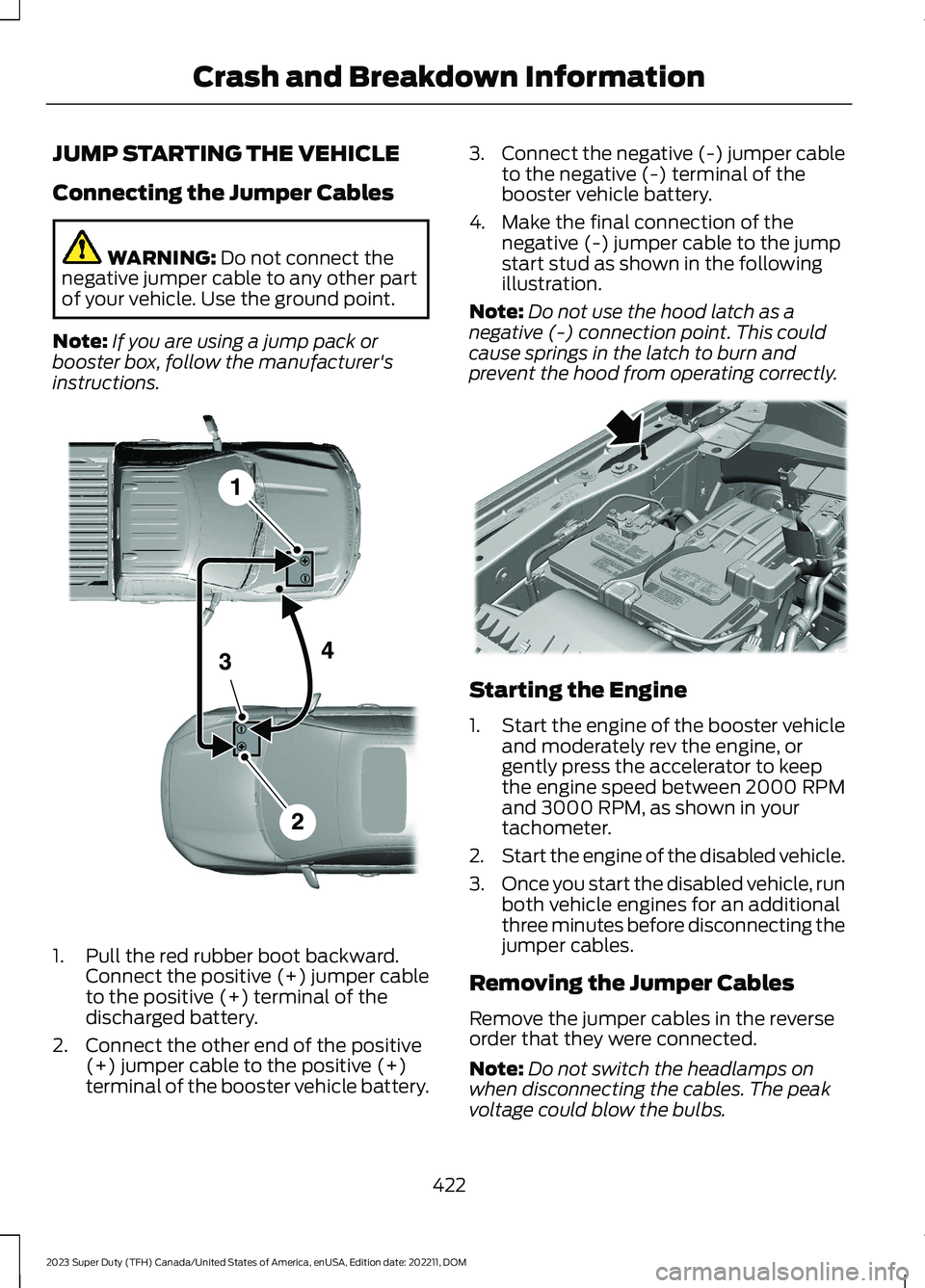
1.Pull the red rubber boot backward.Connect the positive (+) jumper cableto the positive (+) terminal of thedischarged battery.
2.Connect the other end of the positive(+) jumper cable to the positive (+)terminal of the booster vehicle battery.
3.Connect the negative (-) jumper cableto the negative (-) terminal of thebooster vehicle battery.
4.Make the final connection of thenegative (-) jumper cable to the jumpstart stud as shown in the followingillustration.
Note:Do not use the hood latch as anegative (-) connection point. This couldcause springs in the latch to burn andprevent the hood from operating correctly.
Starting the Engine
1.Start the engine of the booster vehicleand moderately rev the engine, orgently press the accelerator to keepthe engine speed between 2000 RPMand 3000 RPM, as shown in yourtachometer.
2.Start the engine of the disabled vehicle.
3.Once you start the disabled vehicle, runboth vehicle engines for an additionalthree minutes before disconnecting thejumper cables.
Removing the Jumper Cables
Remove the jumper cables in the reverseorder that they were connected.
Note:Do not switch the headlamps onwhen disconnecting the cables. The peakvoltage could blow the bulbs.
422
2023 Super Duty (TFH) Canada/United States of America, enUSA, Edition date: 202211, DOMCrash and Breakdown InformationE380338 E379874
Page 568 of 738
Vehicle Software Update
See Software Update Indicators (page583).
Wireless Accessory Charger
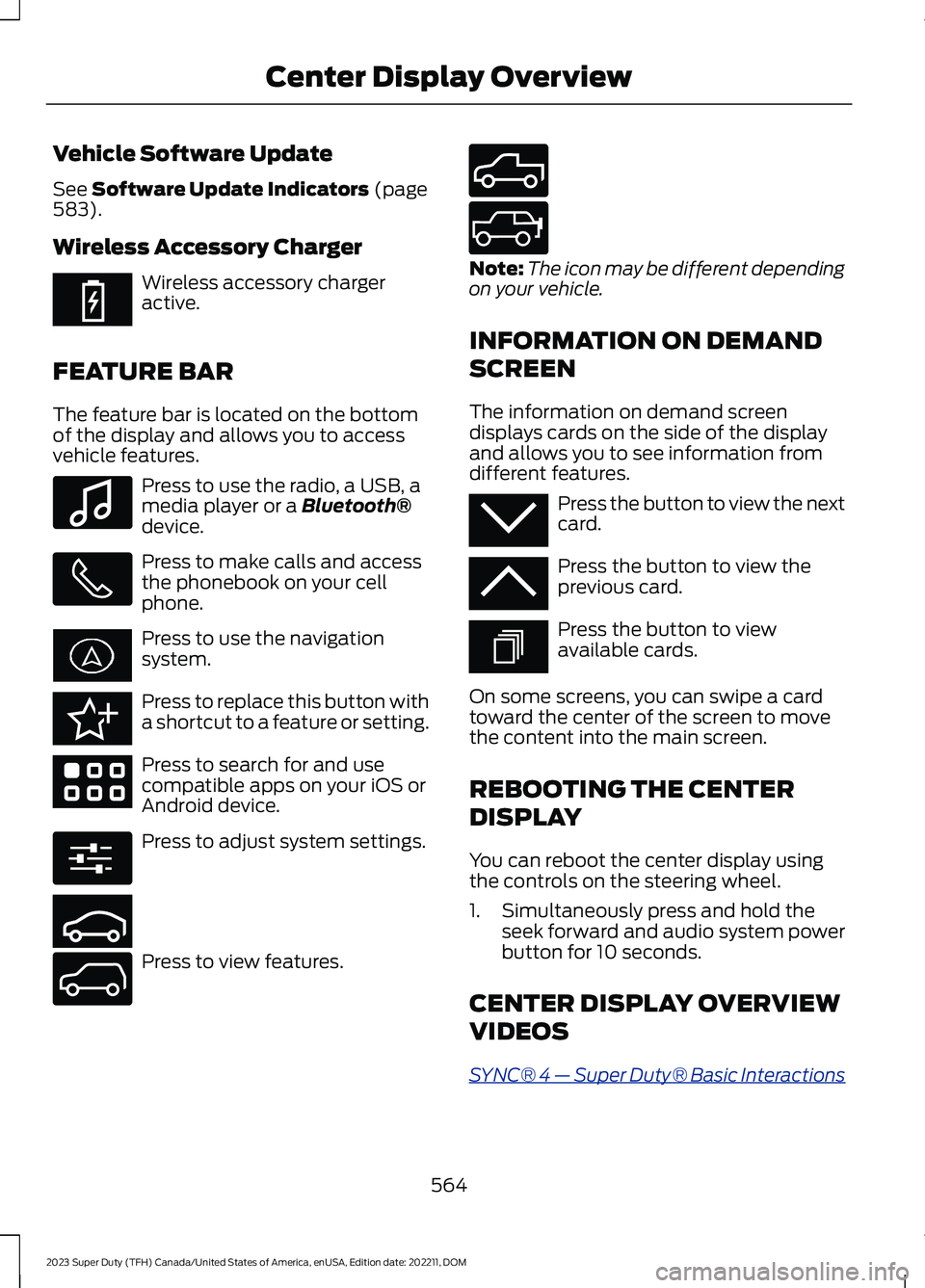
Wireless accessory chargeractive.
FEATURE BAR
The feature bar is located on the bottomof the display and allows you to accessvehicle features.
Press to use the radio, a USB, amedia player or a Bluetooth®device.
Press to make calls and accessthe phonebook on your cellphone.
Press to use the navigationsystem.
Press to replace this button witha shortcut to a feature or setting.
Press to search for and usecompatible apps on your iOS orAndroid device.
Press to adjust system settings.
Press to view features.
Note:The icon may be different dependingon your vehicle.
INFORMATION ON DEMAND
SCREEN
The information on demand screendisplays cards on the side of the displayand allows you to see information fromdifferent features.
Press the button to view the nextcard.
Press the button to view theprevious card.
Press the button to viewavailable cards.
On some screens, you can swipe a cardtoward the center of the screen to movethe content into the main screen.
REBOOTING THE CENTER
DISPLAY
You can reboot the center display usingthe controls on the steering wheel.
1.Simultaneously press and hold theseek forward and audio system powerbutton for 10 seconds.
CENTER DISPLAY OVERVIEW
VIDEOS
SYNC® 4 — Super Duty® Basic Interactions
564
2023 Super Duty (TFH) Canada/United States of America, enUSA, Edition date: 202211, DOMCenter Display OverviewE353214 E100027 E358432 E353220 E280315 E353210 E335299 E335300 E347104 E353212 E353211 E353209
Page 597 of 738
Check Every Six Months
The door weatherstrips for wear. Lubricate if necessary.
The hinges, latches and outside locks for proper operation. Lubricate if necessary.
The parking brake for proper operation.
The seatbelts and seat latches for wear and function.
Safety warning lamps, brake, ABS, airbag and seatbelt for operation.
The washer spray and wiper operation. Clean or replace blades as necessary.
Multi-Point Inspection
It is important to have the systems on yourvehicle regularly checked. This can helpidentify potential issues and prevent majorproblems. We recommend having thefollowing multi-point inspection performedat every scheduled maintenance intervalto help make sure your vehicle keepsrunning great.
Multi-Point Inspection
Hazard warning system operationAccessory drive belt or belts
Horn operationBattery performance
Radiator, cooler, heater and air conditioninghosesEngine air filter
Suspension components for leaks ordamageExhaust system
Steering and linkageExterior lamps operation
Tires including the spare for wear and
proper pressure2Fluid levels1; fill if necessary
Windshield for cracks, chips or pitsFor oil and fluid leaks
Washer spray and wiper operationHalfshaft dust boots
1 Brake, coolant recovery reservoir, automatic transmission and window washer.2If your vehicle has a temporary mobility kit, check the tire sealant expiration Use By dateon the canister. Replace as needed.
593
2023 Super Duty (TFH) Canada/United States of America, enUSA, Edition date: 202211, DOMScheduled Maintenance
Page 601 of 738
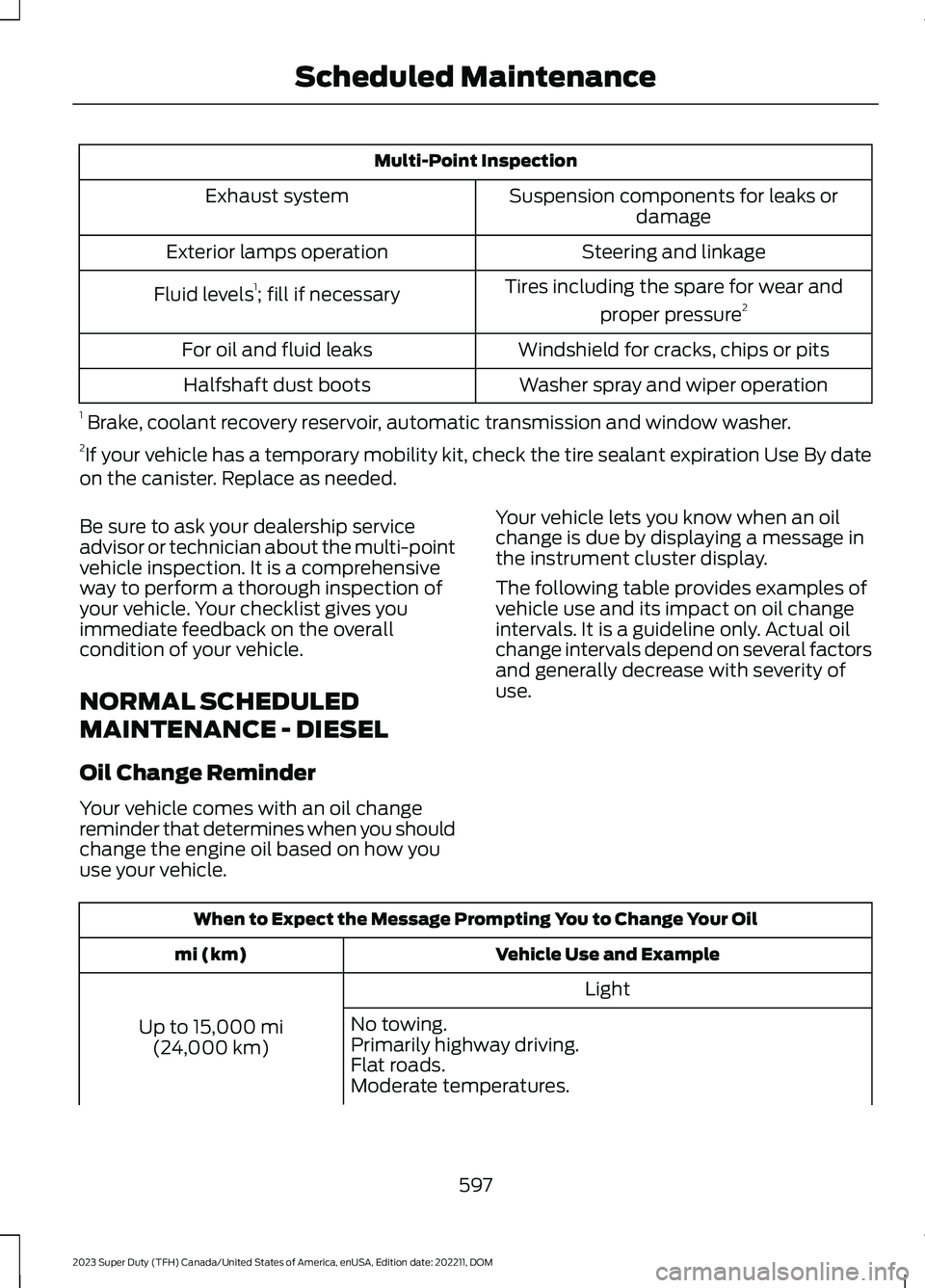
Multi-Point Inspection
Suspension components for leaks ordamageExhaust system
Steering and linkageExterior lamps operation
Tires including the spare for wear and
proper pressure2Fluid levels1; fill if necessary
Windshield for cracks, chips or pitsFor oil and fluid leaks
Washer spray and wiper operationHalfshaft dust boots
1 Brake, coolant recovery reservoir, automatic transmission and window washer.2If your vehicle has a temporary mobility kit, check the tire sealant expiration Use By dateon the canister. Replace as needed.
Be sure to ask your dealership serviceadvisor or technician about the multi-pointvehicle inspection. It is a comprehensiveway to perform a thorough inspection ofyour vehicle. Your checklist gives youimmediate feedback on the overallcondition of your vehicle.
NORMAL SCHEDULED
MAINTENANCE - DIESEL
Oil Change Reminder
Your vehicle comes with an oil changereminder that determines when you shouldchange the engine oil based on how youuse your vehicle.
Your vehicle lets you know when an oilchange is due by displaying a message inthe instrument cluster display.
The following table provides examples ofvehicle use and its impact on oil changeintervals. It is a guideline only. Actual oilchange intervals depend on several factorsand generally decrease with severity ofuse.
When to Expect the Message Prompting You to Change Your Oil
Vehicle Use and Examplemi (km)
Light
Up to 15,000 mi(24,000 km)
No towing.Primarily highway driving.Flat roads.Moderate temperatures.
597
2023 Super Duty (TFH) Canada/United States of America, enUSA, Edition date: 202211, DOMScheduled Maintenance
Page 727 of 738

Switching Predictive Speed Assist ModeOn and Off.......................................................307Predictive Speed Assist –Troubleshooting.......................................308Predictive Speed Assist – InformationMessages........................................................308Preparing Your Vehicle forStorage.........................................................476Programming the Garage DoorOpener..........................................................180Programming the Remote Control -Vehicles With: Flip Key...............................77Programming the Remote Control -Vehicles With: Push Button Start..........78Properly Adjusting the Driver and FrontPassenger Seats..........................................64Protecting the Environment......................30PunctureSee: Changing a Flat Tire...............................509Push Button Ignition Switch....................203
R
Radio Frequency CertificationLabels...........................................................626Blind Spot Information SystemSensors.............................................................626Body Control Module.......................................629Cruise Control Module......................................631Garage Door Opener........................................635Keys and Remote Controls............................636Near Field Communication...........................638Passive Anti-Theft System............................639Radio Transceiver Module..............................643SYNC......................................................................644Telematics Control Unit..................................650Tire Pressure Monitoring SystemSensors.............................................................652Wireless Accessory ChargingModule.............................................................666Rear Axle Fluid Capacity andSpecification..............................................542Rear Cross Traffic BrakingSee: Cross Traffic Braking...............................262Rear Exterior.....................................................35Rear Occupant Alert System AudibleWarnings.......................................................176
Rear Occupant Alert SystemIndicators.......................................................175Rear Occupant Alert SystemLimitations....................................................174Rear Occupant Alert SystemPrecautions..................................................174Rear Occupant Alert System....................174Rear Occupant Alert SystemSettings..........................................................175Rear Parking Aid...........................................283Locating the Rear Parking AidSensors.............................................................283Rear Parking Aid Audible Warnings............284Rear Parking Aid Limitations.........................283What is the Rear Parking Aid.........................283Rear Seats.......................................................170Heated Seats........................................................172Manual Seats.......................................................170Rear View Camera Guide Lines.............288Rear View Camera Precautions..............287Rear View Camera.......................................287Rear View Camera Settings..........................288Rear View Camera Settings....................288Switching Rear View Camera Delay On andOff......................................................................289Zooming the Rear View Camera In andOut.....................................................................288Rear View Camera Videos.......................289Rebooting the Center Display................564Recalling a Preset Position........................177Recovery Towing..........................................423Accessing the Front Towing Point...............423Recreationally Towing Your Vehicle -4x2.................................................................429Recreationally Towing Your Vehicle -4x4..................................................................427Refueling..........................................................218Refueling System Overview............................218Refueling Your Vehicle......................................218Releasing the Electric Parking Brake ifthe Vehicle Battery Has Run Out ofCharge...........................................................254Remote Control Limitations......................69Remotely Starting and Stopping theVehicle...........................................................149Remote Start Limitations..........................149Remote Start Precautions........................149
723
2023 Super Duty (TFH) Canada/United States of America, enUSA, Edition date: 202211, DOMIndex