2023 FORD SUPER DUTY display
[x] Cancel search: displayPage 456 of 738
MANAGING THE COOLANTTEMPERATURE
If you tow a trailer with your vehicle, theengine may temporarily reach a highertemperature during severe operatingconditions, for example ascending a longor steep grade in high ambienttemperatures.
At this time, you may notice the coolanttemperature gauge moves toward the redzone and a message may appear in theinformation display.
WARNING: To reduce the risk ofcrash and injury, be prepared that thevehicle speed may reduce and thevehicle may not be able to acceleratewith full power until the coolanttemperature reduces.
WARNING: If you continue to driveyour vehicle when the engine isoverheating, the engine could stopwithout warning. Failure to follow thisinstruction could result in the loss ofcontrol of your vehicle.
You may notice a reduction in vehiclespeed caused by reduced engine power inorder to manage the engine coolanttemperature. Your vehicle may enter thismode if certain high-temperature andhigh-load conditions take place. Theamount of speed reduction depends onvehicle loading, grade and outsidetemperature. If this occurs, there is noneed to stop your vehicle. You cancontinue to drive. See Fail-Safe Cooling(page 425).
The air conditioning may automaticallyturn on and off during severe operatingconditions to protect the engine fromoverheating. When the coolanttemperature decreases to the normaloperating temperature, the air conditioningturns on.
If the coolant temperature gauge movesfully into the red zone, or if the coolanttemperature warning or service enginesoon messages appear in your informationdisplay, do the following:
1.Stop your vehicle as soon as it is safeto do so. Fully apply the parking brake,shift into park (P) or neutral (N).
2.Leave the engine running until thecoolant temperature gauge needlereturns to the normal position. If thetemperature does not drop afterseveral minutes, follow the remainingsteps.
3.Switch the engine off and wait for it tocool. Check the coolant level.
4.If the coolant level is at or below theminimum mark, add prediluted coolantimmediately.
5.If the coolant level is normal, restartthe engine and continue.
COOLANT – WARNING LAMPS
If the engine begins to overheat,the coolant temperature gaugemoves toward the red zone.
A warning lamp illuminates anda message may appear in theinformation display.
452
2023 Super Duty (TFH) Canada/United States of America, enUSA, Edition date: 202211, DOMMaintenanceE103308 E67028
Page 457 of 738
COOLANT – INFORMATION MESSAGES
Description and ActionMessage
Displays when the engine temperature istoo high. Stop your vehicle as soon as it issafe to do so, switch the engine off andallow it to cool. If the problem persists, haveyour vehicle checked as soon as possible.See Checking the Coolant Level (page450).
High engine temperature Stop safely
CHANGING THE FUEL FILTER
- DIESEL
Your fuel filters must be changed at thecorrect service interval or when you see thelow fuel pressure message appear. Referto scheduled maintenance for the correctservice interval.
CHANGING THE FUEL FILTER
- GASOLINE
Your vehicle has a lifetime fuel filter thatintegrates with the fuel tank. It does notneed regular maintenance or replacement.
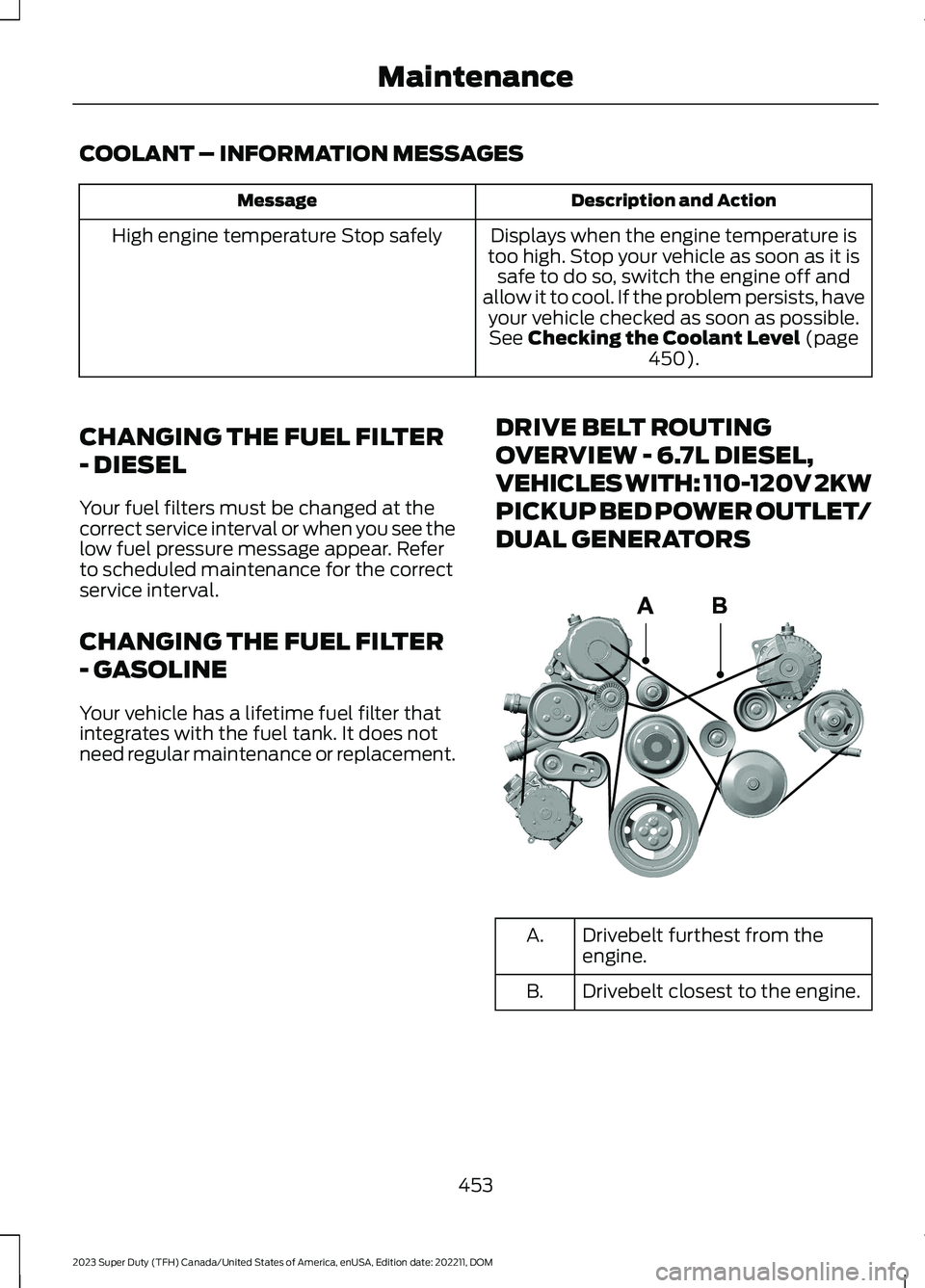
DRIVE BELT ROUTING
OVERVIEW - 6.7L DIESEL,
VEHICLES WITH: 110-120V 2KW
PICKUP BED POWER OUTLET/
DUAL GENERATORS
Drivebelt furthest from theengine.A.
Drivebelt closest to the engine.B.
453
2023 Super Duty (TFH) Canada/United States of America, enUSA, Edition date: 202211, DOMMaintenanceE376526
Page 461 of 738
WHAT IS THE BATTERYMANAGEMENT SYSTEM
The battery management system monitorsbattery conditions and takes actions toextend battery life.
HOW DOES THE BATTERYMANAGEMENT SYSTEM WORK
If excessive battery drain is detected, thesystem temporarily disables someelectrical systems to protect the battery.
Systems included are:
•Heated rear window.
•Heated seats.
•Climate control.
•Heated steering wheel.
•Audio unit.
•Navigation system.
A message could appear in the informationdisplay to alert you that battery protectionactions are active. This message is only fornotification that an action is taking place,and not intended to indicate an electricalproblem or that the battery requiresreplacement.
BATTERY MANAGEMENT SYSTEMLIMITATIONS
After battery replacement, or in somecases after charging the battery with anexternal charger, the battery managementsystem requires eight hours of vehicle sleeptime to relearn the battery state of charge.During this time, your vehicle must remainfully locked with the ignition switched off.
Note:Prior to relearning the battery stateof charge, the battery management systemcould temporarily disable some electricalsystems.
Electrical Accessory Installation
To make sure the battery managementsystem works correctly, do not connect anelectrical device ground connectiondirectly to the battery negative post. Thiscan cause inaccurate measurements ofthe battery condition and potentialincorrect system operation.
Note:If you add electrical accessories orcomponents to the vehicle, it couldadversely affect battery performance anddurability. This could also affect theperformance of other electrical systems inthe vehicle.
CHANGING THE 12V BATTERY
The battery is in the engine compartment.See Maintenance (page 440).
Your vehicle has a maintenance-freebattery. It does not require additionalwater during service.
If the vehicle battery has a cover, makesure you correctly install it after cleaningor replacing the battery.
For longer, trouble-free operation, keep thetop of the battery clean and dry and thebattery cables tightly fastened to thebattery terminals. If any corrosion ispresent on the battery or terminals, removethe cables from the terminals and cleanwith a wire brush. You can neutralize theacid with a solution of baking soda andwater.
We recommend that you disconnect thenegative battery cable terminal from thebattery if you plan to store your vehicle foran extended period.
Note:If you only disconnect the negativebattery cable terminal, make sure it isisolated or placed away from the batteryterminal to avoid unintended connection orarcing.
457
2023 Super Duty (TFH) Canada/United States of America, enUSA, Edition date: 202211, DOMMaintenance
Page 463 of 738
12V BATTERY –
TROUBLESHOOTING
12V BATTERY – WARNING LAMPS
If it illuminates while driving, itindicates a charging systemerror. Switch off all unnecessaryelectrical equipment and have your vehicleimmediately checked.
12V BATTERY – INFORMATION MESSAGES
DetailsMessage
The charging system needs servicing. If the warning stays onor continues to come on, have your vehicle checked as soonas possible.
Charging System ServiceSoon
The charging system needs servicing. Have your vehicleimmediately checked.Charging System ServiceNow
The battery management system determines that the 12Vbattery is at a low state of charge. Start the engine to chargethe battery or charge the battery using an aftermarket batterycharger. Always use the vehicle ground point when connectingthe negative cable of the external battery charger. See JumpStarting the Vehicle (page 422). This message clears onceyou restart your vehicle and the battery state of charge hasrecovered. Do not switch on the ignition when a batterycharger is in use to charge the battery.
Battery State of ChargeLow
The battery management system determines that the batteryis at a low state of charge. Turn the ignition off as soon aspossible to protect the battery. This message will clear oncethe vehicle has been started and the battery state of chargehas recovered. Turning off unnecessary electrical loads willallow faster battery state-of-charge recovery.
Turn Power Off To SaveBattery
Displayed when the battery management system detects anextended low-voltage condition. Various vehicle features willbe disabled to help preserve the battery. Turn off as many ofthe electrical loads as soon as possible to improve systemvoltage. If the system voltage has recovered, the disabledfeatures will operate again as normal.
Electrical Power SaverActive Some FeaturesTurned Off See Manual
459
2023 Super Duty (TFH) Canada/United States of America, enUSA, Edition date: 202211, DOMMaintenanceE67021
Page 477 of 738
Note:Avoid cleaners or polishes thatincrease the gloss of the upper portion ofthe instrument panel. The dull finish in thisarea helps protect you from undesirablewindshield reflection.
CLEANING PLASTIC
We recommend that you only use a mildsoap and water solution on a soft cloth.Dry the area with a clean, soft cloth.
CLEANING DISPLAYS ANDSCREENS
We recommend that you only use amicrofiber cloth in a circular motion toclean off the fingerprint or dust.
If dirt or fingerprints are still on the screen,apply a small amount of alcohol to thecloth and try to clean it again.
Note:Do not pour or spray alcohol onto thetouchscreen.
Note: Do not use detergent or any type ofsolvent to clean the touchscreen.
CLEANING FABRIC
WARNING: On vehicles equippedwith seat-mounted airbags, do not usechemical solvents or strong detergents.Such products could contaminate theside airbag system and affectperformance of the side airbag in a crash.
We recommend that you only clean fabricin the following way:
1.Remove dust and loose dirt with avacuum cleaner.
2.Wipe the surface with a soft, dampcloth and a mild soap and watersolution. Dry the area with a clean, softcloth.
3.For additional information andassistance, we recommend that youcontact an authorized dealer.
For heavy stains, spot clean the area. If aring forms on the fabric, clean the entirearea immediately, but do not oversaturateor the ring could set.
CLEANING LEATHER
WARNING: On vehicles equippedwith seat-mounted airbags, do not usechemical solvents or strong detergents.Such products could contaminate theside airbag system and affectperformance of the side airbag in a crash.
We recommend that you only clean theleather surfaces in the following way:
1.Remove dust and loose dirt with avacuum cleaner.
2.Wipe the surface with a soft, dampcloth and a mild soap and watersolution. Dry the area with a clean, softcloth.
3.Make sure the leather is dry, then applya small amount of conditioner to aclean, dry cloth.
4.Rub the conditioner into the leatheruntil it disappears. Allow theconditioner to dry, then repeat theprocess for the entire interior. If a filmappears, wipe it off with a dry, cleancloth.
5.For additional information andassistance, we recommend that youcontact an authorized dealer.
473
2023 Super Duty (TFH) Canada/United States of America, enUSA, Edition date: 202211, DOMVehicle Care
Page 506 of 738

When the malfunction indicator isilluminated, the system may not be ableto detect or signal low tire pressure asintended. TPMS malfunctions may occurfor a variety of reasons, including theinstallation of replacement or alternatetires or wheels on the vehicle that preventthe TPMS from functioning properly.Always check the TPMS malfunctiontelltale after replacing one or more tires orwheels on your vehicle to ensure that thereplacement or alternate tires and wheelsallow the TPMS to continue to functionproperly.
WARNING: Changes ormodifications not expressively approvedby the party responsible for compliancecould void the user's authority to operatethe equipment. The term "IC:" before theradio certification number only signifiesthat Industry Canada technicalspecifications were met.
This device complies with Part 15 of theFCC Rules and with License exempt RSSStandards of Industry Canada. Operationis subject to the following two conditions:
1.This device may not cause harmfulinterference, and
2.This device must accept anyinterference received, includinginterference that may cause undesiredoperation.
TIRE PRESSURE MONITORING
SYSTEM PRECAUTIONS
WARNING: The tire pressuremonitoring system is not a substitute formanually checking tire pressures. Youshould periodically check tire pressuresusing a pressure gauge. Failure tocorrectly maintain tire pressures couldincrease the risk of tire failure, loss ofcontrol, vehicle rollover and personalinjury.
WARNING: Do not use the tirepressure displayed in the informationdisplay as a tire pressure gauge. Failureto follow this instruction could result inpersonal injury or death.
Note:The use of tire sealants can damagethe tire pressure monitoring system.
Note:If the tire pressure monitor sensorbecomes damaged it may not function.
TIRE PRESSURE MONITORING
SYSTEM LIMITATIONS
When the outside temperature dropssignificantly, the tire pressure coulddecrease and activate the low tire pressurewarning lamp.
The warning lamp could also illuminatewhen you use a spare wheel, or tire sealantfrom the inflator kit.
Note:Regularly checking the vehicle tirepressures can reduce the possibility for thewarning lamp to illuminate due to outsideair temperature changes.
Note:After you inflate the tires to therecommended pressure it could take up totwo minutes of driving over 20 mph(32 km/h) for the warning indicator to turnoff.
502
2023 Super Duty (TFH) Canada/United States of America, enUSA, Edition date: 202211, DOMTire Pressure Monitoring System (If Equipped)
Page 507 of 738
VIEWING THE TIRE
PRESSURES
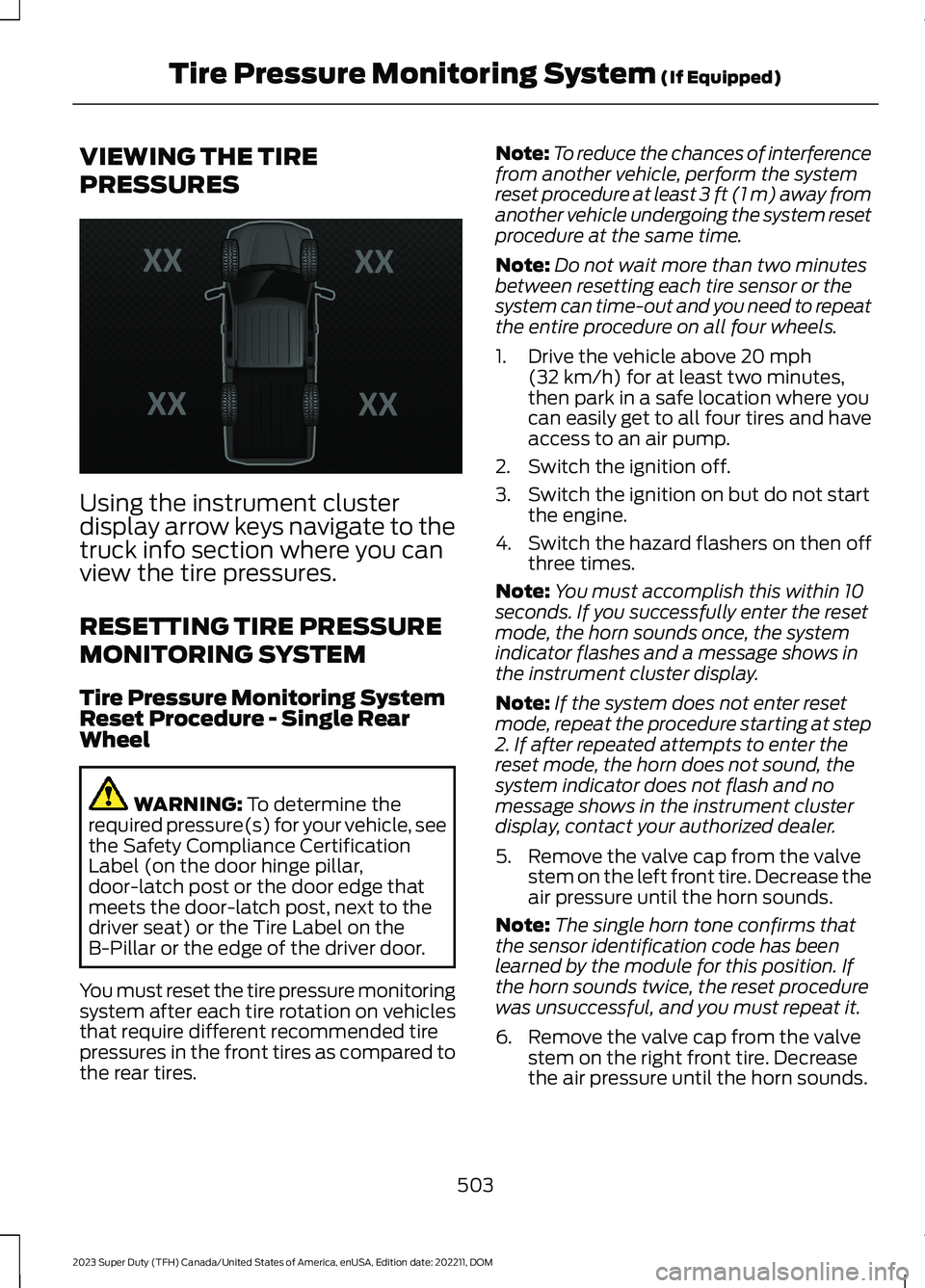
Using the instrument clusterdisplay arrow keys navigate to thetruck info section where you canview the tire pressures.
RESETTING TIRE PRESSURE
MONITORING SYSTEM
Tire Pressure Monitoring SystemReset Procedure - Single RearWheel
WARNING: To determine therequired pressure(s) for your vehicle, seethe Safety Compliance CertificationLabel (on the door hinge pillar,door-latch post or the door edge thatmeets the door-latch post, next to thedriver seat) or the Tire Label on theB-Pillar or the edge of the driver door.
You must reset the tire pressure monitoringsystem after each tire rotation on vehiclesthat require different recommended tirepressures in the front tires as compared tothe rear tires.
Note:To reduce the chances of interferencefrom another vehicle, perform the systemreset procedure at least 3 ft (1 m) away fromanother vehicle undergoing the system resetprocedure at the same time.
Note:Do not wait more than two minutesbetween resetting each tire sensor or thesystem can time-out and you need to repeatthe entire procedure on all four wheels.
1.Drive the vehicle above 20 mph(32 km/h) for at least two minutes,then park in a safe location where youcan easily get to all four tires and haveaccess to an air pump.
2.Switch the ignition off.
3.Switch the ignition on but do not startthe engine.
4.Switch the hazard flashers on then offthree times.
Note:You must accomplish this within 10seconds. If you successfully enter the resetmode, the horn sounds once, the systemindicator flashes and a message shows inthe instrument cluster display.
Note:If the system does not enter resetmode, repeat the procedure starting at step2. If after repeated attempts to enter thereset mode, the horn does not sound, thesystem indicator does not flash and nomessage shows in the instrument clusterdisplay, contact your authorized dealer.
5.Remove the valve cap from the valvestem on the left front tire. Decrease theair pressure until the horn sounds.
Note:The single horn tone confirms thatthe sensor identification code has beenlearned by the module for this position. Ifthe horn sounds twice, the reset procedurewas unsuccessful, and you must repeat it.
6.Remove the valve cap from the valvestem on the right front tire. Decreasethe air pressure until the horn sounds.
503
2023 Super Duty (TFH) Canada/United States of America, enUSA, Edition date: 202211, DOMTire Pressure Monitoring System (If Equipped)E224333
Page 508 of 738
7.Repeat the previous step on the rightrear tire and then on the left rear tire.
8.Switch the ignition off.
Note:If the horn sounds twice again afterswitching the ignition off, and repeating theprocedure, contact your authorized dealerand have your vehicle checked as soon aspossible.
9.Set all four tires to the recommendedair pressure as indicated on the SafetyCompliance Certification Label.
Tire Pressure Monitoring SystemReset Procedure - Dual Rear Wheel
For further information seeUnderstanding Your Tire PressureMonitoring System and refer to DualRear Wheel, earlier in this section.
Read the entire procedure beforeattempting.
1.Drive the vehicle above 20 mph(32 km/h) for at least two minutes,then park in a safe location where youcan easily get to all six tires and haveaccess to an air pump.
2.Place the ignition in the off position andkeep the key in the ignition.
3.Cycle the ignition to the on positionwith the engine off.
4.Turn the hazard flashers on then offthree times. You must accomplish thiswithin 10 seconds. If you successfullyenter the reset mode, the horn soundsonce, the system indicator flashes anda message shows in the instrumentcluster display. If this does not occur,repeat the procedure starting at step2. If after repeated attempts to enterthe reset mode, the horn does notsound, the system indicator does notflash and no message shows in theinstrument cluster display, contact yourauthorized dealer as soon as possible.
5.Train the tire pressure monitoringsystem sensors in the tires using thefollowing system reset sequencestarting with the left front tire in thefollowing order: Left front - driver sidefront tire, Right front - passenger sidefront tire, Right outer rear -passengerside rear outer tire, Right inner rear -passenger side rear inner tire, Left outerrear - driver side rear outer tire, Leftinner rear - driver side rear inner tire.
6.Remove the valve cap from the valvestem on the left front tire. Decrease theair pressure until the horn sounds.
Note:The single horn chirp confirms thatthe sensor identification code has beenlearned by the module for this position. If adouble horn is heard, the reset procedurewas unsuccessful, and you must repeat it.
7.Remove the valve cap from the valvestem on the right front tire. Decreasethe air pressure until the horn sounds.
8.Remove the valve cap from the valvestem on the right outer rear tire.Decrease the air pressure until the hornsounds.
9.Remove the valve cap from the valvestem on the right inner rear tire.Decrease the air pressure until the hornsounds.
10.Remove the valve cap from the valvestem on the left outer rear tire.Decrease the air pressure until thehorn sounds.
11.Remove the valve cap from the valvestem on the left inner rear tire.Decrease the air pressure until thehorn sounds. Training is completeafter the horn sounds for the last tiretrained, the system indicator stopsflashing, and a message is shown inthe instrument cluster display.
504
2023 Super Duty (TFH) Canada/United States of America, enUSA, Edition date: 202211, DOMTire Pressure Monitoring System (If Equipped)