2023 FORD SUPER DUTY display
[x] Cancel search: displayPage 509 of 738
12.Turn the ignition off. If two short hornbeeps are heard, the reset procedurewas unsuccessful and you mustrepeat it. If after repeating theprocedure and two short beeps areheard when the ignition is turned tooff, contact your authorized dealer assoon as possible.
13.Set all six tires to the recommendedair pressure as indicated on theSafety Compliance CertificationLabel, affixed to either the door hingepillar, door-latch post, or the dooredge that meets the door-latch post,next to the driver seating position ortire label located on the B-pillar orthe edge of the driver door.
Trailer Tire Pressure MonitoringSystem (If Equipped)
Note:Additional equipment may berequired for your vehicle to support trailertire pressure and temperature monitoring.See your authorized dealer for moreinformation.
Note:The trailer tire pressure monitoringsystem is not a substitute for proper tiremaintenance. It is your responsibility tomaintain correct tire pressures at all times.
Note:Replace the screw and valve on thetrailer tire pressure sensor anytime the trailertire is repaired, replaced or in for service. Seeyour authorized dealer for details.
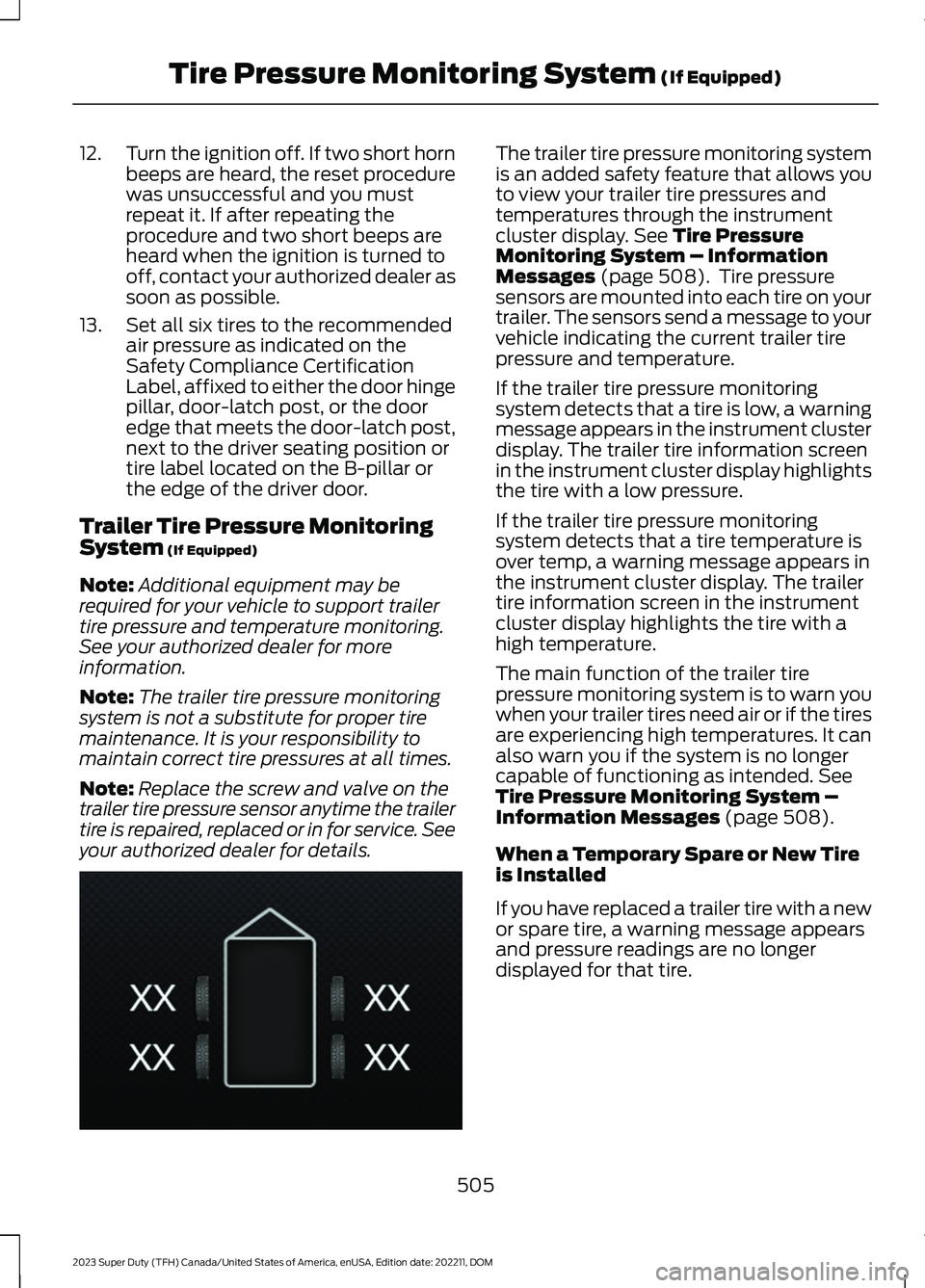
The trailer tire pressure monitoring systemis an added safety feature that allows youto view your trailer tire pressures andtemperatures through the instrumentcluster display. See Tire PressureMonitoring System – InformationMessages (page 508). Tire pressuresensors are mounted into each tire on yourtrailer. The sensors send a message to yourvehicle indicating the current trailer tirepressure and temperature.
If the trailer tire pressure monitoringsystem detects that a tire is low, a warningmessage appears in the instrument clusterdisplay. The trailer tire information screenin the instrument cluster display highlightsthe tire with a low pressure.
If the trailer tire pressure monitoringsystem detects that a tire temperature isover temp, a warning message appears inthe instrument cluster display. The trailertire information screen in the instrumentcluster display highlights the tire with ahigh temperature.
The main function of the trailer tirepressure monitoring system is to warn youwhen your trailer tires need air or if the tiresare experiencing high temperatures. It canalso warn you if the system is no longercapable of functioning as intended. SeeTire Pressure Monitoring System –Information Messages (page 508).
When a Temporary Spare or New Tireis Installed
If you have replaced a trailer tire with a newor spare tire, a warning message appearsand pressure readings are no longerdisplayed for that tire.
505
2023 Super Duty (TFH) Canada/United States of America, enUSA, Edition date: 202211, DOMTire Pressure Monitoring System (If Equipped)E235807
Page 510 of 738
To restore the full function of the trailertire pressure monitoring system:
•Have the damaged wheel and tireassembly repaired and remounted toyour trailer.
•Install the trailer tire pressuremonitoring sensor into the new wheeland tire assembly.
•Perform the trailer tire pressuremonitoring system reset procedure.
Trailer Tire Pressure MonitoringSystem Reset Procedure
Note:You need to perform the tire pressuremonitoring system reset procedure aftereach tire rotation, or when a new trailer tirepressure sensor is installed into a trailer tire.
The trailer tire pressure monitoring systemcan be reset through the menu in theinstrument cluster display. See TirePressure Monitoring System –Information Messages (page 508).Performing the trailer setup process alsoresets the trailer tire pressure monitoringsystem.
Note:For further information on the trailertire pressure monitoring system see theinstructions that were included with thetrailer tire pressure monitoring system kit.
TIRE PRESSURE MONITORING
SYSTEM –
TROUBLESHOOTING
TIRE PRESSURE MONITORINGSYSTEM – WARNING LAMPS
The low tire pressure warninglamp has combined functions,as it warns you when your tiresneed air, and when the system is no longercapable of functioning as intended.
506
2023 Super Duty (TFH) Canada/United States of America, enUSA, Edition date: 202211, DOMTire Pressure Monitoring System (If Equipped)E139232
Page 512 of 738
TIRE PRESSURE MONITORING SYSTEM – INFORMATION MESSAGES
ActionMessage
After inflating your tires to the manufacturer’s recommendedpressure as shown on the Tire Label, on the edge of the driverdoor or the B-Pillar, drive your vehicle for at least two minutesover 20 mph (32 km/h) before the light turns off.
Tire Pressure Low
The system has detected a fault that requires service. Haveyour vehicle checked as soon as possible.Tire Pressure MonitorFault
The system has detected a fault that requires service or aspare tire is in use. Have your vehicle checked as soon aspossible.
Tire Pressure SensorFault
Trailer Tire Pressure Monitoring System
ActionMessage
One or more tires on your trailer is below the specifiedtire pressure.Trailer Tire Low Specified:
Displays when one or more tires on your trailer is abovethe recommended temperature.Trailer Tire Over Temperature
A trailer tire pressure sensor is malfunctioning. If thewarning stays on or continues to come on, contact anauthorized dealer as soon as possible.
Trailer Tire Pressure SensorFault
The trailer tire pressure monitoring system ismalfunctioning. If the warning stays on or continuesto come on, contact an authorized dealer.
Trailer Tire Pressure MonitorFault
The system cannot detect the trailer tire pressuremonitoring system.Trailer Tire Pressure MonitorCapability Not Detected
The trailer tire pressure monitoring system is not setup.See Tire Pressure Monitoring System (page 501).Trailer Tire Pressure IndicationNot Setup See Manual
TIRE PRESSURE MONITORING
SYSTEM VIDEOS
Tire Pressure Monitoring System withIndividual Tire Pressure Display
Trailer Tire Pressure Monitoring System(TPMS)
508
2023 Super Duty (TFH) Canada/United States of America, enUSA, Edition date: 202211, DOMTire Pressure Monitoring System (If Equipped)
Page 533 of 738
An oil that displays this symbol conformsto current engine, emission system andfuel economy performance standards ofILSAC.
We recommend Motorcraft motor oil foryour vehicle. If Motorcraft oil is notavailable, use motor oils of therecommended viscosity grade that displaythe API Certification Mark for gasolineengines.
Do not use supplemental engine oiladditives because they are unnecessaryand could lead to engine damage that yourvehicle warranty does not cover.
Capacities
Including the Oil FilterVariant
8.0 qt (7.57 L)All.
Materials
SpecificationName
WSS-M2C961-A1Motorcraft® SAE 5W-30 Synthetic Blend MotorOil(U.S.)Motorcraft® SAE 5W-30 Super Premium Motor Oil/ Huile moteur de très haute qualité SAE 5W-30Motorcraft®(Canada)XO-5W30-Q1SP(U.S.)CXO-5W30-LSP6(Canada)
Alternative Engine Oil forExtremely Cold Climates
To improve engine cold start performance,we recommend that you use the followingalternative engine oil in extremely coldclimates, where the ambient temperaturereaches -22°F (-30°C) or below.
Materials
SpecificationName
WSS-M2C963-A1Engine Oil - SAE 0W-30 - Synthetic Blend
529
2023 Super Duty (TFH) Canada/United States of America, enUSA, Edition date: 202211, DOMCapacities and Specifications
Page 534 of 738
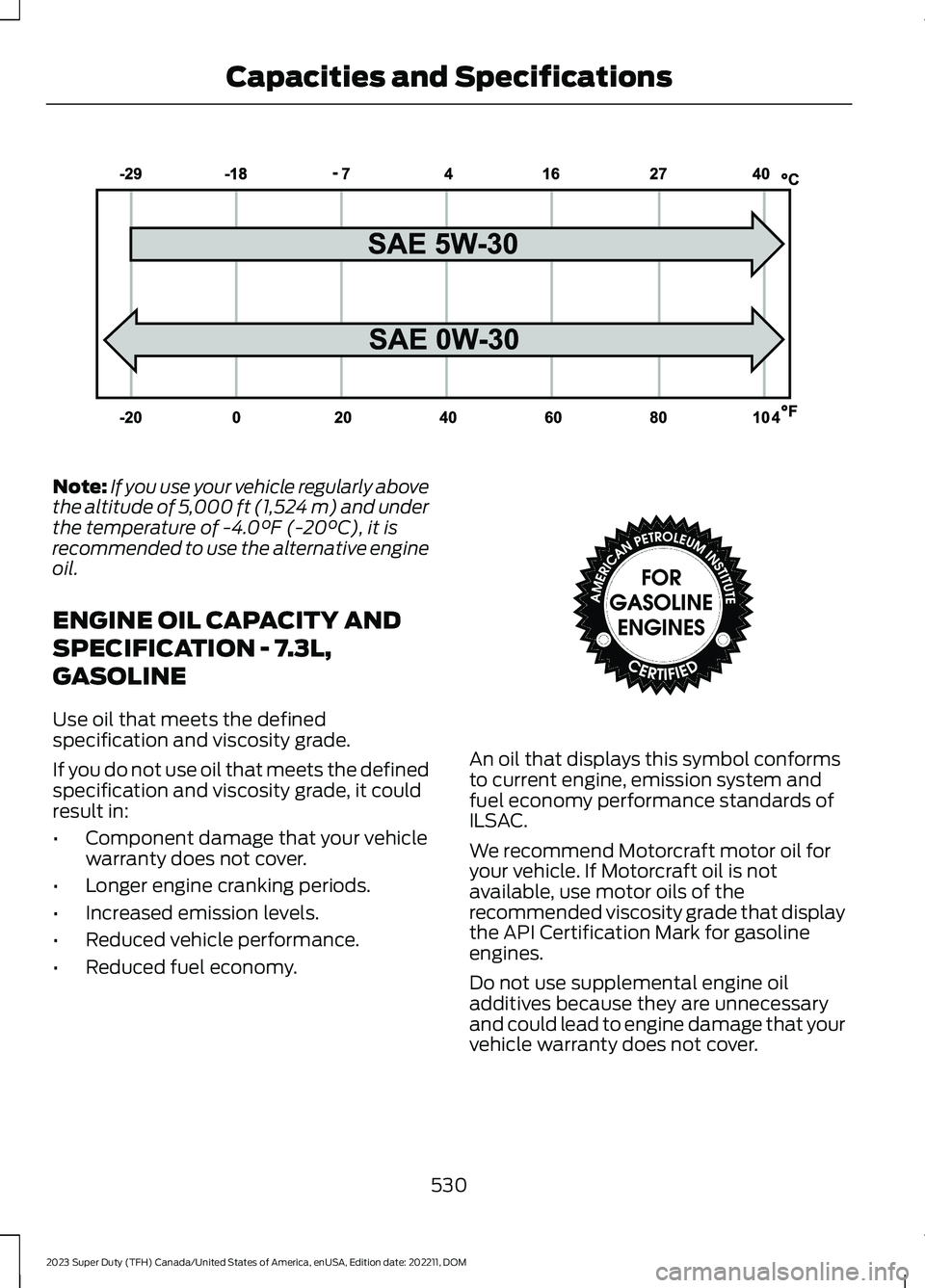
Note:If you use your vehicle regularly abovethe altitude of 5,000 ft (1,524 m) and underthe temperature of -4.0°F (-20°C), it isrecommended to use the alternative engineoil.
ENGINE OIL CAPACITY AND
SPECIFICATION - 7.3L,
GASOLINE
Use oil that meets the definedspecification and viscosity grade.
If you do not use oil that meets the definedspecification and viscosity grade, it couldresult in:
•Component damage that your vehiclewarranty does not cover.
•Longer engine cranking periods.
•Increased emission levels.
•Reduced vehicle performance.
•Reduced fuel economy.
An oil that displays this symbol conformsto current engine, emission system andfuel economy performance standards ofILSAC.
We recommend Motorcraft motor oil foryour vehicle. If Motorcraft oil is notavailable, use motor oils of therecommended viscosity grade that displaythe API Certification Mark for gasolineengines.
Do not use supplemental engine oiladditives because they are unnecessaryand could lead to engine damage that yourvehicle warranty does not cover.
530
2023 Super Duty (TFH) Canada/United States of America, enUSA, Edition date: 202211, DOMCapacities and SpecificationsE240523 E142732
Page 560 of 738
Using the Station List
1.Press Browse.
Note:Available on FM radio only.
2.Press a station.
SWITCHING THE DISPLAY ON
AND OFF
Audio Unit
Press the button.
Touchscreen
To switch the display off:
1.Press Settings on the touchscreen.
2.Press Display Settings.
3.Press Display Off.
Note:The display defaults to on each timeyou switch your vehicle on.
To switch the display on, press anywhereon the touchscreen.
DIGITAL RADIO
WHAT IS DIGITAL RADIO
HD Radio™ technology is the digitalevolution of analog AM/FM radio.
For additional information, visitwww.HDRadio.com.
HD Radio Technology is manufacturedunder license from iBiquity DigitalCorporation and foreign patents. HD Radioand the HD and HD Radio logos areproprietary trademarks of XPERI. Thevehicle manufacturer and XPERI are notresponsible for the content sent using HDRadio technology. Content may bechanged, added or deleted at any time atthe station owner's discretion.
HOW DOES DIGITAL RADIO WORK
Your system has a special receiver thatallows it to receive digital broadcasts inaddition to analog broadcasts.
HD1 signifies the main programming statusand is available in both analog and digitalbroadcasts. Other multicast stations areonly available digitally and could containnew or different content.
Note:When the system first receives anHD1 station, it plays the station in the analogversion until it verifies the station is an HDRadio station. Then it shifts to the digitalversion.
Note:There is an audio mute delay whenswitching to an HD2 or HD3 station becausethe system has to reacquire and decode thedigital signal.
DIGITAL RADIO LIMITATIONS
If you are outside the reception area, thesystem could not work.
If you are on the fringe of the receptionarea, the station could mute due to weaksignal strength.
Note:If you are listening to HD1, the systemchanges back to the analog broadcast untilthe digital broadcast is available again. Ifyou are listening to any other multicastchannels, the station mutes and staysmuted unless it is able to connect to thedigital signal again.
556
2023 Super Duty (TFH) Canada/United States of America, enUSA, Edition date: 202211, DOMAudio SystemE272035
Page 562 of 738
Hills, mountains, tall buildings, bridges,tunnels, freeway overpasses, parkinggarages, dense tree foliage andthunderstorms can interfere with yourreception.
When you pass a ground-basedbroadcast-repeating tower, a strongersignal may overtake a weaker one andcould result in the audio system muting.Your display could show an error messageto indicate the interference.
LOCATING THE SATELLITE RADIOIDENTIFICATION NUMBER
1.Select SiriusXM as the audio source.
2.Tune to channel 0.
SELECTING A CHANNEL
Manually Selecting a Channel
Press the button to find theprevious or next available radiochannel.
Linear Tuner
The linear tuner is displayed whenmanually selecting a channel. You canswipe left or right on the linear tunercarousel to navigate through the channellist. Tap on a channel title to listen to it.
Using Direct Tune
1.Press the channel up or down buttonto open the linear tuner screen.
2.Press Direct Tune to open the numberpad.
3.Enter the channel you prefer.
Using Browse
1.Press Browse.
2.Select a channel.
SATELLITE RADIO SETTINGS
Subscription
Your subscription status is displayed. Youcan subscribe or manage your subscriptiondirectly from the touchscreen.
SiriusXM Favorites
While you are listening to SiriusXM, you cansave favorites by:
•Tapping the currently tuned channelor show logo on the SiriusXM audioscreen.
•Tuning to a channel or show you wantto save as a favorite. Navigate to theSiriusXM Favorites screen and pressthe Add Current button. The currentlytuned channel or show is saved as afavorite.
•Saving a radio preset. This saves thecurrently tuned SiriusXM channel orshow as a favorite
Note:Requires a trial or active subscriptionto use.
Listening History
Listening history is a list of recently listenedto SiriusXM content. You can view, manageand reset the listening history using thecontrols on the touchscreen.
Note:Requires a trial or active subscriptionto use.
Help and Support
You can contact SiriusXM Customer Caredirectly from SYNC and view informationrequired to manage your SiriusXM account.
558
2023 Super Duty (TFH) Canada/United States of America, enUSA, Edition date: 202211, DOMAudio SystemE328569 E328570
Page 563 of 738
AUDIO SYSTEM – TROUBLESHOOTING
AUDIO SYSTEM – INFORMATION MESSAGES
Satellite Radio Troubleshooting
Recommended ActionPotential EffectsError Message
Internet connectivity isturned off. See ConnectedVehicle (page 548).
Internet streaming and OnDemand shows are unavail-able and some SiriusXMfeatures are disabled.
Connectivity Disabled
SYNC attempts to connect.See Satellite Radio Limit-ations (page 557).Switch toa satellite connection for thecurrent channel if the optionis available.
Audio system may mute.Switch to Satellite buttonmay be displayed on theSiriusXM audio screen if thechannel is also available viasatellite.
No Internet
Antenna may be obstructedor satellite reception is weakin your location. See Satel-lite Radio Limitations(page 557).Switch to aninternet connection for thecurrent channel if the optionis available.
Audio system may mute.Switch to Internet buttonmay be displayed on theSiriusXM audio screen if thechannel is also available viastreaming.
No Satellite Signal
Allow some time for theaudio to load or tune to adifferent channel.
Audio system may mutewhile the audio attempts toload.
Slow Network Connection
A temporary update may bein progress. Allow some timebefore retrying to tune to thechannel. If the issuecontinues, the channel mayno longer be available.
Audio system may mute.Radio may tune to adifferent channel.
Channel Unavailable
A temporary update may bein progress. Allow some timebefore retrying to play theepisode. If the issuecontinues, the episode mayno longer be available.
Audio system may mute.Radio may tune to adifferent channel.
Episode Unavailable
559
2023 Super Duty (TFH) Canada/United States of America, enUSA, Edition date: 202211, DOMAudio System