2023 FORD MUSTANG buttons
[x] Cancel search: buttonsPage 280 of 535

CHECKING THE WIPER
BLADES
Run the tip of your fingers over the edge ofthe blade to check for roughness.
Clean the wiper blades with washer fluidor water applied with a soft sponge orcloth.
CHANGING THE WIPER
BLADES
1.Pull the wiper blade and arm awayfrom the glass and press the lockingbuttons together.
2.Rotate and remove the wiper blade.
3.Attach the new blade to the arm andsnap it into place.
Replace wiper blades at least once peryear for optimum performance.
Poor wiper quality can be improved bycleaning the wiper blades and thewindshield. See Cleaning the Windowsand Wiper Blades (page 296).
CHANGING A BULB
Replacing Reverse Lamp Bulbs
1.Make sure the lighting control is in theoff position.
2.Locate the reverse lamp bulb under therear bumper of your vehicle. To accessthe bulb, reach behind the bumper.
3.Disconnect the electrical sensor fromthe bulb by pulling it straight off.
4.Rotate the bulb counterclockwise andremove it from the reverse lampassembly.
LED Lamps
LED lamps are not serviceable items.Contact an authorized dealer if they fail.
The following are LED lamps:
•Headlamps.
•Rear lamp.
•Brake lamp.
•Front fog lamp.
•Front sidemarker
•Daytime running lamp.
276
2023 Mustang (CZG) Canada/United States of America, Vehicles Built From: 14-11-2022, enUSA, Edition date: 202209, First-PrintingMaintenanceE142463 E129990 E177487
Page 378 of 535

Note:Depending on your vehicle optionpackage, the controls may look differentfrom what you see here.
Note:Some features, such as satelliteradio, may not be available in your location.Check with an authorized dealer.
Accessing the Apps Menu
Press and release the button toaccess the apps menu. Followthe on-screen prompts to makeyour selection.
Accessing the Clock Settings
Press and release the button toaccess the clock setting.
Use the center arrow controls tochange the hours and minutes.
Accessing the Media Source Menu
Press and release to open themedia source menu.
You can press this multiple times tochange to a SYNC-Media device or scrollthrough the media sources using the arrowbuttons. Press OK to select a source.
Accessing the Phone Features
Press and release the button toaccess the phone features of theSYNC system.
Accessing the Settings Menu
Press and release the button toaccess the settings menu.Follow the on-screen promptsto make your selection.
Accessing the Sound Settings
Press and release the button toaccess settings for Treble,Midrange, Bass, Fade andBalance.
Adjusting the Volume
Turn to adjust the volume.
Changing Radio Stations
In radio mode, turn to search through theradio frequency band.
374
2023 Mustang (CZG) Canada/United States of America, Vehicles Built From: 14-11-2022, enUSA, Edition date: 202209, First-PrintingAudio SystemE249410 E265036 E265035 E142607 E265373 E265696
Page 379 of 535

In satellite radio mode, turn to find theprevious or next available satellite radiostation.
Listening to the Radio
Press and release to listen to theradio or change radio stations.
Muting the Audio
Press and release the button tomute the playing audio.
Playing or Pausing Media
Press and release the button toeither play or pause the audio.
Switching the Audio Unit On andOff
Press and release the button.
Switching the Display On and Off
Press and release the button.
Using the Display Control
Use the up and down arrow buttons toselect the various settings. When you makeyour selection, press the left and rightarrow buttons to change the settings.
Press and release to confirm aselection.
Using the Number Block
In radio mode, store and recall your favoriteradio stations. To store a favorite stationpress and hold until the sound returns. Inphone mode, enter a phone number.
Using Seek, Fast Forward andReverse
In radio mode, select a frequency band andpress and release either button. Thesystem stops at the first station it finds inthat direction.
In satellite radio mode, press and releaseto select the next or previous satellite radiostation. If you select a specific category(such as jazz, rock or news), press to findthe next or previous station in the categoryyou select.
AUDIO UNIT - VEHICLES WITH:
8 INCH CENTER DISPLAY
SCREEN
WARNING: Driving while distractedcan result in loss of vehicle control, crashand injury. We strongly recommend thatyou use extreme caution when using anydevice that may take your focus off theroad. Your primary responsibility is thesafe operation of your vehicle. Werecommend against the use of anyhand-held device while driving andencourage the use of voice-operatedsystems when possible. Make sure youare aware of all applicable local lawsthat may affect the use of electronicdevices while driving.
375
2023 Mustang (CZG) Canada/United States of America, Vehicles Built From: 14-11-2022, enUSA, Edition date: 202209, First-PrintingAudio SystemE265033 E272035 E265041 E265045 E265044 E287199
Page 391 of 535

__ is a dynamic listing, meaning that itcould be the name of anything, such as acontact or phone number.
Phone Controls
Use the phone buttons on your steeringwheel to answer, reject, or hang up a call.
Accessing Features through thePhone Menu
You can access your call history,phonebook, sent text messages, as wellas access phone and system settings.
1.Press the PHONE button to enter thephone menu.
2.Scroll through the menu to viewcontacts, text messages, and thephone dialer.
SYNC™ APPLICATIONS AND
SERVICES
•911 Assist: Can alert 911 in the event ofan emergency.
•SYNC AppLink: Allows you to connectto and use certain applications (if yourphone is compatible).
These features may require activation.Available AppLink enabled apps vary bymarket.
911 Assist
WARNING: Unless the 911 Assistsetting is set on before a crash, thesystem will not dial for help which coulddelay response time, potentiallyincreasing the risk of serious injury ordeath after a crash.
WARNING: Do not wait for 911Assist to make an emergency call if youcan do it yourself. Dial emergencyservices immediately to avoid delayedresponse time which could increase therisk of serious injury or death after acrash. If you do not hear 911 Assist withinfive seconds of the crash, the system orphone may be damaged ornon-functional.
WARNING: Always place yourphone in a secure location in your vehicleso it does not become a projectile or getdamaged in a crash. Failure to do so maycause serious injury to someone ordamage the phone which could prevent911 Assist from working properly.
Note:The SYNC 911 Assist feature must beset on before the incident.
Note:The SYNC 911 Assist feature onlyoperates in the U.S., Canada or in a territoryin which 911 is the emergency number.
Note:Before setting this feature on, makesure that you read the 911 Assist PrivacyNotice later in this section for importantinformation.
Note:If any user switches 911 Assist to onor off, that setting applies for all pairedphones. If 911 Assist is switched off, eithera voice message plays or a display messageor an icon comes on when your vehicle isstarted and after a previously paired phoneconnects.
Note:Every phone operates differently.While SYNC 911 Assist works with mostcellular phones, some may have troubleusing this feature.
387
2023 Mustang (CZG) Canada/United States of America, Vehicles Built From: 14-11-2022, enUSA, Edition date: 202209, First-PrintingSYNC™ (If Equipped)
Page 398 of 535
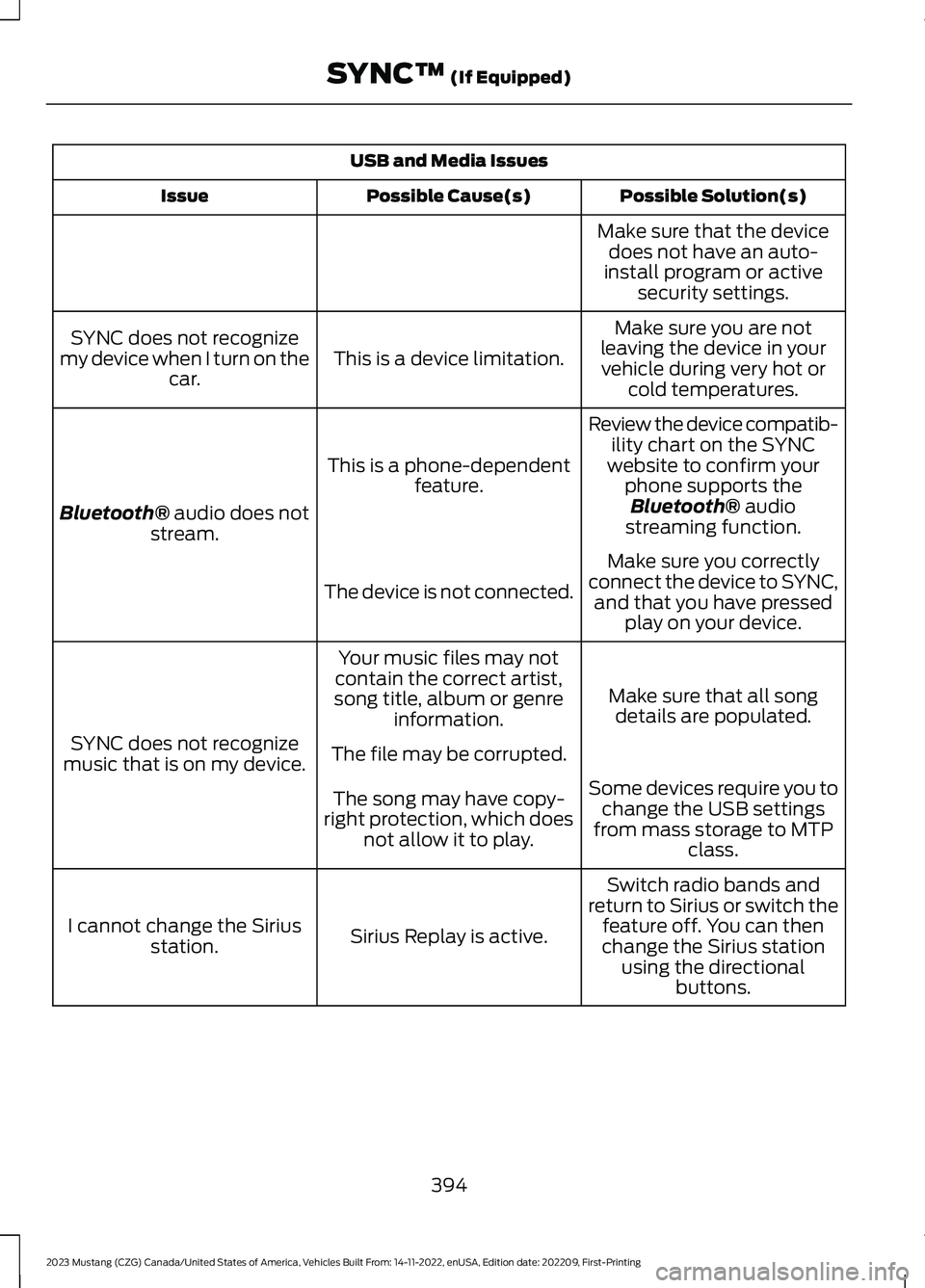
USB and Media Issues
Possible Solution(s)Possible Cause(s)Issue
Make sure that the devicedoes not have an auto-install program or activesecurity settings.
Make sure you are notleaving the device in yourvehicle during very hot orcold temperatures.
This is a device limitation.SYNC does not recognizemy device when I turn on thecar.
Review the device compatib-ility chart on the SYNCwebsite to confirm yourphone supports theBluetooth® audiostreaming function.
This is a phone-dependentfeature.
Bluetooth® audio does notstream.
Make sure you correctlyconnect the device to SYNC,and that you have pressedplay on your device.
The device is not connected.
Make sure that all songdetails are populated.
Your music files may notcontain the correct artist,song title, album or genreinformation.
SYNC does not recognizemusic that is on my device.The file may be corrupted.
Some devices require you tochange the USB settingsfrom mass storage to MTPclass.
The song may have copy-right protection, which doesnot allow it to play.
Switch radio bands andreturn to Sirius or switch thefeature off. You can thenchange the Sirius stationusing the directionalbuttons.
Sirius Replay is active.I cannot change the Siriusstation.
394
2023 Mustang (CZG) Canada/United States of America, Vehicles Built From: 14-11-2022, enUSA, Edition date: 202209, First-PrintingSYNC™ (If Equipped)
Page 403 of 535
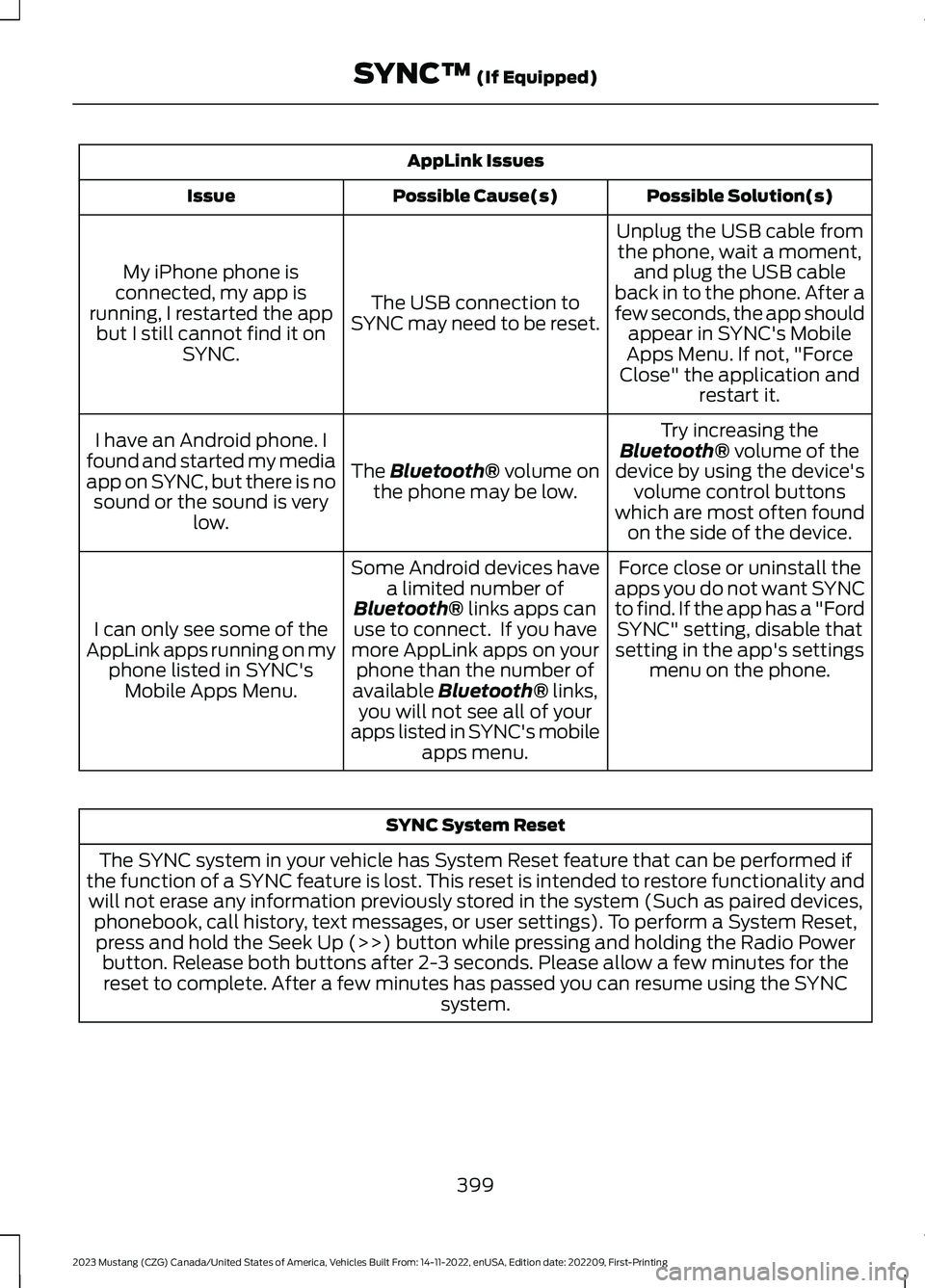
AppLink Issues
Possible Solution(s)Possible Cause(s)Issue
Unplug the USB cable fromthe phone, wait a moment,and plug the USB cableback in to the phone. After afew seconds, the app shouldappear in SYNC's MobileApps Menu. If not, "ForceClose" the application andrestart it.
The USB connection toSYNC may need to be reset.
My iPhone phone isconnected, my app isrunning, I restarted the appbut I still cannot find it onSYNC.
Try increasing theBluetooth® volume of thedevice by using the device'svolume control buttonswhich are most often foundon the side of the device.
The Bluetooth® volume onthe phone may be low.
I have an Android phone. Ifound and started my mediaapp on SYNC, but there is nosound or the sound is verylow.
Force close or uninstall theapps you do not want SYNCto find. If the app has a "FordSYNC" setting, disable thatsetting in the app's settingsmenu on the phone.
Some Android devices havea limited number ofBluetooth® links apps canuse to connect. If you havemore AppLink apps on yourphone than the number ofavailable Bluetooth® links,you will not see all of yourapps listed in SYNC's mobileapps menu.
I can only see some of theAppLink apps running on myphone listed in SYNC'sMobile Apps Menu.
SYNC System Reset
The SYNC system in your vehicle has System Reset feature that can be performed ifthe function of a SYNC feature is lost. This reset is intended to restore functionality andwill not erase any information previously stored in the system (Such as paired devices,phonebook, call history, text messages, or user settings). To perform a System Reset,press and hold the Seek Up (>>) button while pressing and holding the Radio Powerbutton. Release both buttons after 2-3 seconds. Please allow a few minutes for thereset to complete. After a few minutes has passed you can resume using the SYNCsystem.
399
2023 Mustang (CZG) Canada/United States of America, Vehicles Built From: 14-11-2022, enUSA, Edition date: 202209, First-PrintingSYNC™ (If Equipped)
Page 413 of 535

DescriptionVoice Command
The system does not confirm before placing a call.Phone Confirmation Off
The system displays a short list of available commands.Voice Command Lists On
The system does not display the list of commands.Voice Command Lists Off
You can use the volume control to adjustthe volume of the system voice prompts.While prompt is active, adjust the volumecontrol up or down to your desired setting.
Note:Depending on the current climatecontrol settings, the fan speed mayautomatically go down while issuing voicecommands or while making and receivingphone calls via SYNC to reduce the amountof background noise in the vehicle. The fanspeed will automatically return to normaloperation once the voice session ends. Youcan adjust the fan speed during a voicesession, simply press the fan buttons (orturn the fan knob) to increase or decreasethe fan speed to the setting you prefer.
To disable this automatic fan speedreduction feature during voice sessions,press and hold the climate control AC andRecirculated air buttons simultaneously,release and then increase fan speed within2 seconds. To re-enable this feature, repeatthe above sequence.
ENTERTAINMENT
Audio source. Select to choosea different audio source.A
Presets. Swipe left to view morepresets.B
You can access these options using thetouchscreen or voice commands.
Sources
Press this button to select the source ofmedia you want to listen to.
409
2023 Mustang (CZG) Canada/United States of America, Vehicles Built From: 14-11-2022, enUSA, Edition date: 202209, First-PrintingSYNC™ 3 (If Equipped)ABE293491
Page 414 of 535

Menu Item
AM
FM
1SIRIUS
CD
The name of the USB that is plugged in displays here.USB
Bluetooth Stereo
If you have SYNC 3 compatible apps on your connected smart phone, theydisplay here as individual source selections.Apps
1 This feature may not be available in all markets and requires an active subscription.
AM/FM Radio
Tuning a Station
You can use the tune or seek controls onthe radio bezel to select a station.
To tune a station using thetouchscreen, select:
Menu Item
Direct Tune
A pop up appears, allowing you to type inthe frequency of a station. You can onlyenter a valid station for the source you arecurrently listening to.
You can press the backspace button todelete the previously entered number.
Once you have entered the station'scall numbers, you can select:
Action and Descrip-tionMenu Item
Press to beginplaying the stationyou have entered.
Enter
Press to exitwithout changingthe station.
Cancel
Presets
To set a new preset, tune to the stationand then press and hold one of thememory preset buttons. The audio mutesbriefly while the system saves the stationand then returns.
You may be able to add additional presetpages using the settings option on thefeature bar.
410
2023 Mustang (CZG) Canada/United States of America, Vehicles Built From: 14-11-2022, enUSA, Edition date: 202209, First-PrintingSYNC™ 3 (If Equipped)