2023 FORD MUSTANG MACH E change
[x] Cancel search: changePage 349 of 496

C.80: Indicates the aspect ratiowhich gives the tire's ratio ofheight to width. Numbers of 70 orlower indicate a short sidewall.
D.D: Indicates a diagonal type tire.
R: Indicates a radial type tire.
E.16: Indicates the wheel or rimdiameter in inches. If you changeyour wheel size, you will have topurchase new tires to match thenew wheel diameter.
GLOSSARY OF TIRE
TERMINOLOGY
*Tire label: A label showing theoriginal equipment tire sizes,recommended inflation pressureand the maximum weight thevehicle can carry.
*Tire Identification Number(TIN): A number on the sidewallof each tire providing informationabout the tire brand andmanufacturing plant, tire size anddate of manufacture. Also referredto as DOT code.
*Inflation pressure: A measureof the amount of air in a tire.
*Standard load: A class ofP-metric or Metric tires designedto carry a maximum load at setpressure. For example: ForP-metric tires 35 psi (2.4 bar) andfor Metric tires 36 psi (2.5 bar).Increasing the inflation pressurebeyond this pressure will not
increase the tire’s load carryingcapability.
*Extra load: A class of P-metricor Metric tires designed to carry aheavier maximum load at 42 psi(2.9 bar). Increasing the inflationpressure beyond this pressure willnot increase the tire’s loadcarrying capability.
*kPa: Kilopascal, a metric unit ofair pressure.
*PSI: Pounds per square inch, astandard unit of air pressure.
*Cold tire pressure: The tirepressure when the vehicle hasbeen stationary and out of directsunlight for an hour or more andprior to the vehicle being driven for1 mi (1.6 km).
*Recommended inflationpressure: The cold inflationpressure found on the SafetyCompliance Certification Label(affixed to either the door hingepillar, door-latch post, or the dooredge that meets the door-latchpost, next to the driver's seatingposition), or Tire Label located onthe B-Pillar or the edge of thedriver door.
* B-pillar: The structural memberat the side of the vehicle behindthe front door.
*Bead area of the tire: Area ofthe tire next to the rim.
* Sidewall of the tire: Areabetween the bead area and thetread.
345
2023 Mustang Mach-E (CGW) Canada/United States of America, enUSA, Edition date: 202209, DOMWheel and Tire Information
Page 366 of 496

When the malfunction indicator isilluminated, the system may not be ableto detect or signal low tire pressure asintended. TPMS malfunctions may occurfor a variety of reasons, including theinstallation of replacement or alternatetires or wheels on the vehicle that preventthe TPMS from functioning properly.Always check the TPMS malfunctiontelltale after replacing one or more tires orwheels on your vehicle to ensure that thereplacement or alternate tires and wheelsallow the TPMS to continue to functionproperly.
WARNING: Changes ormodifications not expressively approvedby the party responsible for compliancecould void the user's authority to operatethe equipment. The term "IC:" before theradio certification number only signifiesthat Industry Canada technicalspecifications were met.
This device complies with Part 15 of theFCC Rules and with License exempt RSSStandards of Industry Canada. Operationis subject to the following two conditions:
1.This device may not cause harmfulinterference, and
2.This device must accept anyinterference received, includinginterference that may cause undesiredoperation.
TIRE PRESSURE MONITORING
SYSTEM PRECAUTIONS
WARNING: The tire pressuremonitoring system is not a substitute formanually checking tire pressures. Youshould periodically check tire pressuresusing a pressure gauge. Failure tocorrectly maintain tire pressures couldincrease the risk of tire failure, loss ofcontrol, vehicle rollover and personalinjury.
WARNING: Do not use the tirepressure displayed in the informationdisplay as a tire pressure gauge. Failureto follow this instruction could result inpersonal injury or death.
Note:The use of tire sealants can damagethe tire pressure monitoring system.
Note:If the tire pressure monitor sensorbecomes damaged it may not function.
TIRE PRESSURE MONITORING
SYSTEM LIMITATIONS
When the outside temperature dropssignificantly, the tire pressure coulddecrease and activate the low tire pressurewarning lamp.
The warning lamp could also illuminatewhen you use a spare wheel, or tire sealantfrom the inflator kit.
Note:Regularly checking the vehicle tirepressures can reduce the possibility for thewarning lamp to illuminate due to outsideair temperature changes.
Note:After you inflate the tires to therecommended pressure it could take up totwo minutes of driving over 20 mph(32 km/h) for the warning indicator to turnoff.
362
2023 Mustang Mach-E (CGW) Canada/United States of America, enUSA, Edition date: 202209, DOMTire Pressure Monitoring System
Page 376 of 496

WHAT IS A CONNECTED
VEHICLE
A connected vehicle has technology thatallows your vehicle to connect to a mobilenetwork and for you to access a range offeatures. When used in conjunction withthe FordPass app, it could allow you tomonitor and control your vehicle further,for example checking the tire pressures,and the vehicle location. For additionalinformation, refer to the local Ford website.
CONNECTED VEHICLE
REQUIREMENTS
Connected service and related featurefunctionality requires a compatible vehiclenetwork.
Some remote features require additionalservice activation. Log in to your Fordaccount for details. Some restrictions, thirdparty terms and message or data ratesmay apply.
CONNECTED VEHICLE
LIMITATIONS
Evolving technology, cellular networks, orregulations could affect functionality andavailability, or continued provision of somefeatures. These changes could even stopsome features from functioning.
CONNECTING THE VEHICLE TO
A MOBILE NETWORK
WHAT IS THE MODEM
The modem allows access to arange of features built into yourvehicle.
ENABLING AND DISABLING THEMODEM
1.
Press the button on thetouchscreen.
2.Press Connectivity.
3.Press Connected Vehicle Features.
4.Switch vehicle connectivity on or off.
CONNECTING FORDPASS TO THEMODEM
1.Make sure that the modem is enabledusing the vehicle settings menu.
2.Open the FordPass app on your deviceand log in.
3.Add your vehicle or select your vehicleif already added.
4.Select the option to activate yourvehicle.
5.Make sure that the name on the screenmatches the name shown in yourFordPass account.
6.Confirm that FordPass account isconnected to the modem.
CONNECTING THE VEHICLE TO
A WI-FI NETWORK
1.
Press the button on thetouchscreen.
2.Press Connectivity.
3.Press Manage Wi-Fi Networks.
4.Switch Wi-Fi on.
5.Press View Available Networks.
6.Select an available Wi-Fi network.
Note:Enter the network password toconnect to a secure network.
372
2023 Mustang Mach-E (CGW) Canada/United States of America, enUSA, Edition date: 202209, DOMConnected Vehicle E386797 E386797
Page 380 of 496

CHANGING THE VEHICLE WI-
FI HOTSPOT NAME OR
PASSWORD
1.
Press the button on thetouchscreen.
2.Press Connectivity.
3.Press Vehicle Hotspot.
4.Press Settings under the VehicleHotspot menu.
5.Press Edit.
6.Press Change Network Name.
7.Enter your required network name.
8.Press enter to save the network name.
9.Press Change Password.
10.Enter your required password.
11.Press enter to save the password.
Changing the Wi-Fi HotspotFrequency
Note:The vehicle hotspot frequency bandis selectable depending upon your devicecapabilities. You will not be able to connectyour device to the vehicle hotspot if it doesnot support the selected frequency band.
1.
Press the button on thetouchscreen.
2.Press Connectivity.
3.Press Vehicle Hotspot.
4.Press Settings under the VehicleHotspot menu.
5.Press Edit.
6.Select a frequency.
VEHICLE WI-FI HOTSPOT –
TROUBLESHOOTING
VEHICLE WI-FI HOTSPOT –FREQUENTLY ASKED QUESTIONS
Why can I not see the Wi-Fi hotspotname when I search for Wi-Finetworks on my cell phone or otherdevice?
•Make sure Wi-Fi hotspot visibility is on.
•The system does not provide a Wi-Fihotspot at this time.
•Check what frequency the hotspot istransmitting in the vehicle hotspotsettings menu. If the frequency is 5 GHzand your device cannot see thenetwork, change the frequency to 2.4GHz.
376
2023 Mustang Mach-E (CGW) Canada/United States of America, enUSA, Edition date: 202209, DOMVehicle Wi-Fi HotspotE386797 E386797
Page 383 of 496

SELECTING AN FM RADIOSTATION
Turn to search through the radio frequencyband.
Using Direct Tune
1.Press Direct Tune to open the numberpad.
2.Enter the station you prefer.
Note:You can only enter a valid station forthe audio source you are currently listeningto.
Using Seek
Press either button. The systemstops at the first station it findsin that direction.
Using the Station List
1.Press Browse.
2.Press a station.
DIGITAL RADIO
WHAT IS DIGITAL RADIO
HD Radio™ technology is the digitalevolution of analog AM/FM radio.
For additional information, visitwww.HDRadio.com.
HD Radio Technology is manufacturedunder license from iBiquity DigitalCorporation and foreign patents. HD Radioand the HD and HD Radio logos areproprietary trademarks of XPERI. Thevehicle manufacturer and XPERI are notresponsible for the content sent using HDRadio technology. Content may bechanged, added or deleted at any time atthe station owner's discretion.
HOW DOES DIGITAL RADIO WORK
Your system has a special receiver thatallows it to receive digital broadcasts inaddition to analog broadcasts.
HD1 signifies the main programming statusand is available in both analog and digitalbroadcasts. Other multicast stations areonly available digitally and could containnew or different content.
Note:When the system first receives anHD1 station, it plays the station in the analogversion until it verifies the station is an HDRadio station. Then it shifts to the digitalversion.
Note:There is an audio mute delay whenswitching to an HD2 or HD3 station becausethe system has to reacquire and decode thedigital signal.
DIGITAL RADIO LIMITATIONS
If you are outside the reception area, thesystem could not work.
379
2023 Mustang Mach-E (CGW) Canada/United States of America, enUSA, Edition date: 202209, DOMAudio SystemE270235
Page 384 of 496

If you are on the fringe of the receptionarea, the station could mute due to weaksignal strength.
Note:If you are listening to HD1, the systemchanges back to the analog broadcast untilthe digital broadcast is available again. Ifyou are listening to any other multicastchannels, the station mutes and staysmuted unless it is able to connect to thedigital signal again.
Depending on the station quality, you couldhear a slight sound change when thestation changes between analog anddigital audio.
You cannot access a saved HD station ifyour vehicle is outside the station’sreception area.
SWITCHING DIGITAL RADIORECEPTION ON AND OFF
1.
From the audio screen, pressthe button.
2.Switch HD Radio on or off.
DIGITAL RADIO INDICATORS
HD Radio Indicator
The indicator appears when HD Radio ison and you tune to a station broadcastingHD Radio technology.
The color of the indicator changes toindicate the system status.
Gray indicates the system is acquiring adigital station.
Orange indicates digital audio is playing.
Multicast Indicator
The multicast indicator appears if thecurrent station is broadcasting multipledigital broadcasts. The highlightednumbers indicate additional digitalchannels available.
Note:For stations that have more than oneHD multicast, the HD indicator and radiotext appears as a button. Press the buttonto cycle through all of the HD stations onthat specific frequency.
SATELLITE RADIO
WHAT IS SATELLITE RADIO
Your factory-installed SiriusXM radiosystem includes a limited subscriptionterm, which begins on the date of sale orlease of your vehicle. See an authorizeddealer for availability.
For additional information about extendedsubscription terms, visit www.SiriusXM.comin the United States,www.SiriusXM.ca inCanada, or call SiriusXM at1-888-539-7474.
Note:SiriusXM reserves the unrestrictedright to change, rearrange, add or deleteprogramming including canceling, movingor adding particular channels, and its prices,at any time, with or without notice to you.Neither SiriusXM and its affiliates nor FordMotor Company and its affiliates will beliable to you or any third party for any suchmodification, suspension or termination.
380
2023 Mustang Mach-E (CGW) Canada/United States of America, enUSA, Edition date: 202209, DOMAudio SystemE280315 E142616
Page 396 of 496

Contact List
Displays a list of connected phones andcontact sharing status for each phone.
To change the contact sharing status:
1.
Press the button on thetouchscreen.
2.Press Amazon Alexa.
3.Press Contact List.
4.Enable or disable sharing for eachphone.
Note:You can share contacts from morethan one phone at a time.
Note:If a contact list is not shared,hands-free calling does not work via Alexa.
Things to Try
Learn more about what you can do withAlexa by browsing the things to try.
1.
Press the button on thetouchscreen.
2.Press Amazon Alexa.
3.Press Things to Try.
392
2023 Mustang Mach-E (CGW) Canada/United States of America, enUSA, Edition date: 202209, DOMAlexa Built-InE386797 E386797
Page 401 of 496
APP PRECAUTIONS
WARNING: Driving while distractedcan result in loss of vehicle control, crashand injury. We strongly recommend thatyou use extreme caution when using anydevice that may take your focus off theroad. Your primary responsibility is thesafe operation of your vehicle. Werecommend against the use of anyhand-held device while driving andencourage the use of voice-operatedsystems when possible. Make sure youare aware of all applicable local lawsthat may affect the use of electronicdevices while driving.
APP REQUIREMENTS
When you start an app through the systemfor the first time, you could be asked togrant certain permissions. You can reviewand change the permissions that you havegranted at any time when your vehicle isnot moving. We recommend that youcheck your data plan before using yourapps through the system. Using themcould result in additional charges. We alsorecommend that you check the appprovider's terms and conditions andprivacy policy before using their app. Makesure that you have an active account forapps that you want to use through thesystem. Some apps will work with nosetup. Others require you to configuresome personal settings before you can usethem.
ACCESSING APPS
Press the button on thetouchscreen to open theapplication drawer.
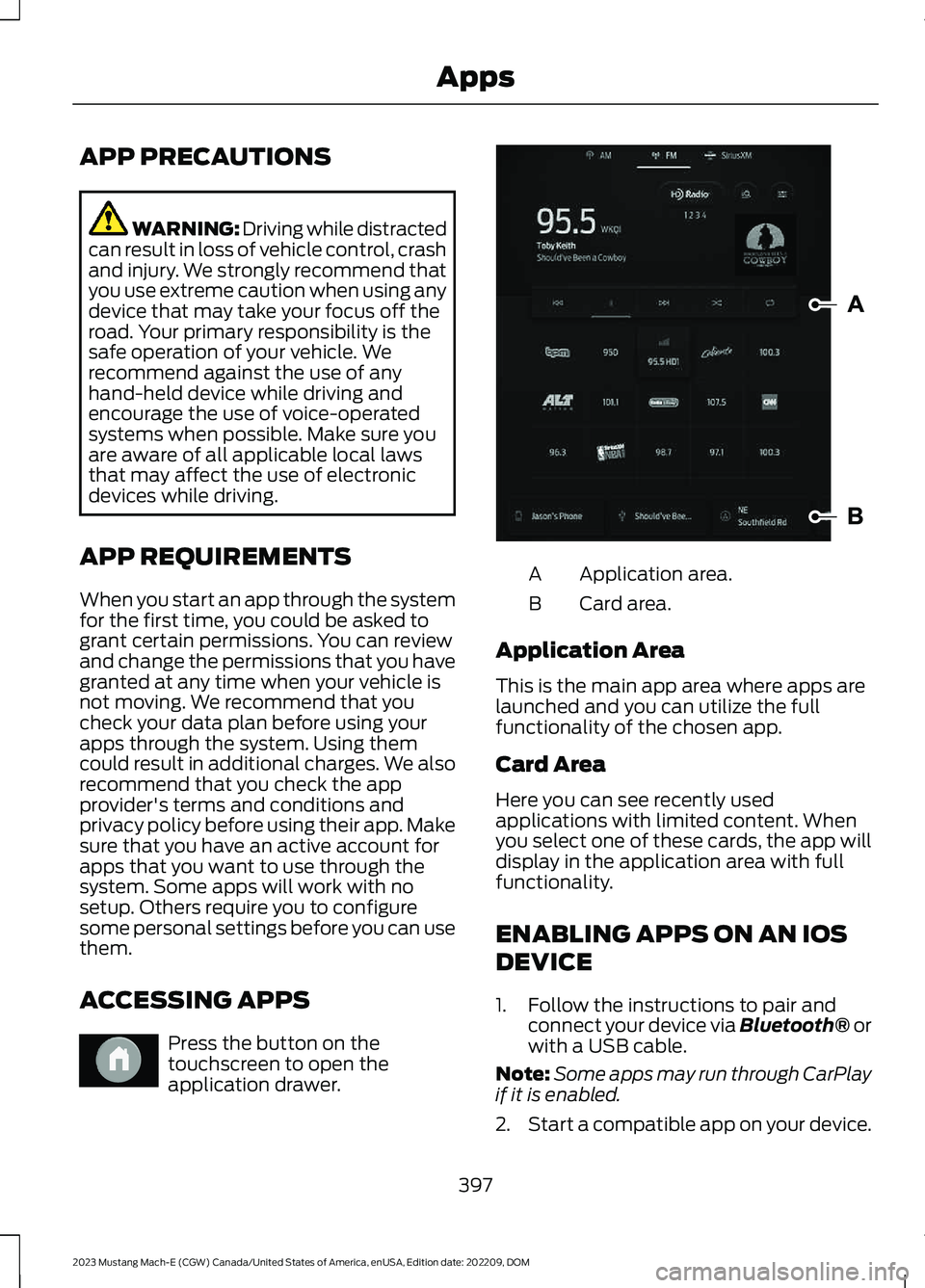
Application area.A
Card area.B
Application Area
This is the main app area where apps arelaunched and you can utilize the fullfunctionality of the chosen app.
Card Area
Here you can see recently usedapplications with limited content. Whenyou select one of these cards, the app willdisplay in the application area with fullfunctionality.
ENABLING APPS ON AN IOS
DEVICE
1.Follow the instructions to pair andconnect your device via Bluetooth® orwith a USB cable.
Note:Some apps may run through CarPlayif it is enabled.
2.Start a compatible app on your device.
397
2023 Mustang Mach-E (CGW) Canada/United States of America, enUSA, Edition date: 202209, DOMAppsE386798 E387032