2023 FORD MAVERICK belt
[x] Cancel search: beltPage 120 of 556

INSTRUMENT CLUSTER
DISPLAY MAIN MENU -
VEHICLES WITH: 6.5 INCH
SCREEN
Menu Item
Select Screens
Audio
Phone
Settings
Display Setup
CUSTOMIZING THE
INSTRUMENT CLUSTER
DISPLAY - VEHICLES WITH: 4.2
INCH SCREEN
1.Using the information display controlson the steering wheel, select MyView.
2.Press the menu button.
3.Select a screen.
4.Press the OK button.
CUSTOMIZING THE
INSTRUMENT CLUSTER
DISPLAY - VEHICLES WITH: 6.5
INCH SCREEN
Adding Screens Using SelectScreens
You can select various screens to show onthe instrument cluster display.
1.Select Select Screens.
2.Use the controls on the steering wheelto highlight a screen to add.
3.Press the OK button.
Note:The amount of screens you can addis limited. If the selected screen does notappear, you must deselect items from themenu.
Select Screens
Calm screen
Fuel economy
Trip 1
Trip 2
This trip
EV Coach
Tire pressure
Intelligent AWD
Off-Road
Trailer light check
Seatbelts
Auto StartStop
Now playing
Note:Some options may appear slightlydifferent or not at all if items are optional.
Configuring Gauges
You can select which values yourspeedometer shows in the instrumentcluster display.
1.Select Display Setup.
2.Select a speed unit to display.
116
2023 Maverick (CFE) Canada/United States of America, enUSA, Edition date: 202208, First-PrintingInstrument Cluster Display
Page 139 of 556
FRONT SEAT PRECAUTIONS
WARNING: Sitting improperly, outof position or with the seatback reclinedtoo far can take weight off the seatcushion and affect the decision of thepassenger sensing system, resulting inserious injury or death in the event of acrash. Always sit upright against yourseat back, with your feet on the floor.
WARNING: Do not recline the seatbackrest too far as this can cause theoccupant to slide under the seatbelt,resulting in personal injury in the eventof a crash.
WARNING: Do not place objectshigher than the top of the seat backrest.Failure to follow this instruction couldresult in personal injury or death in theevent of a sudden stop or crash.
WARNING: Do not adjust the driverseat or seat backrest when your vehicleis moving. This may result in sudden seatmovement, causing the loss of controlof your vehicle.
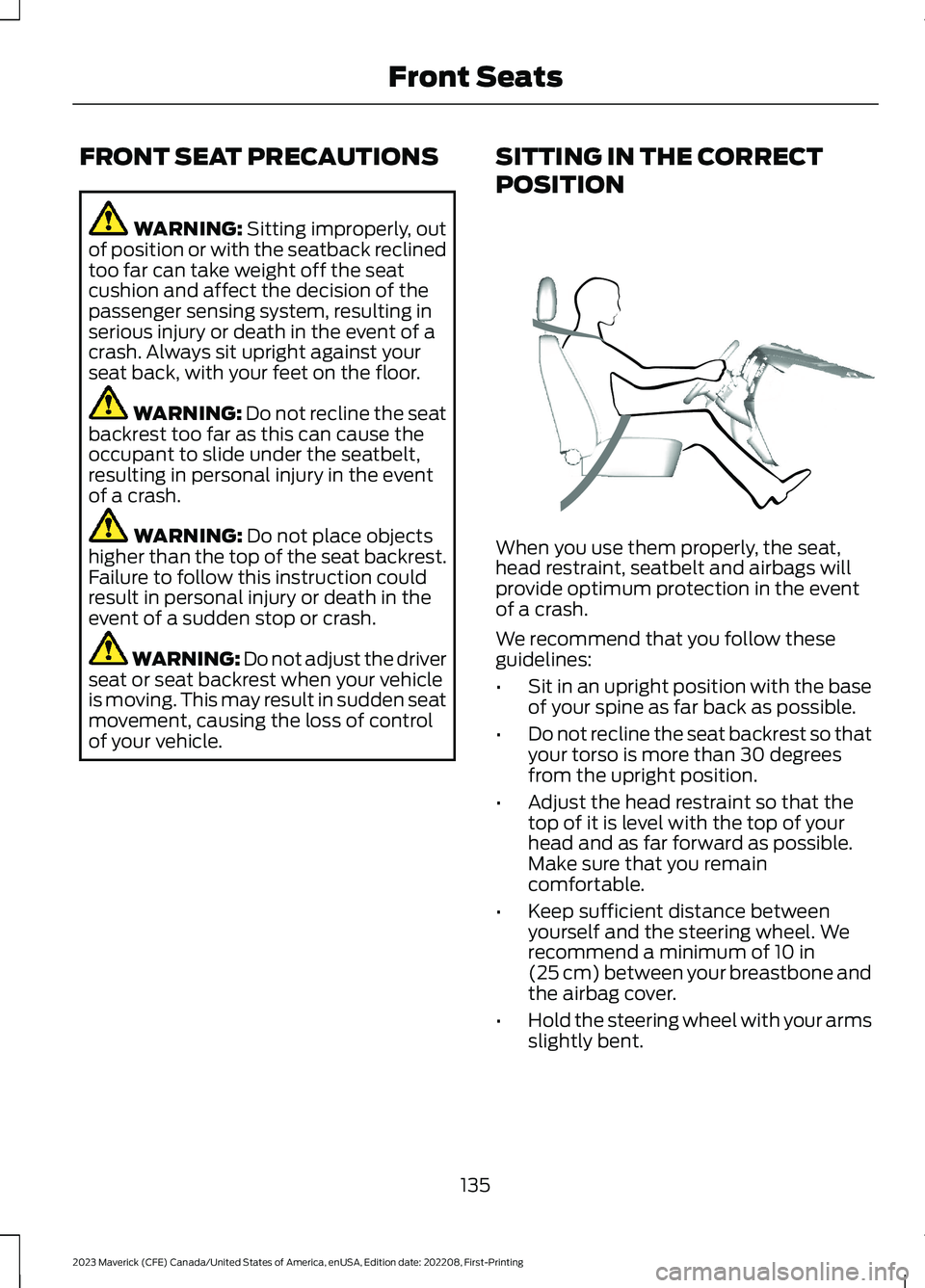
SITTING IN THE CORRECT
POSITION
When you use them properly, the seat,head restraint, seatbelt and airbags willprovide optimum protection in the eventof a crash.
We recommend that you follow theseguidelines:
•Sit in an upright position with the baseof your spine as far back as possible.
•Do not recline the seat backrest so thatyour torso is more than 30 degreesfrom the upright position.
•Adjust the head restraint so that thetop of it is level with the top of yourhead and as far forward as possible.Make sure that you remaincomfortable.
•Keep sufficient distance betweenyourself and the steering wheel. Werecommend a minimum of 10 in(25 cm) between your breastbone andthe airbag cover.
•Hold the steering wheel with your armsslightly bent.
135
2023 Maverick (CFE) Canada/United States of America, enUSA, Edition date: 202208, First-PrintingFront SeatsE68595
Page 140 of 556

•Bend your legs slightly so that you canpress the pedals fully.
•Position the shoulder strap of theseatbelt over the center of yourshoulder and position the lap straptightly across your hips.
Make sure that your driving position iscomfortable and that you can maintain fullcontrol of your vehicle.
MANUAL SEATS
HEAD RESTRAINT COMPONENTS
The front seat head restraints consists of:
An energy absorbing headrestraint.A
Two steel stems.B
Guide sleeve adjust and unlockbutton.C
ADJUSTING THE HEADRESTRAINT
WARNING: Fully adjust the headrestraint before you sit in or operate yourvehicle. This will help minimize the riskof neck injury in the event of a crash. Donot adjust the head restraint when yourvehicle is moving.
WARNING: The head restraint is asafety device. Whenever possible itshould be installed and properlyadjusted when the seat is occupied.Failure to adjust the head restraintproperly could reduce its effectivenessduring certain impacts.
WARNING: Adjust the headrestraints for all passengers before youdrive your vehicle. This will help minimizethe risk of neck injury in the event of acrash. Do not adjust the head restraintswhen your vehicle is moving.
Note:Adjust the seat backrest to an uprightdriving position before adjusting the headrestraint. Adjust the head restraint so thatthe top of it is level with the top of your headand as far forward as possible. Make surethat you remain comfortable. If you areextremely tall, adjust the head restraint toits highest position.
Pull the head restraint up to raise it.
To lower the head restraint:
1.Press and hold the adjust and unlockbutton.
2.Push the head restraint down.
To tilt the head restraint (if equipped):
136
2023 Maverick (CFE) Canada/United States of America, enUSA, Edition date: 202208, First-PrintingFront SeatsE291139
Page 148 of 556
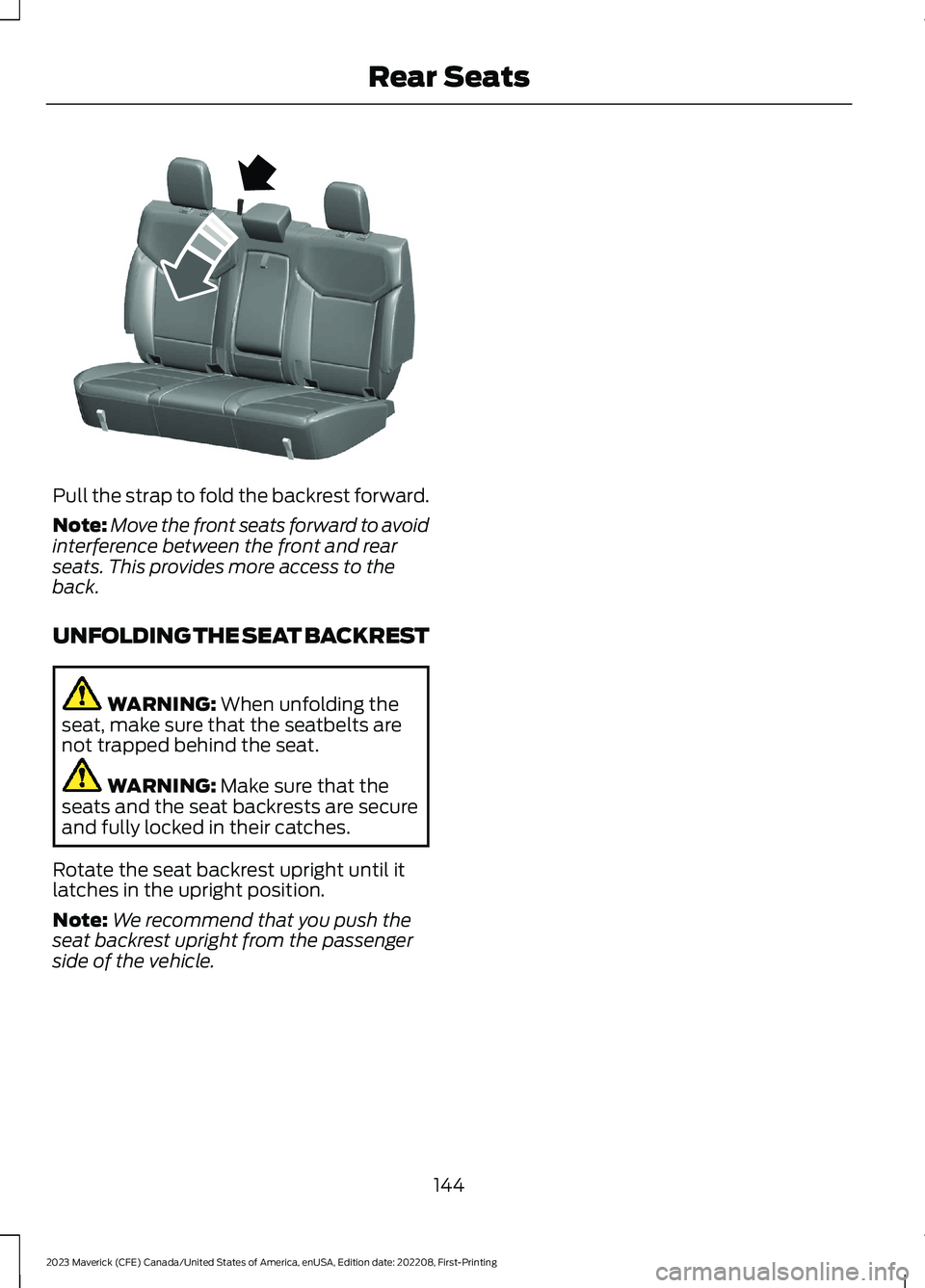
Pull the strap to fold the backrest forward.
Note:Move the front seats forward to avoidinterference between the front and rearseats. This provides more access to theback.
UNFOLDING THE SEAT BACKREST
WARNING: When unfolding theseat, make sure that the seatbelts arenot trapped behind the seat.
WARNING: Make sure that theseats and the seat backrests are secureand fully locked in their catches.
Rotate the seat backrest upright until itlatches in the upright position.
Note:We recommend that you push theseat backrest upright from the passengerside of the vehicle.
144
2023 Maverick (CFE) Canada/United States of America, enUSA, Edition date: 202208, First-PrintingRear SeatsE350495
Page 188 of 556
HOW DOES TEMPORARYNEUTRAL MODE WORK
Use this mode to keep your vehicle inneutral (N) when you exit your vehicle orswitch your vehicle off. For example, if youexit your vehicle before an automatic carwash.
Note:You do not need to use this mode atan automatic car wash if you stay in yourvehicle with power on.
Note:Do not tow your vehicle in this mode.
Note:Automatic return to park (P) isdelayed when your vehicle is in this mode.See What Is Automatic Return to Park(P) (page 184).
TEMPORARY NEUTRAL MODELIMITATIONS
Your vehicle could shift to park (P) after30 minutes, or when the vehicle batterycharge level is low. Prolonged use of thismode can cause the 12 V battery to run outof charge.
Do not tow your vehicle in this mode.Failure to follow these instructions couldresult in vehicle damage not covered bythe vehicle warranty.
ENTERING TEMPORARYNEUTRAL MODE
1.Bring your vehicle to a complete stop.
2.Press and hold the brake pedal.
3.Power your vehicle on.
4.Shift into neutral (N).
Note:An instructional message appears.
5.Press the low (L) button.
Note:A confirmation message appearswhen your vehicle enters the mode.
6.Release the brake pedal.
Note:Your vehicle is free to roll.
7.Switch your vehicle off.
Note:Do not tow your vehicle in this mode.
Note:The neutral (N) indicator on thetransmission selector may flash in thismode.
EXITING TEMPORARY NEUTRALMODE
1.Press the brake pedal.
2.Shift into park (P), or power yourvehicle on and shift into drive (D) orreverse (R).
AUTOMATIC RETURN TO
PARK (P)
WHAT IS AUTOMATIC RETURN TOPARK (P)
Your vehicle shifts into park (P) if youattempt to exit your vehicle without thevehicle in park (P).
HOW DOES AUTOMATIC RETURNTO PARK (P) WORK
Your vehicle shifts into park (P) when yourvehicle is stationary and any of thefollowing occur:
•You switch the vehicle off.
•You open the driver door with yourseatbelt unlatched.
•You unlatch the driver seatbelt whenthe driver door is open.
Note:Do not use automatic return to park(P) when your vehicle is moving, except inan emergency. See Stopping the EngineWhen Your Vehicle is Moving (page 160).
184
2023 Maverick (CFE) Canada/United States of America, enUSA, Edition date: 202208, First-PrintingAutomatic Transmission
Page 189 of 556

AUTOMATIC RETURN TO PARK(P) LIMITATIONS
Automatic return to park (P) may not workif the door ajar sensor or seatbelt sensorare malfunctioning.
See an authorized dealer if any of thefollowing occur:
•Seatbelt indicator illuminates or tonesounds with the seatbelt fastened.
•Door ajar indicator does not illuminatewith the driver door open.
•Door ajar indicator illuminates with thedriver door closed.
•Transmission not in park messageappears with the driver door closed,after you shift out of park (P).
GRADE ASSIST - HYBRID
ELECTRIC VEHICLE (HEV)
WHAT IS GRADE ASSIST
Provides additional grade braking with acombination of engine motoring andhigh-voltage battery charging to helpmaintain vehicle speed when descendinga grade.
MANUAL PARK RELEASE -
GASOLINE (IF EQUIPPED)
WHAT IS MANUAL PARK RELEASE
Manual park release allows you to shiftyour vehicle out of park (P) in the event ofan electrical malfunction or emergency.
MANUAL PARK RELEASEPRECAUTIONS
WARNING: When doing thisprocedure, you need to take thetransmission out of park (P) whichmeans your vehicle can roll freely. Toavoid unwanted vehicle movement,apply the parking brake prior to doingthis procedure. Use wheel chocks ifappropriate.
WARNING: Do not drive yourvehicle until you verify that thestoplamps are working.
USING MANUAL PARK RELEASE
Activating the Manual ParkRelease Cable
1.Apply the parking brake.
Note:If the battery has run out of charge,use an external power source to apply theparking brake.
2.Remove the access cover locatedwithin the center console using aplastic wedge or pry tool.
Note:Do not pull the tether.
185
2023 Maverick (CFE) Canada/United States of America, enUSA, Edition date: 202208, First-PrintingAutomatic Transmission
Page 208 of 556
WHAT IS TRAIL CONTROL
WARNING: The system does notcontrol speed in low traction conditionsor extremely steep slopes. The systemis designed to be an aid and does notrelieve you of your responsibility to drivewith due care and attention. Failure tofollow this instruction could result inpersonal injury.
Trail control lets you focus on steeringduring low-speed and off-road use bycontrolling your vehicle's acceleration andbraking to maintain the speed that you set.
You may hear a noise from the anti-lockbrake system pump motor when you usethe system. This is normal.
TRAIL CONTROL LIMITATIONS
Trail control is unavailable when any of thefollowing occur:
•Your vehicle speed is greater than20 mph (32 km/h) in four-wheel driveor four-wheel drive lock.
•Your vehicle speed is greater than5 mph (8 km/h) in reverse (R).
•The transmission is in park (P).
•The driver side door is open or yourseatbelt is off when the driver side dooris removed.
•Cruise control is on.
•Pro trailer backup assist is on.
SWITCHING TRAIL CONTROL
ON AND OFF
Press the Trail Control on thetouchscreen.
The system switches off if you press thebutton again or exceed 42 mph (68 km/h).
SETTING THE TRAIL CONTROL
SPEED
Note:The buttons are located on thesteering wheel.
Drive to your preferred speed.
Press button to increase the setcurrent speed.
Press button to decrease the setcurrent speed.
Note:The indicator changes color.
You can adjust the set speed in small orlarge increments. Press the toggle buttonupward or downward once to adjust theset speed in small increments. Press andhold the toggle button upward ordownward to adjust the set speed in largeincrements.
You can also adjust the set speed bybraking.
Note:Pressing the brake pedal does notswitch off the system.
CANCELING THE SET SPEED
Press the button.
TRAIL CONTROL INDICATORS
204
2023 Maverick (CFE) Canada/United States of America, enUSA, Edition date: 202208, First-PrintingTrail Control (If Equipped)E272858 E246884 E246885 E350925 E272858
Page 209 of 556
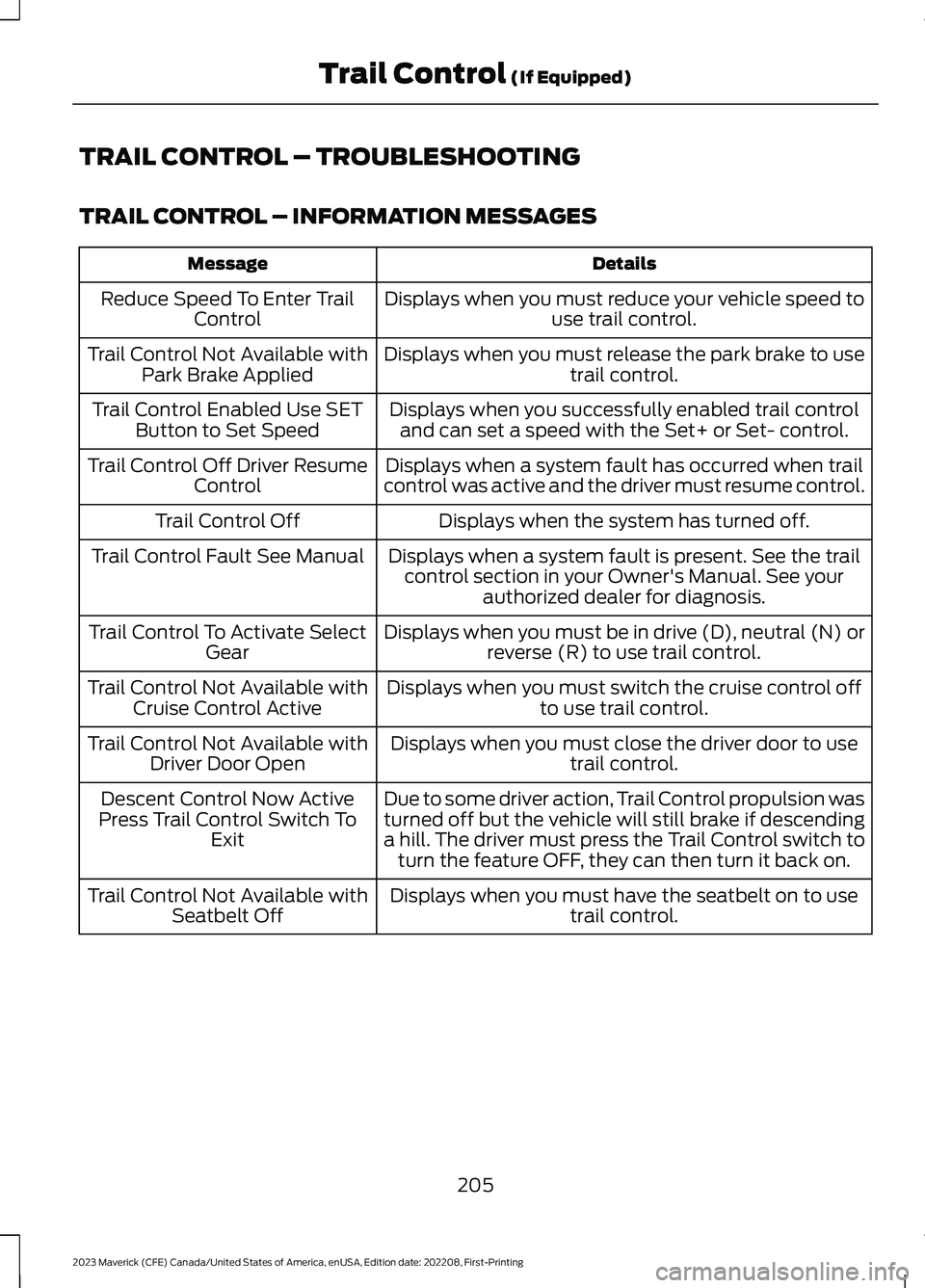
TRAIL CONTROL – TROUBLESHOOTING
TRAIL CONTROL – INFORMATION MESSAGES
DetailsMessage
Displays when you must reduce your vehicle speed touse trail control.Reduce Speed To Enter TrailControl
Displays when you must release the park brake to usetrail control.Trail Control Not Available withPark Brake Applied
Displays when you successfully enabled trail controland can set a speed with the Set+ or Set- control.Trail Control Enabled Use SETButton to Set Speed
Displays when a system fault has occurred when trailcontrol was active and the driver must resume control.Trail Control Off Driver ResumeControl
Displays when the system has turned off.Trail Control Off
Displays when a system fault is present. See the trailcontrol section in your Owner's Manual. See yourauthorized dealer for diagnosis.
Trail Control Fault See Manual
Displays when you must be in drive (D), neutral (N) orreverse (R) to use trail control.Trail Control To Activate SelectGear
Displays when you must switch the cruise control offto use trail control.Trail Control Not Available withCruise Control Active
Displays when you must close the driver door to usetrail control.Trail Control Not Available withDriver Door Open
Due to some driver action, Trail Control propulsion wasturned off but the vehicle will still brake if descendinga hill. The driver must press the Trail Control switch toturn the feature OFF, they can then turn it back on.
Descent Control Now ActivePress Trail Control Switch ToExit
Displays when you must have the seatbelt on to usetrail control.Trail Control Not Available withSeatbelt Off
205
2023 Maverick (CFE) Canada/United States of America, enUSA, Edition date: 202208, First-PrintingTrail Control (If Equipped)