2023 FORD EXPLORER steering wheel
[x] Cancel search: steering wheelPage 352 of 573
Utility vehicles and trucks handledifferently than passenger cars in thevarious driving conditions that areencountered on streets, highways andoff-road. Utility vehicles and trucks are notdesigned for cornering at speeds as highas passenger cars any more than low-slungsports cars are designed to performsatisfactorily under off-road conditions.
Study your owner's manual and anysupplements for specific information aboutequipment features, instructions for safedriving and additional precautions toreduce the risk of an accident or seriousinjury.
Four-Wheel Drive system (ifequipped)
WARNING: Do not becomeoverconfident in the ability of four-wheeldrive vehicles. Although a four-wheeldrive vehicle may accelerate better thana two-wheel drive vehicle in low tractionsituations, it won't stop any faster thantwo-wheel drive vehicles. Always driveat a safe speed.
A vehicle equipped with Four-Wheel Drivehas the ability to use all four wheels topower itself. This increases traction whichmay enable you to safely drive over terrainand road conditions that a conventionaltwo-wheel drive vehicle cannot. Power issupplied to all four wheels through atransfer case. Four-wheel drive vehiclesallow you to select different modes asnecessary. You can find more informationon transfer case operation, drive modeselection, and transfer case maintenancein this manual. See Four-Wheel Drive(page 203). You should become thoroughlyfamiliar with this information before youoperate your vehicle.
We recommend installing the temporaryspare wheel and tire on the front axle whenpossible. This could provide limited 4WDtraction.
Four-wheel drive: Never use a spare tire ofa different size than the one provided withyour vehicle. This could cause thefour-wheel drive system to default torear-wheel drive.
How your vehicle differs fromother vehicles
Sport utility vehicles and trucks can differfrom some other vehicles in a fewnoticeable ways. Your vehicle may be:
•Higher - to allow higher load carryingcapacity and to allow it to travel overrough terrain without getting hung upor damaging underbody components.
•Shorter - to give it the capability toapproach inclines and drive over thecrest of a hill without getting hung upor damaging underbody components.All other things held equal, a shorterwheelbase may make your vehiclequicker to respond to steering inputsthan a vehicle with a longer wheelbase.
•Narrower - to provide greatermaneuverability in tight spaces,particularly in off-road use.
As a result of the above dimensionaldifferences, sport utility vehicles and trucksoften have a higher center of gravity and agreater difference in center of gravitybetween the loaded and unloadedcondition. These differences that makeyour vehicle so versatile also make ithandle differently than an ordinarypassenger car.
348
2023 Explorer (CTW) Canada/United States of America, enUSA, Edition date: 202209, First-PrintingWheels and Tires
Page 367 of 573
WARNING: Snow tires must be thesame size, load index and speed ratingas those originally provided by Ford. Useof any tire or wheel not recommendedby Ford can affect the safety andperformance of your vehicle, which couldresult in an increased risk of loss ofcontrol, vehicle rollover, personal injuryand death. Additionally, the use ofnon-recommended tires and wheels cancause steering, suspension, axle, transfercase or power transfer unit failure.Follow the Ford recommended tireinflation pressure found on the SafetyCompliance Certification Label (on thedoor hinge pillar, door latch post or thedoor edge that meets the door latchpost, next to the driver seat), or TireLabel on the B-Pillar or the edge of thedriver door. Failure to follow the tirepressure recommendations can causeuneven treadwear patterns andadversely affect the way your vehiclehandles.
USING SNOW CHAINS
WARNING: Do not exceed 30 mph(50 km/h). Failure to follow thisinstruction could result in the loss ofcontrol of your vehicle, personal injury ordeath.
WARNING: Do not use snow chainson snow-free roads.
WARNING: Only fit snow chains tospecified tires.
WARNING: If your vehicle is fittedwith wheel trims, remove them beforefitting snow chains.
Only use snow chains on rear wheels.Install snow chains in pairs. Do not useself-tensioning snow chains.
Only use snow chains on the followingspecified tire sizes:
•255/60R18
•Only install chains that are 10 mmor less.
•255/65R18
•Only install chains that are 10 mmor less.
•265/60R18
•Only install chains that are 10 mmor less.
•255/55R20
•Only install chains that are 10 mmor less.
We recommend you use steel wheels ofthe same size and specification if snowchains are required because chains maychip aluminum wheels.
Follow these guidelines when using snowtires and traction devices:
•If possible, avoid fully loading yourvehicle.
•Purchase snow chains from amanufacturer that clearly labels bodyto tire dimension restrictions.
•When driving with snow chains do notexceed 30 mph (50 km/h) or themaximum speed recommended by thechain manufacturer, whichever is less.
•Drive cautiously. If you hear the snowchains rub or bang against the vehicle,stop and tighten them. If this does notwork, remove the snow chains toprevent vehicle damage.
•Remove the snow chains when theyare no longer needed. Do not use snowchains on dry roads.
363
2023 Explorer (CTW) Canada/United States of America, enUSA, Edition date: 202209, First-PrintingWheels and Tires
Page 374 of 573

11.Set all four tires to the recommendedair pressure as indicated on theSafety Compliance CertificationLabel, affixed to either the door hingepillar, door-latch post, or the dooredge that meets the door-latch post,next to the driver seating position orTire Label located on the B-Pillar orthe edge of the driver door.
CHANGING A ROAD WHEEL
WARNING: If the tire pressuremonitor sensor becomes damaged itmay not function.
Note:You should only use tire sealants inroadside emergencies as they may causedamage to the tire pressure monitoringsystem sensor.
Note:The tire pressure monitoring systemindicator light illuminates when the sparetire is in use. To restore the full function ofthe monitoring system, all road wheelsequipped with tire pressure monitoringsensors must be mounted on the vehicle.
If you get a flat tire when driving, do notapply the brake heavily. Instead, graduallydecrease your speed. Hold the steeringwheel firmly and slowly move to a safeplace on the side of the road.
Have a flat serviced by an authorizeddealer in order to prevent damage to thetire pressure monitoring system sensors.See Tire Pressure Monitoring System(page 364). Replace the spare tire with aroad tire as soon as possible. Duringrepairing or replacing of the flat tire, havethe authorized dealer inspect the tirepressure monitoring system sensor fordamage.
Dissimilar Spare Wheel and TireAssembly Information
WARNING: Failure to follow theseguidelines could result in an increasedrisk of loss of vehicle control, injury ordeath.
If you have a dissimilar spare wheel andtire, then it is intended for temporary useonly. This means that if you need to use it,you should replace it as soon as possiblewith a road wheel and tire assembly thatis the same size and type as the road tiresand wheels that were originally providedby us. If the dissimilar spare tire or wheelis damaged, you should replace it ratherthan repair it.
A dissimilar spare wheel and tire assemblyis defined as a spare wheel and tireassembly that is different in brand, size orappearance from the road tires and wheelsand can be one of three types:
1.T-type mini-spare: This spare tirebegins with the letter T for tire size andmay have Temporary Use Only molded inthe sidewall.
2.Full-size dissimilar spare with labelon wheel: This spare tire has a label onthe wheel that states: THIS WHEEL ANDTIRE ASSEMBLY FOR TEMPORARY USEONLY.
When driving with one of the dissimilarspare tires listed above, do not:
•Exceed 50 mph (80 km/h).
•Load the vehicle beyond maximumvehicle load rating listed on the SafetyCompliance Label.
•Tow a trailer.
•Use snow chains on the end of thevehicle with the dissimilar spare tire.
•Use more than one dissimilar spare tireat a time.
370
2023 Explorer (CTW) Canada/United States of America, enUSA, Edition date: 202209, First-PrintingWheels and Tires
Page 376 of 573

WARNING: Do not work on yourvehicle when the jack is the only supportas your vehicle could slip off the jack.Failure to follow this instruction couldresult in personal injury or death.
WARNING: Use only the specifiedjacking points. If you use other positions,you may damage the body, steering,suspension, engine, braking system orthe fuel lines.
WARNING: Never place anythingbetween the vehicle jack and yourvehicle.
WARNING: Never place anythingbetween the vehicle jack and the ground.
WARNING: Park your vehicle sothat you do not obstruct the flow oftraffic or place yourself in any danger andset up a warning triangle.
WARNING: Do not attempt tochange a tire on the side of the vehicleclose to moving traffic. Pull far enoughoff the road to avoid the danger of beinghit when operating the jack or changingthe wheel.
Note:Passengers should not remain in yourvehicle when the vehicle is being jacked.
Note:Jack at the specified locations toavoid damage to the vehicle.
Note:No maintenance or additionallubrication of your jack is required over theservice life of your vehicle.
1.Park on a level surface, set the parkingbrake and switch on the hazardflashers.
2.Apply the parking brake, place thetransmission in park (P) or reverse (R)for manual transmission. Turn theengine off.
3.If your vehicle has air suspension, usethe touch screen to switch on the AirSuspension Service Mode prior tojacking.
4.Block the wheel diagonally oppositethe flat tire. For example, if the leftfront tire is flat, block the right rearwheel.
372
2023 Explorer (CTW) Canada/United States of America, enUSA, Edition date: 202209, First-PrintingWheels and TiresE166722 E142551
Page 433 of 573
Switching Automatic System UpdatesOn
Select the settings option on thefeature bar.
1.Select Automatic Updates.
2.Switch Automatic System Updateson.
The system is now set to check for andreceive system updates when it isconnected to a Wi-Fi network.
Note:You can use the system when adownload is in progress.
Note:If the system is disconnected fromthe Wi-Fi network when a download is inprogress, the download continues the nexttime the system is connected to a Wi-Finetwork.
Additional Information andAssistance
For additional information and assistance,we recommend that you contact anauthorized dealer or refer to the local Fordwebsite.
USING VOICE RECOGNITION
The system allows you to interact with theentertainment, information andcommunication systems on your vehicleusing voice commands. This allows youto keep your hands on the steering wheeland focus on what is in front of you.
Press the voice control buttonon the steering wheel and waitfor the voice prompt.
Note:Press the voice control button againto interrupt a voice prompt and beginspeaking.
Note:Turn the volume control when a voiceprompt plays to adjust the volume.
Note:Press and hold the voice controlbutton on the steering wheel to use Siri onyour iOS device.
The following voice commands aredesigned to help you from any screen:
•List of Commands
•Help
The following tables list some of the morefrequently used voice commands. For acomplete list of voice commands, refer toour website.
General
DescriptionVoice Command
Get a list of voice commands for a specific feature.1___ List of Commands
Cancel an active voice session.Cancel
Get a list of voice commands for a specific feature.1___ Help
Return to the previous screen.Go back
Go to the main menu.Main Menu
429
2023 Explorer (CTW) Canada/United States of America, enUSA, Edition date: 202209, First-PrintingSYNC™ 3E280315 E142599
Page 450 of 573
A/C: Touch to switch the air conditioningon or off. Use A/C with recirculated air toimprove cooling performance andefficiency.
Note:In certain conditions, such asmaximum defrost, the air conditioningcompressor may continue to operate eventhough you switch off the air conditioning.
Switching the Climate Control Onand Off
Touch the button.
Switching the Climate ControlledSeats On and Off
Touch the button to cyclethrough the various climatecontrolled seat settings.
Switching Dual Zone Mode On andOff
Touch the button to switch ontemperature control for theright-hand side of the vehicle.
Switching the Heated ExteriorMirrors On and Off
Touch the button.
Switching the Heated WindshieldOn and Off
Touch the button to clear thewindshield of thin ice and fog.The heated windshield turns offafter a short period of time.
Switching the Heated RearWindow On and Off
Touch the button to clear therear window of thin ice and fog.
Switching the Heated Seats Onand Off
Touch the button to cyclethrough the various heatsettings.
Switching the Heated SteeringWheel On and Off
Touch the button.
Switching Maximum AirConditioning On and Off
Touch the button for maximumcooling.
Recirculated air flows through theinstrument panel air vents, air conditioningturns on and the blower motor adjusts tothe highest speed.
Switching Maximum Defrost Onand Off
Touch the button for maximumdefrosting.
Air flows through the windshield air vents,and the blower motor adjusts to thehighest speed.
You can also use this setting to defog andclear the windshield of a thin covering ofice.
Note:To prevent window fogging, youcannot select recirculated air whenmaximum defrost is on.
446
2023 Explorer (CTW) Canada/United States of America, enUSA, Edition date: 202209, First-PrintingSYNC™ 3 E265282 E265280 E266189 E184884 E256621
Page 459 of 573
•Idling: The vehicle is running and in park(P). The engine and/or the high voltagebattery are on.
•Electric Driving: The vehicle is runningand in drive (D) or neutral (N). The highvoltage battery provides power to thewheels.
•Hybrid Driving: The vehicle is runningand in drive (D) or neutral (N). Theengine and the high voltage batteryprovide power to the wheels.
•Regenerative Braking: The vehicle isrunning in drive (D) and is slowingdown. Power captured by theregenerative braking system is sentback to the high voltage battery.
Engine On Due To
The following conditions help to explainwhy the engine is on, and what you can doto allow all electric operation.
•Drive Power: The engine is on due toaccelerator pedal pressure or speedcontrol activation. Reduce pressure onthe accelerator pedal or switch off thespeed control to return to full electricmode.
•High Speed: The engine is on becausethe vehicle speed exceeds the level forfull electric operation. Reduce thespeed to return to electric operation.
•Heater Setting: The engine is onbecause of the heater setting. Reduceor turn off the heater setting to returnto electric operation.
•Neutral Gear: The engine is on becausethe vehicle is in neutral (N). Shift outof neutral gear to return to electricoperation.
•Engine Cold: The engine is on becauseit is cold. The vehicle returns to electricoperation once the engine is sufficientlywarm.
•Battery Charging: The engine is on tocharge the high voltage battery. Thevehicle returns to electric operationonce the battery is charged.
•Low Gear: The engine is on becausethe vehicle is in low gear. Shift out oflow gear to return to electric operation.
•Normal Operation: The engine is on tooptimize vehicle operation. The vehiclereturns to electric operation whenpossible.
•Engine Braking Active: The engine is onto provide increased powertrainbraking. This can occur when you turnon grade assist, when speed control ison or when driving with your foot offthe accelerator pedal. Turning offgrade assist or speed control mayallow the vehicle to return to electricoperation.
•Battery Temperature: The engine is ondue to a high or low high voltagebattery temperature. This is a normaloperating condition. The vehicle returnsto electric operation when possible.
•Drive Mode: The engine is on due to thedrive mode selection. Select anappropriate drive mode for electric onlyoperation.
APPS
The system allows you interact with selectmobile apps while keeping your eyes onthe road. Voice commands, your steeringwheel buttons, or a quick tap on yourtouchscreen give you advanced control ofcompatible mobile apps. You can alsostream your favorite music or podcasts,share your time of arrival with friends, andkeep connected safely.
455
2023 Explorer (CTW) Canada/United States of America, enUSA, Edition date: 202209, First-PrintingSYNC™ 3
Page 464 of 573
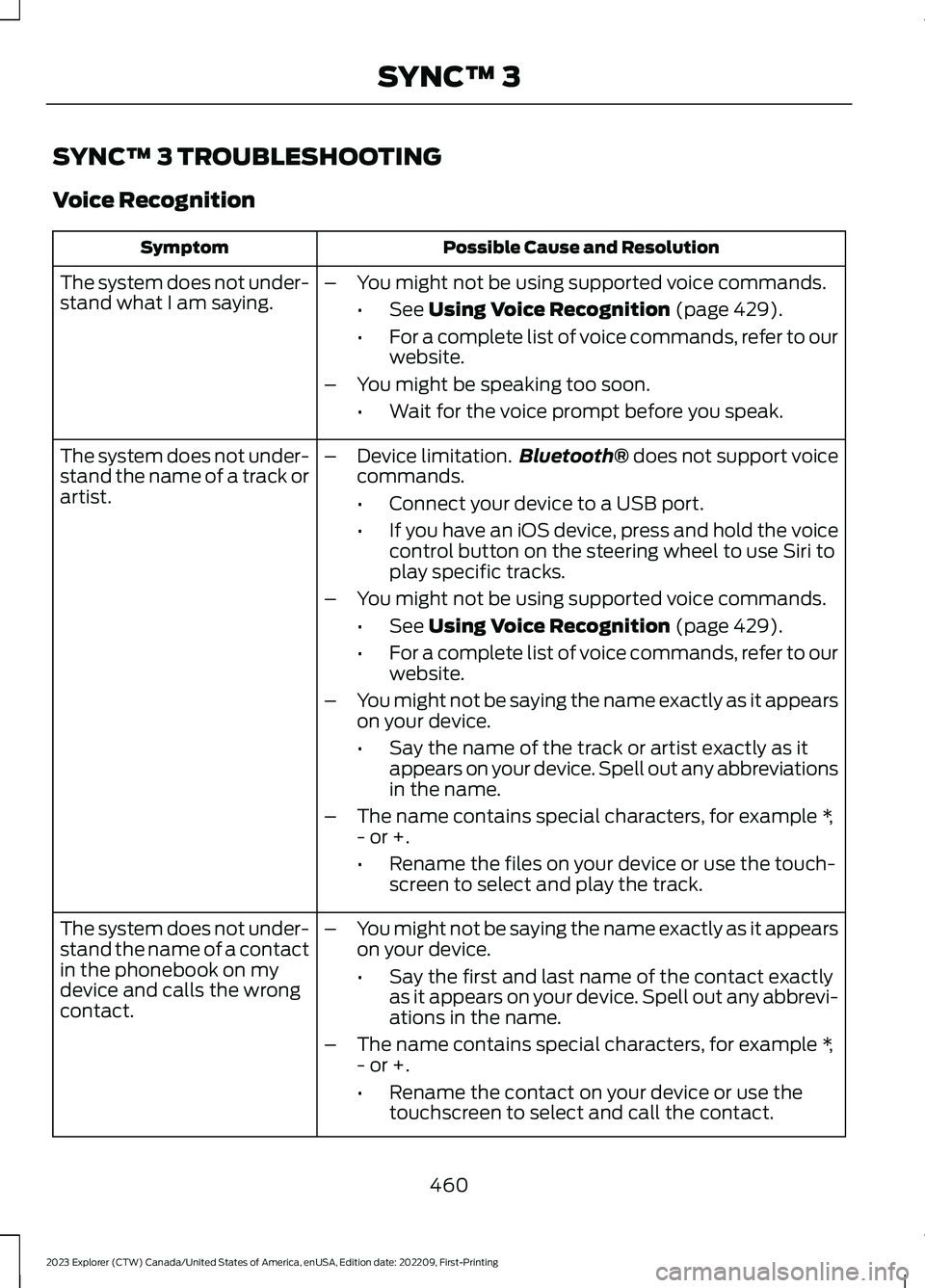
SYNC™ 3 TROUBLESHOOTING
Voice Recognition
Possible Cause and ResolutionSymptom
The system does not under-stand what I am saying.–You might not be using supported voice commands.
•See Using Voice Recognition (page 429).
•For a complete list of voice commands, refer to ourwebsite.
–You might be speaking too soon.
•Wait for the voice prompt before you speak.
The system does not under-stand the name of a track orartist.
–Device limitation.Bluetooth® does not support voicecommands.
•Connect your device to a USB port.
•If you have an iOS device, press and hold the voicecontrol button on the steering wheel to use Siri toplay specific tracks.
–You might not be using supported voice commands.
•See Using Voice Recognition (page 429).
•For a complete list of voice commands, refer to ourwebsite.
–You might not be saying the name exactly as it appearson your device.
•Say the name of the track or artist exactly as itappears on your device. Spell out any abbreviationsin the name.
–The name contains special characters, for example *,- or +.
•Rename the files on your device or use the touch-screen to select and play the track.
The system does not under-stand the name of a contactin the phonebook on mydevice and calls the wrongcontact.
–You might not be saying the name exactly as it appearson your device.
•Say the first and last name of the contact exactlyas it appears on your device. Spell out any abbrevi-ations in the name.
–The name contains special characters, for example *,- or +.
•Rename the contact on your device or use thetouchscreen to select and call the contact.
460
2023 Explorer (CTW) Canada/United States of America, enUSA, Edition date: 202209, First-PrintingSYNC™ 3