2023 FORD EXPLORER display
[x] Cancel search: displayPage 107 of 573

Gauge display.A
Speedometer.B
Information bar.C
Information display.D
Fuel gauge.E
Gauge Display
Displays different gauge selectionsdepending on supported options. Optionsinclude Tachometer or Engine CoolantTemperature.
Information Bar
Displays information related to the currentaudio source, navigation, outside airtemperature and distance to empty.
Information Display
Information that appears depends oncurrent gauge view and on-demandsettings. See General Information (page115).
Fuel Gauge
The fuel gauge indicates about how muchfuel is in the fuel tank.
The arrow adjacent to the fuel pumpsymbol indicates on which side of yourvehicle the fuel filler door is located.
Note:The fuel gauge may vary slightlywhen your vehicle is moving or on a slope.
Low Fuel Reminder
A low fuel level reminder displays andsounds when the distance to emptyreaches 75 mi (120 km) to empty forMyKey, and at 50 mi (80 km),25 mi(40 km),10 mi (20 km) and 0 mi (0 km)for all vehicle keys.
103
2023 Explorer (CTW) Canada/United States of America, enUSA, Edition date: 202209, First-PrintingInstrument ClusterE281475
Page 108 of 573

Note:The low fuel reminder can appear atdifferent fuel gauge positions depending onfuel economy conditions. This variation isnormal.
Distance to Empty
Indicates the approximate distance yourvehicle can travel on the fuel remaining inthe tank. Changes in driving pattern cancause the value to not only decrease butalso increase or stay constant for periodsof time.
Engine Coolant TemperatureGauge
WARNING: Do not remove thecoolant reservoir cap when the engine ison or the cooling system is hot. Wait 10minutes for the cooling system to cooldown. Cover the coolant reservoir capwith a thick cloth to prevent thepossibility of scalding and slowly removethe cap. Failure to follow this instructioncould result in personal injury.
Indicates engine coolant temperature. Atnormal operating temperature, the levelindicator will be in the normal range. If theengine coolant temperature exceeds thenormal range, stop your vehicle as soon assafely possible, switch off the engine andlet the engine cool.
GAUGES - VEHICLES WITH: 4.2 INCH INSTRUMENT CLUSTER
DISPLAY SCREEN
104
2023 Explorer (CTW) Canada/United States of America, enUSA, Edition date: 202209, First-PrintingInstrument ClusterE282227
Page 109 of 573

Tachometer.A
Information display.B
Speedometer.C
Fuel gauge.D
Engine coolant temperature gauge.E
Information Display
Information that appears depends on yourvehicle settings. See GeneralInformation (page 115).
Fuel Gauge
The fuel gauge indicates about how muchfuel is in the fuel tank.
The arrow adjacent to the fuel pumpsymbol indicates on which side of yourvehicle the fuel filler door is located.
Note:The fuel gauge may vary slightlywhen your vehicle is moving or on a slope.
Low Fuel Reminder
A low fuel level reminder displays andsounds when the distance to emptyreaches 75 mi (120 km) to empty forMyKey, and at 50 mi (80 km),25 mi(40 km),10 mi (20 km) and 0 mi (0 km)for all vehicle keys.
Note:The low fuel reminder can appear atdifferent fuel gauge positions depending onfuel economy conditions. This variation isnormal.
Engine Coolant TemperatureGauge
Indicates engine coolant temperature. Atnormal operating temperature, the levelindicator will be in the normal range. If theengine coolant temperature exceeds thenormal range, stop your vehicle as soon assafely possible, switch off the engine andlet the engine cool.
WARNING: Do not remove thecoolant reservoir cap when the engine ison or the cooling system is hot. Wait 10minutes for the cooling system to cooldown. Cover the coolant reservoir capwith a thick cloth to prevent thepossibility of scalding and slowly removethe cap. Failure to follow this instructioncould result in personal injury.
WARNING LAMPS AND
INDICATORS
The following warning lamps andindicators alert you to a vehicle conditionthat may become serious. Some lampsilluminate when you start your vehicle tomake sure they work. If any lamps remainon after starting your vehicle, refer to therespective system warning lamp for furtherinformation.
Note:Some warning indicators appear inthe information display and function thesame as a warning lamp, but do not displaywhen you start your vehicle.
Adaptive Cruise Control (If Equipped)
The cruise control systemindicator light changes color toindicate what mode the systemis in. See How Does Adaptive CruiseControl With Stop and Go Work (page241).
105
2023 Explorer (CTW) Canada/United States of America, enUSA, Edition date: 202209, First-PrintingInstrument ClusterE144524
Page 112 of 573

High Voltage Electric SystemFailure (If Equipped)
It illuminates if your hybridelectric vehicle has an electricalcomponent fault or failure thatcauses your vehicle to shutdown or entera limited operating mode. A message mayappear in the instrument cluster display.
Hill Descent (If Equipped)
Illuminates when you switch hilldescent on.
Hood Ajar
Illuminates when the ignition ison and the hood is notcompletely closed.
Lamps On
Illuminates when you switch thelow beam headlamps or theparking lamps on.
Liftgate Ajar
Illuminates when the liftgate isnot completely closed.
Low Beam Warning
Illuminates when the low beamheadlamp bulb is not properlyfunctioning.
Low Fuel Level
Illuminates when the fuel levelis low or the fuel tank is nearlyempty. Refuel as soon aspossible.
Low Tire Pressure Warning
Illuminates when the tirepressure is low. If the lampremains on with the enginerunning or when driving, check the tirepressure as soon as possible.
It also momentarily illuminates when youswitch the ignition on to confirm the lampis functional. If it does not illuminate whenyou switch the ignition on, or begins toflash at any time, have the systemchecked.
Low Washer Fluid
Illuminates when the windshieldwasher fluid is low.
Powertrain Fault
Illuminates when the systemdetects a powertrain or a4WD/AWD fault. Contact anauthorized dealer as soon as possible.
Ready to Drive (If Equipped)
Illuminates when you haveswitched on your hybrid electricvehicle and it is ready to drive. Acorresponding message may appearstating ready to drive.
Service Engine Soon
It illuminates when you switchthe ignition on prior to enginestart to check the bulb and toindicate whether your vehicle is ready forInspection and Maintenance testing.
108
2023 Explorer (CTW) Canada/United States of America, enUSA, Edition date: 202209, First-PrintingInstrument ClusterE144693 E246598 E71341 E162453 E181350 E139232 E132353 E224090 E67028
Page 114 of 573
GENERAL INFORMATION -
VEHICLES WITH: 6.5 INCH
INSTRUMENT CLUSTER
DISPLAY SCREEN
WARNING: Driving while distractedcan result in loss of vehicle control, crashand injury. We strongly recommend thatyou use extreme caution when using anydevice that may take your focus off theroad. Your primary responsibility is thesafe operation of your vehicle. Werecommend against the use of anyhand-held device while driving andencourage the use of voice-operatedsystems when possible. Make sure youare aware of all applicable local lawsthat may affect the use of electronicdevices while driving.
You can control various systems on yourvehicle using the information displaycontrols on the steering wheel.Corresponding information appears in theinstrument cluster display.
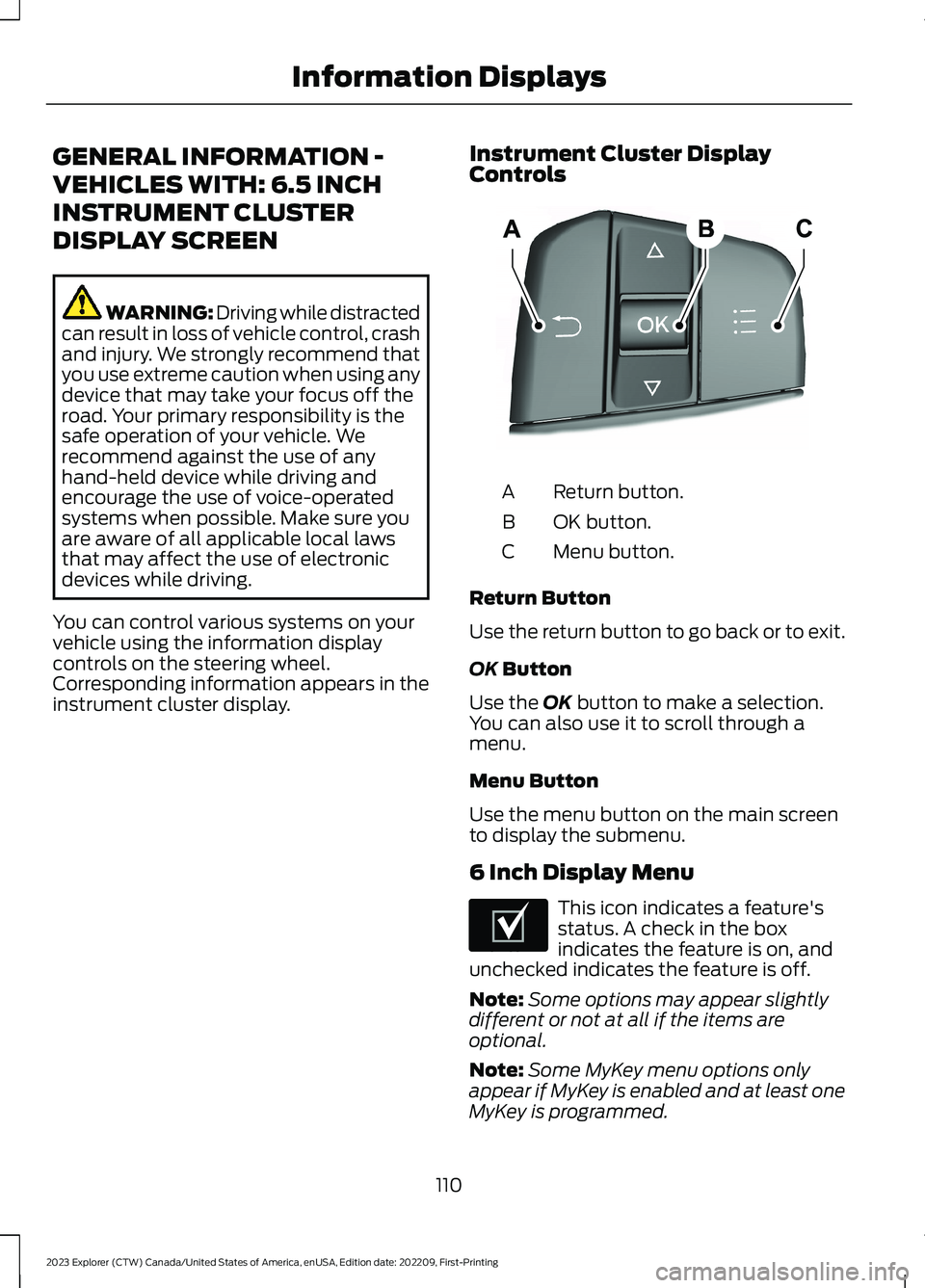
Instrument Cluster DisplayControls
Return button.A
OK button.B
Menu button.C
Return Button
Use the return button to go back or to exit.
OK Button
Use the OK button to make a selection.You can also use it to scroll through amenu.
Menu Button
Use the menu button on the main screento display the submenu.
6 Inch Display Menu
This icon indicates a feature'sstatus. A check in the boxindicates the feature is on, andunchecked indicates the feature is off.
Note:Some options may appear slightlydifferent or not at all if the items areoptional.
Note:Some MyKey menu options onlyappear if MyKey is enabled and at least oneMyKey is programmed.
110
2023 Explorer (CTW) Canada/United States of America, enUSA, Edition date: 202209, First-PrintingInformation DisplaysE250032 E204495
Page 115 of 573
Select Screens
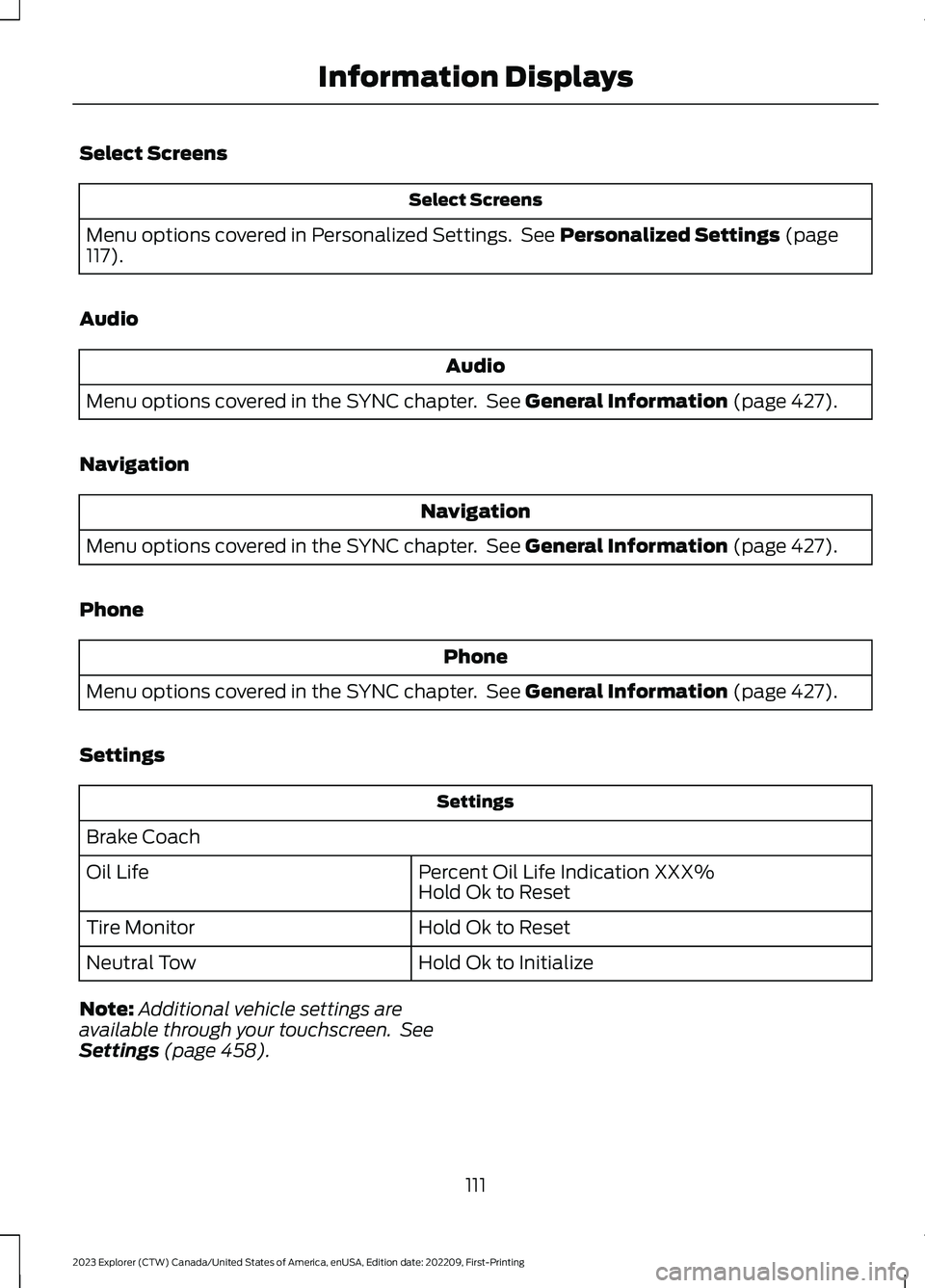
Select Screens
Menu options covered in Personalized Settings. See Personalized Settings (page117).
Audio
Audio
Menu options covered in the SYNC chapter. See General Information (page 427).
Navigation
Navigation
Menu options covered in the SYNC chapter. See General Information (page 427).
Phone
Phone
Menu options covered in the SYNC chapter. See General Information (page 427).
Settings
Settings
Brake Coach
Percent Oil Life Indication XXX%Hold Ok to ResetOil Life
Hold Ok to ResetTire Monitor
Hold Ok to InitializeNeutral Tow
Note:Additional vehicle settings areavailable through your touchscreen. SeeSettings (page 458).
111
2023 Explorer (CTW) Canada/United States of America, enUSA, Edition date: 202209, First-PrintingInformation Displays
Page 116 of 573
Display Setup
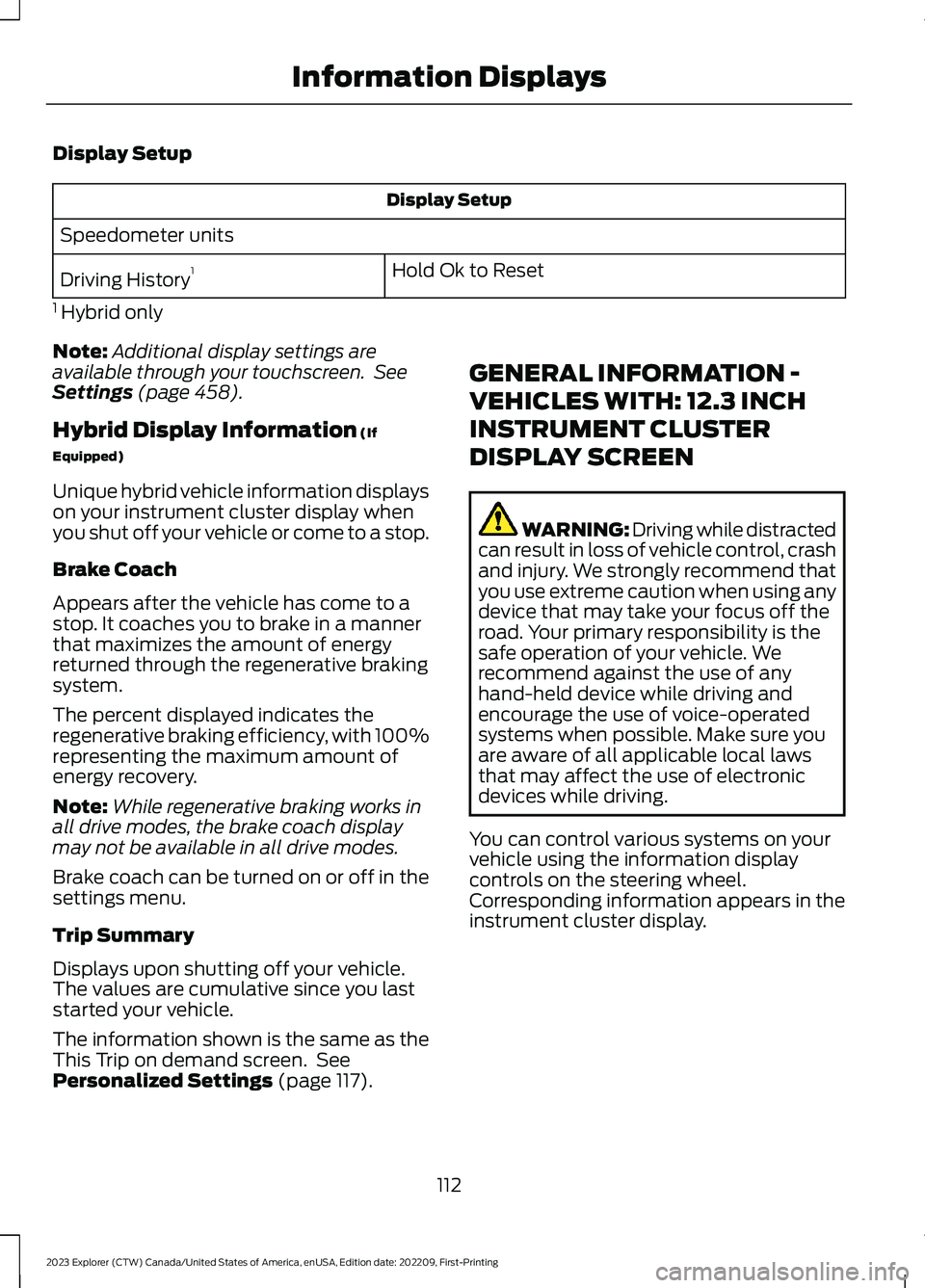
Display Setup
Speedometer units
Hold Ok to ResetDriving History1
1 Hybrid only
Note:Additional display settings areavailable through your touchscreen. SeeSettings (page 458).
Hybrid Display Information (If
Equipped)
Unique hybrid vehicle information displayson your instrument cluster display whenyou shut off your vehicle or come to a stop.
Brake Coach
Appears after the vehicle has come to astop. It coaches you to brake in a mannerthat maximizes the amount of energyreturned through the regenerative brakingsystem.
The percent displayed indicates theregenerative braking efficiency, with 100%representing the maximum amount ofenergy recovery.
Note:While regenerative braking works inall drive modes, the brake coach displaymay not be available in all drive modes.
Brake coach can be turned on or off in thesettings menu.
Trip Summary
Displays upon shutting off your vehicle.The values are cumulative since you laststarted your vehicle.
The information shown is the same as theThis Trip on demand screen. SeePersonalized Settings (page 117).
GENERAL INFORMATION -
VEHICLES WITH: 12.3 INCH
INSTRUMENT CLUSTER
DISPLAY SCREEN
WARNING: Driving while distractedcan result in loss of vehicle control, crashand injury. We strongly recommend thatyou use extreme caution when using anydevice that may take your focus off theroad. Your primary responsibility is thesafe operation of your vehicle. Werecommend against the use of anyhand-held device while driving andencourage the use of voice-operatedsystems when possible. Make sure youare aware of all applicable local lawsthat may affect the use of electronicdevices while driving.
You can control various systems on yourvehicle using the information displaycontrols on the steering wheel.Corresponding information appears in theinstrument cluster display.
112
2023 Explorer (CTW) Canada/United States of America, enUSA, Edition date: 202209, First-PrintingInformation Displays
Page 117 of 573
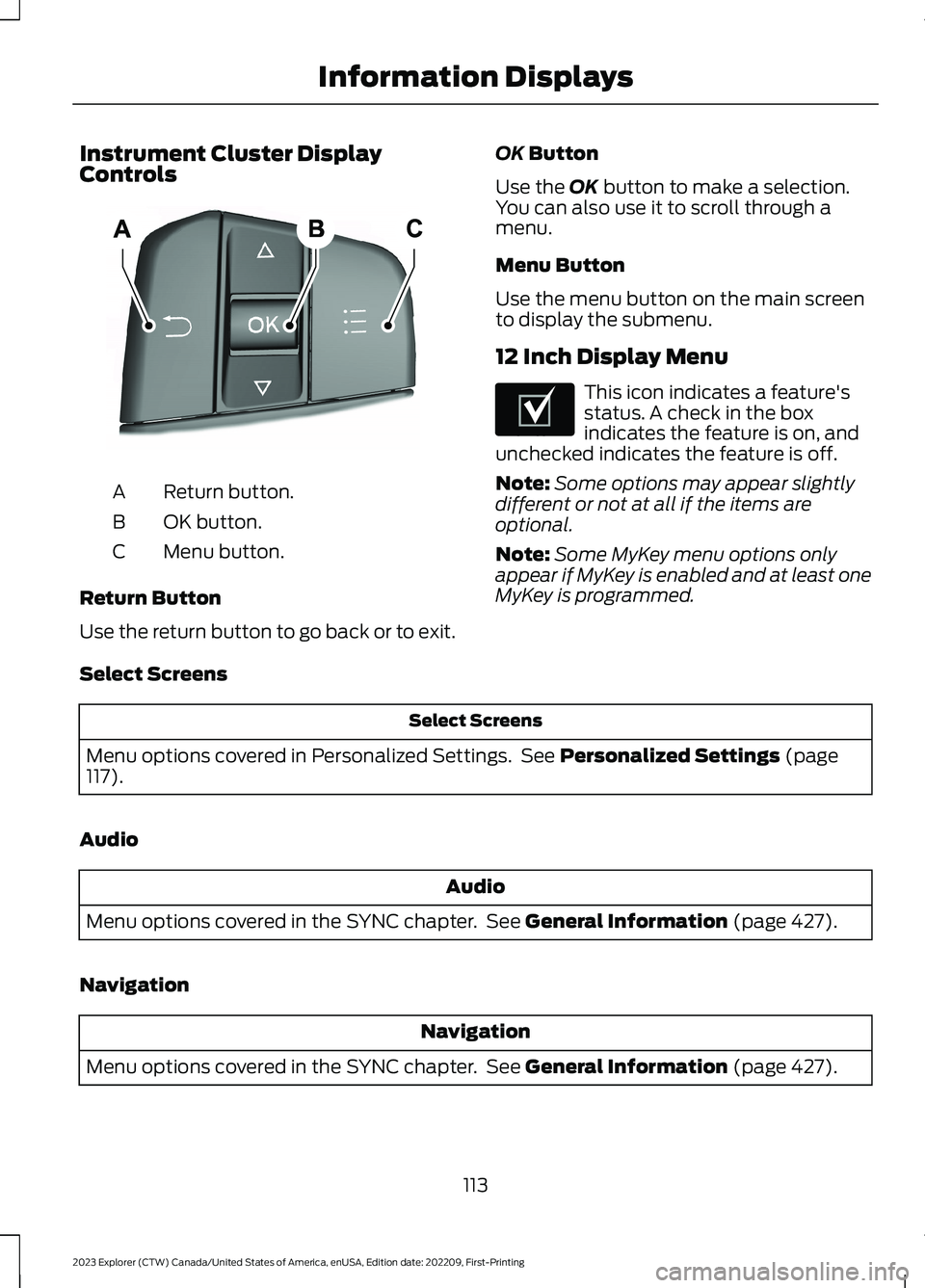
Instrument Cluster DisplayControls
Return button.A
OK button.B
Menu button.C
Return Button
Use the return button to go back or to exit.
OK Button
Use the OK button to make a selection.You can also use it to scroll through amenu.
Menu Button
Use the menu button on the main screento display the submenu.
12 Inch Display Menu
This icon indicates a feature'sstatus. A check in the boxindicates the feature is on, andunchecked indicates the feature is off.
Note:Some options may appear slightlydifferent or not at all if the items areoptional.
Note:Some MyKey menu options onlyappear if MyKey is enabled and at least oneMyKey is programmed.
Select Screens
Select Screens
Menu options covered in Personalized Settings. See Personalized Settings (page117).
Audio
Audio
Menu options covered in the SYNC chapter. See General Information (page 427).
Navigation
Navigation
Menu options covered in the SYNC chapter. See General Information (page 427).
113
2023 Explorer (CTW) Canada/United States of America, enUSA, Edition date: 202209, First-PrintingInformation DisplaysE250032 E204495