2023 FORD EXPLORER Camera
[x] Cancel search: CameraPage 249 of 573

Optimal system performance requires aclear view of the road by thewindshield-mounted camera.
Optimal performance may not occur if:
•The camera is blocked.
•There is poor visibility or lightingconditions.
•There are bad weather conditions.
SWITCHING ADAPTIVE
CRUISE CONTROL ON AND OFF
The cruise controls are on the steeringwheel. See Cruise Control (page 82).
Switching Adaptive Cruise ControlOn
Press the button to set thesystem in standby mode.
The indicator, current gap setting and setspeed appear in the information display.
Switching Adaptive Cruise ControlOff
Press the button when thesystem is in standby mode, orswitch the ignition off.
Note:You erase the set speed when youswitch the system off.
Automatic Cancellation orDeactivation
The system may cancel if:
•The tires lose traction.
•You apply the parking brake.
The system may cancel and set the parkingbrake if:
•You unbuckle the seatbelt and openthe driver door after you stop yourvehicle.
•Your vehicle is at a stop continuouslyfor more than three minutes.
The system may turn off or preventactivating when requested if:
•The vehicle has a blocked sensor.
•The brake temperature is too high.
•There is a failure in the system or arelated system.
SETTING THE ADAPTIVE
CRUISE CONTROL SPEED
Drive to the speed you prefer.
Press the toggle button upwardor downward to set the currentspeed.
Take your foot off the accelerator pedal.
The indicator, current gap setting and setspeed appear in the information display.
A vehicle image illuminates if there is avehicle detected in front of you.
Note:When adaptive cruise control isactive, the speedometer may vary slightlyfrom the set speed displayed in theinformation display.
245
2023 Explorer (CTW) Canada/United States of America, enUSA, Edition date: 202209, First-PrintingAdaptive Cruise Control (If Equipped)E144529 E144529 E246884 E246885 E255686
Page 254 of 573

SWITCHING INTELLIGENT
MODE ON AND OFF
WARNING: You are responsible forcontrolling your vehicle at all times. Thesystem is designed to be an aid and doesnot relieve you of your responsibility todrive with due care and attention. Failureto follow this instruction could result inthe loss of control of your vehicle,personal injury or death.
1.Press Settings on the touchscreen.
2.Press Driver Assistance.
3.Press Cruise Control.
4.Press Intelligent.
Changing the Set Speed withIntelligent Adaptive Cruise Control
When intelligent mode is on, the systemadjusts the set speed to the speed limitdetected by the camera and the speedlimit information provided by thenavigation system.
Note:The set speed adjusts when thesystem detects a different maximum speedlimit.
Note:The speed limit information providedby the navigation map data may beinaccurate or out of date. See Navigation(page 449).
Note:The system alerts you if the set speedincreases beyond the speed limit. SeeAdaptive Cruise Control Indicators (page248).
If the system does not detect a speed limit,the vehicle speed remains at the currentset speed.
You can override the set speed at any time.You may need to override or cancel thesystem in certain situations such asinclement weather or if an incorrect speedis set.
Note:The system may not detect and readspeed limit signs with conditionalinformation, for example, when a sign isflashing, during specific time ranges, orwhen children are present.
Note:Under certain conditions, the systemmay not adjust the vehicle speed until afteryour vehicle passes the speed limit sign.
ADJUSTING THE SET SPEED
TOLERANCE
You can set a permanent speed tolerancethat is above or below the detected speedlimit.
1.Press Settings on the touchscreen.
2.Press Driver Assistance.
3.Press Cruise Control.
4.Press Intelligent.
5.Press Tolerance.
6.Use + and - to set the tolerance.
Note:You cannot set the tolerance morethan 20 mph (30 km/h) above or below therecognized speed.
ADAPTIVE CRUISE CONTROL
– TROUBLESHOOTING
ADAPTIVE CRUISE CONTROL –INFORMATION MESSAGES -VEHICLES WITH: LANECENTERING
Note:Depending on your vehicle optionsand instrument cluster type, not allmessages display or are available.
250
2023 Explorer (CTW) Canada/United States of America, enUSA, Edition date: 202209, First-PrintingAdaptive Cruise Control (If Equipped)
Page 258 of 573

DRIVER ALERT
PRINCIPLE OF OPERATION
WARNING: You are responsible forcontrolling your vehicle at all times. Thesystem is designed to be an aid and doesnot relieve you of your responsibility todrive with due care and attention. Failureto follow this instruction could result inthe loss of control of your vehicle,personal injury or death.
WARNING: The system may notfunction if the sensor is blocked.
WARNING: Take regular restbreaks if you feel tired. Do not wait forthe system to warn you.
WARNING: Certain driving stylesmay result in the system warning youeven if you are not feeling tired.
WARNING: In cold and severeweather conditions the system may notfunction. Rain, snow and spray can alllimit sensor performance.
WARNING: The system will notoperate if the sensor cannot track theroad lane markings.
WARNING: If damage occurs in theimmediate area surrounding the sensor,have your vehicle checked as soon aspossible.
WARNING: The system may notcorrectly operate if your vehicle is fittedwith a suspension kit not approved byus.
Note:Keep the windshield free fromobstructions. For example, bird droppings,insects and snow or ice.
Note:If the camera is blocked or if thewindshield is damaged, the system may notfunction.
Note:The system remembers the on or offsetting in the information display menuthrough ignition cycles.
Note:If enabled in the menu, the systemactivates at speeds above 40 mph(64 km/h). When below the activationspeed, the information display informs thedriver that the system is unavailable.
The system automatically monitors yourdriving behavior using various inputsincluding the front camera sensor.
If the system detects that your drivingalertness is reduced below a certainthreshold, the system alerts you using achime and a message in the cluster display.
USING DRIVER ALERT
Switching the System On and Off
Switch the system on or off using thetouchscreen. See Settings (page 458).
When active, the system monitors youralertness level based upon your drivingbehavior in relation to the lane markings,and other factors.
System Warnings
Note:The system does not issue warningsbelow approximately 40 mph (64 km/h).
254
2023 Explorer (CTW) Canada/United States of America, enUSA, Edition date: 202209, First-PrintingDriving AidsE249505
Page 259 of 573

Note:If you receive a warning you shouldconsider resting, even if the currentassessment is within the typical range.
The warning system has two stages. Atfirst, the system issues a temporarywarning that you need to take a rest. Thismessage only appears for a short time. Ifthe system detects further reduction indriving alertness, it may issue anotherwarning that remains in the informationdisplay for a longer time. You can press OKon the steering wheel control to clear thewarning.
Resetting the System
You can reset the system by either:
•Switching the ignition off and on.
•Stopping the vehicle and then openingand closing the driver’s door.
LANE KEEPING SYSTEM
WARNING: You are responsible forcontrolling your vehicle at all times. Thesystem is designed to be an aid and doesnot relieve you of your responsibility todrive with due care and attention. Failureto follow this instruction could result inthe loss of control of your vehicle,personal injury or death.
WARNING: Always drive with duecare and attention when using andoperating the controls and features onyour vehicle.
WARNING: In cold and severeweather conditions the system may notfunction. Rain, snow and spray can alllimit sensor performance.
WARNING: Large contrasts inoutside lighting can limit sensorperformance.
WARNING: The system will notoperate if the sensor cannot track theroad lane markings.
WARNING: The sensor mayincorrectly track lane markings as otherstructures or objects. This can result ina false or missed warning.
WARNING: The system may notoperate properly if the sensor is blocked.Keep the windshield free fromobstruction.
WARNING: If damage occurs in theimmediate area surrounding the sensor,have your vehicle checked as soon aspossible.
WARNING: The system may notcorrectly operate if your vehicle is fittedwith a suspension kit not approved byus.
Note:The system works above 40 mph(64 km/h).
Note:The system works as long as thecamera can detect one lane marking.
Note:When you select aid or alert and aidmode and the system detects no steeringactivity for a short period, the system alertsyou to put your hands on the steering wheel.The system may detect a light grip ortouch on the steering wheel as hands offdriving.
Note:The system may not function if thecamera is blocked, or if the windshield isdamaged or dirty.
255
2023 Explorer (CTW) Canada/United States of America, enUSA, Edition date: 202209, First-PrintingDriving Aids
Page 262 of 573
•Your vehicle is under the activationspeed.
•The direction indicator is active.
•Your vehicle is in a dynamic maneuver.
•The road has no or poor lane markingsin the camera field-of-view.
•The camera is obscured or unable todetect the lane markings due toenvironmental, traffic or vehicleconditions. For example, significant sunangles, shadows, snow, heavy rain orfog, following a large vehicle that isblocking or shadowing the lane or poorheadlamp illumination.
See Troubleshooting for additionalinformation.
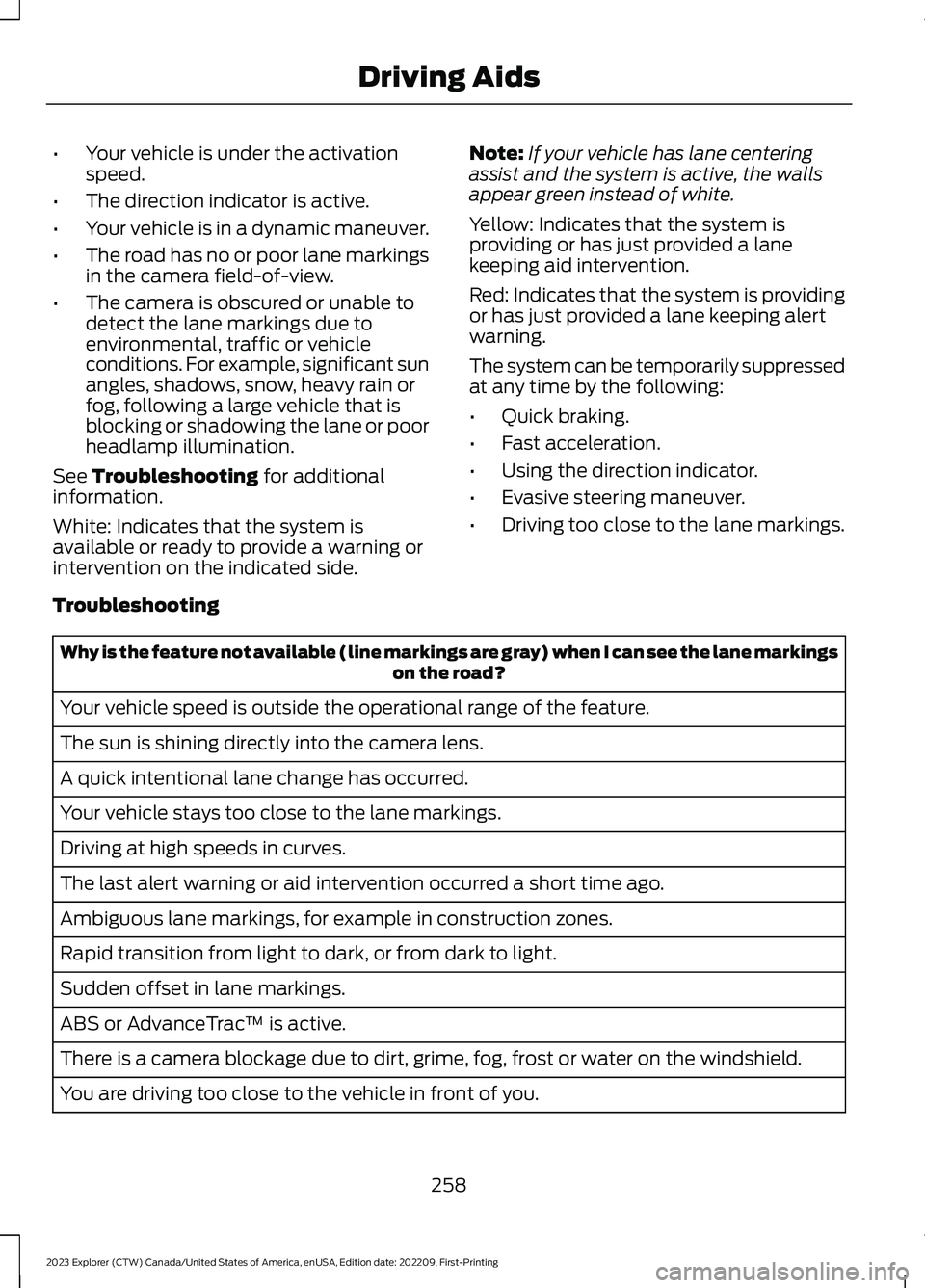
White: Indicates that the system isavailable or ready to provide a warning orintervention on the indicated side.
Note:If your vehicle has lane centeringassist and the system is active, the wallsappear green instead of white.
Yellow: Indicates that the system isproviding or has just provided a lanekeeping aid intervention.
Red: Indicates that the system is providingor has just provided a lane keeping alertwarning.
The system can be temporarily suppressedat any time by the following:
•Quick braking.
•Fast acceleration.
•Using the direction indicator.
•Evasive steering maneuver.
•Driving too close to the lane markings.
Troubleshooting
Why is the feature not available (line markings are gray) when I can see the lane markingson the road?
Your vehicle speed is outside the operational range of the feature.
The sun is shining directly into the camera lens.
A quick intentional lane change has occurred.
Your vehicle stays too close to the lane markings.
Driving at high speeds in curves.
The last alert warning or aid intervention occurred a short time ago.
Ambiguous lane markings, for example in construction zones.
Rapid transition from light to dark, or from dark to light.
Sudden offset in lane markings.
ABS or AdvanceTrac™ is active.
There is a camera blockage due to dirt, grime, fog, frost or water on the windshield.
You are driving too close to the vehicle in front of you.
258
2023 Explorer (CTW) Canada/United States of America, enUSA, Edition date: 202209, First-PrintingDriving Aids
Page 263 of 573
Why is the feature not available (line markings are gray) when I can see the lane markingson the road?
Transitioning between no lane markings to lane markings or vice versa.
There is standing water on the road.
Faint lane markings, for example partial yellow lane markings on concrete roads.
Lane width is too narrow or too wide.
The camera has not been calibrated after a windshield replacement.
Driving on tight roads or on uneven roads.
Why does the vehicle not come back toward the middle of the lane, as expected, in theAid or Aid + Alert mode?
High cross winds are present.
There is a large road crown.
Rough roads, grooves or shoulder drop-offs.
Heavy uneven loading of the vehicle or improper tire inflation pressure.
The tires have been changed, or the suspension has been modified.
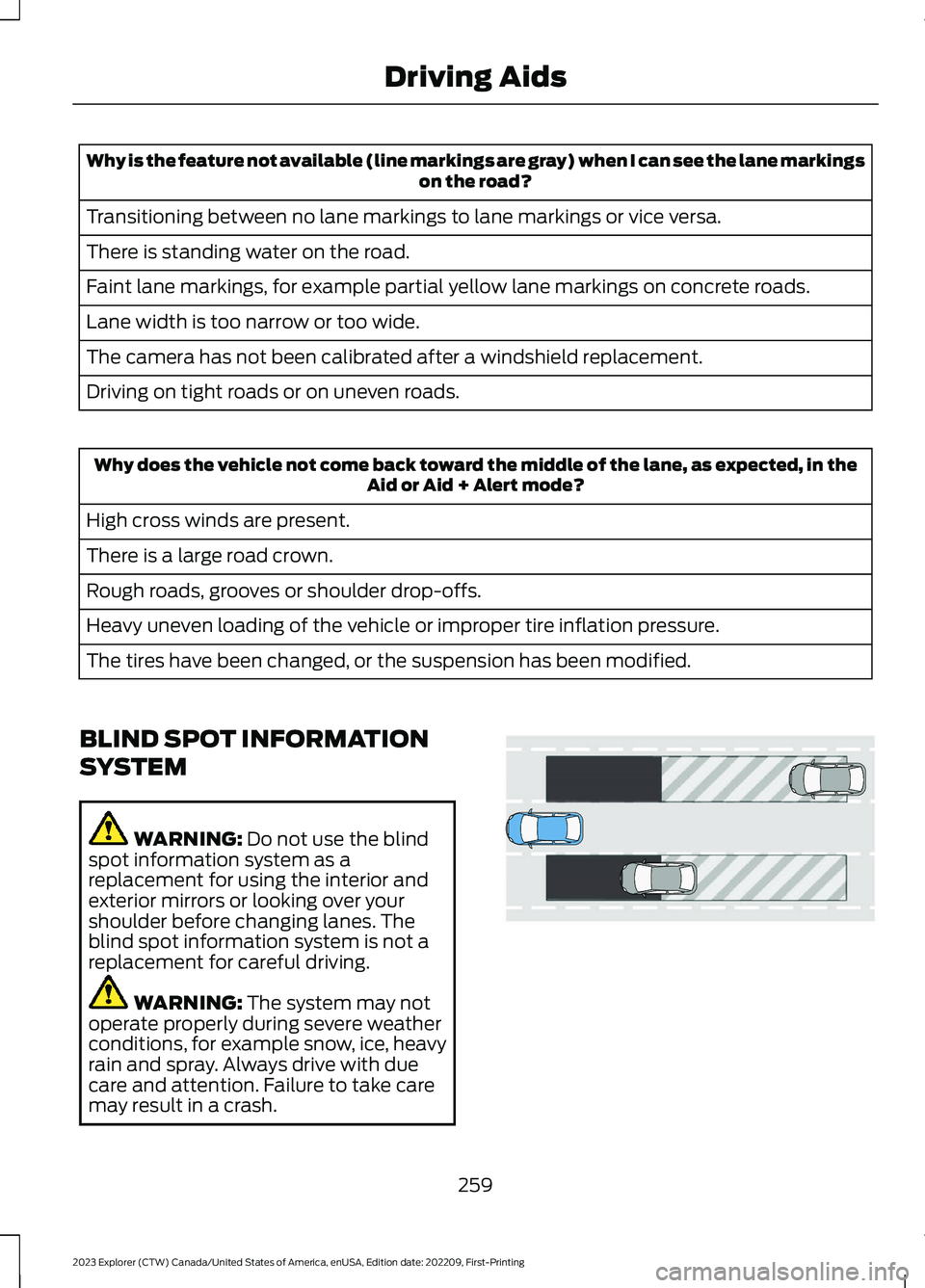
BLIND SPOT INFORMATION
SYSTEM
WARNING: Do not use the blindspot information system as areplacement for using the interior andexterior mirrors or looking over yourshoulder before changing lanes. Theblind spot information system is not areplacement for careful driving.
WARNING: The system may notoperate properly during severe weatherconditions, for example snow, ice, heavyrain and spray. Always drive with duecare and attention. Failure to take caremay result in a crash.
259
2023 Explorer (CTW) Canada/United States of America, enUSA, Edition date: 202209, First-PrintingDriving AidsE255695
Page 275 of 573

After you turn the steering wheel, thesystem applies additional steering torqueto help you steer around the vehicle. Afteryou pass the vehicle, the system appliessteering torque in the opposite direction toencourage you to steer back into the lane.The system deactivates after you fully passthe vehicle.
Note:The system does not automaticallysteer around a vehicle. If you do not turn thesteering wheel, the system does notactivate.
Note:The system does not activate if thedistance to the vehicle ahead is too smalland the system cannot avoid a crash.
Adjusting the Pre-Collision AssistSettings
You can adjust the following settings byusing the touchscreen.
•You can change Alert and DistanceAlert sensitivity to one of three possiblesettings.
•You can switch distance indication andalert on or off.
•If required, you can switch activebraking on or off.
•If required, you can switch evasivesteering assist on or off.
Note:Active braking and evasive steeringassist automatically turn on every time youswitch the ignition on.
Note:If you switch active braking off,evasive steering assist turns off.
Blocked Sensors
Camera.1.
Radar sensor (if equipped).2.
If a message regarding a blocked sensoror camera appears in the informationdisplay, you have obstructed radar signalsor camera images. If your vehicle has aradar sensor, it is behind the fascia coverin the center of the lower grille. With ablocked sensor or camera, the system maynot function, or performance may reduce.The following table lists possible causesand actions for when this messagedisplays.
Camera Troubleshooting
ActionCause
Clean the outside of the windshield in frontof the camera.The windshield in front of the camera isdirty or obstructed in some way.
Wait a short time. It may take severalminutes for the camera to detect that thereis no obstruction.
The windshield in front of the camera isclean but the message remains in thedisplay screen.
271
2023 Explorer (CTW) Canada/United States of America, enUSA, Edition date: 202209, First-PrintingDriving AidsE273245
Page 276 of 573

Radar Troubleshooting (If Equipped)
ActionCause
Clean the grille surface in front of the radaror remove the object causing the obstruc-tion.
The surface of the radar in the grille is dirtyor obstructed in some way.
Wait a short time. It may take severalminutes for the radar to detect that thereis no obstruction.
The surface of the radar in the grille is cleanbut the message remains in the displayscreen.
The system is temporarily disabled. Thesystem automatically reactivates a shorttime after the weather conditions improve.
Heavy rain, spray, snow or fog is interferingwith the radar signals.
The pre-collision assist system is tempor-arily disabled. The system automaticallyreactivates a short time after the weatherconditions improve.
Swirling water or snow or ice on the surfaceof the road may interfere with the radarsignals.
Have the radar checked for proper coverageand operation.Radar is out of alignment due to a front-end impact.
Note:Proper system operation requires aclear view of the road by the camera. Haveany windshield damage in the area of thecamera's field of view repaired.
Note:If something hits the front end of yourvehicle or damage occurs and your vehiclehas a radar sensor, the radar sensing zonemay change. This could cause missed orfalse detections. Contact an authorizeddealer to have the radar checked for propercoverage and operation.
272
2023 Explorer (CTW) Canada/United States of America, enUSA, Edition date: 202209, First-PrintingDriving Aids