2023 FORD EXPLORER traction control
[x] Cancel search: traction controlPage 223 of 573

REVERSE BRAKING ASSIST –FREQUENTLY ASKED QUESTIONS
Why is reverse braking assist unavailable?
•Make sure you switch the system on.See Switching Reverse BrakingAssist On and Off (page 217).
•Make sure that the liftgate, hood andall doors are closed.
•Make sure the cross traffic alert systemis on. See Cross Traffic Alert (page263).
•Make sure the rear parking aid systemis on. See Rear Parking Aid (page 225).
•Make sure traction control is on. SeeUsing Traction Control (page 220).
•The vehicle has sustained a rear endimpact. Have the sensors checked forproper coverage and operation.
•An ABS, traction control or stabilitycontrol event may have occurred. Thesystem resumes operation when theevent is complete.
•Make sure the rear view camera and360 degree camera are not dirty orobstructed. If it is dirty, clean thecamera. See Rear View Camera(page 234). See 360 Degree Camera(page 237). If the message still appearsafter cleaning the camera, wait a shorttime and the message should clear. Ifthe message does not clear, have thesystem checked.
•Make sure the sensors are not blockedor faulted. See Cross Traffic Alert(page 263). See Rear Parking Aid(page 225).
•You recently had your vehicle serviced,or the battery disconnected. Drive yourvehicle a short distance to resumesystem operation.
•The system does not function whenyou connect a trailer. Operationresumes when you disconnect thetrailer.
Note:If the answers to why the system isunavailable do not assist in returning reversebraking assist to available, have the systemchecked as soon as possible.
219
2023 Explorer (CTW) Canada/United States of America, enUSA, Edition date: 202209, First-PrintingReverse Braking Assist (If Equipped)
Page 224 of 573
PRINCIPLE OF OPERATION
The traction control system helps avoiddrive wheel spin and loss of traction.
If your vehicle begins to slide, the systemapplies the brakes to individual wheelsand, when needed, reduces engine powerat the same time. If the wheels spin whenaccelerating on slippery or loose surfaces,the system reduces engine power in orderto increase traction.
USING TRACTION CONTROL
WARNING: Operating your vehiclewith the traction control disabled couldlead to an increased risk of loss of vehiclecontrol, vehicle rollover, personal injuryand death.
The system automatically turns on eachtime you switch the ignition on.
If your vehicle is stuck in mud or snow,switching traction control off may bebeneficial as this allows the wheels to spin.
Note:When you switch traction control off,stability control remains fully active.
Switching the System Off
When you switch the system off or on, amessage appears in the informationdisplay showing system status.
You can switch the system off by using theswitch.
Using a Switch (If Equipped)
Use the traction control switch on thecenter console near the shifter to switchthe system off or on.
The traction control switch.
System Indicator Lights andMessages
The stability and traction controllight:
•Temporarily illuminates on enginestart-up.
•Flashes when a driving conditionactivates either of the systems.
•Illuminates if a problem occurs in eitherof the systems.
The stability and traction controloff light temporarily illuminateson engine start-up and stays onwhen you switch the traction controlsystem off.
220
2023 Explorer (CTW) Canada/United States of America, enUSA, Edition date: 202209, First-PrintingTraction ControlE297971 E138639 E130458
Page 225 of 573

PRINCIPLE OF OPERATION
WARNING: Vehicle modificationsinvolving braking system, aftermarketroof racks, suspension, steering system,tire construction and wheel and tire sizemay change the handling characteristicsof your vehicle and may adversely affectthe performance of the electronicstability control system. In addition,installing any stereo loudspeakers mayinterfere with and adversely affect theelectronic stability control system. Installany aftermarket stereo loudspeaker asfar as possible from the front centerconsole, the tunnel, and the front seatsin order to minimize the risk of interferingwith the electronic stability controlsensors. Reducing the effectiveness ofthe electronic stability control systemcould lead to an increased risk of loss ofvehicle control, vehicle rollover, personalinjury and death.
WARNING: Remember that evenadvanced technology cannot defy thelaws of physics. It’s always possible tolose control of a vehicle due toinappropriate driver input for theconditions. Aggressive driving on anyroad condition can cause you to losecontrol of your vehicle increasing the riskof personal injury or property damage.Activation of the electronic stabilitycontrol system is an indication that atleast some of the tires have exceededtheir ability to grip the road; this couldreduce the operator’s ability to controlthe vehicle potentially resulting in a lossof vehicle control, vehicle rollover,personal injury and death. If yourelectronic stability control systemactivates, SLOW DOWN.
The system automatically turns on eachtime you switch the ignition on.
If a driving condition activates either thestability control or the traction controlsystem you may experience the followingconditions:
•The stability and traction control lightflashes.
•Your vehicle slows down.
•Reduced engine power.
•A vibration in the brake pedal.
•The brake pedal is stiffer than usual.
•If the driving condition is severe andyour foot is not on the brake, the brakepedal may move as the systemsapplies higher brake forces.
The stability control system has severalfeatures built into it to help you maintaincontrol of your vehicle:
Electronic Stability Control
The system enhances your vehicle’s abilityto prevent skids or lateral slides byapplying brakes to one or more of thewheels individually and, if necessary,reducing engine power.
Roll Stability Control
The system enhances your vehicle’s abilityto prevent rollovers by detecting yourvehicle’s roll motion and the rate at whichit changes by applying the brakes to oneor more wheels individually.
Curve Control
The system enhances your vehicle’s abilityto follow the road when cornering severelyor avoiding objects in the roadway. CurveControl operates by reducing engine powerand, if necessary, applying brakes to oneor more of the wheels individually.
221
2023 Explorer (CTW) Canada/United States of America, enUSA, Edition date: 202209, First-PrintingStability Control
Page 226 of 573
Traction Control
The system enhances your vehicle’s abilityto maintain traction of the wheels bydetecting and controlling wheel spin. SeeUsing Traction Control (page 220).
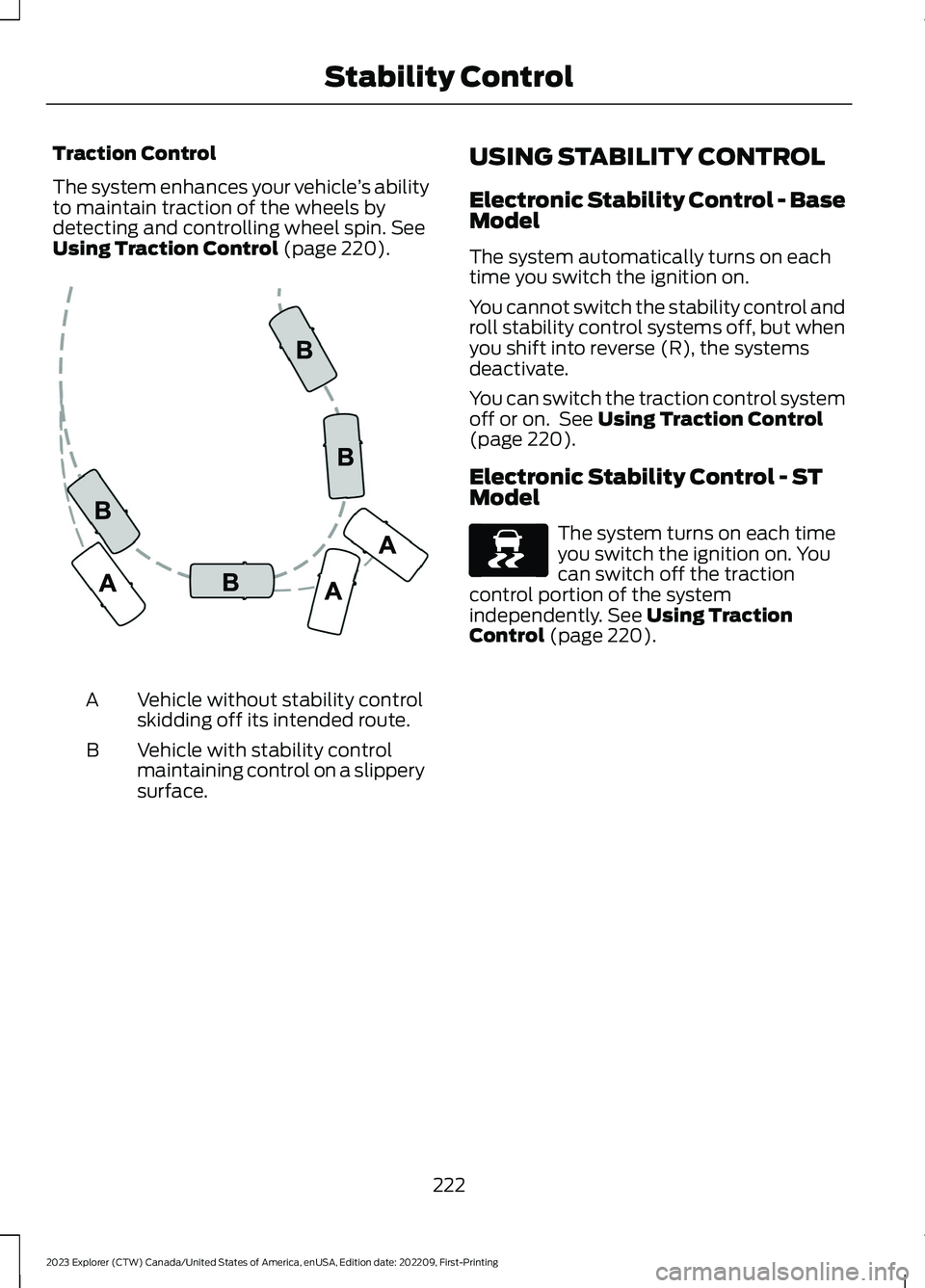
Vehicle without stability controlskidding off its intended route.A
Vehicle with stability controlmaintaining control on a slipperysurface.
B
USING STABILITY CONTROL
Electronic Stability Control - BaseModel
The system automatically turns on eachtime you switch the ignition on.
You cannot switch the stability control androll stability control systems off, but whenyou shift into reverse (R), the systemsdeactivate.
You can switch the traction control systemoff or on. See Using Traction Control(page 220).
Electronic Stability Control - STModel
The system turns on each timeyou switch the ignition on. Youcan switch off the tractioncontrol portion of the systemindependently. See Using TractionControl (page 220).
222
2023 Explorer (CTW) Canada/United States of America, enUSA, Edition date: 202209, First-PrintingStability ControlE72903 E138639
Page 227 of 573
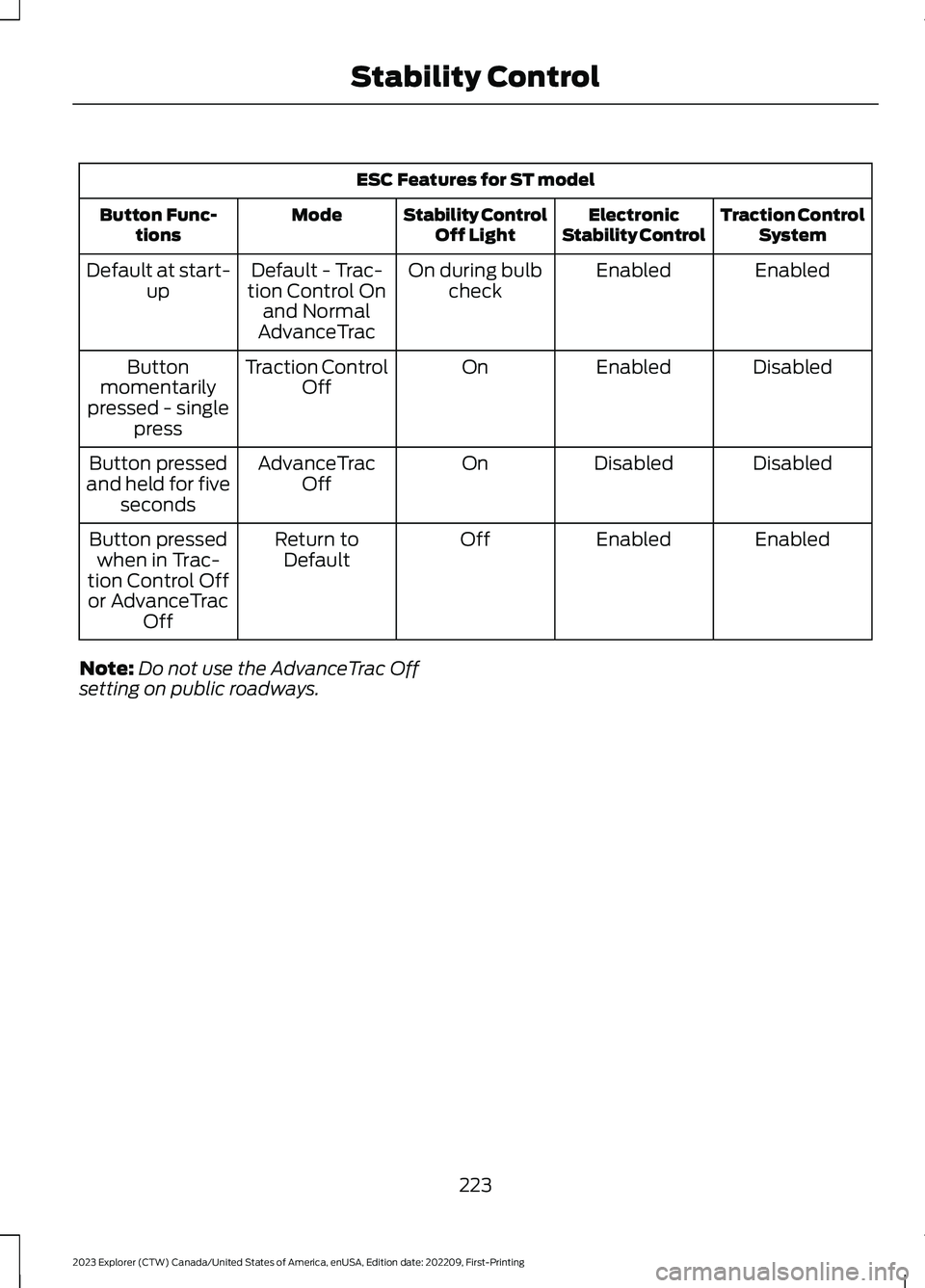
ESC Features for ST model
Traction ControlSystemElectronicStability ControlStability ControlOff LightModeButton Func-tions
EnabledEnabledOn during bulbcheckDefault - Trac-tion Control Onand NormalAdvanceTrac
Default at start-up
DisabledEnabledOnTraction ControlOffButtonmomentarilypressed - singlepress
DisabledDisabledOnAdvanceTracOffButton pressedand held for fiveseconds
EnabledEnabledOffReturn toDefaultButton pressedwhen in Trac-tion Control Offor AdvanceTracOff
Note:Do not use the AdvanceTrac Offsetting on public roadways.
223
2023 Explorer (CTW) Canada/United States of America, enUSA, Edition date: 202209, First-PrintingStability Control
Page 228 of 573
WHAT IS HILL DESCENT
CONTROL
WARNING: Hill descent controlcannot control descent in all surfaceconditions and circumstances, such asice or extremely steep grades. Hilldescent control is a driver assist systemand cannot substitute for good judgmentby the driver. Failure to do so may resultin loss of vehicle control, crash or seriousinjury.
WARNING: The system does notreplace the parking brake. When youleave your vehicle, always apply theparking brake.
Note:The system does not function below3 mph (5 km/h).
Hill descent control allows the driver to setand maintain vehicle speed whiledescending steep slopes in various surfaceconditions.
The system can maintain vehicle speedson downhill slopes between 3–20 mph(5–32 km/h). Above 20 mph (32 km/h),the system remains on but the descentspeed cannot be set or maintained.
The system requires a cool down intervalafter a period of sustained use. Theamount of time that the system canremain active before cooling varies withconditions. The system provides a warningin the message center and a tone soundswhen the system is about to disengage forcooling. At this time, manually apply thebrakes as needed to maintain descentspeed.
SWITCHING HILL DESCENT
CONTROL ON AND OFF
Press the button on the centerconsole. A light illuminates in thecontrol and a tone sounds whenthe system is active.
SETTING THE HILL DESCENT
SPEED
WARNING: The system does notreplace the parking brake. When youleave your vehicle, always apply theparking brake.
WARNING: The system does notcontrol speed in low traction conditionsor extremely steep slopes. The systemis designed to be an aid and does notrelieve you of your responsibility to drivewith due care and attention. Failure tofollow this instruction could result inpersonal injury.
To increase the descent speed, press theaccelerator pedal until you reach the speedyou prefer.
To decrease the descent speed, press thebrake pedal until you reach the speed youprefer.
When you reach the speed you prefer,either by accelerating or decelerating,remove your feet from the pedals. Thesystem maintains the chosen vehiclespeed.
HILL DESCENT CONTROL
INDICATOR
Illuminates when you switch hilldescent control on.
224
2023 Explorer (CTW) Canada/United States of America, enUSA, Edition date: 202209, First-PrintingHill Descent Control
Page 233 of 573

When you shift into neutral (N), the systemonly provides visual indication if yourvehicle is moving at a speed ofapproximately 5 mph (8 km/h) or below,for example, your vehicle is moving on aslope, and the system detects an objectmoving toward your vehicle. When youstop your vehicle, visual indication stopsafter four seconds.
SIDE SENSING SYSTEM (IF
EQUIPPED)
WARNING: The system may notdetect objects with surfaces that absorbreflection. Always drive with due careand attention. Failure to take care mayresult in a crash.
WARNING: The system may notdetect small or moving objects,particularly those close to the ground.
WARNING: To help avoid personalinjury, always use caution when inreverse (R) and when using the sensingsystem.
WARNING: The parking aid systemcan only assist you to detect objectswhen your vehicle is moving at parkingspeeds. To help avoid personal injury youmust take care when using the parkingaid system.
The system uses the front and rearoutermost parking aid sensors to detectobjects that are near to the sides of yourvehicle. The system displays them on avirtual map in the information display asyour vehicle moves past them.
The sensors are on the front and rearbumpers.
Note:Keep the sensors free from snow, iceand large accumulations of dirt.
Note:Do not cover up the sensors.
Note:Do not clean the sensors with sharpobjects.
Note:If your vehicle sustains damageleaving the sensors misaligned, this maycause inaccurate measurements or falsealerts.
The system may not function if:
•You switch the ignition on, off and backon within a few seconds.
•Your vehicle remains stationary for overtwo minutes.
•The anti-lock brake system activates.
•The traction control system activates.
Note:If you switch traction control off, theside sensing system also turns off.
Note:Some accessories, for example largetrailer hitches or bike or surfboard racks cancause reduced performance or false alerts.
To reinitialize the system, you may have todrive your vehicle approximately 10 ft(3 m).
The sensor coverage area is up to 24 in(60 cm) from the side of your vehicle.
229
2023 Explorer (CTW) Canada/United States of America, enUSA, Edition date: 202209, First-PrintingParking AidsE190458
Page 236 of 573

Leaving a Parking Space
The system assists leaving only parallelparking spaces.
1.Press the active park assist button.
2.Use the direction indicator lever tochoose the direction to leave.
3.Press and hold the brake pedal.
4.Release the steering wheel and shiftinto neutral (N).
5.Release the parking brake.
6.Press and hold the active park assistbutton.
7.Release the brake pedal to allow thevehicle to move.
Note: You can slow down your vehicle atany time by pressing the brake pedal.
Note:After the system drives your vehicleto a position where you can exit the parkingspace in a forward movement, a messageappears instructing you to take full controlof your vehicle.
Canceling Active Park Assist
To cancel parking assistance at any time,shift out of neutral (N).
Note:If you turn the steering wheel or openthe driver door the parking assistance alsocancels.
Pausing Active Park Assist
To pause parking assistance at any time,release the active park assist button.
The vehicle stops moving until you pressand hold the active park assist buttonagain.
Note:If you open the passenger or reardoors the parking assistance also pauses.
Active Park Assist Troubleshooting
Possible CauseSymptom
The system is unable to detect a vehicle, curb or objectto park next to, or in-between. This could occur becauseof sensors not operating correctly, not enough roomfor your vehicle, or the traction control is off.
The system does not correctlyoperate.
You may have switched traction control off.The system does not search fora parking space.The transmission is in reverse (R). Your vehicle mustbe moving forward to be able to detect a parking space.
There could be blockage on the sensors. For example,snow, ice or large accumulations of dirt. Blockedsensors can affect how the system functions.
The system does not offer aparking space.
The sensors in the front or rear bumper could bedamaged.
There is not enough room in the parking space for yourvehicle to safely park.
232
2023 Explorer (CTW) Canada/United States of America, enUSA, Edition date: 202209, First-PrintingParking Aids