2023 FORD EXPEDITION steering
[x] Cancel search: steeringPage 316 of 658
5.Select an intensity setting.
AID MODE
WHAT IS AID MODE
Aid mode provides temporary steeringassistance toward the center of the lane.
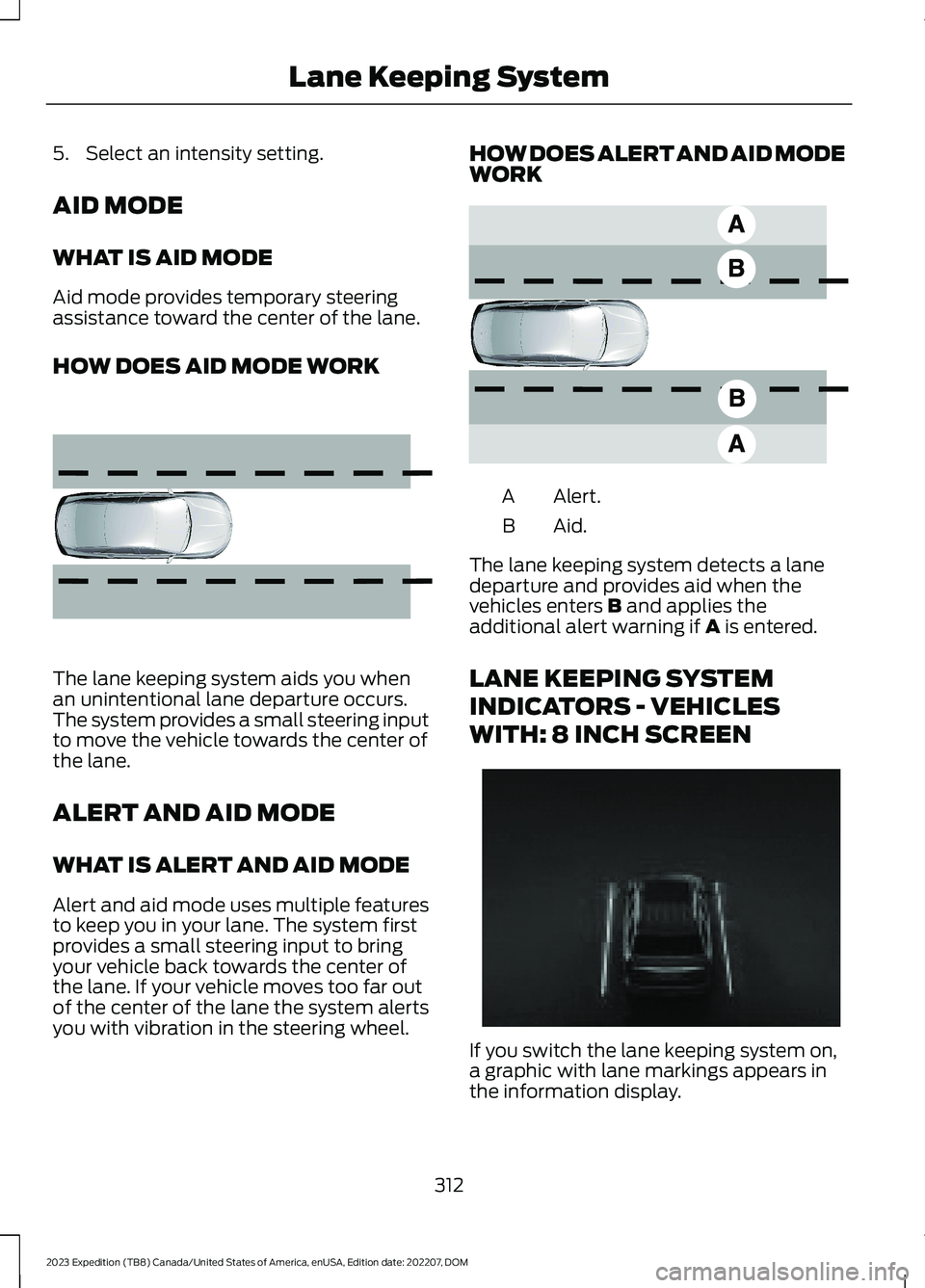
HOW DOES AID MODE WORK
The lane keeping system aids you whenan unintentional lane departure occurs.The system provides a small steering inputto move the vehicle towards the center ofthe lane.
ALERT AND AID MODE
WHAT IS ALERT AND AID MODE
Alert and aid mode uses multiple featuresto keep you in your lane. The system firstprovides a small steering input to bringyour vehicle back towards the center ofthe lane. If your vehicle moves too far outof the center of the lane the system alertsyou with vibration in the steering wheel.
HOW DOES ALERT AND AID MODEWORK
Alert.A
Aid.B
The lane keeping system detects a lanedeparture and provides aid when thevehicles enters B and applies theadditional alert warning if A is entered.
LANE KEEPING SYSTEM
INDICATORS - VEHICLES
WITH: 8 INCH SCREEN
If you switch the lane keeping system on,a graphic with lane markings appears inthe information display.
312
2023 Expedition (TB8) Canada/United States of America, enUSA, Edition date: 202207, DOMLane Keeping System E165516 E165517 E355748
Page 318 of 658
LANE KEEPING SYSTEM
INDICATORS - VEHICLES
WITH: 12 INCH SCREEN
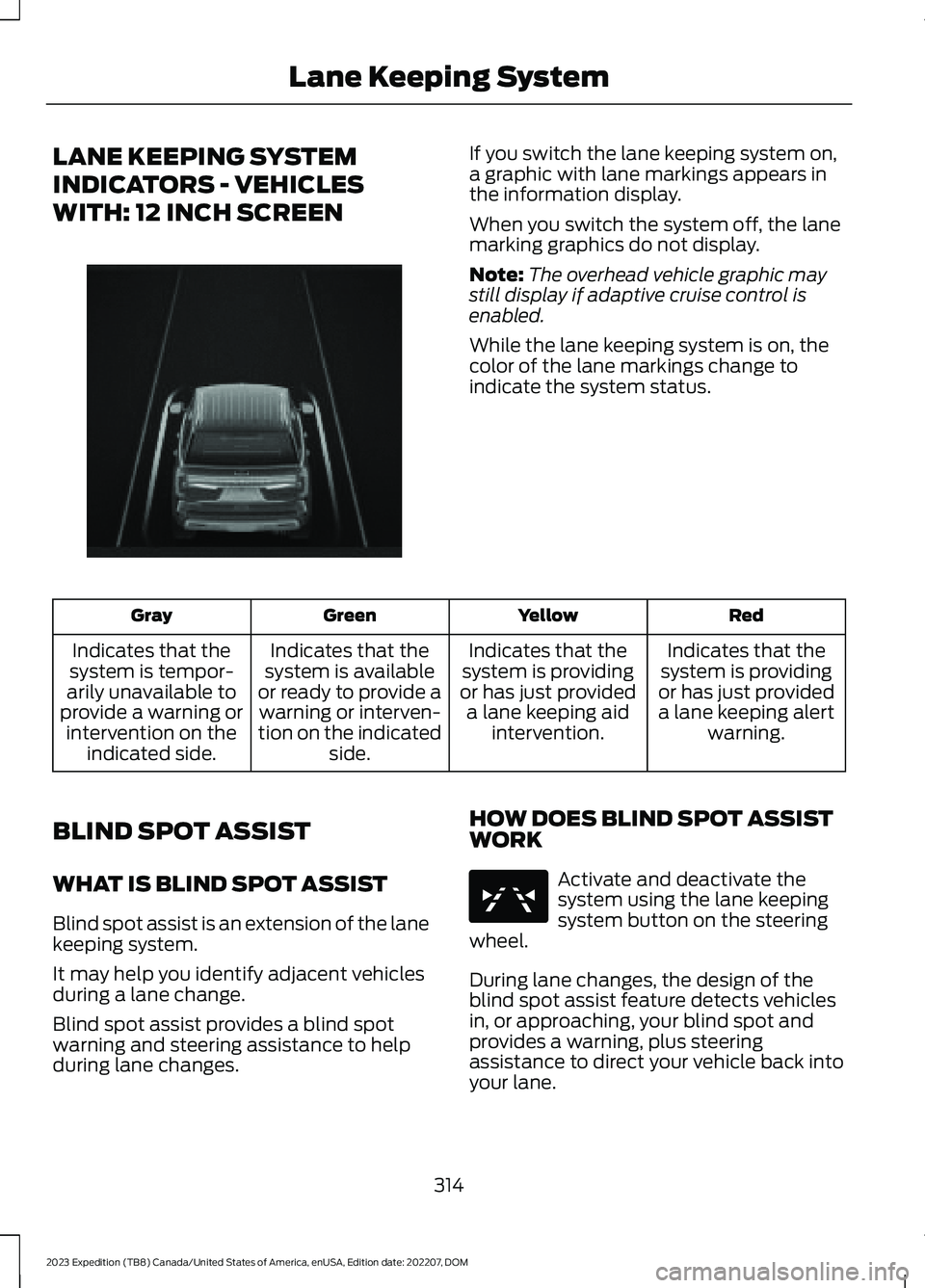
If you switch the lane keeping system on,a graphic with lane markings appears inthe information display.
When you switch the system off, the lanemarking graphics do not display.
Note:The overhead vehicle graphic maystill display if adaptive cruise control isenabled.
While the lane keeping system is on, thecolor of the lane markings change toindicate the system status.
RedYellowGreenGray
Indicates that thesystem is providingor has just provideda lane keeping alertwarning.
Indicates that thesystem is providingor has just provideda lane keeping aidintervention.
Indicates that thesystem is availableor ready to provide awarning or interven-tion on the indicatedside.
Indicates that thesystem is tempor-arily unavailable toprovide a warning orintervention on theindicated side.
BLIND SPOT ASSIST
WHAT IS BLIND SPOT ASSIST
Blind spot assist is an extension of the lanekeeping system.
It may help you identify adjacent vehiclesduring a lane change.
Blind spot assist provides a blind spotwarning and steering assistance to helpduring lane changes.
HOW DOES BLIND SPOT ASSISTWORK
Activate and deactivate thesystem using the lane keepingsystem button on the steeringwheel.
During lane changes, the design of theblind spot assist feature detects vehiclesin, or approaching, your blind spot andprovides a warning, plus steeringassistance to direct your vehicle back intoyour lane.
314
2023 Expedition (TB8) Canada/United States of America, enUSA, Edition date: 202207, DOMLane Keeping SystemE356730 E334922
Page 319 of 658

When active, this system functions with orwithout the use of direction indicators andhazard flashers.
You must keep your hands on the steeringwheel at all times.
BLIND SPOT ASSIST LIMITATIONS
All system limitations present in the basiclane keeping system also apply to blindspot assist.
Blind spot assist does not function underthe following conditions:
•No lane markings are detected.
•One or both rear radar sensors becomeblocked or faulty.
•Attaching bike or cargo racks couldcause false alerts due to obstructionof the sensor.
Blind spot assist may have difficultydetecting hazards under the followingconditions:
•If a vehicle is approaching in anadjacent lane at a speed higher thanyour vehicle.
•Bad weather obstructing the sensors.
BLIND SPOT ASSIST INDICATORS
The lane keeping aid warning lamp or redlane marking in your instrument clusterdisplay indicate blind spot assist activation.In addition, the blind spot informationsystem alert indicator flashes on theexterior mirror on the same side as thedetection. See Blind Spot InformationSystem (page 320).
BLIND SPOT ASSIST WITH
TRAILER COVERAGE
WHAT IS BLIND SPOT ASSISTWITH TRAILER COVERAGE
Blind spot assist with trailer coverage is anextension of the lane keeping system.
It may help you identify adjacent vehiclesduring a lane change.
315
2023 Expedition (TB8) Canada/United States of America, enUSA, Edition date: 202207, DOMLane Keeping SystemE310089
Page 320 of 658

Blind spot assist provides a blind spotwarning and steering assistance to helpduring lane changes.
When attaching a trailer, ensure you haveproperly set up the trailer coveragesettings. See Blind Spot InformationSystem With Trailer Coverage (page322).
HOW DOES BLIND SPOT ASSISTWITH TRAILER COVERAGE WORK
Activate and deactivate thesystem using the lane keepingsystem button on the steeringwheel.
During lane changes, the design of theblind spot assist feature detects vehiclesin, or approaching, your blind spot andprovides a warning, plus steeringassistance to direct your vehicle back intoyour lane.
If a supported trailer is connected, thefunction is reduced to only detectingvehicles on both sides of your vehicle andtrailer, extending rearward from theexterior mirrors to the end of your trailer.See Blind Spot Information SystemWith Trailer Coverage (page 322).
When active, this system functions with orwithout the use of direction indicators andhazard flashers.
You must keep your hands on the steeringwheel at all times.
BLIND SPOT ASSIST WITHTRAILER COVERAGELIMITATIONS
All system limitations present in the basiclane keeping system also apply to blindspot assist.
Blind spot assist does not function underthe following conditions:
•The system does not detect lanemarkings.
•One or both rear radar sensors becomeblocked or faulty.
•You have not configured the attachedtrailer correctly in the trailer tow menusor you attached an unsupported trailer.The system only supports certain trailershapes and dimensions.
Note:Blind spot assist with trailer coveragecould have reduced performance if any ofthe above limitations are present.
Blind spot assist may have difficultydetecting hazards under the followingconditions:
•If a vehicle is approaching in anadjacent lane at a relative speed muchhigher than your vehicle.
•Bad weather conditions are presentthat obstruct the sensors.
•Attaching bike or cargo racks couldcause false alerts due to obstructionof the sensor.
BLIND SPOT ASSIST WITHTRAILER COVERAGE INDICATORS
The lane keeping aid warning lamp or redlane marking in your instrument clusterdisplay indicate blind spot assist activation.In addition, the blind spot informationsystem alert indicator flashes on theexterior mirror on the same side as thedetection. See Blind Spot InformationSystem (page 320).
316
2023 Expedition (TB8) Canada/United States of America, enUSA, Edition date: 202207, DOMLane Keeping SystemE334922 E310089
Page 321 of 658

Blind Spot Assist Information Messages
ActionMessage
Displays if you attach a trailer to your vehicle with the blindspot information system switched off or you have notconfigured the trailer.
Blind Spot Assist NotAvailable TrailerAttached
Displays if your blind spot information system sensors areblocked.Blind Spot Assist NotAvailable Side SensorBlocked
The system has detected a fault that requires service. Haveyour vehicle checked as soon as possible.Blind Spot Assist Systemfault
Lost communication with the trailer module. Blind spot assistis disabled until the failure is fixed.Trailer Brake ModuleFault
Lost communication with the trailer module. Blind spot assistis disabled until the failure is fixed.Trailer Lighting ModuleFault See Manual
Front camera fault. Blind spot assist is disabled until thefailure is fixed.Front Camera FaultService Required
LANE KEEPING SYSTEM – TROUBLESHOOTING
LANE KEEPING SYSTEM – INFORMATION MESSAGES
ActionMessage
The system has malfunctioned. Have yourvehicle checked as soon as possible.Lane Keeping Sys. Malfunction ServiceRequired
The system has detected a condition thathas caused the system to be temporarilyunavailable.
Front Camera Temporarily Not Available
The system has detected a condition thatrequires you to clean the windshield in orderfor it to operate properly.
Front Camera Low Visibility Clean Screen
The system has malfunctioned. Have yourvehicle checked as soon as possible.Front Camera Malfunction Service Required
The system requests that you keep yourhands on the steering wheel.Keep Hands on Steering Wheel
317
2023 Expedition (TB8) Canada/United States of America, enUSA, Edition date: 202207, DOMLane Keeping System
Page 332 of 658
WHAT IS PRE-COLLISION
ASSIST
Pre-collision assist detects and warns ofapproaching hazards in the roadway. Thesystem provides multiple levels ofassistance to help avoid a collision if yourvehicle is rapidly approaching anotherstationary vehicle, a vehicle traveling in thesame direction as yours, or a pedestrian orcyclist within your driving path.
HOW DOES PRE-COLLISION
ASSIST WORK
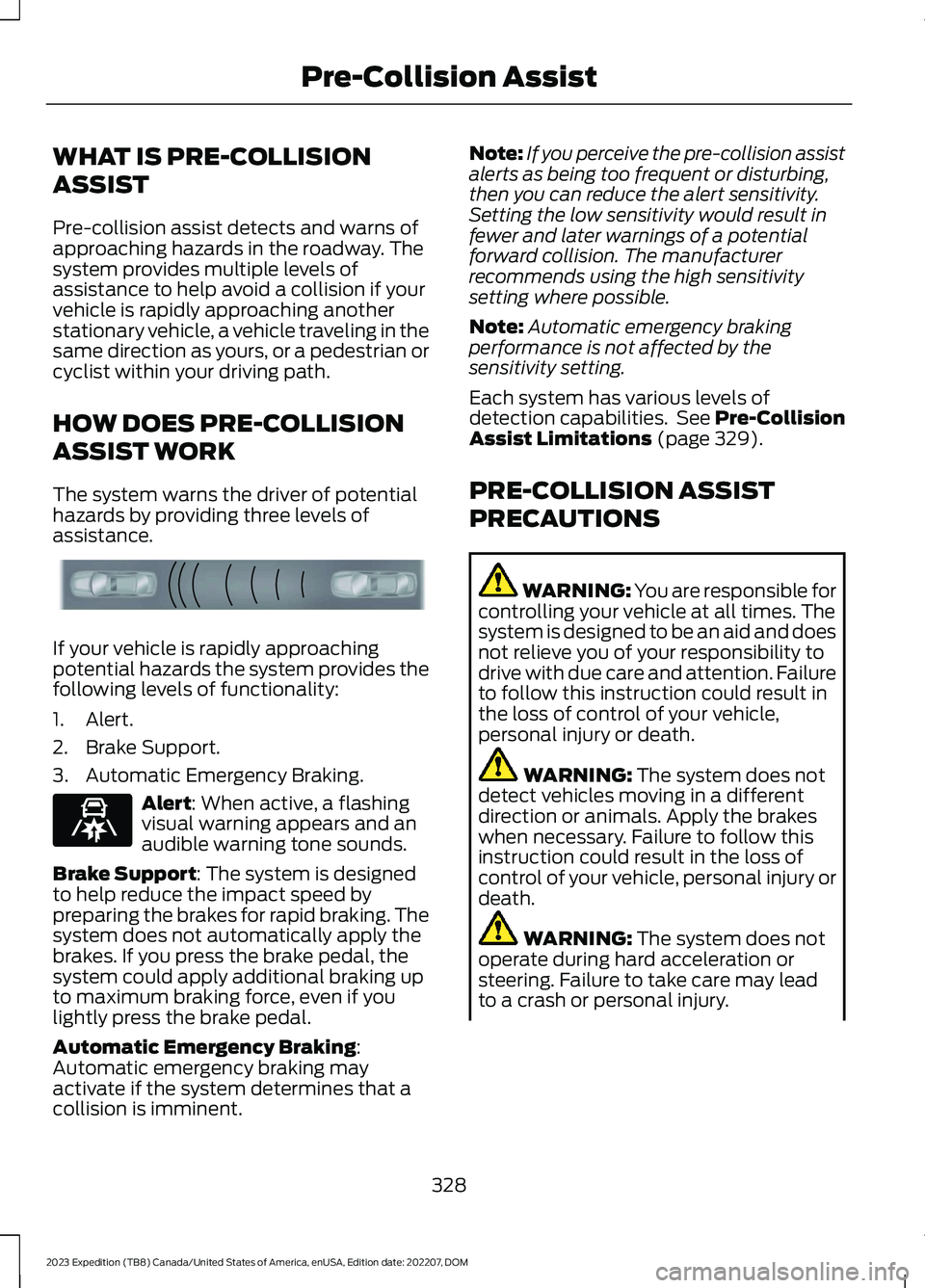
The system warns the driver of potentialhazards by providing three levels ofassistance.
If your vehicle is rapidly approachingpotential hazards the system provides thefollowing levels of functionality:
1.Alert.
2.Brake Support.
3.Automatic Emergency Braking.
Alert: When active, a flashingvisual warning appears and anaudible warning tone sounds.
Brake Support: The system is designedto help reduce the impact speed bypreparing the brakes for rapid braking. Thesystem does not automatically apply thebrakes. If you press the brake pedal, thesystem could apply additional braking upto maximum braking force, even if youlightly press the brake pedal.
Automatic Emergency Braking:Automatic emergency braking mayactivate if the system determines that acollision is imminent.
Note:If you perceive the pre-collision assistalerts as being too frequent or disturbing,then you can reduce the alert sensitivity.Setting the low sensitivity would result infewer and later warnings of a potentialforward collision. The manufacturerrecommends using the high sensitivitysetting where possible.
Note:Automatic emergency brakingperformance is not affected by thesensitivity setting.
Each system has various levels ofdetection capabilities. See Pre-CollisionAssist Limitations (page 329).
PRE-COLLISION ASSIST
PRECAUTIONS
WARNING: You are responsible forcontrolling your vehicle at all times. Thesystem is designed to be an aid and doesnot relieve you of your responsibility todrive with due care and attention. Failureto follow this instruction could result inthe loss of control of your vehicle,personal injury or death.
WARNING: The system does notdetect vehicles moving in a differentdirection or animals. Apply the brakeswhen necessary. Failure to follow thisinstruction could result in the loss ofcontrol of your vehicle, personal injury ordeath.
WARNING: The system does notoperate during hard acceleration orsteering. Failure to take care may leadto a crash or personal injury.
328
2023 Expedition (TB8) Canada/United States of America, enUSA, Edition date: 202207, DOMPre-Collision AssistE156130 E329466
Page 334 of 658

Intersection Assist (If Equipped)
If your vehicle comes with a radar sensorincluded in adaptive cruise control, thepre-collision assist system may operate ina scenario where you are turning across anoncoming vehicle's path. Detection ofvehicles driving in an oncoming directionis active if your vehicle is driving at speedsup to 19 mph (30 km/h).
SWITCHING PRE-COLLISION
ASSIST ON AND OFF -
VEHICLES WITH: 12 INCH
SCREEN
To switch the system on or off, use thetouchscreen:
1.Press Features on the touchscreen.
2.Press Driver Assistance.
3.Press Pre-Collision Assist.
4.Switch the feature on or off.
Adjusting the Pre-Collision AssistSettings
You can adjust the following settings byusing the touchscreen controls in thepre-collision assist menu:
•Change alert and distance alertsensitivity to one of three possiblesettings.
•Switch distance indication and alert onor off.
•If required, switch automaticemergency braking on or off.
•If required, switch the entirepre-collision assist feature on or off.
•If required, switch evasive steeringassist on or off.
Note:Automatic emergency braking andevasive steering turn on every time youswitch the ignition on.
Note:If your vehicle has a radar sensor, werecommend that you switch the system offif you install a snow plow or similar objectin such a way that it may block the radarsensor. Your vehicle remembers the selectedsetting across key cycles.
Note:If you switch automatic emergencybraking off, evasive steering assist switchesoff.
SWITCHING PRE-COLLISION
ASSIST ON AND OFF -
VEHICLES WITH: 15 INCH
SCREEN
To switch the system on or off:
1.Access the vehicle drawer.
2.Press SETTINGS.
3.Press Driver Assistance.
4.Press Pre-Collision Assist.
5.Switch the feature on or off.
330
2023 Expedition (TB8) Canada/United States of America, enUSA, Edition date: 202207, DOMPre-Collision AssistE309750
Page 335 of 658

Adjusting the Pre-Collision AssistSettings
You can adjust the following settings byusing the touchscreen controls in thepre-collision assist menu:
•Change alert and distance alertsensitivity to one of three possiblesettings.
•Switch distance indication and alert onor off.
•If required, switch automaticemergency braking on or off.
•If required, switch the entirepre-collision assist feature on or off.
•If required, switch evasive steeringassist on or off.
Note:Automatic emergency braking andevasive steering assist automatically turnon every time you switch the ignition on.
Note:If your vehicle has a radar sensor, werecommend that you switch the system offif you install a snow plow or similar objectin such a way that it may block the radarsensor. Your vehicle remembers the selectedsetting across key cycles.
Note:If you switch automatic emergencybraking off, evasive steering assist switchesoff.
LOCATING THE PRE-
COLLISION ASSIST SENSORS
Camera.1.
Radar sensor (if equipped).2.
If a message regarding a blocked sensoror camera appears in the informationdisplay, something is obstructing the radarsignals or camera images. The radar sensoris behind the fascia cover in the center ofthe lower grille. With a blocked sensor orcamera, the system may not function, orperformance may reduce. SeePre-Collision Assist – InformationMessages (page 337).
Note:Proper system operation requires aclear view of the road by the camera. Haveany windshield damage in the area of thecamera's field of view repaired.
Note:If something hits the front end of yourvehicle or damage occurs and your vehiclehas a radar sensor, the radar sensing zonecould change. This could cause missed orfalse vehicle detections. Have your vehicleserviced to have the radar checked forproper coverage and operation.
331
2023 Expedition (TB8) Canada/United States of America, enUSA, Edition date: 202207, DOMPre-Collision AssistE355942