2023 FORD EXPEDITION display
[x] Cancel search: displayPage 262 of 658
ELECTRIC POWER STEERING
HOW DOES ELECTRIC POWERSTEERING WORK
The electric power steering system assiststhe brake system to help operateadvanced stability control and accidentavoidance systems.
If your vehicle loses electrical power ordetects a concern when you are driving thesystem switches off and you retain normalsteering function. Additionally, wheneverthe battery is disconnected or a newbattery is installed, you must drive yourvehicle a short distance before the systemrelearns the strategy and reactivates allsystems.
ELECTRIC POWER STEERINGPRECAUTIONS
WARNING: The electric powersteering system has diagnostic checksthat continuously monitor the system. Ifa fault is detected, a message displaysin the information display. Stop yourvehicle as soon as it is safe to do so.Switch the vehicle off. After at least 10seconds, switch the vehicle on andwatch the information display for asteering system warning message. If asteering system warning messagereturns, have the system checked assoon as possible.
WARNING: If the system detectsan error, you may not feel a difference inthe steering, however a serious conditionmay exist. Have your vehicle checked assoon as possible. Failure to do so mayresult in loss of steering control.
Adapt your speed and driving behavioraccording to reduced steering assist.
Extreme continuous steering may increasethe effort to steer. This occurs to preventinternal overheating and damage to thesteering system. If this occurs, you will notlose the ability to steer your vehiclemanually nor will it cause damage to thesystem. Normal steering and driving allowsthe system to cool down and steeringassist returns to normal.
Note:There is no fluid reservoir to check orfill.
STEERING –
TROUBLESHOOTING
STEERING – WARNINGINDICATORS
The electric power steeringsystem indicator illuminates ifthe system detects a fault duringthe continuous diagnostic checks.
Note:If a red warning message displays,stop your vehicle as soon as it is safe to doso.
258
2023 Expedition (TB8) Canada/United States of America, enUSA, Edition date: 202207, DOMSteeringE223375
Page 269 of 658
PARKING AID INDICATORS
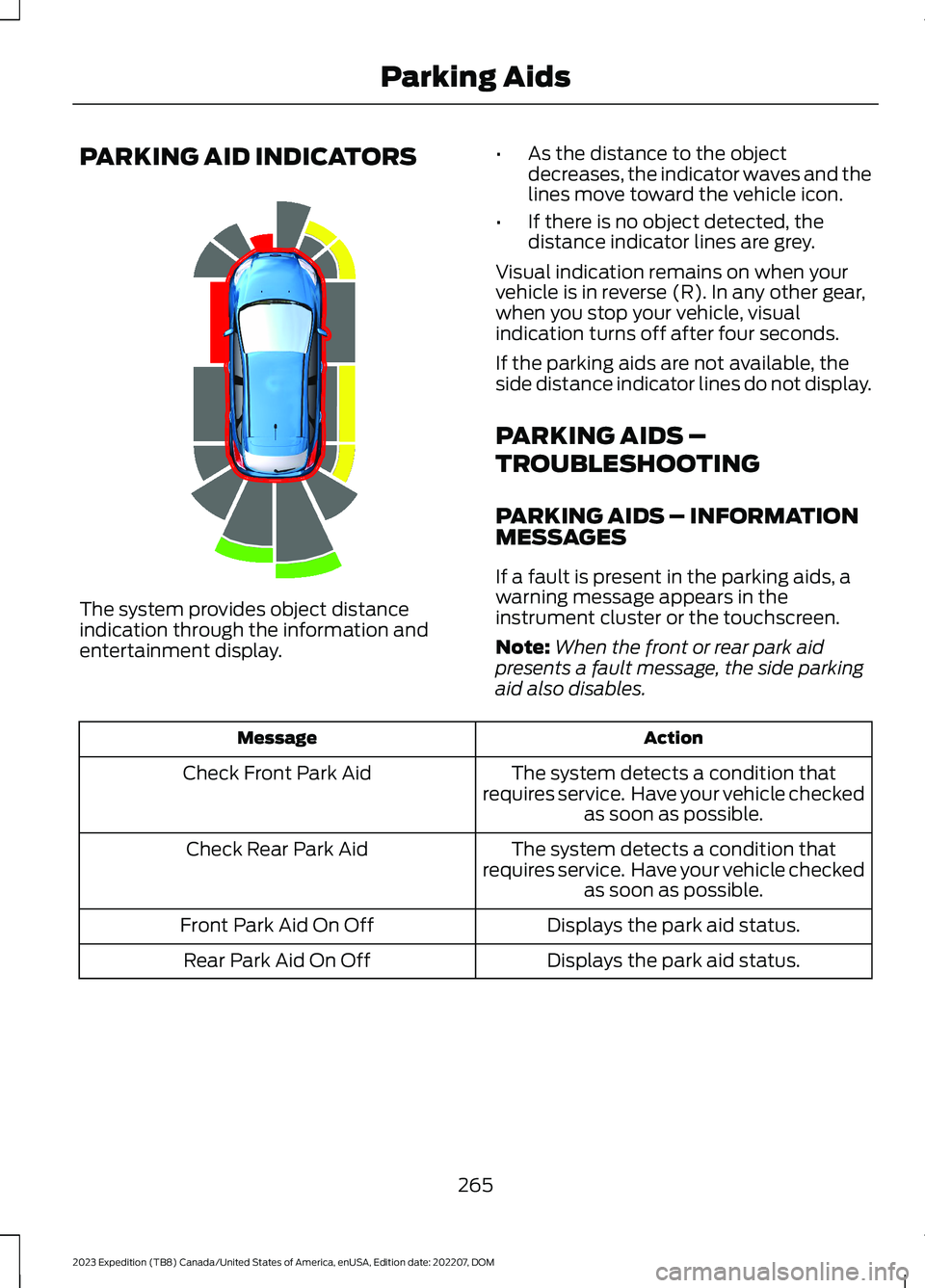
The system provides object distanceindication through the information andentertainment display.
•As the distance to the objectdecreases, the indicator waves and thelines move toward the vehicle icon.
•If there is no object detected, thedistance indicator lines are grey.
Visual indication remains on when yourvehicle is in reverse (R). In any other gear,when you stop your vehicle, visualindication turns off after four seconds.
If the parking aids are not available, theside distance indicator lines do not display.
PARKING AIDS –
TROUBLESHOOTING
PARKING AIDS – INFORMATIONMESSAGES
If a fault is present in the parking aids, awarning message appears in theinstrument cluster or the touchscreen.
Note:When the front or rear park aidpresents a fault message, the side parkingaid also disables.
ActionMessage
The system detects a condition thatrequires service. Have your vehicle checkedas soon as possible.
Check Front Park Aid
The system detects a condition thatrequires service. Have your vehicle checkedas soon as possible.
Check Rear Park Aid
Displays the park aid status.Front Park Aid On Off
Displays the park aid status.Rear Park Aid On Off
265
2023 Expedition (TB8) Canada/United States of America, enUSA, Edition date: 202207, DOMParking AidsE190459
Page 271 of 658
REAR VIEW CAMERA GUIDE
LINES
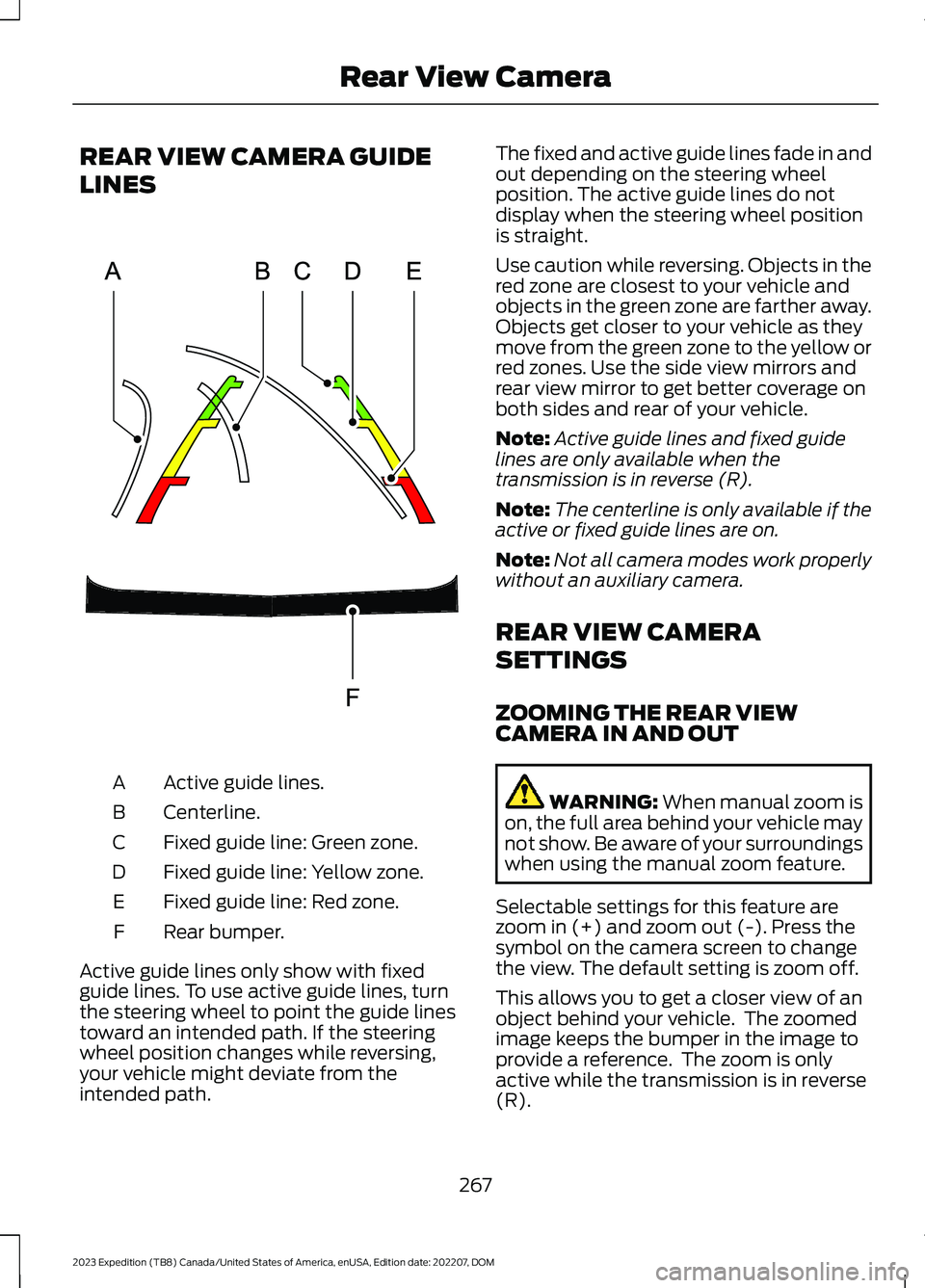
Active guide lines.A
Centerline.B
Fixed guide line: Green zone.C
Fixed guide line: Yellow zone.D
Fixed guide line: Red zone.E
Rear bumper.F
Active guide lines only show with fixedguide lines. To use active guide lines, turnthe steering wheel to point the guide linestoward an intended path. If the steeringwheel position changes while reversing,your vehicle might deviate from theintended path.
The fixed and active guide lines fade in andout depending on the steering wheelposition. The active guide lines do notdisplay when the steering wheel positionis straight.
Use caution while reversing. Objects in thered zone are closest to your vehicle andobjects in the green zone are farther away.Objects get closer to your vehicle as theymove from the green zone to the yellow orred zones. Use the side view mirrors andrear view mirror to get better coverage onboth sides and rear of your vehicle.
Note:Active guide lines and fixed guidelines are only available when thetransmission is in reverse (R).
Note:The centerline is only available if theactive or fixed guide lines are on.
Note:Not all camera modes work properlywithout an auxiliary camera.
REAR VIEW CAMERA
SETTINGS
ZOOMING THE REAR VIEWCAMERA IN AND OUT
WARNING: When manual zoom ison, the full area behind your vehicle maynot show. Be aware of your surroundingswhen using the manual zoom feature.
Selectable settings for this feature arezoom in (+) and zoom out (-). Press thesymbol on the camera screen to changethe view. The default setting is zoom off.
This allows you to get a closer view of anobject behind your vehicle. The zoomedimage keeps the bumper in the image toprovide a reference. The zoom is onlyactive while the transmission is in reverse(R).
267
2023 Expedition (TB8) Canada/United States of America, enUSA, Edition date: 202207, DOMRear View CameraE306774
Page 272 of 658
Note:Zooming in also engages park holdwhich applies the electric park brake whenyou shift to park (P). When you press thezoom button, the electronic park holdbutton illuminates on the touchscreen. SeeConnecting a Trailer (page 354).
Note:Manual zoom is only available whenthe transmission is in reverse (R).
Note:Only the centerline shows when youenable manual zoom.
SWITCHING REAR VIEW CAMERADELAY ON AND OFF - VEHICLESWITH: 12 INCH SCREEN
1.Press Features on the touchscreen.
2.Press Driver Assistance.
3.Press Rear View Camera.
4.Switch Rear View Camera Delay on oroff.
When shifting the transmission out ofreverse (R) and into any gear other thanpark (P), the camera image remains in thedisplay until:
•Your vehicle speed reachesapproximately 5 mph (8 km/h).
•You shift your vehicle into park (P).
SWITCHING REAR VIEW CAMERADELAY ON AND OFF - VEHICLESWITH: 15.5 INCH CENTER DISPLAYSCREEN/15 INCH SCREEN
Access the vehicle drawer on thetouchscreen.
1.Press SETTINGS.
2.Press Driver Assistance.
3.Switch Rear View Camera Delay on oroff.
When shifting the transmission out ofreverse (R) and into any gear other thanpark (P), the camera image remains in thedisplay until:
•Your vehicle speed reachesapproximately 5 mph (8 km/h).
•You shift your vehicle into park (P).
268
2023 Expedition (TB8) Canada/United States of America, enUSA, Edition date: 202207, DOMRear View Camera
Page 274 of 658
Side View Camera
The side view camera is on the outsidemirror. It provides a video image of the areaon the sides of your vehicle to aid you whenparking.
360 DEGREE CAMERA GUIDE
LINES
Note:Active guide lines are only availablewhen the transmission is in reverse (R).
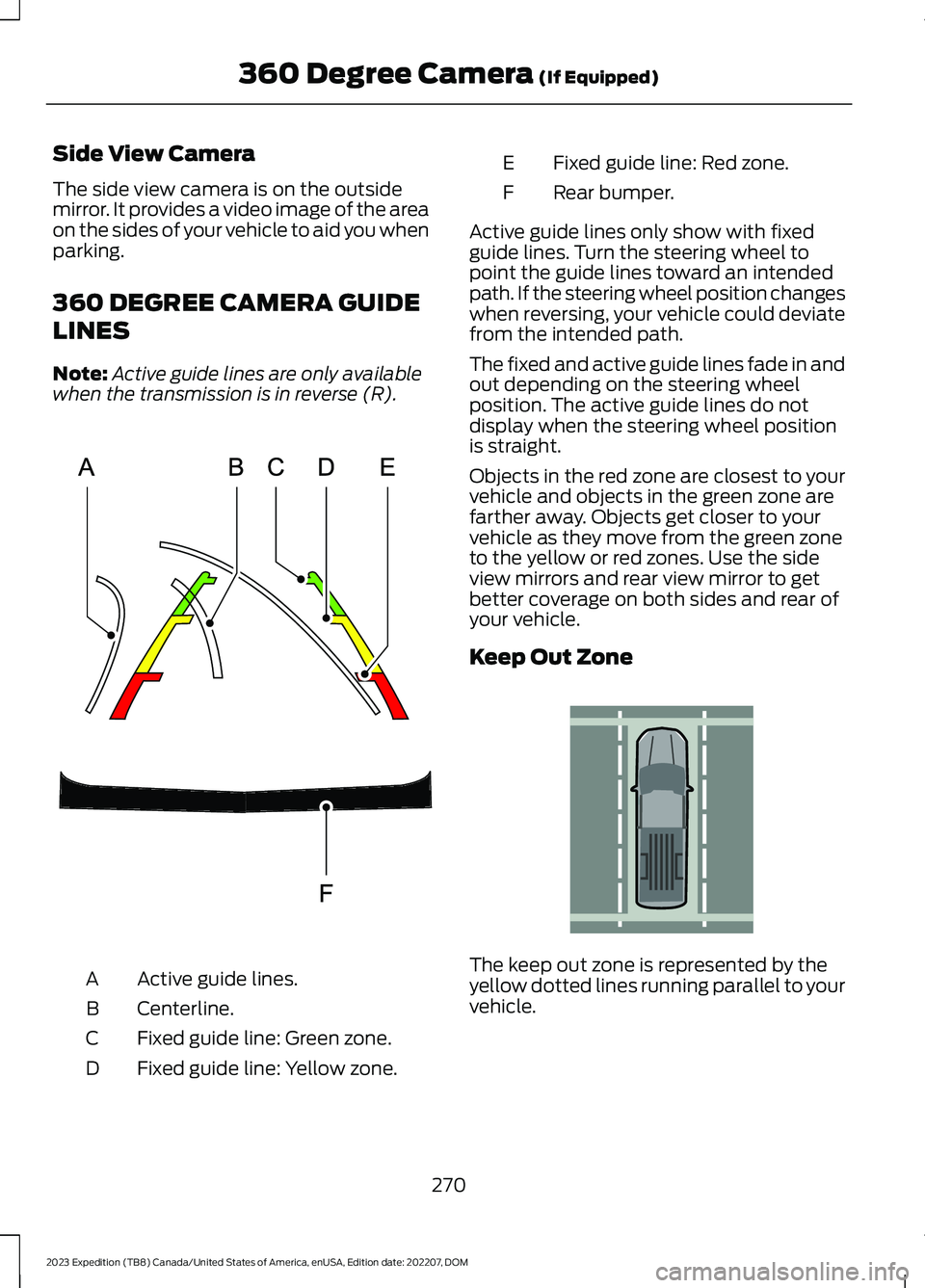
Active guide lines.A
Centerline.B
Fixed guide line: Green zone.C
Fixed guide line: Yellow zone.D
Fixed guide line: Red zone.E
Rear bumper.F
Active guide lines only show with fixedguide lines. Turn the steering wheel topoint the guide lines toward an intendedpath. If the steering wheel position changeswhen reversing, your vehicle could deviatefrom the intended path.
The fixed and active guide lines fade in andout depending on the steering wheelposition. The active guide lines do notdisplay when the steering wheel positionis straight.
Objects in the red zone are closest to yourvehicle and objects in the green zone arefarther away. Objects get closer to yourvehicle as they move from the green zoneto the yellow or red zones. Use the sideview mirrors and rear view mirror to getbetter coverage on both sides and rear ofyour vehicle.
Keep Out Zone
The keep out zone is represented by theyellow dotted lines running parallel to yourvehicle.
270
2023 Expedition (TB8) Canada/United States of America, enUSA, Edition date: 202207, DOM360 Degree Camera (If Equipped)E306774 E310341
Page 275 of 658
360 DEGREE CAMERA
SETTINGS
SWITCHING THE 360 DEGREECAMERA ON AND OFF - VEHICLESWITH: 12 INCH SCREEN
The 360 degree camera systembutton is on the instrumentpanel and allows you to togglethe front camera on or off. The front andrear cameras have multiple screens whichconsist of:
•Normal view.
•Normal view with 360.
•Split view.
Note:The rear view camera activates whenyou switch into reverse (R). Additional viewsare then accessible on the touchscreen.
When in park (P), neutral (N) or drive (D),only the front images display when youpress the button. When in reverse (R), onlythe rear images display when you press thebutton.
Note:The 360 degree camera system turnsoff when your vehicle is in motion at lowspeed, except when in reverse (R).
SWITCHING THE 360 DEGREECAMERA ON AND OFF - VEHICLESWITH: 15 INCH SCREEN
To access the 360 degree camera shiftinto reverse (R) gear or access the cameravia the touchscreen:
1.Access the vehicle drawer.
2.Press CONTROLS.
3.Press Camera.
Note:The rear view camera activates whenyou switch into reverse (R). Additional viewsare then accessible on the touchscreen.
When in park (P), neutral (N) or drive (D),the front images display when the buttonis pressed. When in reverse (R), only therear images display when the button ispressed.
Note:Not all cameras are available.
Note:The 360 degree camera system turnsoff when your vehicle is in motion at lowspeed, except when in reverse (R).
SWITCHING THE 360 DEGREECAMERA VIEW
Press to access the differentcamera views.
Front normal view provides animage of what is directly in frontof your vehicle.
Front split view provides anextended view of what is in frontof your vehicle.
Normal + 360 degree viewcontains the normal cameraview next to a 360 degreecamera view.
Rear normal view provides animage of what is directly behindyour vehicle.
Rear split view provides anextended view of what is behindyour vehicle.
The hitch view provides animage of the area around thetow hitch.
Trailer reverse guidance showsthe sides of your truck and trailer.See Trailer Reverse Guidance(page 382).
Zooms in on the image and parkhold is activated. SeeConnecting a Trailer (page 354).
271
2023 Expedition (TB8) Canada/United States of America, enUSA, Edition date: 202207, DOM360 Degree Camera (If Equipped)E332186 E337002 E336516 E336517 E310996 E310967 E310974 E350276 E310965 E224485
Page 278 of 658
3.Use the turn signal lever to search fora parking space on the driver orpassenger side of your vehicle.
Note:If you do not use the turn signal lever,the system searches for a parking space onthe passenger side of your vehicle.
4.Drive your vehicle approximately 3 ft(1 m) away from and parallel to theother parked vehicles when searchingfor a parking space.
Note:A tone sounds and a messageappears in the information andentertainment display when active parkassist finds a suitable parking space.
5.Press and hold the brake pedal.
6.Release the steering wheel and shiftinto neutral (N).
7.Press and hold the parking aid button.
8.Release the brake pedal to allow yourvehicle to park.
Note:You can slow down your vehicle atany time by pressing the brake pedal.
Note:When parallel parking betweenobjects, the system parks closer to theobject in front of your vehicle to allow easieraccess to the luggage compartment.
Note:When parking is complete, yourvehicle shifts into park (P).
ENTERING A PERPENDICULAR
PARKING SPACE
1.Press the parking aid button.
Note:Active park assist does not recognizeparking space lines and centers your vehiclebetween objects.
2.Press the active park assist icon on thetouchscreen.
3.Select perpendicular parking.
4.Use the turn signal lever to search fora parking space on the driver orpassenger side of your vehicle.
Note:If you do not use the turn signal lever,the system searches for a parking space onthe passenger side of your vehicle.
5.Drive your vehicle approximately 3 ft(1 m) away from and perpendicular tothe other parked vehicles whensearching for a parking space.
Note:A tone sounds and a messageappears in the information andentertainment display when active parkassist finds a parking space.
6.Press and hold the brake pedal.
7.Release the steering wheel and shiftinto neutral (N).
8.Press and hold the parking aid button.
9.Release the brake pedal to allow thevehicle to park.
Note:Active park assist backs your vehicleinto parking spaces.
Note:Active park assist aligns the front endof your vehicle with the lane side of theobject next to it.
Note:When the system detects only oneobject, it allows enough distance to openthe door on either side.
Note:You can slow down your vehicle atany time by pressing the brake pedal.
Note:When parking is complete, yourvehicle shifts into park (P).
EXITING A PARKING SPACE
Active park assist only assists leavingparallel parking spaces.
1.Press the parking aid button.
2.Press the active park assist icon on thetouchscreen.
3.Select parallel park exit.
274
2023 Expedition (TB8) Canada/United States of America, enUSA, Edition date: 202207, DOMActive Park Assist (If Equipped)
Page 281 of 658
WHAT IS CRUISE CONTROL
Cruise control lets you maintain a setspeed without keeping your foot on theaccelerator pedal.
Requirements
Use cruise control when the vehicle speedis greater than 15 mph in imperial units and20 km/h in metric units.
SWITCHING CRUISE CONTROL
ON AND OFF
WARNING: Do not use cruisecontrol on winding roads, in heavy trafficor when the road surface is slippery. Thiscould result in loss of vehicle control,serious injury or death.
The cruise controls are on the steeringwheel.
Switching Cruise Control On
Press the button to activate thesystem. When the systemactivates, the set speed is equalto the current vehicle speed or 15 mph (20km/h), whichever is greater. If the speed istoo low, or other conditions are not correctfor cruise control activation, the systementers standby mode.
Switching Cruise Control Off
Press the button when thesystem is active or switch theignition off.
Note:When you switch cruise control off,the set speed clears.
SETTING THE CRUISE
CONTROL SPEED
WARNING: When you are goingdownhill, your vehicle speed couldincrease above the set speed. Thesystem does not apply the brakes.
Drive to the speed you prefer.
Press either the SET+ or SET-buttons to set the current speed.
Take your foot off the accelerator pedal.
Note:The indicator changes color in theinformation display.
Changing the Set Speed
Press the SET+ button toincrease the set speed in smallincrements. Press and hold theSET+ button to accelerate. Release thebutton when you have reached yourpreferred speed.
Press the SET- button todecrease the set speed in smallincrements. Press and hold theSET- button to decelerate. Release thebutton when you have reached yourpreferred speed.
Note: If you accelerate by pressing theaccelerator pedal, the set speed does notchange. When you release the acceleratorpedal, your vehicle returns to the speed thatyou previously set.
277
2023 Expedition (TB8) Canada/United States of America, enUSA, Edition date: 202207, DOMCruise ControlE332905 E332905 E246884 E246885 E246884 E246885