2023 FORD EXPEDITION display
[x] Cancel search: displayPage 181 of 658
WHAT IS THE REAR
OCCUPANT ALERT SYSTEM
The rear occupant alert system monitorsvehicle conditions and notifies you to checkfor rear seat occupants when you switchthe ignition off.
HOW DOES THE REAR
OCCUPANT ALERT SYSTEM
WORK
The system monitors when rear doors havebeen opened and closed to indicate thepotential presence of an occupant in therear seat.
A message displays in the information andentertainment display screen and anaudible warning sounds when you switchthe ignition off after any of the followingconditions have been met:
•A rear door is opened or closed whilethe ignition is on.
•You switch the ignition on within 15minutes of a rear door opening andclosing.
•You switch the ignition on within 15minutes of the alert having displayedor sounded.
REAR OCCUPANT ALERT
SYSTEM PRECAUTIONS
WARNING: On hot days, thetemperature inside the vehicle can risevery quickly. Exposure of people oranimals to these high temperatures foreven a short time can cause death orserious heat related injuries, includingbrain damage. Small children areparticularly at risk.
WARNING: Do not leave childrenor pets unattended in your vehicle.Failure to follow this instruction couldresult in personal injury or death.
REAR OCCUPANT ALERT
SYSTEM LIMITATIONS
The system does not detect the presenceof objects or passengers in the rear seat.It monitors when rear doors are openedand closed.
Note:It is possible to receive an alert whenthere is no rear seat occupant, but alertconditions are met.
Note:It is possible to receive no alert whenthere is an occupant in the rear seat, if alertconditions are not met. For example, if a rearseat occupant does not enter the vehiclethrough a rear door.
Note:The audible warning does not soundwhen the front door is opened before youswitch the ignition off.
SWITCHING REAR OCCUPANT
ALERT SYSTEM ON AND OFF -
VEHICLES WITH: 12 INCH
SCREEN
1.Press Settings on the touchscreen.
2.Press Vehicle.
3.Switch Rear Occupant Alert on or off.
Note:The default setting is on.
Note:Performing a master reset causes thesystem to switch on again.
177
2023 Expedition (TB8) Canada/United States of America, enUSA, Edition date: 202207, DOMRear Occupant Alert System
Page 182 of 658
Semiannual Reminder (If Equipped)
When you switch the system off, amessage appears every six months as areminder that the system is off. You canswitch the system back on or leave it off.
SWITCHING REAR OCCUPANT
ALERT SYSTEM ON AND OFF -
VEHICLES WITH: 15 INCH
SCREEN
1.Access the vehicle drawer on thetouchscreen.
2.Press SETTINGS.
3.Press Vehicle.
4.Switch Rear Occupant Alert on or off.
Note:The default setting is on.
Note:Performing a master reset causes thesystem to switch on again.
Semiannual Reminder (If Equipped)
When you switch the system off, amessage appears every six months as areminder that the system is off. You canswitch the system back on or leave it off.
REAR OCCUPANT ALERT
SYSTEM INDICATORS
Message
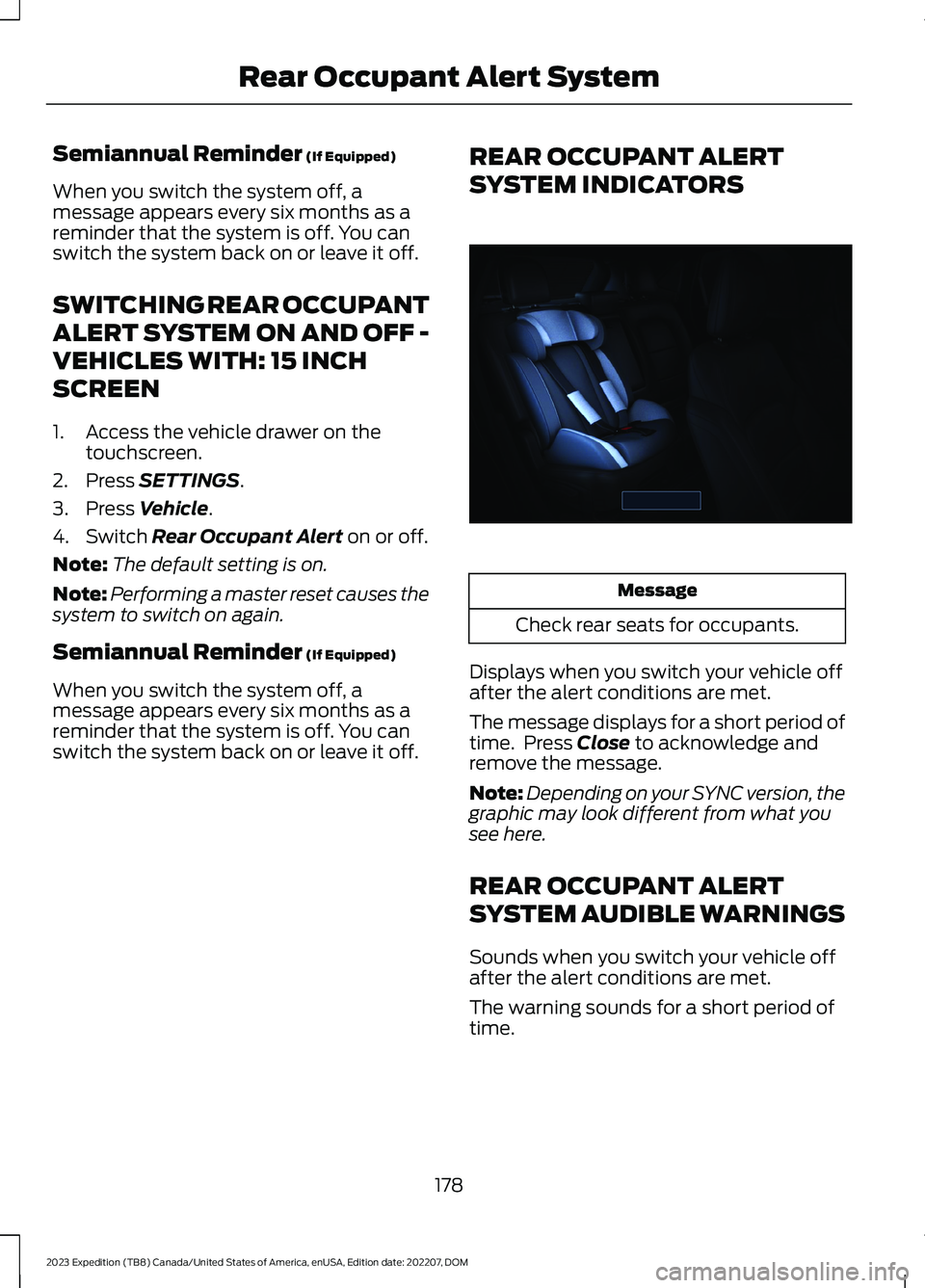
Check rear seats for occupants.
Displays when you switch your vehicle offafter the alert conditions are met.
The message displays for a short period oftime. Press Close to acknowledge andremove the message.
Note:Depending on your SYNC version, thegraphic may look different from what yousee here.
REAR OCCUPANT ALERT
SYSTEM AUDIBLE WARNINGS
Sounds when you switch your vehicle offafter the alert conditions are met.
The warning sounds for a short period oftime.
178
2023 Expedition (TB8) Canada/United States of America, enUSA, Edition date: 202207, DOMRear Occupant Alert SystemE350472
Page 183 of 658

WHAT IS THE MEMORY
FUNCTION
The memory function recalls the positionof these features:
•Driver seat.
•Power mirrors.
•Optional power steering column.
•Optional power adjustable pedals.
MEMORY FUNCTION
PRECAUTIONS
WARNING: Before activating thememory seat, make sure that the areaimmediately surrounding the seat is clearof obstructions and that all occupantsare clear of moving parts.
WARNING: Do not use the memoryfunction when your vehicle is moving.
LOCATING THE MEMORY
FUNCTION BUTTONS
The memory control is on the driver door.
SAVING A PRESET POSITION
1.Adjust the memory features to yourpreferred position.
2.Press and hold the preferred presetbutton until you hear a single tone.
A confirmation message appears in theinformation display.
You can save up to three preset memorypositions at any time.
RECALLING A PRESET
POSITION
Press and release a preset button.
Note:You can recall a preset memoryposition when the ignition is off, or when youplace the transmission in park (P) or neutral(N) if the ignition is on and the vehicle is notmoving.
Note:Pressing any of the preset buttons orany memory feature control during amemory recall cancels the operation.
You can also recall a preset memoryposition by:
•Pressing the unlock button on yourremote control if you linked it to apreset position.
•Unlocking the intelligent driver doorhandle if a linked remote control ispresent.
•Recalling a personal profile in yourSYNC menu.
Using a linked remote control to recall yourmemory position when the ignition is offmoves the seat and steering column to theeasy entry position.
179
2023 Expedition (TB8) Canada/United States of America, enUSA, Edition date: 202207, DOMMemory Function (If Equipped)E142554
Page 194 of 658
WHAT IS THE WIRELESS
ACCESSORY CHARGER
The wireless accessory charger allows youto charge one compatible Qi wirelesscharging device on the charging area.
WIRELESS ACCESSORY
CHARGER PRECAUTIONS
WARNING: Wireless chargingdevices can affect the operation ofimplanted medical devices, includingcardiac pacemakers. If you have anyimplanted medical devices, werecommend that you consult with yourphysician.
Keep the charging area clean and removeforeign objects prior to charging a device.
Do not place items with a magnetic stripor radio-frequency identification chip, forexample passports, parking tickets,transportation passes or credit cards, nearthe charging area when charging a device.Damage could occur to the magnetic stripor radio-frequency identification chip.
Do not place metal objects, for exampleremote controls, coins and candywrappers, on or near the charging areawhen charging a device. Metal objects mayheat up and degrade the chargingperformance, in addition to causinginterruptions in charging.
Charging could be interrupted, degraded,or could stop if any of the following occur:
•The system detects a foreign object.
•The device is misaligned on thecharging area.
•The device moves on the activecharging area when the vehicle is inmotion.
•The vehicle ambient temperature is toohigh.
•You attempt to charge a non-Qicompatible device on the wirelesscharger.
Note:During charging, the device and thecharger could heat up, this is normal. If thebattery gets hotter than usual, the devicemay stop charging.
LOCATING THE WIRELESS
ACCESSORY CHARGER
The charging area is on thecenter console or in the mediabin below the instrument panel.
CHARGING A WIRELESS
DEVICE
Place the device on the center of thecharging surface with the charging sidedown. The charging stops after your devicereaches a full charge.
You can use the charger when the vehicleis in accessory mode, when the vehicle isrunning, or when SYNC is on.
Displays on the status bar whenwireless charging is in progress.
Displays on the status bar whenwireless charging has beeninterrupted.
Note:The charging performance may beaffected if your device is in a case. It may benecessary to remove the case to wirelesslycharge your device.
Note:Software and firmware updates mayaffect device compatibility, including theuse of unofficial software or firmware. Youshould verify charging functionality with yourspecific devices in-vehicle.
190
2023 Expedition (TB8) Canada/United States of America, enUSA, Edition date: 202207, DOMWireless Accessory Charger (If Equipped)E297549 E263583 E372644
Page 202 of 658

HOW DOES AUTOMATIC ENGINESTOP WORK
Automatic engine stop turns the engineoff. The ignition also turns off in order tosave battery power. Before the engineshuts down, a message appears in theinformation display showing a timercounting down. If you do not intervenewithin 30 seconds, the engine shuts down.Another message appears in theinformation display to inform you that theengine has shut down in order to save fuel.Start your vehicle as you normally do.
SWITCHING AUTOMATIC ENGINESTOP ON AND OFF
1.Press Settings on the touchscreen.
2.Press Vehicle Settings.
3.Switch 30min Max Idle on or off.
Note:You cannot permanently switch offthe automatic shutdown. If you switch it off,it turns on each time you switch the ignitionon.
OVERRIDING AUTOMATIC ENGINESTOP
You can stop the engine shutdown, or resetthe timer, at any point before the30-second countdown has expired bydoing any of the following:
•Pressing the brake pedal or acceleratorpedal.
•Pressing the OK or RESET buttonduring the countdown.
Note: You cannot permanently switch offthe automatic engine shutdown feature.When you switch it off temporarily, it turnson at the next ignition cycle.
ACCESSING THE PASSIVE KEY
BACKUP POSITION
If you are unable to start your vehicle, dothe following:
1.Access the backup slot.
2.With the buttons facing the front ofyour vehicle, insert the passive key intothe backup slot.
3.With the key in this position, press thebrake pedal then press the push buttonignition switch to switch the ignition onand start your vehicle.
198
2023 Expedition (TB8) Canada/United States of America, enUSA, Edition date: 202207, DOMStarting and Stopping the Engine E256153
Page 203 of 658
STARTING AND STOPPING
THE ENGINE –
TROUBLESHOOTING
STARTING AND STOPPING THEENGINE – WARNING LAMPS
Malfunction Indicator Lamp
If it illuminates when the engineis running, the on-boarddiagnostics system is detectinga malfunction of the vehicle emissioncontrol system.
If it flashes, engine misfire could beoccurring. Increased exhaust gastemperatures could damage the catalyticconverter or other vehicle components.Avoid heavy acceleration and deceleration,and have your vehicle checked as soon aspossible.
Powertrain Warning Lamp
If it illuminates when the engineis running, this indicates apowertrain or four-wheel drivefault. If it flashes when you are driving,immediately reduce the vehicle speed.Avoid heavy acceleration and deceleration,and have your vehicle checked as soon aspossible.
If both lamps illuminate when the engineis running, stop your vehicle as soon as itis safe to do so. Continuing to drive yourvehicle could cause reduced power or theengine to stop. Switch the ignition off andattempt to restart the engine. Have yourvehicle checked as soon as possible.
STARTING AND STOPPING THE ENGINE – INFORMATION MESSAGES
ActionMessage
Displays if you exceed the starting time limit. You cannotattempt to start the engine for 15 minutes. If you cannot startthe engine after 15 minutes passes, have your vehicle imme-diately checked.
Cranking Time Exceeded
Displays if you are unable to start your vehicle with a correctlycoded key. The system has detected a fault that requiresservice. Have your vehicle checked as soon as possible.
Starting System Fault
Displays if the system does not detect a valid passive key.No Key Detected
199
2023 Expedition (TB8) Canada/United States of America, enUSA, Edition date: 202207, DOMStarting and Stopping the EngineE67028
Page 206 of 658
WHAT IS AUTO-START-STOP
The system is designed to help reduce fuelconsumption and CO2 emissions bystopping the engine when it is idling, forexample at traffic lights.
AUTO-START-STOP
PRECAUTIONS
WARNING: Apply the parkingbrake, shift into park (P), switch theignition off and remove the key beforeyou leave your vehicle. Failure to followthis instruction could result in personalinjury or death.
WARNING: Apply the parkingbrake, shift into park (P), switch theignition off and remove the key beforeyou open the hood or have any serviceor repair work completed. If you do notswitch the ignition off, the engine couldrestart at any time. Failure to follow thisinstruction could result in personal injuryor death.
SWITCHING AUTO-START-
STOP ON AND OFF
The system turns on when you switch theignition on.
Press the button to switch thesystem off.
Note:OFF illuminates in the switch.
Note:Deactivating the system using thebutton lasts only one key cycle.
Press the button again to switch thesystem back on.
Note: The system turns off if it detects amalfunction. If the system malfunctions,have your vehicle checked as soon aspossible.
STOPPING THE ENGINE
Stop your vehicle, keep your foot on thebrake pedal and the transmission in drive(D).
RESTARTING THE ENGINE
Release the brake pedal or press theaccelerator pedal.
A message appears in the instrumentcluster display if the system requires youto take action.
AUTO-START-STOP
INDICATORS
WARNING: The system mayrequire the engine to automaticallyrestart when the auto-start-stopindicator illuminates green or flashesamber. Failure to follow this instructioncould result in personal injury.
The Auto-Start-Stop indicatorilluminates green when theengine stops. It flashes amberand a message appears when you need totake action.
The Auto-Start-Stop indicatorilluminates gray with astrikethrough when the systemis not available.
Note:You can display the reason why thesystem is not available in the informationdisplay.
202
2023 Expedition (TB8) Canada/United States of America, enUSA, Edition date: 202207, DOMAuto-Start-Stop (If Equipped)E121377 E121377 E146361
Page 207 of 658
AUTO-START-STOP –
TROUBLESHOOTING
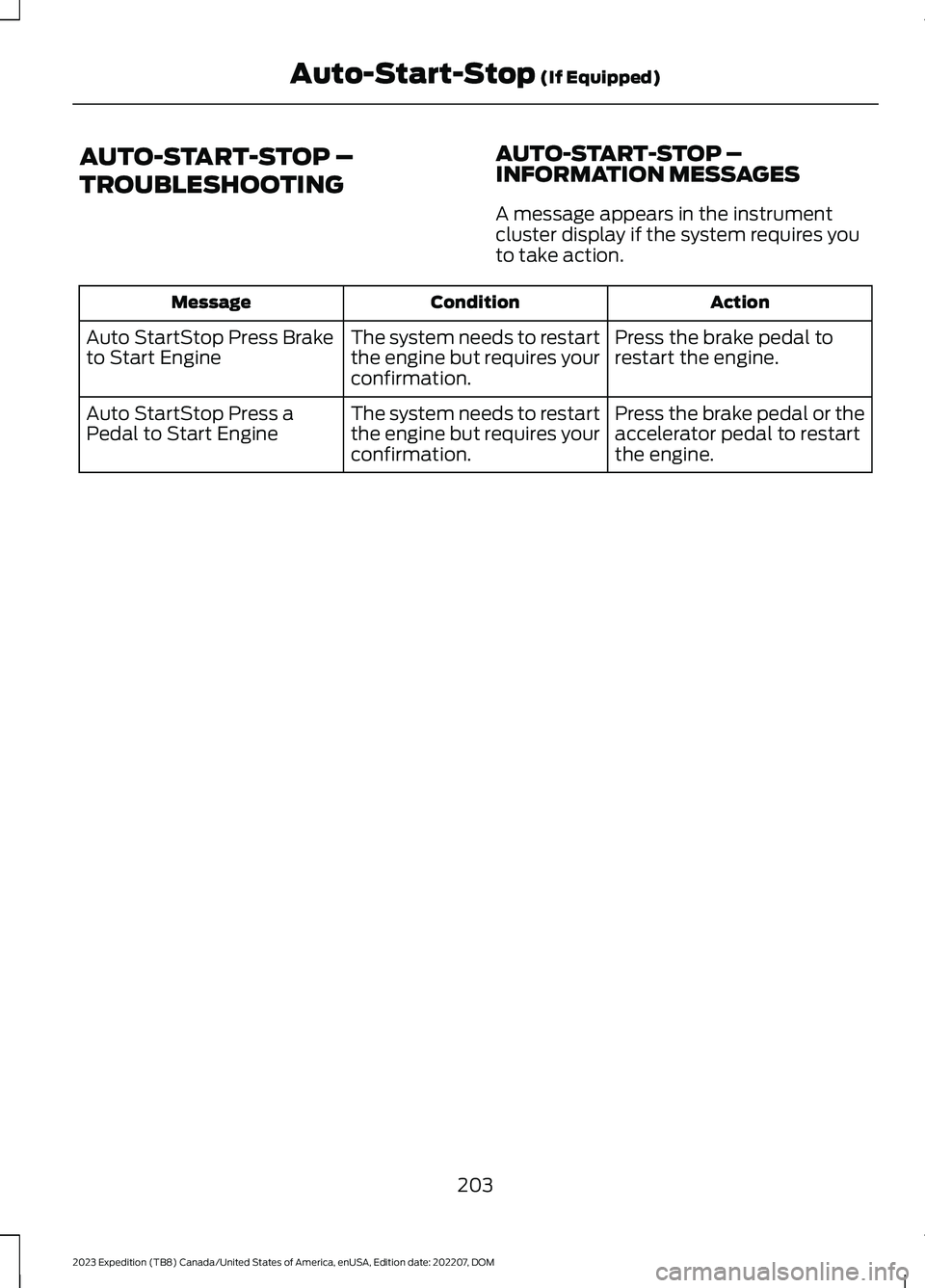
AUTO-START-STOP –INFORMATION MESSAGES
A message appears in the instrumentcluster display if the system requires youto take action.
ActionConditionMessage
Press the brake pedal torestart the engine.The system needs to restartthe engine but requires yourconfirmation.
Auto StartStop Press Braketo Start Engine
Press the brake pedal or theaccelerator pedal to restartthe engine.
The system needs to restartthe engine but requires yourconfirmation.
Auto StartStop Press aPedal to Start Engine
203
2023 Expedition (TB8) Canada/United States of America, enUSA, Edition date: 202207, DOMAuto-Start-Stop (If Equipped)