2023 FORD EXPEDITION buttons
[x] Cancel search: buttonsPage 10 of 658
Rear Seats
Manual Seats................................................169
Power Seats...................................................173
Heated Seats.................................................175
Rear Occupant Alert System
What is the Rear Occupant Alert System..........................................................................177
How Does the Rear Occupant AlertSystem Work..............................................177
Rear Occupant Alert System Precautions..........................................................................177
Rear Occupant Alert System Limitations..........................................................................177
Switching Rear Occupant Alert SystemOn and Off - Vehicles With: 12 InchScreen...........................................................177
Switching Rear Occupant Alert SystemOn and Off - Vehicles With: 15 InchScreen..........................................................178
Rear Occupant Alert System Indicators.........................................................................178
Rear Occupant Alert System AudibleWarnings.....................................................178
Memory Function
What Is the Memory Function................179
Memory Function Precautions...............179
Locating the Memory Function Buttons.........................................................................179
Saving a Preset Position...........................179
Recalling a Preset Position......................179
Garage Door Opener
Garage Door Opener Introduction.........181
Garage Door Opener Precautions andFrequencies................................................181
Programming the Garage Door Opener.........................................................................182
Garage Door Opener AdditionalAssistance.................................................184
USB Ports
Locating the USB Ports.............................185
Playing Media Using the USB Port.......185
Charging a Device........................................185
Power Outlet - Vehicles With:110V Power Outlet
What Is the Power Outlet.........................187
Power Outlet Precautions........................187
Power Outlet Limitations..........................187
Locating the Power Outlets.....................187
Power Outlet Indicators............................187
Power Outlet - Vehicles With:12V Power Outlet
What Is the Power Outlet........................189
Power Outlet Precautions.......................189
Locating the Power Outlets....................189
Wireless Accessory Charger
What Is the Wireless Accessory Charger........................................................................190
Wireless Accessory Charger Precautions........................................................................190
Locating the Wireless Accessory Charger........................................................................190
Charging a Wireless Device.....................190
Storage
Overhead Storage........................................191
Glove Compartment...................................191
Center Console..............................................191
Under Floor Storage...................................192
Starting and Stopping theEngine
Starting and Stopping the Engine –Precautions................................................193
Ignition Switch..............................................193
Push Button Ignition Switch...................194
6
2023 Expedition (TB8) Canada/United States of America, enUSA, Edition date: 202207, DOMTable of Contents
Page 71 of 658

REMOTE CONTROL
LIMITATIONS
WARNING: Changes ormodifications not expressively approvedby the party responsible for compliancecould void the user's authority to operatethe equipment. The term "IC:" before theradio certification number only signifiesthat Industry Canada technicalspecifications were met.
This device complies with Part 15 of theFCC Rules and with Industry Canadalicense-exempt RSS standard(s).Operation is subject to the following twoconditions: (1) This device may not causeharmful interference, and (2) This devicemust accept any interference received,including interference that may causeundesired operation.
Make sure a valid remote control is within3 ft (1 m) from the front door handles andrear of vehicle.
The system may not function if:
•The remote control remains stationaryfor about a minute.
•The vehicle battery has no charge.
•The remote control battery has nocharge.
•There is interference causing issueswith the remote control frequencies.
•The remote control is too close tometal objects or electronic devices, forexample keys or a cell phone.
USING THE REMOTE CONTROL
Use your remote control to access variousvehicle systems.
Note:The buttons on your remote may varydepending on the vehicle region or options.
Unlock
Press the button to unlock alldoors. See Unlocking andLocking the Doors Using theRemote Control (page 81).
Lock
Press the button to lock alldoors. See Unlocking andLocking the Doors Using theRemote Control (page 81).
Remote Start (If Equipped)
Press the button to remote start.See Remotely Starting andStopping the Vehicle (page144).
Liftgate (If Equipped)
Press the button to open or closethe liftgate. See Liftgate (page91).
Panic Alarm (If Equipped)
Press the button to sound thepanic alarm. See Sounding thePanic Alarm (page 68).
OPENING AND CLOSING THE
FLIP KEY
Opening Your Flip Key
Press the round button on the remotecontrol to extend the flip key.
67
2023 Expedition (TB8) Canada/United States of America, enUSA, Edition date: 202207, DOMKeys and Remote ControlsE138629 E138623 E138625 E267940 E138624
Page 80 of 658

Audio System Volume Limit
The audio system maximum volumereduces. A message appears on thetouchscreen if you attempt to exceed thevolume limit. Automatic volume controlturns off.
911 Assist
If you set 911 assist to always on, youcannot switch it off with a MyKey.
Do Not Disturb
If you set do not disturb to always on, youcannot switch it off with a MyKey.
Note:If a phone is connected using AppleCarPlay or Android Auto while driving witha MyKey, the driver can receive phone callsand text messages even if the do not disturbrestriction is on. And if the vehicle comeswith satellite radio, there is no restriction onthe adult content.
Traction and Stability Control
If you set traction control or stabilitycontrol to always on, you cannot switch itoff with a MyKey.
CREATING A MYKEY -
VEHICLES WITHOUT: PUSH
BUTTON START
1.Switch the ignition on using the key youwant to create as MyKey.
2.Press Settings on the touchscreen.
3.Press Vehicle Settings.
4.Press MyKey.
5.Press Create MyKey.
6.Press Yes.
7.Switch the ignition off.
Note:You successfully created a MyKey.We recommend that you label this key soyou can distinguish it from the admin keys.
Note:The programmed restrictions applywhen you switch the vehicle off, open andclose the driver door and restart your vehiclewith the programmed key or remote control.
CREATING A MYKEY -
VEHICLES WITH: PUSH
BUTTON START
1.Raise the center console storagecompartment lid.
2.Place the remote control in the backupslot with the buttons facing toward therear of the vehicle.
3.Switch the ignition on using the key youwant to create as MyKey.
76
2023 Expedition (TB8) Canada/United States of America, enUSA, Edition date: 202207, DOMMyKey™ E256153
Page 83 of 658
MYKEY – INFORMATION MESSAGES - VEHICLES WITH: PUSH BUTTONSTART
DescriptionMessage
Displays when trying to create a MyKey and the admin key isnot placed in the backup position. See Creating a MyKey(page 76).
Place Key in BackupLocation
Displays when trying to create a MyKey with a key alreadydesignated as a MyKey.Key is Already a MyKey
Displays to confirm that the key is restricted after you switchthe ignition off.This Key restricted atNext Key Cycle. LabelKey as MyKey
79
2023 Expedition (TB8) Canada/United States of America, enUSA, Edition date: 202207, DOMMyKey™
Page 89 of 658

WHAT IS KEYLESS ENTRY
The system allows you to lock and unlockyour vehicle without taking the passive keyout of your pocket or purse.
KEYLESS ENTRY LIMITATIONS
Make sure your remote control is within 3 ft(1 m) from the front door handles and thetailgate.
The system could not function if:
•The remote control remains stationaryfor about a minute.
•The vehicle battery has no charge.
•The remote control battery has nocharge.
•There is interference causing issueswith the remote control frequencies.
•The remote control is too close tometal objects or electronic devices, forexample keys or a cell phone.
KEYLESS ENTRY SETTINGS
Switching Keyless Entry On andOff
1.Switch the ignition on using an originalkey that has not been created as aMyKey.
2.Press Settings on the touchscreen.
3.Press Vehicle Settings.
4.Press Locks.
Reprogramming the UnlockingFunction
You can enable two-stage unlockingfunction allowing you to unlock only thedriver door when you touch the unlocksensor.
Press and hold both the lock and unlockbuttons on the remote control for fourseconds to disable or enable two-stageunlocking.
If you program the unlocking function sothat only the driver door unlocks, you canunlock all of the other doors from insideyour vehicle using the power door lockcontrol. You can unlock individual doorsby pulling the interior door handles onthose doors.
USING KEYLESS ENTRY
Unlocking the Doors
With your passive key within 3 ft (1 m) ofyour vehicle, touch the unlock sensor onthe back of the door handle for a briefperiod and then pull on the door handle tounlock, being careful not to touch the locksensor at the same time or pull on the doorhandle too quickly. The intelligent accesssystem requires a brief delay toauthenticate your intelligent access key.
85
2023 Expedition (TB8) Canada/United States of America, enUSA, Edition date: 202207, DOMKeyless Entry (If Equipped)E248553
Page 123 of 658
Front Fog Lamps Indicator
It illuminates when you switchthe front fog lamps on.
SWITCHING THE SPOT LAMPS ONAND OFF (If Equipped)
The spot lamp buttons are near the lightingcontrol.
Press the button to switch on theleft-hand spot lamp.
Press the button to switch on theright-hand spot lamp.
Move the position of the exterior mirrorsto adjust the aim.
Note:Make sure you switch your vehicle on,with the vehicle in accessory mode orrunning.
Note:The spot lamps turn off after 6 mph(10 km/h).
Note:The spot lamps illuminate the areain front of and to the side of your vehicle.
EXTERIOR LAMP INDICATORS
Front Fog Lamp
It illuminates when you switchthe front fog lamps on.
Turn Signal Lamp
It flashes when you switch theturn signal lamps on.
Note:An increase in the rate of flashingwarns of a failed turn signal lamp.
EXTERIOR LAMPS ON AUDIBLEWARNING
Sounds when you open the driver door andthe exterior lamps are on.
EXTERIOR ZONE LIGHTING
WHAT IS EXTERIOR ZONELIGHTING
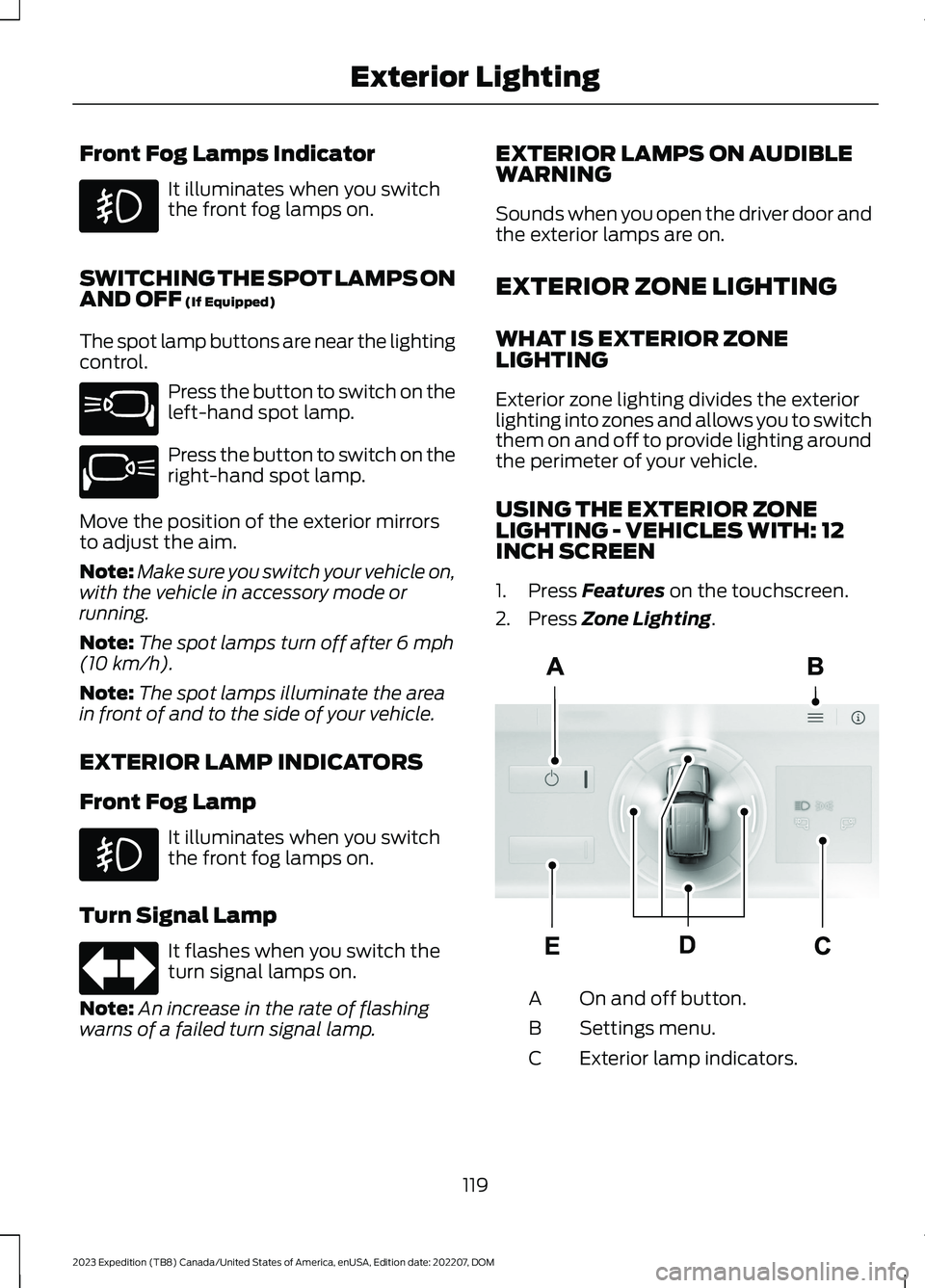
Exterior zone lighting divides the exteriorlighting into zones and allows you to switchthem on and off to provide lighting aroundthe perimeter of your vehicle.
USING THE EXTERIOR ZONELIGHTING - VEHICLES WITH: 12INCH SCREEN
1.Press Features on the touchscreen.
2.Press Zone Lighting.
On and off button.A
Settings menu.B
Exterior lamp indicators.C
119
2023 Expedition (TB8) Canada/United States of America, enUSA, Edition date: 202207, DOMExterior Lighting E340436 E340437 E67018 E343474
Page 130 of 658
ADJUSTING THE INSTRUMENT
PANEL LIGHTING
BRIGHTNESS
The instrument lighting dimmer buttonsare on the lighting control.
Repeatedly press one of thebuttons to adjust the brightness.
AMBIENT LIGHTING (IF EQUIPPED)
SWITCHING AMBIENT LIGHTINGON AND OFF - VEHICLES WITH: 12INCH SCREEN
1.Press Settings on the touchscreen.
2.Press Vehicle Settings.
3.Press Ambient Light.
4.Switch Ambient Light on or off.
SWITCHING AMBIENT LIGHTINGON AND OFF - VEHICLES WITH: 15INCH SCREEN
1.Access the vehicle drawer on thetouchscreen.
2.Press SETTINGS.
3.Press Ambient Light.
4.Switch Ambient Light on or off.
ADJUSTING AMBIENT LIGHTING
Drag the slider left or right.
INTERIOR LIGHTING –
TROUBLESHOOTING
INTERIOR LIGHTING –FREQUENTLY ASKED QUESTIONS
Why do my courtesy lamps or interiorlamps turn off when I have themswitched on when I switch my vehicleoff?
The battery saver turns the courtesylamps and interior lamps off after ashort period of time after you switchyour vehicle off.
126
2023 Expedition (TB8) Canada/United States of America, enUSA, Edition date: 202207, DOMInterior LightingE291299 E296433
Page 144 of 658
USING THE INSTRUMENT
CLUSTER DISPLAY CONTROLS
WARNING: Driving while distractedcan result in loss of vehicle control, crashand injury. We strongly recommend thatyou use extreme caution when using anydevice that may take your focus off theroad. Your primary responsibility is thesafe operation of your vehicle. Werecommend against the use of anyhand-held device while driving andencourage the use of voice-operatedsystems when possible. Make sure youare aware of all applicable local lawsthat may affect the use of electronicdevices while driving.
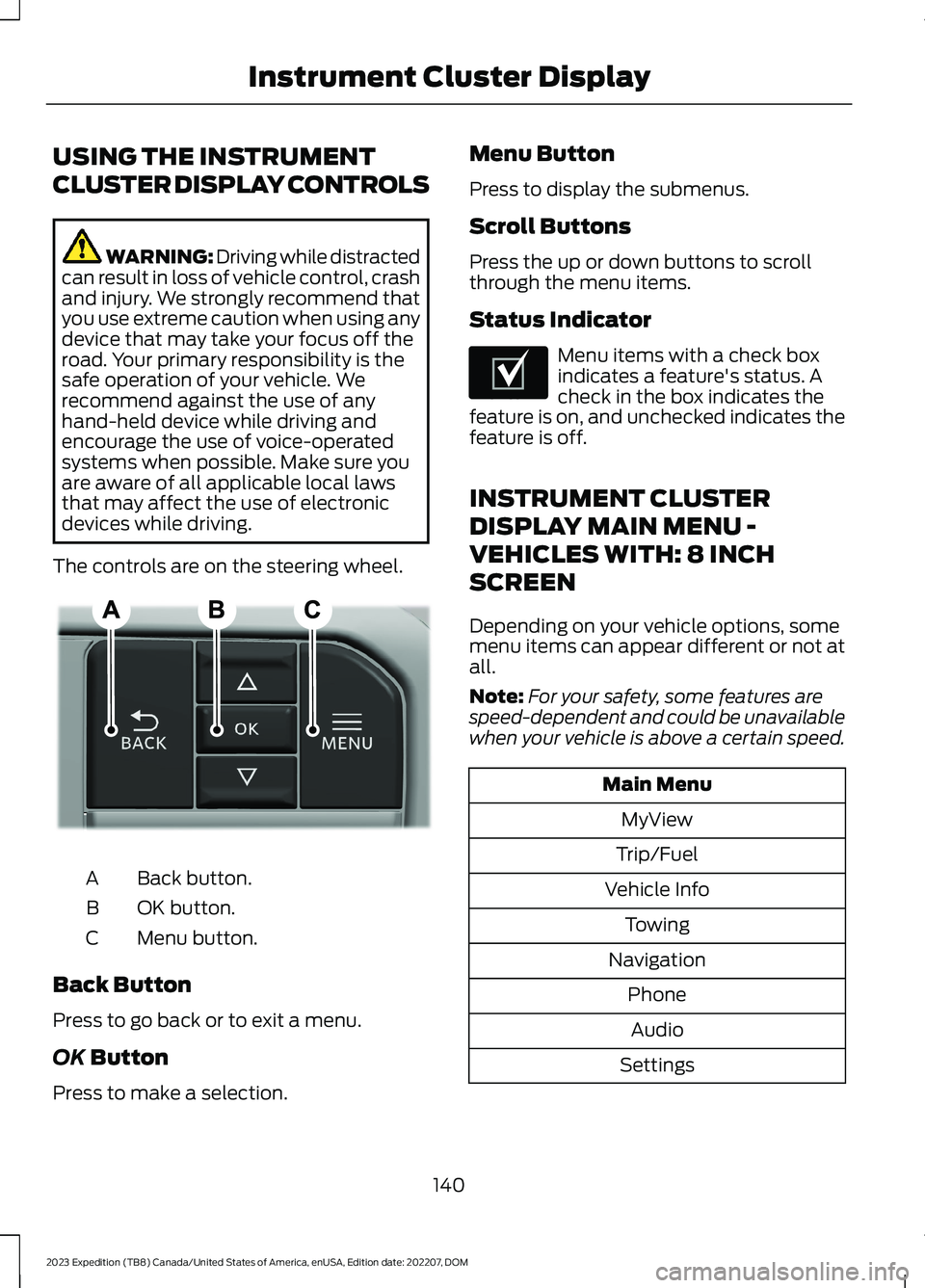
The controls are on the steering wheel.
Back button.A
OK button.B
Menu button.C
Back Button
Press to go back or to exit a menu.
OK Button
Press to make a selection.
Menu Button
Press to display the submenus.
Scroll Buttons
Press the up or down buttons to scrollthrough the menu items.
Status Indicator
Menu items with a check boxindicates a feature's status. Acheck in the box indicates thefeature is on, and unchecked indicates thefeature is off.
INSTRUMENT CLUSTER
DISPLAY MAIN MENU -
VEHICLES WITH: 8 INCH
SCREEN
Depending on your vehicle options, somemenu items can appear different or not atall.
Note:For your safety, some features arespeed-dependent and could be unavailablewhen your vehicle is above a certain speed.
Main Menu
MyView
Trip/Fuel
Vehicle Info
Towing
Navigation
Phone
Audio
Settings
140
2023 Expedition (TB8) Canada/United States of America, enUSA, Edition date: 202207, DOMInstrument Cluster DisplayE309379 E204495