2023 FORD EXPEDITION trailer
[x] Cancel search: trailerPage 14 of 658
Switching Adaptive Cruise Control Onand Off........................................................281
Adaptive Cruise Control AutomaticCancellation.............................................282
Setting the Adaptive Cruise ControlSpeed - Vehicles With: 8 Inch Screen........................................................................282
Setting the Adaptive Cruise ControlSpeed - Vehicles With: 12 Inch Screen........................................................................283
Setting the Adaptive Cruise Control Gap- Vehicles With: 8 Inch Screen..........284
Setting the Adaptive Cruise Control Gap- Vehicles With: 12 Inch Screen.........285
Canceling the Set Speed.........................286
Resuming the Set Speed - Vehicles With:8 Inch Screen...........................................286
Resuming the Set Speed - Vehicles With:12 Inch Screen..........................................287
Overriding the Set Speed........................288
Adaptive Cruise Control Indicators......288
Switching From Adaptive Cruise Controlto Cruise Control - Vehicles With: 12Inch Screen...............................................289
Switching From Adaptive Cruise Controlto Cruise Control - Vehicles With: 15Inch Screen...............................................289
Lane Centering............................................289
Intelligent Adaptive Cruise Control......292
Adaptive Cruise Control –Troubleshooting......................................295
BlueCruise
What Is BlueCruise.....................................297
How Does BlueCruise Work....................297
BlueCruise Precautions............................297
BlueCruise Requirements.......................298
BlueCruise Limitations.............................298
BlueCruise Settings...................................299
Switching BlueCruise On and Off........299
BlueCruise Alerts........................................300
BlueCruise Automatic Cancellation....300
BlueCruise Indicators...............................300
BlueCruise – Troubleshooting................301
Drive Mode Control
What Is Drive Mode Control...................303
How Does Drive Mode Control Work........................................................................303
Selecting a Drive Mode............................303
Drive Modes..................................................304
Drive Mode Control – Troubleshooting........................................................................307
Lane Keeping System
What Is the Lane Keeping System......309
How Does the Lane Keeping SystemWork............................................................309
Lane Keeping System Precautions......309
Lane Keeping System Limitations.......309
Switching the Lane Keeping System Onand Off........................................................310
Switching the Lane Keeping SystemMode - Vehicles With: 12 Inch Screen.........................................................................310
Switching the Lane Keeping SystemMode - Vehicles With: 15 Inch Screen..........................................................................311
Alert Mode.......................................................311
Aid Mode.........................................................312
Alert and Aid Mode.....................................312
Lane Keeping System Indicators -Vehicles With: 8 Inch Screen...............312
Lane Keeping System Indicators -Vehicles With: 12 Inch Screen.............314
Blind Spot Assist..........................................314
Blind Spot Assist with Trailer Coverage.........................................................................315
Lane Keeping System – Troubleshooting.........................................................................317
Blind Spot InformationSystem
What Is Blind Spot Information System........................................................................320
10
2023 Expedition (TB8) Canada/United States of America, enUSA, Edition date: 202207, DOMTable of Contents
Page 15 of 658

How Does Blind Spot InformationSystem Work............................................320
Blind Spot Information SystemPrecautions..............................................320
Blind Spot Information SystemLimitations................................................320
Blind Spot Information SystemRequirements..........................................320
Switching Blind Spot InformationSystem On and Off - Vehicles With: 12Inch Screen................................................321
Switching Blind Spot InformationSystem On and Off - Vehicles With: 15Inch Screen................................................321
Locating the Blind Spot InformationSystem Sensors........................................321
Blind Spot Information System WithTrailer Coverage.......................................322
Blind Spot Information SystemIndicators...................................................323
Blind Spot Information System –Troubleshooting......................................324
Cross Traffic Alert
What Is Cross Traffic Alert.......................325
How Does Cross Traffic Alert Work......325
Cross Traffic Alert Precautions..............325
Cross Traffic Alert Limitations...............325
Switching Cross Traffic Alert On and Off- Vehicles With: 12 Inch Screen..........326
Switching Cross Traffic Alert On and Off- Vehicles With: 15 Inch Screen.........326
Locating the Cross Traffic Alert Sensors........................................................................326
Cross Traffic Alert Indicators...................327
Cross Traffic Alert – Troubleshooting.........................................................................327
Pre-Collision Assist
What Is Pre-Collision Assist...................328
How Does Pre-Collision Assist Work........................................................................328
Pre-Collision Assist Precautions..........328
Pre-Collision Assist Limitations............329
Switching Pre-Collision Assist On andOff - Vehicles With: 12 Inch Screen........................................................................330
Switching Pre-Collision Assist On andOff - Vehicles With: 15 Inch Screen........................................................................330
Locating the Pre-Collision Assist Sensors.........................................................................331
Distance Indication....................................332
Distance Alert...............................................335
Automatic Emergency Braking..............335
Evasive Steering Assist.............................336
Pre-Collision Assist – Troubleshooting........................................................................337
Driver Alert
What Is Driver Alert....................................339
How Does Driver Alert Work...................339
Driver Alert Precautions...........................339
Driver Alert Limitations.............................339
Switching Driver Alert On and Off -Vehicles With: 12 Inch Screen............340
Switching Driver Alert On and Off -Vehicles With: 15.5 Inch Center DisplayScreen/15 Inch Screen.........................340
Driver Alert – Troubleshooting..............340
Speed Sign Recognition
What Is Speed Sign Recognition...........341
How Does Speed Sign Recognition Work.........................................................................341
Speed Sign Recognition Precautions.........................................................................341
Speed Sign Recognition Limitations.........................................................................341
Speed Sign Recognition Indicators.......341
Setting the Speed Sign RecognitionSpeed Warning - Vehicles With: 12 InchScreen.........................................................342
Setting the Speed Sign RecognitionSpeed Warning - Vehicles With: 15 InchScreen.........................................................342
11
2023 Expedition (TB8) Canada/United States of America, enUSA, Edition date: 202207, DOMTable of Contents
Page 16 of 658
Setting the Speed Sign RecognitionSpeed Tolerance - Vehicles With: 12Inch Screen...............................................342
Setting the Speed Sign RecognitionSpeed Tolerance - Vehicles With: 15Inch Screen...............................................342
Speed Sign Recognition –Troubleshooting......................................343
Load Carrying
Load Carrying Precautions......................345
Locating the Safety ComplianceCertification Labels...............................346
What Is the Gross Axle Weight Rating........................................................................346
What Is the Gross Vehicle Weight Rating........................................................................346
What Is the Gross Combined WeightRating.........................................................346
Calculating Payload...................................347
Calculating the Load Limit......................347
Roof Rack......................................................349
Luggage Compartment
Luggage Compartment Precautions........................................................................350
Installing and Removing the LuggageCompartment Cargo Net....................350
Adjusting the Luggage CompartmentLoad Floor..................................................351
Adjusting the Luggage CompartmentDivider.........................................................352
Connecting a Trailer
Connecting a Trailer Precautions.........354
Hitches............................................................354
Connecting a Trailer...................................355
Connecting a Trailer – Troubleshooting........................................................................357
Towing a Trailer
Towing a Trailer Precautions..................358
Trailer Brake Precautions........................358
Towing a Trailer Limitations...................359
Loading Your Trailer...................................359
Trailer Towing Hints...................................359
Launching or Retrieving a Boat orPersonal Watercraft..............................360
Towing Weights and Dimensions..........361
Towing a Trailer – Troubleshooting......363
Integrated Trailer BrakeController
What Is the Integrated Trailer BrakeController..................................................365
Integrated Trailer Brake ControllerPrecautions..............................................365
Using the Integrated Trailer BrakeController..................................................365
Adjusting the Integrated Trailer BrakeController Mode......................................366
Integrated Trailer Brake Controller –Troubleshooting......................................367
Trailer Sway Control
How Does Trailer Sway Control Work.......................................................................369
Trailer Sway Control Precautions.........369
Switching Trailer Sway Control On andOff................................................................369
Trailer Backup Assistance
What is Trailer Backup Assistance.......370
How Does Trailer Backup AssistanceWork............................................................370
Trailer Backup Assistance Precautions........................................................................370
Setting Up the Trailer Backup Assistancefor a Conventional Trailer....................370
Switching Trailer Backup Assistance Onand Off........................................................373
Using the Trailer Backup AssistanceController - Vehicles With: 12 InchScreen.........................................................373
12
2023 Expedition (TB8) Canada/United States of America, enUSA, Edition date: 202207, DOMTable of Contents
Page 17 of 658

Using the Trailer Backup AssistanceController - Vehicles With: 15 InchScreen.........................................................374
Using the Trailer Backup AssistanceViews - Vehicles With: 12 Inch Screen........................................................................375
Using the Trailer Backup AssistanceViews - Vehicles With: 15 Inch Screen........................................................................376
Trailer Backup Assistance –Troubleshooting......................................378
Trailer Reverse Guidance
What Is Trailer Reverse Guidance........382
How Does Trailer Reverse GuidanceWork............................................................382
Trailer Reverse Guidance Precautions........................................................................382
Setting Up Trailer Reverse Guidance fora Conventional Trailer...........................382
Switching Trailer Reverse Guidance Onand Off.......................................................385
Using Trailer Reverse Guidance Views........................................................................385
Trailer Reverse Guidance –Troubleshooting.....................................386
Driving Hints
Cold Weather Precautions......................389
Driving on Snow and Ice..........................389
Breaking-In...................................................389
Driving Economically................................389
Driving in Special Conditions.................390
Driving Through Shallow Water.............391
Floor Mats......................................................392
Crash and BreakdownInformation
Roadside Assistance.................................393
Switching the Hazard Flashers On andOff................................................................394
Jump Starting the Vehicle.......................394
Post-Crash Alert System.........................396
Post Impact Braking..................................396
Automatic Crash Shutoff.........................397
Recovery Towing - Vehicles With: FrontTow Hook...................................................397
Transporting the Vehicle.........................398
Towing Your Vehicle
Towing Your Vehicle Precautions........400
Recreationally Towing Your Vehicle -4x4..............................................................400
Recreationally Towing Your Vehicle - 4x2........................................................................402
Emergency Towing....................................402
Towing Your Vehicle – Troubleshooting........................................................................402
Fuses
Fuse Precautions........................................403
Under Hood Fuse Box..............................403
Body Control Module Fuse Box............408
Identifying Fuse Types................................411
Fuses – Troubleshooting...........................411
Maintenance
Maintenance Precautions........................412
Opening and Closing the Hood..............412
Under Hood Overview...............................413
Engine Oil.......................................................414
Checking the Coolant................................415
Engine Air Filter............................................419
Changing the Fuel Filter............................419
Changing the 12V Battery........................420
Adjusting the Headlamps........................422
Exterior Bulbs...............................................423
Interior Bulbs................................................427
Drive Belt Routing......................................428
Vehicle Care
Cleaning Products......................................429
Cleaning the Exterior................................430
13
2023 Expedition (TB8) Canada/United States of America, enUSA, Edition date: 202207, DOMTable of Contents
Page 96 of 658
Note: Do not leave the liftgate open whiledriving. This could damage the liftgate andits components.
Switching the Power Liftgate Onor Off
You can switch the power liftgate on or offthrough the vehicle settings on yourtouchscreen.
1.Press Settings.
2.Press Vehicle Settings.
3.Press Power Liftgate.
4.Select your option.
When switched off, the liftgate onlyunlatches and will not power open or close.
OPENING THE LIFTGATE USINGTHE REMOTE CONTROL
Press the button twice withinthree seconds.
Note:Be careful when opening or closingthe liftgate in a garage or other enclosedarea to avoid damaging the liftgate.
Note:Do not hang anything, for example abike rack, from the glass or liftgate. Thiscould damage the liftgate and itscomponents.
Note:Do not leave the liftgate open whiledriving. This could damage the liftgate andits components.
OPENING THE HANDS-FREELIFTGATE (If Equipped)
Make sure you have the passive key within3 ft (1 m) of the liftgate.
1.Stand behind your vehicle, and face theliftgate.
2.Move your foot, in a single-kick motion,without pausing, under and away fromthe rear bumper detection area.
3.The liftgate opens.
Avoid the following actions when using thehands-free opening feature:
•Making physical contact with thebumper.
•Holding your foot under the bumper.
•Sweeping your foot from side to side,or kicking at an odd angle.
Detection Zones
The detection area is on the left-hand sideand right-hand side of the rear bumperarea.
Note:Some vehicles may have the abilityto detect the kicking motion from under thetrailer hitch.
92
2023 Expedition (TB8) Canada/United States of America, enUSA, Edition date: 202207, DOMLiftgate - Vehicles With: Power LiftgateE267940 E300799 E253799
Page 97 of 658
Note:Allow the power system to open theliftgate. Manually pushing or pulling theliftgate may activate the system’s obstacledetection feature and stop the poweroperation or reverse its direction, replicatea strut failure, or damage mechanicalcomponents.
Note:Any physical actions that mimic akicking motion such as splashing water,trailer chains or vacuum hoses may causethe hands-free liftgate to activate. Switchthe power liftgate off through your vehiclesettings or keep the passive key away fromthe rear bumper detection area.
SETTING THE LIFTGATE
OPENING HEIGHT
1.Open the liftgate.
2.Stop the liftgate movement by pressingthe control button on the liftgate whenit reaches the desired height.
Note:Once the liftgate stops moving, youcan manually move it to the desired height.
3.Press and hold the control button onthe liftgate until a tone sounds,indicating programming is complete.
Note:You can only use the liftgate controlbutton to program the height.
Note:You cannot program the height if theliftgate position is too low.
4.The power liftgate now opens at theprogrammed height. To change theprogrammed height, repeat the steps.
Note:You can fully open the liftgate bymanually pushing it upward to themaximum open position if it opens in alower position.
Note:The system recalls the newprogrammed height until you reprogram it,even if you disconnect the battery.
CLOSING THE LIFTGATE
CLOSING THE LIFTGATE FROMINSIDE YOUR VEHICLE
WARNING: Make sure all personsare clear of the power liftgate areabefore using the power liftgate control.
With the transmission in park(P), press the button on theinstrument panel.
Note: Make sure that you close the liftgatebefore operating or moving your vehicle,especially in an enclosure, like a garage ora parking structure. This could damage theliftgate and its components.
Note: Make sure the area behind yourvehicle is free from obstruction and thatthere is enough room for you to operate theliftgate. Objects too close to your vehicle,for example a wall, garage door or anothervehicle may come into contact with themoving liftgate. This could damage theliftgate and its components.
Note:Make sure that you fully close theliftgate to prevent cargo from falling out.
CLOSING THE LIFTGATE FROMOUTSIDE YOUR VEHICLE
WARNING: Make sure all personsare clear of the power liftgate areabefore using the power liftgate control.
93
2023 Expedition (TB8) Canada/United States of America, enUSA, Edition date: 202207, DOMLiftgate - Vehicles With: Power LiftgateE138633
Page 99 of 658
•Making physical contact with thebumper.
•Holding your foot under the bumper.
•Sweeping your foot from side to side,or kicking at an odd angle.
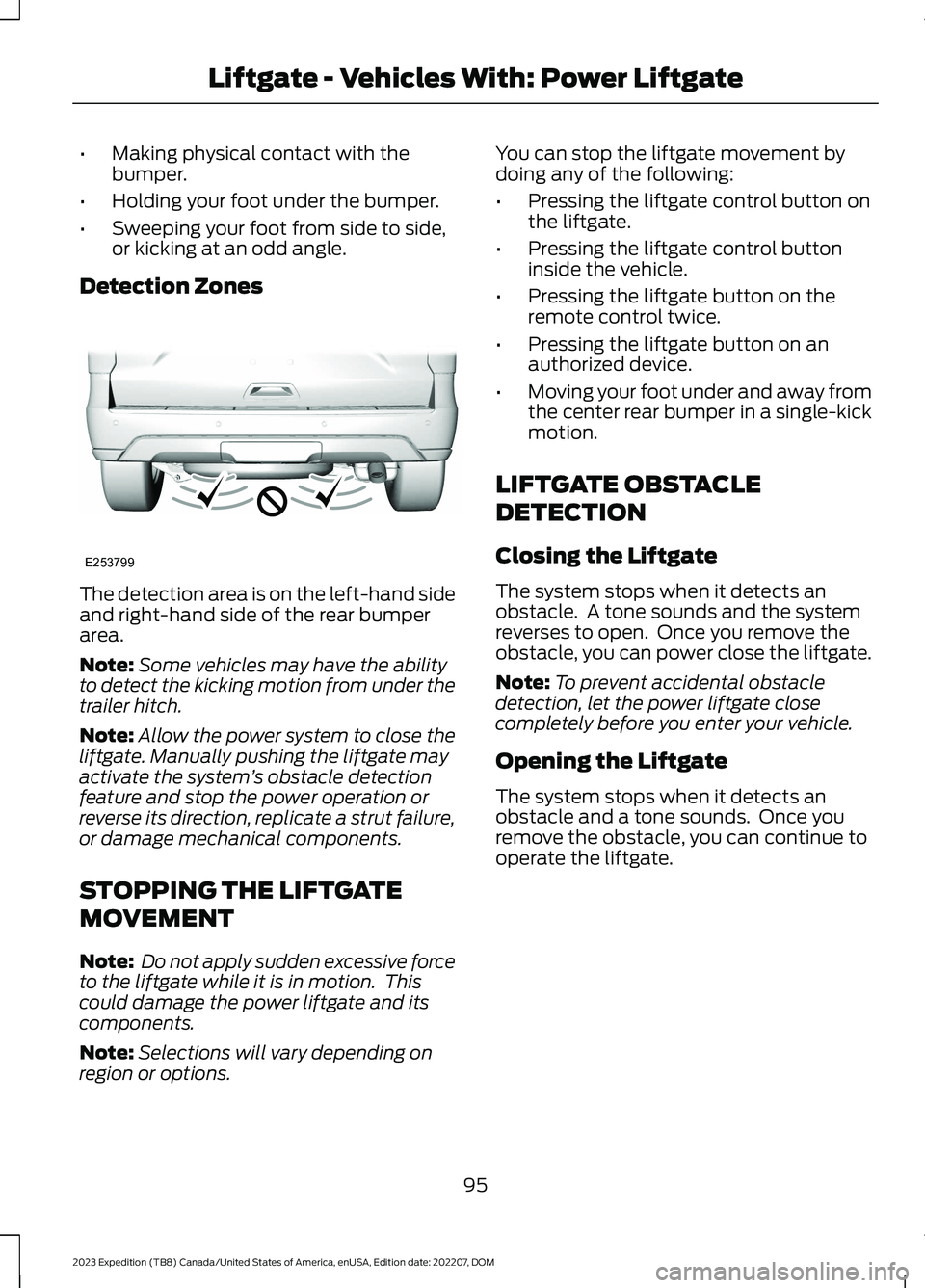
Detection Zones
The detection area is on the left-hand sideand right-hand side of the rear bumperarea.
Note:Some vehicles may have the abilityto detect the kicking motion from under thetrailer hitch.
Note:Allow the power system to close theliftgate. Manually pushing the liftgate mayactivate the system’s obstacle detectionfeature and stop the power operation orreverse its direction, replicate a strut failure,or damage mechanical components.
STOPPING THE LIFTGATE
MOVEMENT
Note: Do not apply sudden excessive forceto the liftgate while it is in motion. Thiscould damage the power liftgate and itscomponents.
Note:Selections will vary depending onregion or options.
You can stop the liftgate movement bydoing any of the following:
•Pressing the liftgate control button onthe liftgate.
•Pressing the liftgate control buttoninside the vehicle.
•Pressing the liftgate button on theremote control twice.
•Pressing the liftgate button on anauthorized device.
•Moving your foot under and away fromthe center rear bumper in a single-kickmotion.
LIFTGATE OBSTACLE
DETECTION
Closing the Liftgate
The system stops when it detects anobstacle. A tone sounds and the systemreverses to open. Once you remove theobstacle, you can power close the liftgate.
Note:To prevent accidental obstacledetection, let the power liftgate closecompletely before you enter your vehicle.
Opening the Liftgate
The system stops when it detects anobstacle and a tone sounds. Once youremove the obstacle, you can continue tooperate the liftgate.
95
2023 Expedition (TB8) Canada/United States of America, enUSA, Edition date: 202207, DOMLiftgate - Vehicles With: Power LiftgateE253799
Page 104 of 658

PASSIVE ANTI-THEFT
SYSTEM
WHAT IS THE PASSIVE ANTI-THEFT SYSTEM
The passive anti-theft system preventssomeone from starting the vehicle with anincorrectly coded key.
Note:Do not leave a duplicate coded keyin your vehicle. Always take the keys andlock all the doors when leaving your vehicle.
HOW DOES THE PASSIVE ANTI-THEFT SYSTEM WORK
The passive anti-theft system arms whenyou switch the ignition off.
It disarms when the ignition is switched onwith a correctly coded key.
Note:The system is not compatible withnon-Ford aftermarket remote start systems.
Note:Do not leave a duplicate coded keyin your vehicle. Always take the keys andlock all doors when leaving your vehicle.
ANTI-THEFT ALARM SYSTEM
WHAT IS THE ANTI-THEFT ALARMSYSTEM
The anti-theft alarm system warns you ofan unauthorized entry to your vehicle.
HOW DOES THE ANTI-THEFTALARM SYSTEM WORK
When armed, the anti-theft alarm istriggered in any of the following ways:
•If someone opens a door, the tailgateor the hood without a correctly codedkey or remote control.
•If you turn the power on without acorrectly coded key.
•If the interior sensors detect movementinside your vehicle.
•If the inclination sensors detect anattempt to raise your vehicle.
•If someone disconnects the vehiclebattery or the battery backup alarm.
•If someone disconnects the trailer. SeeConnecting a Trailer (page 354).
Any further attempts to carry out one ofthe above, sounds the alarm again.
If the anti-theft alarm is triggered, thealarm horn sounds for 30 seconds and theturn signals flash for five minutes.
WHAT IS THE PERIMETER ALARM
The perimeter alarm is designed to detectunauthorized access to your vehicle.
WHAT ARE THE INTERIORSENSORS
The interior sensors are designed to detectany movement inside your vehicle.
The interior sensors are in the overheadconsole.
Note:Do not cover the interior sensors.
100
2023 Expedition (TB8) Canada/United States of America, enUSA, Edition date: 202207, DOMSecurity