Page 336 of 658

Note:If your vehicle detects excessive heatat the camera or a potential misalignmentcondition, a message could display in theinformation display indicating temporarysensor unavailability. When operationalconditions are correct, the messagedeactivates. For example, when the ambienttemperature around the sensor decreasesor the sensor recalibrates successfully.
DISTANCE INDICATION (IF
EQUIPPED)
WHAT IS DISTANCE INDICATION- VEHICLES WITH: 8 INCH SCREEN
Distance indication displays the gapbetween your vehicle and the vehicleahead of you.
Note:The graphic does not display if youswitch on cruise control or adaptive cruisecontrol.
Time GapDistance GapDistance Indic-ator ColorSystem Sensit-ivityVehicle Speed
Greater than 0.9seconds.Greater than82 ft (25 m).Gray.Normal.62 mph(100 km/h).
0.6-0.9seconds.56–82 ft(17–25 m).Yellow.
Less than 0.6seconds.Less than 56 ft(17 m).Red.
332
2023 Expedition (TB8) Canada/United States of America, enUSA, Edition date: 202207, DOMPre-Collision Assist
Page 337 of 658
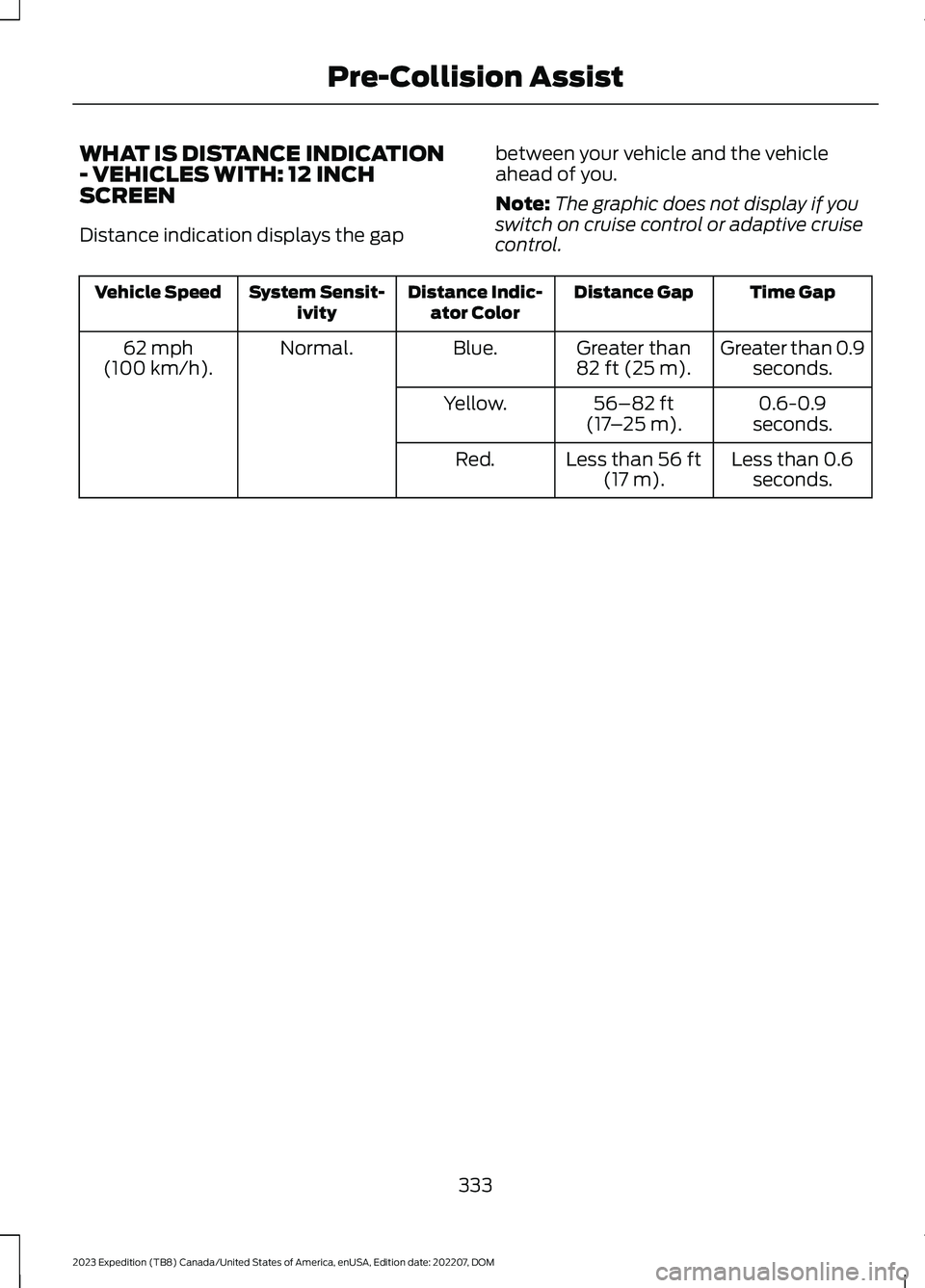
WHAT IS DISTANCE INDICATION- VEHICLES WITH: 12 INCHSCREEN
Distance indication displays the gap
between your vehicle and the vehicleahead of you.
Note:The graphic does not display if youswitch on cruise control or adaptive cruisecontrol.
Time GapDistance GapDistance Indic-ator ColorSystem Sensit-ivityVehicle Speed
Greater than 0.9seconds.Greater than82 ft (25 m).Blue.Normal.62 mph(100 km/h).
0.6-0.9seconds.56–82 ft(17–25 m).Yellow.
Less than 0.6seconds.Less than 56 ft(17 m).Red.
333
2023 Expedition (TB8) Canada/United States of America, enUSA, Edition date: 202207, DOMPre-Collision Assist
Page 338 of 658
SWITCHING DISTANCEINDICATION ON AND OFF -VEHICLES WITH: 12 INCH SCREEN
To switch the system on or off, use thetouchscreen:
1.Press Features on the touchscreen.
2.Press Driver Assistance.
3.Press Pre-Collision Assist.
4.Switch Distance Indication on or off.
SWITCHING DISTANCEINDICATION ON AND OFF -VEHICLES WITH: 15 INCH SCREEN
To switch the system on or off:
1.Access the vehicle drawer.
2.Press SETTINGS.
3.Press Driver Assistance.
4.Press Pre-Collision Assist.
5.Switch Distance Indication on or off.
DISTANCE INDICATIONINDICATOR - VEHICLES WITH: 8INCH SCREEN
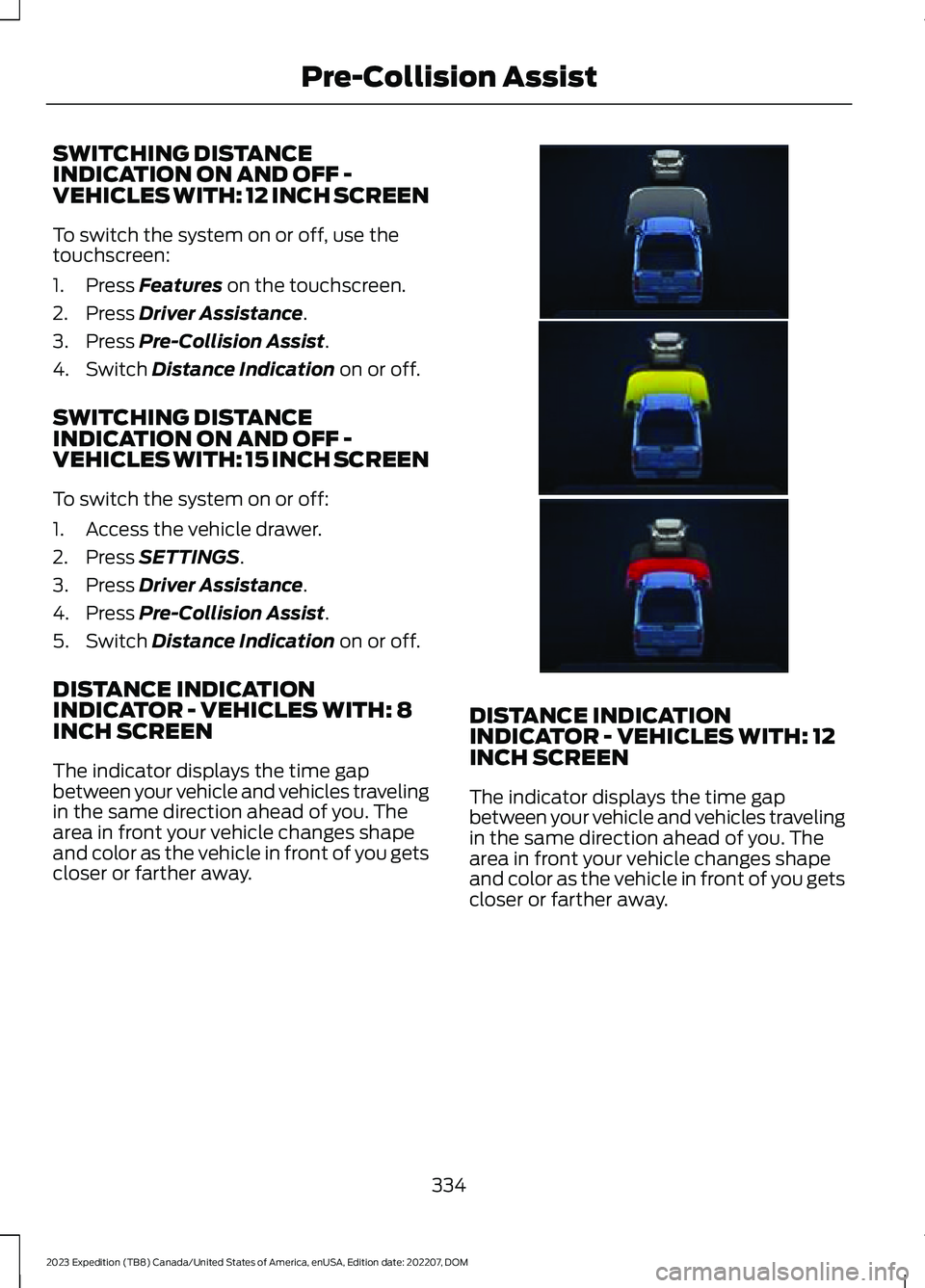
The indicator displays the time gapbetween your vehicle and vehicles travelingin the same direction ahead of you. Thearea in front your vehicle changes shapeand color as the vehicle in front of you getscloser or farther away.
DISTANCE INDICATIONINDICATOR - VEHICLES WITH: 12INCH SCREEN
The indicator displays the time gapbetween your vehicle and vehicles travelingin the same direction ahead of you. Thearea in front your vehicle changes shapeand color as the vehicle in front of you getscloser or farther away.
334
2023 Expedition (TB8) Canada/United States of America, enUSA, Edition date: 202207, DOMPre-Collision AssistE374085
Page 342 of 658
PRE-COLLISION ASSIST –FREQUENTLY ASKED QUESTIONS
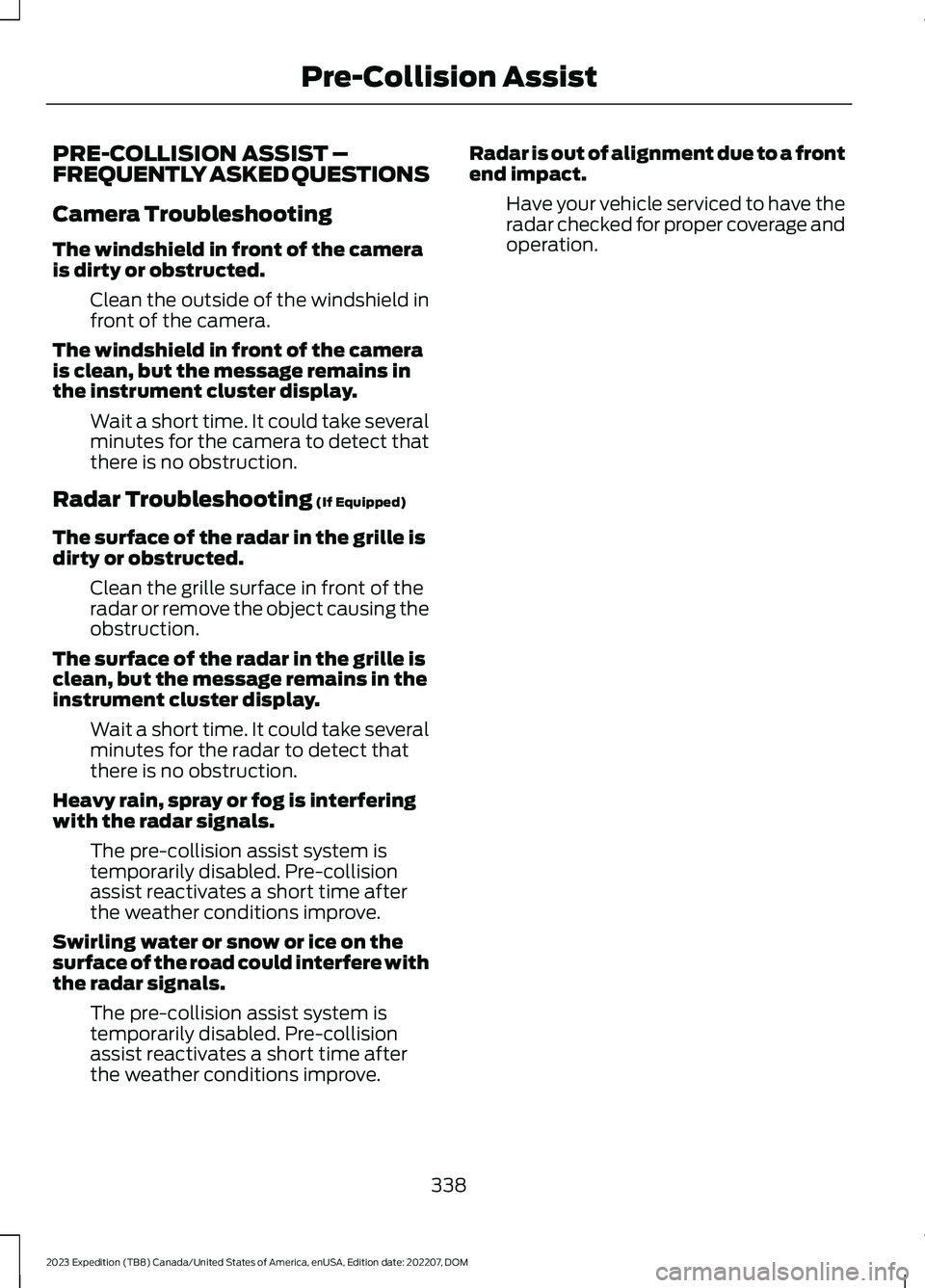
Camera Troubleshooting
The windshield in front of the camerais dirty or obstructed.
Clean the outside of the windshield infront of the camera.
The windshield in front of the camerais clean, but the message remains inthe instrument cluster display.
Wait a short time. It could take severalminutes for the camera to detect thatthere is no obstruction.
Radar Troubleshooting (If Equipped)
The surface of the radar in the grille isdirty or obstructed.
Clean the grille surface in front of theradar or remove the object causing theobstruction.
The surface of the radar in the grille isclean, but the message remains in theinstrument cluster display.
Wait a short time. It could take severalminutes for the radar to detect thatthere is no obstruction.
Heavy rain, spray or fog is interferingwith the radar signals.
The pre-collision assist system istemporarily disabled. Pre-collisionassist reactivates a short time afterthe weather conditions improve.
Swirling water or snow or ice on thesurface of the road could interfere withthe radar signals.
The pre-collision assist system istemporarily disabled. Pre-collisionassist reactivates a short time afterthe weather conditions improve.
Radar is out of alignment due to a frontend impact.
Have your vehicle serviced to have theradar checked for proper coverage andoperation.
338
2023 Expedition (TB8) Canada/United States of America, enUSA, Edition date: 202207, DOMPre-Collision Assist
Page 344 of 658
SWITCHING DRIVER ALERT ON
AND OFF - VEHICLES WITH: 12
INCH SCREEN
1.Press Features on the touchscreen.
2.Press Driver Assistance.
3.Switch Driver Alert on or off.
Note:The system remains on or offdepending on how it was last set.
Resetting Driver Alert
You can reset the system by either:
•Switching the ignition off and on.
•Opening and closing the driver doorwhen your vehicle is stationary, and itis safe to do so.
SWITCHING DRIVER ALERT ON
AND OFF - VEHICLES WITH:
15.5 INCH CENTER DISPLAY
SCREEN/15 INCH SCREEN
To switch the system on or off, use thetouchscreen:
1.Access the vehicle drawer.
2.Press SETTINGS.
3.Press Driver Assistance.
4.Switch Driver Alert on or off.
Note:The system remains on or offdepending on how it was last set.
Resetting Driver Alert
You can reset the system by either:
•Switching the ignition off and on.
•Stopping the vehicle and then openingand closing the driver door.
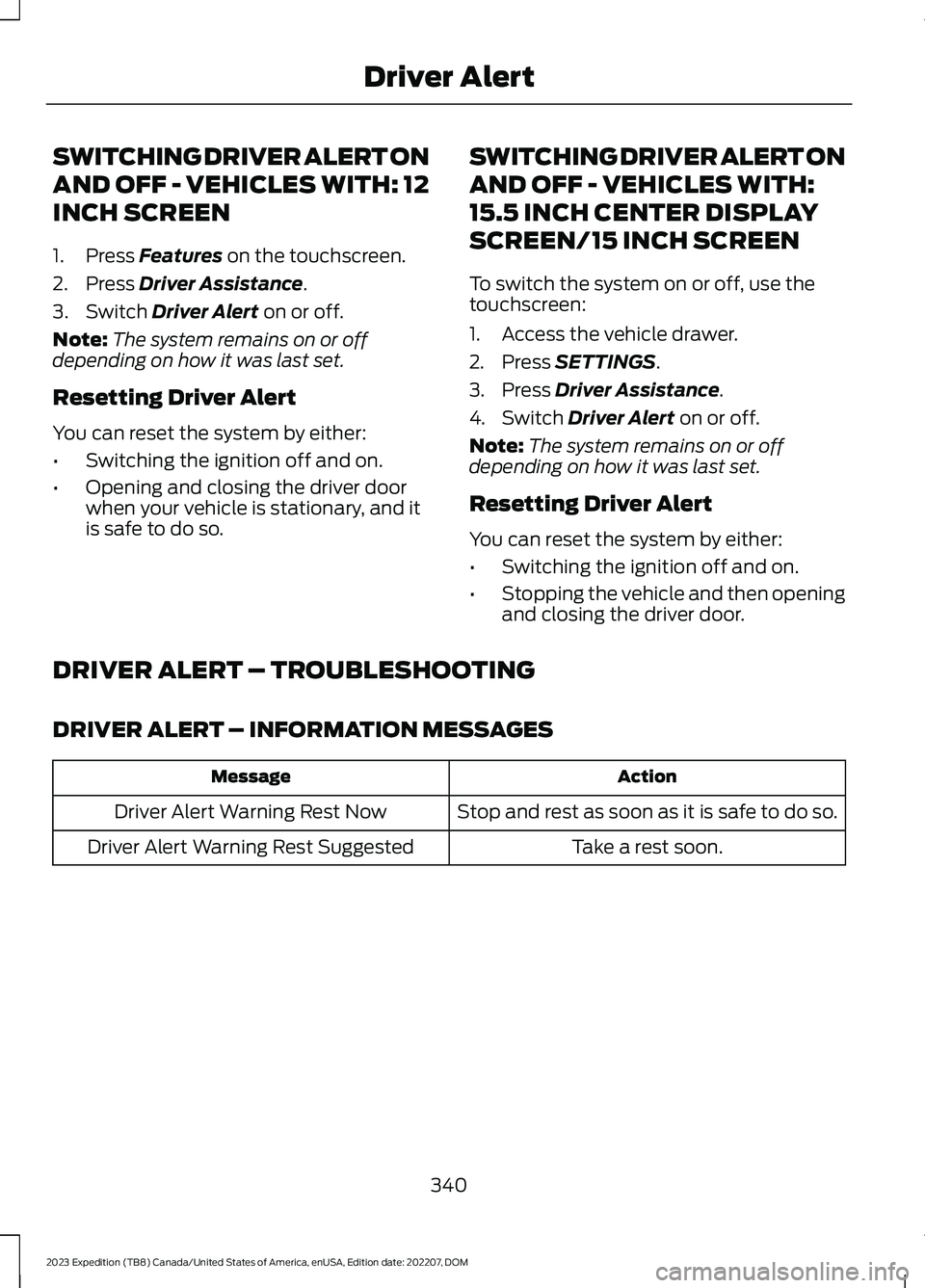
DRIVER ALERT – TROUBLESHOOTING
DRIVER ALERT – INFORMATION MESSAGES
ActionMessage
Stop and rest as soon as it is safe to do so.Driver Alert Warning Rest Now
Take a rest soon.Driver Alert Warning Rest Suggested
340
2023 Expedition (TB8) Canada/United States of America, enUSA, Edition date: 202207, DOMDriver Alert
Page 345 of 658

WHAT IS SPEED SIGN
RECOGNITION
Speed sign recognition detects speed limitsigns to inform you of the current speedlimit. Detected speed signs appear in theinstrument cluster display.
HOW DOES SPEED SIGN
RECOGNITION WORK
Speed sign recognition uses a sensorbehind the interior mirror to detect speedsigns.
If your vehicle has speed sign recognitionwith navigation, stored speed sign datamay influence the indicated speed limitvalue.
SPEED SIGN RECOGNITION
PRECAUTIONS
WARNING: You are responsible forcontrolling your vehicle at all times. Thesystem is designed to be an aid and doesnot relieve you of your responsibility todrive with due care and attention. Failureto follow this instruction could result inthe loss of control of your vehicle,personal injury or death.
WARNING: In cold and severeweather conditions the system may notfunction. Rain, snow and spray can alllimit sensor performance.
WARNING: The system may notoperate properly if the sensor is blocked.Keep the windshield free fromobstruction.
Note:Do not carry out windshield repairsin the immediate area surrounding thesensor.
Note:If your vehicle has a suspension kitnot approved by Ford, the system may notcorrectly function.
Note:The system may not detect all speedsigns and may incorrectly read signs.
Note:Always fit our original parts whenreplacing headlamp bulbs. Other bulbs mayreduce system performance.
SPEED SIGN RECOGNITION
LIMITATIONS
Speed sign recognition may not operatecorrectly due to:
•Outdated map data.
•Incorrect recognition of speed limits bythe sensor of signs on parallel roads orexit ramps.
•Missed recognition of faded, dirty, ordistorted signs.
SPEED SIGN RECOGNITION
INDICATORS
When the system detects a speed limitsign, it appears in the instrument clusterdisplay.
341
2023 Expedition (TB8) Canada/United States of America, enUSA, Edition date: 202207, DOMSpeed Sign Recognition (If Equipped)E317824
Page 346 of 658
Note:Sign indicator image may vary basedon your vehicle's display type.
SETTING THE SPEED SIGN
RECOGNITION SPEED
WARNING - VEHICLES WITH:
12 INCH SCREEN
To set the speed warning, use thetouchscreen.
1.Press Features on the touchscreen.
2.Press Driver Assistance.
3.Press Speed Limit Assist.
4.Switch the feature on or off.
SETTING THE SPEED SIGN
RECOGNITION SPEED
WARNING - VEHICLES WITH:
15 INCH SCREEN
To set the speed warning, use thetouchscreen.
1.Access the vehicle drawer.
2.Press SETTINGS.
3.Press Driver Assistance.
4.Press Speed Limit Assist.
5.Select to switch the feature on or off.
SETTING THE SPEED SIGN
RECOGNITION SPEED
TOLERANCE - VEHICLES WITH:
12 INCH SCREEN
To set the tolerance of the speed warning,use the touchscreen.
1.Press Features on the touchscreen.
2.Press Driver Assistance.
3.Press Speed Limit Assist.
4.Press Tolerance.
5.Use the slider bar to select the requiredlevel.
SETTING THE SPEED SIGN
RECOGNITION SPEED
TOLERANCE - VEHICLES WITH:
15 INCH SCREEN
To set the tolerance of the speed warning,use the touchscreen.
1.Access the vehicle drawer.
2.Press SETTINGS.
3.Press Driver Assistance.
4.Press Speed Limit Assist.
5.Press Tolerance.
6.Use the slider bar to select the requiredlevel.
342
2023 Expedition (TB8) Canada/United States of America, enUSA, Edition date: 202207, DOMSpeed Sign Recognition (If Equipped)
Page 361 of 658

CONNECTING A TRAILER – TROUBLESHOOTING
CONNECTING A TRAILER – INFORMATION MESSAGES
DescriptionMessage
The system senses a trailer connectionbecomes disconnected, either intentionallyor unintentionally, during a given ignitioncycle.
Trailer Disconnected
There are certain faults in your vehiclewiring and trailer wiring or brake system.Trailer Wiring Fault
There is a fault with your trailer battery, oryour trailer battery voltage is very low.Trailer Battery Not Charging See Manual
One or more tires on your trailer is belowthe specified tire pressure.Trailer Tire Low Specified:
Displays when one or more tires on thetrailer is above the recommended temper-ature.
Trailer Tire Over Temperature
A trailer tire pressure sensor is malfunc-tioning. If the warning stays on or continuesto come on, have the system checked assoon as possible.
Trailer Tire Pressure Sensor Fault
The trailer tire pressure monitoring systemis malfunctioning. If the warning stays onor continues to come on, have the systemchecked.
Trailer Tire Pressure Monitor Fault
The system cannot detect the trailer tirepressure monitoring system.Trailer Tire Pressure Monitor Capability NotDetected
The trailer tire pressure monitoring systemis not setup.Trailer Tire Pressure Indication Not SetupSee Manual
357
2023 Expedition (TB8) Canada/United States of America, enUSA, Edition date: 202207, DOMConnecting a Trailer