2023 CADILLAC CT5 wheel
[x] Cancel search: wheelPage 278 of 526

Cadillac CT5 Owner Manual (GMNA-Localizing-U.S./Canada-16500419) -
2023 - CRC - 5/10/22
Driving and Operating 277
If parking on a hill and pulling a
trailer, see Driving
Characteristics and Towing
Tips0365.
Automatic
Transmission
The shift pattern is displayed
in the top of the shift lever.
The selected gear position will
illuminate red on the shift
lever, while all others will be
displayed in white. If the shift
is not immediate, as in very cold conditions, the indicator
on the shift lever may flash
until it is fully engaged.
The shift lever always starts
from a center position,
represented by an up/down
arrow on the shift pattern.
After releasing the shift lever,
it will return to the center
position.
The transmission does not
operate when the vehicle
is off.
If the vehicle is in accessory
mode, the transmission can be
shifted into P (Park).
If the vehicle is turned off
while at a relatively high
vehicle speed, the
transmission will automatically
shift to N (Neutral). Once the
vehicle is stopped, it can be
shifted into P (Park).
P :
This position locks the
drive wheels. Use P (Park)
when starting the engine to
prevent the vehicle from
moving easily.
{Warning
It is dangerous to get out of
the vehicle if the
transmission is not in
P (Park) with the parking
brake set. The vehicle
can roll.
(Continued)
Page 280 of 526

Cadillac CT5 Owner Manual (GMNA-Localizing-U.S./Canada-16500419) -
2023 - CRC - 5/10/22
Driving and Operating 279
R :Use this gear to back up.
If the vehicle is shifted from
either R (Reverse) to D (Drive)
or M (Manual Mode),
or M (Manual Mode) or
D (Drive) to R (Reverse) while
the speed is too high, the
vehicle will shift to N (Neutral).
Reduce the vehicle speed and
try the shift again.
To shift into R (Reverse): 1. Bring the vehicle to a complete stop.
2. Press and hold shift lock release button on the side
of the shift lever.
3. From the center position, move the shift lever
forward through the first
detent to the end of travel.
R is illuminated in red.
4. After releasing the shift lever, it will return to the
center position.
To shift out of R (Reverse): 1. Bring the vehicle to a complete stop. 2. Shift to the desired gear.
3. After releasing the shift
lever, it will return to the
center position.
At low vehicle speeds,
R (Reverse) can be used to
rock the vehicle back and forth
to get out of snow, ice, or sand
without damaging the
transmission. See If the
Vehicle Is Stuck 0261.
N : In this position, the engine
does not connect with the
wheels. To restart the engine
when the vehicle is already
moving, use N (Neutral) only.
{Warning
Shifting into a drive gear
while the engine is running
at high speed is dangerous.
Unless your foot is firmly on
the brake pedal, the vehicle
could move very rapidly. You
could lose control and hit
people or objects. Do not
(Continued)
Warning (Continued)
shift into a drive gear while
the engine is running at high
speed.
Caution
Shifting out of P (Park) or
N (Neutral) with the engine
running at high speed may
damage the transmission.
The repairs would not be
covered by the vehicle
warranty. Be sure the
engine is not running at high
speed when shifting the
vehicle.
The vehicle is not designed to
stay in N (Neutral) for more
than five minutes. It may
automatically shift into
P (Park). N (Neutral) is not
intended for towing. If the
vehicle needs to be towed, see
Transporting a Disabled
Vehicle 0455.
Page 283 of 526

Cadillac CT5 Owner Manual (GMNA-Localizing-U.S./Canada-16500419) -
2023 - CRC - 5/10/22
282 Driving and Operating
Caution
Spinning the tires or holding
the vehicle in one place on a
hill using only the
accelerator pedal may
damage the transmission.
The repair will not be
covered by the vehicle
warranty. If the vehicle is
stuck, do not spin the tires.
When stopping on a hill, use
the brakes to hold the
vehicle in place.
If equipped with the 2.0L L4
engine, engine speeds may be
increased while driving at
highway speeds while the
engine is still warming up.
Manual Mode
Tap Shift Caution
Driving with the engine at a
high rpm without upshifting
while using Tap Shift, could
damage the vehicle. Always
upshift when necessary
while using Tap Shift.
If equipped, vehicles with Tap
Shift have controls on the
back of the steering wheel to
manually shift the automatic
transmission. Permanent Tap Shift Mode
To enter Permanent Tap
Shift Mode:
1. With the vehicle in D (Drive), pull back on the
shift lever to activate
M (Manual Mode). The M in
the shift pattern will
illuminate in red, and the D
will switch to white. While
in Permanent Tap Shift
Mode, the M on the
instrument cluster will be
highlighted and the current
gear shown.
2. After releasing the shift lever, it will return to the
center position.
3. Pull the control toward you to shift. Pull the left
control to downshift, and
the right control to upshift.
To shift to the lowest
available gear, pull and hold
the left control.
Page 288 of 526

Cadillac CT5 Owner Manual (GMNA-Localizing-U.S./Canada-16500419) -
2023 - CRC - 5/10/22
Driving and Operating 287
.Be disabled when the
coolant temperature is
below 0 °C (32 °F).
Drive Systems
All-Wheel Drive
Vehicles with this feature
always send engine power to
all four wheels. It is fully
automatic, and adjusts itself as
needed for road conditions.
Brakes
Electric Brake Boost
Vehicles equipped with
electric brake boost have
hydraulic brake circuits that
are electronically controlled
when the brake pedal is
applied during normal
operation. The system
performs routine tests and
turns off within a few minutes
after the vehicle is turned off.
Noise may be heard during
this time. If the brake pedal is
pressed during the tests orwhen the electric brake boost
system is off, a noticeable
change in pedal force and
travel may be felt. This is
normal.
Antilock Brake
System (ABS)
The Antilock Brake System
(ABS) helps prevent a braking
skid and maintain steering
while braking hard.
If there is a problem with ABS,
this warning light stays on.
See Antilock Brake System
(ABS) Warning Light
0128.
ABS does not change the time
needed to get a foot on the
brake pedal and does not
always decrease stopping
distance. If you get too close
to the vehicle ahead, there will not be enough time to apply
the brakes if that vehicle
suddenly slows or stops.
Always leave enough room
ahead to stop, even with ABS.
Using ABS
Do not pump the brakes. Just
hold the brake pedal down
firmly. Hearing and feeling ABS
operate is normal.
Braking in Emergencies
ABS allows steering and
braking at the same time. In
many emergencies, steering
can help even more than
braking.
Page 290 of 526

Cadillac CT5 Owner Manual (GMNA-Localizing-U.S./Canada-16500419) -
2023 - CRC - 5/10/22
Driving and Operating 289
the correct operation of the
EPB system, or at the request
of other safety functions that
utilize the EPB.
If the EPB fails to apply, block
the rear wheels to prevent
vehicle movement.
EPB Release
To release the EPB:1. Turn the ignition on or to accessory mode.
2. Apply and hold the brake pedal.
3. Press the EPB switch momentarily.
The EPB is released when the
red parking brake status light
is off.
If the amber service parking
brake warning light is on,
release the EPB by pressing
and holding the EPB switch.
Continue to hold the switch
until the red parking brake
status light is off. If either light
stays on after release is
attempted, see your dealer.
Caution
Driving with the parking
brake on can overheat the
brake system and cause
premature wear or damage
to brake system parts. Make
sure that the parking brake
is fully released and the
brake warning light is off
before driving.
If you are towing a trailer and
parking on a hill, see Driving
Characteristics and Towing
Tips 0365.
Automatic EPB Release
The EPB will automatically
release if the vehicle is
running, placed into gear, and
an attempt is made to drive
away. Avoid rapid acceleration
when the EPB is applied, to
preserve parking brake
lining life.
Brake Assist
Brake Assist detects rapid
brake pedal applications due
to emergency braking
situations and provides
additional braking to activate
the Antilock Brake System
(ABS) if the brake pedal is not
pushed hard enough to
activate ABS normally. Minor
noise, brake pedal pulsation,
and/or pedal movement during
this time may occur. Continue
to apply the brake pedal as
the driving situation dictates.
Brake Assist disengages when
the brake pedal is released.
Hill Start Assist (HSA)
{Warning
Do not rely on the HSA
feature. HSA does not
replace the need to pay
attention and drive safely.
You may not hear or feel
alerts or warnings provided
by this system. Failure to
(Continued)
Page 292 of 526

Cadillac CT5 Owner Manual (GMNA-Localizing-U.S./Canada-16500419) -
2023 - CRC - 5/10/22
Driving and Operating 291
holding the vehicle. See
Automatic Vehicle Hold (AVH)
Light0129.
Ride Control
Systems
Traction Control/
Electronic Stability
Control
The vehicle has a Traction
Control System (TCS) and
StabiliTrak/Electronic Stability
Control (ESC). These systems
help limit wheel slip and assist
the driver in maintaining
control, especially on slippery
road conditions.
TCS activates if it senses that
any of the drive wheels are
spinning or beginning to lose
traction. When this happens,
the system brakes the
spinning wheel(s) and/or
reduces engine power to limit
wheel spin. StabiliTrak/ESC activates
when the computer senses a
difference between the
intended path and the
direction the vehicle is actually
traveling. StabiliTrak/ESC
selectively applies braking
pressure at any one of the
vehicle's brakes to help steer
the vehicle in the intended
direction.
If cruise control is being used
and TCS or StabiliTrak/ESC
begins to limit wheel spin,
cruise control will disengage.
Cruise control may be turned
back on when road conditions
allow.
Both systems come on
automatically when the vehicle
is started and begins to move.
The systems may be heard or
felt while they are operating
or while performing diagnostic
checks. This is normal and
does not mean there is a
problem with the vehicle.
It is recommended to leave
both systems on for normal
driving conditions, but it may
be necessary to turn TCS off
if the vehicle gets stuck in
sand, mud, ice, or snow. See If
the Vehicle Is Stuck
0261 and
“Turning the Systems Off and
On” later in this section.
The indicator light for both
systems is in the instrument
cluster. This light will:
.Flash when TCS is limiting
wheel spin.
.Flash when StabiliTrak/ESC
is activated.
.Turn on and stay on when
either system is not working.
Page 293 of 526
Cadillac CT5 Owner Manual (GMNA-Localizing-U.S./Canada-16500419) -
2023 - CRC - 5/10/22
292 Driving and Operating
If either system fails to turn on
or to activate, a message may
display in the Driver
Information Center (DIC), and
dcomes on and stays on to
indicate that the system is
inactive and is not assisting
the driver in maintaining
control. The vehicle is safe to
drive, but driving should be
adjusted accordingly.
If
dcomes on and stays on:
1. Stop the vehicle.
2. Turn the engine off and wait 15 seconds.
3. Start the engine.
Drive the vehicle. if
dcomes
on and stays on, the vehicle
may need more time to
diagnose the problem. If the
condition persists, see your
dealer.
Turning the Systems Off
and On
Caution
Do not repeatedly brake or
accelerate heavily when TCS
is off. The vehicle driveline
could be damaged.
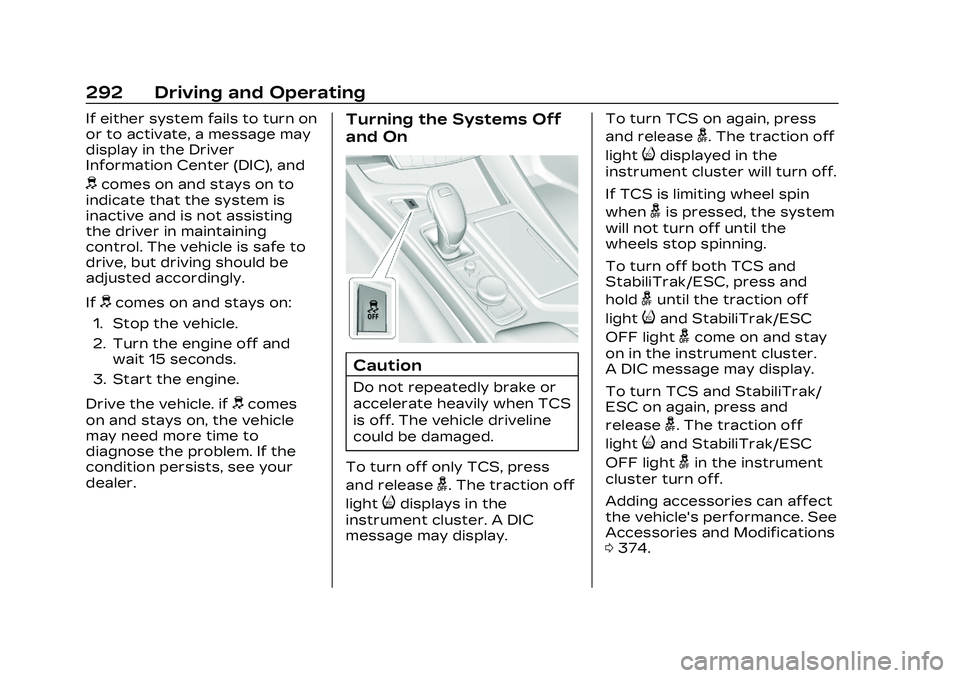
To turn off only TCS, press
and release
g. The traction off
light
idisplays in the
instrument cluster. A DIC
message may display. To turn TCS on again, press
and release
g. The traction off
light
idisplayed in the
instrument cluster will turn off.
If TCS is limiting wheel spin
when
gis pressed, the system
will not turn off until the
wheels stop spinning.
To turn off both TCS and
StabiliTrak/ESC, press and
hold
guntil the traction off
light
iand StabiliTrak/ESC
OFF light
gcome on and stay
on in the instrument cluster.
A DIC message may display.
To turn TCS and StabiliTrak/
ESC on again, press and
release
g. The traction off
light
iand StabiliTrak/ESC
OFF light
gin the instrument
cluster turn off.
Adding accessories can affect
the vehicle's performance. See
Accessories and Modifications
0 374.
Page 295 of 526

Cadillac CT5 Owner Manual (GMNA-Localizing-U.S./Canada-16500419) -
2023 - CRC - 5/10/22
294 Driving and Operating
V-Mode Switch (Variant 1)
V-Mode Switch (Variant 2)Depending on trim level, the
V-Mode switch may be located
on the right side or left side of
the steering wheel. To
activate V-Mode, press the
V-Mode switch on the steering
wheel. To deactivate, select a
different mode using the DMC
switch, or press the V-Mode
switch again.
Performance Traction
Management (PTM) Switch If equipped, activate PTM by
pressing up on the PTM
switch on the steering wheel.
A PTM menu will appear in the
Driver Information Center
(DIC). Press up or down on the
PTM switch to scroll through
the options and make a
selection. To exit PTM, select
INACTIVE in the PTM menu.
Mode Description
Tour Mode
Use for normal city and
highway driving to provide a
smooth, soft ride. This mode
provides a balance between
comfort and handling. This is
the standard mode. See
“Mode Selection Attributes”
later in this section. When
Tour Mode is selected, no
indicator will display.