2023 ACURA INTEGRA audio
[x] Cancel search: audioPage 508 of 740
uuAcuraWatchTMuAdaptive Cruise Control (ACC) with Low Speed Follow*
506
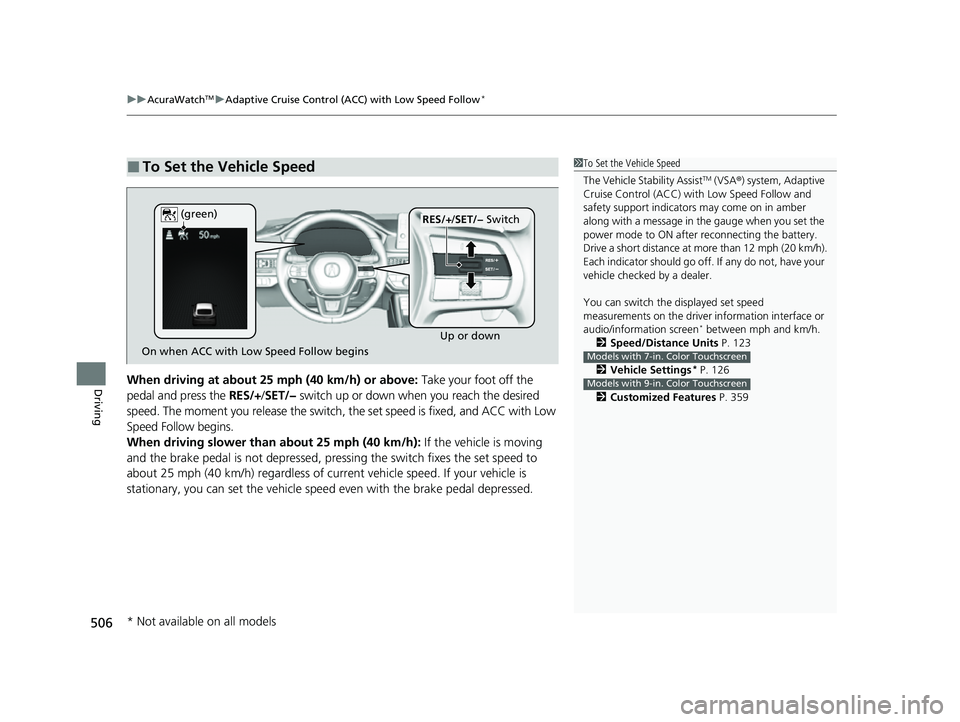
DrivingWhen driving at about 25 mph (40 km/h) or above: Take your foot off the
pedal and press the RES/+/SET/− switch up or down when you reach the desired
speed. The moment you release the switch, the set speed is fixed, and ACC with Low
Speed Follow begins.
When driving slower than about 25 mph (40 km/h): If the vehicle is moving
and the brake pedal is not depressed, pres sing the switch fixes the set speed to
about 25 mph (40 km/h) regardless of current vehicle speed. If your vehicle is
stationary, you can set the vehicle speed even with the brake pedal depressed.
■To Set the Vehicle Speed1 To Set the Vehicle Speed
The Vehicle Stability Assist
TM (VSA ®) system, Adaptive
Cruise Control (ACC) with Low Speed Follow and
safety support indicators may come on in amber
along with a message in the gauge when you set the
power mode to ON after reconnecting the battery.
Drive a short distance at more than 12 mph (20 km/h).
Each indicator should go off. If any do not, have your
vehicle checked by a dealer.
You can switch the displayed set speed
measurements on the driver information interface or
audio/information screen
* between mph and km/h.
2 Speed/Distance Units P. 123
2 Vehicle Settings
* P. 126
2 Customized Features P. 359
Models with 7-in. Color Touchscreen
Models with 9-in. Color Touchscreen
On when ACC with Low Speed Follow begins Up or down
RES/+
/SET/− Switch
(green)
* Not available on all models
23 ACURA INTEGRA-313S56000_03.book 506 ページ 2022年3月18日 金曜日 午前11時47分
Page 524 of 740

uuAcuraWatchTMuAdaptive Cruise Control (ACC) with Low Speed Follow*
522
Driving
Press and hold the Interval button for one
second. Cruise mode selected appears on
the driver information interface for two
seconds, and then the mode switches to
Cruise.
The indicator comes on.
• Green: The system is on.
• White: The system is standby.
To switch back to ACC with Low Speed
Follow, press and hold the Interval button
again for one second.
■When to use
Desired speed in a range above roughly 25 mph (40 km/h).
Take your foot off the pedal and press the RES/+/SET/− switch up or down when
you reach the desired speed.
The moment you release the RES/+/SET/− switch, the set speed is fixed, and cruise
control begins. The color of indicator changes from white to green.
When you use cruise control, Straight Driv ing Assist (a feature of the Electric Power
Steering system) is activated.
By enabling the steering system to automa tically compensate for natural steering
pull, Straight Driving Assist makes it easier for you to keep your vehicle in a straight
line.
■To Switch ACC with Low Speed Follow to Cruise Control1 To Switch ACC with Low Speed Follow to Cruise Control
Always be aware which mode you are in. When you
are driving in Cruise mode, the system will not assist
you to maintain a following-interval from a vehicle
ahead of you.
You cannot switch ACC with Low Speed Follow to
Cruise Control in the following situations:
•When the vehicle speed is set.
•When ACC with Low Speed Follow is not activated.
You can switch the displayed set speed
measurements on the driver information interface or
audio/information screen
* between mph and km/h.
2 Speed/Distance Units P. 123
2 Vehicle Settings
* P. 126
2 Customized Features P. 359
Models with 7-in. Color Touchscreen
Models with 9-in. Color Touchscreen
ACC with
Low Speed
Follow ON Cruise
Control ONInterval
Button
(white) (white)
■To Set the Vehicle Speed
* Not available on all models
23 ACURA INTEGRA-313S56000_03.book 522 ページ 2022年3月18日 金曜日 午前11時47分
Page 529 of 740

Continued527
uuAcuraWatchTMuAdaptive Cruise Control (ACC)*
DrivingTake your foot off the pedal and press the RES/+/SET/- switch up or down when
you reach the desired speed. The moment you release the button, the set speed is
fixed, and ACC begins.
When ACC starts operating, the vehicle icon, distance bars and set speed appear on
the gauge.
■To Set the Vehicle Speed1 To Set the Vehicle Speed
The Vehicle Stability Assist
TM (VSA ®) system, Adaptive
Cruise Control (ACC) and safety support indicators
may come on in amber along with a message in the
gauge when you set the power mode to ON after
reconnecting the battery.
Drive a short distance at more than 12 mph (20 km/h).
Each indicator should go off. If any do not, have your
vehicle checked by a dealer.
You can switch the displayed set speed
measurements on the driver information interface or
audio/information screen between mph and km/h.
2 Speed/Distance Units P. 123
2 Customized Features P. 359
On when ACC begins Up or down
RES/+
/SET/− Switch
(green)
23 ACURA INTEGRA-313S56000_03.book 527 ページ 2022年3月18日 金曜日 午前11時47分
Page 544 of 740

uuAcuraWatchTMuAdaptive Cruise Control (ACC)*
542
Driving
Press and hold the Interval button for one
second. Cruise mode selected appears on
the driver information interface for two
seconds, and then the mode switches to
Cruise.
The indicator comes on.
• Green: The system is on.
• White: The system is standby.
To switch back to ACC, press and hold the
Interval button again for one second.
■When to use
Desired speed in a range above roughly 25 mph (40 km/h).
Take your foot off the pedal and press the RES/+/SET/− switch up or down when
you reach the desired speed.
The moment you release the RES/+/SET/− switch, the set speed is fixed, and cruise
control begins. The color of indicator changes from white to green.
When you use cruise control, Straight Driv ing Assist (a feature of the Electric Power
Steering system) is activated.
By enabling the steering system to automa tically compensate for natural steering
pull, Straight Driving Assist makes it easier for you to keep your vehicle in a straight
line.
■To Switch ACC to Cruise Control1 To Switch ACC to Cruise Control
Always be aware which mode you are in. When you
are driving in Cruise mode, the system will not assist
you to maintain a following-interval from a vehicle
ahead of you.
You cannot switch ACC to Cruise Control in the
following situations:
•When the vehicle speed is set.
•When ACC is not activated.
You can switch the displayed set speed
measurements on the driver information interface or
audio/information screen between mph and km/h. 2 Speed/Distance Units P. 123
2 Customized Features P. 359
ACC ONCruise
Control ON
Interval
Button
(white) (white)
■To Set the Vehicle Speed
23 ACURA INTEGRA-313S56000_03.book 542 ページ 2022年3月18日 金曜日 午前11時47分
Page 600 of 740

598
uuParking Your Vehicle uParking Sensor System*
Driving
Parking Sensor System*
The corner and center sensors monitor obstacles around your vehicle, and the
beeper, driver information in terface and audio/informatio n screen let you know the
approximate distance between your vehicle and the obstacle.
■The sensor location and range
1 Parking Sensor System*
Even when the system is on, always confirm if there is
no obstacle near your ve hicle before parking.
The system may not work properly when:
•The sensors are covered with snow, ice, mud, or
dirt.
•The vehicle has been out in hot or cold weather.•There is something nearby that emits ultrasonic
waves or high frequency sounds.
•Driving in bad weather (rain, fog, snow, etc.).•Any accessories have been put on or around the
sensors.
uIf you put any accessories on or around the rear
sensors, the system may acti vate if it detects these
accessories as an obstacle. In this case, turn off the
rear sensor. 2 Customized Features P. 359
The system may not de tect these obstacles:
•Thin or low objects.
•Sonic-absorptive materials, such as snow, cotton,
or sponge.
•Objects directly under the bumper.
The system may falsely de tect obstacles in the
following situations:
•The vehicle is on uneven su rface, such as grass,
bumps, or a hill.
•When close to other vehicl es with sonar sensors or
other objects that em it ultrasonic waves.
•There is splashing water near the sensors due to
heavy rains, etc.
Front Corner Sensors Rear Corner Sensors
Rear Center Sensors
Front Center Sensors
Within about 24 in (60 cm) or less Front: Within about 39 in (100 cm) or less
Rear: Within abou
t 43 in (110 cm) or less
* Not available on all models
23 ACURA INTEGRA-313S56000_03.book 598 ページ 2022年3月18日 金曜日 午前11時47分
Page 601 of 740

Continued599
uuParking Your Vehicle uParking Sensor System*
Driving
■Parking sensor system on and off
You can turn the system on and off using the driver information interface.
2 Switching the Display P. 112
2 Safety Support P. 121
The front corner, rear corner and rear center sensors start to detect an obstacle
when the transmission is in
(R, and the vehicle speed is less than 5 mph (8 km/h).
The front corner and front center sensors start to detect an obstacle when the
transmission is in any position other than
(P* or (R, and the vehicle speed is less
than 5 mph (8 km/h).
You also need to release the parking brake.
1 Parking Sensor System*
Do not put any accessories on or around the sensors.
When you set the power mode to ON, the system will
be in the previously selected condition.
You can turn the rear park ing sensor system on and
off using the audio/information screen. 2 Customized Features P. 359
Manual transmission models
* Not available on all models
23 ACURA INTEGRA-313S56000_03.book 599 ページ 2022年3月18日 金曜日 午前11時47分
Page 603 of 740

601
uuParking Your Vehicle uParking Sensor System*
Driving
■When the distance between your vehicle and obstacles becomes shorter
*1:On the driver information interface
*2:On the audio/information screen
*3:At this stage, only the center sensors detect obstacles.
To temporarily turn off the beeper, press the right selector wheel while it is sounding. Temporary OFF will be canceled when the shift
position is switched or the vehicle speed reaches 14 km/h or higher.
Interval
between beepsDistance between the Bumper and Obstacle
IndicatorDriver information
interfaceAudio/Information ScreenCorner SensorsCenter Sensors
Moderate—
Front: About 39-24 in (100-60 cm)
Rear: About 43-24 in (110-60 cm)
Comes on*1/
Blinks*2 in Yellow*3
ShortAbout 24-18 in (60-45 cm) About 24-18 in (60-45 cm)
Comes on*1/
Blinks*2 in Amber
Very shortAbout 18-14 in (45-35 cm) About 18-14 in (45-35 cm)
ContinuousAbout 14 in
(35 cm) or lessAbout 14 in
(35 cm) or lessComes on*1/
Blinks*2 in Red
Indicators light up
where the sensor
detects an obstacle.
Indicators light up where the
sensor detects an obstacle.
Indicators light up where the
sensor detects an obstacle. Indicators light up where the
sensor detects an obstacle.
23 ACURA INTEGRA-313S56000_03.book 601 ページ 2022年3月18日 金曜日 午前11時47分
Page 606 of 740

uuParking Your Vehicle uCross Traffic Monitor
604
Driving
An arrow icon appears on the side a vehicl e is approaching on the audio/information
screen.
■When the System Detects a Vehicle1 When the System Detects a Vehicle
If the on the lower right changes to in amber
when the transmission is in
(R, mud, snow or ice,
etc. may have accumulated in the vicinity of the
sensor. The system is temp orarily canceled. Check the
bumper corners for any obs tructions, and thoroughly
clean the area if necessary.
If the comes on when the transmission is in
( R,
there may be a problem with the Cross Traffic
Monitor system. Do not use the system and have your
vehicle checked by a dealer.
If the display remains the same with the transmission
in
( R, there may be a problem with the rear camera
system and the Cross Traffic Monitor system.
Do not use the system and have your vehicle checked
by a dealer.
Wide View
Normal View Arrow IconTop Down View
23 ACURA INTEGRA-313S56000_03.book 604 ページ 2022年3月18日 金曜日 午前11時47分