Page 348 of 740
346
uuGeneral Information on the Audio System uAbout Open Source Licenses
Features
About Open Source Licenses
To see the open source license information, follow these steps.
1. Press the MENU button.
2. Select License .
1. Press the button.
2. Select General Settings .
3. Select System .
4. Select About .
5. Select Legal Information .
6. Select License .
Models with 7-in. Color Touchscreen
Models with 9-in. Color Touchscreen
23 ACURA INTEGRA-313S56000_03.book 346 ページ 2022年3月18日 金曜日 午前11時47分
Page 349 of 740
347
uuGeneral Information on the Audio System uLicense Information
Continued
Features
License Information
For DTS patents, see http://patents.dts.com . Manufactured under license from DTS
Licensing Limited. DTS, the Symbol, & DTS and the Symbol together are registered
trademarks, and DTS Neural Surround is a tra demark of DTS, Inc. © DTS, Inc. All
Rights Reserved.
The Bluetooth® word mark and logos are register ed trademarks owned by Bluetooth
SIG, Inc. and any use of such marks by PANASONIC CORPORATION is under license.
Other trademarks and trade names are those of their respective owners.
The Bluetooth® word mark and logos are register ed trademarks owned by Bluetooth
SIG, Inc. and any use of such marks by MITSUBISHI ELECTRIC is under license.
Other trademarks and trade names are those of their respective owners.
https://www.bluetooth.com/develop- with-bluetooth/marketing-branding/
■DTS Neural Surround
■Bluetooth
23 ACURA INTEGRA-313S56000_03.book 347 ページ 2022年3月18日 金曜日 午前11時47分
Page 350 of 740

348
uuGeneral Information on the Audio System uLicense Information
Features
This product is protected by certain intelle ctual property rights of Microsoft. Use or
distribution of such technology outside of this product is prohibited without a
license from Microsoft.
“Made for iPod,” and “Made for iPhone,” mean that an electronic accessory has
been designed to connect specifically to iPod, or iPhone, respectively, and has been
certified by the developer to meet Appl e performance standards. Apple is not
responsible for the operation of this devi ce or its compliance with safety and
regulatory standards. Please note that the use of this accessory with iPod, or iPhone,
may affect wireless performance.
Apple, the Apple Logo, iPhone, iPod touch are trademarks of Apple Inc., registered
in the U.S. and other countries. Apple CarPlay, iPod, iPhone, iTunes, Siri and
Lightning are trademarks of Apple Inc. App Store is a service mark of Apple Inc.
■Windows Media
■Apple
23 ACURA INTEGRA-313S56000_03.book 348 ページ 2022年3月18日 金曜日 午前11時47分
Page 351 of 740
349
uuGeneral Information on the Audio System uLicense Information
Continued
Features
Mpeg4 Visual
THIS PRODUCT IS LICENSED UNDER THE MPEG-4 VISUAL PATENT PORTFOLIO
LICENSE FOR THE PERSONAL AND NON-COMMERCIAL USE OF A CONSUMER FOR
(i) ENCODING VIDEO IN COMPLIANCE WITH THE MPEG-4 VISUALA STANDARD
(“MPEG-4 VIDEO”) AND/OR (ii) DECODING MPEG-4 VIDEO THAT WAS ENCODED
BY A CONSUMER ENGAGED IN A PERSONAL AND NONCOMMERCIAL ACTIVITY
AND/OR WAS OBTAINED FROM A VIDEO PR OVIDER LICENSED BY MPEG LA TO
PROVIDE MPEG-4 VIDEO. NO LICENSE IS GRANTED OR SHALL BE IMPLIED FOR ANY
OTHER USE. ADDITIONAL INFORMATION INCLUDING THAT RELATING TO
PROMOTIONAL, INTERNAL AND COMMERCIAL USES AND LICENSING MAY BE
OBTAINED FROM MPEG LA, LLC.
SEE HTTP://WWW.MPEGLA.COM .
VC-1
THIS PRODUCT IS LICENSED UNDER THE VC-1 PATENT PORTFOLIO LICENSE FOR THE
PERSONAL AND NON-COMMERCIAL USE OF A CONSUMER TO (i) ENCODE VIDEO
IN COMPLIANCE WITH THE VC-1 STANDARD (“VC-1 VIDEO”) AND/OR (ii) DECODE
VC-1 VIDEO THAT WAS ENCODED BY A CONSUMER ENGAGED IN A PERSONAL
AND NON-COMMERCIAL ACTIVITY AND/OR WAS OBTAINED FROM A VIDEO
PROVIDER LICENSED TO PROVIDE VC-1 VIDEO. NO LICENSE IS GRANTED OR SHALL
BE IMPLIED FOR ANY OTHER USE.
ADDITIONAL INFORMATION MAY BE OBTA INED FROM MPEG LA, L.L.C. SEE
HTTP://WWW.MPEGLA.COM .
■MPEG
23 ACURA INTEGRA-313S56000_03.book 349 ページ 2022年3月18日 金曜日 午前11時47分
Page 352 of 740
350
uuGeneral Information on the Audio System uLicense Information
Features
AVC/H.264
THIS PRODUCT IS LICENSED UNDER THE AVC PATENT PORTFOLIO LICENSE FOR THE
PERSONAL AND NONCOMMERCIAL USE OF A CONSUMER TO (i) ENCODE VIDEO IN
COMPLIANCE WITH THE AVC STANDARD (“ AVC VIDEO”) AND/OR (ii) DECODE
AVC VIDEO THAT WAS ENCODED BY A CONSUMER ENGAGED IN A PERSONAL
AND NON-COMMERCIAL ACTIVITY AND/OR WAS OBTAINED FROM A VIDEO
PROVIDER LICENSED TO PROVIDE AVC VIDEO. NO LICENSE IS GRANTED OR SHALL
BE IMPLIED FOR ANY OTHER USE.
ADDITIONAL INFORMATION MAY BE OBTA INED FROM MPEG LA, L.L.C. SEE
HTTP://WWW. MPEGLA.COM .
23 ACURA INTEGRA-313S56000_03.book 350 ページ 2022年3月18日 金曜日 午前11時47分
Page 353 of 740
351Continued
Features
Customized Features
Use the audio/information screen to customize certain features.
While the vehicle is at a complete stop with the power mode in ON, press the MENU
button. To customize the phone settings, press the PHONE button, then select
Settings .
■How to Customize the Settings
1Customized Features
When you customize settings:
•Make sure that the vehicle is at a complete stop.
•Shift to (P.
To customize features detail, refer to the following. 2 Customization Flow P. 352
2 List of customizable options P. 355
Models with 7-in. Color Touchscreen
Audio/Information Screen
MENU Button
Selector Knob
PHONE Button
23 ACURA INTEGRA-313S56000_03.book 351 ページ 2022年3月18日 金曜日 午前11時47分
Page 357 of 740
355
uuCustomized Features u
Continued
Features
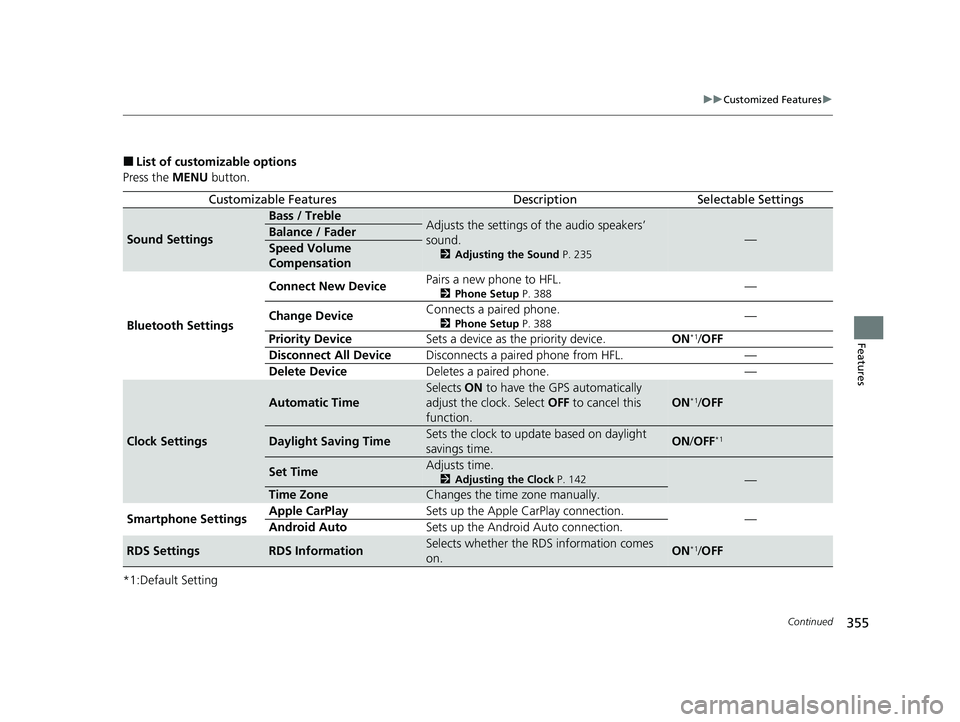
■List of customizable options
Press the MENU button.
*1:Default Setting
Customizable FeaturesDescriptionSelectable Settings
Sound Settings
Bass / TrebleAdjusts the settings of the audio speakers’
sound.
2 Adjusting the Sound P. 235
—Balance / Fader
Speed Volume
Compensation
Bluetooth Settings Connect New Device
Pairs a new phone to HFL.
2
Phone Setup P. 388—
Change Device Connects a paired phone.
2
Phone Setup P. 388—
Priority Device Sets a device as the priority device. ON
*1/OFF
Disconnect All Device Disconnects a paired phone from HFL. —
Delete Device Deletes a paired phone. —
Clock Settings
Automatic Time
Selects ON to have the GPS automatically
adjust the clock. Select OFF to cancel this
function.
ON*1/ OFF
Daylight Saving TimeSets the clock to update based on daylight
savings time.ON /OFF*1
Set TimeAdjusts time.
2 Adjusting the Clock P. 142—
Time ZoneChanges the time zone manually.
Smartphone Settings Apple CarPlay
Sets up the Apple CarPlay connection.
—
Android Auto Sets up the Android Auto connection.
RDS SettingsRDS InformationSelects whether the RDS information comes
on.ON*1/OFF
23 ACURA INTEGRA-313S56000_03.book 355 ページ 2022年3月18日 金曜日 午前11時47分
Page 358 of 740

356
uuCustomized Features u
Features
*1:Default Setting
Customizable FeaturesDescriptionSelectable Settings
Display Adjustment Brightness
Changes the brightness of the audio/
information screen.
—
Contrast
Changes the contrast of the audio/
information screen.
Black Level Changes the black level of the audio/
information screen.
Day Changes between the daytime mode,
nighttime mode and display off mode.
Night
Display OFF
Touch Panel SensitivitySets the sensitivity of
the touch panel screen.Normal*1/High
Rear Camera Setting Fixed Guideline
Shows the guideline that does not move with
the steering wheel.
2
Multi-View Rear Camera P. 606
ON*1/OFF
Dynamic Guideline Shows the guideline that moves with the
steering wheel.
2
Multi-View Rear Camera P. 606
ON*1/OFF
LanguageChanges the display language.English*1/Español /Français
License Shows the legal information. —
Factory Data ResetResets all the settings to their factory default.
2Defaulting All the Settings P. 358—
23 ACURA INTEGRA-313S56000_03.book 356 ページ 2022年3月18日 金曜日 午前11時47分


