Page 607 of 740
605
uuParking Your Vehicle uCross Traffic Monitor
Driving
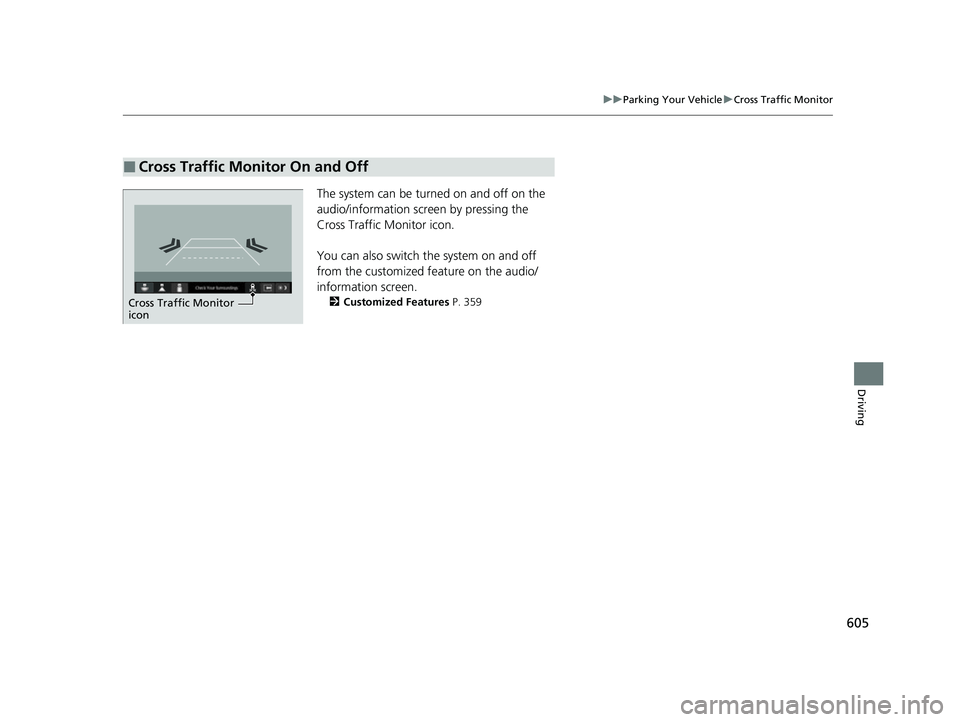
The system can be turned on and off on the
audio/information scre en by pressing the
Cross Traffic Monitor icon.
You can also switch the system on and off
from the customized feature on the audio/
information screen.
2 Customized Features P. 359
■Cross Traffic Monitor On and Off
Cross Traffic Monitor
icon
23 ACURA INTEGRA-313S56000_03.book 605 ページ 2022年3月18日 金曜日 午前11時47分
Page 608 of 740

606
Driving
Multi-View Rear Camera
About Your Multi-View Rear Camera
The audio/information screen can display your vehicle’s rear view.
The display automatically changes to the rear view when the transmission is put into
(R.
■Multi-View Rear Camera Display Area
1About Your Multi-View Rear Camera
The rear camera view is restricted. You cannot see
the corner ends of the bumper or what is underneath
the bumper. Its unique le ns also makes objects
appear closer or farther than they actually are.
Visually confirm that it is safe to drive before backing
up. Certain conditions (such as weather, lighting, and
high temperatures) may also restrict the rear view. Do
not rely on the rearview display which does not give
you all information about conditions at the back of
your vehicle.
The rear camera view is di splayed prior to the audio/
information screen.
If the camera lens is cove red with dirt or moisture,
use a soft, moist cloth to keep the lens clean and free
of debris.
You can change the Fixed Guideline and Dynamic
Guideline settings. 2 Customized Features P. 351, 359
Fixed Guideline
ON: Guidelines appear when you put the
transmission into
( R.
OFF: Guidelines do not appear.
Dynamic Guideline
ON: Guidelines move according to the steering
wheel direction.
OFF: Guidelines do not move.
Approx. 39 inches (1 m)
Camera
Approx. 20 inches (50 cm)
23 ACURA INTEGRA-313S56000_03.book 606 ページ 2022年3月18日 金曜日 午前11時47分
Page 626 of 740

uuMaintenance MinderTMuTo Use Maintenance MinderTM
624
Maintenance
Reset the maintenance minder informati on display if you have performed the
maintenance service.
1. Set the power mode to ON.
2. Roll the right selector wheel until the Ma intenance Minder screen is displayed.
3. Press and hold the right selector wheel for about 10 seconds to enter the reset
mode.
4. Roll the right selector wheel to select a maintenance item to reset, or to select All
due items (You can also select Cancel to end the process).
5. Press the right selector wheel to reset the selected item.
6. Repeat from step 3 for other items you wish to reset.
■Resetting the Display1Resetting the Display
NOTICE
Failure to reset the Maintenance MinderTM display
after a maintenance servic e results in the system
showing incorrect maintena nce intervals, which can
lead to serious mechanical problems.
The dealer will reset the Maintenance Minder
TM
display after completing th e required maintenance
service. If someone other than a dealer performs
maintenance service, reset the Maintenance
Minder
TM display yourself.
You can also reset the Maintenance Minder
TM display
using the driver information interface.
2 Vehicle Settings
* P. 126
You can also reset the Maintenance Minder
TM display
using the audio/information screen. 2 Customized Features P. 359
Models with 7-in. Color Touchscreen
Models with 9-in. Color Touchscreen
Right Selector Wheel
* Not available on all models
23 ACURA INTEGRA-313S56000_03.book 624 ページ 2022年3月18日 金曜日 午前11時47分
Page 653 of 740

651
Maintenance
Battery
Checking the Battery
The condition of the battery is monitored by a
sensor located on the negative terminal of the
battery. If there is a problem with this sensor,
the driver information interface will display a
warning message. If this happens, have your
vehicle inspected by a dealer.
Check the battery term inals for corrosion
monthly.
If your vehicle’s battery is disconnected or goes dead:
• The audio system is disabled.
2 Reactivating the audio system P. 229
•The clock resets.
2 Clock P. 142
•The immobilizer system needs to be reset.
2 Immobilizer System Indicator P. 95
1Battery
WARNING: Battery post, terminals,
and related accessories contain lead
and lead compounds.
Wash your hands after handling.
3WARNING
The battery gives off explosive hydrogen
gas during normal operation.
A spark or flame can cause the battery to
explode with enough force to kill or
seriously hurt you.
When conducting any battery
maintenance, wear prot ective clothing and
a face shield, or have a skilled technician do
it.
Canadian models only
23 ACURA INTEGRA-313S56000_03.book 651 ページ 2022年3月18日 金曜日 午前11時47分
Page 658 of 740

656
Maintenance
Cleaning
Interior Care
Use a damp cloth with a mixture of mild detergent and warm water to remove dirt.
Use a clean cloth to remove detergent residue.
Use a soft brush with a mixture of mild soap and warm water to clean the seat belts.
Let the belts air dry. Wipe the openings of the seat belt anchors using a clean cloth.
■Cleaning Seat Belts
1 Interior Care
Do not spill liquids inside the vehicle. Electrical
devices and systems may ma lfunction if liquids are
splashed on them.
Do not use silicone based sprays on electrical devices
such as audio devices and switches. Doing so may
cause the items to malfunction or cause a fire inside
the vehicle.
If a silicone based spray is inadvertently used on
electrical devices, consult a dealer.
Depending on their compos ition, chemicals and
liquid aromatics may cause discoloration, wrinkles,
and cracking to resin-ba sed parts and textiles.
Do not use alkali solvents or organic solvents such as
benzene or gasoline.
After using chemicals, make su re to gently wipe them
away using a dry cloth.
Do not place used cloths on top of resin based parts
or textiles for long periods of time without washing.
Opening
23 ACURA INTEGRA-313S56000_03.book 656 ページ 2022年3月18日 金曜日 午前11時47分
Page 696 of 740

694
Handling the Unexpected
If the Battery Is Dead
Jump Starting Procedure
Turn off the power to electric devices, such as audio and lights. Turn off the engine,
then open the hood. 1.Open the cover on the positive + terminal.
2. Connect the first jump er cable to your
vehicle’s battery + terminal.
3. Connect the other end of the first jumper
cable to the booster battery + terminal.
u Use a 12-volt booster battery only.
u When using an automotive battery
charger to boost your 12-volt battery,
select a lower charging voltage than 15-
volt. Check the charger manual for the
proper setting.
4. Connect the second jumper cable to the
booster battery - terminal.
5. Connect the other end of the second
jumper cable to the stud bolt as shown. Do
not connect this jumper cable to any other
part.
6. If your vehicle is connected to another
vehicle, start the assi sting vehicle’s engine
and increase its rpm slightly.
7. Attempt to start your vehicle’s engine. If it
turns over slowly, check that the jumper
cables have good metal-to-metal contact.1If the Battery Is Dead
Securely attach the jumper cables clips so that they
do not come off when the e ngine vibrates. Be careful
not to tangle the jumper cables or allow the cable
ends to touch each other while attaching or
detaching the jumper cables.
Battery performance degrades in cold conditions and
may prevent the engi ne from starting.
3WARNING
A battery can explode if you do not follow
the correct procedure, seriously injuring
anyone nearby.
Keep all sparks, open flames, and smoking
materials away from the battery.
Booster Battery
23 ACURA INTEGRA-313S56000_03.book 694 ページ 2022年3月18日 金曜日 午前11時47分
Page 708 of 740

706
uuFuses uFuse Locations
Handling the Unexpected
■Circuit protected and fuse rating
Circuit ProtectedAmps
1BATTERY125 A
2 -40 A
-40 A
F/BOX OPTION 60 A -40 A
F/BOX OPTION2 40 A DC/DC2 30 A
F/BOX MAIN 60 A
3
-30 A
-30 A
-70 A
RR DEFROSTER30 A
-40 A
-30 A
HTR MTR40 A
4 -30 A
ABS/VSA MTR 40 A DC/DC 30 A
-3 0 A
IG MAIN 30 A
R/M1 30 A
R/M2 30 A
5
ST MAGNETIC SW30 A
WIPER30 A
EPS70 A
-30 A
ABS/VSA FSR40 A
MAIN FAN30 A
F/BOX MAIN240 A
6 SUB FAN (30 A)
7 IG MAIN230 A
8 - (7.5 A)
9EVP*(30 A)
10 - (7.5 A)
11--
12 - -
13H/STRG BATT SNSR10 A
14 - -
15FR FOG*(10 A)
16 MG CLUTCH 10 A
17WASHER15 A
18 HORN 15 A
19BACK UP15 A
20 AUDIO (15 A)
21RFC RLY CL+(7.5 A)
22 DBW 15 A
23--
24 BACKUP FI-ECU 10 A
25IGP15 A
Circuit ProtectedAmps
26 TCU*(15 A)
27LCM L15 A
28 INJ (15 A)
29STOP10 A
30 LCM R 15 A
31IG COIL15 A
32 - -
33HAZARD15 A
34 AUDIO SUB VST (7.5 A)
35--
36 AUDIO VST MAIN (30 A)
37BACKUP2(30 A)
38 - -
39--
40 VBACT (10 A)
41IGPS [LAF]10 A
42 IG1 MON2 (7.5 A)
Circuit ProtectedAmps
* Not available on all models
23 ACURA INTEGRA-313S56000_03.book 706 ページ 2022年3月18日 金曜日 午前11時47分
Page 710 of 740

708
uuFuses uFuse Locations
Handling the Unexpected
■Circuit protected and fuse rating
Circuit ProtectedAmps
1P/W DR20 A
2 P/W AS 20 A
3P/W RR R20 A
4 P/W RR L 20 A
5OPTION10 A
6 SRS 10 A
7T/G MTR / TRUNK ACT10 A
8 IDAS / HUD (10 A)
9FR ACC SOCKET20 A
10 DOOR LOCK 20 A
11METER10 A
12 OPTION3 (ST CUT) 10 A
13--
14 OPTION6 (VB SOL) 10 A
15DR DOOR UNLOCK10 A
16 SUNROOF 20 A
17--
18 - -
19--
20 - -
21--
22 SMART 10 A
23DR DOOR LOCK10 A
24 - -
25IMG10 A
26 SRS 10 A
27ST CUT RLY10 A
28 OPTION5 10 A
29FUEL PUMP15 A
30 L SIDE DOOR UNLOCK 10 A
31R SIDE DOOR UNLOCK10 A
32 - -
33--
34 - -
35--
36 - -
37--
38 - -
39R SIDE DOOR LOCK10 A
40 P/SEAT REC / RR HI 20 A
41P/SEAT SLIDE / FR HI20 A
42 BACK LT (7.5 A)
43A/C10 A
44 DRL 10 A
45ACC10 A
46 ACC KEY LOCK 10 A
47L SIDE DOOR LOCK 10 A
48 H/SEAT 20 A
49AS P/SEAT REC*(20 A)
50 P/LUMBAR DR*(10 A)
51--
52 RR H/SEAT*(20 A)
Circuit ProtectedAmps
53AS P/SEAT SLI*(20 A)
54 OPTION1 / FUEL LID 10 A
55AUDIO AMP*(30 A)
56 ADS*(30 A)
Circuit ProtectedAmps
ABACKUP2 MAIN(10 A)
B AUDIO SUB VST (7.5 A)
CACC VST(10 A)
DVST 1 (10 A)
EAUDIO VST(15 A)
FEOP(20 A)
G--
HVST 2 (10 A)
Circuit ProtectedAmps
Sub Fuse Box
* Not available on all models
23 ACURA INTEGRA-313S56000_03.book 708 ページ 2022年3月18日 金曜日 午前11時47分