2022 TOYOTA VENZA HYBRID maintenance
[x] Cancel search: maintenancePage 1 of 548

VENZA_OM_OM48G63U_(U)
1
2
3
4
5
6
7
8
9
Pictorial indexSearch by illustration
For safety
and securityMake sure to read through them
(Main topics: Child seat, theft deterrent system)
Vehicle status
information and
indicatorsReading driving-related information
(Main topics: Meters, multi-information display)
Before driving
Opening and closing the doors and windows,
adjustment before driving
(Main topics: Keys, doors, seats)
Driving
Operations and advice which are necessary for
driving
(Main topics: Starting hybrid system, refueling)
Interior featuresUsage of the interior features
(Main topics: Air conditioner, storage features)
Maintenance
and careCaring for your vehicle and maintenance
procedures
(Main topics: Interior and exterior, light bulbs)
When trouble
arisesWhat to do in case of malfunction and emergency
(Main topics: 12-volt battery discharge, flat tire)
Vehicle
specificationsVehicle specifications, customizable features
(Main topics: Fuel, oil, tire inflation pressure)
For ownersReporting safety defects for U.S. owners, and seat
belt, SRS airbag and headlight aim instructions for
Canadian owners
IndexSearch by symptom
Search alphabetically
Page 4 of 548
4TABLE OF CONTENTS
Luggage compartment fea-tures ............................ 340
5-4. Using the other interior fea- tures
Toyota multi-operation touch
(vehicle with the 12.3-inch
display) ........................ 344
Panoramic fixed moon roof with one-touch frosted glass
control ......................... 346
Other interior features ... 349
Garage door opener...... 360
6-1. Maintenance and care Cleaning and protecting the vehicle exterior ............ 370
Cleaning and protecting the vehicle interior ............. 373
6-2. Maintenance Maintenance requirements.................................... 377
General maintenance.... 379
Emission inspection and maintenance (I/M) pro-
grams .......................... 381
6-3. Do-it-yourself maintenance Do-it-yourself service pre-cautions ....................... 383
Hood ............................. 385
Positioning a floor jack .. 386
Engine compartment ..... 388
12-volt battery ............... 394
Tires .............................. 397
Tire inflation pressure ... 409
Wheels ......... .................411 Air conditioning filter ......
413
Cleaning the hybrid battery (traction battery) air intake
vent and filter ............... 415
Wiper insert replacement .................................... 419
Electronic key battery .... 422
Checking and replacing fuses ............................ 424
Headlight aim ................ 427
Exterior lights................. 428
7-1. Essential information Emergency flashers....... 430
If your vehicle has to be stopped in an emergency.................................... 431
If the vehicle is submerged or water on the road is rising.................................... 432
7-2. Steps to take in an emer- gency
If your vehicle needs to be towed ........................... 433
If you think something is wrong........................... 436
If a warning light turns on or a warning buzzer sounds.................................... 438
If a warning message is dis- played .......................... 449
If you have a flat tire ...... 453
If the hybrid system will not start ............................. 460
If you lose your keys...... 462
6Maintenance and care
7When trouble arises
Page 5 of 548
5TABLE OF CONTENTS
1
2
3
4
5
6
7
8
9
If the fuel filler door cannot be opened ................... 462
If the electronic key does not operate properly .......... 463
If the 12-volt battery is dis- charged ....................... 465
If your vehicle overheats 470
If the vehicle becomes stuck .................................... 474
8-1. Specifications Maintenance data (fuel, oil level, etc.) .................... 476
Fuel information ............ 486
Tire information ............. 488
8-2. Customization Customizable features .. 498
8-3. Initialization Items to initialize ........... 512
9-1. For owners Reporting safety defects for U.S. owners................. 514
Reporting safety defects for Canadian owners ........ 515
Seat belt instructions for Canadian owners (in
French) ........................ 515
SRS airbag instructions for Canadian owners (in
French) ........................ 517
Headlight aim instructions for Canadian owners (in
French) ........................ 524What to do if... (Trouble-
shooting) ..................... 526
Alphabetical Index ........ 529
8Vehicle specifications
9For owners
Index
Page 72 of 548
721-4. Hybrid system
■Charging the 12-volt battery
P.467
■After the 12-volt battery has dis-
charged or when the terminal
has been removed and installed
during exchange, etc.
The gasoline engine may not stop
even if the vehicle is being driven by
the hybrid battery (traction battery).
If this continues for a few days, con-
tact your To yota dealer.
■Sounds and vibrations specific
to a Hybrid Electric Vehicle
There may be no engine sound or
vibration even though the vehicle is
able to move with the “READY” indi-
cator is illuminate d. For safety,
make sure to shift the shift lever to P
and apply the parking brake when
parked.
The following sounds or vibrations
may occur when the hybrid system
is operating and are not a malfunc-
tion:
●Motor sounds may be heard from
the engine compartment.
●Sounds may be heard from the
hybrid battery (traction battery)
under the rear seats when the
hybrid system starts or stops.
●Relay operating sounds such as a
snap or soft clank will be emitted
from the hybrid battery (traction
battery), under the rear seats,
when the hybrid system is started
or stopped.
●Sounds from the hybrid system
may be heard when the back door
is open.
●Sounds may be heard from the
transmission when the gasoline
engine starts or stops, when driv-
ing at low speeds, or during idling.
●Engine sounds may be heard
when accelerating sharply.
●Sounds may be heard due to
regenerative braking when the
brake pedal is dep ressed or as
the accelerator pedal is released.
●Vibration may be felt when the
gasoline engine starts or stops.
●Cooling fan sounds may be heard
from the air intake vent under the
rear seat.
■Maintenance, repair, recycling,
and disposal
Contact your Toyota dealer regard-
ing maintenance, repair, recycling
and disposal. Do n ot dispose of the
vehicle yourself.
When driving with the gasoline
engine stopped, a sound, which
changes in accordance with the
driving speed, will be played in
order to warn people nearby of
the vehicle’s approach. The
sound will stop when the vehicle
speed exceeds approximately
22 mph (35 km/h).
■Acoustic Vehicle Alerting Sys-
tem
In the following cases, the Acoustic
Vehicle Alerting System may be dif-
ficult for surrounding people to hear.
●In very noisy areas
●In the wind or the rain
Also, as the Acoust ic Vehicle Alert-
ing System is installed on the front
of the vehicle, it may be more diffi-
cult to hear from the rear of the vehi-
cle compared to the front.
■If “Acoustic Vehicle Alerting
System Malfunction Visit your
Dealer” is displayed on the
multi-information display
The system may be malfunctioning.
Have the vehicle inspected by your
Toyota dealer.
Acoustic Vehicle Alerting
System
Page 77 of 548
771-4. Hybrid system
1
For safety and security
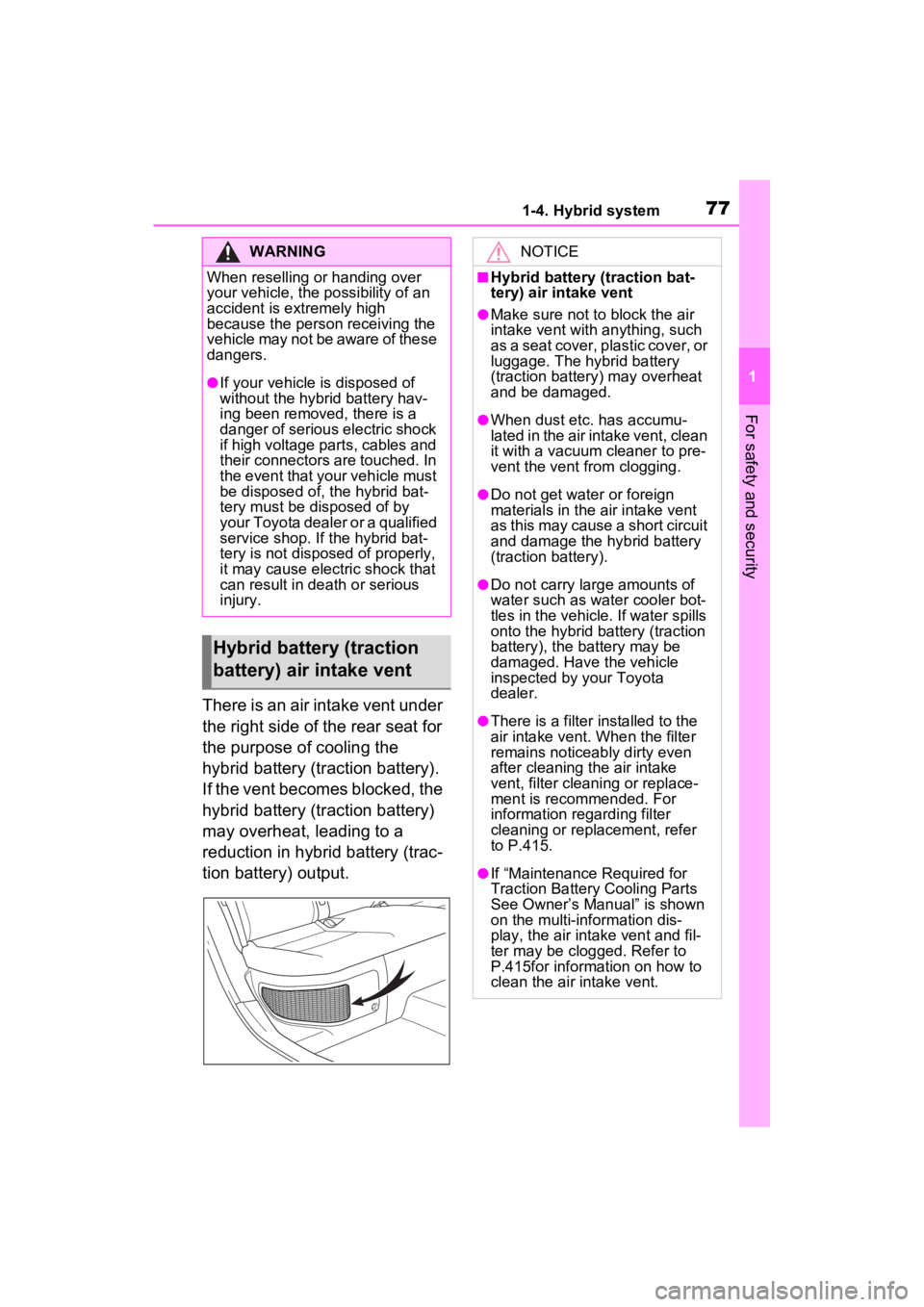
There is an air intake vent under
the right side of the rear seat for
the purpose of cooling the
hybrid battery (traction battery).
If the vent becomes blocked, the
hybrid battery (traction battery)
may overheat, leading to a
reduction in hybrid battery (trac-
tion battery) output.
WARNING
When reselling or handing over
your vehicle, the possibility of an
accident is extremely high
because the person receiving the
vehicle may not be aware of these
dangers.
●If your vehicle is disposed of
without the hybrid battery hav-
ing been removed, there is a
danger of serious electric shock
if high voltage parts, cables and
their connectors are touched. In
the event that your vehicle must
be disposed of, the hybrid bat-
tery must be disposed of by
your Toyota dealer or a qualified
service shop. If the hybrid bat-
tery is not disposed of properly,
it may cause electric shock that
can result in death or serious
injury.
Hybrid battery (traction
battery) air intake vent
NOTICE
■Hybrid battery (traction bat-
tery) air intake vent
●Make sure not to block the air
intake vent with anything, such
as a seat cover, plastic cover, or
luggage. The hybrid battery
(traction battery) may overheat
and be damaged.
●When dust etc. has accumu-
lated in the air intake vent, clean
it with a vacuum cleaner to pre-
vent the vent from clogging.
●Do not get water or foreign
materials in the air intake vent
as this may cause a short circuit
and damage the hybrid battery
(traction battery).
●Do not carry large amounts of
water such as water cooler bot-
tles in the vehicle. If water spills
onto the hybrid battery (traction
battery), the battery may be
damaged. Have the vehicle
inspected by your Toyota
dealer.
●There is a filter installed to the
air intake vent. When the filter
remains noticeably dirty even
after cleaning the air intake
vent, filter cleaning or replace-
ment is recommended. For
information regarding filter
cleaning or replacement, refer
to P.415.
●If “Maintenance Required for
Traction Battery Cooling Parts
See Owner’s Manual” is shown
on the multi-information dis-
play, the air intake vent and fil-
ter may be clogged. Refer to
P.415for information on how to
clean the air intake vent.
Page 79 of 548
791-5. Theft deterrent system
1
For safety and security
1-5.Theft deterrent system
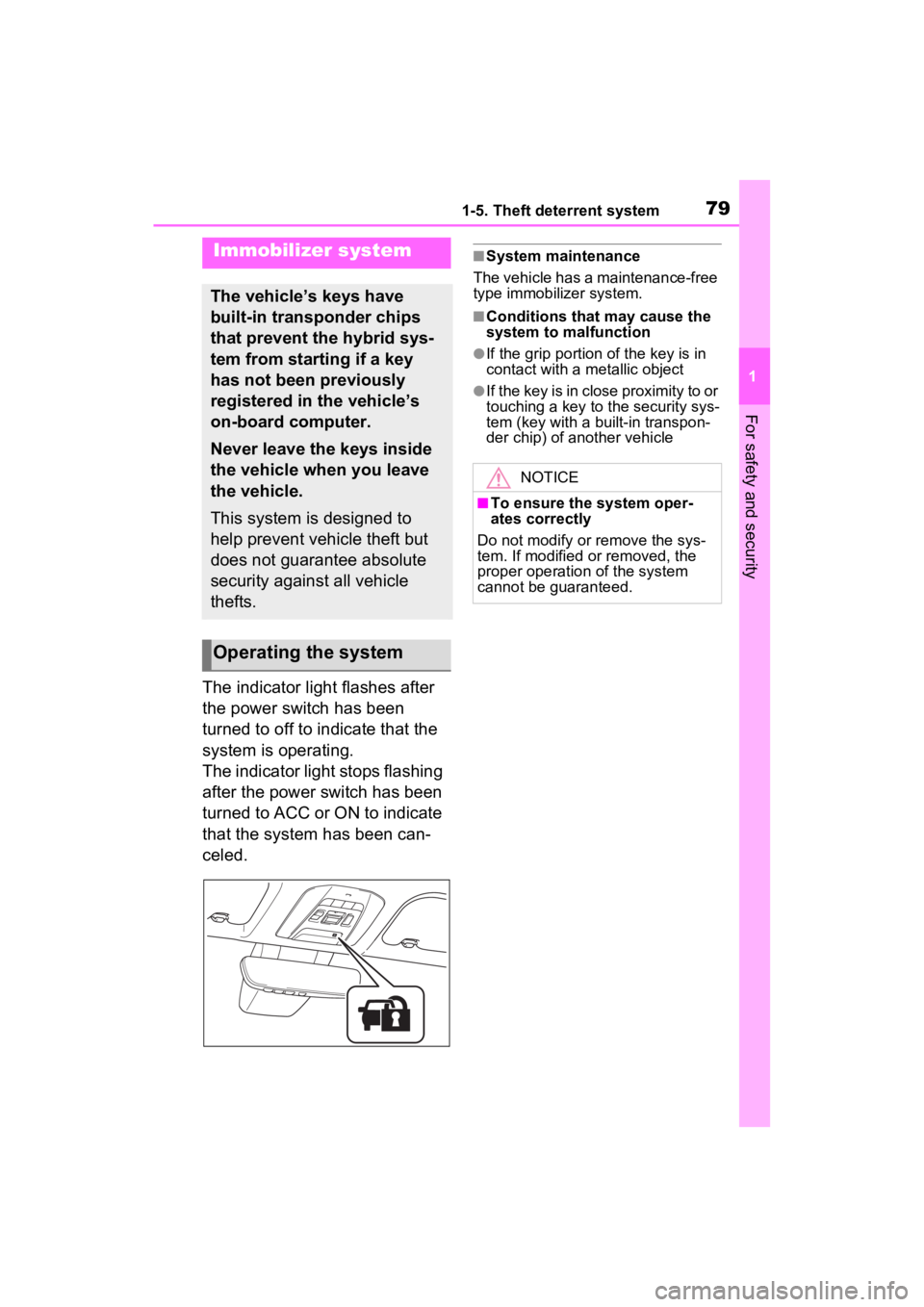
The indicator light flashes after
the power switch has been
turned to off to indicate that the
system is operating.
The indicator light stops flashing
after the power switch has been
turned to ACC or ON to indicate
that the system has been can-
celed.
■System maintenance
The vehicle has a maintenance-free
type immobilizer system.
■Conditions that may cause the
system to malfunction
●If the grip portion of the key is in
contact with a metallic object
●If the key is in close proximity to or
touching a key to the security sys-
tem (key with a built-in transpon-
der chip) of another vehicle
Immobilizer system
The vehicle’s keys have
built-in transponder chips
that prevent the hybrid sys-
tem from starting if a key
has not been previously
registered in the vehicle’s
on-board computer.
Never leave the keys inside
the vehicle when you leave
the vehicle.
This system is designed to
help prevent vehicle theft but
does not guarantee absolute
security against all vehicle
thefts.
Operating the system
NOTICE
■To ensure the system oper-
ates correctly
Do not modify or remove the sys-
tem. If modified or removed, the
proper operation of the system
cannot be guaranteed.
Page 80 of 548
801-5. Theft deterrent system
*: If equipped
■Items to check before lock-
ing the vehicle
To prevent unexpected trigger-
ing of the alarm and vehicle
theft, make sure of the following:
Nobody is in the vehicle.
The side windows are closed
before the alarm is set.
No valuables or other per-
sonal items are left in the
vehicle.
■Setting
Close the doors, hood, and lock
all the doors. The system will be
set automatically after 30 sec-
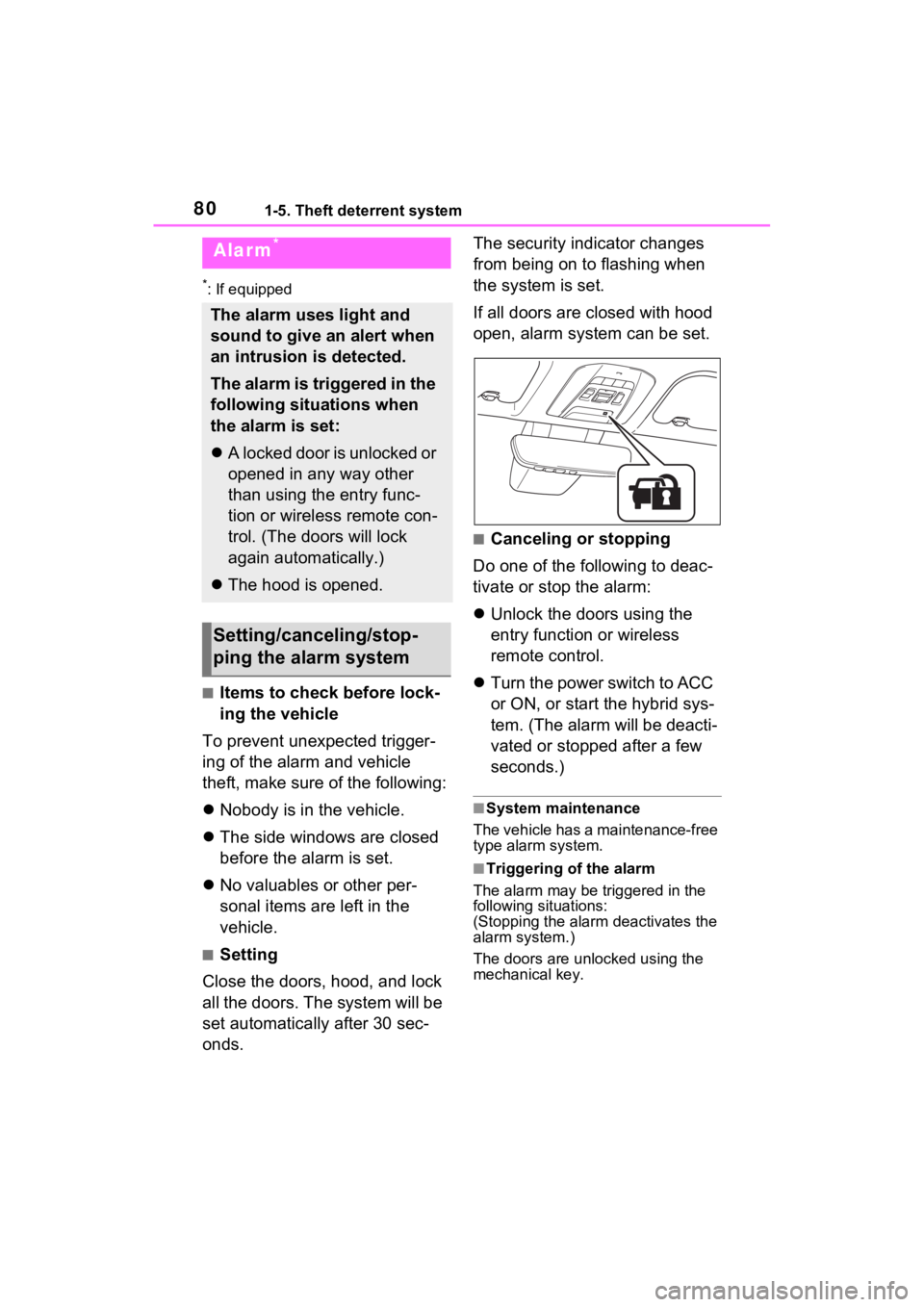
onds. The security indicator changes
from being on to flashing when
the system is set.
If all doors are closed with hood
open, alarm system can be set.
■Canceling or stopping
Do one of the following to deac-
tivate or stop the alarm:
Unlock the doors using the
entry function or wireless
remote control.
Turn the power switch to ACC
or ON, or start the hybrid sys-
tem. (The alarm will be deacti-
vated or stopped after a few
seconds.)
■System maintenance
The vehicle has a maintenance-free
type alarm system.
■Triggering of the alarm
The alarm may be triggered in the
following situations:
(Stopping the alarm deactivates the
alarm system.)
The doors are unlocked using the
mechanical key.
Alarm*
The alarm uses light and
sound to give an alert when
an intrusion is detected.
The alarm is triggered in the
following situations when
the alarm is set:
A locked door is unlocked or
opened in any way other
than using the entry func-
tion or wireless remote con-
trol. (The doors will lock
again automatically.)
The hood is opened.
Setting/canceling/stop-
ping the alarm system
Page 90 of 548
902-1. Instrument cluster
Odometer, trip meter and oil maintenance
Odometer:
Displays the total distance that the vehicle has been driven
Trip meter:
Displays the distance the vehicle has been driven since the meter was last
reset. Trip meters “A” and “B” c an be used to record and display different
distances independently.
Oil maintenance:
Displays the distance until the next engine oil change.
Shift position and shift range indicator
Displays the selected shift posit ion or selected shift range (P.204)
Engine coolant temperature gauge
Displays the engine c oolant temperature
■The meters and display illumi-
nate when
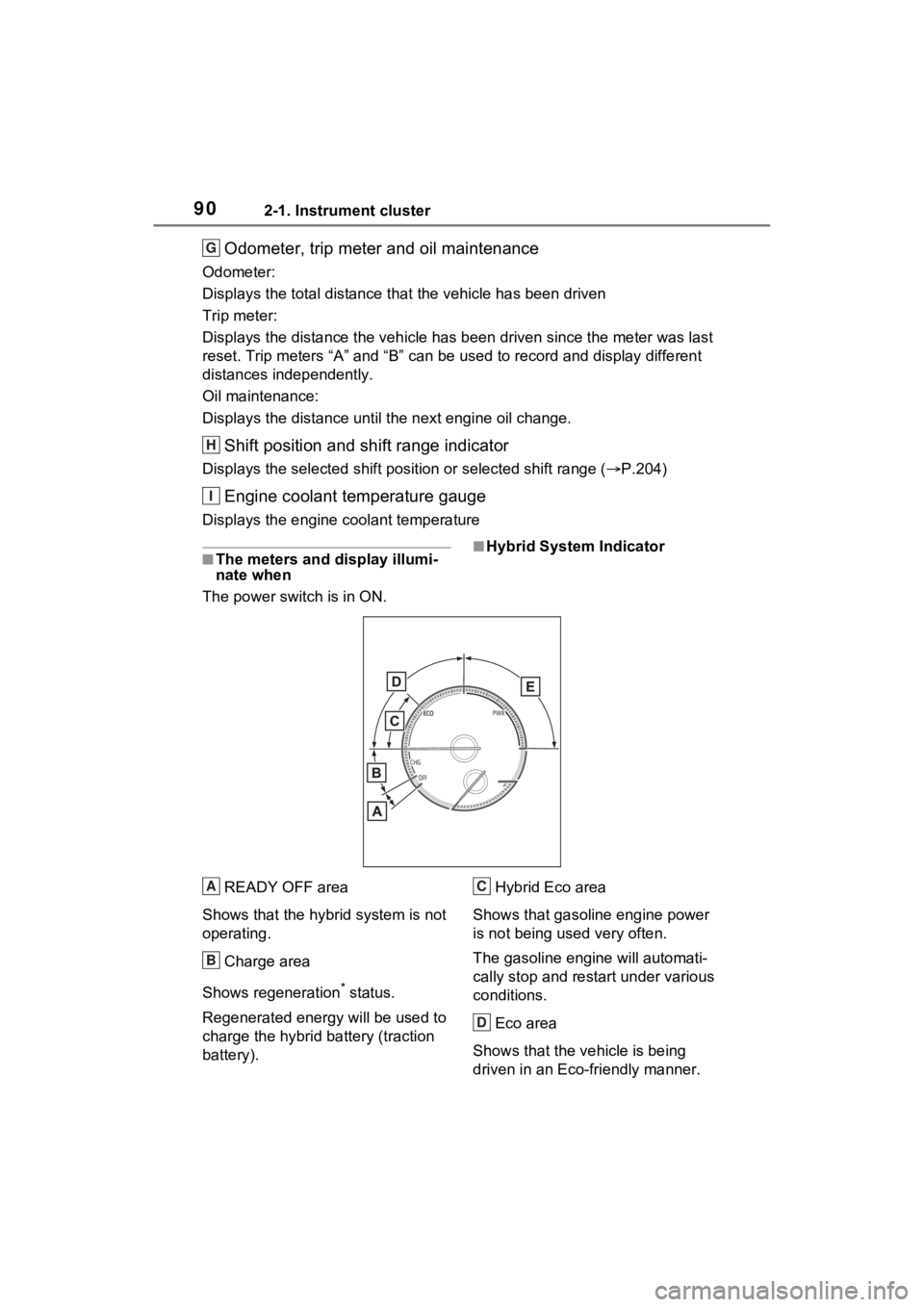
The power swit ch is in ON.■Hybrid System Indicator
READY OFF area
Shows that the hybrid system is not
operating.
Charge area
Shows regeneration
* status.
Regenerated e nergy will be used to
charge the hybrid battery (traction
battery). Hybrid Eco area
Shows that gasoline engine power
is not being used very often.
The gasoline engi ne will automati-
cally stop and restart under various
conditions.
Eco area
Shows that the vehicle is being
driven in an Eco-friendly manner.
G
H
I
A
B
C
D