2022 TOYOTA VENZA HYBRID overheating
[x] Cancel search: overheatingPage 91 of 548
912-1. Instrument cluster
2
Vehicle status information and indicators
By keeping the indicator needle
within Eco area, more Eco-friendly
driving can be achieved.
Power area
Shows that an Eco-friendly driving
range is being exceeded (during full
power driving etc.)
*: When used in this manual, “regen- eration” refers to the conversion of
energy created by the movement
of the vehicle into electrical
energy.
In the following situ ation, the Hybrid
System Indicator does not operate.
●“READY” indicator is not illumi-
nated.
●The shift position is in a range
other than D or S.
■Outside temperature display
●In the following si tuations, the cor-
rect outside tempe rature may not
be displayed, or the display may
take longer than normal to
change.
• When stopped, or driving at low
speeds (less than 12 mph [20
km/h])
• When the outside temperature
has changed suddenly (at the
entrance/exit of a garage, tunnel,
etc.)
●When “--” or “E” is displayed, the
system may be malfunctioning.
Take your vehicle to your Toyota
dealer.
●Displays the outside temperature
within the range of -40°F (-40°C)
to 122°F (50°C).
●When the outside temperature is
approximately 37°F (3°C) or
lower, the indicator will flash
for approximately 10 seconds,
then stay on.
■Liquid crystal display
P.97
Switches the items of the odom-
eter, trip meter A, trip meter B
and (oil maintenance) by
pressing the “ODO TRIP”
switch.
When the trip meter is dis-
played, pressing and holding the
EWARNING
■The information display at
low temperatures
Allow the interior of the vehicle to
warm up before using the liquid
crystal information display. At
extremely low temperatures, the
display monitor may respond
slowly, and display changes may
be delayed.
For example, there is a lag
between the driver’s shifting and
the new shift range appearing on
the display. This lag could cause
the driver to downshift again,
causing rapid and excessive
engine braking and possibly an
accident resulting in death or
injury.
NOTICE
■To prevent damage to the
engine and its components
The engine may be overheating if
the engine coolant temperature
gauge is in the red zone (“H”). In
this case, immediately stop the
vehicle in a safe place, and check
the engine after it has cooled
completely. ( P.470)
Using the “ODO TRIP”
switch
Page 95 of 548
952-1. Instrument cluster
2
Vehicle status information and indicators
range is being exceeded (during full
power driving etc.)
*: When used in this manual, “regen-eration” refers to the conversion of
energy created by the movement
of the vehicle into electrical
energy.
In the following situ ation, the Hybrid
System Indicator does not operate.
●“READY” indicator is not illumi-
nated.
●The shift position is in a range
other than D or S.
■Outside temperature display
●In the following si tuations, the cor-
rect outside tempe rature may not
be displayed, or the display may
take longer than normal to
change.
• When stopped, or driving at low speeds (less than 12 mph [20
km/h])
• When the outside temperature has changed suddenly (at the
entrance/exit of a garage, tunnel,
etc.)
●When “--” or “E” is displayed, the
system may be malfunctioning.
Take your vehicle to your Toyota
dealer.
●Displays the outside temperature
within the range of -40°F (-40°C)
to 122°F (50°C).
●When the outside temperature is
approximately 37°F (3°C) or
lower, the indicator will flash
for approximately 10 seconds,
then stay on.
■Liquid crystal display
P.107
Switches the items of the odom-
eter, trip meter A, trip meter B
and (oil maintenance) by
pressing the “ODO TRIP”
switch.
When the trip meter is dis-
played, pressing and holding the
switch will reset the trip meter.
WARNING
■The information display at
low temperatures
Allow the interior of the vehicle to
warm up before using the liquid
crystal information display. At
extremely low temperatures, the
display monitor may respond
slowly, and display changes may
be delayed.
For example, there is a lag
between the driver’s shifting and
the new shift range appearing on
the display. This lag could cause
the driver to downshift again,
causing rapid and excessive
engine braking and possibly an
accident resulting in death or
injury.
NOTICE
■To prevent damage to the
engine and its components
The engine may be overheating if
the engine coolant temperature
gauge is in the red zone (“H”). In
this case, immediately stop the
vehicle in a safe place, and check
the engine after it has cooled
completely. ( P.470)
Using the “ODO TRIP”
switch
Page 189 of 548
1894-1. Before driving
4
Driving
WARNING
●Always apply the parking brake,
shift the shift lever to P, stop the
hybrid system and lock the vehi-
cle.
Do not leave the vehicle unat-
tended while the “READY” indi-
cator is illuminated.
If the vehicle is parked with the
shift lever in P but the parking
brake is not set, the vehicle may
start to move, possibly leading
to an accident.
●Do not touch the exhaust pipes
while the “READY” indicator is
illuminated or immediately after
turning the hybrid system off.
Doing so may cause burns.
■When taking a nap in the
vehicle
Always turn the hybrid system off.
Otherwise, if you accidentally
move the shift lever or depress
the accelerator pedal, this could
cause an accident or fire due to
hybrid system overheating. Addi-
tionally, if the vehicle is parked in
a poorly ventilated area, exhaust
gases may collect and enter the
vehicle, leading to death or a seri-
ous health hazard.
■When braking
●When the brakes a re wet, drive
more cautiously.
Braking distance increases
when the brakes are wet, and
this may cause one side of the
vehicle to brake differently than
the other side. Also, the parking
brake may not securely hold the
vehicle.
●If the electronically controlled
brake system does not operate,
do not follow other vehicles
closely and avoid hills or sharp
turns that require braking.
In this case, braking is still pos-
sible, but the brake pedal
should be depressed more
firmly than usual. Also, the brak-
ing distance will increase. Have
your brakes fixed immediately.
●The brake system consists of 2
or more individual hydraulic sys-
tems; if one of the systems fails,
the other(s) will still operate. In
this case, the brake pedal
should be depressed more
firmly than usual and the brak-
ing distance will increase. Have
your brakes fixed immediately.
■If the vehicle becomes stuck
Do not spin the wheels exces-
sively when any of the tires is up
in the air, or the vehicle is stuck in
sand, mud, etc. This may damage
the driveline components or pro-
pel the vehicle forward or back-
ward, causing an accident.
NOTICE
■When driving the vehicle
●Do not depress the accelerator
and brake pedals at the same
time during driving, as this may
restrain the hybrid system out-
put.
●Do not use the accelerator
pedal or depress the accelera-
tor and brake pedals at the
same time to hold the vehicle on
a hill.
Page 211 of 548
2114-2. Driving procedures
4
Driving
■Parking brake automatic lock
function
The parking brake will be set auto-
matically under the following condi-
tions:
●The brake pedal is not depressed
●The driver’s door is open
●The driver’s seat belt is not fas-
tened
●The shift lever is in a position
other than P or N
●The malfunction indicator lamp
and brake system warning light
are not illuminated
■If “Parking Brake Temporarily
Unavailable” i s displayed on
the multi-information display
If the parking brake is operated
repeatedly over a short period of
time, the system may restrict opera-
tion to prevent overheating. If this
happens, refrain from operating the
parking brake. Nor mal operation will
return after about 1 minute.
■If “Parking Brake Unavailable”
is displayed on the multi-infor-
mation display
Operate the parking brake switch. If
the message does not disappear
after operating the switch several
times, the system may be malfunc-
tioning. Have the vehicle inspected
by your Toyota dealer.
■Parking brake operation sound
When the parking brake operates, a
motor sound (whirring sound) may
be heard. This does not indicate a
malfunction.
■Parking brake indicator light
and Parking brake switch indi-
cator
●Depending on the power switch
mode, the parking brake indicator
light and the parking brake switch
indicator will turn on and stay on
as described below:
ON: Comes on until the parking
brake is released. Not in ON: Stays
on for approxi-
mately 15 seconds.
●When the power switch is turned
off with the parking brake set, the
parking brake indicator light and
the parking brake switch indicator
will stay on for abo ut 15 seconds.
This does not indicate a malfunc-
tion.
■When the parking brake switch
malfunctions
Automatic mode (automatic brake
setting and releas ing) will be turned
on automatically.
■Parking the vehicle
P.184
■Parking brake engaged warning
buzzer
A buzzer will sound if the vehicle is
driven with the parking brake
engaged. “Parking Brake ON” is dis-
played on the multi-information dis-
play (with the vehicle reaching a
speed of 3 mph [5 km/h]).
■If the brake system warning
light comes on
P.438
■Usage in winter time
P.305
WARNING
■When parking the vehicle
Do not leave a child in the vehicle
alone. The parking brake may be
released unintentionally by a child
and there is the danger of the
vehicle moving that may lead to
an accident resulting in death or
serious injury.
■Parking brake switch
Do not set any objects near the
parking brake switch. Objects
may interfere with the switch and
may lead the parking brake to
unexpectedly operate.
Page 212 of 548
2124-2. Driving procedures
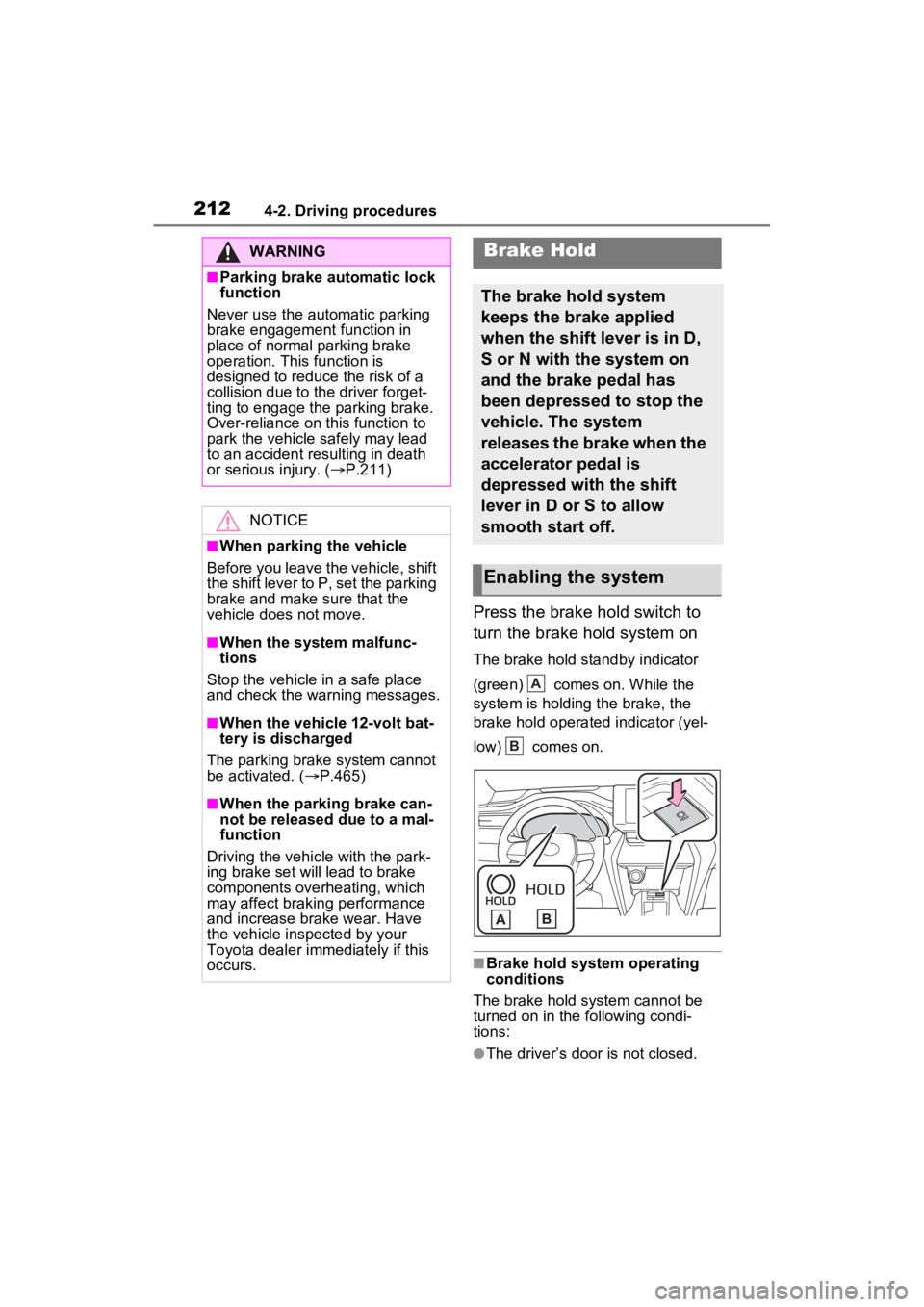
Press the brake hold switch to
turn the brake hold system on
The brake hold standby indicator
(green) comes on. While the
system is holding the brake, the
brake hold operated indicator (yel-
low) comes on.
■Brake hold system operating
conditions
The brake hold system cannot be
turned on in the following condi-
tions:
●The driver’s door is not closed.
WARNING
■Parking brake automatic lock
function
Never use the automatic parking
brake engagement function in
place of normal parking brake
operation. This function is
designed to reduc e the risk of a
collision due to the driver forget-
ting to engage the parking brake.
Over-reliance on this function to
park the vehicle safely may lead
to an accident resulting in death
or serious injury. ( P.211)
NOTICE
■When parking the vehicle
Before you leave the vehicle, shift
the shift lever to P, set the parking
brake and make sure that the
vehicle does not move.
■When the system malfunc-
tions
Stop the vehicle in a safe place
and check the warning messages.
■When the vehicle 12-volt bat-
tery is discharged
The parking brake system cannot
be activated. ( P.465)
■When the parking brake can-
not be released due to a mal-
function
Driving the vehicle with the park-
ing brake set will lead to brake
components overheating, which
may affect braking performance
and increase brake wear. Have
the vehicle inspected by your
Toyota dealer imme diately if this
occurs.
Brake Hold
The brake hold system
keeps the brake applied
when the shift lever is in D,
S or N with the system on
and the brake pedal has
been depressed to stop the
vehicle. The system
releases the brake when the
accelerator pedal is
depressed with the shift
lever in D or S to allow
smooth start off.
Enabling the system
A
B
Page 299 of 548

2994-5. Using the driving support systems
4
Driving
■ECB operating sound
ECB operating sound may be heard
in the following cases, but it does
not indicate that a malfunction has
occurred.
●Operating sound heard from the
engine compartment when the
brake pedal is dep ressed repeat-
edly, when the hybrid system is
started or just after the vehicle
begins to move.
●Operating sound heard from the
engine compartment when the
brake pedal is operated.
●Motor sound of the brake system
heard from the front part of the
vehicle when the driver’s door is
opened.
●Operating sound heard from the
engine compartment when one or
two minutes passed after the stop
of the hybrid system.
■Active Cornering Assist opera-
tion sounds and vibrations
When the Active Cornering Assist is
operated, operation sounds and
vibrations may b e generated from
the brake system, but this is not a
malfunction.
■EPS operation sound
When the steering wheel is oper-
ated, a motor sou nd (whirring
sound) may be heard. This does not
indicate a malfunction.
■Automatic reactivation of TRAC
and VSC systems
After turning the TRAC and VSC
systems off, the systems will be
automatically re-enabled in the fol-
lowing situations:
●When the power switch is turned
off.
●If only the TRAC system is turned
off, the TRAC will turn on when
vehicle speed increases.
If both the TRAC and VSC sys-
tems are turned off, automatic re-
enabling will not oc cur when vehi- cle speed increases.
■Operating conditions of Active
Cornering Assist
The system operates when the fol-
lowing occurs.
●TRAC/VSC can operate
●The driver is attempting to accel-
erate while turning
●The system detects that the vehi-
cle is drifting to the outer side
●The brake pedal is released
■Reduced effectiveness of the
EPS system
The effect iveness of the EPS sys-
tem is reduced to prevent the sys-
tem from overheating when there is
frequent steering input over an
extended period of time. The steer-
ing wheel may feel heavy as a
result. Should this occur, refrain
from excessive steering input or
stop the vehicle a nd turn the hybrid
system off. The EPS system should
return to normal within 10 minutes.
■Secondary Collision Brake
operating conditions
The system operates when the SRS
airbag sensor de tects a collision
while the vehicle is in motion. How-
ever, the system does not operate in
any of the following situations.
●The vehicle speed is below 6 mph
(10 km/h)
●Components are damaged
■Secondary Collision Brake
automatic cancellation
The system is automatically can-
celed in any of th e following situa-
tions.
●The vehicle speed drops below
approximately 6 mph (10 km/h)
●A certain amount of time elapses
during operation
●The accelerator pedal is
depressed a large amount
Page 300 of 548
3004-5. Using the driving support systems
■If a message about AWD is shown on the multi-information display
Perform the following actions.
MessageDetails/Actions
“AWD System Over- heated
Switching to 2WD Mode”
AWD system is overheating.
Stop the vehicle in a sa fe place and let the
engine idle.
Once the display message on the multi-informa-
tion display turns off, there is no problem continu-
ing to drive.
If the message does not disappear, have your
vehicle checked by your Toyota dealer immedi-
ately.
“AWD System Over- heated
2WD Mode Engaged”
The vehicle switched from all-wheel drive (AWD)
to front wheel drive due to overheating.
Stop the vehicle in a sa fe place and let the
engine idle.
Once the display message on the multi-informa-
tion display turns off, the AWD system returns to
normal.
If the message does not disappear, have your
vehicle checked by your Toyota dealer immedi-
ately.
“AWD System Malfunc- tion
2WD Mode Engaged Visit Your Dealer”A malfunction occurred in the AWD system.
Have your vehicle checked by your Toyota
dealer immediately.
WARNING
■The ABS does not operate
effectively when
●The limits of tire gripping perfor-
mance have been exceeded
(such as excessively worn tires
on a snow covered road).
●The vehicle hydroplanes while
driving at high speed on wet or
slick roads.
■Stopping distance when the
ABS is operating may exceed
that of normal conditions
The ABS is not designed to
shorten the vehicle’s stopping dis-
tance. Always maintain a safe dis-
tance from the veh icle in front of
you, especially in the following sit-
uations:
●When driving on dirt, gravel or
snow-covered roads
●When driving with tire chains
Page 347 of 548
3475-4. Using the other interior features
5
Interior features
■The moon roof at low tempera-
tures
The moon roof may take some time
to change between opaque and
transparent. Allow the interior of the
vehicle to warm up before use.
■Turning the power switch to
OFF
The transparent moon roof automat-
ically returns to opaque when the
power switch is turned to OFF.
■If the indicator on the dimming
switch flashes
The panoramic fixed moon roof with
one-touch frosted glass control may
be malfunctioning. Have the vehicle
inspected by your Toyota dealer
immediately.
■Operation of the electronic sun-
shade
To prevent the electronic sunshade
motor from overheating, the motor
may be suspended if the electronic
sunshade is opening and closing
repeatedly in a short period of time.
In this case, refrain from operating
the power switch.
Wait for a little while, the electronic
sunshade motor will resume func-
tioning.
■When the vehicle is subjected
to a strong impact
The moon roof changes to opaque
and cannot be changed back to
transparent. Have the vehicle
inspected by your Toyota dealer.
■Jam protection function for the
electronic sunshade
●If an object becomes jammed
between the electronic sunshade
and the sunshade frame while the
electronic sunshade is closing, the
electronic sunshade movement is
stopped and the electronic sun-
shade is opened slightly.
●When the jam protection function
has operated, even if the
“CLOSE” side of the switch is pressed again, the electronic sun-
shade will not move
in the close
direction until th e reverse opera-
tion has stopped completely.
●The electronic sunshade may
operate in reverse if the electronic
sunshade is subject to an impact
due to the surro undings or the
driving conditions.
■When the automatic opening
and closing f unction of the
electronic sunshade does not
work
Perform the following initialization
procedure.
1 Turn the power switch to ON.
2 Press and hold the “CLOSE”
side of the switch.
It closes until it is near the fully
closed position and then stops. After
that, it and operates in the opening
direction then closes to the fully
closed position.
If the switch is released at the incor-
rect time, the proc edure will have to
be performed again from the begin-
ning.
If the automatic opening and closing
function does not work normally
even after performing the operations
above, have the vehicle inspected
by your Toyo ta dealer.
■Customization
Some functions can be customized.
(Customizable features: P.510)
WARNING
Observe the following precau-
tions.
Failure to do so may result in
death or serious injury.