2022 TOYOTA RAV4 lock
[x] Cancel search: lockPage 639 of 748

6398-2. Steps to take in an emergency
8
When trouble arises
1Open the deck board
( P.531).
2 Take out the jack.
Do not touch the threaded portion
of the jack as it is greased.
Take out the tool bag.
WARNING
■Using the tire jack
Observe the following precau-
tions.
Improper use of the tire jack may
cause the vehicle to suddenly fall
off the jack, leading to death or
serious injury.
●Do not use the tire jack for any
purpose other than replacing
tires or installing and removing
tire chains.
●The equipped jack can only be
used with your vehicle. Do not
use it with other vehicles.
●And do not use jacks from other
vehicles with your vehicle.
●Put the jack prope rly in its jack
point.
●Do not put any part of your body
under the vehicle while it is sup-
ported by the jack.
●Do not start the engine or drive
the vehicle while the vehicle is
supported by the jack.
●Do not raise the vehicle while
someone is inside.
●When raising the vehicle, do not
put an object on or under the
jack.
●Do not raise the vehicle to a
height greater than that required
to replace the tire.
●Use a jack stand if it is neces-
sary to get under the vehicle.
●Stop the vehicle on firm, flat and
level ground, firmly set the park-
ing brake and shift the shift
lever to P. Block the wheel diag-
onally opposite to the one being
changed if necessary.
●When lowering the vehicle,
make sure that there is no-one
near the vehicle. If there are
people nearby, warn them
vocally before lowering.
Taking out the jack
Taking out the tool bag
Page 649 of 748

6498-2. Steps to take in an emergency
8
When trouble arises
Use the mechanical key
(P.106) in order to perform the
following operations.
1 Locks all the doors
2 Unlocks the door
Turning the key rearward unlocks
the driver’s door. Turning the key
once again within 5 seconds
unlocks the other doors.
■Key linked functions
1 Closes the windows and the
moon roof
*1 or panoramic moon
roof
*1 (turn and hold)*2
2 Opens the windows and the
moon roof
*1 or panoramic moon
roof
*1 (turn and hold)*2
*1
: If equipped
*2: These settings must be custom- ized at your Toyota dealer.
1 Ensure that the shift lever is
in P and depress the brake
pedal.
2 Touch the Toyota emblem
side of the electronic key to
the engine switch.
When the electronic key is
detected, a buzzer sounds and the
engine switch will turn to ON.
When the smart key system is
deactivated in customization set-
ting, the engine switch will turn to
ACC.
Locking and unlocking
the doorsWARNING
■When using the mechanical
key and operating the power
windows or the moon roof (if
equipped) or panoramic
moon roof (if equipped)
Operate the power window or the
moon roof or panoramic moon
roof after checking to make sure
that there is no p ossibility of any
passenger having any of their
body parts caught in the window
or the moon roof or panoramic
moon roof. Also, do not allow chil-
dren to operate t he mechanical
key. It is possible for children and
other passengers to get caught in
the power window or the moon
roof or panoramic moon roof.
Starting the engine
Page 650 of 748

6508-2. Steps to take in an emergency
3Firmly depress the brake
pedal and check that is
displayed on the multi-infor-
mation display.
4 Press the engine switch
shortly and firmly.
In the event that the engine still
cannot be started, contact your
Toyota dealer.
■Stopping the engine
Shift the shift lever to P, set the
parking brake and press the engine
switch as you no rmally do when
stopping the engine.
■Replacing the key battery
As the above proc edure is a tempo-
rary measure, it is recommended
that the electronic key battery be
replaced immediate ly when the bat-
tery is depleted. ( P.597)
■Alarm (if equipped) (for Canada)
Using the mechanical key to lock
the doors will not set the alarm sys-
tem.
If a door is unlocked using the
mechanical key when the alarm sys-
tem is set, the alarm may be trig-
gered.
■Changing engine switch modes
Release the brake pedal and press
the engine switch in step 3 above.
The engine does not start and
modes will be cha nged each time
the switch is pressed. ( P.195)
If you have a set of jumper (or
booster) cables and a second
vehicle with a 12-volt battery,
you can jump start your vehicle
by following the steps below.
1Vehicles with alarm: Confirm
that the electronic key is
being carried.
When connecting the jumper (or
booster) cables, depending on the
situation, the alarm may activate
and the doors locked. ( P.74)
2 Open the hood. ( P.569)
If the vehicle battery
is discharged
The following procedures
may be used to start the
engine if the vehicle’s bat-
tery is discharged.
You can also call your
Toyota dealer or a qualified
repair shop.
Restarting the engine
Page 652 of 748

6528-2. Steps to take in an emergency
■Starting the engine when the
battery is discharged
The engine cannot be started by
push-starting.
■To prevent battery discharge
●Turn off the headlights and the
audio system while the engine is
stopped.
(Vehicles with Stop & Start system:
Except when the engine is stopped
due to the Stop & Start system)
●Turn off any unnec essary electri-
cal components when the vehicle
is running at a low speed for an
extended period, such as in heavy
traffic.
■When the battery is removed or
discharged
●Information stor ed in the ECU is
cleared. When the battery is
depleted, have the vehicle
inspected at your Toyota dealer.
●Some systems may require initial-
ization. ( P.696)
■When removing the battery ter-
minals
When the battery terminals are
removed, the information stored in
the ECU is cleared . Before remov-
ing the battery terminals, contact
your Toyota dealer.
■Charging the battery
The electricity stor ed in the battery
will discharge gradu ally even when
the vehicle is not i n use, due to nat-
ural discharge and the draining
effects of certain electrical appli-
ances. If the vehicle is left for a long
time, the battery may discharge,
and the engine ma y be unable to
start. (The battery recharges auto-
matically during driving.)
■When recharging or replacing
the battery (vehicles without
smart key start system)
The engine may not start on the first
attempt after the battery has recharged but will start normally
after the second attempt. This is not
a malfunction.
■When recharging or replacing
the battery (vehicles with smart
key system)
●In some cases, it may not be pos-
sible to unlock the doors using the
smart key system when the bat-
tery is discharged. Use the wire-
less remote control or the
mechanical key to lock or unlock
the doors.
●The engine may not start on the
first attempt after
the battery has
recharged but will start normally
after the second attempt. This is
not a malfunction.
●The engine switch mode is memo-
rized by the vehicle. When the
battery is reconnected, the system
will return to the mode it was in
before the bat tery was dis-
charged. Before disconnecting the
battery, turn the engine switch to
OFF.
If you are unsure what mode the
engine switch wa s in before the
battery discharged, be especially
careful when reconnecting the
battery.
■When the battery is removed or
discharged (vehicles with Stop
& Start system)
The Stop & Start system may not
automatically stop the engine for up
to an hour.
■When replacing the battery
●Vehicles with Stop & Start system:
Use a genuine battery specifically
designed for use with the Stop &
Start system or a battery with equiv-
alent specifications to a genuine
battery. If an unsup ported battery is
used, Stop & Start system functions
may be restricted to protect the bat-
tery. Also, battery performance may
decrease and the engine may not
be able to restart. Contact your
Toyota dealer for details.
Page 662 of 748

6629-1. Specifications
■Engine number
The engine number is stamped
on the engine block as shown.
■Oil capacity (Drain and refill reference*)
*: The engine oil capacity is a reference quantity to be used whe n changing
the engine oil. Warm up and turn off the engine, wait more than 5 min-
utes, and check the oil level on the dipstick.
■Engine oil selection
“Toyota Genuine Motor Oil” is used in your Toyota vehicle.
Use Toyota approved “Toyota
Engine
ModelA25A-FKS
Type4-cylinder in line
, 4-cycle, gasoline
Bore and stroke3.44 4.07 in. (87.50 103.48 mm)
Displacement151.8 cu. in. (2487 cm3)
Valve clearanceAutomatic adjustment
Drive belt tensionAutomatic adjustment
Fuel
Fuel typeUnleaded gasoline only
Octane Rating87 (Research Octane Number 91) or
higher
Fuel tank capacity (Reference)14.5 gal. (55 L, 12.1 Imp.gal.)
Lubrication system
With filter4.8 qt. (4.5 L , 4.0 Imp. qt.)
Without filter4.4 qt. (4.2 L, 3.7 Imp. qt.)
Page 685 of 748
6859-2. Customization
9
Vehicle specifications
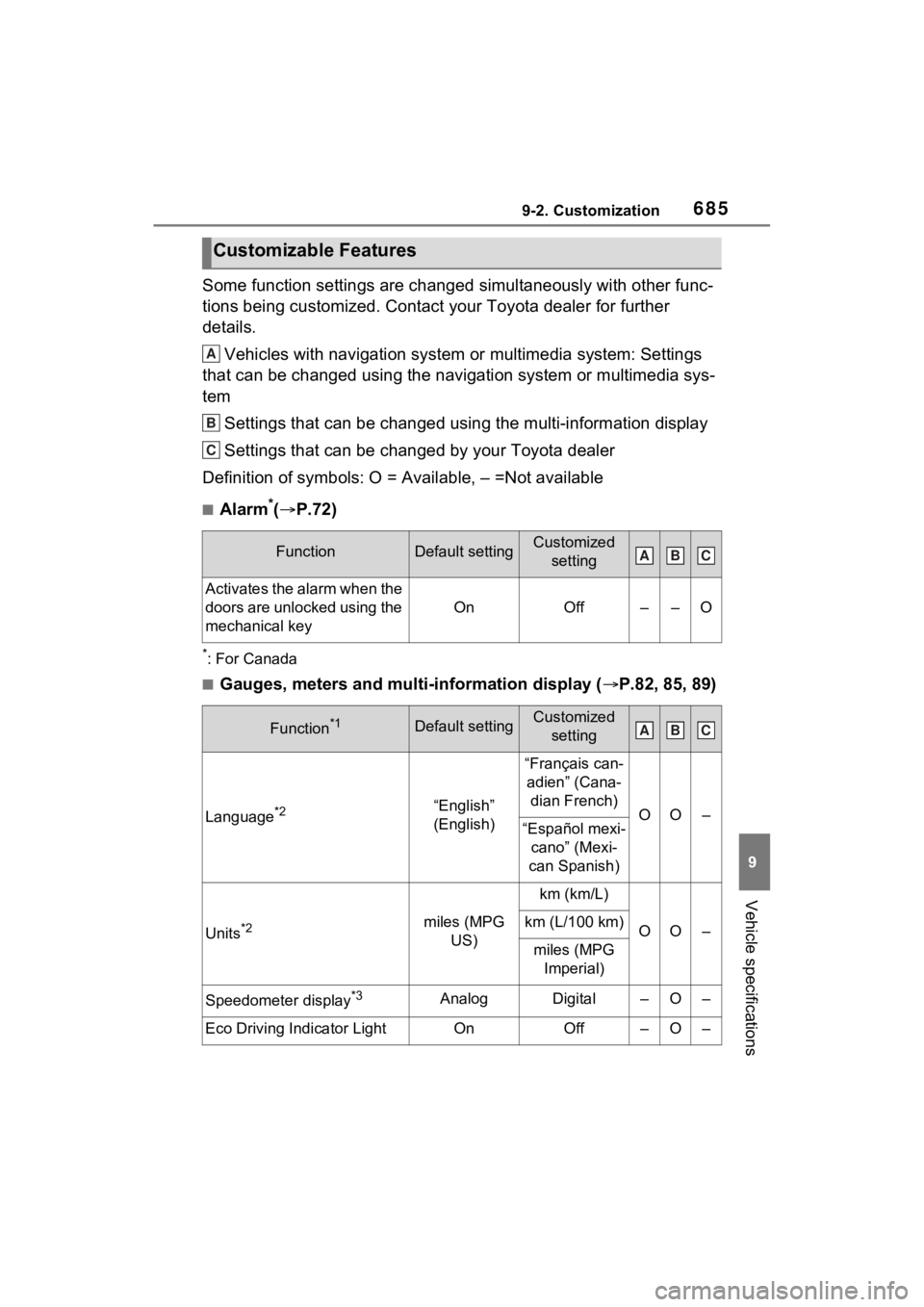
Some function settings are changed simultaneously with other func-
tions being customized. Contact your Toyota dealer for further
details.Vehicles with navigation system or multimedia system: Settings
that can be changed using the navigation system or multimedia s ys-
tem
Settings that can be changed using the multi-information displa y
Settings that can be changed by your Toyota dealer
Definition of symbols: O = Available, – =Not available
■Alarm*( P.72)
*: For Canada
■Gauges, meters and multi-information display ( P.82, 85, 89)
Customizable Features
FunctionDefault settingCustomized
setting
Activates the alarm when the
doors are unlocked using the
mechanical key
OnOff––O
Function*1Default settingCustomized setting
Language*2“English”
(English)
“Français can-adien” (Cana- dian French)
OO–“Español mexi- cano” (Mexi-
can Spanish)
Units*2miles (MPG US)
km (km/L)
OO–km (L/100 km)
miles (MPG Imperial)
Speedometer display*3AnalogDigital–O–
Eco Driving Indicator LightOnOff–O–
A
B
C
ABC
ABC
Page 687 of 748

6879-2. Customization
9
Vehicle specifications
■Door lock (P.107, 648)
■Smart key system* and wireless remote control ( P.104, 127)
*: If equipped
FunctionDefault settingCustomized
setting
Unlocking using a key
Driver’s door unlocked in
first step, all doors
unlocked in
second step
All doors
unlocked in first step
––O
Automatic door locking func-
tion
Shift position linked door
locking opera- tionOff
O–OSpeed linked door locking operation
Automatic door unlocking
function
Shift position linked door unlocking operationOff
O–ODriver’s door linked door unlocking operation
FunctionDefault settingCustomized setting
Operation signal (emer-
gency flashers)OnOffO–O
Operation buzzer volume5OffO–O1 to 7
Time elapsed before the
automatic door lock function
is activated if a door is not
opened after being unlocked
60 seconds
Off
O–O30 seconds
120 seconds
Open door reminder buzzer
(When locking the vehicle)OnOff––O
ABC
ABC
Page 688 of 748

6889-2. Customization
■Smart key system*1 ( P.127)
*1: If equipped
*2: This setting can be changed when the smart door unlocking sett ing is set
to “Driver’s door”.
■Wireless remote control ( P.104)
*: If equipped
FunctionDefault settingCustomized
setting
Smart key systemOnOff––O
Smart door unlockingDriver’s doorAll the doorsO–O
Number of consecutive door
lock operations2 timesAs many as desired––O
Time elapsed before unlock-
ing all the door when gripping
and holding the driver’s door
handle
*2
2 seconds
Off
––O1.5 seconds
2.5 seconds
FunctionDefault settingCustomized setting
Wireless remote controlOnOff––O
Unlocking operation
Driver’s door unlocked in
first step, all doors
unlocked in
second step
All doors
unlocked in first step
O–O
Theft deterrent panic modeOnOff––O
Locking operation when door
openedOnOffO–O
The function that activates
the switch of the wire-
less remote control when
locking the door
* ( P.117)
On (Unlocking
all the door)
Off
––OOn (Unlocking back door
only)
ABC
ABC