2022 TOYOTA RAV4 HYBRID key
[x] Cancel search: keyPage 525 of 752
5256-2. Using the interior lights
6
Interior features
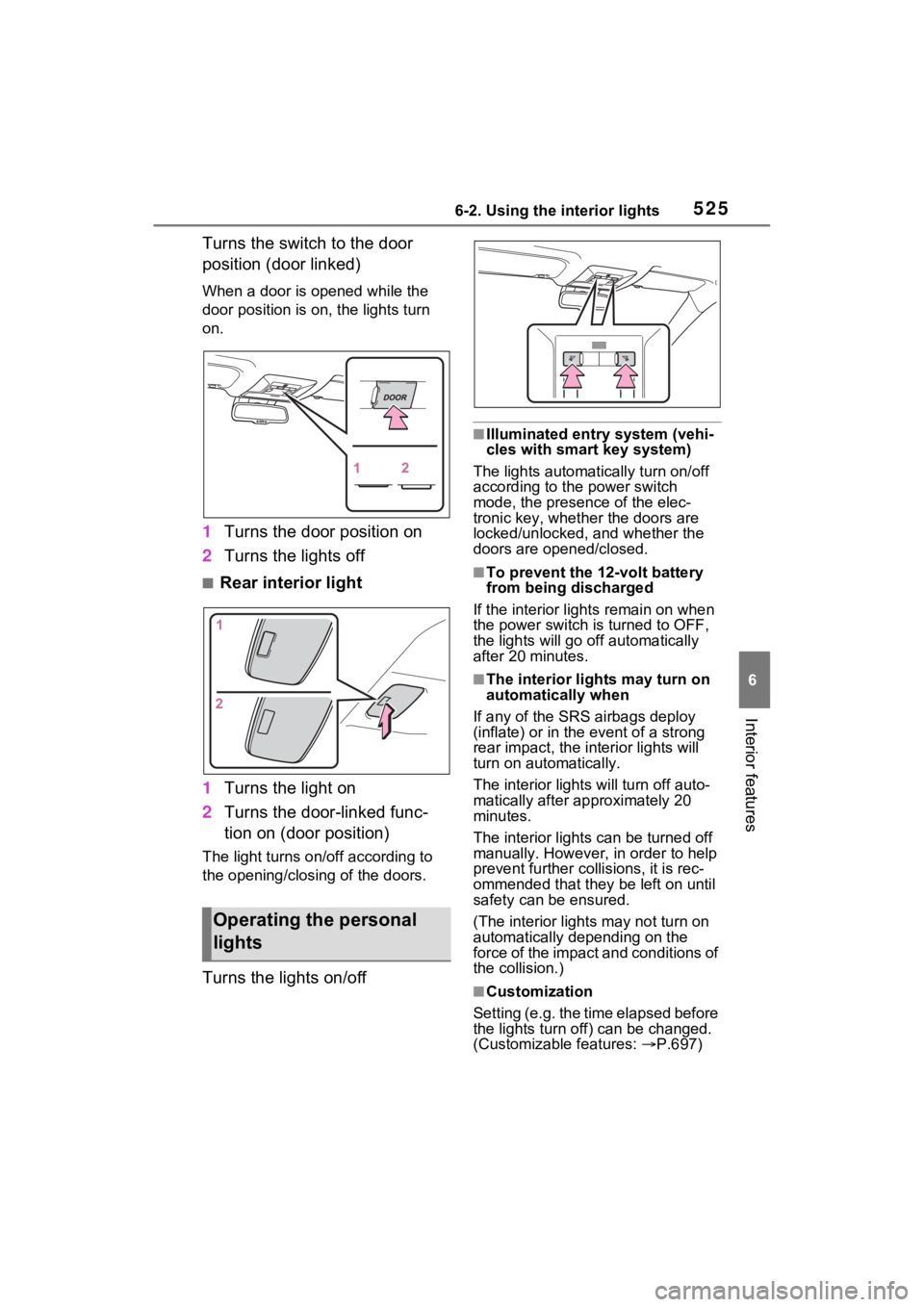
Turns the switch to the door
position (door linked)
When a door is opened while the
door position is on, the lights turn
on.
1Turns the door position on
2 Turns the lights off
■Rear interior light
1 Turns the light on
2 Turns the door-linked func-
tion on (door position)
The light turns on/off according to
the opening/closing of the doors.
Turns the lights on/off
■Illuminated entry system (vehi-
cles with smart key system)
The lights automatically turn on/off
according to the power switch
mode, the presence of the elec-
tronic key, whether the doors are
locked/unlocked, and whether the
doors are opened/closed.
■To prevent the 12-volt battery
from being discharged
If the interior light s remain on when
the power switch is turned to OFF,
the lights will go off automatically
after 20 minutes.
■The interior li ghts may turn on
automatically when
If any of the SRS airbags deploy
(inflate) or in the event of a strong
rear impact, the in terior lights will
turn on automatically.
The interior lights will turn off auto-
matically after approximately 20
minutes.
The interior lights can be turned off
manually. However, in order to help
prevent further co llisions, it is rec-
ommended that they be left on until
safety can be ensured.
(The interior lights may not turn on
automatically depending on the
force of the impact and conditions of
the collision.)
■Customization
Setting (e.g. the time elapsed before
the lights turn off) can be changed.
(Customizable features: P.697)
Operating the personal
lights
Page 528 of 752
5286-3. Using the storage features
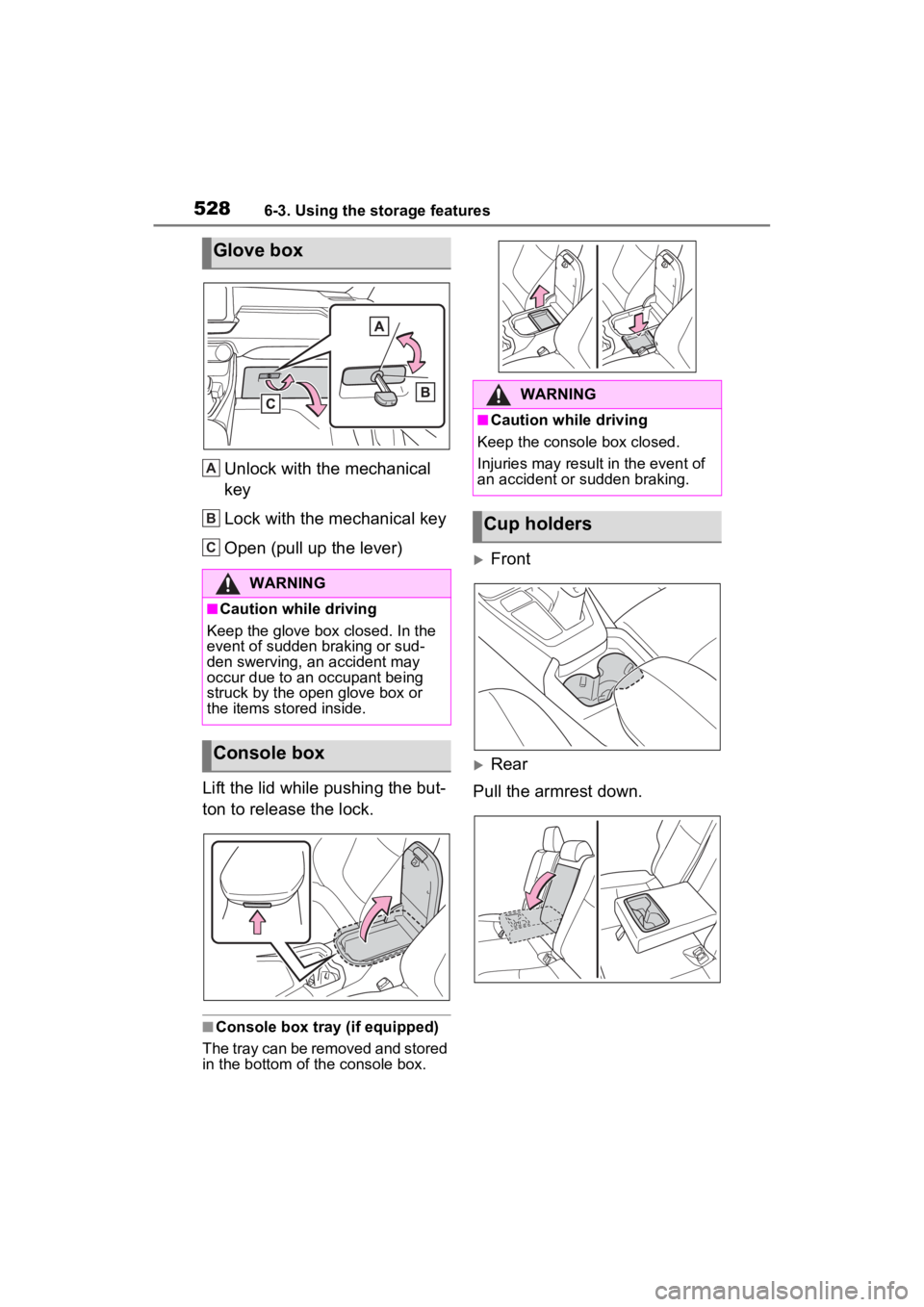
Unlock with the mechanical
key
Lock with the mechanical key
Open (pull up the lever)
Lift the lid while pushing the but-
ton to release the lock.
■Console box tray (if equipped)
The tray can be removed and stored
in the bottom of the console box.
Front
Rear
Pull the armrest down.
Glove box
WARNING
■Caution while driving
Keep the glove box closed. In the
event of sudden braking or sud-
den swerving, an accident may
occur due to an occupant being
struck by the open glove box or
the items stored inside.
Console box
A
B
C
:$51,1*
■Caution while driving
Keep the console box closed.
Injuries may resul t in the event of
an accident or sudden braking.
Cup holders
Page 542 of 752

5426-4. Using the other interior features
Repeatedly flashes 4 times
continuously (Orange)
■The wireless charger can be
operated when
The power switch i s in ACC or ON.
■Usable portable devices
●Qi standard wireless charge stan-
dard can be used on compatible
devices. However, not all Qi stan-
dard devices and compatibility are
guaranteed.
●Starting with mobile phones and
smartphones, it is aimed for low
power electrically supplied porta-
ble devices of no more than 5W.
●However, charging exceeding 5 W
is supported by the following por-
table devices.
• Charging at 7.5 W or less is sup- ported by iPhone’s that support
7.5 W charging.
• Charging at 10 W or less is sup- ported by portable devices compli-
ant with WPC standard Ver1.2.4.
■Using the smart key system
If the smart key system detects the
key while a device is being charged,
charging will be temporarily
stopped.
■When covers and accessories
are attached to portable devices
Do not charge in situations where
cover and accessories not able to handle Qi are attached to the porta-
ble device. Depending on the type
of cover and acce
ssory, it may not
be possible to charge. When
charging is not performed even with
the portable devic e placed on the
charge area, remove the cover and
accessories.
■While charging, noise enters
the AM radio
●Turn off the wireless charger and
confirm that the noise has
decreased. If the noise
decreases, continuously pushing
the power supply switch of the
wireless charger for 2 seconds,
the frequency of the charger can
be changed and the noise can be
reduced. Also, on that occasion,
the operation indicator light will
flash orange 2 times.
●iPhone’s use a particular fre-
quency for rapid charging.
Depending on the iOS version,
rapid charging may not be per-
formed while switching frequen-
cies.
■Important points of the wireless
charger
●If the electronic key cannot be
detected within the vehicle inte-
rior, charging c annot be done.
When the door is opened and
closed, charging may be tempo-
rarily suspended.
●When charging, the wireless
charging device and portable
device will get warmer, however
this is not a malfunction.
When a portable device gets
warm while char ging, charging
may stop due to the protection
function on the portable device
side. In this case, when the tem-
perature of the portable device
drops significantly, charge again.
The fan may start operating to lower
the temperature inside the wireless
charger, however this is not a mal-
function.
Suspected causesHandling method
Safety shut-
down resulting
when the tem-
perature within
the wireless
charger
exceeded the set
valueStop charging,
remove the por-
table device from
the charging
tray, wait for the
temperature to
drop, and then
start charging
again.
Page 553 of 752

553
7
7
Maintenance and care
Maintenance and care
7-1. Maintenance and careCleaning and protecting the vehicle exterior .......... 554
Cleaning and protecting the vehicle interior ........... 557
7-2. Maintenance Maintenance requirements.................................. 560
General maintenance.. 561
Emission inspection and maintenance (I/M) pro-
grams ........................ 564
7-3. Do-it-yourself mainte- nance
Do-it-yourself service pre- cautions ..................... 565
Hood ........................... 567
Positioning a floor jack 568
Engine compartment ... 570
12-volt battery ............. 576
Tires ............................ 578
Tire inflation pressure . 587
Wheels ......... ...............589
Air conditioning filter .... 591
Cleaning the hybrid battery (traction battery) air intake
vent and filter............. 593
Wiper insert replacement .................................. 597
Wireless remote con- trol/electronic key battery
.................................. 600Checking and replacing
fuses .......................... 603
Headlight aim .............. 606
Light bulbs ................... 607
Page 554 of 752

5547-1. Maintenance and care
7-1.Maintenance and care
Working from top to bottom,
liberally apply water to the
vehicle body, wheel wells and
underside of the vehicle to
remove any dirt and dust.
Wash the vehicle body using
a sponge or soft cloth, such
as a chamois.
For hard-to-remove marks,
use car wash soap and rinse
thoroughly with water.
Wipe away any water.
Wax the vehicle when the
waterproof coating deterio-
rates.
If water does not bead on a clean
surface, apply wax when the vehi-
cle body is cool.
■Automatic car washes
●Before washing the vehicle:
• Fold the mirrors
• Turn off the power back door (if equipped)
Start washing from the front of the
vehicle. Make sure to extend the
mirrors before driving.
●Brushes used in automatic car washes may scratch the vehicle
surface, parts (wheel, etc.) and
harm your vehicle’s paint.
●Rear spoiler may not be washable
in some automatic car washes.
There may also be an increased
risk of damage to vehicle.
■High pressure car washes
As water may enter the cabin, do
not bring the nozzle tip near the
gaps around the doors or perimeter
of the windows, or spray these
areas continuously.
■Note for a smart key system (if
equipped)
If the door handle becomes wet
while the electronic key is within the
effective range, t he door may lock
and unlock repeatedly. In that case,
follow the following correction pro-
cedures to wash the vehicle:
●Place the key in a position 6 ft. (2
m) or more separate from the
vehicle while the vehicle is being
washed. (Take care to ensure that
the key is not stolen.)
●Set the electronic key to battery-
saving mode to disable the smart
key system. ( P.144)
■Wheels and wheel ornaments
●Remove any dirt immediately by
using a neutral detergent.
●Wash detergent off with water
immediately after use.
●To protect the paint from damage,
make sure to obs erve the follow-
ing precautions.
• Do not use acidic, alkaline or abrasive detergent
• Do not use hard brushes
• Do not use detergent on the
wheels when they are hot, such
as after driving or parking in hot
weather
■Brake pads and calipers
Rust may form if the vehicle is
parked with wet brake pads or disc
rotors, causing them to stick. Before
Cleaning a nd protect-
ing the vehicle exte-
rior
Perform the following to
protect the vehicle and
maintain it in prime condi-
tion:
Cleaning instructions
Page 576 of 752

5767-3. Do-it-yourself maintenance
The 12-volt battery is located in
the right-hand side of luggage
compartment.
■Before recharging
When recharging, the 12-volt bat-
tery produces hydrogen gas which
is flammable and explosive. There-
fore, observe the following precau-
tions before recharging:
●If recharging with the 12-volt bat-
tery installed on the vehicle, be
sure to disconnect the ground
cable.
●Make sure the power switch on
the charger is off when connecting
and disconnecting the charger
cables to the 12-volt battery.
■After recharging/reconnecting
the 12-volt battery (vehicles
with smart key system)
●Unlocking the doors using the
smart key system may not be pos-
sible immediately after reconnect-
ing the 12-volt battery. If this
happens, use the wireless remote
control or the mechanical key to
lock/unlock the doors.
●Start the hybrid system with the
power switch in ACC. The hybrid
system may not start with the
power switch turned off. How-
ever, the hybrid system will oper- ate normally from the second
attempt.
●The power switch mode is
recorded by the vehicle. If the 12-
volt battery is reconnected, the
vehicle will return the power
switch mode to the status it was in
before the 1
2-volt battery was dis-
connected. Make sure to turn off
the power switch before discon-
nect the 12-volt battery. Take
extra care when connecting the
12-volt battery if the power switch
mode prior to discharge is
unknown.
If the hybrid system will not start
even after multiple attempts at all
methods above, contact your
Toyota dealer.
12-volt battery
Location
WARNING
■Chemicals in the 12-volt bat-
tery
The 12-volt battery contains poi-
sonous and corrosive sulfuric acid
and may produce hydrogen gas
which is flammable and explosive.
To reduce the risk of death or
serious injury, take the following
precautions while working on or
near the 12-volt battery:
●Do not cause sparks by touch-
ing the 12-volt battery terminals
with tools.
●Do not smoke or light a match
near the 12-volt battery.
●Avoid contact with eyes, skin
and clothes.
●Never inhale or swallow electro-
lyte.
●Wear protective safety glasses
when working near the 12-volt
battery.
●Keep children away from the
12-volt battery.
Page 600 of 752
6007-3. Do-it-yourself maintenance
■If the key battery is depleted
The following symptoms may occur:
●The smart key system (if
equipped) and wireless remote
control will not function properly.
●The operational range will be
reduced.
Prepare the following before
replacing the battery:
Flathead screwdriver
Small flathead screwdriver
Lithium battery CR2032
■Use a CR2032 lithium battery
●Batteries can be purchased at
your Toyota dealer, local electrical
appliance shops or camera stores.
●Replace only with the same or
equivalent type recommended by
the manufacturer.
●Dispose of used batteries accord-
ing to the local laws.
Vehicles without smart key
system
1 Remove the cover.
Use a screwdriver of an appropriate
size. Forcedly prying may cause
the cover damaged.
NOTICE
■To prevent damage
●Be careful not to damage the
claws when replacing the wiper
insert.
●After the wiper blade is removed
from the wiper arm, place a
cloth, etc., between the rear
window and wiper arm to pre-
vent damage to the rear win-
dow.
●Be sure not to pull excessively
on the wiper insert or deform its
metal plates.
Wireless remote con-
trol/electron ic key bat-
tery
Replace the battery with a
new one if it is depleted.
Items to prepare
Replacing the battery
Page 601 of 752
6017-3. Do-it-yourself maintenance
7
Maintenance and care
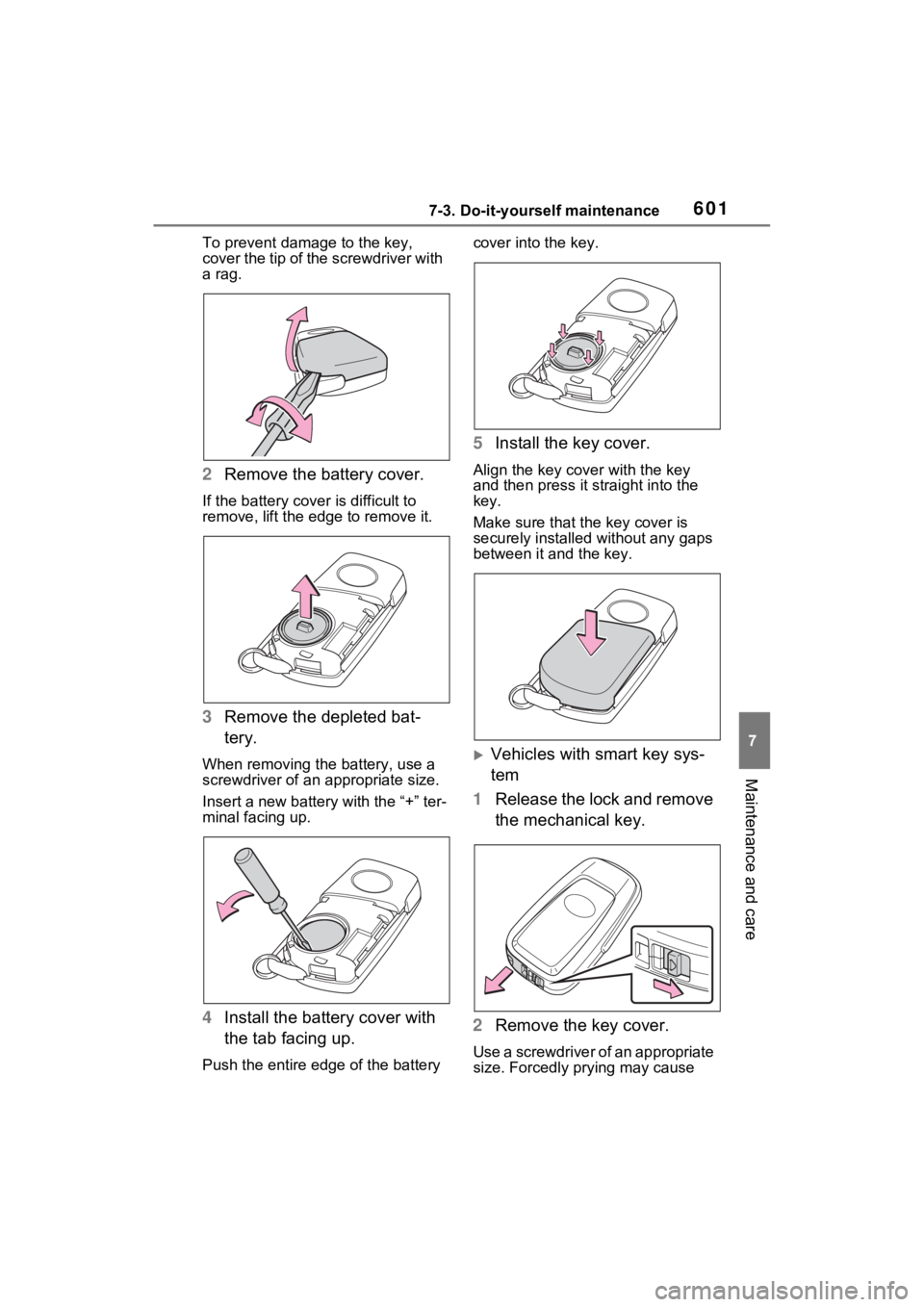
To prevent damage to the key,
cover the tip of the screwdriver with
a rag.
2 Remove the battery cover.
If the battery cover is difficult to
remove, lift the ed ge to remove it.
3Remove the depleted bat-
tery.
When removing the battery, use a
screwdriver of an appropriate size.
Insert a new battery with the “+” ter-
minal facing up.
4Install the battery cover with
the tab facing up.
Push the entire edge of the battery cover into the key.
5
Install the key cover.
Align the key co ver with the key
and then press it straight into the
key.
Make sure that the key cover is
securely installed without any gaps
between it and the key.
Vehicles with smart key sys-
tem
1 Release the lock and remove
the mechanical key.
2 Remove the key cover.
Use a screwdriver of an appropriate
size. Forcedly prying may cause