Page 653 of 752

6538-2. Steps to take in an emergency
8
When trouble arises
1Ensure that the shift lever is
in P and depress the brake
pedal.
2 Touch the Toyota emblem
side of the electronic key to
the power switch.
When the electronic key is
detected, a buzzer sounds and the
power switch will turn to ON.
When the smart key system is
deactivated in customization set-
ting, the power switch will turn to
ACC.
3Firmly depress the brake
pedal and check that is
displayed on the multi-infor-
mation display.
4 Press the power switch
shortly and firmly.
In the event that t he hybrid system
still cannot be started, contact your
Toyota dealer.
■Stopping the hybrid system
Shift the shift lever to P, set the
parking brake and press the power
switch as you normally do when
stopping the hybrid system.
■Replacing the key battery
As the above proce dure is a tempo-
rary measure, it is recommended
that the electronic key battery be
replaced immediately when the bat-
tery is depleted. ( P.600)
■Alarm (if equipped) (for Canada)
Using the mechanical key to lock
the doors will not set the alarm sys-
tem.
If a door is unl ocked using the
mechanical key when the alarm sys-
tem is set, the alarm may be trig-
gered.
■Changing power switch modes
Release the brake pedal and press
the power switch in step 3 above.
The hybrid system does not start
and modes will be changed each
time the switch is pressed.
( P.209)
WARNING
■When using the mechanical
key and operating the power
windows or the moon roof (if
equipped) or panoramic
moon roof (if equipped)
Operate the power window or the
moon roof or panoramic moon
roof after checking to make sure
that there is no possibility of any
passenger having any of their
body parts caught in the window
or the moon roof or panoramic
moon roof. Also, do not allow chil-
dren to operate the mechanical
key. It is possible for children and
other passengers to get caught in
the power window or the moon
roof or panoramic moon roof.
Starting the hybrid sys-
tem
Page 654 of 752

6548-2. Steps to take in an emergency
If you have a set of jumper (or
booster) cables and a second
vehicle with a 12-volt battery,
you can jump start your vehicle
by following the steps below.
1Vehicles with alarm: Confirm
that the electronic key is
being carried.
When connecting the jumper (or
booster) cables, depending on the
situation, the ala rm may activate and the doors locked. (
P.84)
2 Open the hood ( P.567) and
fuse box cover.
Push claws and to com-
pletely release the lock, and then lift
up the cover.
3 Open the exclusive jump
starting terminal cover.
4 Connect a positive jumper cable clamp to on your vehicle and
connect the clamp on the other end of the positive cable to on
the second vehicle. Then, connect a negative cable clamp to
If the 12-volt battery is
discharged
The following procedures
may be used to start the
hybrid system if the vehi-
cle’s 12-volt battery is dis-
charged.
You can also call your
Toyota dealer or a qualified
repair shop.
Restarting the hybrid sys-
tem
AB
A
B
C
Page 656 of 752

6568-2. Steps to take in an emergency
■Starting the hybrid system
when the 12-volt battery is dis-
charged
The hybrid system cannot be
started by push-starting.
■To prevent 12-vol t battery dis-
charge
●Turn off the headlights and the
audio system while the hybrid sys-
tem is off.
●Turn off any unnec essary electri-
cal components when the vehicle
is running at a low speed for an
extended period, such as in heavy
traffic.
■When the 12-volt battery is
removed or discharged
●Information stor ed in the ECU is
cleared. When the 12-volt battery
is depleted, have the vehicle
inspected at your Toyota dealer.
●Some systems may require initial-
ization. ( P.699)
■When removing the 12-volt bat-
tery terminals
When the 12-volt battery terminals
are removed, the information stored
in the ECU is cleared. Before
removing the 12-volt battery termi-
nals, contact your Toyota dealer.
■Charging the 1 2-volt battery
The electricity stor ed in the 12-volt
battery will discharge gradually even
when the vehicle is not in use, due
to natural discharge and the drain-
ing effects of certa in electrical appli-
ances. If the vehicle is left for a long
time, the 12-volt battery may dis-
charge, and the hybrid system may
be unable to start. (The 12-volt bat-
tery recharges aut omatically while
the hybrid system is operating.)
■When recharging or replacing
the 12-volt battery (vehicles
without smart key system)
The hybrid system may not start on
the first attempt after the 12-volt bat- tery has recharged but will start nor-
mally after the second attempt. This
is not a malfunction.
■When recharging or replacing
the 12-volt battery (vehicles
with smart key system)
●In some cases, it may not be pos-
sible to unlock the doors using the
smart key system when the 12-
volt battery is discharged. Use the
wireless remote c
ontrol or the
mechanical key to lock or unlock
the doors.
●The hybrid syste m may not start
on the first attempt after the 12-
volt battery has recharged but will
start normally after the second
attempt. This is n ot a malfunction.
●The power switch mode is memo-
rized by the vehicle. When the 12-
volt battery is reconnected, the
system will return to the mode it
was in before the 12-volt battery
was discharged. Before discon-
necting the 12-volt battery, turn
the power switch to OFF.
If you are unsure what mode the
power switch was in before the
12-volt battery discharged, be
especially careful when recon-
necting the 12-volt battery.
■When replacing t he 12-volt bat-
tery
●Use a 12-volt battery that con-
forms to European regulations.
●Type A:
Use a battery that the case size is
same as the previous one (LN1), 20
hours rate capacity (20HR) is equiv-
alent (45Ah) or greater, and perfor-
mance rating (CCA) is equivalent
(285A) or greater.
Type B:
Use a battery that the case size is
same as the previous one (LN1), 20
hours rate capacity (20HR) is equiv-
alent (45Ah) or greater, and perfor-
mance rating (CCA) is equivalent
(286A) or greater.
Page 688 of 752
6889-2. Customization
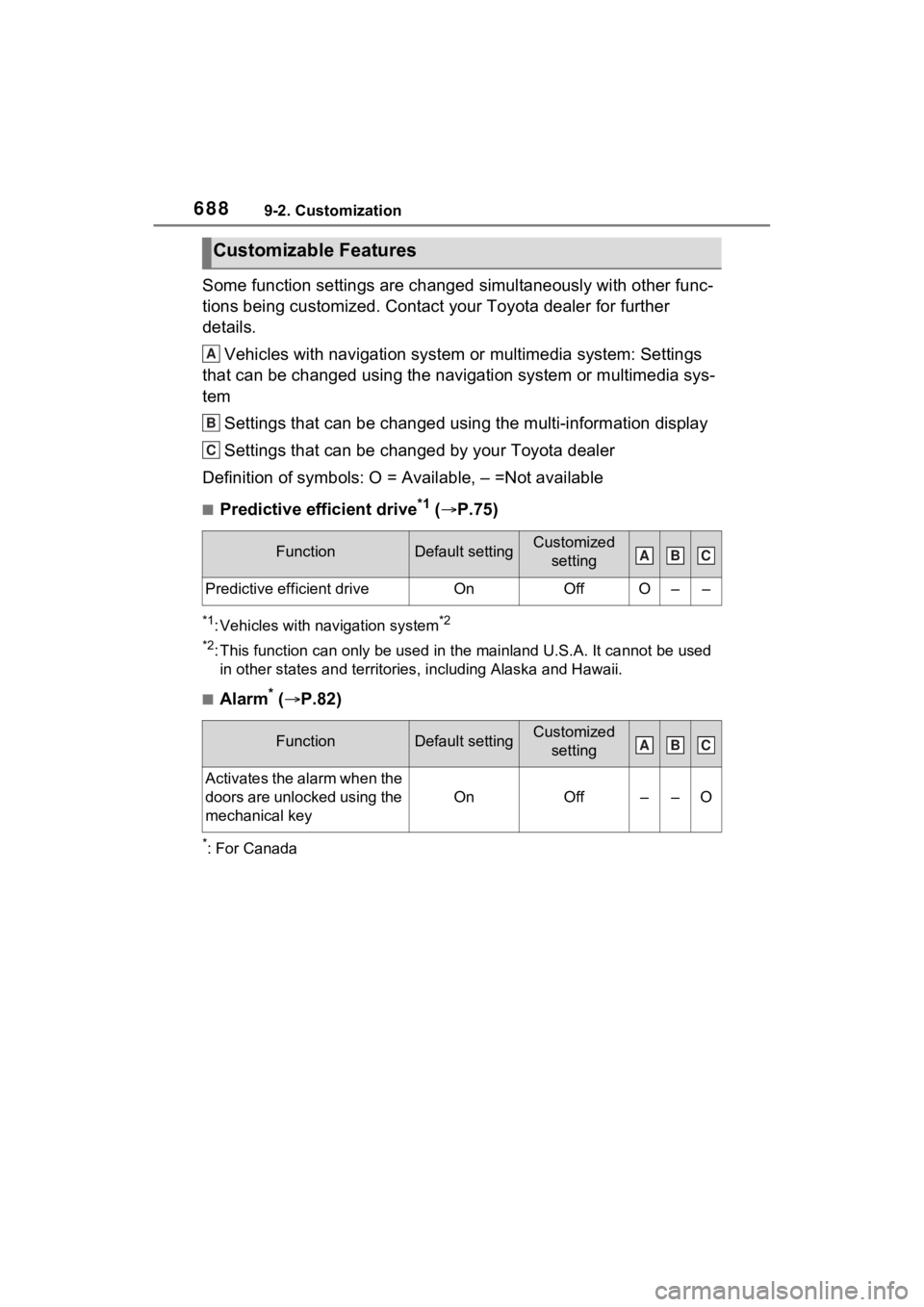
Some function settings are changed simultaneously with other func-
tions being customized. Contact your Toyota dealer for further
details.Vehicles with navigation system or multimedia system: Settings
that can be changed using the navigation system or multimedia s ys-
tem
Settings that can be changed using the multi-information displa y
Settings that can be changed by your Toyota dealer
Definition of symbols: O = Available, – =Not available
■Predictive efficient drive*1 ( P.75)
*1: Vehicles with navigation system*2
*2
: This function can on ly be used in the mainland U.S.A. It canno t be used
in other states and territorie s, including Alaska and Hawaii.
■Alarm* ( P.82)
*: For Canada
Customizable Features
FunctionDefault settingCustomized
setting
Predictive efficient driveOnOffO––
FunctionDefault settingCustomized setting
Activates the alarm when the
doors are unlocked using the
mechanical key
OnOff––O
A
B
C
ABC
ABC
Page 690 of 752
6909-2. Customization
*1: For details about each function: P.107
*2: The default setting varies according to country.
*3: Vehicles with 7-inch display only
■Door lock ( P.123, 652)
■Smart key system* and wireless remote control ( P.120, 143)
Multi-Information display offOffOn–O–
Rear seat reminder functionOnOff–O–
Convenience Services (Sug-
gestion function)On
On (when the
vehicle is stopped)
O–O
Off
FunctionDefault settingCustomized setting
Unlocking using a key
Driver’s door unlocked in
first step, all doors
unlocked in
second step
All doors
unlocked in first step
––O
Automatic door locking func-
tion
Shift position linked door
locking opera- tionOff
O–OSpeed linked door locking operation
Automatic door unlocking
function
Shift position linked door unlocking operationOff
O–ODriver’s door linked door unlocking operation
FunctionDefault settingCustomized setting
Operation signal (emer-
gency flashers)OnOffO–O
Function*1Default settingCustomized settingABC
ABC
ABC
Page 691 of 752
6919-2. Customization
9
Vehicle specifications
*: If equipped
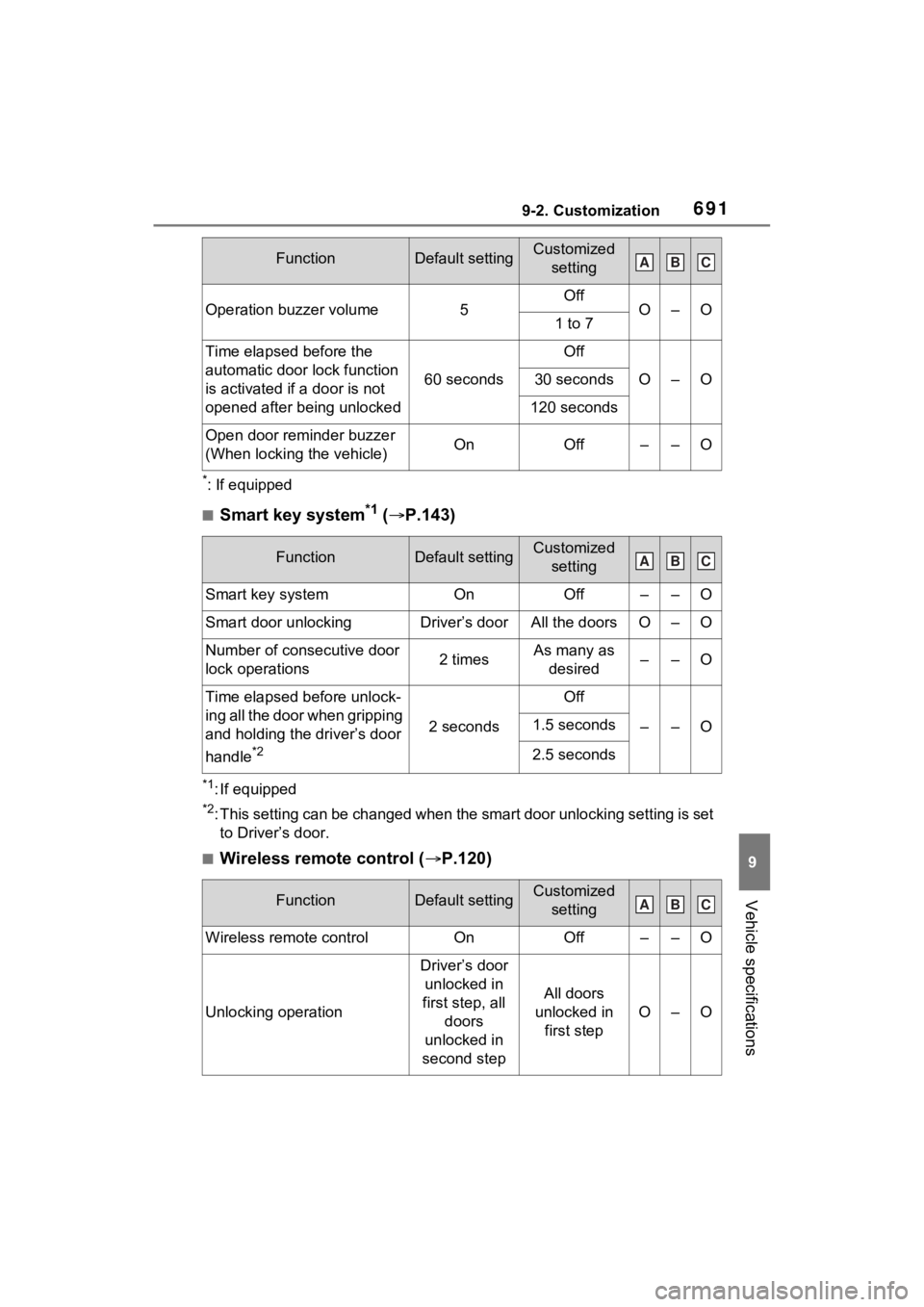
■Smart key system*1 ( P.143)
*1: If equipped
*2: This setting can be changed when the smart door unlocking sett ing is set
to Driver’s door.
■Wireless remote control ( P.120)
Operation buzzer volume5OffO–O1 to 7
Time elapsed before the
automatic door lock function
is activated if a door is not
opened after being unlocked
60 seconds
Off
O–O30 seconds
120 seconds
Open door reminder buzzer
(When locking the vehicle)OnOff––O
FunctionDefault settingCustomized
setting
Smart key systemOnOff––O
Smart door unlockingDriver’s doorAll the doorsO–O
Number of consecutive door
lock operations2 timesAs many as desired––O
Time elapsed before unlock-
ing all the door when gripping
and holding the driver’s door
handle
*2
2 seconds
Off
––O1.5 seconds
2.5 seconds
FunctionDefault settingCustomized setting
Wireless remote controlOnOff––O
Unlocking operation
Driver’s door unlocked in
first step, all doors
unlocked in
second step
All doors
unlocked in first step
O–O
FunctionDefault settingCustomized settingABC
ABC
ABC
Page 693 of 752
6939-2. Customization
9
Vehicle specifications
*1: If equipped
*2: The operation buzzer that sounds when the back door begins to operate
cannot be turned off.
*3: The open position is set by the power back door switch. ( P.142)
*4: When the towing hitch is installe d, Hands Free Power Back Door does
not work.
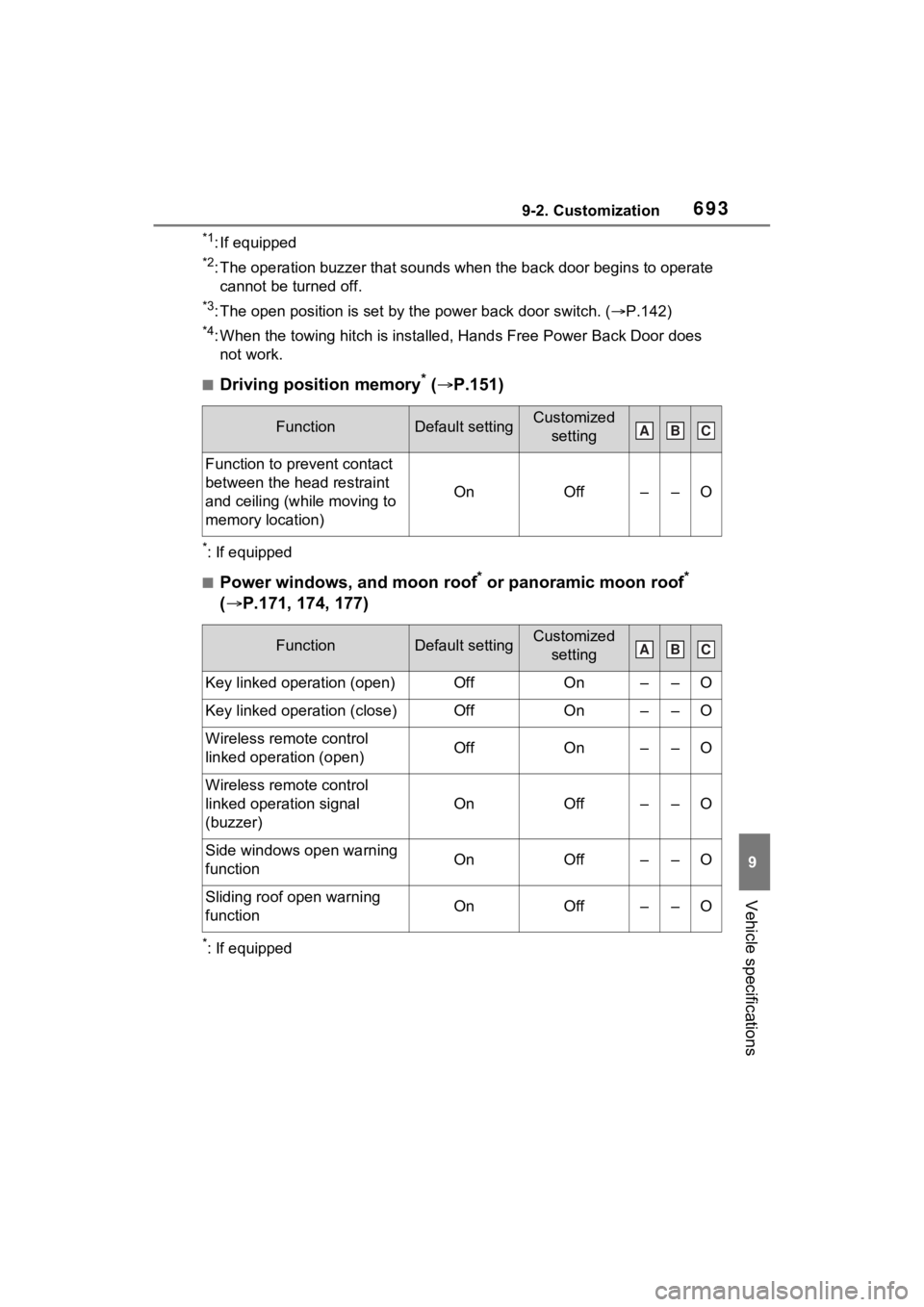
■Driving position memory* ( P.151)
*: If equipped
■Power windows, and moon roof* or panoramic moon roof*
( P.171, 174, 177)
*: If equipped
FunctionDefault settingCustomized
setting
Function to prevent contact
between the head restraint
and ceiling (while moving to
memory location)
OnOff––O
FunctionDefault settingCustomized setting
Key linked operation (open)OffOn––O
Key linked operation (close)OffOn––O
Wireless remote control
linked operation (open)OffOn––O
Wireless remote control
linked operation signal
(buzzer)
OnOff––O
Side windows open warning
functionOnOff––O
Sliding roof open warning
functionOnOff––O
ABC
ABC
Page 694 of 752
6949-2. Customization
■Moon roof* ( P.174)
*: If equipped
■Lights ( P.224)
*: Except for Canada
■Automatic light control system* ( P.224)
*: If equipped
FunctionDefault settingCustomized
setting
Automatic modeOnOff––O
Opening direction when
using the key linked opera-
tion
SlideTilt up––O
Opening direction when
using the wireless remote
control linked operation
SlideTilt up––O
FunctionDefault settingCustomized setting
Daytime Running Lights*OnOffO–O
Light reminder buzzerOnOff––O
FunctionDefault settingCustomized setting
Light sensor sensitivityStandard–2 to 2O–O
Time elapsed before head-
lights automatically turn off
after doors are closed
30 seconds
Off
O–O60 seconds
90 seconds
Windshield wiper linked
headlight illuminationOnOff––O
ABC
ABC
ABC