Page 447 of 568
447
7
7
When trouble arises
When trouble arises
.7-1. Essential informationEmergency flashers .... 448
If your vehicle has to be stopped in an emergency.................................. 448
If the vehicle is submerged or water on the road is ris-
ing ............................. 449
7-2. Steps to take in an emer- gency
If your vehicle needs to be towed......................... 451
If you think something is wrong ........................ 454
Fuel pump shut off system .................................. 455
If a warning light turns on or a warning buzzer sounds.................................. 456
If a warning message is dis- played........................ 467
If you have a flat tire.... 471
If the engine will not start .................................. 485
If you lose your keys ... 486
If the fuel filler door cannot be opened ................. 487
If the electronic key does not operate properly .. 488
If the vehicle battery is dis- charged ..................... 490
If your vehicle overheats .................................. 494If the vehicle becomes stuck
.................................. 496
Page 469 of 568

4697-2. Steps to take in an emergency
7
When trouble arises
■If “Maintenance Required
Soon” is displayed
Indicates that all maintenance
according to the dr iven distance on
the maintenance schedule
* should
be performed soon.
Comes on approximately 4500
miles (7200 km) after the message
has been reset. If necessary, per-
form maintenance. Please reset the
message after the maintenance is
performed. ( P.401)
*: Refer to the separate “Scheduled
Maintenance Guide” or “Owner’s
Manual Supplement” for the main-
tenance interval applicable to your
vehicle.
■If “Maintenance Required Visit
Your Dealer” is displayed
Indicates that all maintenance is
required to correspond to the driven
distance on the maintenance sched-
ule
*.
Comes on approximately 5000
miles (8000 km) after the message
has been reset. (The indicator will
not work properly unless the mes-
sage has been reset.) Perform the
necessary maintenance. Please
reset the message after the mainte-
nance is performed. ( P.401)
*: Refer to the separate “Scheduled
Maintenance Guide” or “Owner’s
Manual Supplement” for the main-
tenance interval applicable to your
vehicle.
■If “Oil Maintenance Required
Soon” is displayed
Indicates that the engine oil should
be scheduled to be changed.
Check the engine oil and change it if
necessary. After changing the
engine oil, make sure to reset the
message. ( P.412)
■If “Oil Maintenance Required” is
displayed
Indicates that the engine oil should
be changed.
Check and change the engine oil,
and oil filter by your Toyota dealer.
After changing the engine oil, make
sure to reset t he message.
( P.412)
■If a message that indicates the
need for visiting your Toyota
dealer is displayed
The system or part shown on the
multi-information di splay is malfunc-
tioning. Have the vehicle inspected
by your Toyota dealer immediately.
■If a message that indicates the
need for referring to Owner’s
Manual is displayed
●If any of the following messages
are shown on the multi-informa-
tion display, it may indicate a mal-
function. Immediately stop the
vehicle and contact your Toyota
dealer.
• “Braking Power Low Stop in a Safe Place See Owner's Manual”
• “Oil Pressure Low Stop in a Safe
Place See Owner's Manual”
• “Charging System Malfunction Stop in a Safe Place See Owner's
Manual”
●If “Smart Key System Malfunction
See Owner's Manual” is shown on
the multi-information display, it
may indicate a malfunction. Have
the vehicle inspected by your Toy-
ota dealer immediately.
●If any of the following messages
are shown on the multi-informa-
tion display, follow the instruc-
tions.
• “Engine Coolant Temp High Stop in a Safe Place See Owner's Man-
ual” ( P.494)
• “High Transmission Fluid Temp See Owner's Manual” ( P.206)
Page 471 of 568
4717-2. Steps to take in an emergency
7
When trouble arises
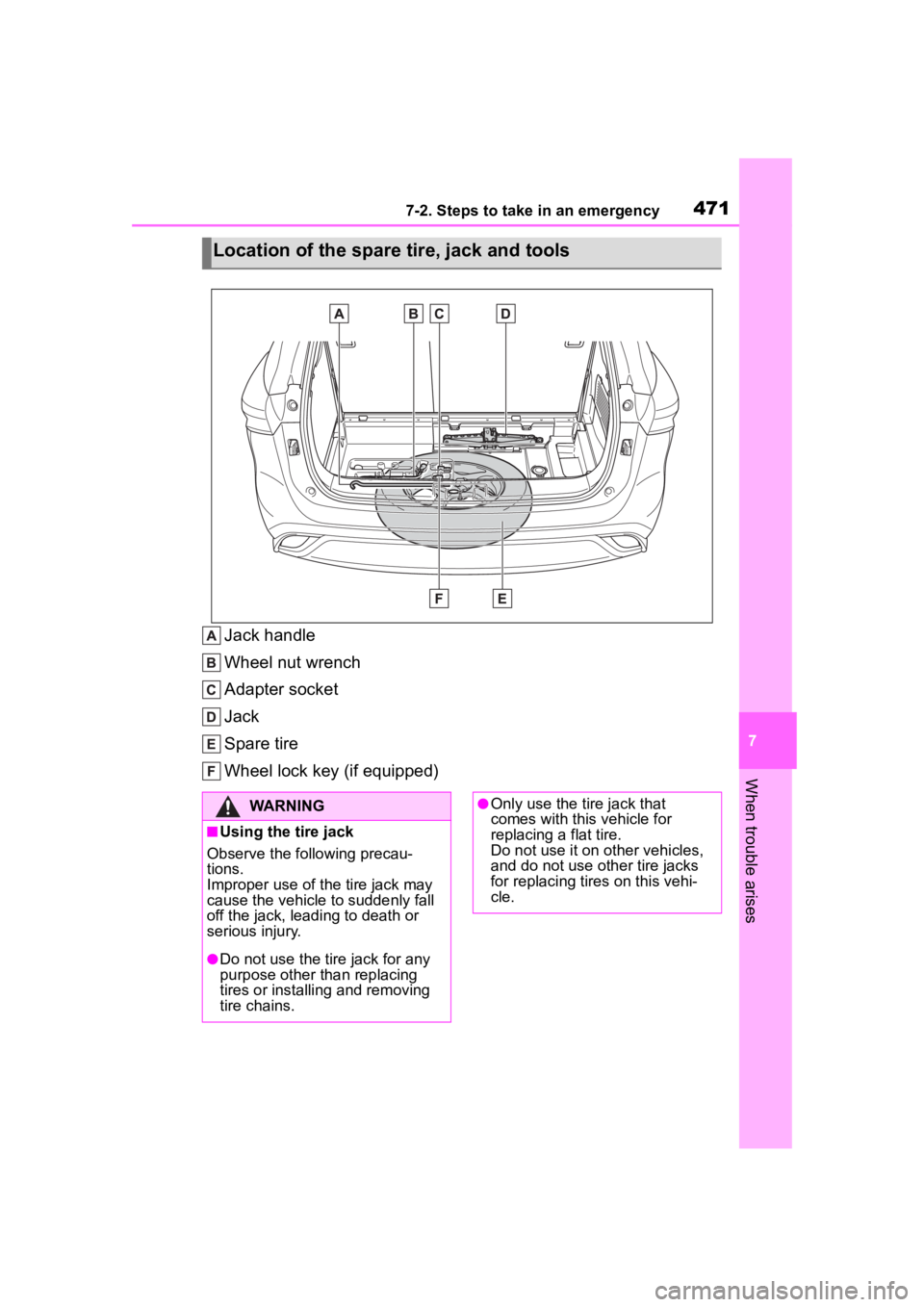
Jack handle
Wheel nut wrench
Adapter socket
Jack
Spare tire
Wheel lock key (if equipped)
Location of the spare tire, jack and tools
WARNING
■Using the tire jack
Observe the following precau-
tions.
Improper use of the tire jack may
cause the vehicle to suddenly fall
off the jack, leading to death or
serious injury.
●Do not use the tire jack for any
purpose other than replacing
tires or installing and removing
tire chains.
●Only use the tire jack that
comes with this vehicle for
replacing a flat tire.
Do not use it on other vehicles,
and do not use other tire jacks
for replacing tires on this vehi-
cle.
Page 472 of 568
4727-2. Steps to take in an emergency
When replacing tires on a vehi-
cle with wheel lock nuts, use the
following procedures to remove
and install the wheel lock nuts.
The wheel lock key is stored in
the tray inside the luggage com- partment. Always return the
wheel lock key to its original
position after use, so that it does
not get lost. (
P.472)
■Removal
For ease of removal, the wheel
lock nut should always be the
first one loosened.
1 Place the wheel lock key on
top of the wheel lock nut,
turning until the wheel lock
key and wheel lock nut pat-
terns engage.
2 Place the wheel nut wrench
on the wheel lock key, and
while applying pressure on
the wheel lock key, loosen
the wheel lock nut.
■Installation
For ease of installation, the
wheel lock nut should always be
the last one tightened.
1 By hand, install a wheel lock
nut on each wheel.
2 Place the wheel lock key on
top of the wheel lock nut,
turning until the wheel lock
key and wheel lock nut pat-
terns engage.
3 Place the wheel nut wrench
on the wheel lock key, and
while applying pressure on
the wheel lock key, tighten
the wheel lock nut to the rec-
ommended torque.
WARNING
●Put the jack prope rly in its jack
point.
●Do not put any part of your body
under the vehicle while it is sup-
ported by the jack.
●Do not start the engine or drive
the vehicle while the vehicle is
supported by the jack.
●Do not raise the vehicle while
someone is inside.
●When raising the vehicle, do not
put an object on or under the
jack.
●Do not raise the vehicle to a
height greater than that required
to replace the tire.
●Use a jack stand if it is neces-
sary to get under the vehicle.
●When lowering the vehicle,
make sure that there is no-one
near the vehicle. If there are
people nearby, warn them
vocally before lowering.
Wheel lock nut (if
equipped)
Page 473 of 568
4737-2. Steps to take in an emergency
7
When trouble arises
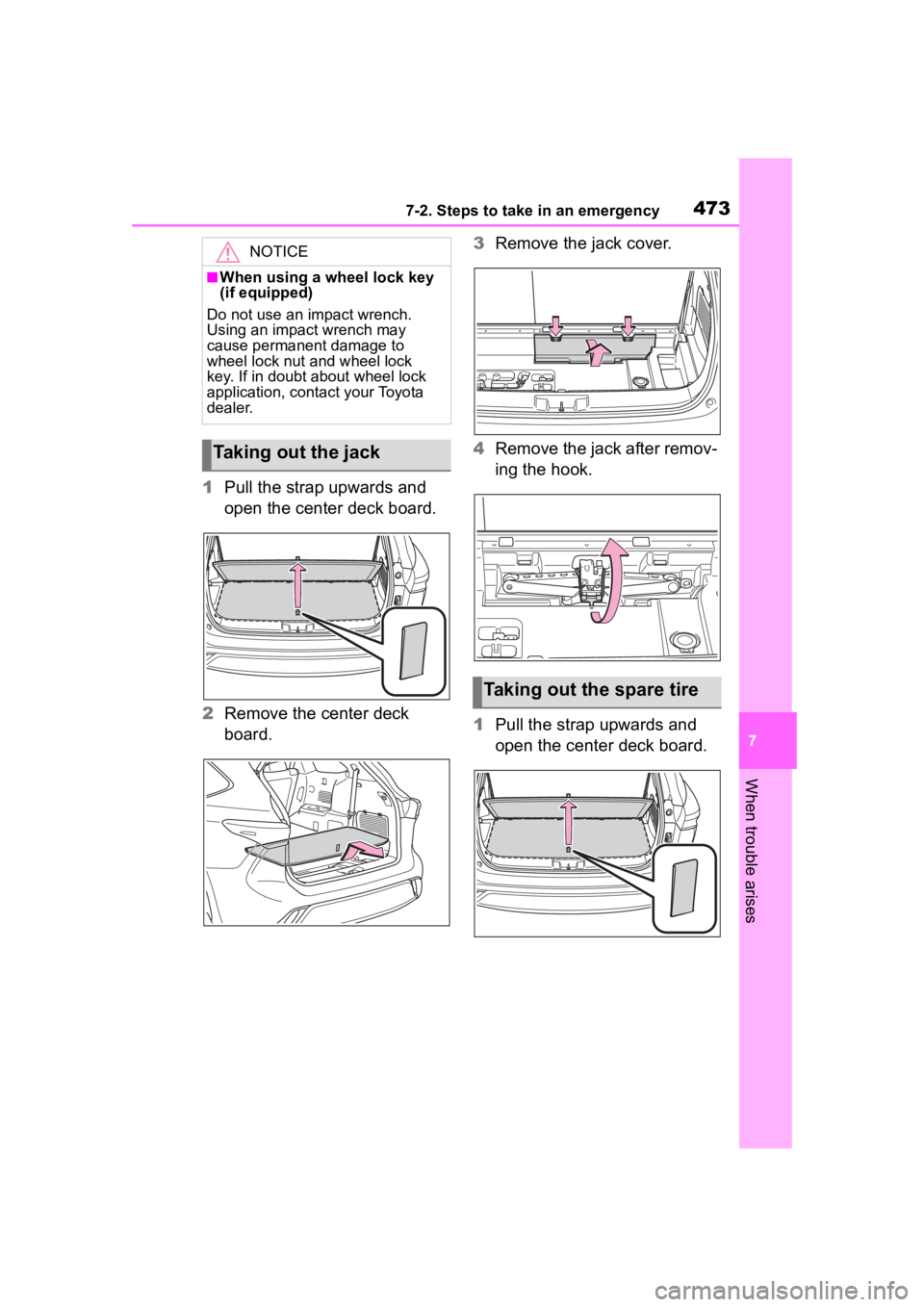
1Pull the strap upwards and
open the center deck board.
2 Remove the center deck
board. 3
Remove the jack cover.
4 Remove the jack after remov-
ing the hook.
1 Pull the strap upwards and
open the center deck board.
NOTICE
■When using a wheel lock key
(if equipped)
Do not use an impact wrench.
Using an impact wrench may
cause permanent damage to
wheel lock nut and wheel lock
key. If in doubt about wheel lock
application, contact your Toyota
dealer.
Taking out the jack
Taking out the spare tire
Page 474 of 568
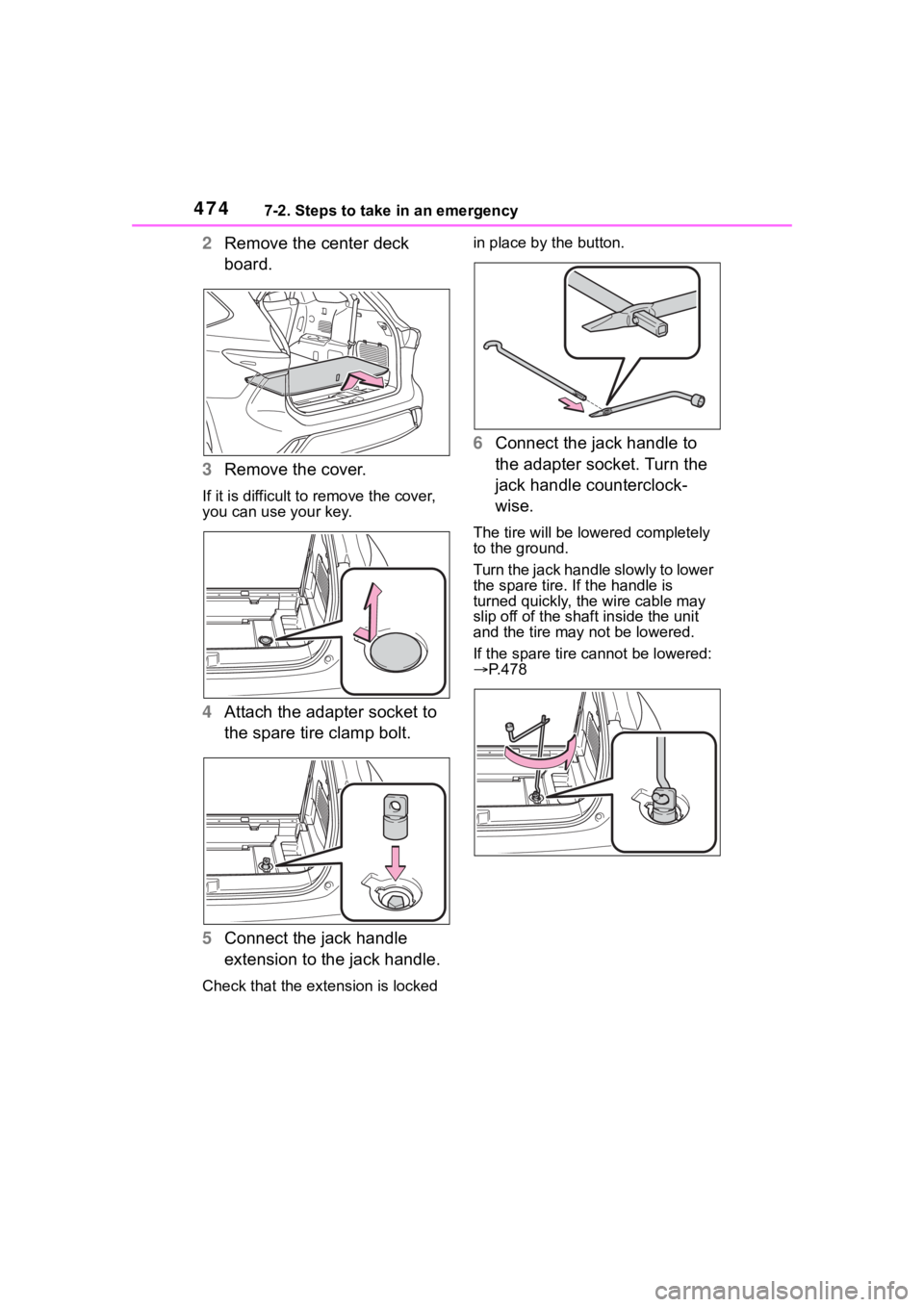
4747-2. Steps to take in an emergency
2Remove the center deck
board.
3 Remove the cover.
If it is difficult to remove the cover,
you can use your key.
4Attach the adapter socket to
the spare tire clamp bolt.
5 Connect the jack handle
extension to the jack handle.
Check that the extension is locked in place by the button.
6
Connect the jack handle to
the adapter socket. Turn the
jack handle counterclock-
wise.
The tire will be low ered completely
to the ground.
Turn the jack handle slowly to lower
the spare tire. If the handle is
turned quickly, the wire cable may
slip off of the shaf t inside the unit
and the tire may not be lowered.
If the spare tire cannot be lowered:
P.478
Page 476 of 568
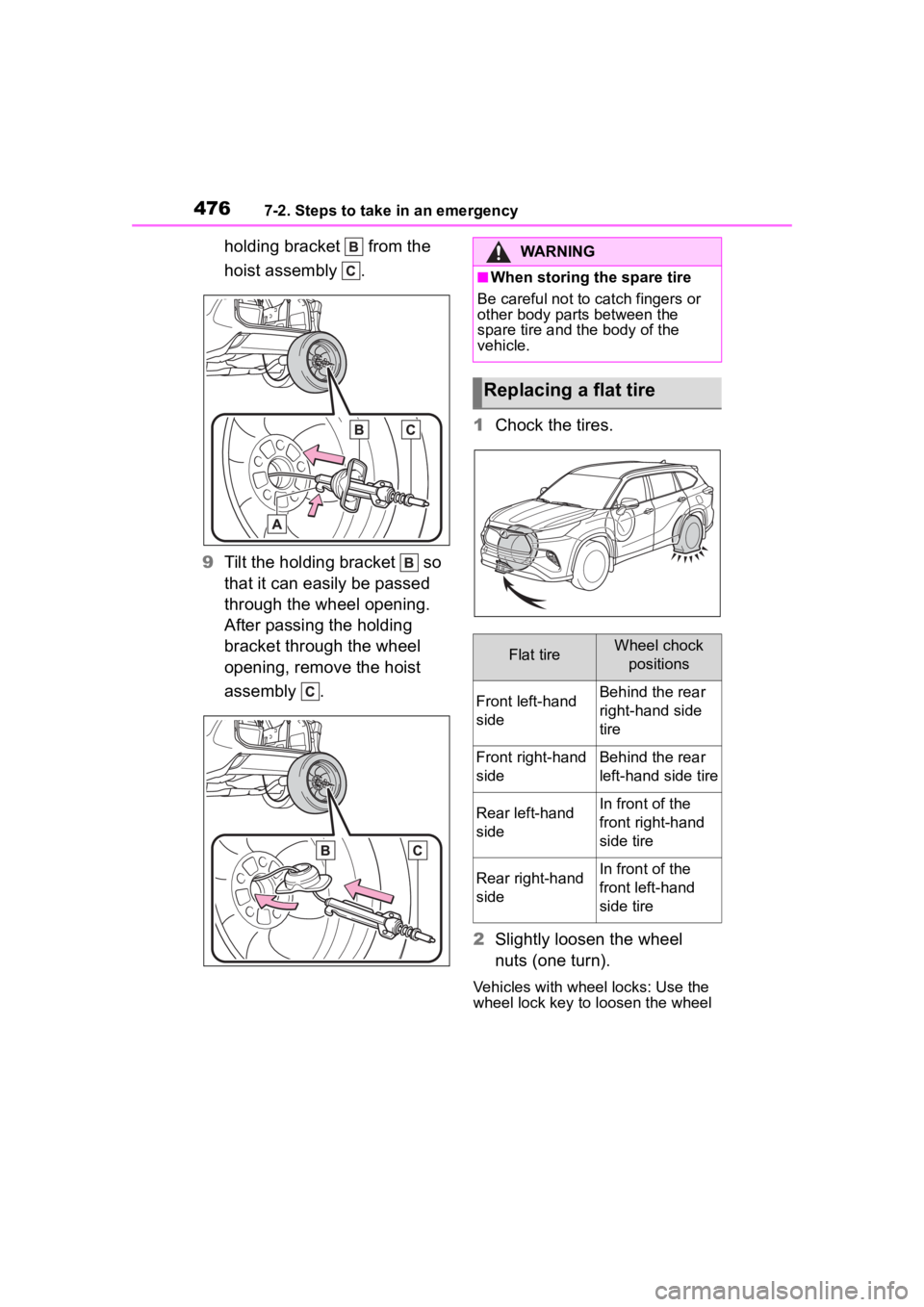
4767-2. Steps to take in an emergency
holding bracket from the
hoist assembly .
9 Tilt the holding bracket so
that it can easily be passed
through the wheel opening.
After passing the holding
bracket through the wheel
opening, remove the hoist
assembly . 1
Chock the tires.
2 Slightly loosen the wheel
nuts (one turn).
Vehicles with wheel locks: Use the
wheel lock key to loosen the wheel
WARNING
■When storing the spare tire
Be careful not to catch fingers or
other body parts between the
spare tire and the body of the
vehicle.
Replacing a flat tire
Flat tireWheel chock
positions
Front left-hand
sideBehind the rear
right-hand side
tire
Front right-hand
sideBehind the rear
left-hand side tire
Rear left-hand
sideIn front of the
front right-hand
side tire
Rear right-hand
sideIn front of the
front left-hand
side tire
Page 479 of 568
4797-2. Steps to take in an emergency
7
When trouble arises
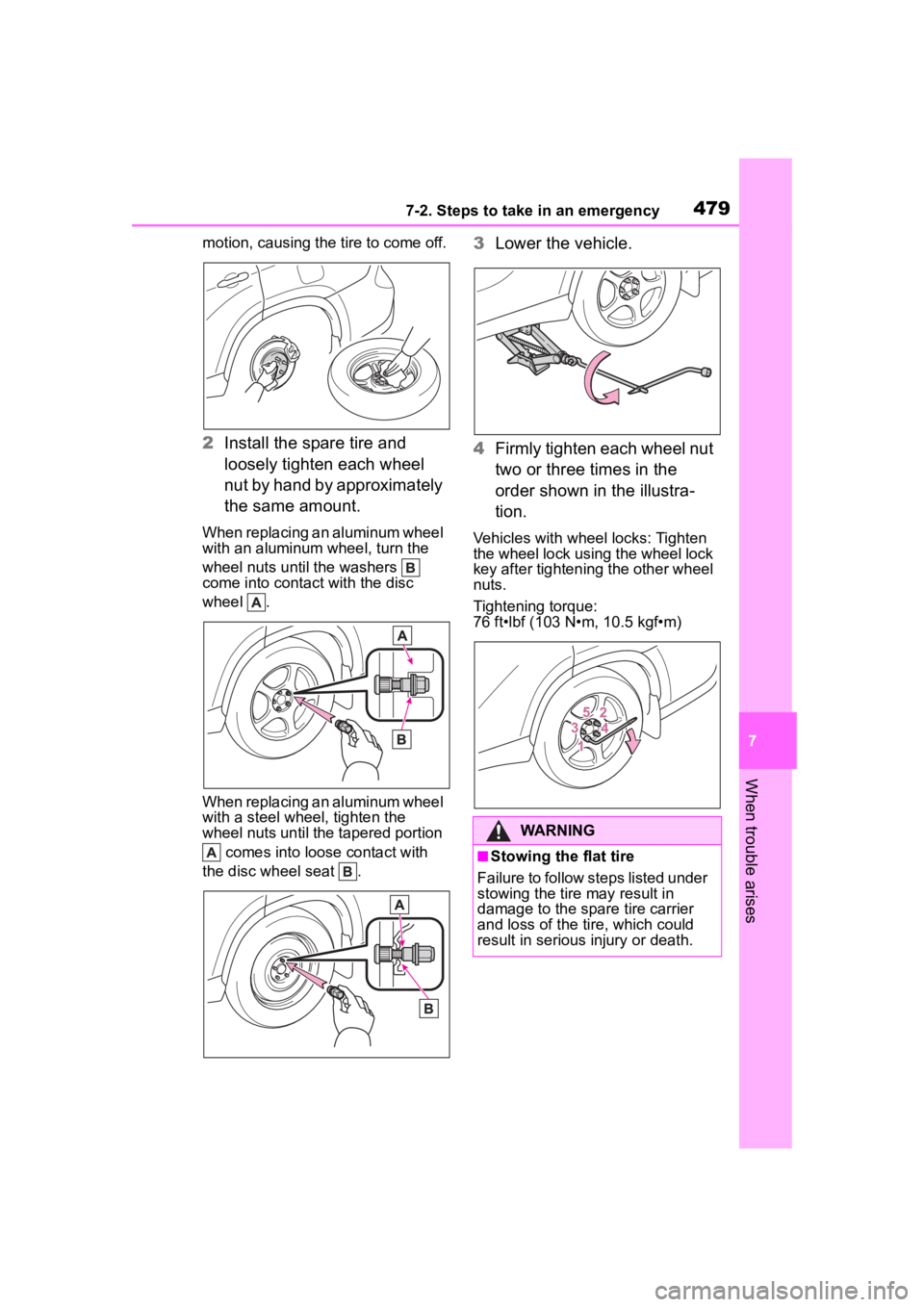
motion, causing the tire to come off.
2Install the spare tire and
loosely tighten each wheel
nut by hand by approximately
the same amount.
When replacing an aluminum wheel
with an aluminum wheel, turn the
wheel nuts until the washers
come into contact with the disc
wheel .
When replacing an aluminum wheel
with a steel wheel, tighten the
wheel nuts until the tapered portion
comes into loose contact with
the disc wheel seat .
3 Lower the vehicle.
4 Firmly tighten each wheel nut
two or three times in the
order shown in the illustra-
tion.
Vehicles with wheel locks: Tighten
the wheel lock using the wheel lock
key after tightening the other wheel
nuts.
Tightening torque:
76 ft•lbf (103 N•m, 10.5 kgf•m)
WARNING
■Stowing the flat tire
Failure to follow steps listed under
stowing the tire may result in
damage to the spare tire carrier
and loss of the tire, which could
result in serious injury or death.