2022 TOYOTA HIGHLANDER warning
[x] Cancel search: warningPage 131 of 568

1313-2. Opening, closing and locking the doors
3
Before driving
WARNING
●Do not operate the Hands Free
Power Back Door if there is little
space under the rear bumper.
NOTICE
■Back door spindles
The back door is equipped with
spindles that hold the back door in
place.
Observe the following precau-
tions. Failure to do so may cause
damage to the back door spindle,
resulting in malfunction.
●Do not attach any foreign
objects, such as stickers, plastic
sheets, or adhesives to the
spindle rod.
●Do not attach any accessories
other than genuine Toyota parts
to the back door.
●Do not place your hand on the
spindle or apply lateral forces to
it.
■To prevent back door closer
malfunction
Do not apply excessive force to
the back door while the back door
closer is operating. Applying
excessive force may cause the
back door closer to malfunction.
■To prevent malfunction of the
power back door
●Make sure that there is no ice
between the back door and
frame that would prevent move-
ment of the back door. Operat-
ing the power back door when
excessive load is present on the
back door may cause a mal-
function.
●Do not apply excessive force to
the power back d oor while the
back door is operating.
●Take care not to damage the
sensors (installed on the right
and left edges of the power
back door) with a knife or other
sharp object. If a sensor is dis-
connected, the power back door
will not close automatically.
■Hands Free Power Back Door
precautions (if equipped)
The kick sensor is located behind
lower center p art of the rear
bumper. Observe the following to
ensure that the Hands Free
Power Back Door function oper-
ates properly:
●Keep the lower c enter part of
the rear bumper clean at all
times.
If the lower center part of the rear
bumper is dirty or covered with
snow, the kick sensor may not
operate. In this situation, clean off
the dirt or snow, move the vehicle
from the current position and then
check if the kick sensor operates.
If it does not operate, have the
vehicle inspected by your Toyota
dealer.
●Do not apply coatings that have
a rain clearin g (hydrophilic)
effect, or other coatings, to the
lower center part of the rear
bumper.
Page 134 of 568
1343-2. Opening, closing and locking the doors
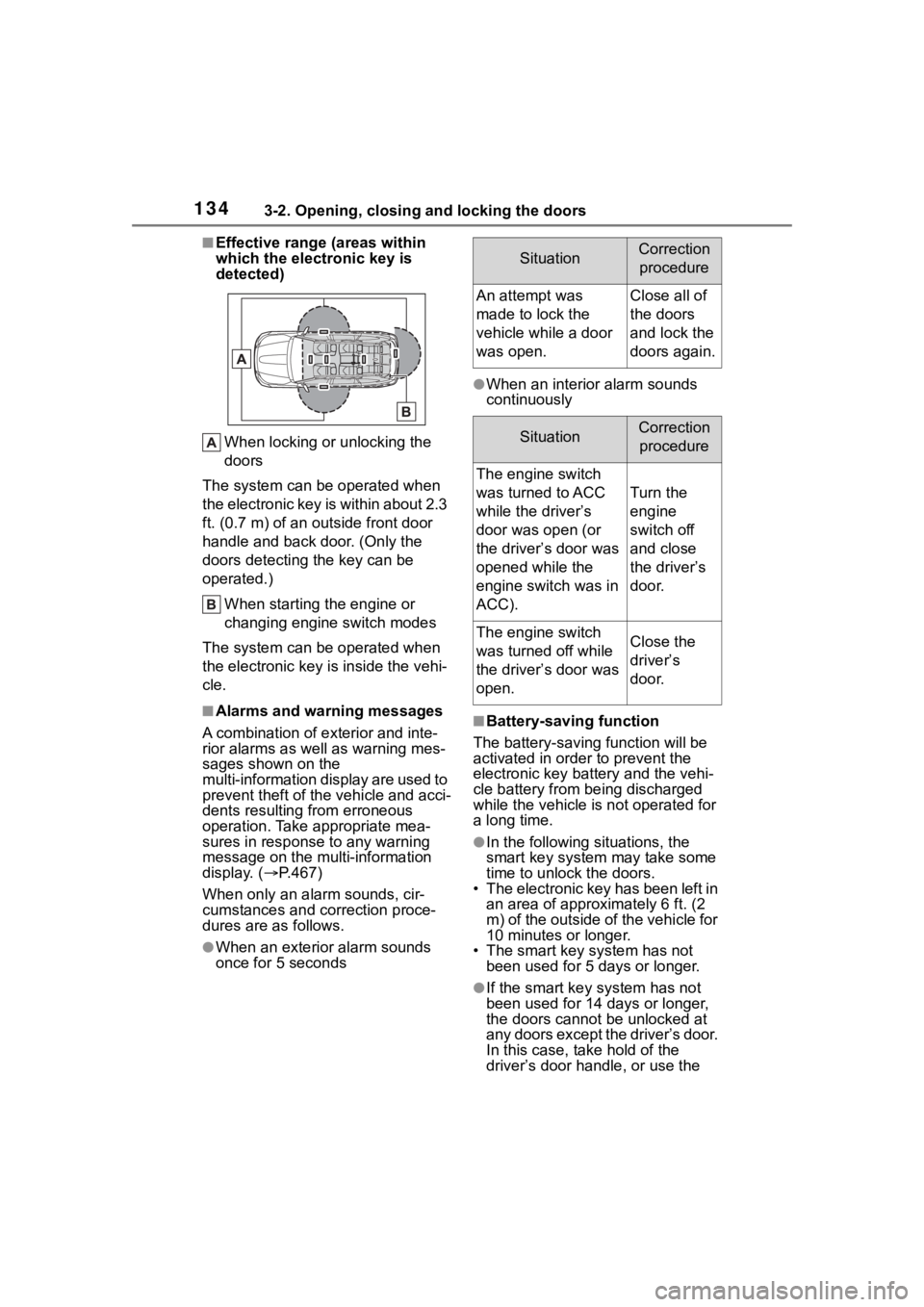
■Effective range (areas within
which the electronic key is
detected)When locking or unlocking the
doors
The system can be operated when
the electronic key is within about 2.3
ft. (0.7 m) of an outside front door
handle and back door. (Only the
doors detecting t he key can be
operated.)
When starting the engine or
changing engine switch modes
The system can be operated when
the electronic key is inside the vehi-
cle.
■Alarms and warning messages
A combination of e xterior and inte-
rior alarms as well as warning mes-
sages shown on the
multi-information display are used to
prevent theft of the vehicle and acci-
dents resulting from erroneous
operation. Take appropriate mea-
sures in response to any warning
message on the multi-information
display. ( P.467)
When only an ala rm sounds, cir-
cumstances and c orrection proce-
dures are as follows.
●When an exterior alarm sounds
once for 5 seconds
●When an interior alarm sounds
continuously
■Battery-saving function
The battery-saving function will be
activated in ord er to prevent the
electronic key battery and the vehi-
cle battery from being discharged
while the vehicle is not operated for
a long time.
●In the following situations, the
smart key system may take some
time to unlock the doors.
• The electronic key has been left in
an area of approxi mately 6 ft. (2
m) of the outside of the vehicle for
10 minutes or longer.
• The smart key system has not been used for 5 days or longer.
●If the smart key system has not
been used for 14 days or longer,
the doors cannot be unlocked at
any doors except the driver’s door.
In this case, take hold of the
driver’s door handle, or use the
SituationCorrection
procedure
An attempt was
made to lock the
vehicle while a door
was open.Close all of
the doors
and lock the
doors again.
SituationCorrection procedure
The engine switch
was turned to ACC
while the driver’s
door was open (or
the driver’s door was
opened while the
engine switch was in
ACC).
Turn the
engine
switch off
and close
the driver’s
door.
The engine switch
was turned off while
the driver’s door was
open.Close the
driver’s
door.
Page 140 of 568
1403-2. Opening, closing and locking the doors
WARNING
■Caution regarding interfer-
ence with electronic devices
●People with implantable car-
diac pacemakers, cardiac
resynchronization ther-
apy-pacemakers or implantable
cardioverter defibrillators should
keep away from the smart key
system antennas. ( P.133) The
radio waves may affect the
operation of such devices. If
necessary, the entry function
can be disabled. Ask your Toy-
ota dealer for details, such as
the frequency of radio waves
and timing of the emitted radio
waves. Then, consult your doc-
tor to see if you should disable
the entry function.
●Users of any electrical medical
device other than implantable
cardiac pacemakers, cardiac
resynchronization ther-
apy-pacemakers or implantable
cardioverter defib rillators should
consult the manufacturer of the
device for information about its
operation under the influence of
radio waves. Radio waves could
have unexpected e ffects on the
operation of such medical
devices.
Ask your Toyota dealer for details
on disabling the entry function.
Page 141 of 568
1413-3. Adjusting the seats
3
Before driving
3-3.Adjusting the seats
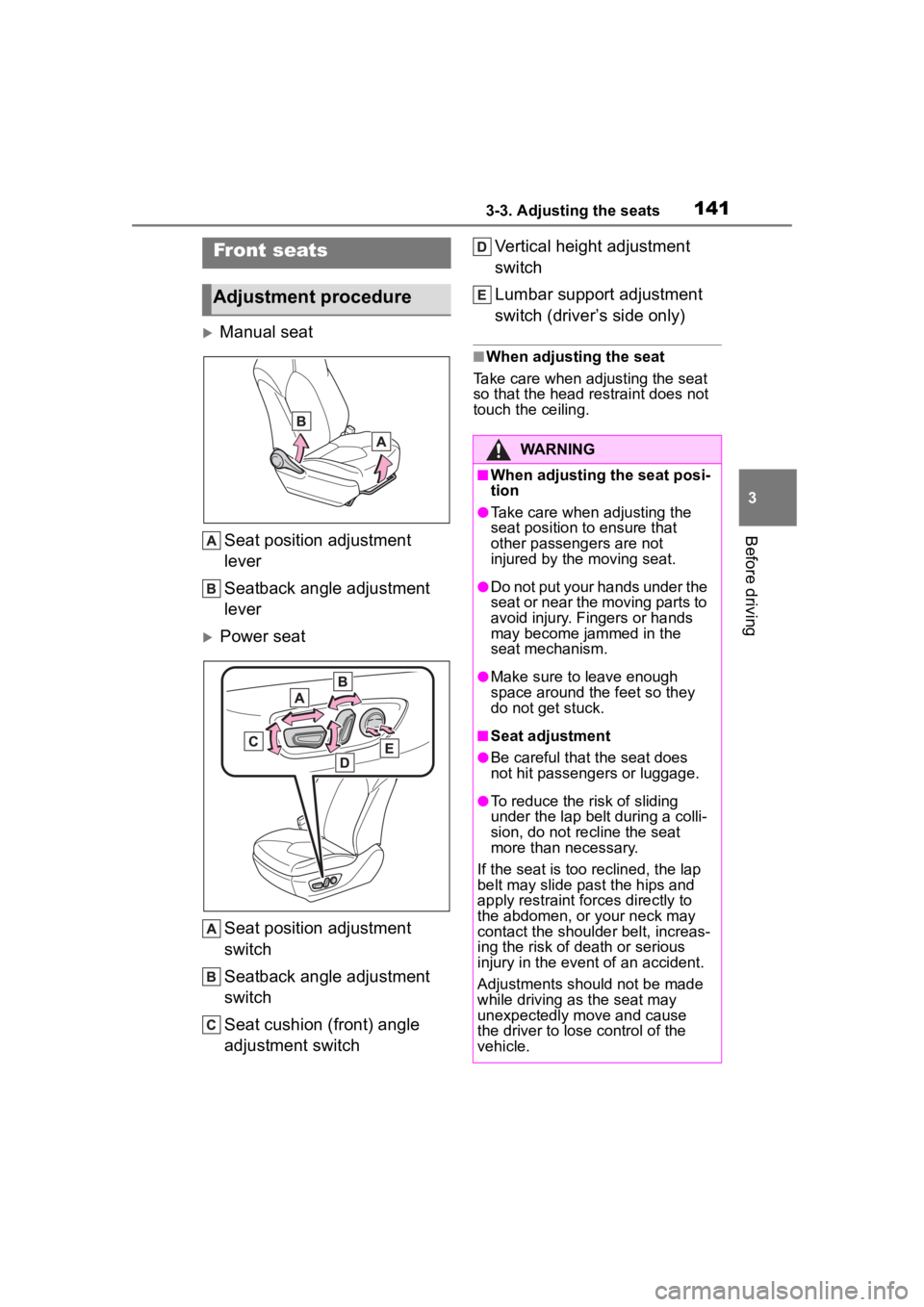
Manual seatSeat position adjustment
lever
Seatback angle adjustment
lever
Power seat
Seat position adjustment
switch
Seatback angle adjustment
switch
Seat cushion (front) angle
adjustment switch Vertical height adjustment
switch
Lumbar support adjustment
switch (driver’s side only)
■When adjusting the seat
Take care when adjusting the seat
so that the head restraint does not
touch the ceiling.
Front seats
Adjustment procedure
WARNING
■When adjusting the seat posi-
tion
●Take care when adjusting the
seat position to ensure that
other passengers are not
injured by the moving seat.
●Do not put your hands under the
seat or near the moving parts to
avoid injury. Fingers or hands
may become jammed in the
seat mechanism.
●Make sure to leave enough
space around the feet so they
do not get stuck.
■Seat adjustment
●Be careful that the seat does
not hit passengers or luggage.
●To reduce the risk of sliding
under the lap bel t during a colli-
sion, do not recline the seat
more than necessary.
If the seat is too reclined, the lap
belt may slide past the hips and
apply restraint for ces directly to
the abdomen, or your neck may
contact the shoulder belt, increas-
ing the risk of death or serious
injury in the event of an accident.
Adjustments should not be made
while driving as the seat may
unexpectedly move and cause
the driver to lose control of the
vehicle.
Page 142 of 568
1423-3. Adjusting the seats
WARNING
●Manual seat only: After adjust-
ing the seat, make sure that the
seat is locked in position.
Rear seats
The seat position and seat-
back angle can be adjusted,
and the seatback can be
folded by operating a seat-
back angle adjustment
lever.
WARNING
■Seat adjustment
●To reduce the risk of sliding
under the lap belt during a colli-
sion, do not recline the seat
more than necessary.
If the seat is too reclined, the lap
belt may slide past the hips and
apply restraint for ces directly to
the abdomen, or your neck may
contact the shoulder belt, increas-
ing the risk of death or serious
injury in the event of an accident.
Adjustments should not be made
while driving as the seat may
unexpectedly move and cause
the driver to lose control of the
vehicle.
●Be careful that the seat does
not hit passengers or luggage.
●Be careful not to get your hands
or feet caught in the seat.
■After adjusting or returning
the seats
Observe the following precau-
tions. Failure to do so may result
in death or serious injury.
●Make sure that the seat and
seatback are securely locked in
position by lightly rocking them
back and forth.
●Check that the seat belts are
not twisted or caught in the
seatback.
Page 143 of 568
1433-3. Adjusting the seats
3
Before driving
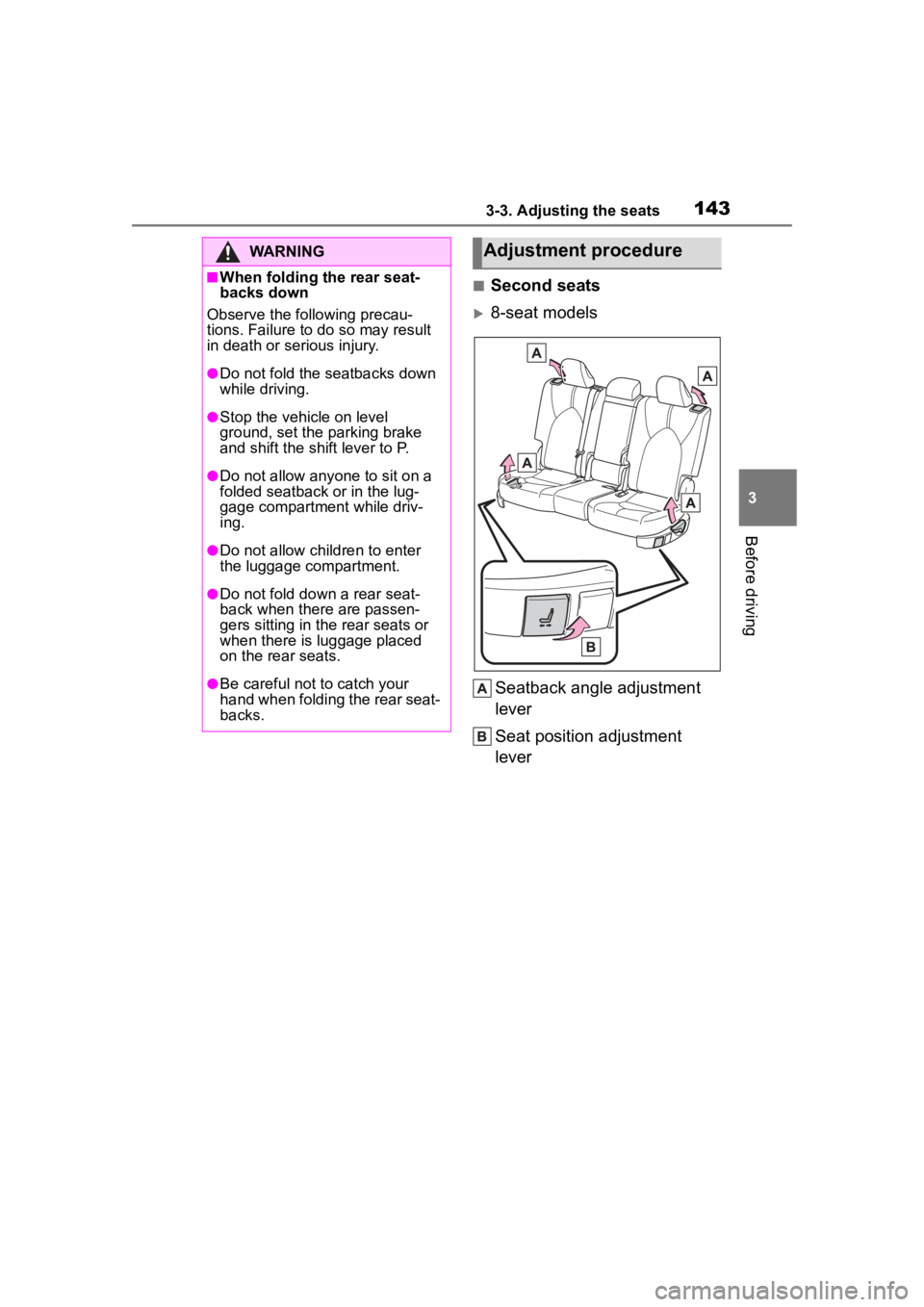
■Second seats
8-seat modelsSeatback angle adjustment
lever
Seat position adjustment
lever
WARNING
■When folding the rear seat-
backs down
Observe the following precau-
tions. Failure to do so may result
in death or serious injury.
●Do not fold the seatbacks down
while driving.
●Stop the vehicle on level
ground, set the parking brake
and shift the shift lever to P.
●Do not allow anyo ne to sit on a
folded seatback or in the lug-
gage compartment while driv-
ing.
●Do not allow child ren to enter
the luggage compartment.
●Do not fold down a rear seat-
back when there are passen-
gers sitting in the rear seats or
when there is luggage placed
on the rear seats.
●Be careful not to catch your
hand when folding the rear seat-
backs.
Adjustment procedure
Page 148 of 568

1483-3. Adjusting the seats
ten.
■Seat positions that can be
memorized
The adjusted positions other than
the position adjusted by lumbar sup-
port switch can be recorded.
■In order to correctly use the
driving position memory func-
tion
If a seat position is already in the
furthest possible position and the
seat is operated in the same direc-
tion, the recorded position may be
slightly different w hen it is recalled.
1Check that the shift lever is in
P.
2 Turn the engine switch to
ON.
3 Press one of the buttons for
the driving position you want to recall until the buzzer
sounds.
■To stop the position recall oper-
ation part-way through
Perform any of the following opera-
tions:
●Press the “SET” button.
●Press button “1” or “2”.
●Operate any of t he seat adjust-
ment switches (only cancels seat
position recall).
■Operating the driving position
memory after turning the
engine switch off
Recorded seat positions can be
activated up to 180 seconds after
the driver’s door is opened and
another 60 seconds after it is closed
again.
■When the recorded seat posi-
tion cannot be recalled
The seat position may not be
recalled in some situations when the
seat position is recorded in a certain
range. For details, contact your Toy-
ota dealer.
■Registering procedure
Record your driving position to
WARNING
■Seat adjustment caution
Take care during seat adjustment
so that the seat d oes not strike
the rear passenger or squeeze
your body again st the steering
wheel.
Recalling a driving posi-
tion
Registering/cancel-
ing/recall a driving posi-
tion to an electronic key
(memory recall function)
Page 150 of 568
1503-3. Adjusting the seats
( P.521)
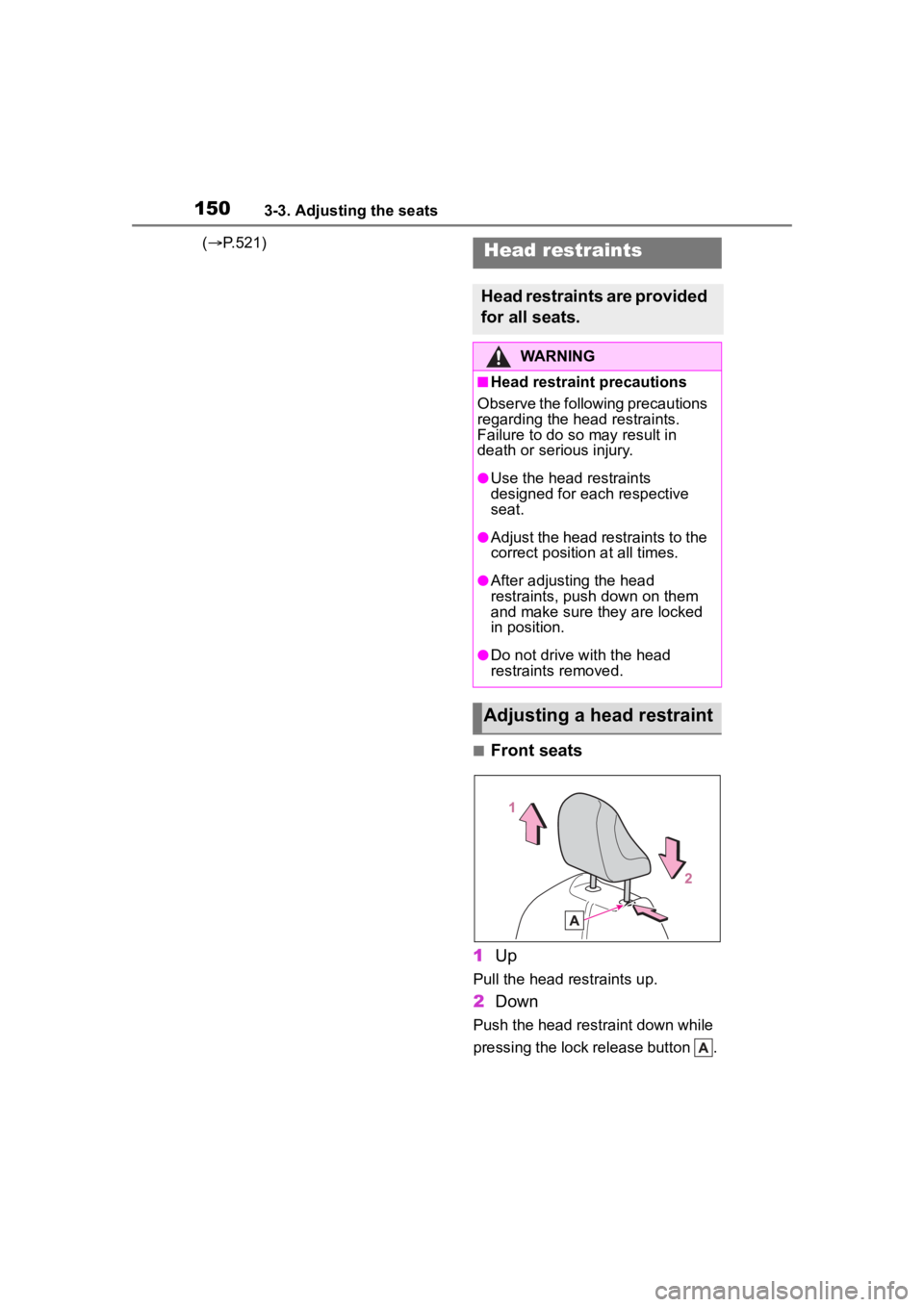
■Front seats
1 Up
Pull the head restraints up.
2Down
Push the head restraint down while
pressing the lock release button .
Head restraints
Head restraints are provided
for all seats.
WARNING
■Head restraint precautions
Observe the following precautions
regarding the head restraints.
Failure to do so may result in
death or serious injury.
●Use the head restraints
designed for each respective
seat.
●Adjust the head restraints to the
correct position at all times.
●After adjusting the head
restraints, push down on them
and make sure they are locked
in position.
●Do not drive with the head
restraints removed.
Adjusting a head restraint