Page 75 of 568
75
2
2
Vehicle status information and indicators
Vehicle status informationand indicators
.2-1. Instrument cluster
Warning lights and indica-tors ............................... 76
Gauges and meters ....... 81
Multi-information display (4.2-inch display) .......... 84
Multi-information display (7-inch display) ............. 93
Head-up display .......... 103
Fuel consumption informa- tion ............................ 108
Page 76 of 568
762-1. Instrument cluster
2-1.Instrument cluster
For the purpose of explanation, the following illustrations display all
warning lights and indicators illuminated.
4.2-inch display
The units used on the meters and some indicators may differ
depending on the target region.
War ning lights and indicators
The warning lights and indicators on the instrument cluster,
center panel and outside rear view mirrors inform the driver of
the status of the vehicle’s various systems.
Warning lights and indicators displayed on the instru-
ment cluster
Page 77 of 568

772-1. Instrument cluster
2
Vehicle status information and indicators
7-inch display
The units used on the meters and some indicators may differ
depending on the target region.
Warning lights inform the driver
of malfunctions in the indicated
vehicle’s systems.
Warning lights
(U.S.A.)
Brake system warning
light
*1 ( P.456)
(red)
(Canada)
Brake system warning
light
*1 ( P.456)
(yellow)
Brake system warning
light
*1 ( P.456)
High coolant temperature
warning light
*2 ( P.456)
Charging system warning
light
*1 ( P.457)
Low engine oil pressure
warning light
*2 ( P.457)
(U.S.A.)
Malfunction indicator
lamp
*1 ( P.457)
(Canada)
Malfunction indicator
lamp
*1 ( P.457)
SRS warning light
*1
( P.457)
(U.S.A.)
ABS warning light*1
( P.458)
(Canada)
ABS warning light*1
( P.458)
Brake Overri de System
warning light/Drive-Start
Control warning light
*2
( P.458)
(red/yel-
low)
Electric power steering
system warning light
( P.458)
Low fuel leve l warning
light
*1( P.459)
Driver’s and front passen-
ger’s seat belt reminder
light ( P.459)
Page 78 of 568

782-1. Instrument cluster
*1: These lights turn on when the engine switch is turned to ON to
indicate that a system check is
being performed. They will turn off after the engine is started, or
after a few seconds. There may
be a malfunction in a system if a
light does not come on, or turn
off. Have the vehicle inspected
by your Toyota dealer.
*2: This light illuminates on the
multi-information display.
*3: 7-inch display only : This light illu-
minates on the mu lti-information
display.
*4: This light comes on when the system is turned off.
*5: 4.2-inch display only: These lights turn on when the engine
switch is turned to ON to indicate
that a system check is being per-
formed. They will turn off after
the engine is started, or after a
few seconds. There may be a
malfunction in a system if a light
does not come on, or turn off.
Have the vehicle inspected by
your Toyota dealer.
*6: 7-inch display only
The indicators inform the driver
of the operating state of the
Rear passengers’ seat
belt reminder light
*2
( P.459)
Tire pressure warning
light
*1 ( P.460)
(orange)
LTA indicator*2 ( P.460)
(flashes)
Stop & Start cancel indica-
tor
*3, 4, 5 (if equipped)
( P.460)
(flashes)
Intuitive parking assist
OFF indicator
*1, 4, 6 (if
equipped) ( P.461)
(flashes)
RCTA OFF indicator*2, 4 ( if
equipped) ( P.461)
(flashes)
PKSB OFF indicator*1, 4, 6
(if equipped) ( P.461)
(flashes or
illumi-
nates)PCS warning light*1
( P.462)
Slip indicator
*1 ( P.462)
(flashes)
(U.S.A.)
Parking brake indicator*1
( P.463)
(flashes)
(Canada)
Parking brake indicator*1
( P.463)
(flashes)
Brake hold operated indi-
cator
*1 ( P.463)
WARNING
■If a safety system warning
light does not come on
Should a safety system light such
as the ABS and SRS warning
lights not come on when you start
the engine, this could mean that
these systems are not available to
help protect you in an accident,
which could result in death or seri-
ous injury. Have the vehicle
inspected by you r Toyota dealer
immediately if this occurs.
Indicators
Page 79 of 568

792-1. Instrument cluster
2
Vehicle status information and indicators
vehicle’s various systems.
Turn signal indicator
( P.209)
(U.S.A.)
Headlight indicator
( P.216)
(Canada)
Tail light indicator
( P.216)
Headlight high beam indi-
cator ( P.218)
Automatic High Beam indi-
cator
*1 ( P.219)
Front fog light indicator
*1
(if equipped) ( P.222)
PCS warning light
*3, 4
( P.238)
Cruise control indicator
*2
( P.265)
Dynamic radar cruise con-
trol indicator
*2 ( P.257)
Cruise control “SET” indi-
cator
*2 ( P.257)
(white)
LTA i n d i c a t o r*2 ( P.252)
(green)
LTA i n d i c a t o r*2 ( P.235,
252)
(orange)
(flashes)LTA i n d i c a t o r*2 ( P.252)
BSM outside rear view
mirror indicators
*5, 6 (if
equipped) (P.278, 293)
BSM OFF indicator
*2, 3 (if
equipped) (P.278)
Intuitive parking assist
OFF indicator
*3, 4, 10(if
equipped) (P.285)
RCTA OFF indicator*2, 3 (if
equipped) ( P.293)
PKSB OFF indicator
*3, 4,
10
(if equipped) ( P.301)
Stop & Start indicator
*1, 9
(if equipped) ( P.272)
Stop & Start cancel indica-
tor
*1, 3, 9 (if equipped)
( P.273)
(flashes)
Slip indicator*4 ( P.319)
VSC OFF indicator
*3, 4
( P.320)
Smart key system indica-
tor
*2 ( P.202)
(U.S.A.)
Parking brake indicator*4
( P.210)
(Canada)
Parking brake indicator*4
( P.210)
Brake hold standby indica-
tor
*4 ( P.213)
Brake hold operated indi-
cator
*4 ( P.213)
Snow mode indicator
*2
( P.315)
Downhill assist control
system indicator
*1, 9 (if
equipped) ( P.316)
Eco Driving Indicator
Light
*4 ( P. 8 6 , 9 5 )
Low outside temperature
indicator
*2, 7 ( P. 8 1 )
Security indicator
*8
( P.71, 73)
“PASS AIR BAG ON/OFF”
indicator
*4, 8 ( P. 4 3 )
Page 81 of 568
812-1. Instrument cluster
2
Vehicle status information and indicators
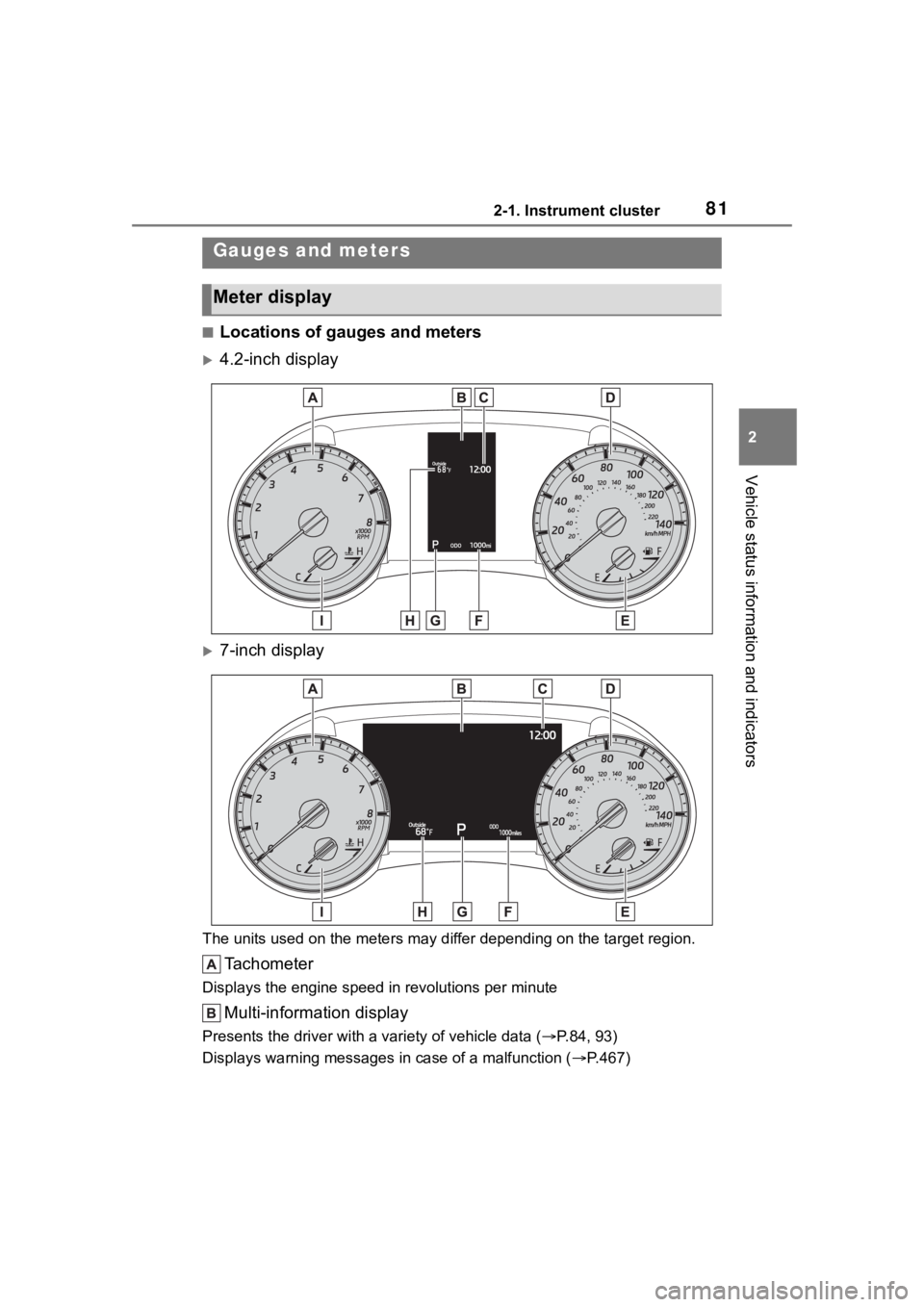
■Locations of gauges and meters
4.2-inch display
7-inch display
The units used on the meters may differ depending on the target region.
Tachometer
Displays the engine speed in revolutions per minute
Multi-information display
Presents the driver with a variety of vehicle data (P.84, 93)
Displays warning messages in case of a malfunction (P.467)
Gauges and meters
Meter display
Page 82 of 568

822-1. Instrument cluster
Clock (P.84)
Speedometer
Fuel gauge
Displays the quantity of fu el remaining in the tank
Odometer and trip meter display ( P.83)
Shift position display ( P.206)
Outside temperature
Displays the outside temperature within the range of -40°F (-40°C) to 122°F
(50°C). Low outside temperature indicator comes on when the ambient
temperature is 37°F (3°C) or lower.
Engine coolant temperature gauge
Displays the engine c oolant temperature
■The meters and display illumi-
nate when
The engine switch is in ON.
■Outside temperature display
●In the following si tuations, the cor-
rect outside tempe rature may not
be displayed, or the display may
take longer than normal to
change:
• When stopped, or driving at low
speeds (less than 12 mph [20
km/h])
• When the outside temperature
has changed suddenly (at the
entrance/exit of a garage, tunnel,
etc.)
●When “--” or “E” is displayed, the
system may be malfunctioning.
Take your vehicle to your Toyota
dealer.
■Liquid crystal display
Small spots or light spots may
appear on the display. This phenom-
enon is characteristi c of liquid crys-
tal displays, and there is no problem
continuing to use the display.
■Customization
The meters can be customized on of the multi-information display.
( P.91, 101)
WARNING
■The information display at
low temperatures
Allow the interior of the vehicle to
warm up before using the liquid
crystal information display. At
extremely low temperatures, the
information disp lay monitor may
respond slowly, and display
changes may be delayed.
For example, there is a lag
between the driver’s shifting and
the new gear number appearing
on the display. This lag could
cause the driver to downshift
again, causing rapid and exces-
sive engine braking and possibly
an accident resulting in death or
injury.
NOTICE
■To prevent damage to the
engine and its components
●Do not let the indicator needle
of the tachometer enter the red
zone, which indicates the maxi-
mum engine speed.
Page 83 of 568

832-1. Instrument cluster
2
Vehicle status information and indicators
■Display items
Odometer
Displays the total distance the vehi-
cle has been driven.
Trip meter A/trip meter B
Displays the distan ce the vehicle
has been driven si nce the meter
was last reset. Trip meters A and B
can be used to record and display
different distances independently.
Distance until next engine oil
change
Displays the distan ce the vehicle
can be driven until an oil change is
necessary.
■Changing the display
Each time the “ODO TRIP”
switch is pressed, the displayed
item will be changed. When the
trip meter is displayed, pressing
and holding the switch will reset
the trip meter.
■Pop-up display
In some situations the following
will be temporarily displayed:
Distance until next engine oil
change
Displays the distance until the next
engine oil change. This display will
be displayed in the following situa-
tions:
When the engine switch is
turned to ON.
When a warning message
indicating that oil mainte-
nance should be performed
soon or is required is dis-
played.
The brightness of the instrument
panel lights can be adjusted.
NOTICE
●The engine may be overheating
if the engine coolant tempera-
ture gauge is in the red zone
(H). In this case, immediately
stop the vehicle in a safe place,
and check the engine after it
has cooled completely.
( P.494)
Odometer and trip meter
display
Changing the instrument
panel light brightness