2022 TOYOTA GR SUPRA engine
[x] Cancel search: enginePage 187 of 356

1873-1. CONTROLS
3
CONTROLS
When lane markings are cov-
ered in snow, ice, dirt or
water.
In tight curves or on narrow
lanes.
When lane markings are cov-
ered by objects.
When driving very close to the
vehicle in front of you.
Up to 10 seconds after the
start of the engine via the
Start/Stop button.
A vehicle message may be dis-
played when the system is not
fully functional.
*: if equipped
Blind spot monitor detects vehi-
cles in the blind spot or vehicles
approaching from behind in the
adjacent lane. A warning is
issued in various gradations in
these situations. Radar sensors monitor the area
behind and next to the vehicle
when traveling faster than a
minimum speed.
The minimum speed is coun-
try-specific and is displayed in
the menu for the Toyota Supra
Safety systems.
The system indicates whether
there are vehicles in the blind
spot, arrow 1, or approaching
from behind in the adjacent
lane, arrow
2.
The light in the exterior mirror
lights up dimmed.
Before you change lanes after
setting the turn signal, the sys-
tem issues a warning in the situ-
ations described above.
The light in the exterior mirror
flashes and the steering wheel
vibrates.
Blind spot monitor*
Concept
General information
Safety information
WARNING
The system cannot serve as a
substitute for the driver’s personal
judgment in assessing visibility
and traffic situation. There is a risk
of an accident. Adjust driving style
to traffic conditions. Watch traffic
closely and actively intervene
where appropriate.
Page 194 of 356
1943-1. CONTROLS
When the vehicle speed is
mainly below about 43
mph/70 km/h.
With a sporty driving style,
such as during rapid accelera-
tion or when cornering fast.
In active driving situations,
such as when changing lanes
frequently.
When the road surface is
poor.
In the event of strong side
winds.
The system is reset approx. 45
minutes after parking the vehi-
cle, for instance in the case of a
break during longer trips on
highways. This chapter describes all stan-
dard, country-specific and
optional features offered with
the series. It also describes fea-
tures and functions that are not
necessarily available in your
vehicle, e.g., due to the selected
options or country versions. This
also applies to safety-related
functions and systems. When
using these functions and sys-
tems, the applicable laws and
regulations must be observed.
ABS prevents locking of the
wheels during braking.
The vehicle maintains its steer-
ing power even during full brake
applications, which increases
the active safety.
ABS is operational every time
you start the engine.
Situations which the ABS can-
not operate sufficiently:
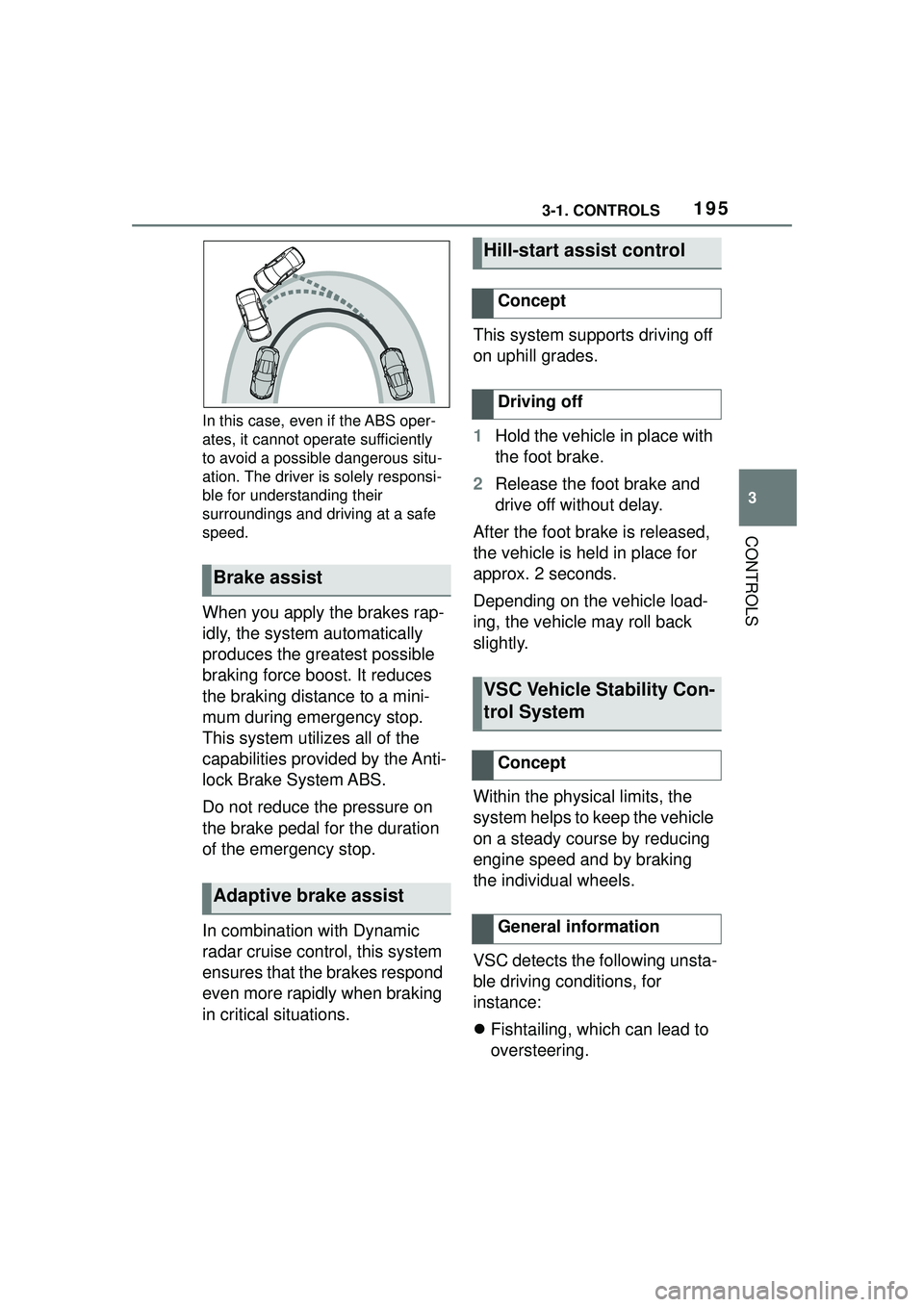
When entering a curve at an
excessively high rate of speedDriving stability con-
trol systems
Vehicle features and
options
Anti-lock Braking System
ABS
Page 195 of 356
1953-1. CONTROLS
3
CONTROLS
In this case, even if the ABS oper-
ates, it cannot operate sufficiently
to avoid a possible dangerous situ-
ation. The driver is solely responsi-
ble for understanding their
surroundings and driving at a safe
speed.
When you apply the brakes rap-
idly, the system automatically
produces the greatest possible
braking force boost. It reduces
the braking distance to a mini-
mum during emergency stop.
This system utilizes all of the
capabilities provided by the Anti-
lock Brake System ABS.
Do not reduce the pressure on
the brake pedal for the duration
of the emergency stop.
In combination with Dynamic
radar cruise control, this system
ensures that the brakes respond
even more rapidly when braking
in critical situations.This system supports driving off
on uphill grades.
1
Hold the vehicle in place with
the foot brake.
2 Release the foot brake and
drive off without delay.
After the foot brake is released,
the vehicle is held in place for
approx. 2 seconds.
Depending on the vehicle load-
ing, the vehicle may roll back
slightly.
Within the physical limits, the
system helps to keep the vehicle
on a steady course by reducing
engine speed and by braking
the individual wheels.
VSC detects the following unsta-
ble driving conditions, for
instance:
Fishtailing, which can lead to
oversteering.
Brake assist
Adaptive brake assist
Hill-start assist control
Concept
Driving off
VSC Vehicle Stability Con-
trol System
Concept
General information
Page 202 of 356
2023-1. CONTROLS
After the rocker switch is released,
the vehicle maintains its final
speed. Pressing the switch beyond
the resistance point causes the
vehicle to accelerate more rapidly.
An interrupted cruise control can
be continued by calling up the
stored speed.
Make sure that the difference
between current speed and
stored speed is not too large
before calling up the stored
speed. Otherwise, unintentional
braking or accelerating may
occur.
Cruise control is continued with
the stored values.
In the following cases, the
stored speed value is deleted
and cannot be called up again:
When the system is switched
off.
When drive-ready state is
switched off. With the proper equipment, the
value of the selected speed is
briefly displayed digitally.
Some system information can
also be displayed in the
Head-up Display.
The desired speed is also main-
tained downhill.
The speed may not be main-
tained on uphill grades if the
engine power is insufficient.
Continuing cruise control
Press the button with the
system interrupted.
Displays in the instrument
cluster
Indicator light
Indicator light green:
system is active.
Gray indicator light: the
system has been inter-
rupted.
No indicator light: sys-
tem is switched off.
Status display
Displays in the Head-up
Display
The symbol is displayed
when the set desired
speed is reached.
System limits
Page 211 of 356
2113-1. CONTROLS
3
CONTROLS
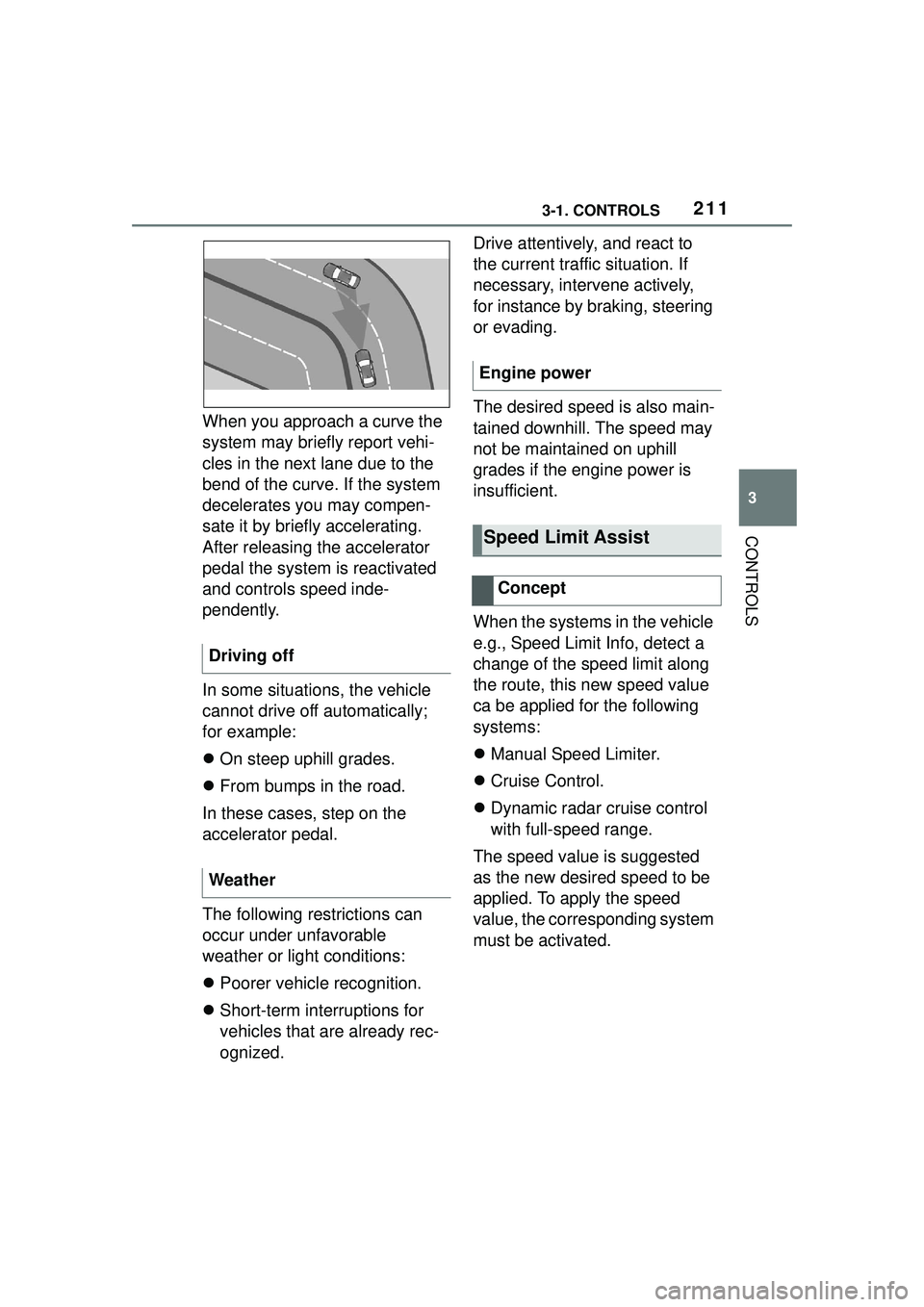
When you approach a curve the
system may briefly report vehi-
cles in the next lane due to the
bend of the curve. If the system
decelerates you may compen-
sate it by briefly accelerating.
After releasing the accelerator
pedal the system is reactivated
and controls speed inde-
pendently.
In some situations, the vehicle
cannot drive off automatically;
for example:
On steep uphill grades.
From bumps in the road.
In these cases, step on the
accelerator pedal.
The following restrictions can
occur under unfavorable
weather or light conditions:
Poorer vehicle recognition.
Short-term interruptions for
vehicles that are already rec-
ognized. Drive attentively, and react to
the current traffic situation. If
necessary, intervene actively,
for instance by braking, steering
or evading.
The desired speed is also main-
tained downhill. The speed may
not be maintained on uphill
grades if the engine power is
insufficient.
When the systems in the vehicle
e.g., Speed Limit Info, detect a
change of the speed limit along
the route, this new speed value
ca be applied for the following
systems:
Manual Speed Limiter.
Cruise Control.
Dynamic radar cruise control
with full-speed range.
The speed value is suggested
as the new desired speed to be
applied. To apply the speed
value, the corresponding system
must be activated.
Driving off
Weather
Engine power
Speed Limit Assist
Concept
Page 214 of 356

2143-1. CONTROLS
The system is controlled using
the following sensors:
• Ultrasonic sensors in the bumpers.
Additional information:
Sensors of the vehicle, refer to
page 40.
The system switches on auto- matically in the following situa-
tions:
If selector lever position R is
engaged when the engine is
running.
Depending on the equipment
version: while approaching
detected obstacles if the
speed is slower than approx.
2.5 mph/4 km/h. The activa-
tion distance depends on the
situation in question.
You may switch automatic acti-
vation when obstacles are
detected on and off.
Via Toyota Supra Command:
1 "My vehicle"
2 "Vehicle settings"
3 "Parking"
4 Where applicable: "Automatic
Parking Sens. activation"
5 "Automatic Parking Sensors
activ."
Depending on equipment, an
additional camera view is also
switched on.
The system switches off when a
certain driving distance or speed
is exceeded.
Switch the system back on, if
needed.
WARNING
Due to high speeds when Parking
Sensors is activated, the warning
can be delayed due to physical
circumstances. There is a risk of
injury or risk of damage to prop-
erty. Avoid approaching an object
too fast. Avoid driving off fast
while Parking Sensors is not yet
active.
Overview
Button in the vehicle
Park assistance button
Sensors
Switching on/off
Switching on automatically
Automatic deactivation
during forward travel
Page 219 of 356

2193-1. CONTROLS
3
CONTROLS
The system is controlled by the
following sensors:
• Rearview camera.
Additional information:
Sensors of the vehicle, refer to
page 40.
The system is switched on auto-
matically if selector lever posi-
tion R is engaged when the
engine is running.
The system switches off when a
certain driving distance or speed is exceeded.
Switch the system back on, if
needed.
On: the LED lights up.
Off: the LED goes out.
The parking assistance func-
tions are shown on the Control
Display.
If the rearview camera view is
not displayed, change the view
via Toyota Supra Command:
1 If necessary, tilt the controller
to the side.
2 "Rear view camera"
The rearview camera image is
displayed.
The rearview camera is
switched on.
Keep the recording range of
the camera clear. Protruding
cargo or roof rack systems
can limit the detection range
of the camera.
Overview
Depending on the vehicle
equipment: button in the
vehicle
Park assistance button
Sensors
Switching on/off
Switching on automatically
Automatic deactivation
during forward travel
Depending on the vehicle
equipment: switching on/off
manually
Press the park assistance
button.
Switching the view via Toy-
ota Supra Command
Functional requirements
Page 228 of 356

2283-1. CONTROLS
Via Toyota Supra Command:
1"My Vehicle"
2 "Vehicle settings"
3 "Climate functions"
4 "Temperature adjustment,
upper body"
5 Set the desired temperature.
Do not rapidly switch between
different temperature settings.
Otherwise, the automatic air
conditioning will not have suffi-
cient time to adjust the set tem-
perature.
The air in the car's interior will
be cooled and dehumidified
and, depending on the tempera-
ture setting, warmed again.
The car's interior can only be
cooled with the drive-ready state
switched on. Air conditioning is switched on
with the engine running.
Depending on the weather, the
windshield and side windows
may fog up briefly when
drive-ready state is switched on.
The air conditioning is switched
on automatically with the AUTO
program.
When using the automatic air
conditioning, condensation
water develops and collects
underneath the vehicle.
The system is set to the lowest
temperature, optimum air flow
and recirculated-air mode with
the drive-ready state switched
on.
The function is available with
external temperatures above
approx. 32 °F/0 °C and with the
drive-ready state switched on.
Adjusting
Turn the dial clockwise
to increase the tempera-
ture and counterclock-
wise to decrease the
temperature.
Air conditioning
Concept
Switching on/off
Press the button.
Maximum cooling
Concept
General information