Page 127 of 528
Features of your vehicle
48
4
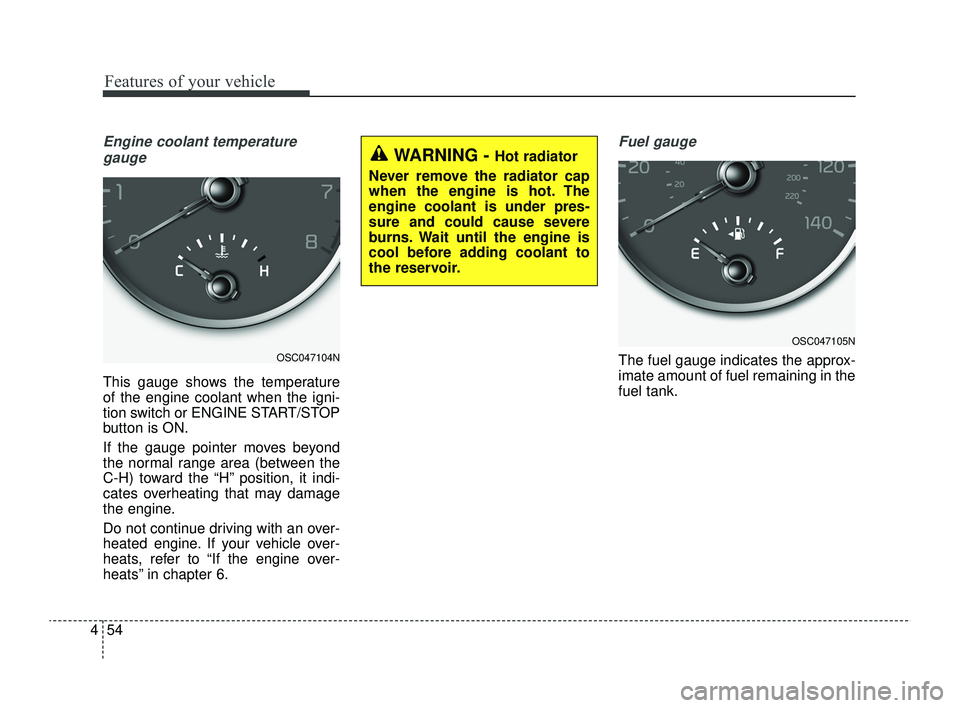
Inside rearview mirror
Adjust the rearview mirror so that the
center view through the rear window
is seen. Make this adjustment before
you start driving.
Do not place objects in the rear seat
which would interfere with your vision
through the rear window.
Day/night rearview mirror
Make this adjustment before you
start driving and while the day/night
lever is in the day position (1).
Pull the day/night lever toward you
(2) to reduce the glare from the
headlights of the vehicles behind you
during night driving.
Remember that you lose some
rearview clarity in the night position.
❈ (1) : Day, (2) : Night
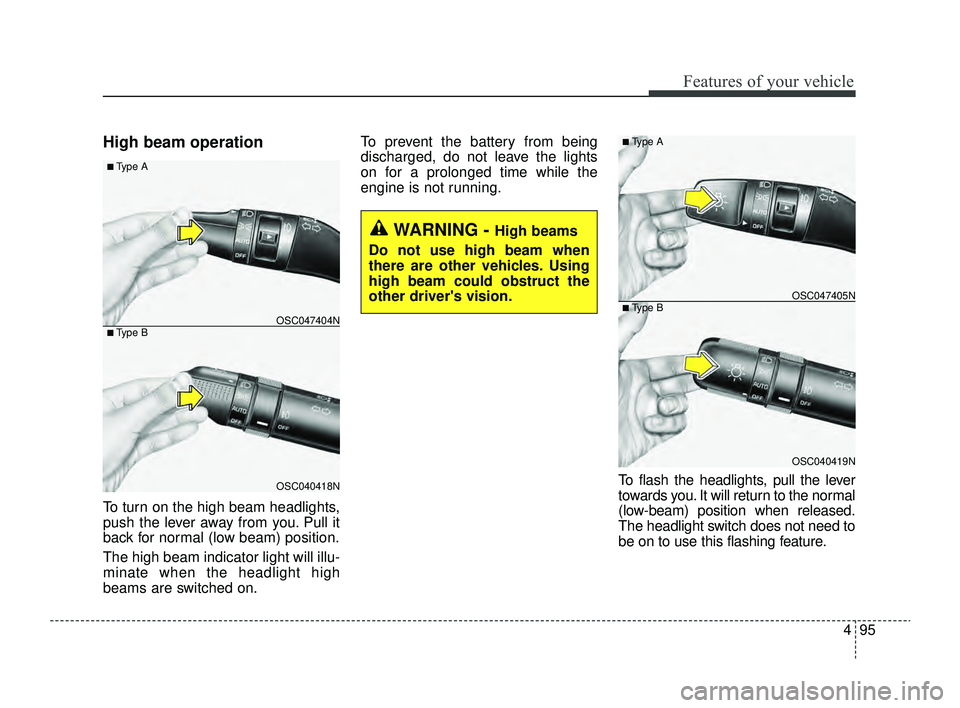
Day/night rearview mirror with
Telematics function (if equipped)
For day and night function:
Make this adjustment before you
start driving and while the day/night
lever (1) is in the day position.
Pull the day/night lever (2) toward
you to reduce the glare from the
headlights of the vehicles behind you
during night driving.
Remember that you lose some
rearview clarity in the night position.
❈ (1) : Day, (2) : Night
MIRRORS
WARNING - Mirror
adjustment
Do not adjust the rearview mirror
while the vehicle is moving. This
could result in loss of control.
OUM046434L
WARNING
Do not modify the inside mirror
in any manner including
installing a wider mirror. Doing
so could result in injury during
an accident or deployment of
the air bag.
OBDM049458
SC PE USA 4.QXP 9/9/2021 6:03 PM Page 48
Page 128 of 528
449
Features of your vehicle
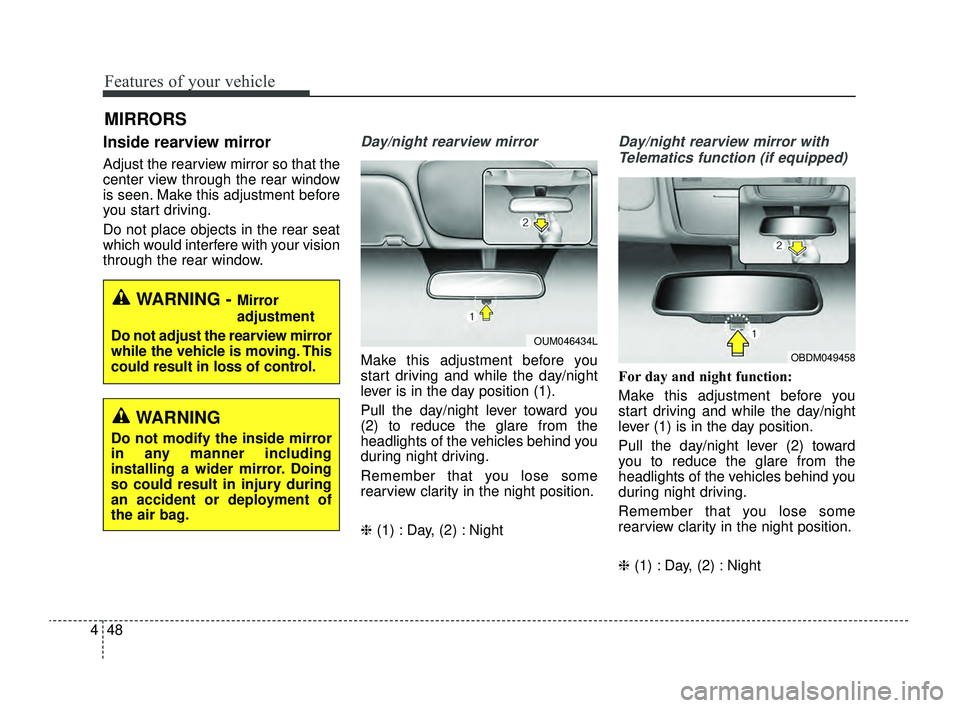
For Telematics button function:
1. Virtual Assistant button
2. UVO button
3. Roadside Assist button
Telematics buttons are also located
on the mirror.
Outside rearview mirror
Be sure to adjust mirror angles
before driving.
Your vehicle is equipped with both
left-hand and right-hand outside
rearview mirrors. The mirrors can be
adjusted remotely with the remote
switch (if equipped). The mirror
heads can be folded to prevent dam-
age during an automatic car wash or
when passing through a narrow
street.
The right outside rearview mirror is
convex. Objects seen in the mirror
are closer than they appear.
Use your interior rearview mirror or
direct observation to determine the
actual distance of following vehicles
when changing lanes.CAUTION - Rearview mirror
Do not scrape ice off the mirrorface; this may damage the sur-face of the glass. If ice shouldrestrict movement of the mirror,do not force the mirror foradjustment. To remove ice, usea deicer spray, or a sponge orsoft cloth with very warm water.
WARNING - Mirror
adjustment
Do not adjust or fold the outside
rearview mirrors while the vehi-
cle is moving. This could result
in loss of control.
CAUTION
When cleaning the mirror, use a paper towel or similar materialdampened with glass cleaner.Do not spray glass cleanerdirectly on the mirror. It maycause the liquid cleaner to enterthe mirror housing.
OSC040588N
SC PE USA 4.QXP 9/9/2021 6:03 PM Page 49
Page 129 of 528

Features of your vehicle
50
4
Remote control
Electric type
The electric remote control mirror
switch allows you to adjust the posi-
tion of the left and right outside
rearview mirrors. To adjust the posi-
tion of either mirror, the ignition
switch or ENGINE START/STOP but-
ton should be in the ACC or ON posi-
tion.
To adjust the position of either mirror,
press the R or L button (1) to select
the right side mirror or the left side
mirror, then press a corresponding
point (▲) on the mirror adjustment
control to position the selected mirror
up, down, left or right. After adjustment, press the R or L
button again to prevent any inadver-
tent adjustment.
Folding the outside rearview mirror
Manual type
To fold the outside review mirror,
grasp the housing of the mirror and
then fold it toward the rear of the
vehicle.
OSC040518
CAUTION - Outside mirror
The mirrors stop moving when
they reach the maximumadjusting angles, but themotor continues to operatewhile the switch is pressed.Do not press the switch longerthan necessary as the motormay be damaged.
Do not attempt to adjust the outside rearview mirror byhand. Doing so may damagethe parts.
When the mirror control, press exactly “ � �
”(2) marking area.
Otherwise, the mirror will move to unintended directionor malfunction.
OYB046034
SC PE USA 4.QXP 9/9/2021 6:03 PM Page 50
Page 133 of 528
Features of your vehicle
54
4
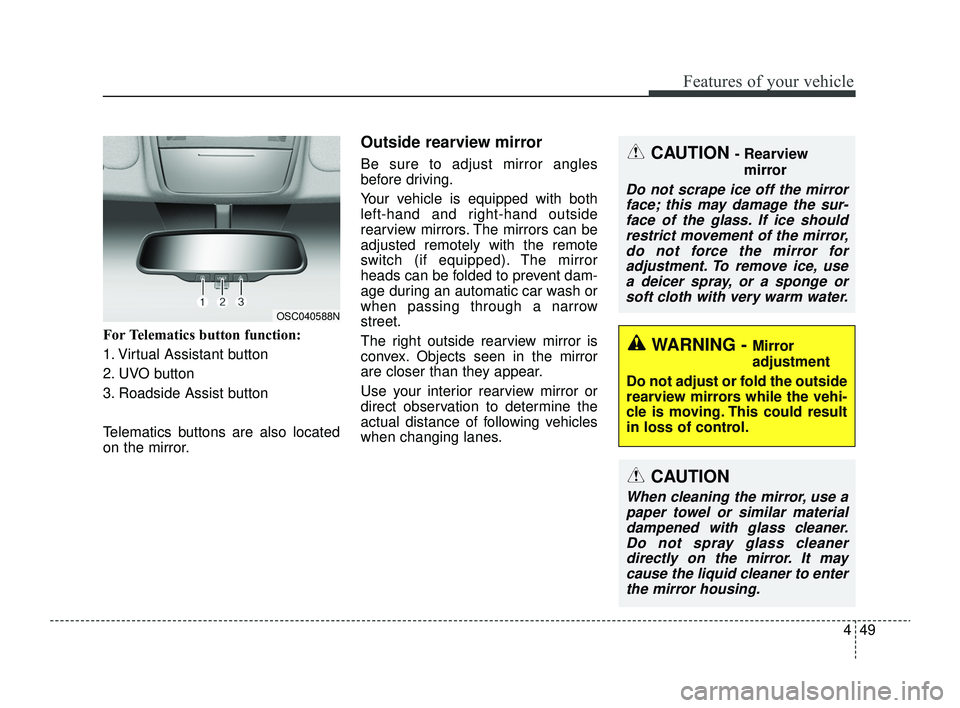
Engine coolant temperature
gauge
This gauge shows the temperature
of the engine coolant when the igni-
tion switch or ENGINE START/STOP
button is ON.
If the gauge pointer moves beyond
the normal range area (between the
C-H) toward the “H” position, it indi-
cates overheating that may damage
the engine.
Do not continue driving with an over-
heated engine. If your vehicle over-
heats, refer to “If the engine over-
heats” in chapter 6.
Fuel gauge
The fuel gauge indicates the approx-
imate amount of fuel remaining in the
fuel tank.OSC047104N
WARNING - Hot radiator
Never remove the radiator cap
when the engine is hot. The
engine coolant is under pres-
sure and could cause severe
burns. Wait until the engine is
cool before adding coolant to
the reservoir.
OSC047105N
SC PE USA 4.QXP 9/9/2021 6:04 PM Page 54
Page 158 of 528

479
Features of your vehicle
Parking Brake & BrakeFluid Warning Light
This warning light illuminates:
Once you set the ignition switch or ENGINE START/STOP button to
the ON position.
- It illuminates for approximately 3seconds
When the parking brake is applied.
When the brake fluid level in the reservoir is low.
- If the warning light illuminateswith the parking brake released, it
indicates the brake fluid level in
reservoir is low. If the brake fluid level in the reservoir
is low:
1.Drive carefully to the nearest safe
location and stop your vehicle.
2.With the engine stopped, check the brake fluid level immediately and
add fluid as required (For more
details, refer to "Brake Fluid" in
chapter 7).
Then check all brake components
for fluid leaks. If any leak on the
brake system is still found, the
warning light remains on, or the
brakes do not operate properly, do
not drive the vehicle.
In this case, have your vehicle
towed to an authorized Kia dealer
and inspected. Dual-diagonal braking system
Your vehicle is equipped with dual-
diagonal braking systems. This
means you still have braking on two
wheels even if one of the dual sys-
tems should fail.
With only one of the dual systems
working, greater pedal pressure will
be required to stop the vehicle.
Also, the vehicle will require
increased stopping distance with
only a portion of the brake system
working.
If the brakes fail while you are driv-
ing, shift to a lower gear for addition-
al engine braking and stop the vehi-
cle as soon as it is safe to do so.
Driving the vehicle with a warning
light ON is dangerous. If the Parking
Brake & Brake Fluid Warning Light
illuminates with the parking brake
released, it indicates that the brake
fluid level is low.
In this case, have your vehicle inspect-
ed by an authorized Kia dealer.
SC PE USA 4.QXP 9/9/2021 6:05 PM Page 79
Page 174 of 528
495
Features of your vehicle
High beam operation
To turn on the high beam headlights,
push the lever away from you. Pull it
back for normal (low beam) position.
The high beam indicator light will illu-
minate when the headlight high
beams are switched on.To prevent the battery from being
discharged, do not leave the lights
on for a prolonged time while the
engine is not running.
To flash the headlights, pull the lever
towards you. It will return to the normal
(low-beam) position when released.
The headlight switch does not need to
be on to use this flashing feature.
WARNING - High beams
Do not use high beam when
there are other vehicles. Using
high beam could obstruct the
other driver's vision.
OSC040418N
OSC047404N
■ Type A
■ Type B
OSC040419N
OSC047405N
■ Type A
■ Type B
SC PE USA 4.QXP 9/9/2021 6:05 PM Page 95
Page 175 of 528
Features of your vehicle
96
4
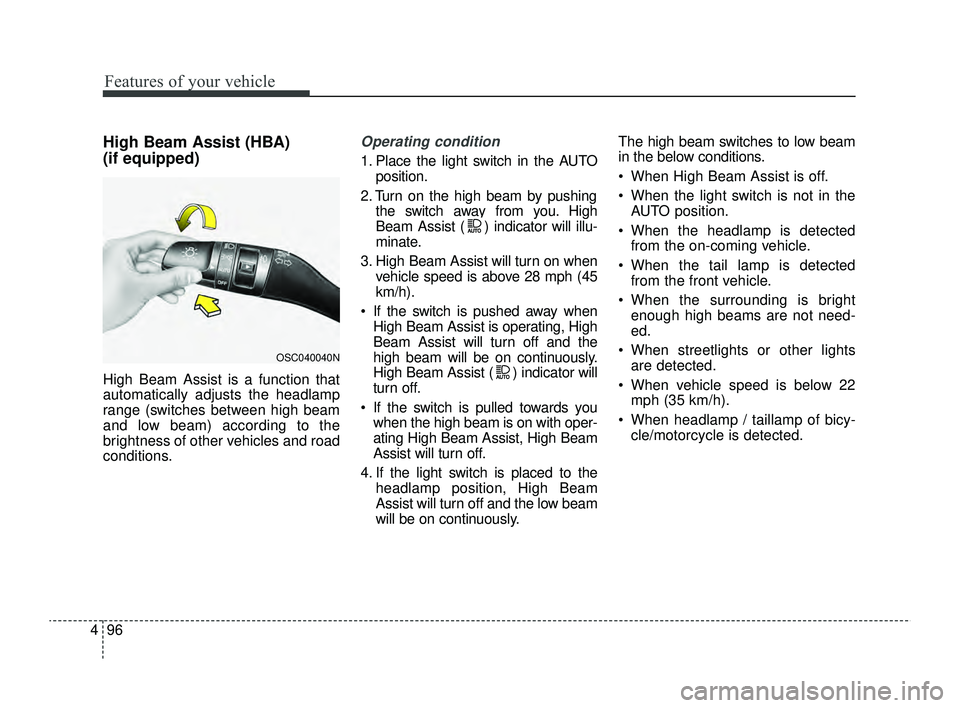
High Beam Assist (HBA)
(if equipped)
High Beam Assist is a function that
automatically adjusts the headlamp
range (switches between high beam
and low beam) according to the
brightness of other vehicles and road
conditions.
Operating condition
1. Place the light switch in the AUTO
position.
2. Turn on the high beam by pushing the switch away from you. High
Beam Assist ( ) indicator will illu-
minate.
3. High Beam Assist will turn on when vehicle speed is above 28 mph (45
km/h).
If the switch is pushed away when High Beam Assist is operating, High
Beam Assist will turn off and the
high beam will be on continuously.
High Beam Assist ( ) indicator will
turn off.
If the switch is pulled towards you when the high beam is on with oper-
ating High Beam Assist, High Beam
Assist will turn off.
4. If the light switch is placed to the headlamp position, High Beam
Assist will turn off and the low beam
will be on continuously. The high beam switches to low beam
in the below conditions.
When High Beam Assist is off.
When the light switch is not in the
AUTO position.
When the headlamp is detected from the on-coming vehicle.
When the tail lamp is detected from the front vehicle.
When the surrounding is bright enough high beams are not need-
ed.
When streetlights or other lights are detected.
When vehicle speed is below 22 mph (35 km/h).
When headlamp / taillamp of bicy- cle/motorcycle is detected.
OSC040040N
SC PE USA 4.QXP 9/9/2021 6:05 PM Page 96
Page 180 of 528

4101
Features of your vehicle
To vary the speed setting, turn the
speed control knob (1).
If the wiper switch is set in AUTO
mode when the ignition switch is ON,
the wiper will operate once to per-
form a self-check of the system. Set
the wiper to off position when the
wiper is not in use.Windshield washers (front)
In the OFF position, pull the lever
gently toward you to spray washer
fluid on the windshield and to run the
wipers 1-3 cycles.
Use this function when the wind-
shield is dirty.
CAUTION
When washing the vehicle, setthe wiper switch in the off posi-tion to stop the auto wiper oper-ation.
The wiper may operate and bedamaged if the switch is set inthe AUTO mode while washingthe vehicle.
Do not remove the sensor coverlocated on the upper end of thepassenger side windshieldglass. Damage to system partscould occur and may not becovered by your vehicle warran-ty.
When starting the vehicle inwinter, set the wiper switch inthe off position. Otherwise,wipers may operate and ice maydamage the windshield wiperblades. Always remove all snowand ice and defrost the wind-shield properly prior to operat-ing the windshield wipers.
OSC040424N
OSC047429N
■ Type A
■ Type B
CAUTION
When the ignition switch is ONand the windshield wiper switchis placed in the AUTO mode, usecaution in the following situa-tions to avoid any injury to thehands or other parts of thebody:
Do not touch the upper end of the windshield glass facingthe rain sensor.
Do not wipe the upper end of the windshield glass with adamp or wet cloth.
Do not put pressure on the windshield glass.
SC PE USA 4.QXP 9/9/2021 6:06 PM Page 101