2022 KIA RIO tow
[x] Cancel search: towPage 191 of 528
Features of your vehicle
112
4
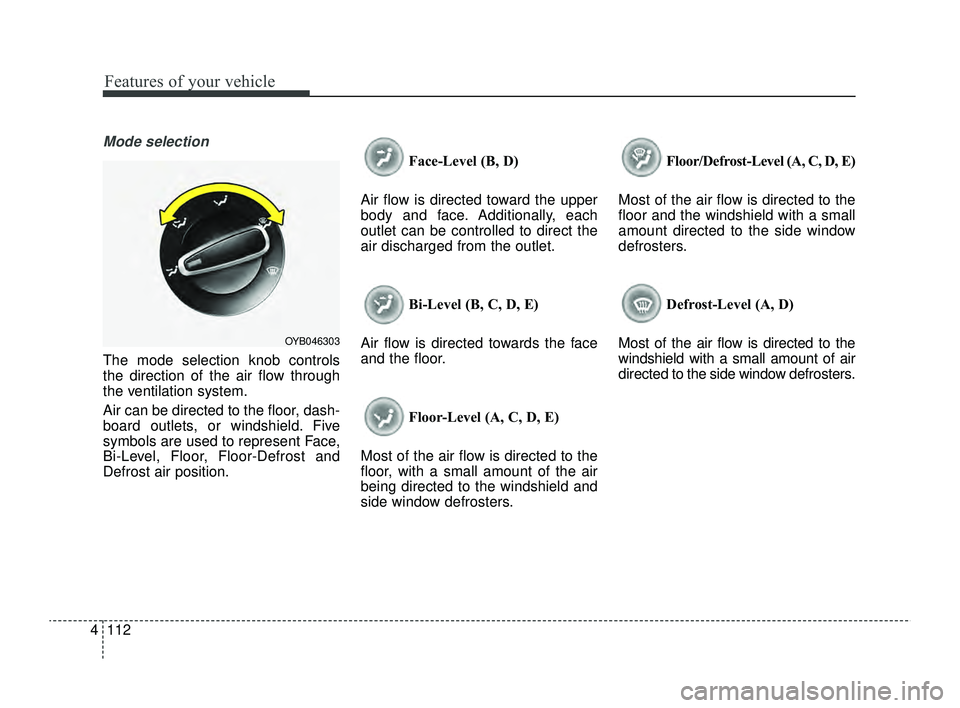
Mode selection
The mode selection knob controls
the direction of the air flow through
the ventilation system.
Air can be directed to the floor, dash-
board outlets, or windshield. Five
symbols are used to represent Face,
Bi-Level, Floor, Floor-Defrost and
Defrost air position. Face-Level (B, D)
Air flow is directed toward the upper
body and face. Additionally, each
outlet can be controlled to direct the
air discharged from the outlet.
Bi-Level (B, C, D, E)
Air flow is directed towards the face
and the floor.
Floor-Level (A, C, D, E)
Most of the air flow is directed to the
floor, with a small amount of the air
being directed to the windshield and
side window defrosters. Floor/Defrost-Level (A, C, D, E)
Most of the air flow is directed to the
floor and the windshield with a small
amount directed to the side window
defrosters.
Defrost-Level (A, D)
Most of the air flow is directed to the
windshield with a small amount of air
directed to the side window defrosters.
OYB046303
SC PE USA 4.QXP 9/9/2021 6:07 PM Page 112
Page 192 of 528

4113
Features of your vehicle
MAX A/C-Level (B, D) (if equipped)
The MAX A/C mode is used to cool
the inside of the vehicle faster. Air
flow is directed toward the upper
body and face.
In this mode, the air conditioning and
the recirculated air position will be
selected automatically.Instrument panel vents
The outlet vents can be opened or
closed separately using the thumb-
wheel.
Also, you can adjust the direction of
air delivered from these vents using
the vent control lever as shown.
Temperature control
The temperature control knob allows
you to control the temperature of the
air flowing from the ventilation sys-
tem. To change the air temperature in
the passenger compartment, turn
the knob to the right for warmer and
hot air, or to the left for cooler air.
OSC040311NOYB046305
OSC041479N
SC PE USA 4.QXP 9/9/2021 6:07 PM Page 113
Page 204 of 528
4125
Features of your vehicle
Face-Level (B, D)
Air flow is directed toward the upper
body and face. Additionally, each
outlet can be controlled to direct the
air discharged from the outlet.
Bi-Level (B, C, D, E)
Air flow is discharged towards the
face and floor. Floor-Level (C, A, D, E)
Most of the air flow is directed to the
floor, with a small amount of the air
being directed to the windshield and
side window defroster.
Floor/Defrost-Level (A, C, D, E)
Most of the air flow is directed to the
floor and the windshield with a small
amount directed to the side window
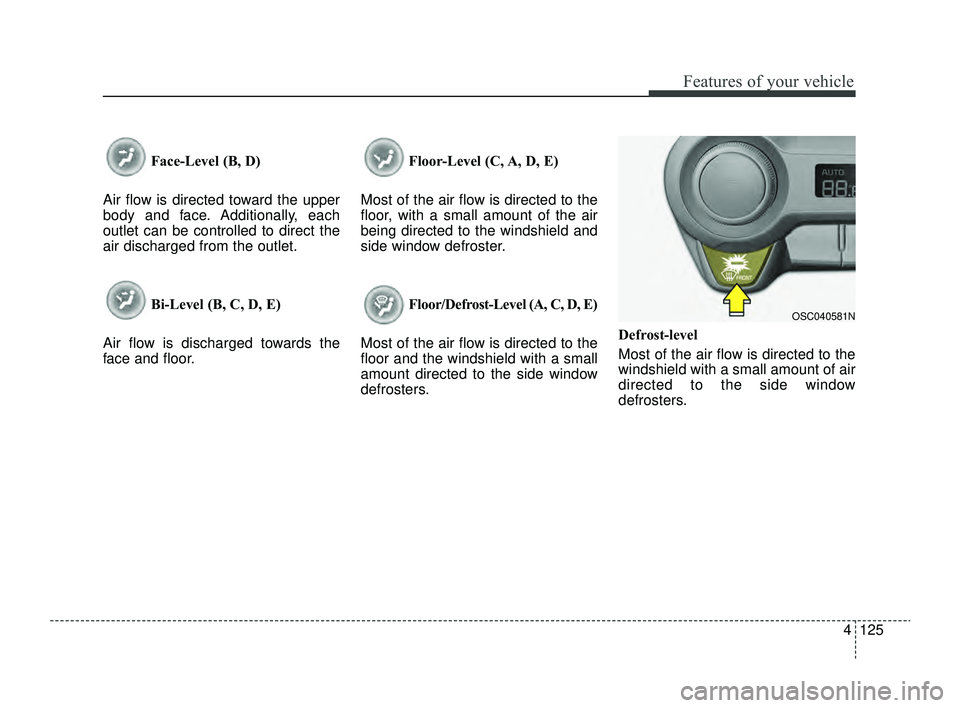
defrosters. Defrost-level
Most of the air flow is directed to the
windshield with a small amount of air
directed to the side window
defrosters.
OSC040581N
SC PE USA 4.QXP 9/9/2021 6:07 PM Page 125
Page 217 of 528
Features of your vehicle
138
4
Automatic climate control system
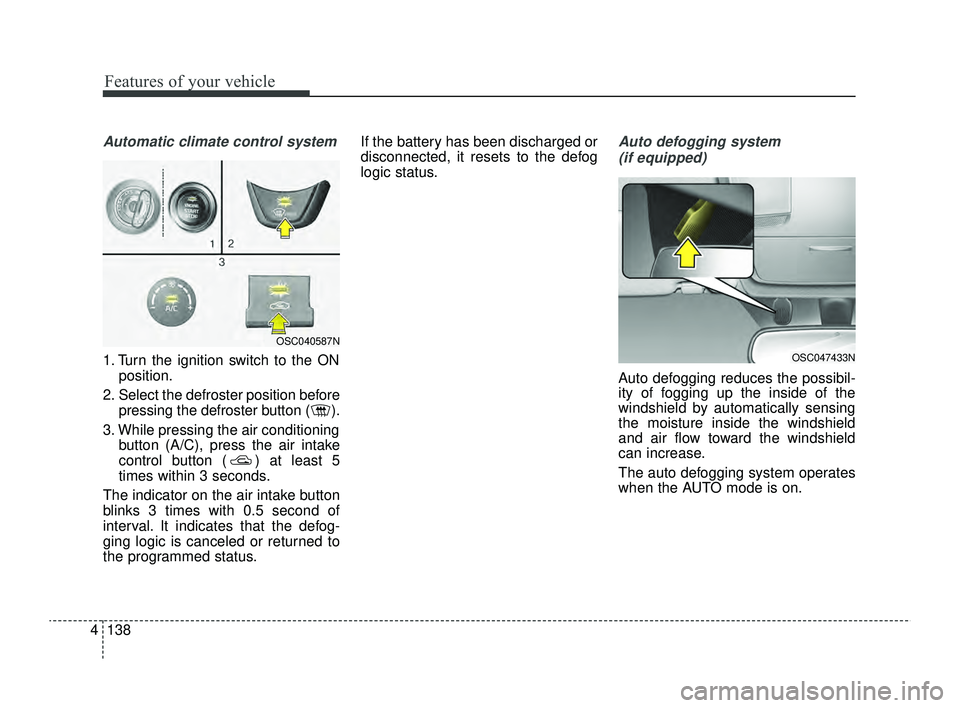
1. Turn the ignition switch to the ON
position.
2. Select the defroster position before pressing the defroster button ( ).
3. While pressing the air conditioning button (A/C), press the air intake
control button ( ) at least 5
times within 3 seconds.
The indicator on the air intake button
blinks 3 times with 0.5 second of
interval. It indicates that the defog-
ging logic is canceled or returned to
the programmed status. If the battery has been discharged or
disconnected, it resets to the defog
logic status.
Auto defogging system
(if equipped)
Auto defogging reduces the possibil-
ity of fogging up the inside of the
windshield by automatically sensing
the moisture inside the windshield
and air flow toward the windshield
can increase.
The auto defogging system operates
when the AUTO mode is on.
OSC047433N
OSC040587N
SC PE USA 4.QXP 9/9/2021 6:08 PM Page 138
Page 218 of 528

4139
Features of your vehicle
This indicator illuminates
when the auto defogging
system senses moisture
on the inside of the wind-
shield and is activated.
If more moisture is in the vehicle, the
auto defogging system addresses
excess moisture on the inside of the
windshield in stages as follows:
Step 1 : Operating the air condition- ing
Step 2 : Outside air position
Step 3 : Blowing air flow toward the windshield
Step 4 : Increasing air flow toward the windshield
If your vehicle is equipped with the
auto defogging system, it is automat-
ically activated when the conditions
are met.
However, if you would like to deacti-
vate the auto defogging system,
keep the front defroster button
pressed longer than 3 seconds. The “ADS OFF” symbol will be
shown in the climate display to
inform you that the system is deacti-
vated.
To re-activate the auto defogging
system again, follow the procedure
mentioned above and the “ADS
OFF” symbol will disappear.
If the battery has been disconnected
or discharged, it resets to the auto
defogging status.
✽ ✽
NOTICE
• When the air conditioning is
turned on by Auto defogging sys-
tem, if you try to turn off the air
conditioning, the indicator will
blink 3 times and the air condi-
tioning will not be turned off.
• For efficiency, do not select recir- culated air position while Auto
defogging system is operating.
CAUTION
Do not remove the sensor cover
located on the upper end of thedriver side windshield glass.Damage to the system partscould occur and may not be cov-ered by your vehicle warranty.
SC PE USA 4.QXP 9/9/2021 6:08 PM Page 139
Page 229 of 528
Features of your vehicle
150
4
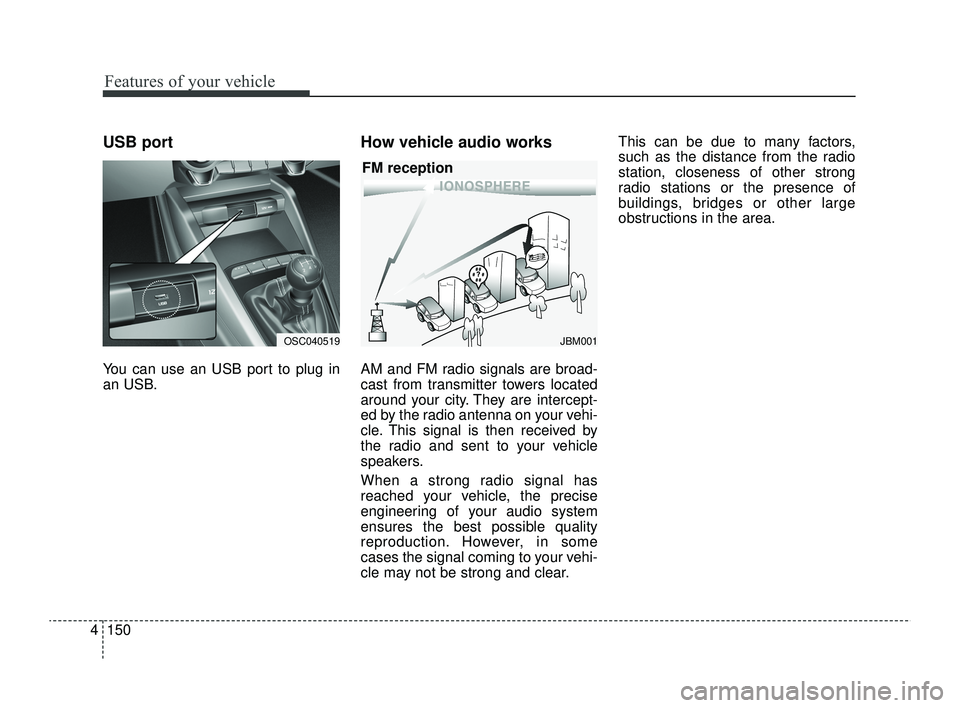
USB port
You can use an USB port to plug in
an USB.
How vehicle audio works
AM and FM radio signals are broad-
cast from transmitter towers located
around your city. They are intercept-
ed by the radio antenna on your vehi-
cle. This signal is then received by
the radio and sent to your vehicle
speakers.
When a strong radio signal has
reached your vehicle, the precise
engineering of your audio system
ensures the best possible quality
reproduction. However, in some
cases the signal coming to your vehi-
cle may not be strong and clear. This can be due to many factors,
such as the distance from the radio
station, closeness of other strong
radio stations or the presence of
buildings, bridges or other large
obstructions in the area.
JBM001
FM reception
OSC040519
SC PE USA 4.QXP 9/9/2021 6:09 PM Page 150
Page 236 of 528

• Driver Attention Warning operation . . . . . . . . . . . . 5-78
• Driver Attention Warning malfunction andlimitations. . . . . . . . . . . . . . . . . . . . . . . . . . . . . . . . . . 5-81\
Cruise Control (CC). . . . . . . . . . . . . . . . . . . . . . . . 5-84
• Cruise Control operation . . . . . . . . . . . . . . . . . . . . . . 5-84
• Increasing set speed. . . . . . . . . . . . . . . . . . . . . . . . . . . 5-85
• Decreasing set speed . . . . . . . . . . . . . . . . . . . . . . . . . . 5-85
• Accelerating temporarily . . . . . . . . . . . . . . . . . . . . . . 5-86
• Temporarily pausing Cruise Control . . . . . . . . . . . . 5-86
• Resuming Cruise Control . . . . . . . . . . . . . . . . . . . . . . 5-87
• Turning off Cruise Control. . . . . . . . . . . . . . . . . . . . . 5-87
Lane Following Assist (LFA) . . . . . . . . . . . . . . . . . 5-89
• Detecting sensor . . . . . . . . . . . . . . . . . . . . . . . . . . . . . . 5-89
• Lane Following Assist settings . . . . . . . . . . . . . . . . . 5-89
• Lane Following Assist operation . . . . . . . . . . . . . . . . 5-90
• Lane Following Assist malfunction and limitations . 5-93
Rear Cross-Traffic Collision Warning (RCCW) . 5-94
• Detecting sensor . . . . . . . . . . . . . . . . . . . . . . . . . . . . . . 5-94
• Rear Cross-Traffic Collision Warning settings . . . . 5-95
• Rear Cross-Traffic Collision Warning operation . . . 5-96
• Rear Cross-Traffic Collision Warning malfunction
and limitations . . . . . . . . . . . . . . . . . . . . . . . . . . . . . . 5-97
Declaration of conformity . . . . . . . . . . . . . . . . . . 5-102
• The radio frequency components (Rear Corner Radar)complies . . . . . . . . . . . . . . . . . . . . . . . . . . . . . . . . . . 5-10\
2
Economical operation . . . . . . . . . . . . . . . . . . . . . 5-103
Special driving conditions . . . . . . . . . . . . . . . . . . 5-105
• Hazardous driving conditions . . . . . . . . . . . . . . . . . 5-105
• Rocking the vehicle . . . . . . . . . . . . . . . . . . . . . . . . . . 5-105
• Smooth cornering . . . . . . . . . . . . . . . . . . . . . . . . . . . 5-106
• Driving at night . . . . . . . . . . . . . . . . . . . . . . . . . . . . 5-106
• Driving in the rain . . . . . . . . . . . . . . . . . . . . . . . . . . . 5-107
• Driving in flooded areas . . . . . . . . . . . . . . . . . . . . . . 5-108
• Driving off-road . . . . . . . . . . . . . . . . . . . . . . . . . . . . . 5-108
• Highway driving . . . . . . . . . . . . . . . . . . . . . . . . . . . . 5-108
Winter driving . . . . . . . . . . . . . . . . . . . . . . . . . . . 5-110
• Snowy or Icy conditions . . . . . . . . . . . . . . . . . . . . . . 5-110
• Use high quality ethylene glycol coolant . . . . . . . . . 5-112
• Check battery and cables . . . . . . . . . . . . . . . . . . . . . 5-112
• Change to "winter weight" oil if necessary . . . . . . 5-113
• Check spark plugs and ignition system . . . . . . . . . . 5-113
• To keep locks from freezing . . . . . . . . . . . . . . . . . . . 5-113
• Use approved window washer anti-freeze in system5-113
• Don't let your parking brake freeze . . . . . . . . . . . . 5-113
• Don't let ice and snow accumulate underneath . . . 5-113
• Carry emergency equipment . . . . . . . . . . . . . . . . . . 5-114
• Trailer Towing . . . . . . . . . . . . . . . . . . . . . . . . . . . . . . 5-114
5
SC PE USA 5.QXP 9/9/2021 6:17 PM Page 2
Page 285 of 528

551
Driving your vehicle
The camera sensor recognition islimited
The vehicle in front is too small to be detected. (for example a motor-
cycle etc.)
The vehicle in front is an oversize vehicle or trailer that is too big to
be detected by the camera recog-
nition function. (for example a trac-
tor trailer, etc.)
The camera's field of view is not well illuminated. (either too dark or
too much reflection or too much
backlight that obscures the field of
view)
The vehicle in front does not have their rear lights or their rear lights
does not turned ON or their rear
lights are located unusually.
The outside brightness changes suddenly, for example when enter-
ing or exiting a tunnel.
Light coming from a street light or an oncoming vehicle is reflected on
a wet road surface such as a pud-
dle in the road.
The field of view in front is obstructed by sun glare or head
light of oncoming vehicle. The windshield glass is fogged up;
a clear view of the road is obstruct-
ed.
The vehicle in front is driving errat- ically.
The vehicle is on unpaved or uneven rough surfaces, or road
with sudden gradient changes.
The vehicle is driven near areas containing metal substances as a
construction zone, railroad, etc.
The vehicle drives inside a building, such as a basement parking lot.
The camera does not recognize the entire vehicle in front.
The camera is damaged.
The brightness outside is too low such as when the headlamps are
not on at night or the vehicle is
going through a tunnel.
The shadow is on the road by a median strip, trees, etc.
The vehicle drives through a toll- gate.
The windshield glass is fogged up; a clear view of the road is obstruct-
ed. The rear part of the vehicle in front
is not normally visible. (The vehicle
turns in other direction or the vehi-
cle is overturned.)
The adverse road conditions cause excessive vehicle vibrations while
driving.
The sensor recognition changes suddenly when passing over a
speed bump.
The vehicle in front is moving verti- cally to the driving direction.
The vehicle in front is stopped ver- tically.
The vehicle in front is driving towards your vehicle or reversing.
You are on a roundabout and the vehicle in front circles.
SC PE USA 5.QXP 9/9/2021 6:18 PM Page 51