Page 157 of 546
3-7
Convenient features of your vehicle
Information
This device complies with Industry
Canada RSS-210 standard.
Operation is subject to the following
three conditions:
1. This device may not cause interfer- ence.
2. This device must accept any inter- ference, including interference that
may cause undesired operation of
the device.
3. Changes or modifications not expressly approved by the party
responsible for compliance could
void the user's authority to operate
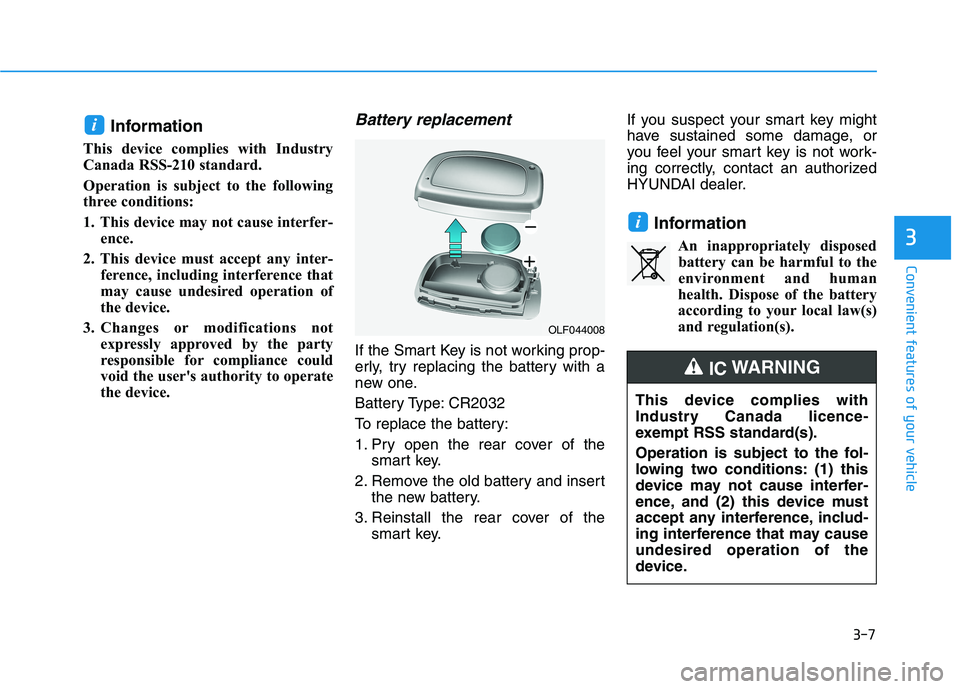
the device.Battery replacement
If the Smart Key is not working prop-
erly, try replacing the battery with a
new one.
Battery Type: CR2032
To replace the battery:
1. Pry open the rear cover of thesmart key.
2. Remove the old battery and insert the new battery.
3. Reinstall the rear cover of the smart key. If you suspect your smart key might
have sustained some damage, or
you feel your smart key is not work-
ing correctly, contact an authorized
HYUNDAI dealer.
InformationAn inappropriately disposedbattery can be harmful to the
environment and human
health. Dispose of the battery
according to your local law(s)
and regulation(s).
i
i
3
OLF044008
This device complies with
Industry Canada licence-
exempt RSS standard(s).
Operation is subject to the fol-
lowing two conditions: (1) this
device may not cause interfer-
ence, and (2) this device must
accept any interference, includ-
ing interference that may causeundesired operation of the
device.
IC WARNING
Page 158 of 546
3-8
Convenient features of your vehicle
Immobilizer System
The immobilizer system helps pro-
tects your vehicle from theft.
If an improperly coded key (or other
device) is used, the power system is
disabled.
When the POWER button is placed
in the ON position, the immobilizersystem indicator should come on
briefly, then go off. If the indicator
starts to blink, the system does not
recognize the coding of the key.
Place the POWER button to the OFF
position, then place the POWER but-ton to the ON position again.
The system may not recognize your
key’s coding if another immobilizer
key or other metal object (i.e., key
chain) is near the key. The vehicle
may not start because the metal may
interrupt the transponder signal from
transmitting normally. If the system repeatedly does not
recognize the coding of the key, it is
recommended that you contact your
HYUNDAI dealer.Do not attempt to alter this system or
add other devices to it. Electrical
problems could result that may make
your vehicle inoperable.
The transponder in your key is an
important part of the immobilizer
system. It is designed to give
years of trouble-free service, how-
ever you should avoid exposure to
moisture, static electricity and
rough handling. Immobilizer sys-
tem malfunction could occur.
Information
This device complies with Industry
Canada RSS-210 standard.
Operation is subject to the following
three conditions:
1. This device may not cause interfer- ence.
2. This device must accept any inter- ference, including interference that
may cause undesired operation of
the device.
3. Changes or modifications not expressly approved by the party
responsible for compliance could
void the user's authority to operate
the device.
i
NOTICE
In order to prevent theft of your
vehicle, do not leave spare keys
anywhere in your vehicle. Your
immobilizer password is a cus-
tomer unique password andshould be kept confidential.
WARNING
Page 177 of 546
3-27
Convenient features of your vehicle
3
Information
This device complies with Industry
Canada RSS-210 standard.
Operation is subject to the following
three conditions:
1. This device may not cause interfer- ence.
2. This device must accept any inter- ference, including interference that
may cause undesired operation of
the device.
3. The transceiver has been tested and complies with FCC and Industry
Canada rules. Changes or modifi-
cations not expressly approved by
the party responsible for compli-
ance could void the user's authority
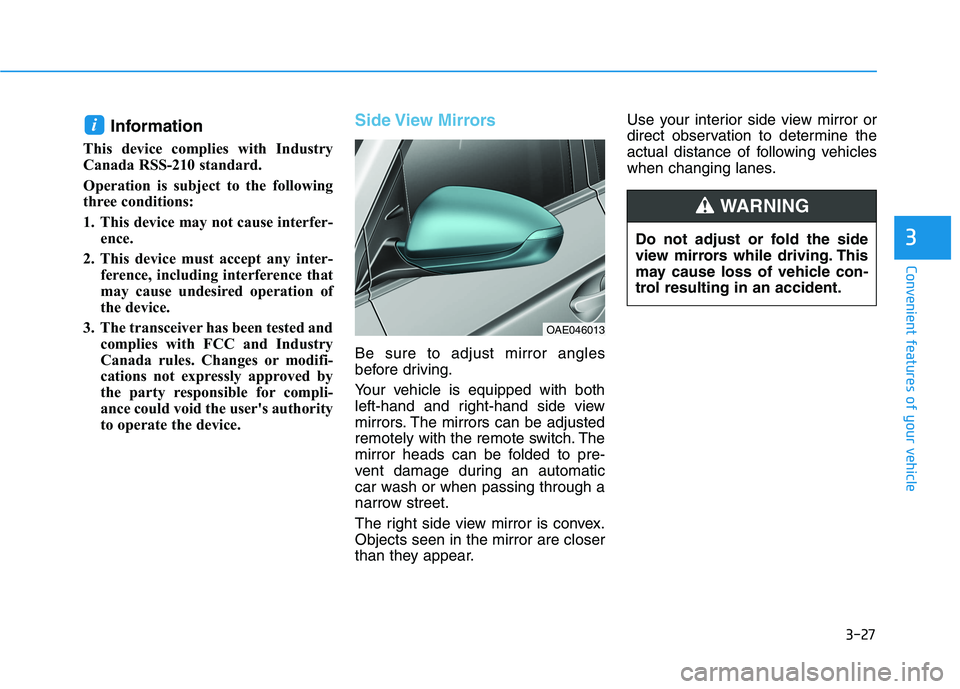
to operate the device.Side View Mirrors
Be sure to adjust mirror angles
before driving.
Your vehicle is equipped with both
left-hand and right-hand side view
mirrors. The mirrors can be adjusted
remotely with the remote switch. The
mirror heads can be folded to pre-
vent damage during an automatic
car wash or when passing through a
narrow street.
The right side view mirror is convex. Objects seen in the mirror are closer
than they appear. Use your interior side view mirror or
direct observation to determine the
actual distance of following vehicles
when changing lanes.
i
OAE046013
Do not adjust or fold the side
view mirrors while driving. This
may cause loss of vehicle con-
trol resulting in an accident.
WARNING
Page 192 of 546
3-42
Convenient features of your vehicle
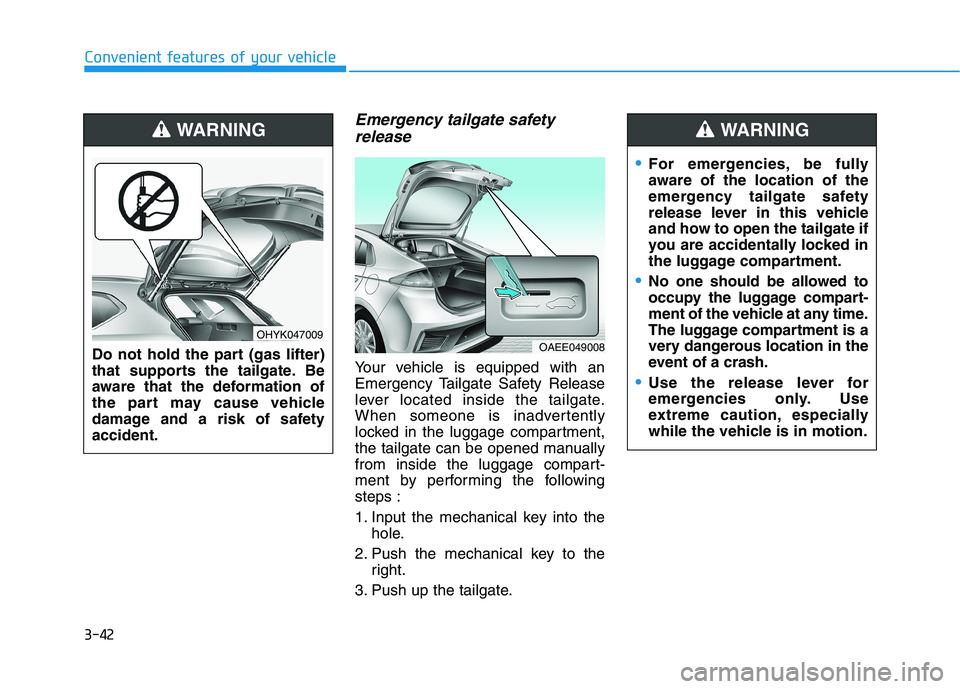
Emergency tailgate safetyrelease
Your vehicle is equipped with an
Emergency Tailgate Safety Release
lever located inside the tailgate.
When someone is inadvertently
locked in the luggage compartment,
the tailgate can be opened manually
from inside the luggage compart-
ment by performing the followingsteps :
1. Input the mechanical key into the hole.
2. Push the mechanical key to the right.
3. Push up the tailgate.
For emergencies, be fully
aware of the location of the
emergency tailgate safety
release lever in this vehicle
and how to open the tailgate if
you are accidentally locked in
the luggage compartment.
No one should be allowed to
occupy the luggage compart-
ment of the vehicle at any time.
The luggage compartment is a
very dangerous location in the
event of a crash.
Use the release lever for
emergencies only. Use
extreme caution, especially
while the vehicle is in motion.
WARNING
OAEE049008
Do not hold the part (gas lifter)
that supports the tailgate. Be
aware that the deformation of
the part may cause vehicle
damage and a risk of safetyaccident.
WARNING
OHYK047009
Page 228 of 546
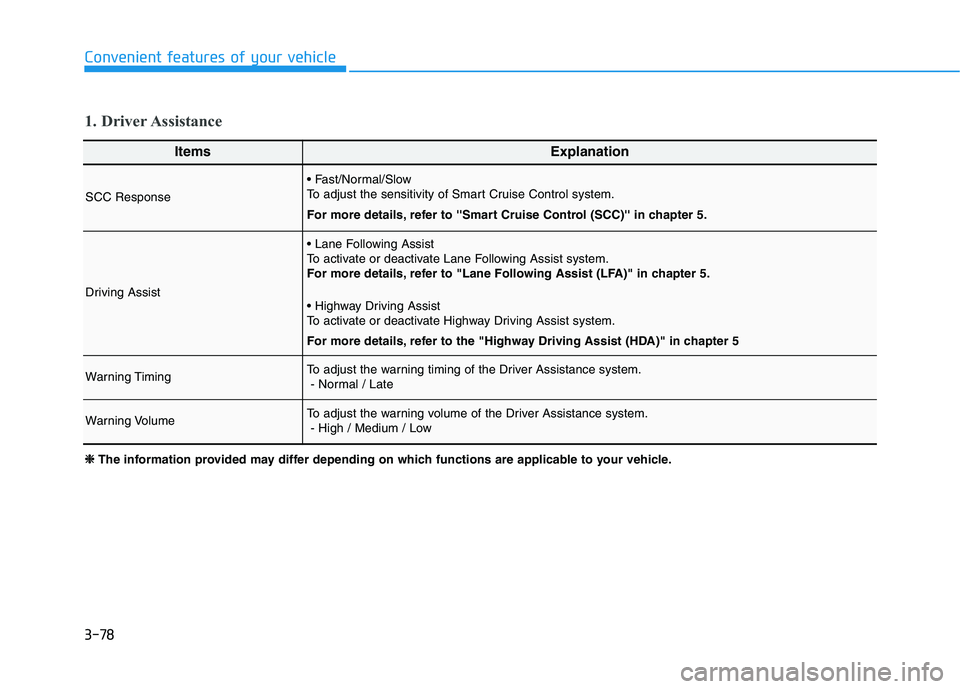
3-78
Convenient features of your vehicle
ItemsExplanation
SCC Response
To adjust the sensitivity of Smart Cruise Control system.
For more details, refer to ''Smart Cruise Control (SCC)'' in chapter 5.
Driving Assist
To activate or deactivate Lane Following Assist system.
For more details, refer to "Lane Following Assist (LFA)" in chapter 5.
To activate or deactivate Highway Driving Assist system.
For more details, refer to the "Highway Driving Assist (HDA)" in chapter 5
Warning TimingTo adjust the warning timing of the Driver Assistance system.- Normal / Late
Warning VolumeTo adjust the warning volume of the Driver Assistance system.- High / Medium / Low
1. Driver Assistance
❈❈
The information provided may differ depending on which functions are applicable to your vehicle.
Page 241 of 546
3-91
Convenient features of your vehicle
3
LLIIGG HH TT
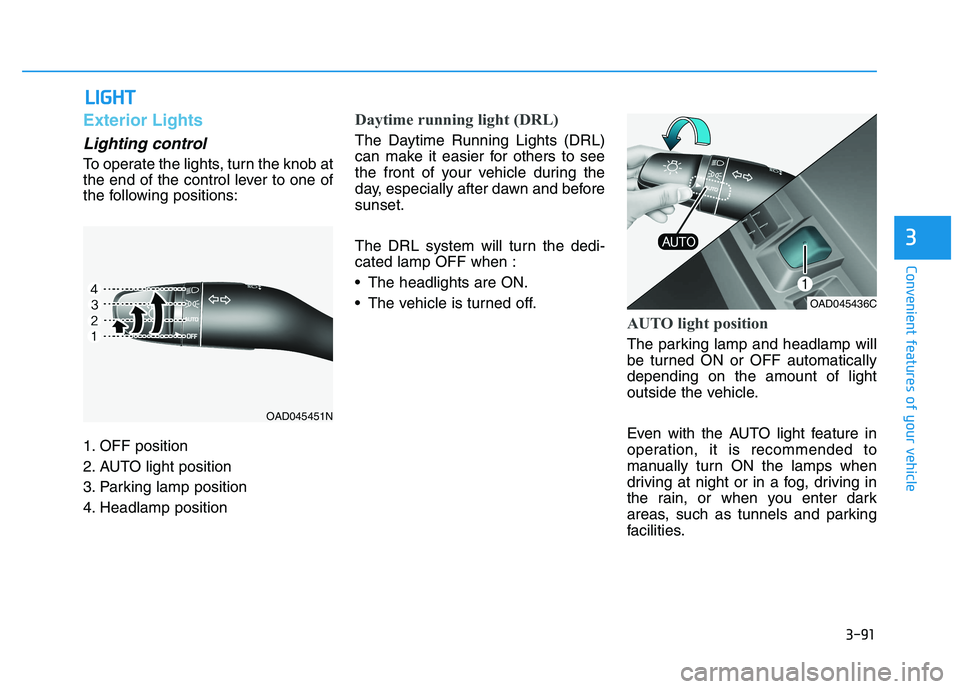
Exterior Lights
Lighting control
To operate the lights, turn the knob at
the end of the control lever to one of
the following positions:
1. OFF position
2. AUTO light position
3. Parking lamp position
4. Headlamp position
Daytime running light (DRL)
The Daytime Running Lights (DRL)
can make it easier for others to see
the front of your vehicle during the
day, especially after dawn and beforesunset.
The DRL system will turn the dedi- cated lamp OFF when :
• The headlights are ON.
The vehicle is turned off.
AUTO light position
The parking lamp and headlamp will
be turned ON or OFF automaticallydepending on the amount of light
outside the vehicle.
Even with the AUTO light feature in
operation, it is recommended to
manually turn ON the lamps when
driving at night or in a fog, driving in
the rain, or when you enter dark
areas, such as tunnels and parking
facilities.
OAD045451N
OAD045436C
Page 246 of 546
3-96
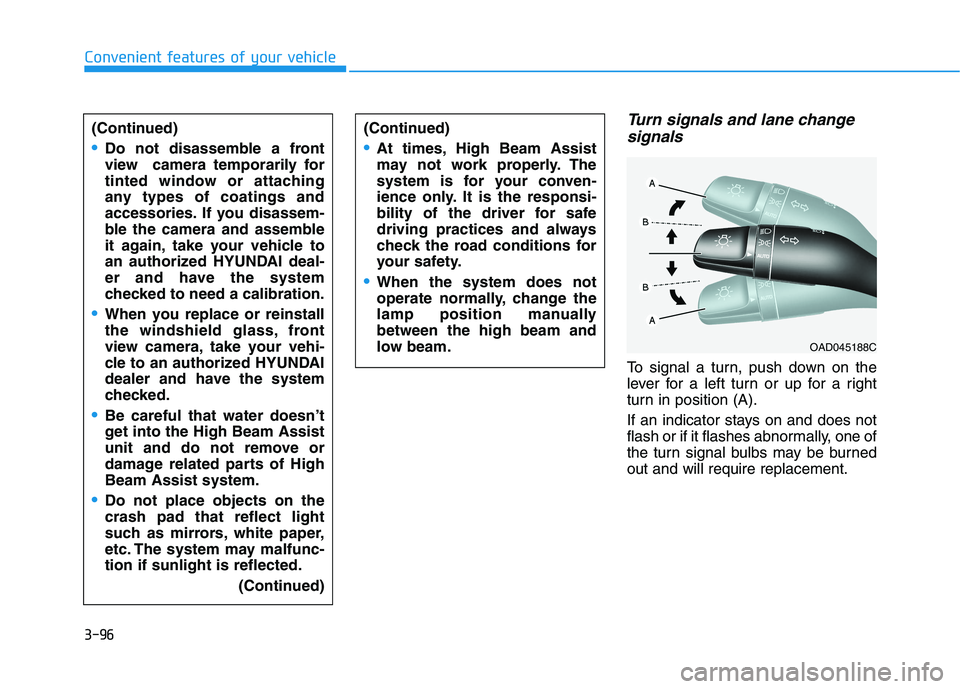
Turn signals and lane changesignals
To signal a turn, push down on the
lever for a left turn or up for a right
turn in position (A).
If an indicator stays on and does not
flash or if it flashes abnormally, one of
the turn signal bulbs may be burnedout and will require replacement.
Convenient features of your vehicle
(Continued)
Do not disassemble a front
view camera temporarily for
tinted window or attaching
any types of coatings and
accessories. If you disassem-
ble the camera and assemble
it again, take your vehicle to
an authorized HYUNDAI deal-
er and have the system
checked to need a calibration.
When you replace or reinstall
the windshield glass, front
view camera, take your vehi-
cle to an authorized HYUNDAI
dealer and have the system
checked.
Be careful that water doesn’t
get into the High Beam Assist
unit and do not remove or
damage related parts of HighBeam Assist system.
Do not place objects on the crash pad that reflect light
such as mirrors, white paper,
etc. The system may malfunc-tion if sunlight is reflected.
(Continued)
(Continued)
At times, High Beam Assist
may not work properly. The
system is for your conven-
ience only. It is the responsi-
bility of the driver for safe
driving practices and always
check the road conditions for
your safety.
When the system does not
operate normally, change the
lamp position manuallybetween the high beam and
low beam.
OAD045188C
Page 257 of 546
3-107
Convenient features of your vehicle
3
(Continued)
Always pay close attention
when the vehicle is driven
close to objects, particularly
pedestrians, and especially
children.
Always keep the camera lens
clean. If lens is covered with
foreign matter, the camera
may not operate normally.
When stopping for a long time in winter or parking in an
indoor parking lot, the image
may temporarily be blurry due
to exhaust gas.
Rear View Monitor is not a
safety device. It only serves toassist the driver in identifying
objects directly behind the
middle of the vehicle. The
camera does not cover thecomplete area behind the
vehicle.
Never rely solely on the rear
view monitor. As there are
blind spots that do not appear
on the camera while backing
up and parking, You must
always use methods of view-
ing the area behind you
including looking over both
shoulders as well as continu-
ously checking all three rear
view mirrors.
Always look around your vehi-
cle to make sure there are no
objects or obstacles before
moving the vehicle in any
direction to prevent a collision.(Continued)
CAUTION