2021 TOYOTA YARIS CROSS unit
[x] Cancel search: unitPage 46 of 650
44
YARIS CROSS Owner's Manual_Europe_M52K60_en
1-1. For safe use
WARNING
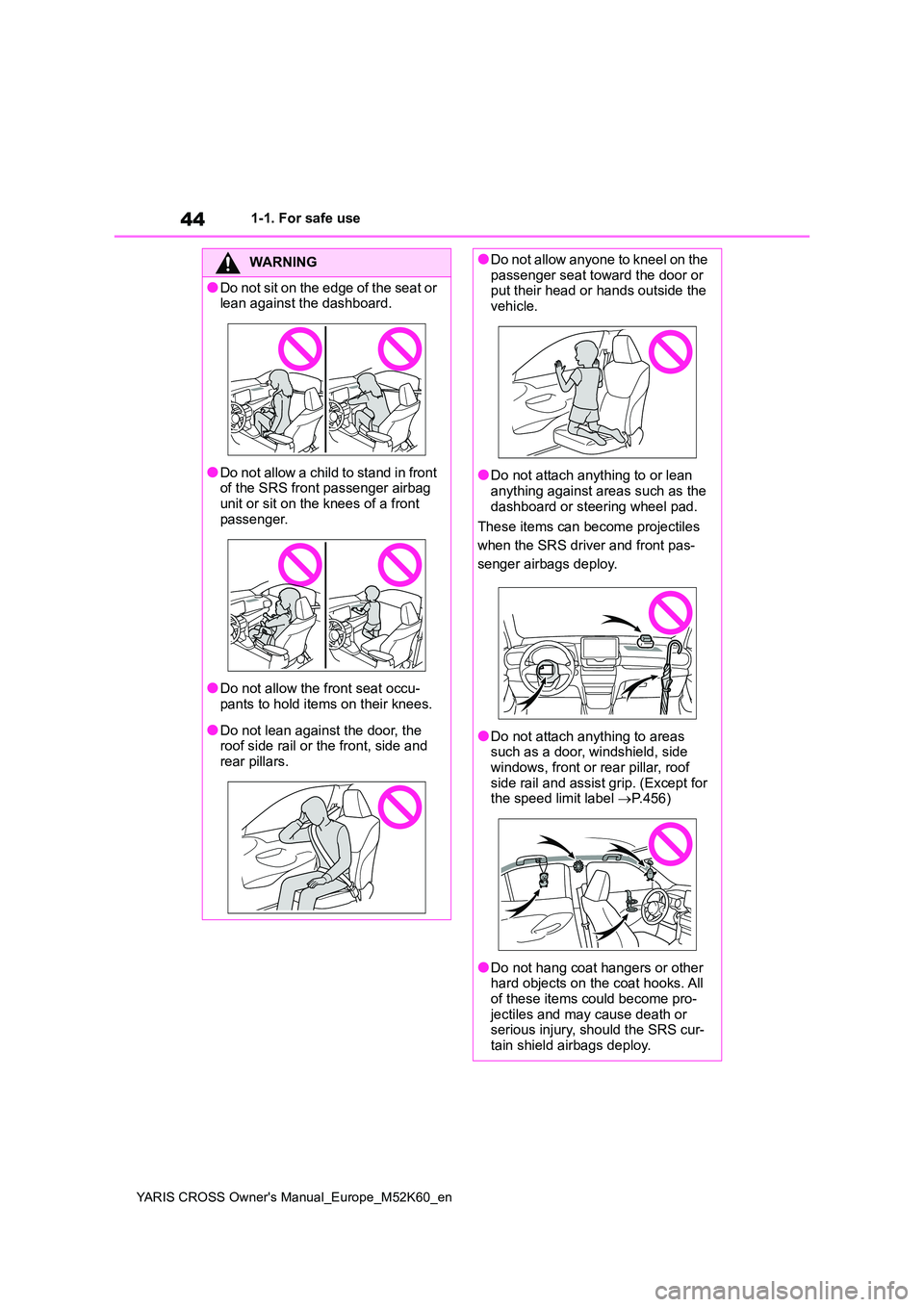
●Do not sit on the edge of the seat or lean against the dashboard.
●Do not allow a child to stand in front of the SRS front passenger airbag
unit or sit on the knees of a front passenger.
●Do not allow the front seat occu-pants to hold items on their knees.
●Do not lean against the door, the roof side rail or the front, side and rear pillars.
●Do not allow anyone to kneel on the passenger seat toward the door or put their head or hands outside the
vehicle.
●Do not attach anything to or lean
anything against areas such as the dashboard or steering wheel pad.
These items can become projectiles
when the SRS driver and front pas-
senger airbags deploy.
●Do not attach anything to areas such as a door, windshield, side windows, front or rear pillar, roof
side rail and assist grip. (Except for the speed limit label P.456)
●Do not hang coat hangers or other hard objects on the coat hooks. All of these items could become pro-
jectiles and may cause death or serious injury, should the SRS cur-tain shield airbags deploy.
Page 61 of 650
59
1
YARIS CROSS Owner's Manual_Europe_M52K60_en
1-2. Child safety
For safety and security
The child restraint systems mentioned in the table may not be available out-
side the EU countries and United Kingdom.
When securing some types of child
restraint systems in rear seat, it
may not be possible to properly use
the seat belts in positions next to
the child restraint without interfering
with it or affecting seat belt effec-
tiveness. Be sure your seat belt fits
snugly across your shoulder and
low on your hips. If it does not, or if
it interferes with the child restraint,
move to a different position. Failure
to do so may result in death or seri-
ous injury.
When installing a child restraint
in the rear seats, adjust the front
seat so that it does not interfere
with the child or child restraint
system.
When installing a child seat with
support base, if the child seat
interferes with the seatback
when latching it into the support
base, adjust the seatback rear-
ward until there is no interfer-
ence.
If the seat belt shoulder anchor is
ahead of the child seat belt
guide, move the seat cushion
forward.
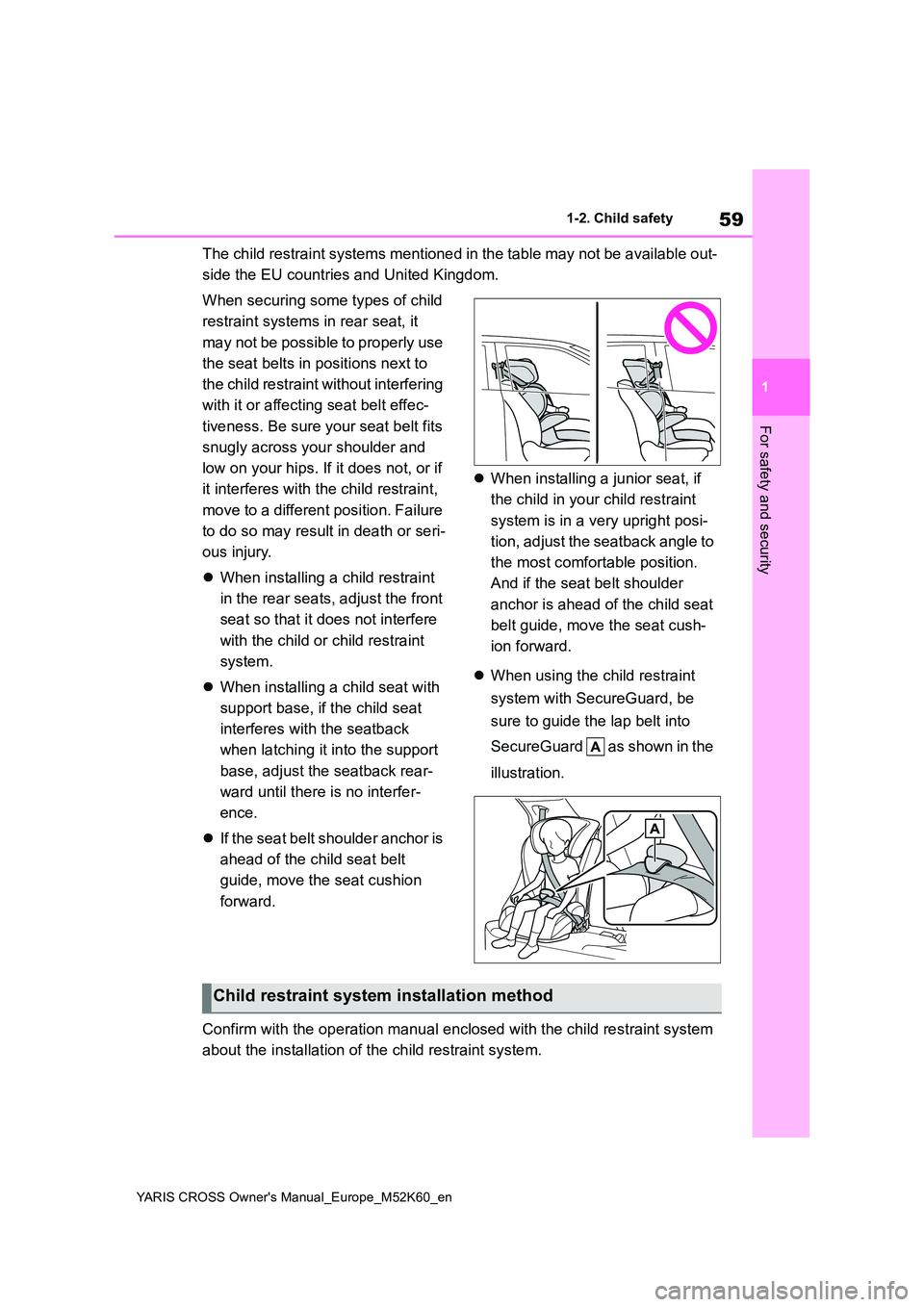
When installing a junior seat, if
the child in your child restraint
system is in a very upright posi-
tion, adjust the seatback angle to
the most comfortable position.
And if the seat belt shoulder
anchor is ahead of the child seat
belt guide, move the seat cush-
ion forward.
When using the child restraint
system with SecureGuard, be
sure to guide the lap belt into
SecureGuard as shown in the
illustration.
Confirm with the operation manual enclosed with the child restr aint system
about the installation of the child restraint system.
Child restraint system installation method
Page 82 of 650

80
YARIS CROSS Owner's Manual_Europe_M52K60_en
1-4. Hybrid system
Power control unit
*: AWD models only
■Running out of fuel
When the vehicle has run out of fuel and the hybrid system cannot be started,
refuel the vehicle with at least enough gasoline to make the low fuel level warn-ing light ( P.442) go off. If there is only
a small amount of fuel, the hybrid sys- tem may not be able to start. (The stan-dard amount of fuel is about 6.3 L [1.7
gal., 1.4 Imp. gal.] when the vehicle is on a level surface. This value may vary when the vehicle is on a slope. Add
extra fuel when the vehicle is inclined.)
■Electromagnetic waves
●High voltage parts and cables on
hybrid vehicles incorporate electro- magnetic shielding, and therefore emit approximately the same amount of
electromagnetic waves as conven- tional gasoline powered vehicles or home electronic appliances.
●Your vehicle may cause sound inter-ference in some third party-produced
radio parts.
■Hybrid battery (traction battery)
The hybrid battery (traction battery) has
a limited service life. The lifespan of the hybrid battery (traction battery) can change in accordance with driving style
and driving conditions.
■Starting the hybrid system in an extremely cold environment
When the hybrid battery (traction bat-
tery) is extremely cold (below approxi- mately -30°C [-22°F]) under the influence of the outside temperature, it
may not be possible to start the hybrid system. In this case, try to start the hybrid system again after the tempera-
ture of the hybrid battery increases due to the outside temperature increase etc.
■Declaration of conformity
This model conforms to hydrogen emis-
sions according to regulation ECE100
(Battery electric vehicle safety).
WARNING
■High voltage precautions
This vehicle has high voltage DC and AC systems as well as a 12-volt sys-tem. DC and AC high voltage is very
dangerous and can cause severe burns and electric shock that may result in death or serious injury.
●Never touch, disassemble, remove or replace the high voltage parts,
cables or their connectors.
●The hybrid system will become hot
after starting as the system uses high voltage. Be careful of both the high voltage and the high tempera-
ture, and always obey the warning labels attached to the vehicle.
●Never try to open the service plug access hole located under the left side of the rear seat. The service
plug is used only when the vehicle is serviced and is subject to high voltage.
■Road accident cautions
Observe the following precautions to
reduce the risk of death or serious injury:
●Pull your vehicle off the road, apply the parking brake, shift the shift lever to P, and turn the hybrid sys-
tem off.
Page 97 of 650
95
2
YARIS CROSS Owner's Manual_Europe_M52K60_en
2-1. Instrument cluster
Vehicle status information and indicators
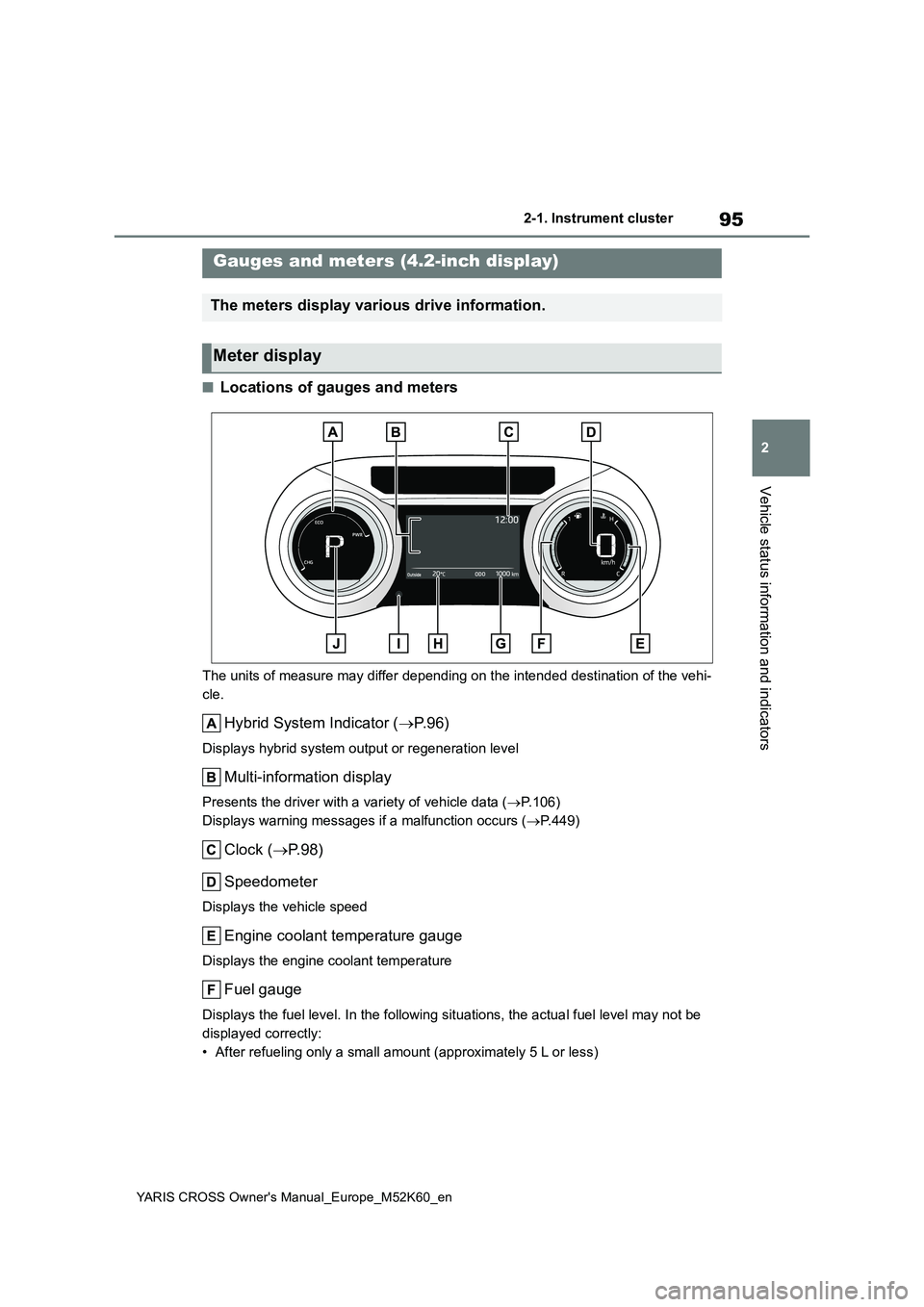
■Locations of gauges and meters
The units of measure may differ depending on the intended destination of the vehi-
cle.
Hybrid System Indicator ( P. 9 6 )
Displays hybrid system output or regeneration level
Multi-information display
Presents the driver with a variety of vehicle data (P.106)
Displays warning messages if a malfunction occurs ( P.449)
Clock (P.98)
Speedometer
Displays the vehicle speed
Engine coolant temperature gauge
Displays the engine coolant temperature
Fuel gauge
Displays the fuel level. In the following situations, the actua l fuel level may not be
displayed correctly:
• After refueling only a small amount (approximately 5 L or less )
Gauges and meters (4.2-inch display)
The meters display various drive information.
Meter display
Page 102 of 650

100
YARIS CROSS Owner's Manual_Europe_M52K60_en
2-1. Instrument cluster
The display of the speedometer can be selected from two types, analog or
digital. ( P. 1 1 7 )
■When analog speedometer is displayed
The units of measure may differ depending on the intended destination of the vehi-
cle.
Hybrid System Indicator ( P. 1 0 2 )
Displays hybrid system output or regeneration level
Speedometer
Displays the vehicle speed
Clock (P.104, 105)
Fuel gauge
Displays the fuel level. In the following situations, the actua l fuel level may not be
displayed correctly:
• After refueling only a small amount (approximately 5 L or less )
• When stopped on a hill or other slope
• When driving on a slope or around a curve
Engine coolant temperature gauge
Gauges and meters (7-inch display)
The meters display various drive information.
Meter display
Page 103 of 650

101
2
YARIS CROSS Owner's Manual_Europe_M52K60_en
2-1. Instrument cluster
Vehicle status information and indicators
Displays the engine coolant temperature
Display change button (P. 1 0 4 )
Odometer and trip meter display ( P.104)
Outside temperature
Displays the outside temperature within the range of -40°C (-40 °F) to 60°C (140°F)
Shift position indicator (P.197)
Multi-information display
Presents the driver with a variety of vehicle data ( P.112)
Displays warning messages if a malfunction occurs ( P.449)
■When digital speedometer is displayed
The units of measure may differ depending on the intended destination of the vehi-
cle.
Hybrid System Indicator ( P. 1 0 2 )
Displays hybrid system output or regeneration level
Speedometer
Displays the vehicle speed
Clock (P.104, 105)
Fuel gauge
Displays the fuel level. In the following situations, the actua l fuel level may not be
displayed correctly:
• After refueling only a small amount (approximately 5 L or less )
• When stopped on a hill or other slope
Page 112 of 650

110
YARIS CROSS Owner's Manual_Europe_M52K60_en
2-1. Instrument cluster
Select to enable selection of an
audio source or track on the meter
using the meter control switches.
This menu icon can be set to be dis-
played/not displayed in .
■Display items
Drive information
Energy monitor (P. 1 2 3 )
Torque distribution (if equipped)
Tire inflation pressure
■Drive information
2 items that are selected using the
“Drive Info. Items” setting (average
speed, distance and total time) can
be displayed vertically.
The displayed information changes
according to the “Drive Info. Type”
setting (since the system was
started or between resets).
( P. 1 1 0 )
Use the displayed information as a
reference only.
Following items will be displayed.
“Trip”
• “Average Speed”: Displays the aver-
age vehicle speed since hybrid sys-
tem start*
• “Distance”: Displays the distance
driven since hybrid system start*
• “Total Time”: Displays the elapsed
time since hybrid system start*
*: These items are reset each time the
hybrid system stops.
“Total”
• “Average Speed”: Displays the aver-
age vehicle speed since the display
was reset*
• “Distance”: Displays the distance
driven since the display was reset*
• “Total Time”: Displays the elapsed
time since the display was reset*
*: To reset, display the desired item and
press and hold the meter control
switch.
■Torque distribution (if
equipped)
Drive power put on each tire is dis-
played with a bar meter. The larger
the bar meter the larger the driving
power is displayed.
■Tire inflation pressure
Displays inflation pressure of each
tire.
■Meter display settings that can
be changed
Clock setting (vehicles without
navigation/multimedia system)
P. 9 8
Language
Select to change the language dis-
played.
Units
Select to change the units of measure
Audio system-linked dis-
play (if equipped)
Vehicle information display
Settings display
Page 119 of 650
117
2
YARIS CROSS Owner's Manual_Europe_M52K60_en
2-1. Instrument cluster
Vehicle status information and indicators
driven since hybrid system start*
• “Total Time”: Displays the elapsed
time since hybrid system start*
*: These items are reset each time the
hybrid system stops.
“Total”
• “Average Speed”: Displays the aver-
age vehicle speed since the display
was reset*
• “Distance”: Displays the distance
driven since the display was reset*
• “Total Time”: Displays the elapsed
time since the display was reset*
*: To reset, display the desired item and
press and hold the meter control
switch.
■Torque distribution (if
equipped)
Drive power put on each tire is dis-
played with a bar meter. The larger
the bar meter the larger the driving
power is displayed.
■Tire inflation pressure
Displays inflation pressure of each
tire.
■Meter display settings that can
be changed
Clock setting (vehicles without
navigation/multimedia system)
P. 1 0 4
Language
Select to change the language dis-
played.
Units
Select to change the units of measure
displayed.
Meter Type
The speed meter display method can
be changed.
EV indicator
Select to enable/disable the EV indica-
tor.
Select to change the displayed content
of the following:
• Hybrid System Indicator
Select to display/not display the Eco
Accelerator Guidance. ( P. 1 1 4 )
• Fuel economy display
Select to change the average fuel con-
sumption display between after
start/after reset/after refuel. ( P.114)
(if equipped)
Select to display/not display the audio
system linked display.
Select to change the displayed content
of the following:
• Display contents
Select to display/not display the energy
monitor/torque distribution display.
( P.123)
• Drive information type
Select to change the drive information
type display between after start/after
reset.
• Drive information items
Select to set the first and second items
of the drive information display to any of
Settings display