2021 PEUGEOT BOXER light
[x] Cancel search: lightPage 82 of 212
80
Driving
Loading sill height manual
correction
Adjusting the platform sill up or down
► A quick press on one of the controls selects
the upper or lower level. Each press (diode lit)
increases or decreases by one level.
A long press on one of the controls selects the
maximum corresponding level (-3 or +3).
Returning to the normal sill height
► Press the same number of times in the
opposite direction of the displayed position.
Deactivation/Reactivation
► Press and hold both controls simultaneously
to deactivate/reactivate the system.
Deactivation is confirmed by the lighting of the
control LEDs.
Beyond a speed of 3 mph (5 km/h), the
system reactivates automatically.
Loading sill height
automatic correction
Beyond a speed of 12 mph (20 km/h), the
system automatically restores the rear sill height
to its normal level.
Malfunction
In the event of a system malfunction, this
warning lamp comes on.
Have it checked by a PEUGEOT dealer or a
qualified workshop.
Driving with the suspension set too high
or too low poses risk of damaging
components under the body.
The height may be adjusted automatically to
take account of changes in temperature or
loading.
You must avoid using this control in the
following circumstances:
–
when working underneath the vehicle,
–
when changing a wheel,
–
when the vehicle is being transported by
lorry
, train, ferry, boat, etc.
To avoid damaging the vehicle or injuring
anyone, check that there is nothing or no
person that might be close to or come into
contact with the vehicle, before raising or
lowering the suspension.
Driving and manoeuvring
aids - General
recommendations
Driving and manoeuvring aids cannot, in
any circumstances, replace the need for
vigilance on the part of the driver.
The driver must comply with the Highway
Code, must remain in control of the vehicle in
all circumstances and must be able to retake
control of it at all times. The driver must adapt
the speed to climatic conditions, traffic and
the state of the road.
It is the driver's responsibility to constantly
monitor traffic conditions, assess the distance
and relative speed of other vehicles, and
anticipate their manoeuvres before using the
direction indicator and changing lanes.
These systems do not make it possible to
exceed the laws of physics.
Driving aids
You should hold the steering wheel with
both hands, always use the door and interior
mirrors, always leave your feet close to the
pedals and take a break every 2 hours.
Manoeuvring aids
The driver must always check the
surroundings of the vehicle before and during
Page 83 of 212
81
Driving
6the whole manoeuvre, in particular using the
mirrors.
Radar(s)
The operation of the radar(s), along with
any associated functions, may be affected
by the accumulation of dirt (e.g.
mud, ice),
in poor weather conditions (e.g.
heavy rain,
snow), or if the bumpers are damaged.
If the front bumper is to be repainted, contact
a PEUGEOT dealer or a qualified workshop;
certain types of paint could interfere with the
operation of the radar(s).
Driving aids camera
This camera and its associated functions
may be impaired or not work if the windscreen
area in front of the camera is dirty, misty,
frosty, covered with snow, damaged or
masked by a sticker.
In humid and cold weather, demist the
windscreen regularly.
Poor visibility (inadequate street lighting,
heavy rain, thick fog, snowfall), dazzle
(headlamps of an oncoming vehicle, low sun,
reflections on a damp road, leaving a tunnel,
alternating shade and light) can also impair
detection performance.
In the event of a windscreen replacement,
contact a PEUGEOT dealer or a qualified
workshop to recalibrate the camera;
otherwise, the operation of the associated
driving aids may be disrupted.
Other cameras
The images from the camera(s)
displayed on the touch screen or on the
instrument panel may be distorted by the
terrain.
In the presence of areas in shade, or in
conditions of bright sunlight or inadequate
lighting, the image may be darkened and with
lower contrast.
Obstacles may appear further away than they
actually are.
Sensors
The operation of the sensors, as well as
any associated functions, may be disrupted
by noise pollution such as that emitted by
noisy vehicles and machinery (e.g. lorries,
pneumatic drills), by the accumulation of
snow or dead leaves on the road or in the
event of damaged bumpers and mirrors.
When reverse gear is engaged, an audible
signal (long beep) indicates that the sensors
may be dirty.
A front or rear impact to the vehicle can
upset the sensors’ settings, which is not
always detected by the system: distance
measurements may be distorted.
The sensors do not systematically detect
obstacles that are too low (pavements, studs)
or too thin (trees, posts, wire fences).
Certain obstacles located in the sensors’ blind
spots may not be detected or may no longer
be detected during the manoeuvre.
Certain materials (fabrics) absorb sound
waves: pedestrians may not be detected.
Maintenance
Clean the bumpers and door mirrors and
the field of vision of the cameras regularly.
When washing your vehicle at high pressure,
direct the spray from at least 30
cm away
from the radar, sensors and cameras.
Mats/Pedal trims
The use of mats or pedal trims not
approved by PEUGEOT may interfere with
the operation of the speed limiter or cruise
control.
To avoid any risk of jamming the pedals:
–
Ensure that the mat is secured correctly
.
–
Never fit one mat on top of another
.
Units of speed
Ensure that the units of speed displayed
on the instrument panel (mph or km/h) are
those for the country you are driving in.
If this is not the case, when the vehicle is
stationary, set the display to the required
Page 87 of 212
85
Driving
6Cruise control - Specific
recommendations
The cruise control function does not guarantee compliance with the maximum
authorised speed and the safety distance
between vehicles, the driver remains
responsible for their driving.
In the interest of public safety, only use cruise
control if the traffic conditions enable vehicles
to drive at a steady speed and maintain an
adequate safety distance.
Remain vigilant while cruise control is
activated. If you press and hold one of the
speed setting modification buttons, your
vehicle may change speed very abruptly.
When descending a steep hill , the cruise
control system cannot prevent the vehicle
from exceeding the set speed. Brake if
necessary to control the vehicle speed.
On steep climbs or when towing, the set
speed may not be reached or maintained.
Exceeding the programmed speed
setting
You can temporarily exceed the speed
setting by pressing the accelerator pedal (the
programmed speed flashes).
To return to the speed setting, release the
accelerator pedal (when the set speed is
reached again, the displayed speed stops
flashing).
Operating limits
Never use the system in the following
situations:
–
In an urban area with the risk of
pedestrians crossing the road.
–
In heavy traffic.
–
On winding or steep roads.
–
On slippery or flooded roads.
–
In poor weather conditions.
–
In the event of restricted visibility for the
driver
.
–
Driving on a speed circuit.
–
Driving on a rolling road.
–
When using a ‘space-saver
’ type spare
wheel.
–
When using snow chains, non-slip covers
or studded tyres.
Cruise control
For more information, refer to the
General recommendations on the use
of driving and manoeuvring aids and the
Cruise control - particular
recommendations.
System which automatically maintains the
speed of the vehicle at the cruise setting
programmed by the driver, without using the
accelerator pedal. To be programmed or activated, the speed of the
vehicle must be above 19 mph (30 km/h), with at
least 2
nd gear engaged.
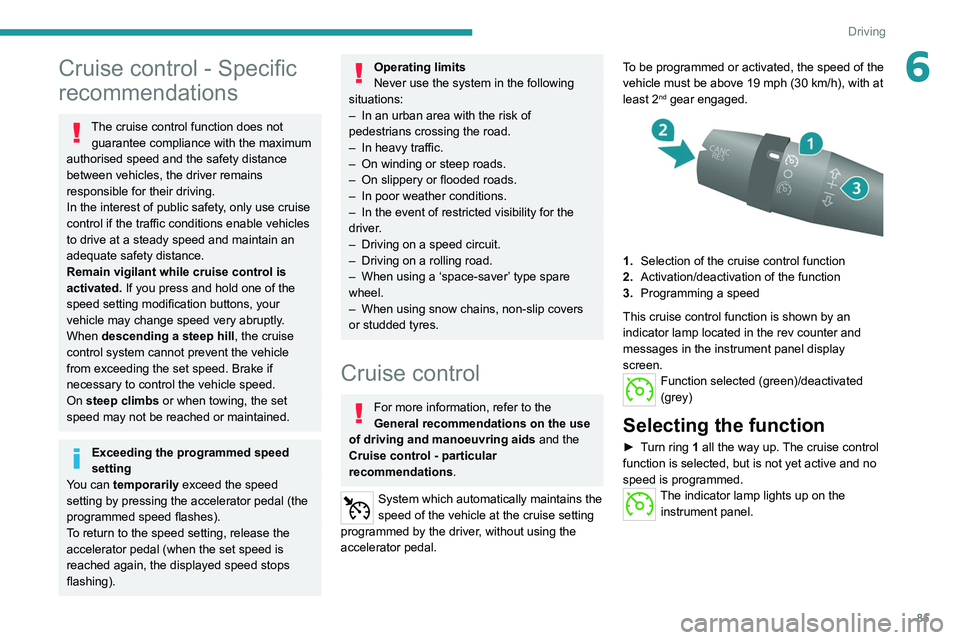
1.
Selection of the cruise control function
2. Activation/deactivation of the function
3. Programming a speed
This cruise control function is shown by an
indicator lamp located in the rev counter and
messages in the instrument panel display
screen.
Function selected (green)/deactivated
(grey)
Selecting the function
► Turn ring 1 all the way up. The cruise control
function is selected, but is not yet active and no
speed is programmed.
The indicator lamp lights up on the instrument panel.
Page 89 of 212
87
Driving
6a qualified workshop for any replacement and
calibration of the camera.
Operation
The system starts automatically when moving
off.
A check of the operating conditions takes place: these two indicator
lamps come on in the instrument panel.
When these conditions are met, these two
indicator lamps go off. The system is activated.
If the operating conditions are not met, the
system is activated but is no longer effective.
This is signalled by the fixed illumination of these
two warning lamps in the instrument panel.
Operating conditions
Once engaged, the system is active only when
these operating conditions are met:
–
The vehicle is moving forwards.
–
No malfunction of the vehicle is detected.
–
The speed of the vehicle is equal to or greater
than approximately 37 mph (60 km/h).
–
The longitudinal marking of the traffic lanes is
clearly visible.
–
The visibility conditions are clear
.
–
The trajectory is in a straight line (or in the
case of bends, they are wide).
–
The field of vision is sufficiently clear (the
safety distance with the vehicle ahead is
respected). –
In the event of a lane departure, the direction
indicator corresponding to the direction (right or
left) of the departure has not been operated.
–
The trajectory of the vehicle is consistent with
the road layout.
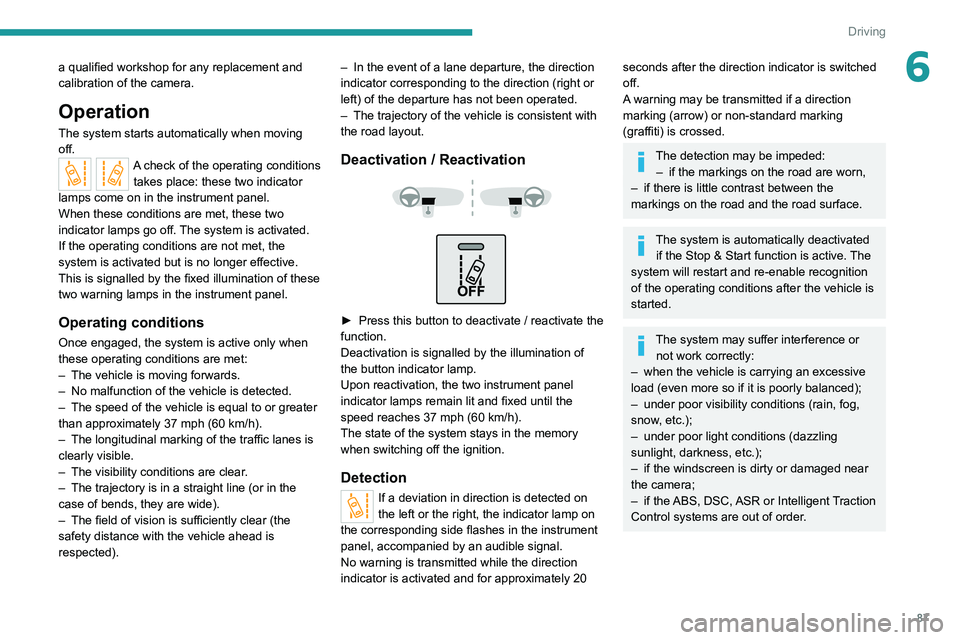
Deactivation / Reactivation
► Press this button to deactivate / reactivate the
function.
Deactivation is signalled by the illumination of
the button indicator lamp.
Upon reactivation, the two instrument panel
indicator lamps remain lit and fixed until the
speed reaches 37 mph (60 km/h).
The state of the system stays in the memory
when switching off the ignition.
Detection
If a deviation in direction is detected on
the left or the right, the indicator lamp on
the corresponding side flashes in the instrument
panel, accompanied by an audible signal.
No warning is transmitted while the direction
indicator is activated and for approximately 20
seconds after the direction indicator is switched
off.
A warning may be transmitted if a direction
marking (arrow) or non-standard marking
(graffiti) is crossed.
The detection may be impeded: – if the markings on the road are worn,
–
if there is little contrast between the
markings on the road and the road surface.
The system is automatically deactivated if the Stop & Start function is active. The
system will restart and re-enable recognition
of the operating conditions after the vehicle is
started.
The system may suffer interference or not work correctly:
–
when the vehicle is carrying an excessive
load (even more so if it is poorly balanced);
–
under poor visibility conditions (rain, fog,
snow
, etc.);
–
under poor light conditions (dazzling
sunlight, darkness, etc.);
–
if the windscreen is dirty or damaged near
the camera;
–
if the
ABS, DSC, ASR or Intelligent Traction
Control systems are out of order.
Page 90 of 212
88
Driving
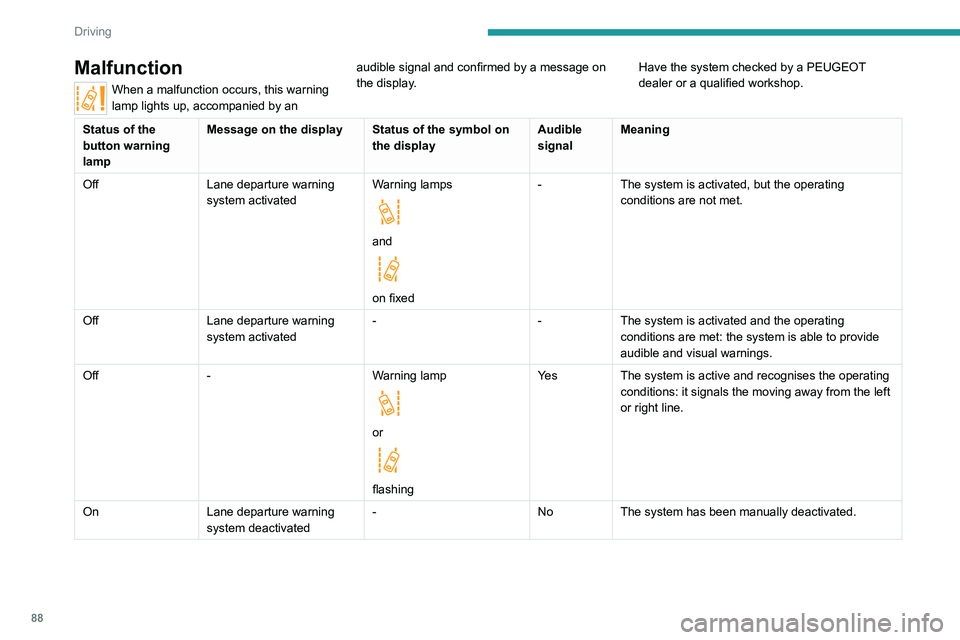
Malfunction
When a malfunction occurs, this warning
lamp lights up, accompanied by an audible signal and confirmed by a message on
the display.
Have the system checked by a PEUGEOT
dealer or a qualified workshop.
Status of the
button warning
lampMessage on the display Status of the symbol on
the displayAudible
signalMeaning
Off Lane departure warning
system activated Warning lamps
and
on fixed-
The system is activated, but the operating
conditions are not met.
Off Lane departure warning
system activated -
-The system is activated and the operating
conditions are met: the system is able to provide
audible and visual warnings.
Off - Warning lamp
or
flashingYe s
The system is active and recognises the operating
conditions: it signals the moving away from the left
or right line.
On Lane departure warning
system deactivated -
NoThe system has been manually deactivated.
Page 92 of 212
90
Driving
The trailer detection mode is set via the
MODE button.
For more information on Vehicle configuration
(MODE), refer to the corresponding section.
Two modes are available:
–
Max
: for a trailer length greater than 9 metres.
–
Auto
: for an automatic detection of the trailer
length (3 m, 6 m or 9 m).
In Auto mode, an icon appears in the instrument
panel indicating the length detected by the
system.
It may be necessary to make a 90° turn
to allow the system to detect the length
of the trailer.
When a trailer is detected, vehicle detection
when reversing is deactivated.
Operating conditions
– All vehicles are moving in the same direction
and in adjacent lanes.
–
The speed of your vehicle is 6 mph (10 km/h)
minimum.
–
When you overtake a vehicle, the speed
difference is less than 16
mph (25 km/h).
–
When another vehicle overtakes you, the
speed difference is less than 31
mph (50 km/h).
Active Safety Brake with Collision Risk Alert and
Intelligent emergency
braking assistance
For more information, refer to the
General recommendations on the use
of driving and manoeuvring aids .
This system:
–
warns the driver that their vehicle is at risk of
collision with the vehicle in front.
–
reduces the vehicle's speed to avoid a
collision or limit its severity
.
This system is comprised of three functions:
–
Collision
Risk Alert.
–
Intelligent emergency braking assistance
(iEBA).
–
Active Safety Brake (automatic emergency
braking).
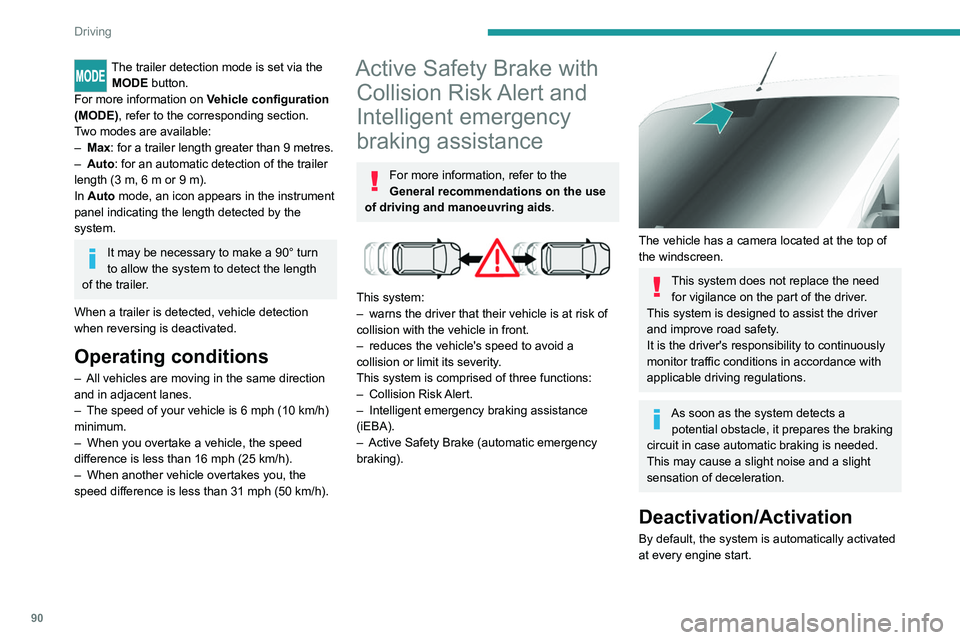
The vehicle has a camera located at the top of
the windscreen.
This system does not replace the need for vigilance on the part of the driver.
This system is designed to assist the driver
and improve road safety.
It is the driver's responsibility to continuously
monitor traffic conditions in accordance with
applicable driving regulations.
As soon as the system detects a potential obstacle, it prepares the braking
circuit in case automatic braking is needed.
This may cause a slight noise and a slight
sensation of deceleration.
Deactivation/Activation
By default, the system is automatically activated
at every engine start.
Page 95 of 212

93
Driving
6This warning lamp flashes (for approximately 10 seconds) as soon as
the function applies the vehicle’s brakes.
With a manual gearbox, in the event of automatic
emergency braking bringing the vehicle to a
complete stop, the engine may stall.
The driver can maintain control of the vehicle at any time by firmly turning the
steering wheel and/or firmly depressing the
accelerator pedal.
The brake pedal may vibrate slightly while the function is operating.
If the vehicle comes to a complete stop,
automatic braking is maintained for 1 to 2
seconds.
Malfunction
In the event of a system malfunction, this
warning lamp comes on on the instrument
panel, accompanied by an onscreen message
and an audible signal.
Contact a PEUGEOT dealer or a qualified
workshop to have the system checked.
If these warning lamps come on
after the engine has been switched
off and then restarted, contact a PEUGEOT
dealer or a qualified workshop to have the
system checked.
Audible rear parking sensors
For more information, refer to the
General recommendations on the use
of driving and manoeuvring aids .
If fitted to your vehicle, the system consists of 4
proximity sensors installed in the rear bumper.
They detect any obstacle, e.g. person, vehicle,
tree, barrier, which is behind the vehicle while
manoeuvring.
Certain types of obstacle detected at the
beginning of the manoeuvre will no longer be
detected at the end of manoeuvre if they are
located in the blind spots between and under the
sensors. Examples: stake, roadworks cone or
pavement post.
The rear parking sensors may be associated
with the reversing camera.
Switching on
► Engage reverse gear with the gear lever .
The proximity information is indicated by an
audible signal which becomes more rapid as the
vehicle approaches the obstacle.
When the distance between the rear of
the vehicle and the obstacle is less than
approximately 30 centimetres, the audible signal
becomes continuous.
Switching off
► Disengage reverse gear and shift to neutral.
Malfunction
In the event of a malfunction, this warning
lamp lights up on the instrument panel.
Consult a PEUGEOT dealer or a qualified
workshop.
Page 107 of 212
105
Practical information
7
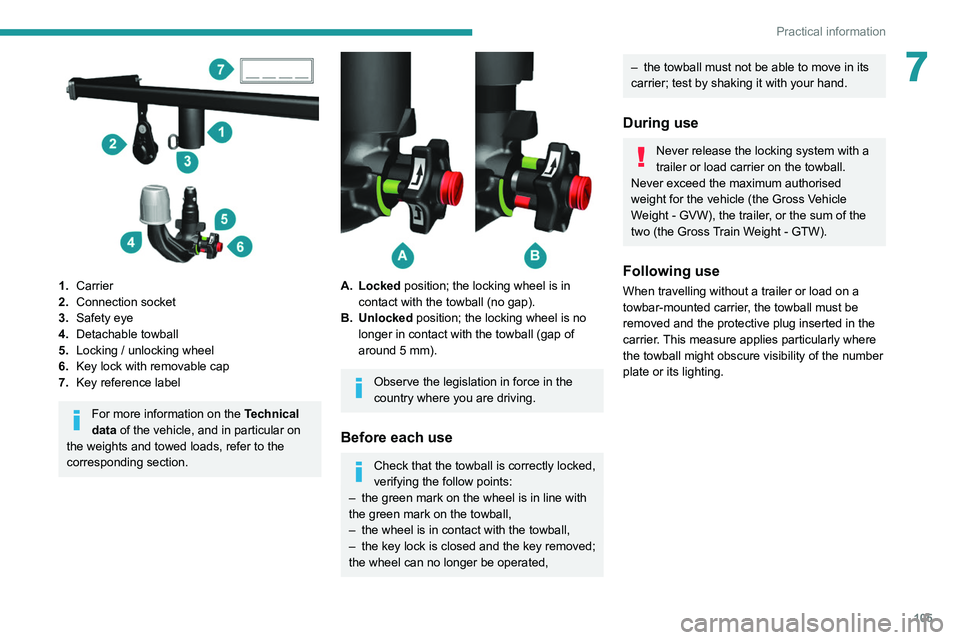
1.Carrier
2. Connection socket
3. Safety eye
4. Detachable towball
5. Locking / unlocking wheel
6. Key lock with removable cap
7. Key reference label
For more information on the Technical
data of the vehicle, and in particular on
the weights and towed loads, refer to the
corresponding section.
A. Locked position; the locking wheel is in contact with the towball (no gap).
B. Unlocked position; the locking wheel is no longer in contact with the towball (gap of
around 5 mm).
Observe the legislation in force in the
country where you are driving.
Before each use
Check that the towball is correctly locked,
verifying the follow points:
–
the green mark on the wheel is in line with
the green mark on the towball,
–
the wheel is in contact with the towball,
–
the key lock is closed and the key removed;
the wheel can no longer be operated,
– the towball must not be able to move in its
carrier; test by shaking it with your hand.
During use
Never release the locking system with a
trailer or load carrier on the towball.
Never exceed the maximum authorised
weight for the vehicle (the Gross Vehicle
Weight - GVW), the trailer, or the sum of the
two (the Gross Train Weight - GTW).
Following use
When travelling without a trailer or load on a
towbar-mounted carrier, the towball must be
removed and the protective plug inserted in the
carrier. This measure applies particularly where
the towball might obscure visibility of the number
plate or its lighting.