Page 123 of 244
6-5
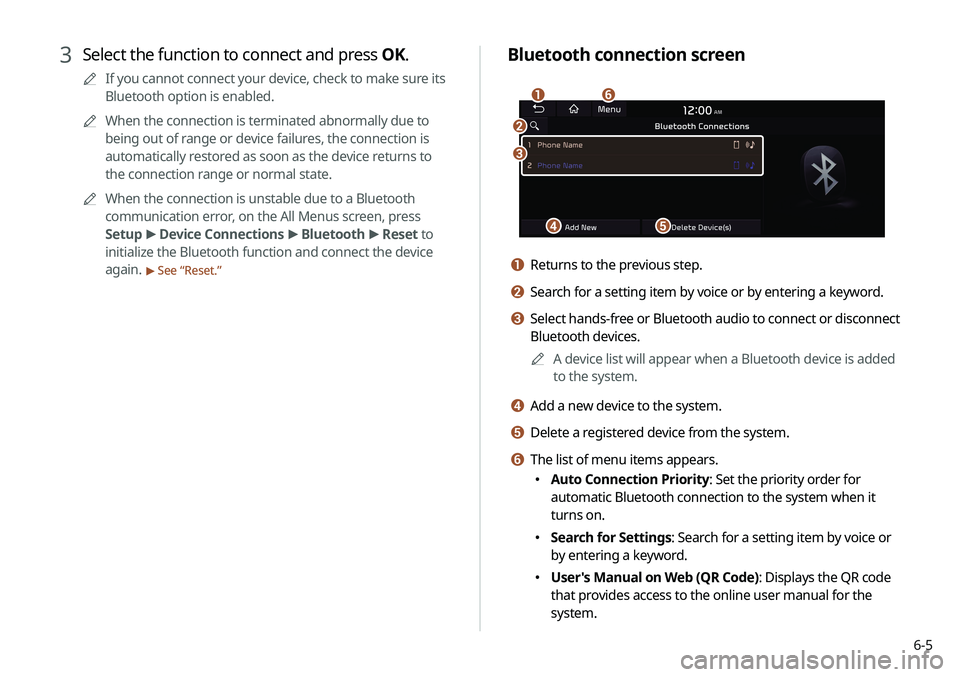
Bluetooth connection screen
d
a
c
e
f
b
a Returns to the previous step.
b Search for a setting item by voice or by entering a keyword.
c Select hands-free or Bluetooth audio to connect or disconnect
Bluetooth devices.A
A
A device list will appear when a Bluetooth device is added
to the system.
d Add a new device to the system.
e Delete a registered device from the system.
f The list of menu items appears.
�Auto Connection Priority: Set the priority order for
automatic Bluetooth connection to the system when it
turns on.
�Search for Settings: Search for a setting item by voice or
by entering a keyword.
�User's Manual on Web (QR Code): Displays the QR code
that provides access to the online user manual for the
system.
3 Select the function to connect and press OK.
A
A
If you cannot connect your device, check to make sure its
Bluetooth option is enabled.
A
A
When the connection is terminated abnormally due to
being out of range or device failures, the connection is
automatically restored as soon as the device returns to
the connection range or normal state.
A
A
When the connection is unstable due to a Bluetooth
communication error, on the All Menus screen, press
Setup >
Device Connections >
Bluetooth >
Reset to
initialize the Bluetooth function and connect the device
again.
> See “ Reset.”
Page 124 of 244
6-6
Deleting a registered device
If you will no longer use a Bluetooth device or you want to add
a new device when 6 devices are already registered, delete an
existing registered device.
1 On the All Menus screen, press Setup >
Device
Connections >
Bluetooth >
Bluetooth
Connections >
Delete Device(s).
2 Select a device to delete and press Delete.
To delete all registered devices, press Mark All >
Delete.
3 Press Yes.
A
A
When you delete a registered device, all related contacts, call
logs, and text messages are removed from the system.
Disconnecting a registered device
1 On the All Menus screen, press Setup >
Device
Connections >
Bluetooth >
Bluetooth
Connections.
2 Press the connected device name or icons.
3 Press Disconnect in the connection settings
window.
A
A
To disconnect a function, select the function to disconnect
and press OK.
Page 126 of 244
6-8
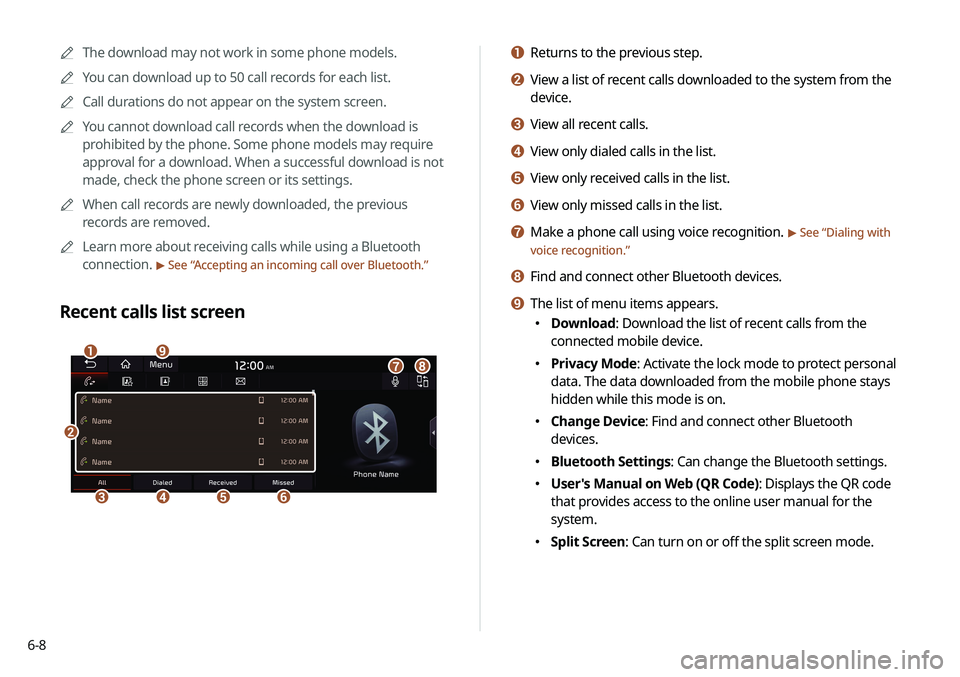
a Returns to the previous step.
b View a list of recent calls downloaded to the system from the
device.
c View all recent calls.
d View only dialed calls in the list.
e View only received calls in the list.
f View only missed calls in the list.
g Make a phone call using voice recognition. > See “Dialing with
voice recognition.”
h Find and connect other Bluetooth devices.
i The list of menu items appears.
� Download: Download the list of recent calls from the
connected mobile device.
�Privacy Mode: Activate the lock mode to protect personal
data. The data downloaded from the mobile phone stays
hidden while this mode is on.
�Change Device: Find and connect other Bluetooth
devices.
�Bluetooth Settings: Can change the Bluetooth settings.
�User's Manual on Web (QR Code): Displays the QR code
that provides access to the online user manual for the
system.
�Split Screen: Can turn on or off the split screen mode.
A
A
The download may not work in some phone models.
A
A
You can download up to 50 call records for each list.
A
A
Call durations do not appear on the system screen.
A
A
You cannot download call records when the download is
prohibited by the phone. Some phone models may require
approval for a download. When a successful download is not
made, check the phone screen or its settings.
A
A
When call records are newly downloaded, the previous
records are removed.
A
A
Learn more about receiving calls while using a Bluetooth
connection.
> See “Accepting an incoming call over Bluetooth.”
Recent calls list screen
b
cdef
agih
Page 127 of 244

6-9
4 To set a phone number as a favorite, press the
button next to it.
The phone number is now added to your favorites list.
5 Choose a contact from the list.
The system dials the selected contact.
A
A
You can add up to 10 favorite contacts for each device.
A
A
When another mobile phone is connected, the screen does
not display the contacts from the previous phone, but they
are kept in the system until the phone is deleted from the list.
A
A
Learn more about receiving calls while using a Bluetooth
connection.
> See “Accepting an incoming call over Bluetooth.”
Dialing from the favorites list
Make a list of frequently used phone numbers to call them quickly
in the future.
When you connect your mobile device and system over
Bluetooth, your contacts stored on the device will be downloaded
to the system, and you can add frequently used phone numbers
to the favorites list. Call your favorite contacts quickly and easily
by selecting them from the list.
1 Perform any of the following methods:
� On the All Menus screen, press Phone.
�On the steering wheel, press the Call button.
2 On the Bluetooth Call screen, press .
3 On the favorites screen, press Add New and
select a name from the displayed list.
A
A
If you already have contacts on your favorites list, press
Menu >
Edit on the Favorites screen.
A
A
To search for a contact by entering a name or phone
number on your contacts list, press Menu >
Search.
Page 128 of 244
6-10
e The list of menu items appears.
�Add New/Edit: Add a new contact or edit the favorites list
from downloaded contacts.
�Delete: Delete a contact from the favorites list.
�Privacy Mode: Activate the lock mode to protect personal
data. The data downloaded from the mobile phone stays
hidden while this mode is on.
�Change Device: Find and connect other Bluetooth
devices.
�Bluetooth Settings: Can change the Bluetooth settings.
�User's Manual on Web (QR Code): Displays the QR code
that provides access to the online user manual for the
system.
�Split Screen: Can turn on or off the split screen mode.
Favorites screen
c
b
aed
a Returns to the previous step.
b View a list of favorite contacts.
c Make a phone call using voice recognition. > See “
Dialing with
voice recognition.”
d Find and connect other Bluetooth devices.
Page 129 of 244
6-11
A
A
You can download only the contacts that can be displayed on
the connected Bluetooth device. The contacts may not appear
in some applications.
A
A
You can download up to 5,000 contacts for each device.
A
A
The download may not work in some phone models.
A
A
Contacts from both the mobile device and its SIM card are
downloaded at the same time. The system may not be able to
download SIM card contacts from all phone models.
A
A
When speed dial numbers are set to contacts on the phone,
press and hold a speed dial number on the dial pad to make
a call easily. Some mobile phone models may not support the
speed dial function.
A
A
You cannot download contacts when the download is
prohibited by the phone. Some phone models may require
approval for a download. When a successful download is not
made, check the phone screen or its settings.
A
A
Depending on the phone model or operation status,
downloading may take longer than usual.
A
A
When a new contacts list is downloaded, the previous records
are removed.
A
A
The downloaded contacts cannot be edited or deleted from
the system.
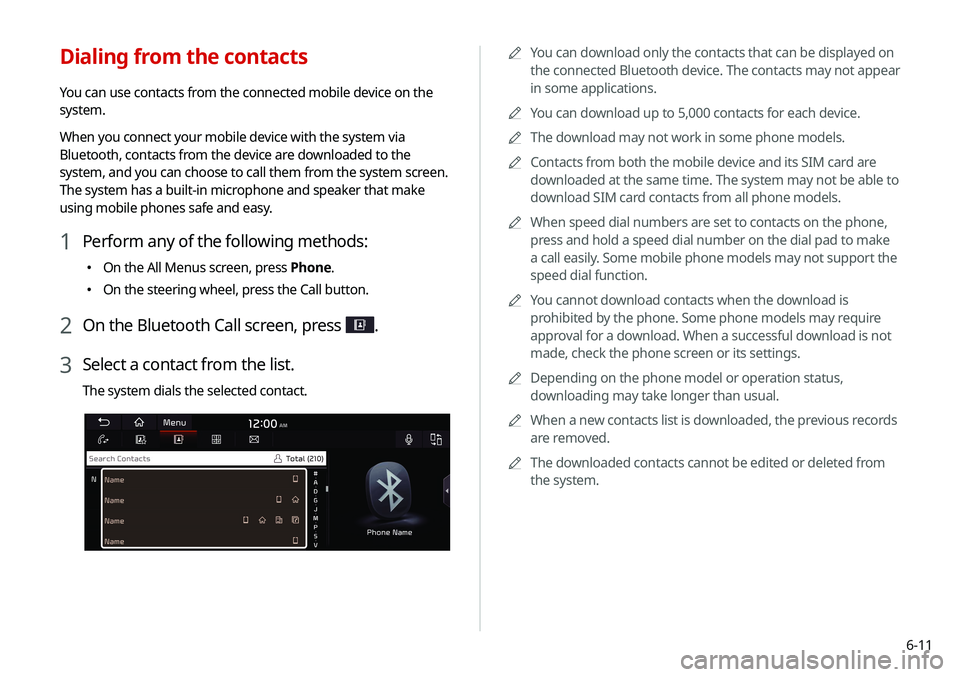
Dialing from the contacts
You can use contacts from the connected mobile device on the
system.
When you connect your mobile device with the system via
Bluetooth, contacts from the device are downloaded to the
system, and you can choose to call them from the system screen.
The system has a built-in microphone and speaker that make
using mobile phones safe and easy.
1 Perform any of the following methods:
�On the All Menus screen, press Phone.
�On the steering wheel, press the Call button.
2 On the Bluetooth Call screen, press .
3 Select a contact from the list.
The system dials the selected contact.
Page 130 of 244
6-12
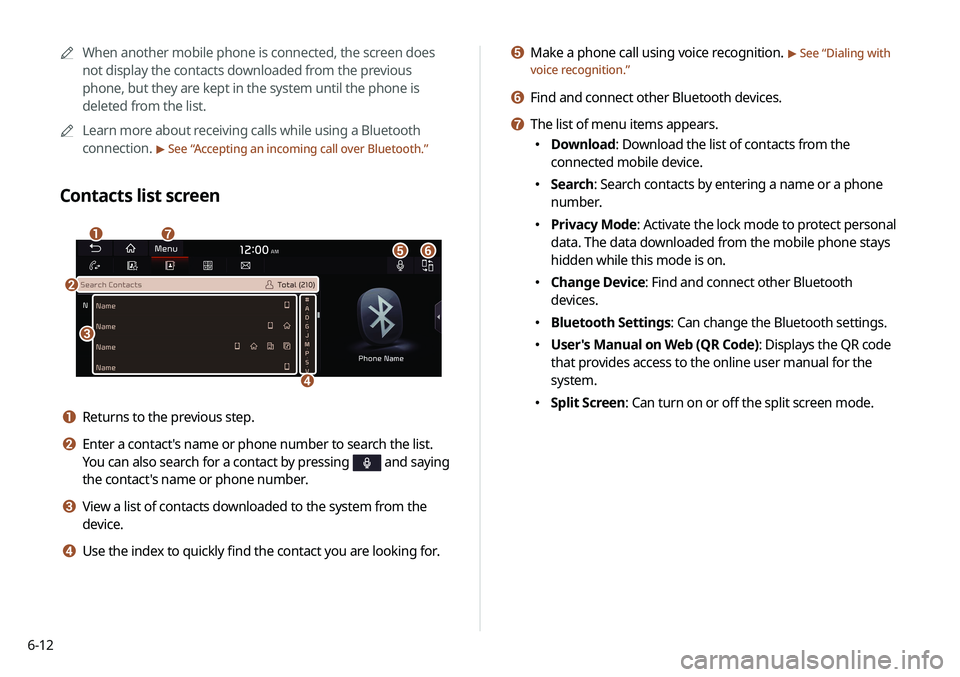
e Make a phone call using voice recognition. > See “Dialing with
voice recognition.”
f Find and connect other Bluetooth devices.
g The list of menu items appears.
� Download: Download the list of contacts from the
connected mobile device.
�Search: Search contacts by entering a name or a phone
number.
�Privacy Mode: Activate the lock mode to protect personal
data. The data downloaded from the mobile phone stays
hidden while this mode is on.
�Change Device: Find and connect other Bluetooth
devices.
�Bluetooth Settings: Can change the Bluetooth settings.
�User's Manual on Web (QR Code): Displays the QR code
that provides access to the online user manual for the
system.
�Split Screen: Can turn on or off the split screen mode.
A
A
When another mobile phone is connected, the screen does
not display the contacts downloaded from the previous
phone, but they are kept in the system until the phone is
deleted from the list.
A
A
Learn more about receiving calls while using a Bluetooth
connection.
> See “Accepting an incoming call over Bluetooth.”
Contacts list screen
a
e
c
d
g
f
b
a Returns to the previous step.
b Enter a contact's name or phone number to search the list.
You can also search for a contact by pressing
and saying
the contact's name or phone number.
c View a list of contacts downloaded to the system from the
device.
d Use the index to quickly find the contact you are looking for.
Page 132 of 244
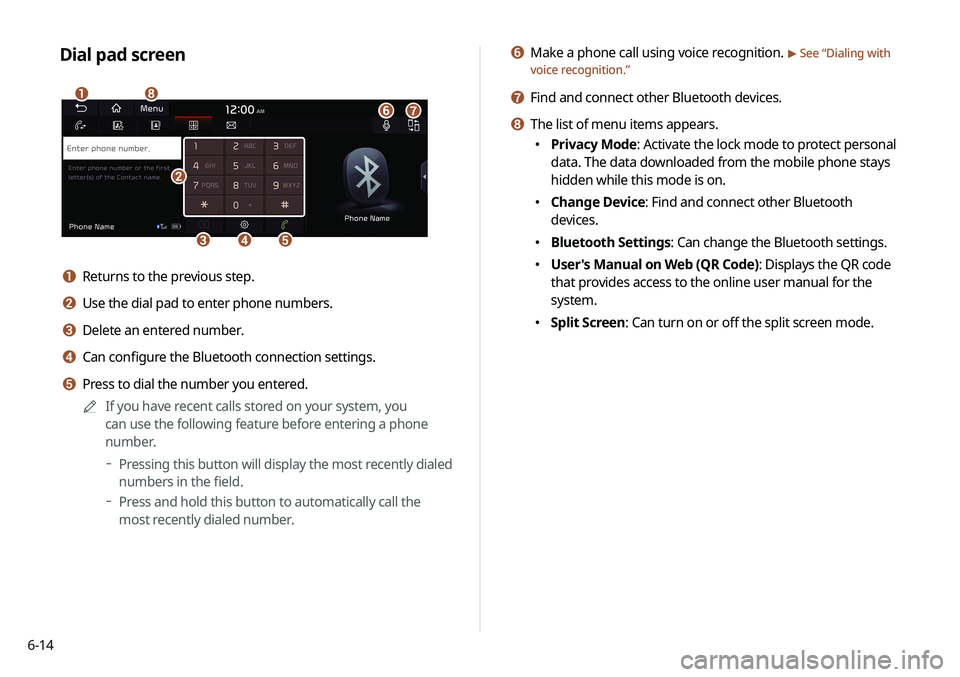
6-14
f Make a phone call using voice recognition. > See “Dialing with
voice recognition.”
g Find and connect other Bluetooth devices.
h The list of menu items appears.
� Privacy Mode: Activate the lock mode to protect personal
data. The data downloaded from the mobile phone stays
hidden while this mode is on.
�Change Device: Find and connect other Bluetooth
devices.
�Bluetooth Settings: Can change the Bluetooth settings.
�User's Manual on Web (QR Code): Displays the QR code
that provides access to the online user manual for the
system.
�Split Screen: Can turn on or off the split screen mode.
Dial pad screen
b
cde
a
f
h
g
a Returns to the previous step.
b Use the dial pad to enter phone numbers.
c Delete an entered number.
d Can configure the Bluetooth connection settings.
e Press to dial the number you entered.
A
A
If you have recent calls stored on your system, you
can use the following feature before entering a phone
number.
Pressing this button will display the most recently dialed
numbers in the field.
Press and hold this button to automatically call the
most recently dialed number.

