Page 135 of 244
6-17
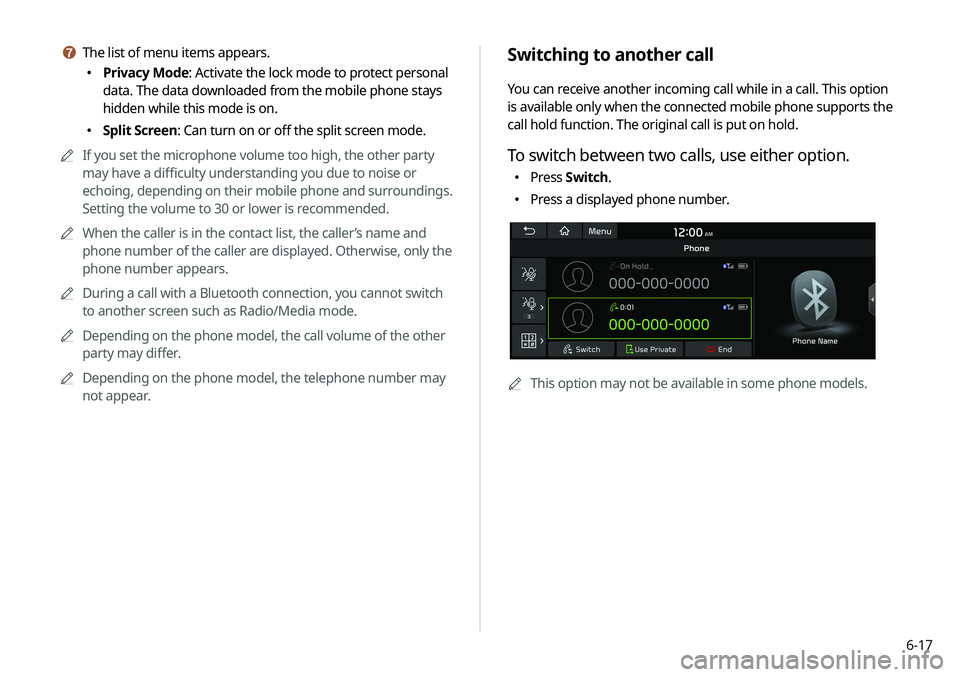
Switching to another call
You can receive another incoming call while in a call. This option
is available only when the connected mobile phone supports the
call hold function. The original call is put on hold.
To switch between two calls, use either option.
�Press
Switch.
�Press a displayed phone number.
A
A
This option may not be available in some phone models.
g The list of menu items appears.
�Privacy Mode: Activate the lock mode to protect personal
data. The data downloaded from the mobile phone stays
hidden while this mode is on.
�Split Screen: Can turn on or off the split screen mode.
A
A
If you set the microphone volume too high, the other party
may have a difficulty understanding you due to noise or
echoing, depending on their mobile phone and surroundings.
Setting the volume to 30 or lower is recommended.
A
A
When the caller is in the contact list, the caller’s name and
phone number of the caller are displayed. Otherwise, only the
phone number appears.
A
A
During a call with a Bluetooth connection, you cannot switch
to another screen such as Radio/Media mode.
A
A
Depending on the phone model, the call volume of the other
party may differ.
A
A
Depending on the phone model, the telephone number may
not appear.
Page 137 of 244
6-19
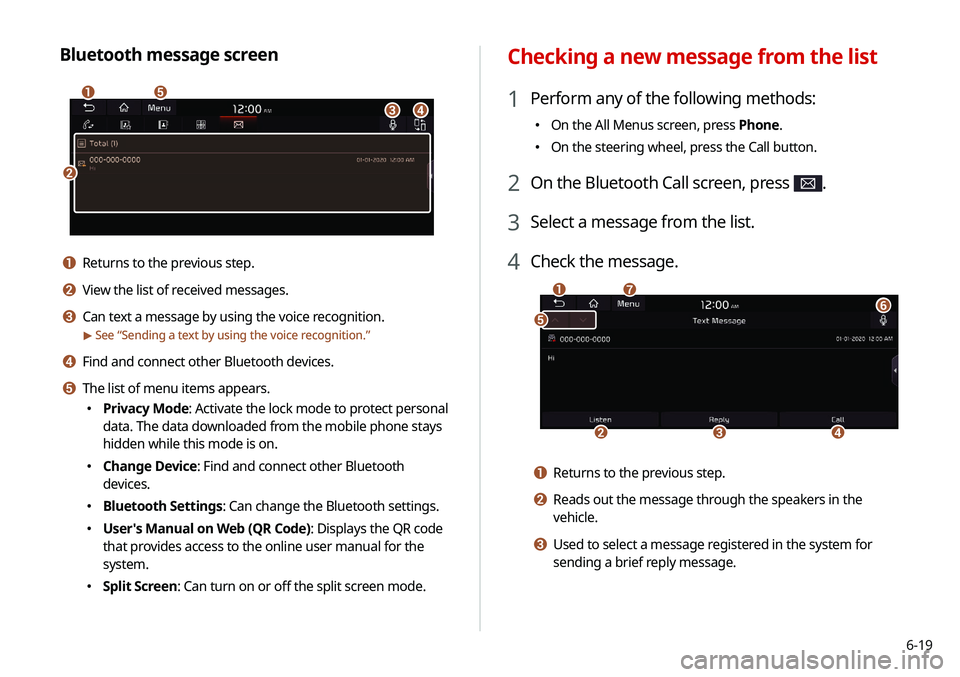
Checking a new message from the list
1 Perform any of the following methods:
�On the All Menus screen, press Phone.
�On the steering wheel, press the Call button.
2 On the Bluetooth Call screen, press .
3 Select a message from the list.
4 Check the message.
b
a
e
g
cd
f
a Returns to the previous step.
b Reads out the message through the speakers in the
vehicle.
c Used to select a message registered in the system for
sending a brief reply message.
Bluetooth message screen
b
a
c
e
d
a Returns to the previous step.
b View the list of received messages.
c Can text a message by using the voice recognition.
> See “
Sending a text by using the voice recognition.”
d Find and connect other Bluetooth devices.
e The list of menu items appears.
� Privacy Mode: Activate the lock mode to protect personal
data. The data downloaded from the mobile phone stays
hidden while this mode is on.
�Change Device: Find and connect other Bluetooth
devices.
�Bluetooth Settings: Can change the Bluetooth settings.
�User's Manual on Web (QR Code): Displays the QR code
that provides access to the online user manual for the
system.
�Split Screen: Can turn on or off the split screen mode.
Page 146 of 244
7-8
CommandFunction
Cancel Route Stop the navigation guidance and
cancel your current destination.
Destination
Information View information on the distance and
time to your current destination.
Route Options Find another route.
Show Route View the entire route on the map.
A
A
When you use a command starting with "Find," the system
searches for locations within the state or province where your
vehicle is currently located. To search for locations in another
state or province, say the state or province name first and
then say the location you want.
A
A
Some commands, such as "Cancel Route " or "Show Route,"
are available only when a destination is set.Command Function
Previous Searches You can select a destination from the
list of destinations that have recently
been searched for. Say the number of
the location you want.
Traffic Information Access the traffic information screen.
Go Home Set the location saved to the Home
shortcut button in your address book
as your destination.
Go to Work Set the location saved to the Work
shortcut button in your address book
as your destination.
Change Home You can change the location saved as
your home.
Change Work You can change the location saved as
your work.
Pause Route Pause the navigation guidance.
Resume Route Resume the navigation guidance.
Turn Guidance On Unmute the navigation guidance.
Turn Guidance Off Mute the navigation guidance.
Page 147 of 244
7-9
Radio commands
CommandFunction
FM <87.5 to 107.9> Turn on the FM radio with that
frequency.
AM <530 to 1710> Turn on the AM radio with that
frequency.
SiriusXM <0 to 999> Turn on the SiriusXM radio with that
channel number.
Search commands
CommandFunction
Search settings for
You can search for a setting menu.
For example, say "Search settings for
Bluetooth" or "Search settings for
Display."
>
See “Settings.”
Other commands
Command Function
Help Move to the help screen.
Line <1 to 4>* Select an item with the designated
number on a list. Simple numbers, such
as "One" or "Two," can be recognized.
Yes * Accept a notification asking for your
confirmation in an exceptional situation.
No* Deny a notification asking for your
confirmation in an exceptional situation.
Next* If there are more than five items on a list,
scroll to the next page.
Previous* If you scroll to the next page of a list,
scroll back to the previous page.
Manual Input* When using the Dial Number command,
open the keypad to enter a phone
number manually.
Go Back* Returns to the previous step.
Exit End voice recognition.
* These commands are available only in certain situations.
Page 161 of 244

8-3
3 Enter your phone number or email address, and
then press Submit.
A
A
When you have a registered account and verification code,
press I already have a code.
4 Enter the verification code you received from
MyUVO.com and then press Submit.
A
A
Now activation starts. While the activation is in progress,
the system buttons are locked.
ÜCaution
Do not turn off the vehicle while the activation is in progress. It
may cause a system malfunction.
A
A
When activation fails, contact the UVO Center at 844-UVO-
9411/844-886-9411.
A
A
When your UVO service expires, you can reactivate the service
by renewing your subscription on MyUVO.com and entering
your verification code again in the Activate UVO menu.
Subscribing to the service
You must activate the service to use it on the system. An account
with MyUVO.com is required to activate the service. When you do
not have an account, create a new account to activate the service.
When you already have an account, enter the verification code
you received from MyUVO.com.
ÜCaution
Do NOT turn off the vehicle when the service setting is in
progress. It may cause system malfunction.
1 Park your vehicle in a safe place.
A
A
You cannot enter information for service activation while
your vehicle is moving.
2 On the All Menus screen, press UVO >
UVO
Settings >
Activate UVO.
Page 164 of 244
8-6
Using the received location information
You can view points of interest (POIs) received from the UVO
website and the UVO application and set one of them as the
destination.
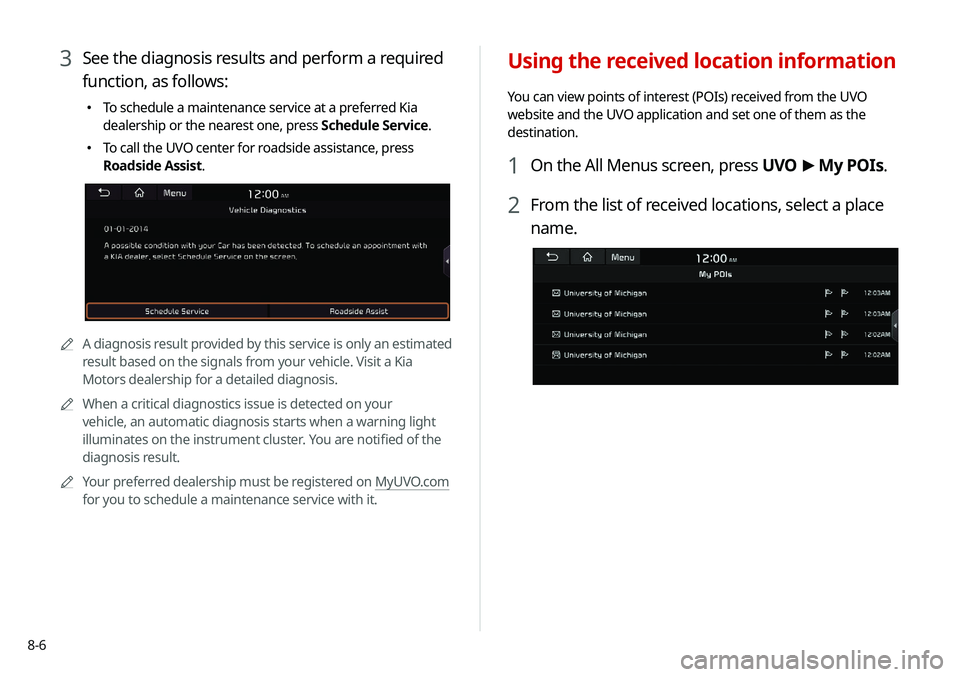
1 On the All Menus screen, press UVO >
My POIs.
2 From the list of received locations, select a place
name.
3 See the diagnosis results and perform a required
function, as follows:
� To schedule a maintenance service at a preferred Kia
dealership or the nearest one, press Schedule Service.
�To call the UVO center for roadside assistance, press
Roadside Assist.
AA
A diagnosis result provided by this service is only an estimated
result based on the signals from your vehicle. Visit a Kia
Motors dealership for a detailed diagnosis.
A
A
When a critical diagnostics issue is detected on your
vehicle, an automatic diagnosis starts when a warning light
illuminates on the instrument cluster. You are notified of the
diagnosis result.
A
A
Your preferred dealership must be registered on MyUVO.com
for you to schedule a maintenance service with it.
Page 165 of 244
8-7
Checking maintenance service intervals
(if equipped)
You can see information about the intervals for the last and next
maintenance services. This feature can help you maintain your
vehicle on a regular basis.
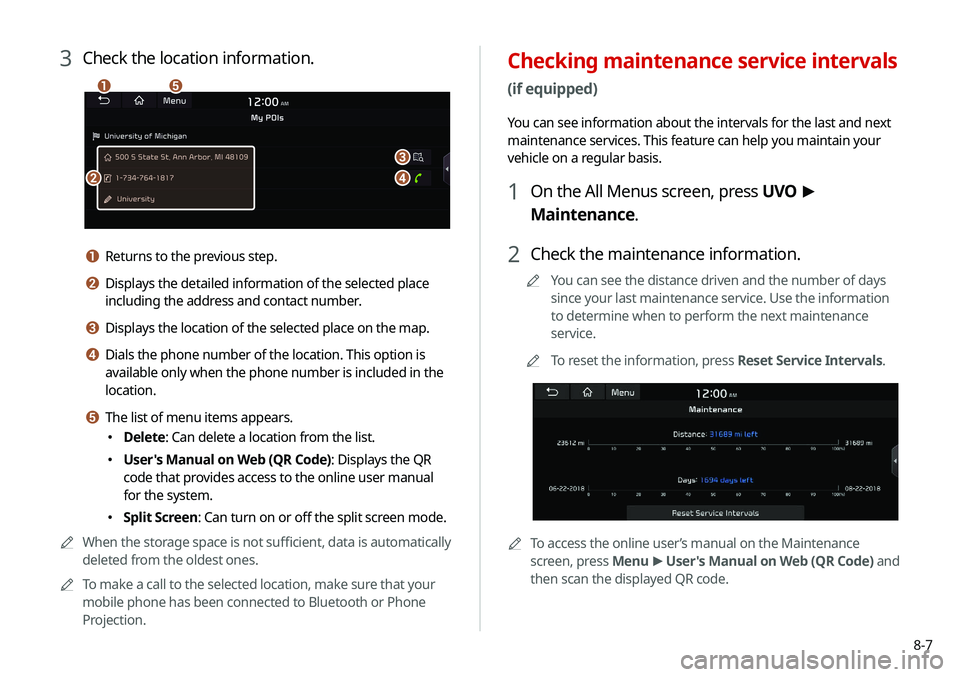
1 On the All Menus screen, press UVO >
Maintenance.
2 Check the maintenance information.
A
A
You can see the distance driven and the number of days
since your last maintenance service. Use the information
to determine when to perform the next maintenance
service.
A
A
To reset the information, press Reset Service Intervals.
AATo access the online user’s manual on the Maintenance
screen, press Menu >
User's Manual on Web (QR Code) and
then scan the displayed QR code.
3 Check the location information.
a
b
c
d
e
a Returns to the previous step.
b Displays the detailed information of the selected place
including the address and contact number.
c Displays the location of the selected place on the map.
d Dials the phone number of the location. This option is
available only when the phone number is included in the
location.
e The list of menu items appears.
� Delete: Can delete a location from the list.
�User's Manual on Web (QR Code): Displays the QR
code that provides access to the online user manual
for the system.
�Split Screen: Can turn on or off the split screen mode.
A
A
When the storage space is not sufficient, data is automatically
deleted from the oldest ones.
A
A
To make a call to the selected location, make sure that your
mobile phone has been connected to Bluetooth or Phone
Projection.
Page 166 of 244
8-8
Checking the weather information
(if equipped)
You can see the weather information (temperature, humidity,
amount/probability of precipitation, etc.) for today or the next 3
days.A
A
The weather information is accessible only when the system
is connected to the network.
On the All Menus screen, press UVO >
Weather.
Weather information screen
d
c
a
b
Contacting the UVO Center
You can contact a UVO Center representative directly to request
help or make inquiries about using the UVO services.
Perform any of the following methods:
� On the All Menus screen, press UVO
>
Virtual Assistant.
� Press the [] button on the vehicle.
A
A
To end the call, press End on the screen or press the [
]
button.
A
A
This feature is not available during a Bluetooth call.
Configuring the UVO settings
You can subscribe to the UVO service or see the modem
information.
A
A
For more information:
> see “Configuring the UVO settings.”
