Page 22 of 244
10
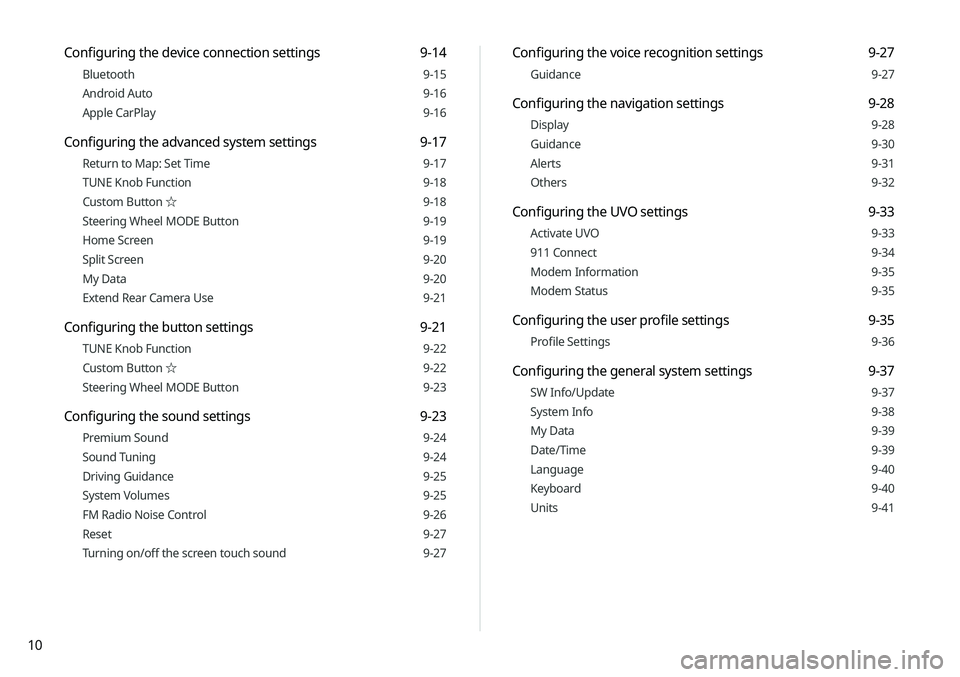
Configuring the voice recognition settings 9-27
Guidance 9-27
Configuring the navigation settings 9-28
Display 9-28
Guidance 9-30
Alerts 9-31
Others 9-32
Configuring the UVO settings 9-33
Activate UVO 9-33
911 Connect 9-34
Modem Information 9-35
Modem Status 9-35
Configuring the user profile settings 9-35
Profile Settings 9-36
Configuring the general system settings 9-37
SW Info/Update 9-37
System Info 9-38
My Data 9-39
Date/Time 9-39
Language 9-40
Keyboard 9-40
Units 9-41
Configuring the device connection settings 9-14
Bluetooth 9-15
Android Auto 9-16
Apple CarPlay 9-16
Configuring the advanced system settings 9-17
Return to Map: Set Time 9-17
TUNE Knob Function 9-18
Custom Button ☆ 9-18
Steering Wheel MODE Button 9-19
Home Screen 9-19
Split Screen 9-20
My Data 9-20
Extend Rear Camera Use 9-21
Configuring the button settings 9-21
TUNE Knob Function 9-22
Custom Button ☆ 9-22
Steering Wheel MODE Button 9-23
Configuring the sound settings 9-23
Premium Sound 9-24
Sound Tuning 9-24
Driving Guidance 9-25
System Volumes 9-25
FM Radio Noise Control 9-26
Reset 9-27
Turning on/off the screen touch sound 9-27
Page 23 of 244
11
10 Appendix
Solutions 10-2
System status indicator icons 10-9
FAQ 10-11
Product specifications 10-13
Important information 10-17
Index 10-20
Trademarks 10-24
Open Source Information 10-25
Configuring the display settings 9-41
Illumination 9-42
Blue Light Filter 9-43
Screen Saver 9-43
Home Screen 9-44
Split Screen 9-44
Media Change Notifications 9-45
Extend Rear Camera Use 9-45
Reset 9-45
Configuring the media settings 9-46
Media Change Notifications 9-46
Repeat Folder 9-46
Updating the system software and map 9-47
Page 26 of 244
1-2
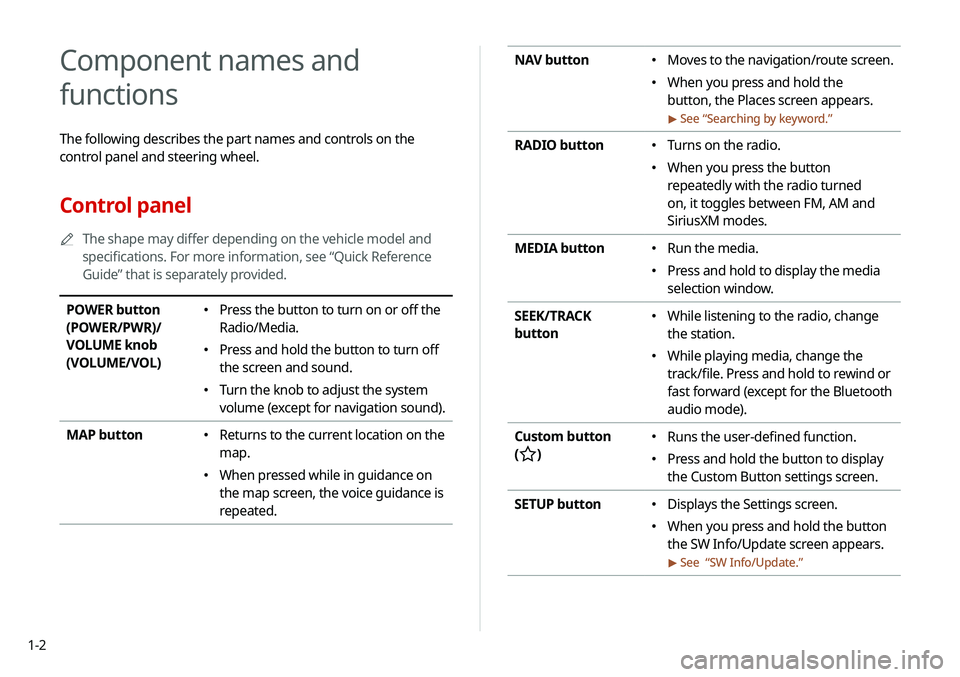
NAV button �Moves to the navigation/route screen.
�When you press and hold the
button, the Places screen appears.
> See “
Searching by keyword.”
RADIO button � Turns on the radio.
�When you press the button
repeatedly with the radio turned
on, it toggles between FM, AM and
SiriusXM modes.
MEDIA button
� Run the media.
�Press and hold to display the media
selection window.
SEEK/TRACK
button
� While listening to the radio, change
the station.
�While playing media, change the
track/file. Press and hold to rewind or
fast forward (except for the Bluetooth
audio mode).
Custom button
(
)
� Runs the user-defined function.
�Press and hold the button to display
the Custom Button settings screen.
SETUP button
� Displays the Settings screen.
�When you press and hold the button
the SW Info/Update screen appears.
> See “
SW Info/Update.”
Component names and
functions
The following describes the part names and controls on the
control panel and steering wheel.
Control panel
A
A
The shape may differ depending on the vehicle model and
specifications. For more information, see “Quick Reference
Guide” that is separately provided.
POWER button
(POWER/PWR)/
VOLUME knob
(VOLUME/VOL) �Press the button to turn on or off the
Radio/Media.
�Press and hold the button to turn off
the screen and sound.
�Turn the knob to adjust the system
volume (except for navigation sound).
MAP button
� Returns to the current location on the
map.
�When pressed while in guidance on
the map screen, the voice guidance is
repeated.
Page 27 of 244
1-3
Steering wheel remote control
A
A
The shape may differ depending on the vehicle model and
specifications. For more information, see “Quick Reference
Guide” that is separately provided.
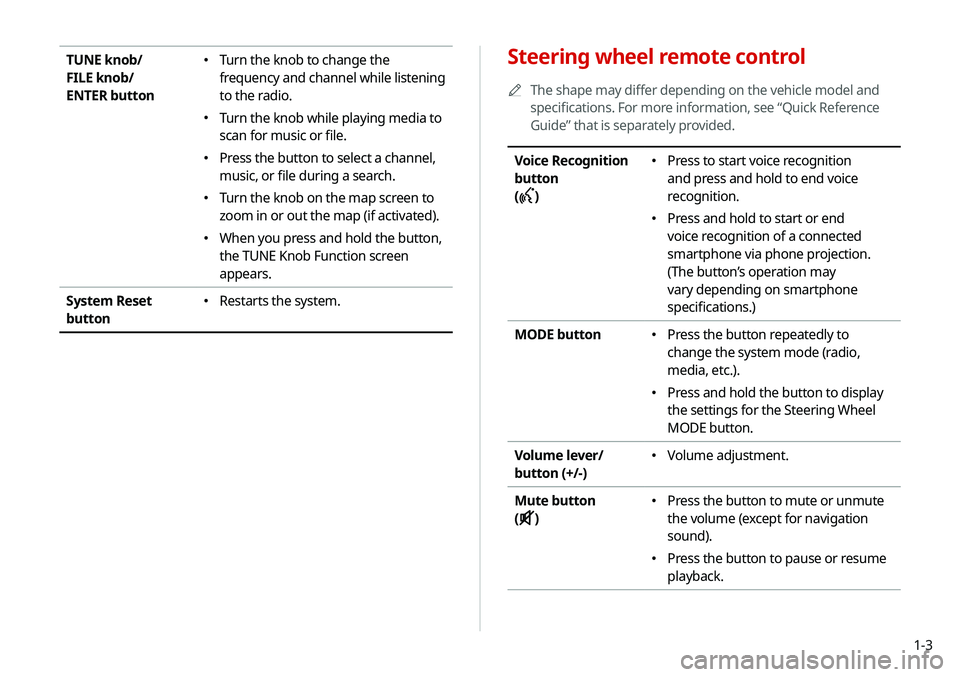
Voice Recognition
button
(
)
� Press to start voice recognition
and press and hold to end voice
recognition.
�Press and hold to start or end
voice recognition of a connected
smartphone via phone projection.
(The button’s operation may
vary depending on smartphone
specifications.)
MODE button
� Press the button repeatedly to
change the system mode (radio,
media, etc.).
�Press and hold the button to display
the settings for the Steering Wheel
MODE button.
Volume lever/
button (+/-)
� Volume adjustment.
Mute button
(
)
� Press the button to mute or unmute
the volume (except for navigation
sound).
�Press the button to pause or resume
playback.
TUNE knob/
FILE knob/
ENTER button �Turn the knob to change the
frequency and channel while listening
to the radio.
�Turn the knob while playing media to
scan for music or file.
�Press the button to select a channel,
music, or file during a search.
�Turn the knob on the map screen to
zoom in or out the map (if activated).
�When you press and hold the button,
the TUNE Knob Function screen
appears.
System Reset
button
� Restarts the system.
Page 28 of 244
1-4
Turning the system on or off
The following explains how to turn on or off the system. Before
using the system, be sure to read the user's manual for safe and
convenient manipulation.
Turning on the system
1 Turn on the vehicle.
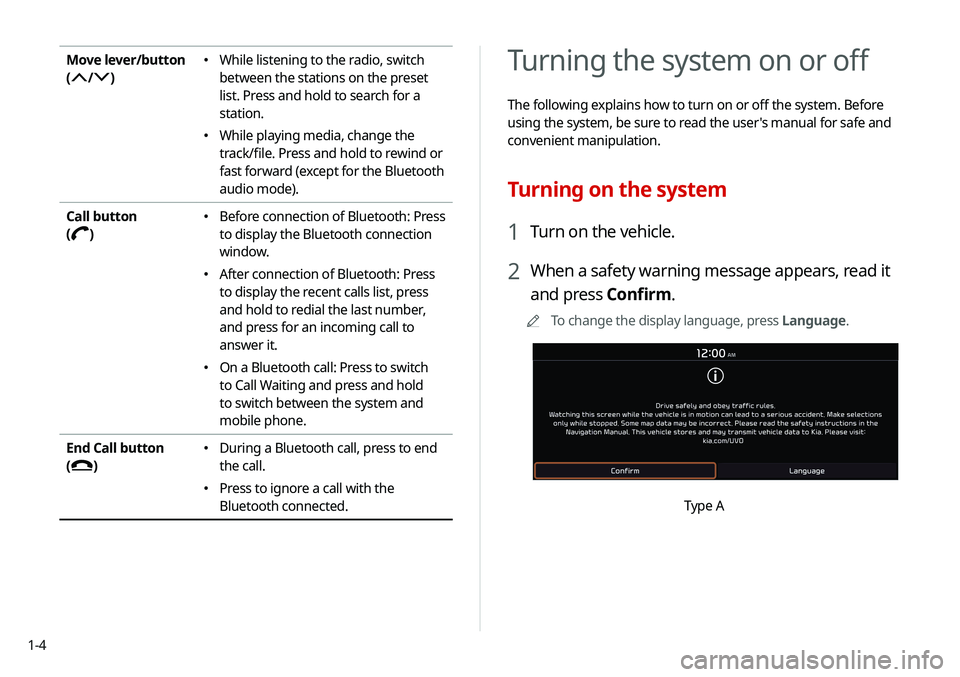
2 When a safety warning message appears, read it
and press Confirm.
A
A
To change the display language, press Language.
Type A
Move lever/button
(
/)
� While listening to the radio, switch
between the stations on the preset
list. Press and hold to search for a
station.
�While playing media, change the
track/file. Press and hold to rewind or
fast forward (except for the Bluetooth
audio mode).
Call button
(
)
� Before connection of Bluetooth: Press
to display the Bluetooth connection
window.
�After connection of Bluetooth: Press
to display the recent calls list, press
and hold to redial the last number,
and press for an incoming call to
answer it.
�On a Bluetooth call: Press to switch
to Call Waiting and press and hold
to switch between the system and
mobile phone.
End Call button
(
)
� During a Bluetooth call, press to end
the call.
�Press to ignore a call with the
Bluetooth connected.
Page 29 of 244
1-5
ÝWarning
�Driving while distracted can result in a loss of vehicle control
that may lead to an accident, severe bodily injury, or death.
The driver's primary responsibility is the safe and legal
operation of the vehicle, and the use of any vehicle systems,
including the touch screen and steering wheel controls, which
take the driver's eyes, attention, and focus away from the safe
operation of the vehicle, or which are not permissible by law,
should never be used during the operation of the vehicle.
�Some functions may not be active while driving to ensure
safety. Those functions run only when the vehicle is stationary.
In order to use them, first stop the vehicle.
�When the screen is not displayed, the volume is muted, or
other system failures occur, immediately stop using the
system. When you use the faulty system continuously, it may
cause fire, electric shock, or fatal system failure.
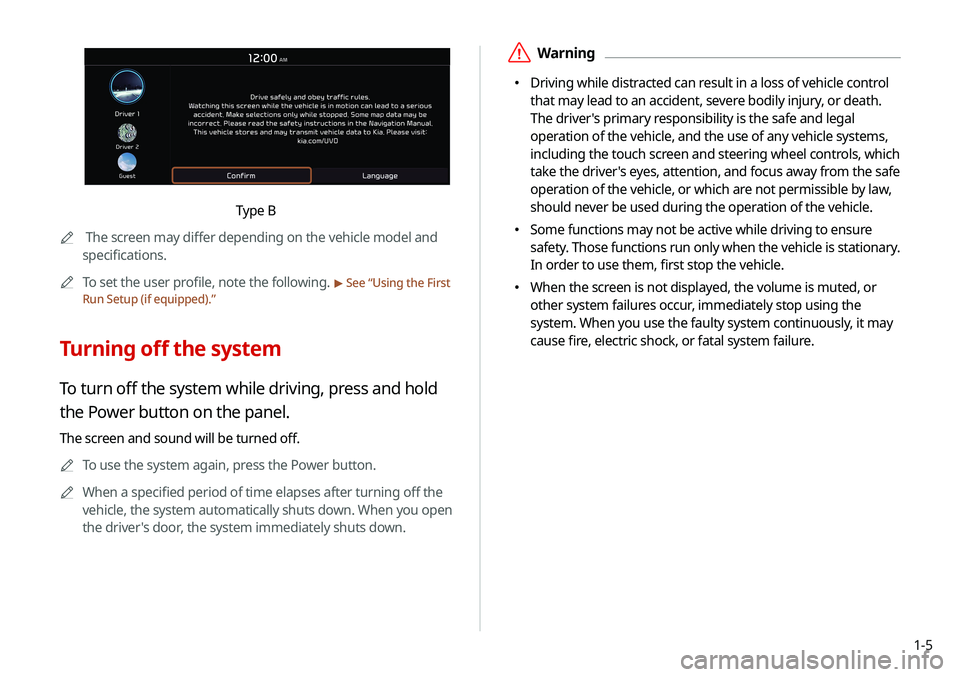
Type B
A
A
The screen may differ depending on the vehicle model and
specifications.
A
A
To set the user profile, note the following.
> See “Using the First
Run Setup (if equipped).”
Turning off the system
To turn off the system while driving, press and hold
the Power button on the panel.
The screen and sound will be turned off.
A
A
To use the system again, press the Power button.
A
A
When a specified period of time elapses after turning off the
vehicle, the system automatically shuts down. When you open
the driver's door, the system immediately shuts down.
Page 30 of 244

1-6
Using the touch screen
This system is equipped with a touch-enabled screen. You can use
various practices by using this feature.
ÝWarning
Do not use the touch screen while driving as this will divert your
attention away from the safe operation of the vehicle. You may
lose your steering control which could cause an accident and
severe bodily injuries.
ÜCaution
�Do not press the touch screen with excessive force or a sharp
object. The touch screen may become damaged.
�Be careful for the touch screen not to contact any electrically
charged object. Static or other electric shock may cause the
system to malfunction or damage the touch screen.
A
A
The touch screen does not respond when you are wearing
gloves. Take off the gloves or wear electrostatic touch gloves.
ÜCaution
�The system can be turned on even when the ignition switch is
in “ACC” or “ON.” However, when you use the system without
turning on the vehicle for a long time, it may cause battery
discharge. To use the system for a long time, be sure to turn
on the vehicle.
�When you use the system with the vehicle turned off, the
battery warning message appears. The warning message
disappears as soon as you turn on the vehicle.
AA
The screen may differ depending on the vehicle model and
specifications.
A
A
When you turn off and on the vehicle, the system is turned on
with the mode and settings used when the vehicle was turned
off.
A
A
To prevent audio from playing loud when you turn on the
vehicle, adjust the system volume to an adequate level.
A
A
To automatically decrease the system volume, move to the All
Menus screen and press Setup >
Sound >
System Volumes
> Start-up Volume Limit to set the function.
> See “ Start-up
Volume Limit.”
Page 34 of 244
1-10
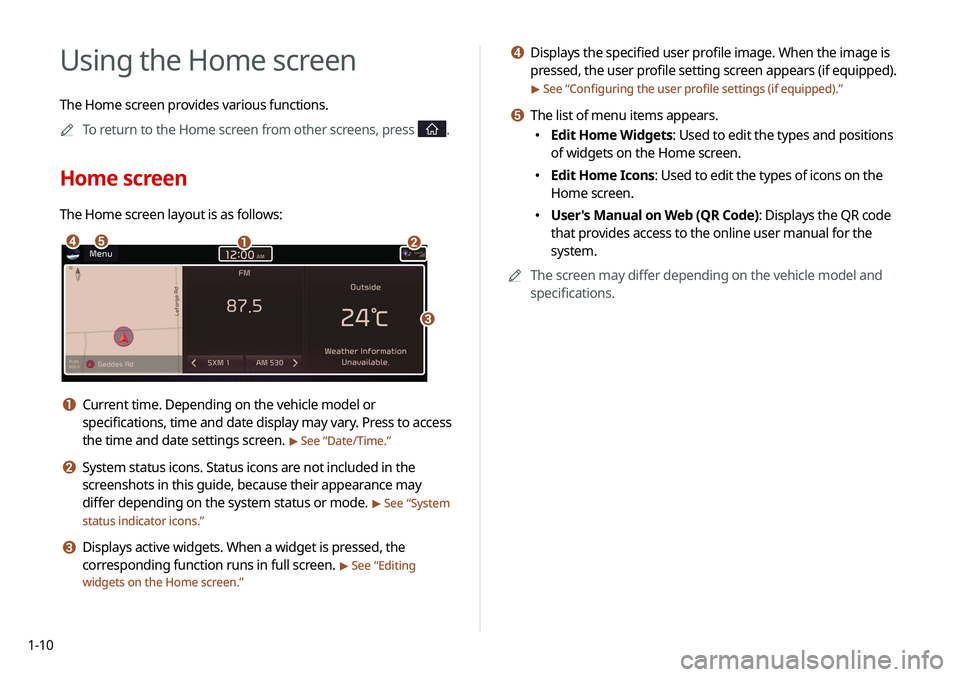
d Displays the specified user profile image. When the image is
pressed, the user profile setting screen appears (if equipped).
> See “Configuring the user profile settings (if equipped).”
e The list of menu items appears.
�Edit Home Widgets: Used to edit the types and positions
of widgets on the Home screen.
�Edit Home Icons: Used to edit the types of icons on the
Home screen.
�User's Manual on Web (QR Code): Displays the QR code
that provides access to the online user manual for the
system.
A
A
The screen may differ depending on the vehicle model and
specifications.
Using the Home screen
The Home screen provides various functions.
A
A
To return to the Home screen from other screens, press
.
Home screen
The Home screen layout is as follows:
ab
c
de
a Current time. Depending on the vehicle model or
specifications, time and date display may vary. Press to access
the time and date settings screen.
> See “Date/Time.”
b System status icons. Status icons are not included in the
screenshots in this guide, because their appearance may
differ depending on the system status or mode.
> See “System
status indicator icons.”
c Displays active widgets. When a widget is pressed, the
corresponding function runs in full screen.
> See “ Editing
widgets on the Home screen.”
