Page 253 of 478
5-18
Driving your vehicle
Always apply the parking brake
when leaving the vehicle. Do not
depend on placing the gear in P
(Park) to keep the vehicle from
moving.
Exercise extreme caution when
driving on a slippery surface. Be
especially careful when braking,
accelerating or shifting gears. On a
slippery surface, an abrupt change
in vehicle speed can cause the
drive wheels to lose traction and
may cause loss of vehicle control
resulting in an accident
Optimum vehicle performance and
economy is obtained by smoothly
depressing and releasing the
accelerator.To reduce the risk of SERIOUS
INJURY or DEATH:
ALWAYS wear your seat belt.
In a collision, an unbelted
occupant is significantly more
likely to be seriously injured
or killed than a properly belt-
ed occupant.
Avoid high speeds when cor-
nering or turning.
Do not make quick steering
wheel movements, such as
sharp lane changes or fast,
sharp turns.
The risk of rollover is greatly
increased if you lose control
of your vehicle at highway
speeds.
WARNING Loss of control often occurs if
two or more wheels drop off
the roadway and the driver
over steers to reenter the
roadway.
In the event your vehicle
leaves the roadway, do not
steer sharply. Instead, slow
down before pulling back into
the travel lanes.
HYUNDAI recommends you
follow all posted speed limits.
Page 254 of 478
5-19
Driving your vehicle
5
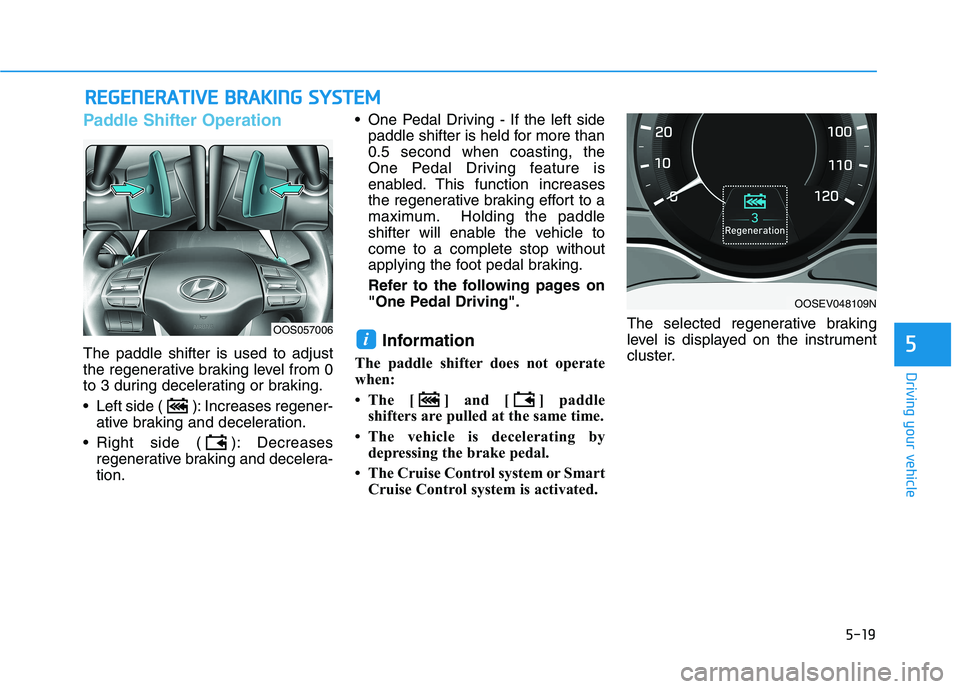
Paddle Shifter Operation
The paddle shifter is used to adjust
the regenerative braking level from 0
to 3 during decelerating or braking.
Left side ( ): Increases regener-
ative braking and deceleration.
Right side ( ): Decreases
regenerative braking and decelera-
tion. One Pedal Driving - If the left side
paddle shifter is held for more than
0.5 second when coasting, the
One Pedal Driving feature is
enabled. This function increases
the regenerative braking effort to a
maximum. Holding the paddle
shifter will enable the vehicle to
come to a complete stop without
applying the foot pedal braking.
Refer to the following pages on
"One Pedal Driving".Information
The paddle shifter does not operate
when:
• The [ ] and [ ] paddle
shifters are pulled at the same time.
• The vehicle is decelerating by
depressing the brake pedal.
• The Cruise Control system or Smart
Cruise Control system is activated.The selected regenerative braking
level is displayed on the instrument
cluster.
i
R RE
EG
GE
EN
NE
ER
RA
AT
TI
IV
VE
E
B
BR
RA
AK
KI
IN
NG
G
S
SY
YS
ST
TE
EM
M
OOSEV048109N
OOS057006
Page 255 of 478
5-20
Driving your vehicle
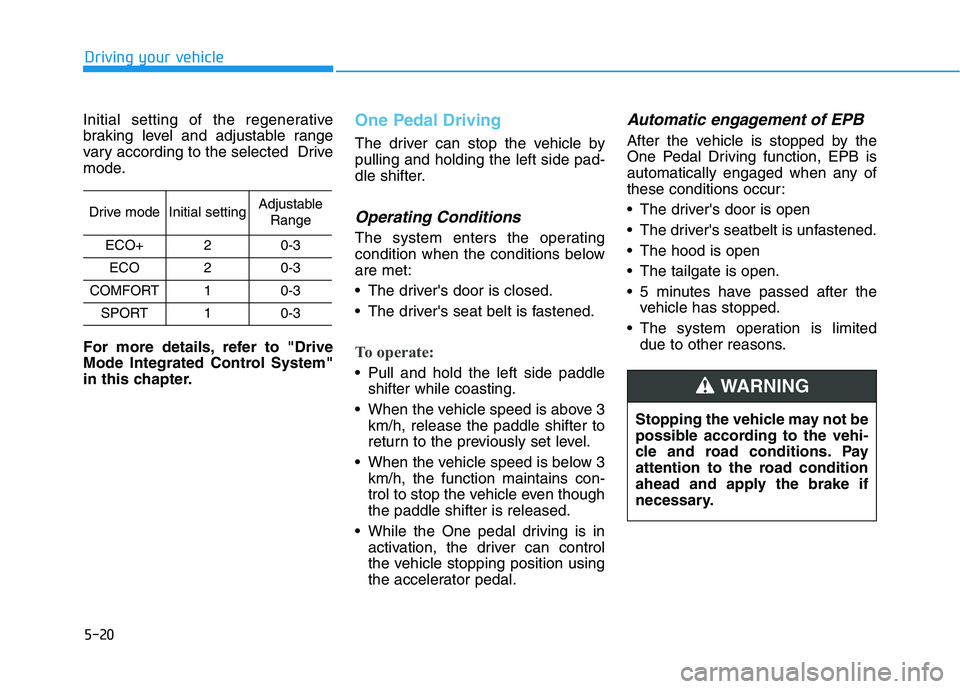
Initial setting of the regenerative
braking level and adjustable range
vary according to the selected Drive
mode.
For more details, refer to "Drive
Mode Integrated Control System"
in this chapter.
One Pedal Driving
The driver can stop the vehicle by
pulling and holding the left side pad-
dle shifter.
Operating Conditions
The system enters the operating
condition when the conditions below
are met:
The driver's door is closed.
The driver's seat belt is fastened.
To operate:
Pull and hold the left side paddle
shifter while coasting.
When the vehicle speed is above 3
km/h, release the paddle shifter to
return to the previously set level.
When the vehicle speed is below 3
km/h, the function maintains con-
trol to stop the vehicle even though
the paddle shifter is released.
While the One pedal driving is in
activation, the driver can control
the vehicle stopping position using
the accelerator pedal.
Automatic engagement of EPB
After the vehicle is stopped by the
One Pedal Driving function, EPB is
automatically engaged when any of
these conditions occur:
The driver's door is open
The driver's seatbelt is unfastened.
The hood is open
The tailgate is open.
5 minutes have passed after the
vehicle has stopped.
The system operation is limited
due to other reasons.
Drive modeInitial settingAdjustable
Range
ECO+20-3
ECO20-3
COMFORT10-3
SPORT10-3
Stopping the vehicle may not be
possible according to the vehi-
cle and road conditions. Pay
attention to the road condition
ahead and apply the brake if
necessary.
WARNING
Page 256 of 478
5-21
Driving your vehicle
5
The Smart Regeneration System
controls the regenerative braking
automatically according to the road
gradient and driving condition of the
vehicle in front. The system mini-
mizes the unnecessary operation of
the brake and acceleration pedal,
improving the electric energy effi-
ciency and assisting the driver.System Setting
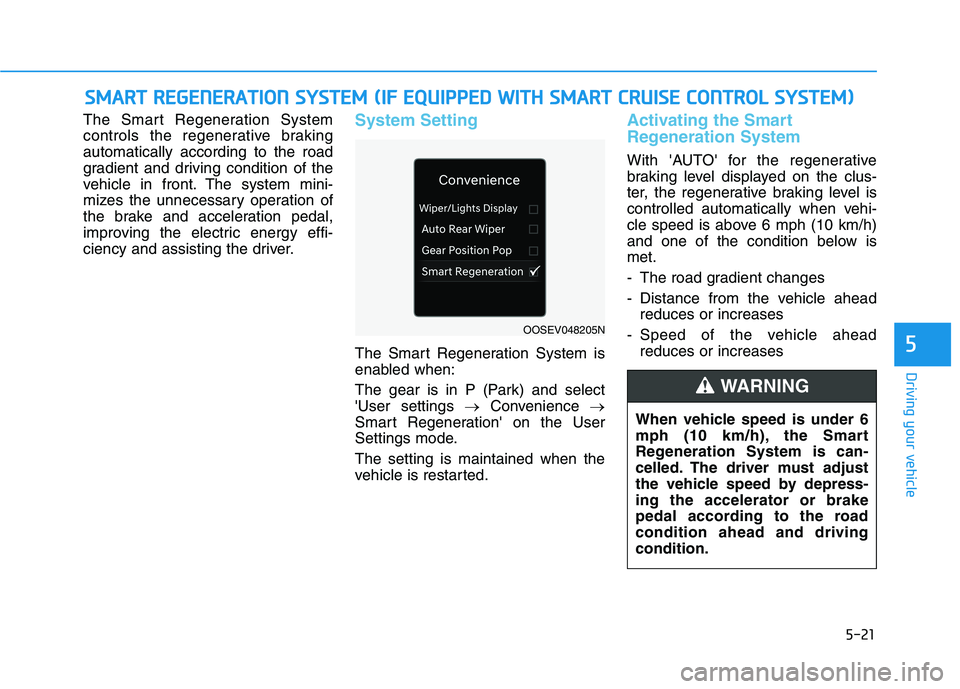
The Smart Regeneration System is
enabled when:
The gear is in P (Park) and select
'User settings →Convenience →
Smart Regeneration' on the User
Settings mode.
The setting is maintained when the
vehicle is restarted.
Activating the Smart
Regeneration System
With 'AUTO' for the regenerative
braking level displayed on the clus-
ter, the regenerative braking level is
controlled automatically when vehi-
cle speed is above 6 mph (10 km/h)
and one of the condition below is
met.
- The road gradient changes
- Distance from the vehicle ahead
reduces or increases
- Speed of the vehicle ahead
reduces or increases
S SM
MA
AR
RT
T
R
RE
EG
GE
EN
NE
ER
RA
AT
TI
IO
ON
N
S
SY
YS
ST
TE
EM
M
(
(I
IF
F
E
EQ
QU
UI
IP
PP
PE
ED
D
W
WI
IT
TH
H
S
SM
MA
AR
RT
T
C
CR
RU
UI
IS
SE
E
C
CO
ON
NT
TR
RO
OL
L
S
SY
YS
ST
TE
EM
M)
)
OOSEV048205N
When vehicle speed is under 6
mph (10 km/h), the Smart
Regeneration System is can-
celled. The driver must adjust
the vehicle speed by depress-
ing the accelerator or brake
pedal according to the road
condition ahead and driving
condition.
WARNING
Page 257 of 478
5-22
Driving your vehicle
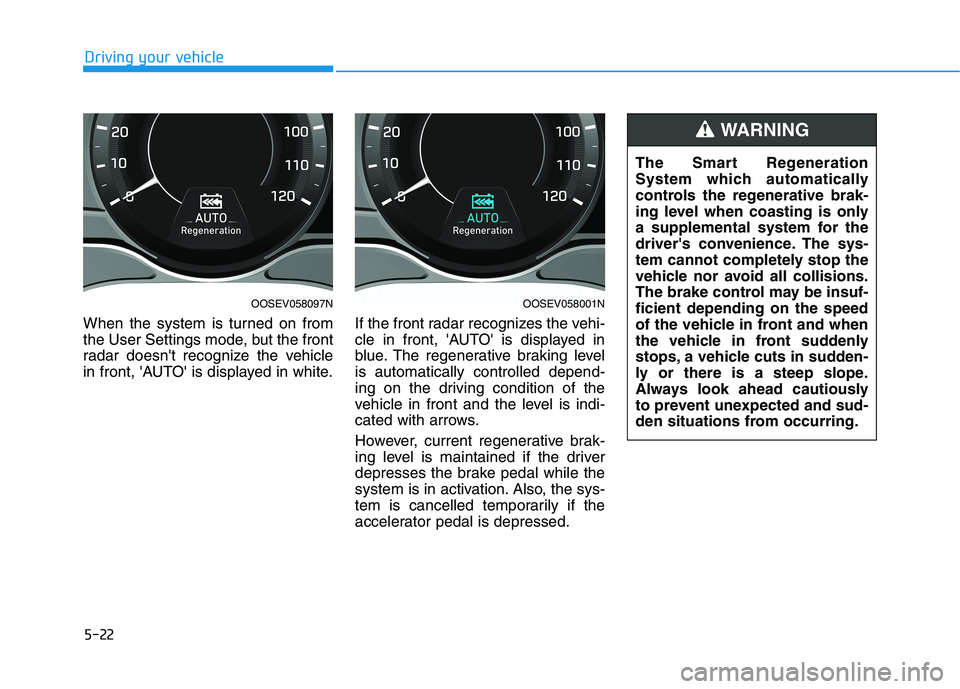
When the system is turned on from
the User Settings mode, but the front
radar doesn't recognize the vehicle
in front, 'AUTO' is displayed in white.If the front radar recognizes the vehi-
cle in front, 'AUTO' is displayed in
blue. The regenerative braking level
is automatically controlled depend-
ing on the driving condition of the
vehicle in front and the level is indi-
cated with arrows.
However, current regenerative brak-
ing level is maintained if the driver
depresses the brake pedal while the
system is in activation. Also, the sys-
tem is cancelled temporarily if the
accelerator pedal is depressed.
OOSEV058097NOOSEV058001N
The Smart Regeneration
System which automatically
controls the regenerative brak-
ing level when coasting is only
a supplemental system for the
driver's convenience. The sys-
tem cannot completely stop the
vehicle nor avoid all collisions.
The brake control may be insuf-
ficient depending on the speed
of the vehicle in front and when
the vehicle in front suddenly
stops, a vehicle cuts in sudden-
ly or there is a steep slope.
Always look ahead cautiously
to prevent unexpected and sud-
den situations from occurring.
WARNING
Page 258 of 478
5-23
Driving your vehicle
5
Cancelling the Smart
Regeneration System:
Cancelled manually
Pulling and holding the right side
paddle shifter for more than 1 sec-
ond.
The Smart Regeneration System
turns off temporarily. Note that the
"AUTO" indicator in the LCD dis-
play turns off.
Cancelled automatically
- The vehicle is shifted to N
(Neutral), R (Reverse) or P
(Park).
- Cruise Control system (including
Smart Cruise Control system) is
enabled.
- The ESC (Electronic Stability
Control) or ABS is activated.
Resuming the Smart
Regeneration System
To re-activate the Smart
Regeneration System while driving,
pull and hold the right side paddle
shifter for more than 1 second again.
Note that the "AUTO" indicator in the
LCD display turns back on, signaling
that the Smart Regeneration System
is enabled again.
Disabling the Smart
Regeneration System
To turn off the system, shift to P (Park)
and deselect 'User Settings →
Convenience →Smart Regeneration'
on the User Settings mode.
Vehicle-to-Vehicle Front
Recognition - Front Radar
Sensor
In order for the Smart Regeneration
System to operate properly, always
make sure the radar sensor cover is
clean and free of dirt, snow, and
debris. Dirt, snow, or foreign sub-
stances on the lens may adversely
affect the sensing performance of
the sensor. In this case, the system
operation may stop temporarily and
not operate normally.
Do not apply license plate
frame or foreign objects such
as a bumper sticker or a
bumper guard near the radar
sensor. Doing so may adverse-
ly affect the sensing perform-
ance of the radar.
Always keep the radar sensor
and lens cover clean and free
of dirt and debris.
CAUTION
When the Smart Regeneration
System is cancelled automati-
cally, adjust the vehicle speed
directly by depressing the
accelerator or brake pedal
according to the road condition
ahead and driving condition.
WARNING
Page 260 of 478
5-25
Driving your vehicle
5
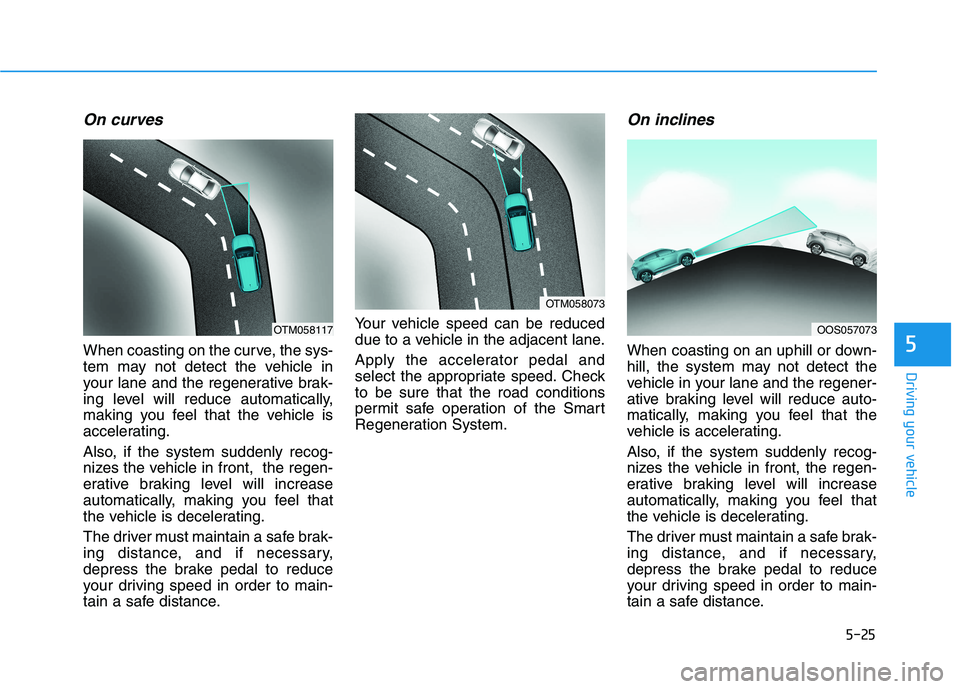
On curves
When coasting on the curve, the sys-
tem may not detect the vehicle in
your lane and the regenerative brak-
ing level will reduce automatically,
making you feel that the vehicle is
accelerating.
Also, if the system suddenly recog-
nizes the vehicle in front, the regen-
erative braking level will increase
automatically, making you feel that
the vehicle is decelerating.
The driver must maintain a safe brak-
ing distance, and if necessary,
depress the brake pedal to reduce
your driving speed in order to main-
tain a safe distance.Your vehicle speed can be reduced
due to a vehicle in the adjacent lane.
Apply the accelerator pedal and
select the appropriate speed. Check
to be sure that the road conditions
permit safe operation of the Smart
Regeneration System.
On inclines
When coasting on an uphill or down-
hill, the system may not detect the
vehicle in your lane and the regener-
ative braking level will reduce auto-
matically, making you feel that the
vehicle is accelerating.
Also, if the system suddenly recog-
nizes the vehicle in front, the regen-
erative braking level will increase
automatically, making you feel that
the vehicle is decelerating.
The driver must maintain a safe brak-
ing distance, and if necessary,
depress the brake pedal to reduce
your driving speed in order to main-
tain a safe distance.
OTM058117
OTM058073
OOS057073
Page 261 of 478
5-26
Driving your vehicle
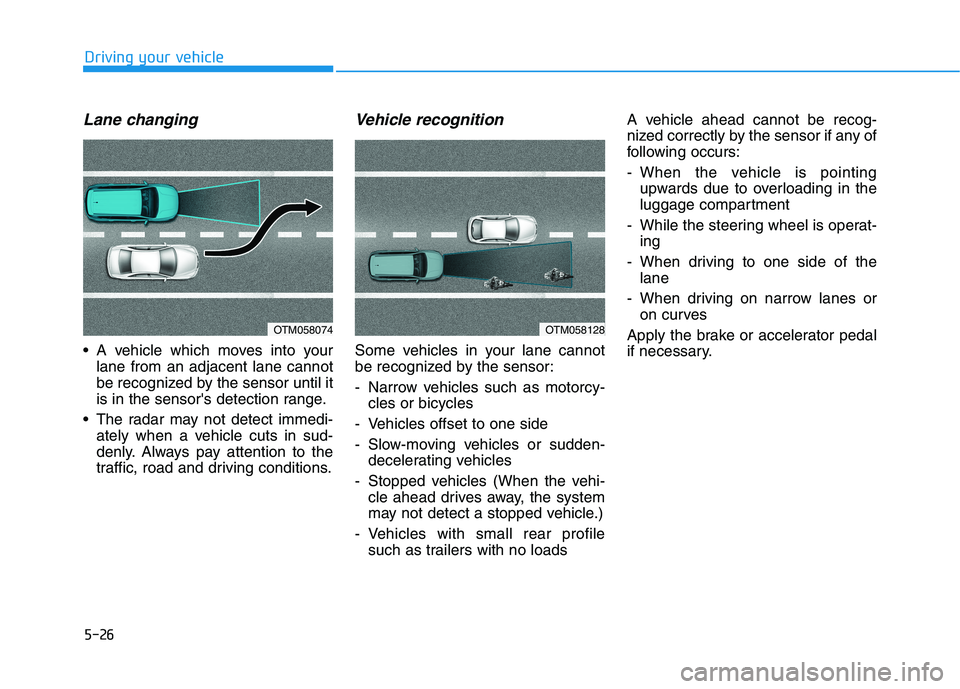
Lane changing
A vehicle which moves into your
lane from an adjacent lane cannot
be recognized by the sensor until it
is in the sensor's detection range.
The radar may not detect immedi-
ately when a vehicle cuts in sud-
denly. Always pay attention to the
traffic, road and driving conditions.
Vehicle recognition
Some vehicles in your lane cannot
be recognized by the sensor:
- Narrow vehicles such as motorcy-
cles or bicycles
- Vehicles offset to one side
- Slow-moving vehicles or sudden-
decelerating vehicles
- Stopped vehicles (When the vehi-
cle ahead drives away, the system
may not detect a stopped vehicle.)
- Vehicles with small rear profile
such as trailers with no loadsA vehicle ahead cannot be recog-
nized correctly by the sensor if any of
following occurs:
- When the vehicle is pointing
upwards due to overloading in the
luggage compartment
- While the steering wheel is operat-
ing
- When driving to one side of the
lane
- When driving on narrow lanes or
on curves
Apply the brake or accelerator pedal
if necessary.
OTM058128OTM058074