2021 FORD F-150 engine
[x] Cancel search: enginePage 181 of 796
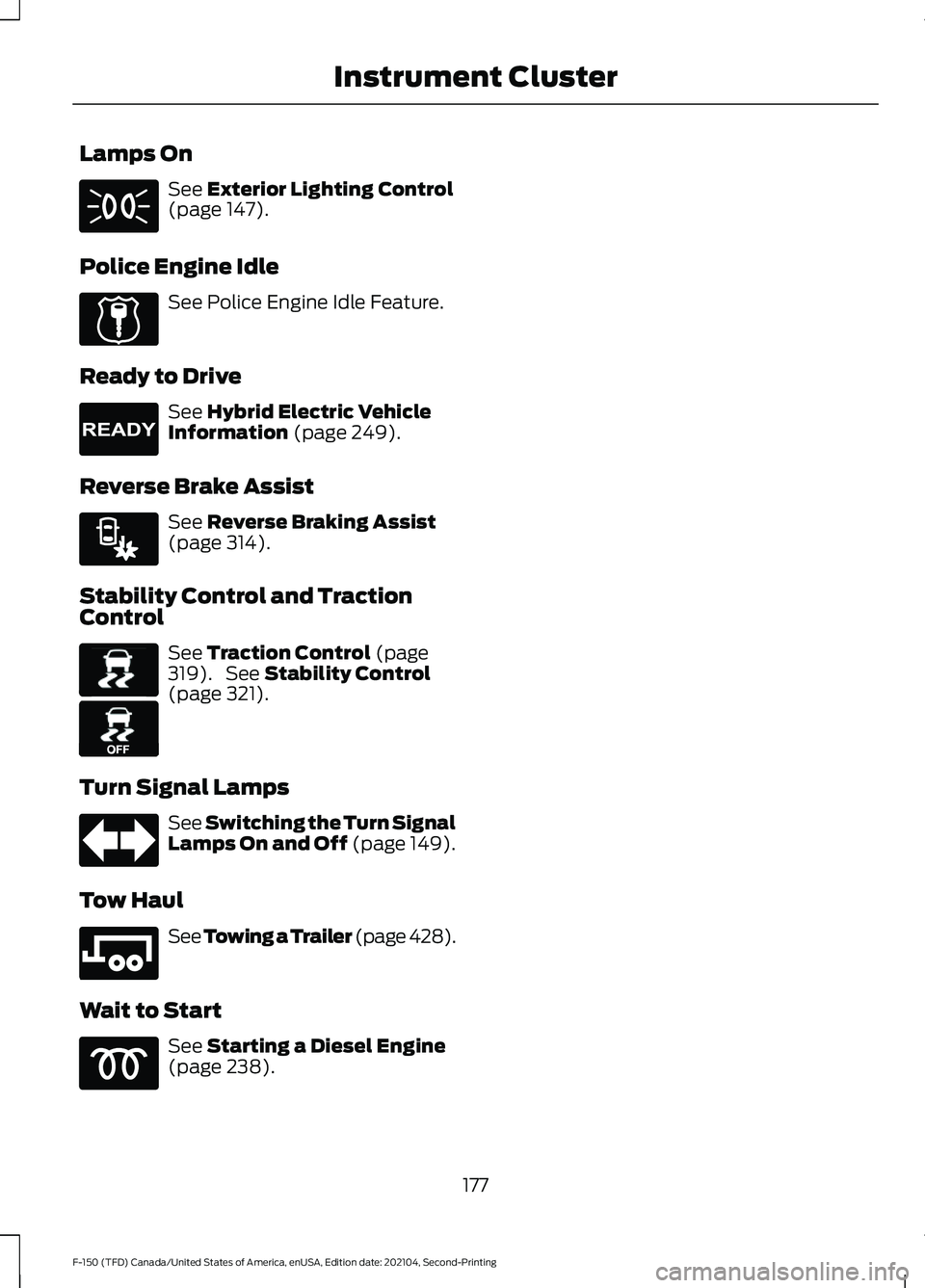
Lamps On
See Exterior Lighting Control
(page 147).
Police Engine Idle See Police Engine Idle Feature.
Ready to Drive See
Hybrid Electric Vehicle
Information (page 249).
Reverse Brake Assist See
Reverse Braking Assist
(page 314).
Stability Control and Traction
Control See
Traction Control (page
319). See Stability Control
(page 321).
Turn Signal Lamps See Switching the Turn Signal
Lamps On and Off (page 149).
Tow Haul See
Towing a Trailer (page 428).
Wait to Start See
Starting a Diesel Engine
(page 238).
177
F-150 (TFD) Canada/United States of America, enUSA, Edition date: 202104, Second-Printing Instrument Cluster E224045 E224090 E293490 E138639 E130458 E246592
Page 185 of 796

PERSONALIZED SETTINGS
CHANGING THE MEASURE UNIT
1. Press Settings on the touchscreen.
2. Press
General.
3. Press
Measure Units.
4. Select a measurement unit.
CHANGING THE TEMPERATURE
UNIT
1. Press
Settings on the touchscreen.
2. Press
General.
3. Press
Temperature Units.
4. Select
Fahrenheit or Celsius.
CHANGING THE TIRE PRESSURE
UNIT
1. Press
Settings on the touchscreen.
2. Press
General.
3. Press
Tire Pressure Units.
4. Select a pressure unit.
HYBRID DISPLAY
INFORMATION
WHAT IS EV COACH
EV coach helps you get the most of your
vehicle's electrical driving and regenerative
braking capabilities.
HOW DOES EV COACH WORK
When accelerating or maintaining speed,
a blue or white solid bar displays. This
indicates vehicle power. A blue rectangular
box could also display that shows the
power level that the engine turns on at. When the power level displays in the
rectangular box, it is blue which indicates
you are in electric only operation.
When the power level displays outside of
the rectangular box, it is white which
indicates you are in hybrid operation.
When you are decelerating, either releasing
the accelerator pedal or applying the
brake, you see a green or white solid bar
which indicates the power being used to
slow your vehicle down. A green
rectangular box could also display that
shows the amount of power that can be
recaptured by the regenerative braking
system and returned to the high voltage
battery.
When the power level displays in the
rectangular box, it is green which indicates
that the regenerative braking system is
being used to slow down your vehicle and
return the maximum amount of energy to
the high voltage battery.
When the power level displays outside of
the rectangular box, it is white which
indicates both regenerative and
conventional braking systems are in use.
WHAT IS BRAKE COACH
The brake coach appears after the vehicle
has come to a stop. It coaches you to brake
in a manner that maximizes the amount
of energy returned through the
regenerative braking system.
The percent displayed is an indication of
the regenerative braking efficiency with
100% representing the maximum amount
of energy recovery. You can switch brake
coach on or off in the settings menu on
your touchscreen.
181
F-150 (TFD) Canada/United States of America, enUSA, Edition date: 202104, Second-Printing Instrument Cluster Display
Page 187 of 796

WHAT IS REMOTE START
The system allows you to remotely start
your vehicle and to adjust the interior
temperature according to the settings that
you chose.
REMOTE START
PRECAUTIONS
WARNING: Do not start the engine
in a closed garage or in other enclosed
areas. Exhaust fumes are toxic. Always
open the garage door before you start
the engine. Failure to follow this
instruction could result in personal injury
or death. WARNING: Do not keep electrical
devices plugged in the power point
whenever the device is not in use. Power
points power up during remote start. WARNING:
Do not keep electrical
devices plugged into the power outlet
whenever the device is not in use. The
outlet provides power when the vehicle
is on. Failure to follow this instruction
could result in personal injury.
REMOTE START LIMITATIONS
Remote start does not work under the
following conditions:
• The alarm horn is sounding.
• The hood is open.
• The transmission is not in park (P).
• The ignition is on.
• The battery voltage is below the
minimum operating voltage.
• Remote start is not enabled. Note:
Do not use remote start if the fuel
level is low.
Note: You can use remote start with
FordPass.
See Connecting the Vehicle to
a Wi-Fi Network (page 620).
ENABLING REMOTE START
1. Press
Settings on the touchscreen.
2. Press
Vehicle Settings.
3. Press
Remote Start Setup.
4. Switch
Remote Start on or off.
Note: To remote start with FordPass, make
sure that the modem is enabled.
See
Connecting FordPass to the Modem
(page
620).
REMOTELY STARTING AND
STOPPING THE VEHICLE
Remotely Starting the Vehicle Press the button on the remote
control.
Within three seconds, press the
button on the remote control.
Within three seconds, press the
button again.
Note: You can also use FordPass to start
the vehicle.
Note: The turn signal lamps flash twice.
Note: The parking lamps turn on when the
vehicle is running.
Note: The horn sounds if the system fails
to start.
Note: All other vehicle systems remain off
when you have remotely started the vehicle.
183
F-150 (TFD) Canada/United States of America, enUSA, Edition date: 202104, Second-Printing Remote Start
(If Equipped)E138623 E138625
Page 193 of 796
SWITCHING DUAL MODE ON AND
OFF
Press the button.
CLIMATE CONTROL HINTS
General Hints
• Prolonged use of recirculated air may
cause the windows to fog up.
• You may feel a small amount of air
from the footwell air vents regardless
of the air distribution setting.
• To reduce humidity build-up inside your
vehicle, do not drive with the system
switched off or with recirculated air
always switched on.
• Do not place objects under the front
seats as this may interfere with the
airflow to the rear seats.
• Remove any snow, ice or leaves from
the air intake area at the base of the
windshield.
• To improve the time to reach a
comfortable temperature in hot
weather, drive with the windows open
until you feel cold air through the air
vents.
Automatic Climate Control
• Adjusting the settings when your
vehicle interior is extremely hot or cold
is not necessary. Automatic mode is
best recommended to maintain set
temperature.
• The system adjusts to heat or cool the
interior to the temperature you select
as quickly as possible.
• For the system to function efficiently,
the instrument panel and side air vents
should be fully open. •
If you press AUTO during cold outside
temperatures, the system directs air
flow to the windshield and side window
air vents.In addition, the blower motor
may run at a slower speed until the
engine warms up.
• If you press
AUTO during hot
temperatures and the inside of the
vehicle is hot, the system uses
recirculated air to maximize interior
cooling. Blower motor speed may also
reduce until the air cools.
Quickly Heating the Interior
1. Press
AUTO.
2. Adjust the temperature function to the
setting you prefer.
Recommended Settings for
Heating
1. Press
AUTO.
2. Adjust the temperature function to the
setting you prefer. Use
72°F (22°C) as
a starting point, then adjust the setting
as necessary.
Quickly Cooling the Interior
1. Press
MAX A/C.
2. Drive with the windows open for a short
period of time.
Recommended Settings for
Cooling
1. Press
AUTO.
2. Adjust the temperature function to the
setting you prefer. Use
72°F (22°C) as
a starting point, then adjust the setting
as necessary.
Defogging the Side Windows in
Cold Weather
1. Press and release defrost or maximum
defrost.
189
F-150 (TFD) Canada/United States of America, enUSA, Edition date: 202104, Second-Printing Climate Control - Vehicles With: Automatic Temperature
ControlE265280
Page 205 of 796

Adjusting the Upper Seat Backrest
(If Equipped)
The front upper seat backrest tilts for extra
comfort. To tilt the upper seat backrest,
pivot the upper seat backrest toward your
shoulders.
After the upper seat backrest reaches the
forward-most tilt position, pivot it forward
again to release it to the rearward, untilted
position.
ADJUSTING THE SEAT HEIGHT ADJUSTING THE LUMBAR
SUPPORT
MASSAGE SEATS (IF EQUIPPED)
MASSAGE SEAT LIMITATIONS
The engine must be running or the vehicle
must be in accessory mode to activate the
seats.
The passenger side massage is available
if the occupant meets the seat sensor
weight requirements.
Allow a few seconds for any selection to
activate. Selecting a different adjustment
cancels the current one in progress. When
the seat backrest and cushion are both
active, the massage alternates between
zones.
201
F-150 (TFD) Canada/United States of America, enUSA, Edition date: 202104, Second-Printing Front SeatsE311333 E308337 E327927
Page 207 of 796

Press the heated seat symbol on the
climate controls or touchscreen to cycle
through the various heat settings and off.
The more indicators that display, the
warmer the temperature of the seat.
Note:
The heated seats may remain on
after you remote start your vehicle, based
on your remote start settings. The heated
seats may also turn on when you start your
vehicle if they were on when you switched
your vehicle off.
VENTILATED SEATS (IF EQUIPPED)
VENTILATED SEAT PRECAUTIONS
Do not:
• Spill liquid on the front seats. This may
cause the air vent holes to become
blocked and not work properly.
• Place cargo or objects under the seats.
They may block the air intake causing
the air vents to not work properly.
SWITCHING THE VENTILATED
SEATS ON AND OFF
The vehicle must be running to use this
feature. Press this symbol on the climate controls
or the touchscreen to cycle through the
various ventilation settings and off. More
indicator lights indicate higher fan speeds.
Note:
When you switch the climate control
fan speed and the ventilated seats to their
maximum settings, the ventilated seats
provide increased cooling.
If the engine falls below 350 RPM while
the ventilated seats are on, the feature
turns itself off unless the vehicle is in
Auto-Start-Stop mode. You may need to
reactivate the ventilated seats.
Note: The ventilated seats may remain on
after you remote start your vehicle, based
on your remote start settings. The ventilated
seats may also turn on when you start your
vehicle if they were on when you switched
your vehicle off.
203
F-150 (TFD) Canada/United States of America, enUSA, Edition date: 202104, Second-Printing Front SeatsE146322 E224689
Page 220 of 796

WHAT IS THE POWER OUTLET
The vehicle functions as a portable
generator and can power devices that
require up to the rating listed on power
outlet label.
POWER OUTLET
PRECAUTIONS - VEHICLES
WITH: 2KW
WARNING: Do not start the engine
in a closed garage or in other enclosed
areas. Exhaust fumes are toxic. Always
open the garage door before you start
the engine. Failure to follow this
instruction could result in personal injury
or death. WARNING: Exhaust leaks may
result in entry of harmful and potentially
lethal fumes into the passenger
compartment. If you smell exhaust
fumes inside your vehicle, have your
vehicle inspected immediately. Do not
drive if you smell exhaust fumes. WARNING:
Do not connect any
vehicle power outlets to any premises.
This can create a backfeed to utility lines.
Failure to follow this instruction could
result in property damage, fire, electrical
shock or death. WARNING:
The vehicle's engine
runs while the generator is switched on.
Running engines emit carbon monoxide.
Only use the generator when the vehicle
is outdoors. Failure to follow this
instruction could result in personal injury
or death.
Note: Automatic engine stop is disabled
and the gasoline engine will continue to idle
when the outlet is switched on.
Note: We recommend using UL approved
devices for use with the power outlet.
Note: Unplug electrical devices from the
power outlet when they are not switched
on.
Note: Make sure there is no damage to the
outlets before driving your vehicle.
Note: Make sure that objects are not
blocking the inverter inlet and exhaust near
the rear underseat storage compartment.
Note: The climate control system may turn
on and power may be limited during extreme
hot or cold temperatures to optimize the
performance of the system.
Note: When the outlet is switched on and
the vehicle is in Park (P) the engine turns
off 30 minutes after the low fuel warning is
displayed. After the vehicle is turned off,
generator mode only operates while driving
or until the vehicle is refueled.
216
F-150 (TFD) Canada/United States of America, enUSA, Edition date: 202104, Second-Printing Power Outlet - Vehicles With: Pickup Bed Power Generator
Outlet
Page 221 of 796

Grounding Types
Grounding Type
Vehicle Type
Neutral floating: The neutral of the invertergenerator is isolated from system ground.
Gas
Neutral bonded: The neutral of the invertergenerator is bonded to system ground.
Connecting loads that also have neutral bonded to ground will cause the ground fault detection to trip.
HEV
Note: If additional grounding measures are
required, consult with a qualified electrician.
POWER OUTLET
PRECAUTIONS - VEHICLES
WITH: 2.4KW/7.2KW WARNING: Do not start the engine
in a closed garage or in other enclosed
areas. Exhaust fumes are toxic. Always
open the garage door before you start
the engine. Failure to follow this
instruction could result in personal injury
or death. WARNING: Exhaust leaks may
result in entry of harmful and potentially
lethal fumes into the passenger
compartment. If you smell exhaust
fumes inside your vehicle, have your
vehicle inspected immediately. Do not
drive if you smell exhaust fumes. WARNING:
Do not connect any
vehicle power outlets to any premises,
including buildings or recreational
vehicles. This can create a backfeed to
utility lines. Failure to follow this
instruction could result in damage to the
vehicle, fire, electrical shock or death. WARNING:
The vehicle's engine
runs while the generator is switched on.
Running engines emit carbon monoxide.
Only use the generator when the vehicle
is outdoors. Failure to follow this
instruction could result in personal injury
or death.
Note: The gasoline engine may start and
stop to provide power when the outlet is
switched on.
Note: We recommend using UL approved
devices for use with the power outlet.
Note: Unplug electrical devices from the
power outlet when they are not switched
on.
Note: The climate control system may turn
on and power may be limited during extreme
hot or cold temperatures to optimize the
performance of the system.
Note: When the outlet is switched on and
the vehicle is in Park (P) the engine turns
off 30 minutes after the low fuel warning is
displayed. After the vehicle is turned off,
generator mode only operates while driving
or until the vehicle is refueled.
217
F-150 (TFD) Canada/United States of America, enUSA, Edition date: 202104, Second-Printing Power Outlet - Vehicles With: Pickup Bed Power Generator
Outlet