2021 FORD F-150 engine
[x] Cancel search: enginePage 30 of 796

SYMBOLS USED ON YOUR
VEHICLE
These are some of the symbols you may
see on your vehicle.
Air conditioning system
Air conditioning system lubricant
type
Anti-lock braking system
Avoid smoking, flames or sparks
Battery
Battery acid
Brake fluid - non petroleum
based
Brake system
Brake system
Cabin air filter
Check fuel cap
Child safety door lock or unlock
Child seat lower anchor Child seat tether anchor
Cruise control
Do not open when hot
Electric Parking brake
Engine air filter
Engine coolant
Engine coolant temperature
Engine oil
Explosive gas
Fan warning
Fasten seatbelt
Flammable
Airbag
Front fog lamps
Fuel pump reset
26
F-150 (TFD) Canada/United States of America, enUSA, Edition date: 202104, Second-Printing Symbols GlossaryE162384 E231157 E270480 E139223 E141128 E332905 E71880 E231160 E67017
Page 34 of 796
SERVICE DATA
Service data recorders in your vehicle are
capable of collecting and storing
diagnostic information about your vehicle.
This potentially includes information about
the performance or status of various
systems and modules in the vehicle, such
as engine, throttle, steering or brake
systems. In order to properly diagnose and
service your vehicle, Ford Motor Company
(Ford of Canada in Canada), and service
and repair facilities may access or share
among them vehicle diagnostic
information received through a direct
connection to your vehicle when
diagnosing or servicing your vehicle.
Additionally, Ford Motor Company (Ford
of Canada, in Canada) may, where
permitted by law, use vehicle diagnostic
information for vehicle improvement or
with other information we may have about
you, for example, your contact information,
to offer you products or services that may
interest you. Data may be provided to our
service providers such as part suppliers
that may help diagnose malfunctions, and
who are similarly obligated to protect data.
We retain this data only as long as
necessary to perform these functions or to
comply with law. We may provide
information where required in response to
official requests to law enforcement or
other government authorities or third
parties acting with lawful authority or court
order, and such information may be used
in legal proceedings. For U.S. only (if
equipped), if you choose to use connected
apps and services, you consent that certain
diagnostic information may also be
accessed electronically by Ford Motor
Company and Ford authorized service
facilities, and that the diagnostic
information may be used to provide
services to you, personalizing your
experience, troubleshoot, and to improve
products and services and offer you
products and services that may interest
you, where permitted by law. For Canada
only, for more information, please review
the Ford of Canada privacy policy at
www.ford.ca, including our U.S. data
storage and use of service providers in
other jurisdictions who may be subject to
legal requirements in Canada, the United
States and other countries applicable to
them, for example, lawful requirements to
disclose personal information to
governmental authorities in those
countries.
EVENT DATA
This vehicle is equipped with an event data
recorder. The main purpose of an event
data recorder is to record, in certain crash
or near crash-like situations, such as an
airbag deployment or hitting a road
obstacle; this data will assist in
understanding how a vehicle
’s systems
performed. The event data recorder is
designed to record data related to vehicle
dynamics and safety systems for a short
period of time, typically 30 seconds or less.
The event data recorder in this vehicle is
designed to record such data as:
• How various systems in your vehicle
were operating.
• Whether or not the driver and
passenger seatbelts were
buckled/fastened.
• How far (if at all) the driver was
depressing the accelerator and/or the
brake pedal.
• How fast the vehicle was traveling.
• Where the driver was positioning the
steering wheel.
This data can help provide a better
understanding of the circumstances in
which crashes and injuries occur.
30
F-150 (TFD) Canada/United States of America, enUSA, Edition date: 202104, Second-Printing Data Privacy
Page 37 of 796

UNIQUE FEATURES
Powertrain
•
3.5L EcoBoost engine.
• 10R80 10-speed automatic
transmission with paddle shifters and
water to air transmission cooler.
• Torque On Demand™ 2-speed transfer
case with 4 Hi-Loc.
• Rear differential capable of locking in
4A, 4H and 4L.
• 35 spline rear axle shafts for increased
capability.
• 4.10 front and rear axle ratios and
optional Torsen front differential.
• Equal length dual exhaust with X-pipe
and active exhaust valves, 4.5 in
(114.3 mm) exhaust tips.
• Charge air cooler fan assembly for
greater cooling at low speeds.
Chassis
• Cast aluminum lower control arms.
• Forged steel upper control arms.
• Fox Factory 3.1 Live Valve Internal
Bypass front shocks.
• Fox Factory 3.1 Live Valve Internal
Bypass Remote Reservoir rear shocks.
• 24 inch triple rate rear springs.
• Unique underbody shields.
• Heavy duty fully boxed frame.
• Unique 5 link rear suspension.
• Unique cast aluminum knuckle.
• Ride height sensors at each corner.
• Off-road tuned stabilizer bar and
jounce bumpers. Exterior
•
Optional off-road driving lights.
• Modified rear bumper with integrated
rear tow hooks.
• Underbody shields plus front tow
hooks.
• Hood with functional air extractors.
• Front fenders with functional air
extractors.
• Front and rear LED marker lamps.
• 17 x 8.5 aluminum wheels.
• Optional 17 x 8.5 forged beadlock
compatible wheels.
• LT 315/70R17 BF Goodrich All Terrain
TA KO2 tires.
• Optional 37x12.5R17 LT BF Goodrich All
Terrain TA KO2 tires.
Interior
• Unique terrain-mode and trail control
functionality plus six auxiliary switches.
• Optional premium leather and suede
seats.
33
F-150 (TFD) Canada/United States of America, enUSA, Edition date: 202104, Second-Printing At a Glance - Raptor
Page 73 of 796

SEATBELT REMINDER
INDICATORS
A warning lamp illuminates if the ignition
is on, a front seat is occupied and the
seatbelt has not been fastened.
The warning lamp illuminates
until you fasten your seatbelt.
SEATBELT REMINDER AUDIBLE
WARNINGS
A warning tone sounds if the warning lamp
illuminates and your vehicle exceeds a
relatively low speed.
The warning tone sounds for up to five
minutes or until you fasten your seatbelt.
SWITCHING THE SEATBELT
REMINDER ON AND OFF WARNING: While the system
allows you to deactivate it, this system
is designed to improve your chances of
being safely belted and surviving an
accident. We recommend you leave the
system activated for yourself and others
who may use the vehicle.
Note: The driver and front passenger
warnings switch off independently. When
you perform this procedure for one seating
position, do not buckle the other position as
this cancels the process.
Note: If you are using MyKey, you cannot
disable the seatbelt reminder. Also, if the
seatbelt reminder has been previously
disabled, it will be re-enabled during the use
of MyKey. See
MyKey ™ (page 98).
Read Steps 1 - 4 before proceeding with
the programming procedure. Make sure that:
•
The parking brake is set.
• The transmission is in park (P).
• The ignition is off.
• The driver and front passenger
seatbelts are unfastened.
1. Switch the ignition on. Do not start the
engine.
2. Wait about one minute until the seatbelt warning light switches off.
After Step 2, wait an additional five
seconds before proceeding with Step
3. Once you start Step 3, you must
complete the procedure within 30
seconds.
3. For the seating position you are switching off, buckle then unbuckle the
seatbelt three times at a moderate
speed, ending in the unbuckled state.
After Step 3, the seatbelt warning light
switches on.
4. When the seatbelt warning light is on, buckle then unbuckle the seatbelt.
After Step 4, the seatbelt warning light
flashes for confirmation.
This switches the feature off for that
seating position if it is currently on.
This switches the feature on for that
seating position if it is currently off.
CHECKING THE SEATBELTS
Check the seatbelts and child restraints
periodically to make sure they work
properly and are not damaged. Make sure
there are no nicks, tears or cuts. Replace if
necessary.
Check the following seatbelt assemblies
after a crash.
• Retractors.
• Buckles.
• Front seatbelt buckle assemblies.
69
F-150 (TFD) Canada/United States of America, enUSA, Edition date: 202104, Second-Printing SeatbeltsE71880
Page 100 of 796

Programming Backup Location
1. Place the first programmed remote in
the backup slot inside the cup holder
or center console with your foot off the
brake pedal, press and release the push
button ignition switch.
2. Wait five seconds and then press and release the push button ignition switch
again.
3. Remove the remote control.
4. Within 10 seconds, place a second programmed remote control in the
backup slot. Press and release the
push button ignition switch.
5. Wait five seconds and then press and release the push button ignition switch
again. Keep the ignition on for at least
three seconds, but no more than 10
seconds.
6. Remove the remote control. 7. Place the unprogrammed remote
control in the backup slot and press
and release the push button ignition
switch.
Programming is now complete. With your
foot on the brake pedal, press the push
button ignition switch to verify the remote
control functions operate and your vehicle
starts with the new remote control.
If programming was not successful, wait
10 seconds and repeat Steps 1 through 7.
If you are still unsuccessful, take your
vehicle to an authorized dealer.
PROGRAMMING THE REMOTE
CONTROL - VEHICLES WITH:
FLIP KEY
General Information
You can program your own remote control
to your vehicle. This procedure programs
both the engine immobilizer keycode and
the remote entry portion of the remote
control to your vehicle.
Only use remote controls with an
integrated mechanical key.
You must have two previously
programmed coded remote controls and
the new un–programmed remote readily
accessible. Contact an authorized dealer
to have the spare remote control
programmed if the two previously
programmed coded remote controls are
not available.
Read and understand the entire procedure
before you begin.
Steps for Programming Your Spare
Remote Control
1. Insert the first previously programmed
coded key into the ignition.
96
F-150 (TFD) Canada/United States of America, enUSA, Edition date: 202104, Second-Printing Keys and Remote ControlsE312216 E269950
Page 101 of 796

2.
Switch the ignition from off to on. Keep
the ignition on for at least three
seconds, but no more than 10 seconds.
3. Switch the ignition off and remove the
first coded key from the ignition.
4. After three seconds but within 10 seconds of switching the ignition off,
insert the second previously coded key
into the ignition.
5. Switch the ignition from off to on. Keep
the ignition on for at least three
seconds, but no more than 10 seconds.
6. Switch the ignition off and remove the
second previously programmed coded
key from the ignition.
7. After three seconds but within 10 seconds of switching the ignition off
and removing the previously
programmed coded key, insert the new
un–programmed key into the ignition. 8.
Switch the ignition from off to on. Keep
the ignition on for at least six seconds
until you hear the door locks cycle.
9. Remove the newly programmed coded
key from the ignition.
The key starts the engine if programming
is successful. You can operate the keyless
remote entry system with the new remote
control with integrated key.
If programming was not successful, wait
20 seconds and repeat Steps 1 through 8.
If you are still unsuccessful, take your
vehicle to an authorized dealer.
Note: You can program a maximum of six
coded remote controls to your vehicle.
KEYS AND REMOTE CONTROLS – TROUBLESHOOTING
KEYS AND REMOTE CONTROLS – INFORMATION MESSAGES Action
Message
Replace remote control battery.
Key Battery Low Replace
Soon
97
F-150 (TFD) Canada/United States of America, enUSA, Edition date: 202104, Second-Printing Keys and Remote Controls
Page 107 of 796
MYKEY – FREQUENTLY ASKED
QUESTIONS - VEHICLES WITH:
PUSH BUTTON START
What is an admin key?
An admin key is a key that you have
not created as a MyKey. See Creating
a MyKey (page 99).
Why am I not able to create a MyKey? You have not placed the admin key in
the backup position. See
Creating a
MyKey (page 99). The key used to
switch the ignition on is not an admin
key. The key used to switch the ignition
on is the only admin key. There has to
be at least one admin key. You did not
switch the ignition off after creating
the last MyKey.
Why am I not able to program a MyKey? The admin key is not inside your
vehicle. The key used to switch the
ignition on is not an admin key. You
have not created any MyKeys. See
Creating a MyKey
(page 99).
Why am I not able to clear the MyKeys? The admin key is not inside your
vehicle. The key used to switch the
ignition on is not an admin key. You
have not created any MyKeys. See
Creating a MyKey
(page 99).
Why is the MyKey distance not
accumulating? The key used to start the engine is an
admin key. An admin key and a MyKey
are inside your vehicle. You have not
created any MyKeys. See
Creating a
MyKey (page 99). You have cleared
the MyKeys. See Clearing All
MyKeys (page 100). Why am I not able to start the engine
with a MyKey?
An admin key and a MyKey are inside
your vehicle. The system recognizes
only the admin key when both are
present.
MYKEY – FREQUENTLY ASKED
QUESTIONS - VEHICLES WITH:
FLIP KEY
What is an admin key? An admin key is a key that you have
not created as a MyKey. See Creating
a MyKey
(page 100).
Why am I not able to create a MyKey? The key used to switch the ignition on
is not an admin key. The key used to
switch the ignition on is the only admin
key. There has to be at least one admin
key.
Why am I not able to program a MyKey? The key used to switch the ignition on
is not an admin key. You have not
created any MyKeys. See
Creating a
MyKey (page 100).
Why am I not able to clear the MyKeys? The key used to switch the ignition on
is not an admin key. You have not
created any MyKeys. See
Creating a
MyKey (page 100).
Why is the MyKey distance not
accumulating? The key used to start the engine is an
admin key. You have not created any
MyKeys. See
Creating a MyKey
(page 100). You have cleared the
MyKeys. See Clearing All MyKeys
(page 100).
103
F-150 (TFD) Canada/United States of America, enUSA, Edition date: 202104, Second-Printing MyKey
™
(If Equipped)
Page 169 of 796
ADJUSTING THE EXTERIOR
MIRRORS
WARNING: Do not adjust the
mirrors when your vehicle is moving. This
could result in the loss of control of your
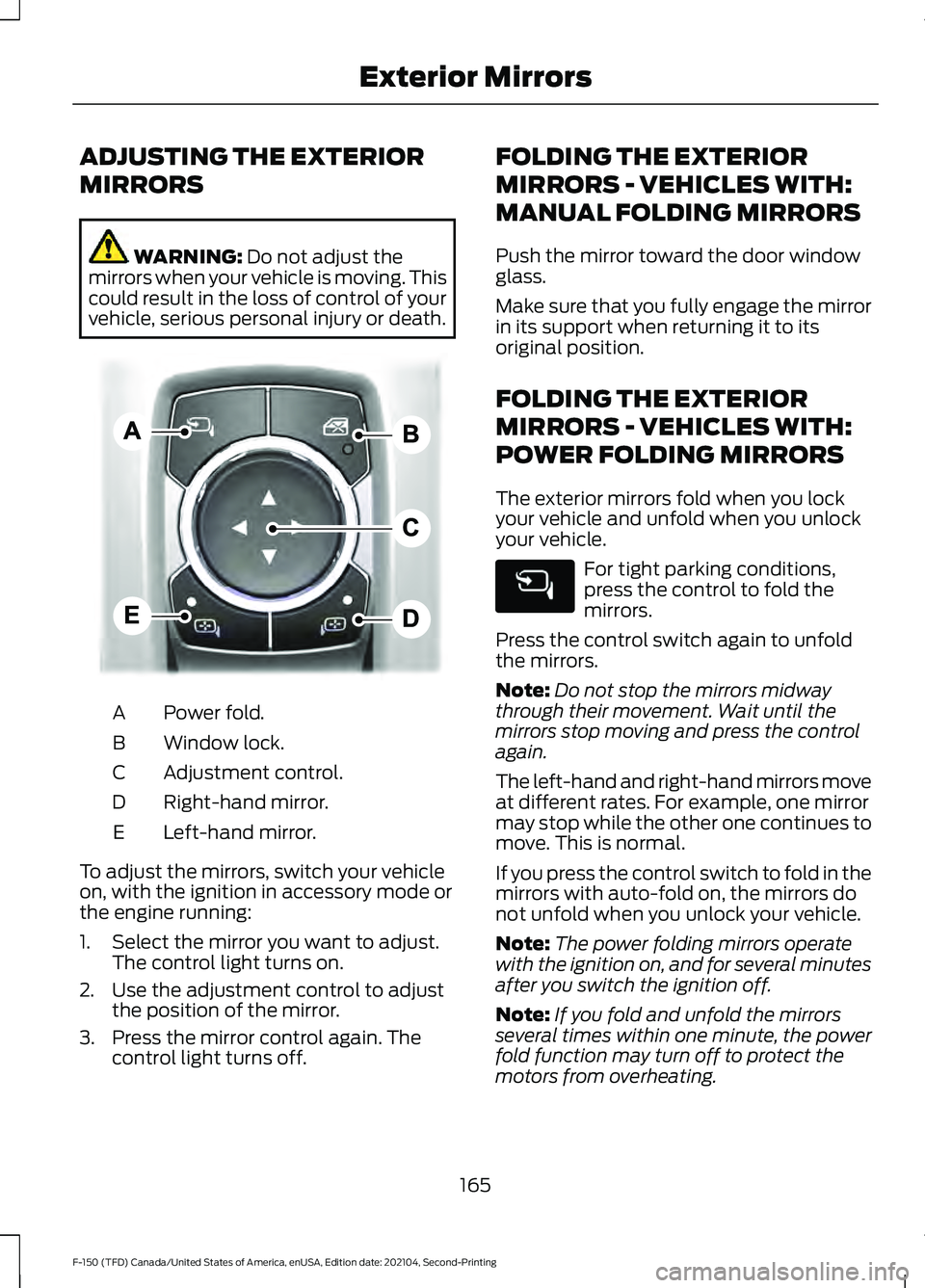
vehicle, serious personal injury or death. Power fold.
A
Window lock.
B
Adjustment control.
C
Right-hand mirror.
D
Left-hand mirror.
E
To adjust the mirrors, switch your vehicle
on, with the ignition in accessory mode or
the engine running:
1. Select the mirror you want to adjust. The control light turns on.
2. Use the adjustment control to adjust the position of the mirror.
3. Press the mirror control again. The control light turns off. FOLDING THE EXTERIOR
MIRRORS - VEHICLES WITH:
MANUAL FOLDING MIRRORS
Push the mirror toward the door window
glass.
Make sure that you fully engage the mirror
in its support when returning it to its
original position.
FOLDING THE EXTERIOR
MIRRORS - VEHICLES WITH:
POWER FOLDING MIRRORS
The exterior mirrors fold when you lock
your vehicle and unfold when you unlock
your vehicle.
For tight parking conditions,
press the control to fold the
mirrors.
Press the control switch again to unfold
the mirrors.
Note: Do not stop the mirrors midway
through their movement. Wait until the
mirrors stop moving and press the control
again.
The left-hand and right-hand mirrors move
at different rates. For example, one mirror
may stop while the other one continues to
move. This is normal.
If you press the control switch to fold in the
mirrors with auto-fold on, the mirrors do
not unfold when you unlock your vehicle.
Note: The power folding mirrors operate
with the ignition on, and for several minutes
after you switch the ignition off.
Note: If you fold and unfold the mirrors
several times within one minute, the power
fold function may turn off to protect the
motors from overheating.
165
F-150 (TFD) Canada/United States of America, enUSA, Edition date: 202104, Second-Printing Exterior MirrorsE311081