2021 FORD F-150 climate control
[x] Cancel search: climate controlPage 9 of 796

Engine Oil Pressure Gauge
.......................172
Transmission Fluid Temperature Gauge ........................................................................\
..
172
Turbo Boost Gauge ......................................
172
Diesel Exhaust Fluid Gauge ......................
172
What Are the Instrument Cluster Warning Lamps .........................................
172
Instrument Cluster Warning Lamps ......
173
What Are the Instrument Cluster Indicators ....................................................
174
Instrument Cluster Indicators .................
174
Instrument Cluster Indicators - Police Responder ..................................................
176
Instrument Cluster Display
Using the Instrument Cluster Display Controls .......................................................
178
Instrument Cluster Display Main Menu - Vehicles With: 12.3 Inch Screen ..........
178
Instrument Cluster Display Main Menu - Raptor, Vehicles With: 12.3 Inch Screen
........................................................................\
.
179
Instrument Cluster Display Main Menu - Vehicles With: 4.2 Inch Screen ...........
179
Instrument Cluster Display Main Menu - Vehicles With: 8 Inch Screen ...............
179
Trip Computer - Vehicles With: 4.2 Inch Screen .........................................................
180
Trip Computer - Vehicles With: 8 Inch Screen/12.3 Inch Screen ......................
180
Customizing the Instrument Cluster Display ........................................................
180
Personalized Settings .................................
181
Hybrid Display Information .......................
181
What Is Brake Coach ...................................
181
What Is the Trip Summary .......................
182
Remote Start
What Is Remote Start ................................
183
Remote Start Precautions .......................
183
Remote Start Limitations .........................
183
Enabling Remote Start ..............................
183Remotely Starting and Stopping the
Vehicle .........................................................
183
Extending the Remote Start Duration ........................................................................\
.
184
Remote Start Remote Control Indicators ........................................................................\
.
184
Remote Start Settings ..............................
184
Climate Control - Vehicles With: Automatic
Temperature Control
Identifying the Climate Control Unit .....
186
Switching Climate Control On and Off ........................................................................\
186
Switching Recirculated Air On and Off ........................................................................\
186
Switching Air Conditioning On and Off ........................................................................\
186
Switching Defrost On and Off ................
186
Switching Maximum Defrost On and Off ........................................................................\
186
Switching Maximum Cooling On and Off ........................................................................\
.
187
Switching the Heated Wiper Park On and Off .................................................................
187
Switching the Heated Rear Window On and Off .........................................................
187
Setting the Blower Motor Speed ...........
187
Switching the Heated Mirrors On and Off ........................................................................\
.
187
Setting the Temperature ...........................
187
Directing the Flow of Air ...........................
188
Auto Mode .....................................................
188
Climate Control Hints ................................
189
Climate Control - Vehicles With: Manual Temperature
Control
Identifying the Climate Control Unit ......
191
Switching Climate Control On and Off ........................................................................\
..
191
Switching Recirculated Air On and Off ........................................................................\
..
191
5
F-150 (TFD) Canada/United States of America, enUSA, Edition date: 202104, Second-Printing Table of Contents
Page 10 of 796

Switching Air Conditioning On and Off
........................................................................\
..191
Switching Defrost On and Off .................
191
Switching Maximum Defrost On and Off ........................................................................\
..
191
Switching Maximum Cooling On and Off ........................................................................\
..
191
Switching the Heated Rear Window On and Off ........................................................
192
Setting the Blower Motor Speed ...........
192
Switching the Heated Mirrors On and Off ........................................................................\
.
192
Setting the Temperature ..........................
192
Directing the Flow of Air ............................
192
Climate Control Hints ................................
193
Interior Air Quality
What Is the Cabin Air Filter ......................
194
Replacing the Cabin Air Filter .................
194
Front Seats
Front Seat Precautions .............................
195
Sitting in the Correct Position .................
195
Manual Seats ................................................
196
Power Seats ..................................................
198
Massage Seats .............................................
201
Heated Seats ................................................
202
Ventilated Seats .........................................
203
Rear Seats
Manual Seats ...............................................
204
Heated Seats ...............................................
205
Rear Occupant Alert System
What is the Rear Occupant Alert System ........................................................................\
207
How Does the Rear Occupant Alert System Work ............................................
207
Rear Occupant Alert System Precautions ........................................................................\
207 Rear Occupant Alert System Limitations
........................................................................\
207
Switching Rear Occupant Alert System On and Off ................................................
207
Rear Occupant Alert System Indicators .......................................................................
208
Rear Occupant Alert System Audible Warnings ...................................................
208
Memory Function
What Is the Memory Function ...............
209
Memory Function Precautions ..............
209
Locating the Memory Function Buttons .......................................................................
209
Saving a Preset Position ..........................
209
Recalling a Preset Position .....................
209
Garage Door Opener
What Is the Garage Door Opener ..........
210
How Does the Garage Door Opener Work ........................................................................\
.
210
Garage Door Opener Precautions .........
210
Garage Door Opener Limitations ..........
210
Programming the Garage Door Opener to Your Hand-Held Transmitter ...........
211
Programming the Garage Door Opener to Your Garage Door Opener Motor
........................................................................\
..
211
Programming the Garage Door Opener to Your Gate Opener Motor ..................
212
Clearing the Garage Door Opener .........
212
Reprogramming the Garage Door Opener ........................................................................\
.
213
Garage Door Opener Radio Frequencies ........................................................................\
.
213
USB Ports
Locating the USB Ports .............................
214
Locating the USB Ports - Raptor ...........
214
Playing Media Using the USB Port ........
214
Charging a Device ........................................
215
6
F-150 (TFD) Canada/United States of America, enUSA, Edition date: 202104, Second-Printing Table of Contents
Page 35 of 796

Note:
Event data recorder data is recorded
by your vehicle only if a non-trivial crash
situation occurs; no data is recorded by the
event data recorder under normal driving
conditions and no personal data or
information (for example name, gender,
age, and crash location) is recorded.
However, parties, such as law enforcement,
could combine the event data recorder data
with the type of personally identifying data
routinely acquired during a crash
investigation.
To read data recorded by an event data
recorder, special equipment is required,
and access to the vehicle or the event data
recorder is needed. In addition to the
vehicle manufacturer, other parties, such
as law enforcement, that have such special
equipment, can read the information if they
have access to the vehicle or the event
data recorder.
BlueCruise Data (If Equipped)
If BlueCruise is active in certain crash or
near crash-like situations, such as an
airbag deployment or hitting a road
obstacle, the system may record driver
attentiveness, based on the direction of
eyes and duration, and photographs of the
driver seat area.
Note: No data is recorded under normal
driving conditions.
SETTINGS DATA
Your vehicle has electronic control units
that have the ability to store data based
on your personalized settings. The data is
stored locally in the vehicle or on devices
that you connect to it, for example, a USB
drive or digital music player. You can delete
some of this data and also choose whether
to share it through the services to which
you subscribe. See
Enabling and
Disabling the Modem (page 620). Comfort and Convenience Data
Data recorded includes, for example:
•
Seat and steering wheel position.
• Climate control settings.
• Radio presets.
Entertainment Data
Data recorded includes, for example:
• Music, videos or album art.
• Contacts and corresponding address
book entries.
• Navigation destinations.
CONNECTED VEHICLE DATA The modem has a SIM. The
modem was enabled when your
vehicle was built and periodically
sends messages to stay connected to the
cell phone network, receive automatic
software updates and send vehicle-related
information to us, for example diagnostic
information. These messages could
include information that identifies your
vehicle, the SIM and the electronic serial
number of the modem. Cell phone network
service providers could have access to
additional information, for example cell
phone network tower identification. For
additional information about our privacy
policy, visit
www .For dC onne c t e d . c om or
refer to your local Ford website.
Note: The modem continues to send this
information unless you disable the modem
or stop the modem from sharing vehicle
data by changing the modem settings.
See
Connected Vehicle (page 620).
Note: The service can be unavailable or
interrupted for a number of reasons, for
example environmental or topographical
conditions and data plan coverage.
Note: To find out if your vehicle has a
modem, visit
www .For dC onne c t e d . c om .
31
F-150 (TFD) Canada/United States of America, enUSA, Edition date: 202104, Second-Printing Data Privacy
Page 41 of 796
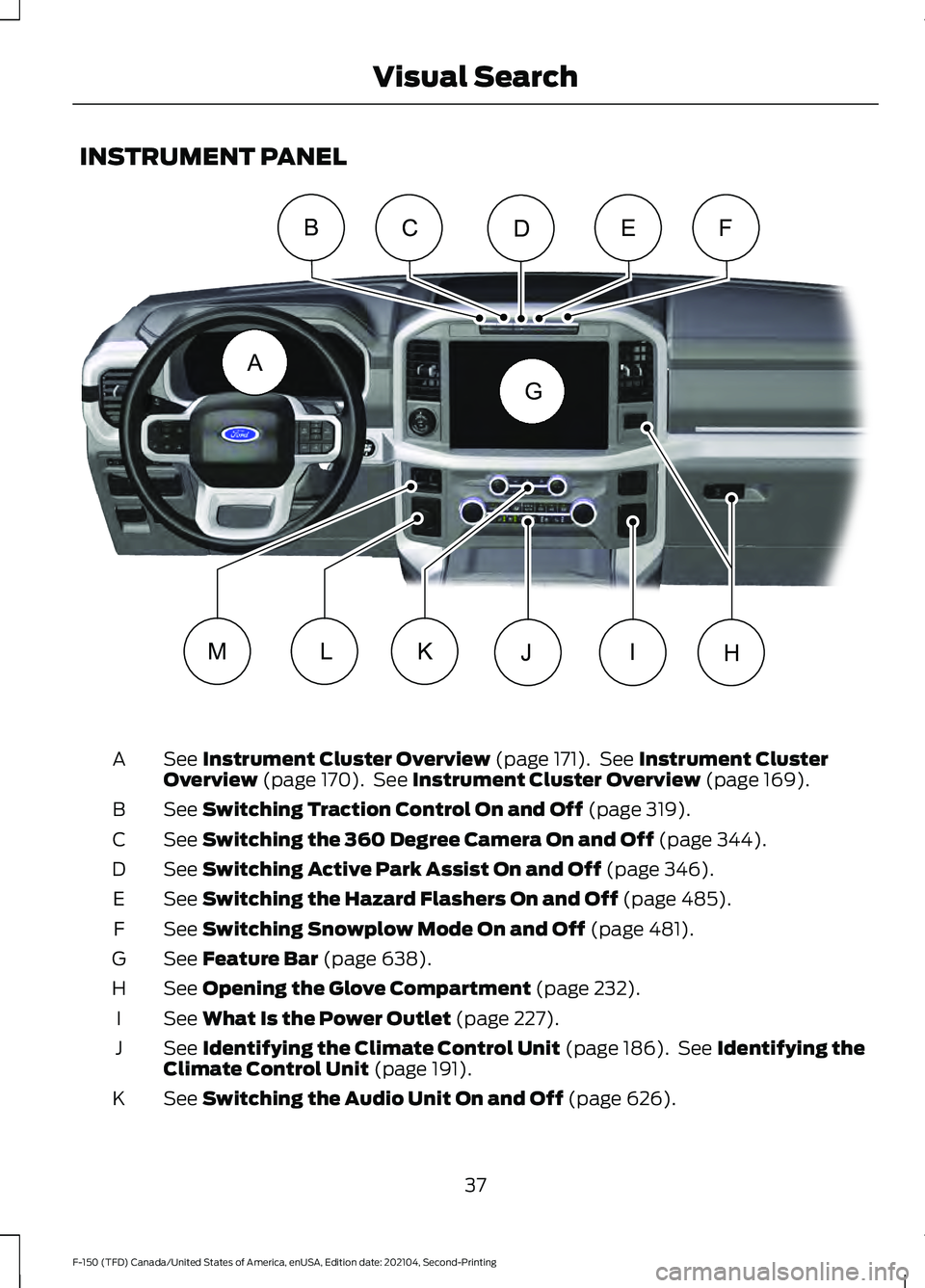
INSTRUMENT PANEL
See Instrument Cluster Overview (page 171). See Instrument Cluster
Overview (page 170). See Instrument Cluster Overview (page 169).
A
See
Switching Traction Control On and Off (page 319).
B
See
Switching the 360 Degree Camera On and Off (page 344).
C
See
Switching Active Park Assist On and Off (page 346).
D
See
Switching the Hazard Flashers On and Off (page 485).
E
See
Switching Snowplow Mode On and Off (page 481).
F
See
Feature Bar (page 638).
G
See
Opening the Glove Compartment (page 232).
H
See
What Is the Power Outlet (page 227).
I
See
Identifying the Climate Control Unit (page 186). See Identifying the
Climate Control Unit (page 191).
J
See
Switching the Audio Unit On and Off (page 626).
K
37
F-150 (TFD) Canada/United States of America, enUSA, Edition date: 202104, Second-Printing Visual SearchA
BCEFD
G
IJKLMHE328453
Page 43 of 796
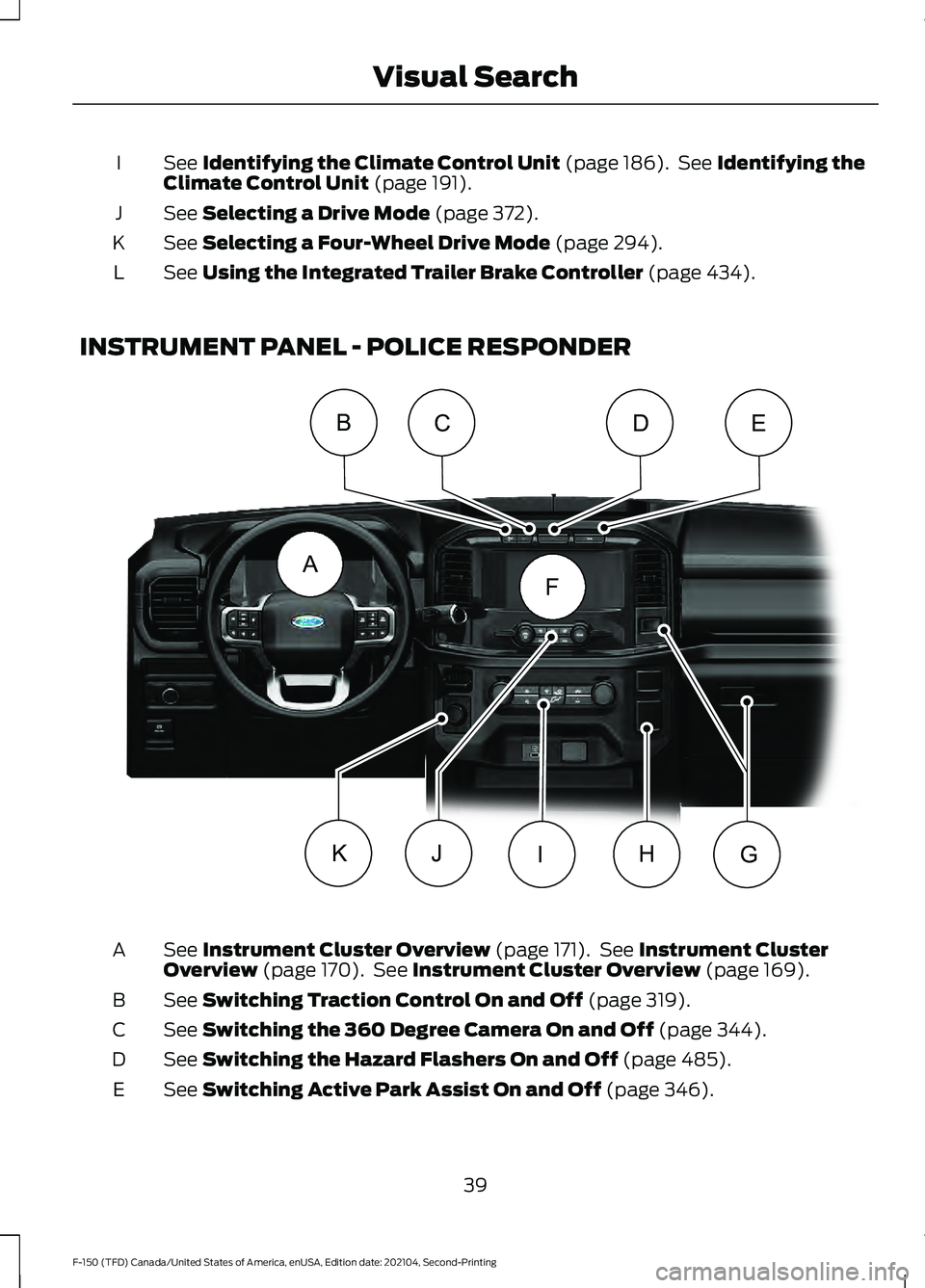
See Identifying the Climate Control Unit (page 186). See Identifying the
Climate Control Unit (page 191).
I
See
Selecting a Drive Mode (page 372).
J
See
Selecting a Four-Wheel Drive Mode (page 294).
K
See
Using the Integrated Trailer Brake Controller (page 434).
L
INSTRUMENT PANEL - POLICE RESPONDER See
Instrument Cluster Overview (page 171). See Instrument Cluster
Overview (page 170). See Instrument Cluster Overview (page 169).
A
See
Switching Traction Control On and Off (page 319).
B
See
Switching the 360 Degree Camera On and Off (page 344).
C
See
Switching the Hazard Flashers On and Off (page 485).
D
See
Switching Active Park Assist On and Off (page 346).
E
39
F-150 (TFD) Canada/United States of America, enUSA, Edition date: 202104, Second-Printing Visual SearchA
BCDE
F
HIJKGE343531
Page 44 of 796
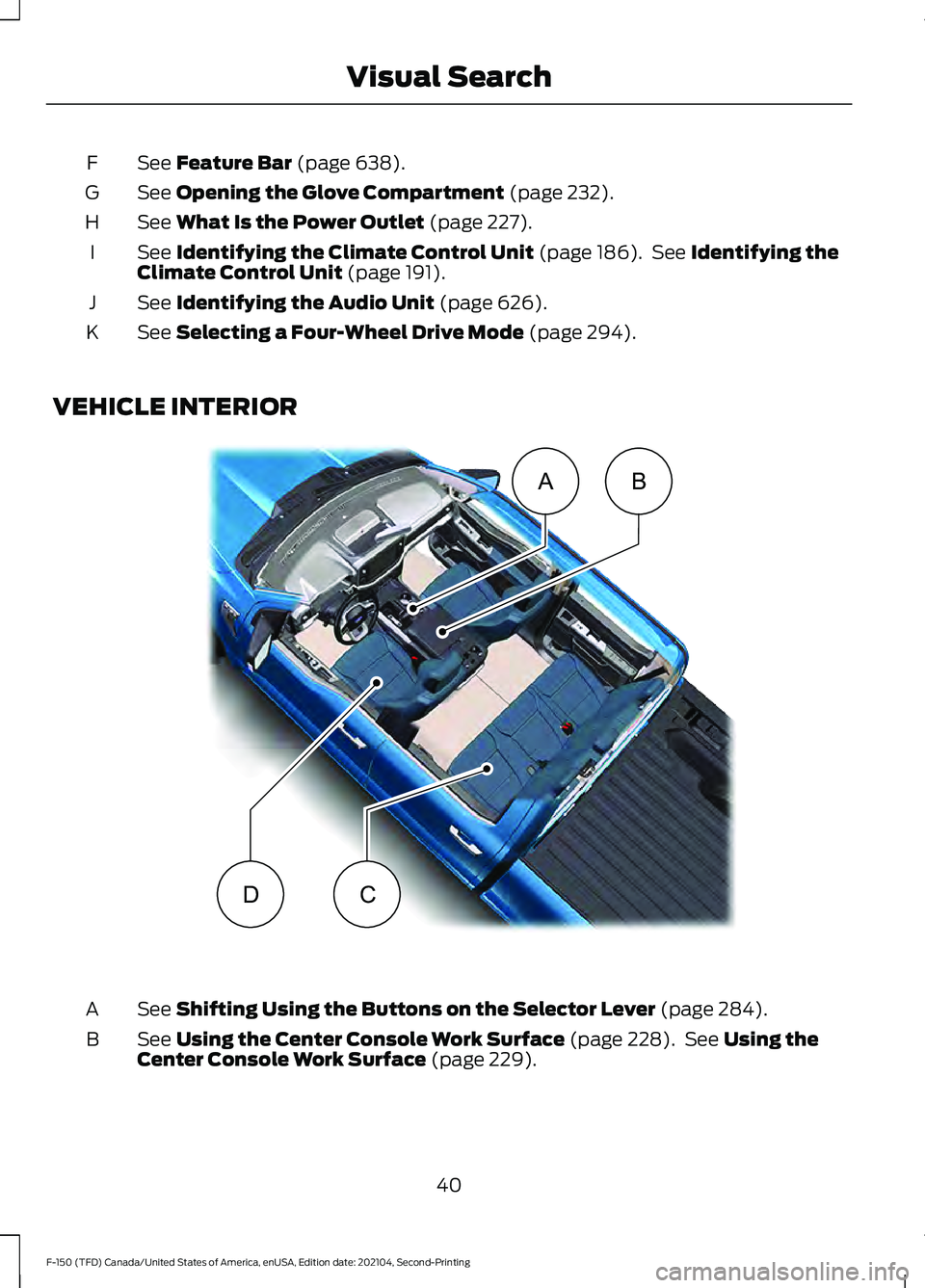
See Feature Bar (page 638).
F
See
Opening the Glove Compartment (page 232).
G
See
What Is the Power Outlet (page 227).
H
See
Identifying the Climate Control Unit (page 186). See Identifying the
Climate Control Unit (page 191).
I
See
Identifying the Audio Unit (page 626).
J
See
Selecting a Four-Wheel Drive Mode (page 294).
K
VEHICLE INTERIOR See
Shifting Using the Buttons on the Selector Lever (page 284).
A
See
Using the Center Console Work Surface (page 228). See Using the
Center Console Work Surface (page 229).
B
40
F-150 (TFD) Canada/United States of America, enUSA, Edition date: 202104, Second-Printing Visual SearchAB
CDE320265
Page 142 of 796

POWER RUNNING BOARD
PRECAUTIONS
WARNING: In extreme climates,
excessive ice buildup may occur, causing
the running boards not to deploy. Make
sure that the running boards have
deployed, and have finished moving
before attempting to step on them. The
running boards will resume normal
function once the blockage is cleared. WARNING:
Switch off the running
boards before jacking or placing any
object under your vehicle. Never place
your hand between the extended running
board and your vehicle. A moving running
board may cause injury.
Do not use the running boards, front and
rear hinge assemblies, running board
motors, or the running board underbody
mounts to lift your vehicle when jacking.
Use proper jacking points.
The running boards could move slower in
cold temperatures.
POWER RUNNING BOARD
SETTINGS
1. Press
Features on the touchscreen.
2. Press
Running Boards.
3. Press a setting.
Running Boards (Modes)
Off
The power running boards remain stowed,
regardless of door position. Auto
The power running boards deploy when
you approach your vehicle with a remote
control, unlock the door or open the door.
The power running boards stow:
•
After a few seconds when you close
the doors.
• If you unlock the door but do not open
it.
• If you have switched
Approach
detection on and do not open a door
before the Auto Timer setting expires.
Note: When you select this mode, an option
displays that allows you to select how long
the running boards stay deployed without
opening the door.
Out
The power running boards remain
deployed, regardless of door position.
Approach detection
When you switch
Approach detection on
with Auto switched on, the running boards
deploy when you approach your vehicle
with a remote control.
POWER RUNNING BOARD
KICK SWITCH
You can use the power running board kick
switch to deploy and stow the running
board without opening or closing the door.
138
F-150 (TFD) Canada/United States of America, enUSA, Edition date: 202104, Second-Printing Power Running Boards
(If Equipped)
Page 145 of 796

RESETTING THE STOPPING
POSITION - VEHICLES WITH:
POWER ADJUSTABLE
STEERING COLUMN
Note:
The steering wheel stops when it
detects an obstruction. This sets a new
stopping position.
To reset the steering column to its normal
stopping position:
1. Confirm there is nothing obstructing the motion of the steering column.
2. Press and hold the steering column control until the steering column stops
moving.
3. Press the steering column control again.
Note: The steering column may start to
move again.
4. When the steering column stops, continue holding the control for a few
seconds.
5. Repeat for each direction, as necessary.
HORN Press on the center of the
steering wheel near the horn icon
to activate the horn.
SWITCHING THE HEATED
STEERING WHEEL ON AND OFF
- VEHICLES WITH: HEATED
STEERING WHEEL To activate the heated steering
wheel, press the button on the
climate control unit. On some vehicles, an indicator on the
button illuminates when the heated
steering wheel is on.
Note:
A sensor regulates the temperature
of the steering wheel.
141
F-150 (TFD) Canada/United States of America, enUSA, Edition date: 202104, Second-Printing Steering WheelE270945