2021 FORD EXPLORER service indicator
[x] Cancel search: service indicatorPage 372 of 577
Please note that the TPMS is not a
substitute for proper tire maintenance, and
it is the driver
’s responsibility to maintain
correct tire pressure, even if under-inflation
has not reached the level to trigger
illumination of the TPMS low tire pressure
telltale.
Your vehicle has also been equipped with
a TPMS malfunction indicator to indicate
when the system is not operating properly.
The TPMS malfunction indicator is
combined with the low tire pressure
telltale. When the system detects a
malfunction, the telltale will flash for
approximately one minute and then remain
continuously illuminated. This sequence
will continue upon subsequent vehicle
start-ups as long as the malfunction exists.
When the malfunction indicator is
illuminated, the system may not be able
to detect or signal low tire pressure as
intended. TPMS malfunctions may occur
for a variety of reasons, including the
installation of replacement or alternate
tires or wheels on the vehicle that prevent
the TPMS from functioning properly.
Always check the TPMS malfunction
telltale after replacing one or more tires or
wheels on your vehicle to ensure that the
replacement or alternate tires and wheels
allow the TPMS to continue to function
properly.
This device complies with Part 15 of the
FCC Rules and with License exempt RSS
Standards of Industry Canada. Operation
is subject to the following two conditions:
1. This device may not cause harmful interference, and
2. This device must accept any interference received, including
interference that may cause undesired
operation. WARNING: Changes or
modifications not expressively approved
by the party responsible for compliance
could void the user's authority to operate
the equipment. The term "IC:" before the
radio certification number only signifies
that Industry Canada technical
specifications were met.
Changing Tires With a Tire
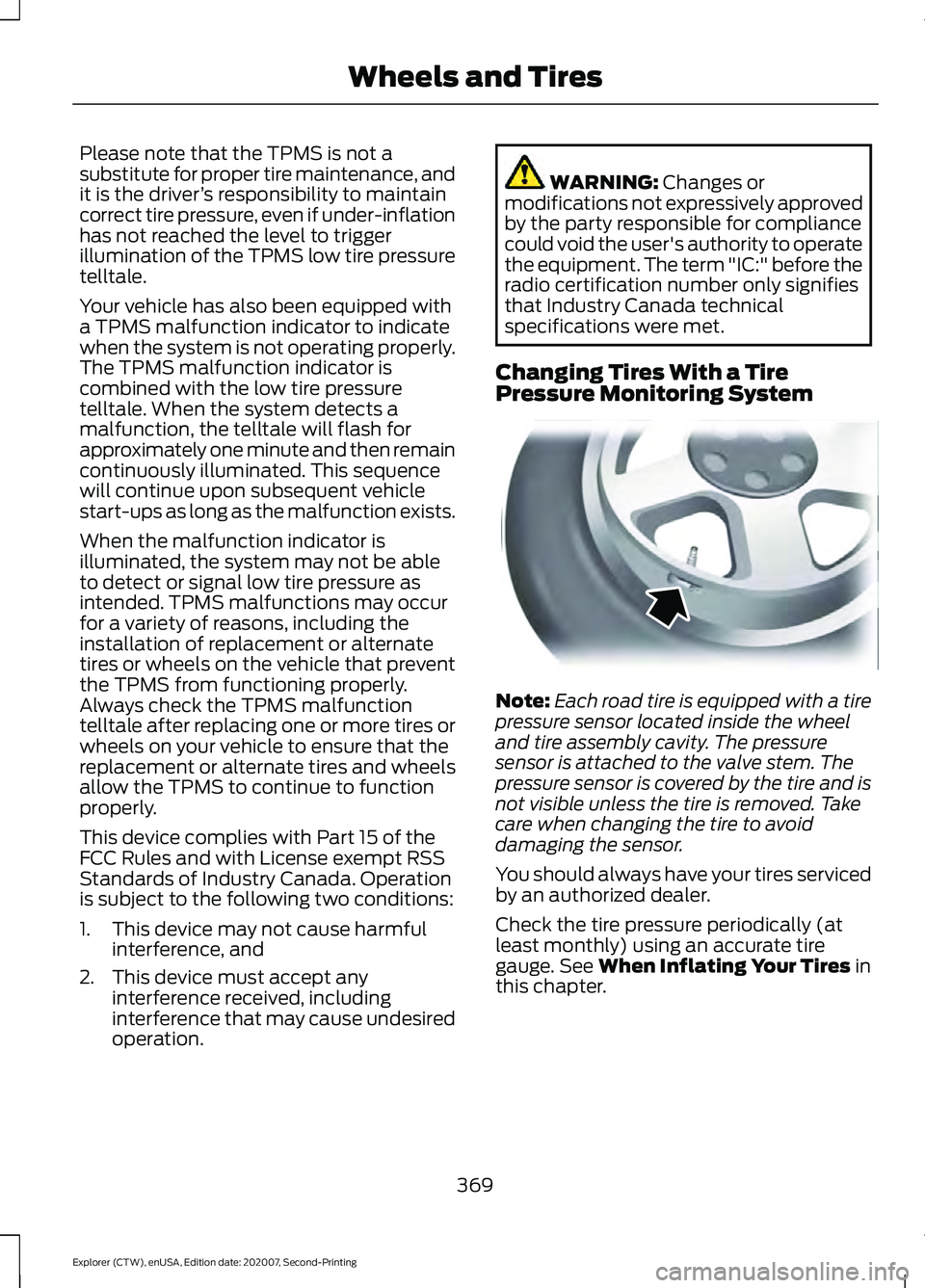
Pressure Monitoring System Note:
Each road tire is equipped with a tire
pressure sensor located inside the wheel
and tire assembly cavity. The pressure
sensor is attached to the valve stem. The
pressure sensor is covered by the tire and is
not visible unless the tire is removed. Take
care when changing the tire to avoid
damaging the sensor.
You should always have your tires serviced
by an authorized dealer.
Check the tire pressure periodically (at
least monthly) using an accurate tire
gauge. See
When Inflating Your Tires in
this chapter.
369
Explorer (CTW), enUSA, Edition date: 202007, Second-Printing Wheels and TiresE142549
Page 376 of 577
•
To reduce the chances of interference
from another vehicle, perform the
system reset procedure at least 3 ft
(1 m) away from another Ford Motor
Company vehicle undergoing the
system reset procedure at the same
time.
• Do not wait more than two minutes
between resetting each tire sensor or
the system can time-out and you have
to repeat the entire procedure on all
four wheels.
• A double horn sounds indicating the
need to repeat the procedure.
Performing the System Reset Procedure
Read the entire procedure before
attempting.
1. Drive the vehicle above
20 mph
(32 km/h) for at least two minutes,
then park in a safe location where you
can easily get to all four tires and have
access to an air pump.
2. Place the ignition in the off position and
keep the key in the ignition.
3. Cycle the ignition to the on position with the engine off.
4. Turn the hazard flashers on then off three times. You must accomplish this
within 10 seconds. If you successfully
enter the reset mode, the horn sounds
once, the system indicator flashes and
a message shows in the information
display. If this does not occur, please
try again starting at step 2. If after
repeated attempts to enter the reset
mode, the horn does not sound, the
system indicator does not flash and no
message shows in the information
display, seek service from your
authorized dealer. 5. Train the tire pressure monitoring
system sensors in the tires using the
following system reset sequence
starting with the left front tire in the
following clockwise order: Left front -
driver side front tire, Right front -
passenger side front tire, Right rear -
passenger side rear tire, Left rear -
driver side rear tire.
6. Remove the valve cap from the valve stem on the left front tire. Decrease the
air pressure until the horn sounds.
Note: The single horn tone confirms that
the sensor identification code has been
learned by the module for this position. If a
double horn is heard, the reset procedure
was unsuccessful, and you must repeat it.
7. Remove the valve cap from the valve stem on the right front tire. Decrease
the air pressure until the horn sounds.
8. Remove the valve cap from the valve stem on the right rear tire. Decrease the
air pressure until the horn sounds.
9. Remove the valve cap from the valve stem on the left rear tire. Decrease the
air pressure until the horn sounds.
Training is complete after the horn
sounds for the last tire trained, driver
side rear tire, the system indicator
stops flashing, and a message shows
in the information display.
10. Turn the ignition off. If two short horn
beeps are heard, the reset procedure
was unsuccessful and you must
repeat it. If after repeating the
procedure and two short beeps are
heard when the ignition is turned to
off, seek assistance from your
authorized dealer.
373
Explorer (CTW), enUSA, Edition date: 202007, Second-Printing Wheels and Tires
Page 377 of 577

11.
Set all four tires to the recommended
air pressure as indicated on the
Safety Compliance Certification
Label, affixed to either the door hinge
pillar, door-latch post, or the door
edge that meets the door-latch post,
next to the driver seating position or
Tire Label located on the B-Pillar or
the edge of the driver door.
CHANGING A ROAD WHEEL WARNING: If the tire pressure
monitor sensor becomes damaged it
may not function.
Note: You should only use tire sealants in
roadside emergencies as they may cause
damage to the tire pressure monitoring
system sensor.
Note: The tire pressure monitoring system
indicator light illuminates when the spare
tire is in use. To restore the full function of
the monitoring system, all road wheels
equipped with tire pressure monitoring
sensors must be mounted on the vehicle.
If you get a flat tire when driving, do not
apply the brake heavily. Instead, gradually
decrease your speed. Hold the steering
wheel firmly and slowly move to a safe
place on the side of the road.
Have a flat serviced by an authorized
dealer in order to prevent damage to the
tire pressure monitoring system sensors.
See
Tire Pressure Monitoring System
(page 368). Replace the spare tire with a
road tire as soon as possible. During
repairing or replacing of the flat tire, have
the authorized dealer inspect the tire
pressure monitoring system sensor for
damage. Dissimilar Spare Wheel and Tire
Assembly Information WARNING:
Failure to follow these
guidelines could result in an increased
risk of loss of vehicle control, injury or
death.
If you have a dissimilar spare wheel and
tire, then it is intended for temporary use
only. This means that if you need to use it,
you should replace it as soon as possible
with a road wheel and tire assembly that
is the same size and type as the road tires
and wheels that were originally provided
by us. If the dissimilar spare tire or wheel
is damaged, you should replace it rather
than repair it.
A dissimilar spare wheel and tire assembly
is defined as a spare wheel and tire
assembly that is different in brand, size or
appearance from the road tires and wheels
and can be one of three types:
1. T-type mini-spare:
This spare tire
begins with the letter T for tire size and
may have Temporary Use Only molded in
the sidewall.
2. Full-size dissimilar spare with label
on wheel:
This spare tire has a label on
the wheel that states: THIS WHEEL AND
TIRE ASSEMBLY FOR TEMPORARY USE
ONLY.
When driving with one of the dissimilar
spare tires listed above, do not:
• Exceed
50 mph (80 km/h).
• Load the vehicle beyond maximum
vehicle load rating listed on the Safety
Compliance Label.
• Tow a trailer.
• Use snow chains on the end of the
vehicle with the dissimilar spare tire.
• Use more than one dissimilar spare tire
at a time.
374
Explorer (CTW), enUSA, Edition date: 202007, Second-Printing Wheels and Tires
Page 423 of 577
Power (Watt)
Specification
Lamp
LED.
LED.
Central high mounted brake lamp.
27
3757NAK, PY27/7W
Rear direction indicator.
21
W21W
Reversing lamps.
5
W5W
License plate lamp.
Note: LED lamps are not serviceable. See an authorized dealer if they fail.
Interior Lamps Power (Watt)
Specification
Lamp
LED.
LED.
All interior lamps.
Note: LED lamps are not serviceable. See an authorized dealer if they fail.
420
Explorer (CTW), enUSA, Edition date: 202007, Second-Printing Capacities and Specifications
Page 486 of 577

When the oil change message appears in
the information display, it is time for an oil
change. Make sure you perform the oil
change within two weeks or 500 mi
(800 km) of the message appearing. Make
sure you reset the Intelligent Oil-Life
Monitor after each oil change. See
Oil
Change Indicator Reset (page 327).
If your information display resets
prematurely or becomes inoperative, you
should perform the oil change interval at
six months or
5,000 mi (8,000 km) from
your last oil change. Never exceed one year
or
10,000 mi (16,000 km) between oil
change intervals,
Your vehicle is very sophisticated and built
with multiple, complex performance
systems. Every manufacturer develops
these systems using different
specifications and performance features.
That is why it is important to rely upon your
dealership to properly diagnose and repair
your vehicle.
We have recommended maintenance
intervals for various parts and component
systems based upon engineering testing.
We rely upon this testing to determine the
most appropriate mileage for replacement
of oils and fluids to protect your vehicle at
the lowest overall cost to you and
recommends against maintenance
schedules that deviate from the scheduled
maintenance information.
We strongly recommend the use of only
our genuine manufactured or our
authorized re-manufactured replacement
parts engineered for your vehicle. Additives and Chemicals
This owner's manual and our Workshop
Manual list the recommended additives
and chemicals for your vehicle. We do not
recommend using chemicals or additives
not approved by us as part of your vehicle
’s
normal maintenance. Please consult your
warranty information.
Oils, Fluids and Flushing
In many cases, fluid discoloration is a
normal operating characteristic and, by
itself, does not necessarily indicate a
concern or that the fluid needs to be
changed. However, a qualified expert, such
as the factory-trained technicians at your
dealership, should inspect discolored fluids
that also show signs of overheating or
foreign material contamination
immediately.
Make sure to change your vehicle ’s oils and
fluids at the specified intervals or in
conjunction with a repair. Flushing is a
viable way to change fluid for many vehicle
sub-systems during scheduled
maintenance. It is critical that systems are
flushed only with new fluid that is the same
as that required to fill and operate the
system or using our approved flushing
chemical.
Owner Checks and Services
Make sure you perform the following basic
maintenance checks and inspections every
month or at six-month intervals.
483
Explorer (CTW), enUSA, Edition date: 202007, Second-Printing Scheduled Maintenance
Page 492 of 577

Extensive Idling or Low-speed Driving for Long Distances, as in Heavy Commercial Use
Change engine oil and filter as indicated by the information
display and perform services listed in the Normal Sched-
uled Maintenance chart.
As required
Replace cabin air filter.
Inspect frequently, service
as required
Replace engine air filter.
Replace spark plugs.
Every 60,000 mi
(96,000 km) Operating in Dusty or Sandy Conditions - Such as Unpaved or Dusty Roads
Replace cabin air filter.
Inspect frequently, service
as required
Replace engine air filter.
Inspect the wheels and related components for abnormal
noise, wear, looseness or drag.
Every
5,000 mi (8,000 km)
Rotate tires, inspect tires for wear and measure tread
depth.
Change engine oil and filter. 1
Every
5,000 mi (8,000 km)
or six months
Perform multi-point inspection.
1 Reset your Intelligent Oil-Life Monitor after engine oil and filter changes. See Oil Change
Indicator Reset
(page 327). Exclusive use of E85 - Flex Fuel Vehicles Only
If ran exclusively on E85, fill the fuel tank full with regular
unleaded fuel.
Every oil change
Exceptions
There are several exceptions to the Normal
Schedule: Axle and Transfer Case Maintenance
The transfer case, front and rear axles in
your vehicle do not require normal
scheduled maintenance. Your vehicle is
electronically monitored and notifies you
of required service by displaying a message
in the information display. The transfer
case, front and rear axles are more likely
489
Explorer (CTW), enUSA, Edition date: 202007, Second-Printing Scheduled Maintenance
Page 566 of 577
Switching the Rear Heated Seats On and
Off...................................................................... 453
Switching the Rear Ventilated Seats On and Off.............................................................. 453
Switching the Ventilated Seats On and Off...................................................................... 453
Climate Control.............................................139
Cold Weather Precautions.......................296
Collision, Damage or Fire Event.............302 Guidance for Ford Motor Company Electric
and Hybrid-Electric Vehicles Equipped
With High Voltage Batteries..................... 302
Connected Vehicle
.......................................421
Connecting the Vehicle to a Mobile
Network............................................................. 421
Connected Vehicle Data...............................17
Connected Vehicle Limitations...............421
Connected Vehicle Requirements..........421
Connected Vehicle – Troubleshooting - Vehicles With: Modem............................422
Connected Vehicle – Troubleshooting - Vehicles With: SYNC 3............................423
Connecting the Vehicle to a Mobile Network.........................................................421
Connecting FordPass to the Modem..........421
Enabling and Disabling the Modem............421
What Is the Modem........................................... 421
Connecting the Vehicle to a Wi-Fi Network - Vehicles With: SYNC 3
........421
Coolant Check See: Engine Coolant Check............................. 331
Crash Sensors and Airbag Indicator
........52
Creating a MyKey...........................................65
Programming and Changing Configurable
Settings.............................................................. 66
Creating a Vehicle Wi-Fi Hotspot..........425 Connecting a Device to the Wi-Fi
Hotspot............................................................ 425
Finding the Wi-Fi Hotspot Name and Password......................................................... 425
Cross Traffic Alert........................................268 Cross Traffic Alert Behavior When Trailer
is Attached...................................................... 270
Cross Traffic Alert Indicator........................... 270
Cross Traffic Alert Information Messages........................................................... 271
Cross Traffic Alert System Limitations ....................................................... 270Cross Traffic Alert System Sensors.............270
Switching the System On and Off...............270
Using Cross Traffic Alert.................................
268
Cruise Control
...............................................244
Cruise Control Indicators..........................245
Cruise Control - Vehicles With: Adaptive Cruise Control With Stop and Go..........82
Cruise Control - Vehicles With: Cruise Control
............................................................83
Cup Holders......................................................171
Customer Assistance.................................305
Customer Information................................491 Radio Frequency Certification Labels........491
D
Data Privacy
......................................................15
Services That Third Parties Provide...............15
Services That We Provide.................................. 15
Daytime Running Lamps - Vehicles With: Configurable Daytime Running
Lamps.............................................................89
Daytime Running Lamps - Vehicles With: Daytime Running Lamps (DRL)............89
Digital Radio
...................................................427
HD Radio Reception and Station
Troubleshooting............................................ 428
Direction Indicators
.......................................90
Direction Indicator................................................ 91
Switching the Direction Indicators On and Off........................................................................\
. 90
Doors and Locks.............................................69
Drive Mode Control.....................................278 Drive Modes......................................................... 278
Drive Modes...................................................278 Deep Snow/Sand.............................................. 278
Eco........................................................................\
... 279
Normal................................................................... 279
Slippery.................................................................. 279
Sport....................................................................... 279
Tow/Haul.............................................................. 279
Trail........................................................................\
.. 279
Driver Alert.....................................................259 PRINCIPLE OF OPERATION.......................... 259
USING DRIVER ALERT.................................... 259
Driver and Passenger Airbags....................47 Children and Airbags.......................................... 48
563
Explorer (CTW), enUSA, Edition date: 202007, Second-Printing Index
Page 568 of 577
Trailer Lamps.......................................................
292
When Towing a Trailer..................................... 293
Event Data.........................................................16
Export Unique Options.................................14
Exterior Mirrors - Excluding: ST.................97 360-Degree Camera.......................................... 98
Auto-dimming Feature...................................... 98
Auto-Folding Mirrors .......................................... 97
Blind Spot Information System...................... 98
Direction Indicator Mirrors ............................... 98
Fold-Away Exterior Mirrors............................... 97
Heated Exterior Mirrors ..................................... 98
Memory Mirrors ................................................... 98
Power Exterior Mirrors......................................... 97
Puddle Lamps....................................................... 98
Exterior Mirrors - ST......................................98 Auto-dimming Feature.................................... 100
Auto-Folding Mirrors........................................... 99
Blind Spot Information System.................... 100
Direction Indicator Mirrors.............................. 100
Fold-Away Exterior Mirrors............................... 99
Heated Exterior Mirrors.................................... 100
Memory Mirrors................................................... 100
Power Exterior Mirrors........................................ 98
Puddle Lamps..................................................... 100
F
Fastening the Seatbelts..............................39
Seatbelt Locking Modes................................... 40
Using Seatbelts During Pregnancy................39
Flat Tire See: Changing a Road Wheel........................ 374
Floor Mats.......................................................297
Fog Lamps - Front See: Front Fog Lamps........................................ 89
Ford Credit
..........................................................11
US Only...................................................................... 11
Ford Protect..................................................480 Ford Protect Extended Service Plan
(CANADA ONLY)........................................... 481
Ford Protect Extended Service Plans (U.S. Only)................................................................. 480
Four-Wheel Drive.........................................207 Principle of Operation...................................... 207
Front Fog Lamps
............................................89
Front Fog Lamp Indicator................................. 90Switching the Front Fog Lamps On or
Off........................................................................\
. 89
Front Parking Aid
..........................................232
Object Distance Indicator............................... 233
Front Passenger Sensing System
............48
Front Wiper Blades See: Changing the Front Wiper Blades......340
Fuel and Refueling.......................................185
Fuel Consumption.......................................194 Advertised Capacity.......................................... 194
Calculating Fuel Economy.............................. 195
Fuel Filler Funnel Location........................187
Fuel Filter........................................................340
Fuel Quality - E85........................................185 Choosing the Right Fuel - Flex Fuel
Vehicles............................................................. 185
Switching Between E85 and Gasoline............................................................ 186
Fuel Quality - Gasoline...............................187 Choosing the Right Fuel................................... 187
Fuel Shutoff
..................................................299
Fuses..................................................................312
Fuse Specification Chart............................312 Engine Compartment Fuse Box.................... 312
Passenger Compartment Fuse Panel.........317
G
Garage Door Opener...................................162
Garage Door Opener See: Universal Garage Door Opener............162
Gauges - Vehicles With: 12.3 Inch Instrument Cluster Display
Screen...........................................................104
Distance to Empty............................................. 106
Engine Coolant Temperature Gauge..........106
Fuel Gauge............................................................ 105
Gauge Display...................................................... 105
Information Bar................................................... 105
Information Display........................................... 105
Low Fuel Reminder............................................ 105
Gauges - Vehicles With: 4.2 Inch Instrument Cluster Display
Screen...........................................................106
Engine Coolant Temperature Gauge...........107
Fuel Gauge............................................................ 107
Information Display............................................ 107
565
Explorer (CTW), enUSA, Edition date: 202007, Second-Printing Index