2021 AUDI E-TRON ignition
[x] Cancel search: ignitionPage 264 of 308

Care and cleaning
height and width of the inside of the car
wash.
ZA\ WARNING
—To reduce the risk of accidents, only wash
the vehicle when the ignition is off and fol-
low the instructions from the car wash oper-
ator.
—To reduce the risk of cuts, protect yourself
from sharp metal components when wash-
ing the underbody or the inside of the wheel
housings.
— After washing the vehicle, the braking effect
may be delayed due to moisture on the
brake rotors or ice in the winter. This in-
creases the risk of an accident. The brakes
must be dried with a few careful brake appli-
cations.
—To reduce the risk of paint damage, do not
wash the vehicle in direct sunlight.
—To reduce the risk of damage, do not wash
decorative decals* with a pressure washer.
—To reduce the risk of damage to the surface,
do not use insect removing sponges, kitchen
sponges, or similar items.
— When washing matte finish painted vehicle
components:
— To reduce the risk of damage to the sur-
face, do not use polishing agents or hard
wax.
— Never use protective wax. It can destroy
the matte finish effect.
@) Note — Do not place any stickers or magnetic
signs on vehicle components painted with
matte finish paint. The paint could be
damaged when the stickers or magnets
are removed.
— If you wash the vehicle in an automatic car
wash, you must fold the exterior mirrors in
to reduce the risk of damage to the mirrors.
Power folding exterior mirrors* must only
be folded in and out using the power folding @) For the sake of the environment
function.
—To reduce the risk of damage to the rims
and tires, compare the width between the
wheels on your vehicle with the distance be-
tween the guide rails in the car wash.
—To reduce the risk of damage, compare the
height and width of your vehicle with the
Only wash the vehicle in facilities specially de-
signed for that purpose. This will reduce the
risk of dirty water contaminated with oil from
entering the sewer system.
Cleaning and care information
When cleaning and caring for individual vehicle are not listed, consult an authorized Audi dealer
components, refer to the following tables. The or authorized Audi Service Facility. Also follow
information contained there is simply recommen- __ the information found in > A.
dations. For questions or for components that
Exterior cleaning
Component Situation Solution
Windshield wiper | Deposits Soft cloth with glass cleaner, > page 56
blades
Headlights/ Deposits Soft sponge with a mild soap solution®
tail lights
Sensors/ Deposits Sensors: soft cloth with a solvent-free cleaning product
camera lenses Camera lenses: soft cloth with an alcohol-free cleaning sol-
ution
Snow/ice Hand brush/solvent-free de-icing spray >
262
Page 270 of 308
Emergency assistance
ZA\ WARNING
— Please note that the tire mobility kit cannot
be used in all situations, and that it may on-
ly be used temporarily.
— The tire sealant must not come in contact
with skin, eyes, or clothing.
— If tire sealant comes into contact with your
eyes or your skin, thoroughly rinse the af-
fected area immediately with clean water.
— Do not inhale the fumes.
— If you swallow any of the tire sealant, thor-
oughly rinse your mouth immediately and
drink a lot of water. Do not induce vomiting.
Seek medical attention immediately.
— Change your clothing immediately if it
comes into contact with tire sealant.
— If an allergic reaction occurs, seek medical
attention immediately.
— Keep the tire sealant away from children.
@ Tips
— If sealant leaks, allow it to dry in place. You
can then peel it off like a sticker.
— Note the expiration date on the sealant bot-
tle. Replace the tire sealant at an authorized
Audi dealer or authorized Audi Service Fa-
cility.
— Radio reception can be interrupted when
operating the compressor.
— Follow the legal regulations that are appli-
cable in the country where you are operating
the vehicle.
2) The compressor may look different. However, the way it is
operated is generally the same.
268
Repairing tires
Applies to: vehicles with tire mobility kit
RAZ-0213|
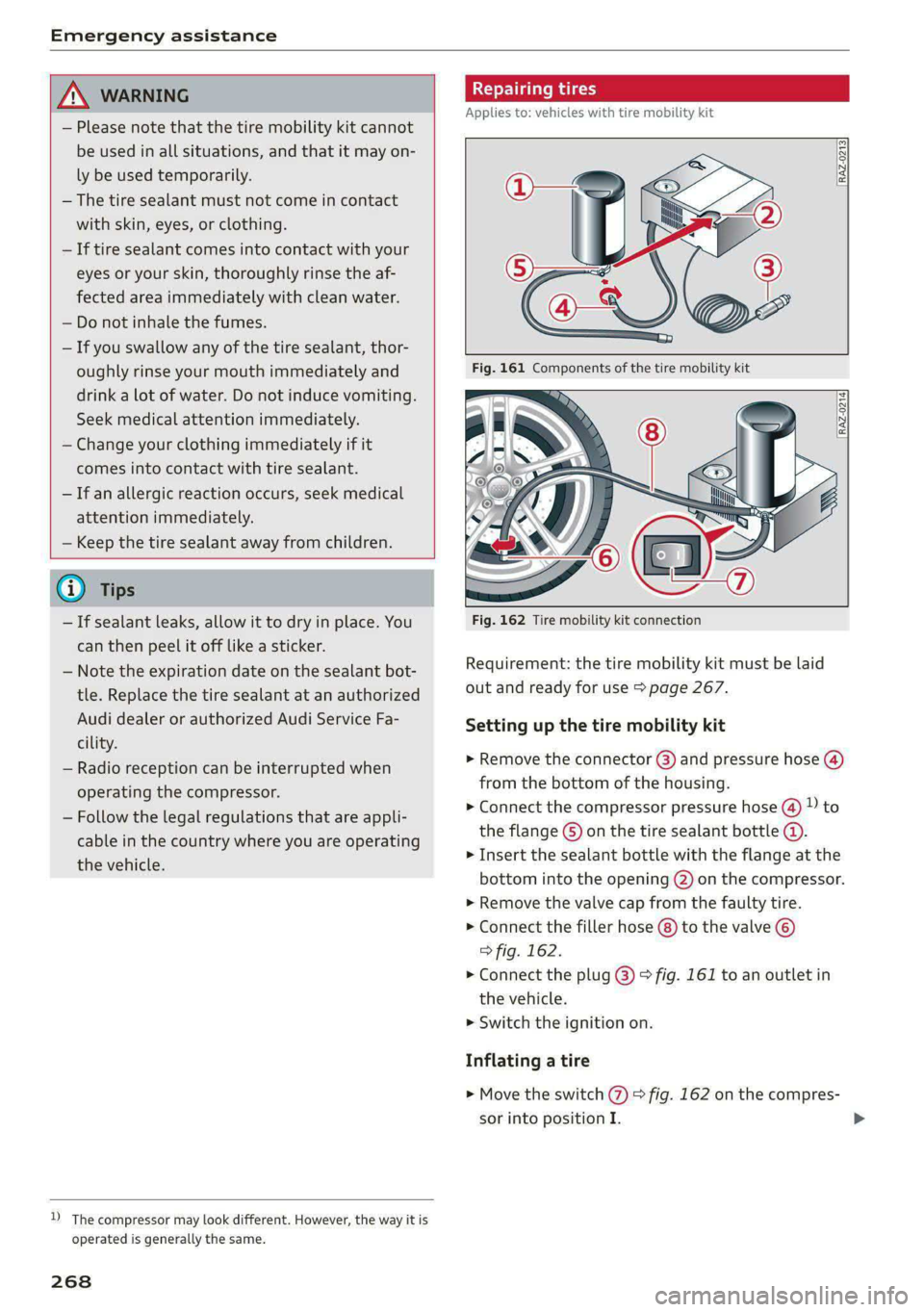
Fig. 162 Tire mobility kit connection
Requirement: the tire mobility kit must be laid
out and ready for use > page 267.
Setting up the tire mobility kit
> Remove the connector (3) and pressure hose (4)
from the bottom of the housing.
> Connect the compressor pressure hose ®@ D to
the flange © on the tire sealant bottle ©.
> Insert the sealant bottle with the flange at the
bottom into the opening (2) on the compressor.
> Remove the valve cap from the faulty tire.
> Connect the filler hose (8) to the valve ©)
> fig. 162.
> Connect the plug @) > fig. 161 to an outlet in
the vehicle.
> Switch the ignition on.
Inflating a tire
> Move the switch (%) > fig. 162 on the compres-
sor into position I.
Page 271 of 308
4KE012721BF
Emergency assistance
> Inflate the tire to between 29 psi (200 kPA)
and 36 psi (250 kPA) and read the pressure on
the gauge.
> If this tire pressure is not reached, remove the
filler hose. Drive slowly approximately 33 feet
(10 m) forward or in reverse so that the sealant
can be distributed in the tire. Inflate the tire
again > A\.
ZA\ WARNING
— Read and follow the manufacturer's safety
precautions on the compressor and in the in-
structions on the bottle of sealant.
— Ifa tire pressure of 29 psi (200 kPA) cannot
reached after inflating for 6 minutes, then
the tire is too severely damaged. Do not con-
tinue driving.
— If the tire cannot be repaired with the tire
sealant, see an authorized Audi dealer or au-
thorized Audi Service Facility for assistance.
@) Tips
Do not operate the compressor for more than
six minutes continuously, or it can overheat.
Once the compressor has cooled, you can con-
tinue to use it.
CeoT nn tata]
Applies to: vehicles with tire mobility kit
> Affix the sticker that says "max. 50 mph (max.
80 km/h)" that is provided with the tire mobili-
ty kit within the driver's field of vision.
> Stop the vehicle after driving for about 10 mi-
nutes and check the tire pressure.
> If the tire pressure is lower than 19 psi (130
kPA), then the tire is too severely damaged. Do
not continue driving.
Nv WARNING
Pay attention to the following after repairing
the tire:
— Do not drive faster than 50 mph (80 km/h).
— Avoid hard acceleration or braking and driv-
ing fast around curves.
— The vehicle may become more difficult to
control.
— If the tire is too severely damaged, see an
authorized Audi dealer or authorized Audi
Service Facility for assistance.
(@) For the sake of the environment
You can give the used tire sealant bottle to an
authorized Audi dealer or authorized Audi
Service Facility for disposal.
G) Tips
Remember to obtain a new bottle of sealant
from an authorized Audi dealer or authorized
Audi Service Facility after repairing a tire.
Replacing wheels
You must complete the preparation before
changing a tire.
> Read and follow the important safety precau-
tions > page 267.
> Set the parking brake.
> Select the “P” position.
> When towing a trailer: disconnect the trailer
from your vehicle.
> Lay out the vehicle tool kit > page 267 and the
spare tire > page 273.
> Applies to: vehicles with air suspension: Select
on the home screen: VEHICLE > Settings &
Service > Air suspension: wheel change.
> Switch the ignition off.
Z\ WARNING
The vehicle must also be secured to prevent it
from rolling when using the vehicle jack*. Use
suitable objects to block the front and back of
the wheel that is diagonal from the wheel
with the flat tire.
269
Page 277 of 308

4KE012721BF
Emergency assistance
— When the parking lock is engaged, neither
the front nor rear axle may be lowered or
raised more than 10. The driveshafts or
tires could be seriously damaged.
— Towing must not be used to charge the
high-voltage battery (recuperation), be-
cause this could result in major damages to
the tow vehicle or the vehicle being towed.
— The vehicle must not be tow started for
technical reasons.
G) Tips
— Switch Audi pre sense* off > page 160 when
loading the vehicle onto a vehicle carrier,
train, ship, or other type of transportation,
or when towing the vehicle. This can prevent
an undesired intervention from the pre
sense* system.
— Follow the local legal regulations for tow-
ing.
Read and follow the important information under
=> page 274.
Preparations
> Only secure the towing cable or tow bar at the
designated towing loops > page 275,
=> page 276.
> Make sure the towing cable is not twisted. Oth-
erwise it could disconnect from the towing loop
while towing.
> Switch the emergency flashers on in both
vehicles > page 50. However, do not do this if it
prohibited by law.
Towing vehicle (front)
> Only start to drive when the towing cable is
taut.
> Press the brake pedal very carefully.
> Avoid sudden braking or driving maneuvers.
Vehicle being towed (rear)
> Make sure the ignition is switched on so that
the steering wheel is not locked and so that you
can use the turn signals, the horn, and the
windshield wipers if needed > A\.
> Switching it off before the vehicle has stopped
may impair the function of the brake booster
and power steering. You would then need to
use more force to steer and brake the vehicle.
> Release the parking brake > page 98.
> Select the “N” selector lever position.
>» Switch the ESC off to avoid error messages
=> page 106.
> Make sure the towing cable is always taut.
ZA WARNING
— Never tow a vehicle using a tow bar or tow-
ing cable if the vehicle does not have electri-
cal power.
— If the vehicle runs out of power while it is
being towed, stop towing the vehicle imme-
diately and consult an authorized Audi deal-
er or qualified repair facility.
t towing loop
Fig. 170 Front bumper: installing the towing loop
The threaded opening for the towing loop is lo-
cated on the right side of the front bumper.
> Remove the towing loop from the vehicle tool
kit > page 267.
> Press the cap inward with brief, strong pressure
=> fig. 170. The cap will loosen from the bump-
er.
> Tighten the towing eye as far as it will go into
the mount. Use a suitable object to tighten the
towing eye completely and securely in the
mount.
» After using, place the towing loop back in the
vehicle tool kit. >
275
Page 279 of 308

4KE012721BF
Fuses and bulbs
Fuses and bulbs
Fuses
erate mie
Fig. 172 Right side of the motor compartment: fuse panel
cover @)
Fig. 173 Front passenger footwell: cover and clip Q), left
side of the luggage compartment: cover @)
A fuse that has blown will have metal strips that
have burned through.
The fuses are located on the right side of the mo-
tor compartment (@ in the front passenger foot-
well @), and under the left side of the luggage
compartment @).
> Switch the ignition and all electrical equipment
off.
> Check the table that follows to see which fuse
belongs to the equipment.
> Remove the screwdriver from the vehicle tool
kit > page 267.
> Remove the appropriate cover.
> Remove the colored plastic clip from the fuse
panel, if necessary.
> Remove the clip from the fuse panel in the
front passenger’s footwell @).
> Remove the fuse using the clip.
>» Replace the blown fuse only with a fuse that
has the same amp rating.
> Reinstall the plastic bracket.
> Install the cover.
Fuse color identification
Color Current rating
in amps
Black 1
Gray 2
Purple 3
Pink 4
Light brown 5
Brown 16d)
Red 10
Light blue 15
Yellow 20
White or transparent [25
Light green 30
Teal 35
Orange 40
Z\ WARNING
Do not repair fuses and never replace a blown
fuse with one that has a higher amp rating.
This can cause damage to the electrical sys-
tem and increases the risk of fire.
Qo Note
If a new fuse burns out again shortly after you
have installed it, have the electrical system
checked as soon as possible by an authorized
Audi dealer or authorized Audi Service Facili-
ty.
277
Page 285 of 308

4KE012721BF
Data privacy
ae la acta adie
Applies to: vehicles with Audi connect
> Applies to MMI: Select on the home screen:
SETTINGS > Privacy settings.
When using Audi connect services or during data
collection, data will be transmitted from the ve-
hicle.
> To display additional information about the pri-
vacy settings and the associated symbols in the
status bar, press @ in the MMI.
Requirement: the ignition must be switched on.
Setting the maximum privacy settings
When the Activate privacy mode function is
switched on, the data connection is deactivated
or sending of data is restricted, but all safety-re-
lated, legal, or contractually required Audi con-
nect services remain activated. The majority of
the Audi connect services are deactivated.
When the function is switched off, the data con-
nection will be available in order to use Audi con-
nect services.
Adjusting individual privacy settings
In the MMI, you can adjust individually which da-
ta should be transmitted from the vehicle. If you
switch on a data category, the data will be trans-
mitted.
You can also deactivate individual services for
your vehicle at my.audi.com if you are logged into
the vehicle as the key user > page 29. These de-
activated services will not be available in the ve-
hicle. For additional information, visit my.audi.
com.)
() Note
You are responsible for all precautions taken
for data protection, anti-virus protection, and
protection against loss of data on mobile de-
vices that are used to access the Internet
through the Wi-Fi hotspot.
D In certain countries.
@) Tips
— The following interfaces are not affected by
changes to the privacy settings: Bluetooth,
Bluetooth Low Energy (BLE), Wi-Fi, Audi
smartphone interface (ASI), Near Field
Communication (NFC), charging communi-
cation (high-voltage system), Electronic Toll
Collect (ETC), On-Board Diagnostic System
(OBD) if equipped.
— If the maximum privacy settings are switch-
ed on, your vehicle may not receive security
updates and certificates for establishing an
encrypted connection, depending on vehicle
equipment. In order to receive security up-
dates and certificates, switch the maximum
privacy settings off for at least ten minutes
every six months. Make sure that your vehi-
cle is connected to the Internet. A symbol in
the MMI status bar indicates if the required
data connection is available > page 20.
— If the transmission of data is limited, it will
have the following effects on the exchange
of data for Audi connect services and emer-
gency calls, if equipped:
— The emergency call function will remain
available without restrictions and will con-
tinue
to transmit data.
— If an online roadside assistance call is ini-
tiated, no data will be transmitted, but a
call will be made.
— If the Geofencing Alert, Speed Alert,
and/or Valet Alert services have been acti-
vated by the key user, then they will re-
main available without restrictions and
continue to transmit data.
— Stored destinations (favorites, last desti-
nations) are only stored in the vehicle. If
you allow transmission of data again,
these destinations will be synchronized via
the myAudi account. To prevent synchroni-
zation of destinations, delete the destina-
tions before you allow data to be trans-
mitted again.
283
Page 299 of 308

4KE012721BF
Index
Hotspot
refer to Wi-Fi... 66. cece eee 189
I
Idle
FEPEPCO GOST: ¢ + ave s van § Hades Ga Hoos 92
Ignition
Switching on and off...............000- 90
Imbalance (Wheels)... esis seeds woes 250
Immobilizer
refer to Electronic immobilizer........... 36
Indicator lights « sess s esses: sevu ge weep ee ee 7
Inspection interval. .........0s eee e seen 239
INStROMENECIUStEr: s saws « « save ye mane 3 oe 11
Adjusting the layout................... 12
Cleaning... . 6. cece cece eee eee 264
Failure... ee eee ee 11
Motorcodes: « scwss s & cas 3 2 meum 2 2 ewes es 231
On-board computer..............2..04. 14
Operating ...... 66... cece eee eee eee 12
Service interval display..............0. 239
Software information...............0- 231
Switching tabs.......... 0.000... ee eee 12
Switching the view.............2--000 eee 12
Vehicle Tunchions cis + «issu a «esi 9 6 eres 13
Version information..............0... 231
Instrument illumination................. 52
Integrated assistance................0-. 17
Integrated Toll Module................. 139
Intelligent search
Navigation.................0..0.000. 195
Interference-Causing Equipment Standard
(ICES)... eee eee eee eee 289
Interior lighting............-.....00e 51:52
Interior monitoring................0000- 35
Intermittent mode (windshield wipers) ..... 54
International travel. «sso 6s awe oe wee 6 190
Internet
refer toconnect.......... cece eee eee 186
Internet radio
refer
to Online radio.............. 211,212
Intersection assistant.................. 163
TONIZer eee 86
iPhone
refer to Audi music interface........... 217
J
Jump starting....................0.00. 274
K
Key. eee eee ee 32,36
Convenience opening and closing......... 44
Key*replacement:. . «css se ones ee ons aes 36
Mechanical key............02.000 02000 36
NOURGCOONIZEO = acces ¢ = caves + Stee 3 Eee 91
PANIG Butt ois: 2s ceinane mo scat 2 x cucuaie 3 ov 36
Replacing the battery.................. 38
Unlocking and locking................-- 37
Vehicle COd€ wis ¢ s wea ¢ ¢ name + ¢ wee ss 36
K@YUSERs « ¢ sews + © sees « © ces ¢ © dees oF es 30
KiCkK-COWils : nacy s 3 seme x a ems 2 5 tome £2 ee 93
L
Lane assist
refer to Lane departure warning......... 155
refer to Lane guidance................ 155
Lane departure warning................. 155
Cleaning the camera area.............. 262
Lane guidance.................-00 000s 147
LASOR SCANNER: 5 cocswee iso cecese ox votes 2 w omer 130
Cleaning....... 66... cece eee eee eee 263
LATCH (securing child safety seats)......... 74
Launch Control. .....................005 93
Leather care andcleaning............... 264
Legal information
License subscriptions................. 231
Software information................. 231
Software licensesii:s « «sau ox sean + siaema « 231
Version information...............4.. 231
License plate bracket..............0000. 287
Lifting points (vehicle jack).............. 271
Light/rain sensor
Headlights ....... 0... cece eee eee eee 48
Intermittent mode (windshield wipers).... 54
Lighting
EXtGCiOrs » wens 2 v new 2 o gow © Kamm oe ree 48
TR@ Ki ON, csswess «+ ssctie 2 o stesinne © eowiente w= sarees © 51
LIQIES 3 ccccoe 2 x sneave a v emcee v ences 2s eum ¥ ee 48
Lights on the charging port
refer to Charging display............... 114
297