2021 ALFA ROMEO GIULIA engine
[x] Cancel search: enginePage 57 of 284

55
the number of buttons and knobs indicate that
the selected feature is on/off. If no operation
is performed for a predetermined time, the
pop-up will close on the display.
Humidity Sensor
The Humidity Sensor helps prevent the
windows from fogging up. The AUTO function
(indicator illuminated) must be on for the
Humidity Sensor to function.
When outside temperature is low, the system
may turn the compressor on and turn air recir-
culation off for safer driving.
Stop/Start
The Stop/Start system shuts off the engine
when the vehicle speed is 0 mph (0 km/h), as
a fuel conservation measure.
In order to maintain comfort in the cabin, the
Stop/Start feature will not activate if any of the
following conditions exist:
The climate control system is in AUTO mode
(indicator illuminated), and the vehicle has
yet to reach the set temperature
The climate control system is in LO maximum
cooling
The climate control system is in HI maximum
heating
The climate control system is in the MAX-DEF
status
When the Stop/Start system is active, the
engine will restart if the inside temperature
changes significantly, or if the LO setting, or
MAX-DEF setting, is activated.
With Stop/Start system on (engine is off), air
flow is reduced to keep the compartment
comfort conditions for longer.
Until the temperature drastically changes within
the cabin, the climate control system will
continue to maintain the temperature while the
engine is off. By deactivating the Stop/Start
system with the button (located by the head
-
light switch), the climate control system operates
normally according to the settings.
NOTE:
In harsh climate conditions, limit the use of
the Stop/Start system to prevent the
compressor from continuously switching on
and off. This will prevent rapid misting of the
windows and the accumulation of humidity
in the passenger compartment.
When the Stop/Start system is on, the
climate control system will always take air in
from outside, reducing the probability of the
windows fogging up.
System Maintenance
In winter months, the Climate Control system
must be turned on at least once a month for
approximately ten minutes.
Have the system inspected at an authorized
dealer before the summer.
INTERIOR STORAGE AND
EQUIPMENT
Glove Compartment
The glove compartment is located on the
passenger side of the instrument panel.
Opening The Glove Compartment
Pull the release handle to open the glove
compartment.
When the glove compartment is opened, a
light turns on to illuminate the inside of the
compartment.
NOTE:
If equipped with a lock, unlock the glove
compartment by placing the emergency key
in the lock on the handle.
Do not insert large objects that will prevent
the glove compartment from closing
completely.
21_GA_OM_EN_USC_t.book Page 55
Page 59 of 284
57
Cigar Lighter And Ash Tray — If Equipped
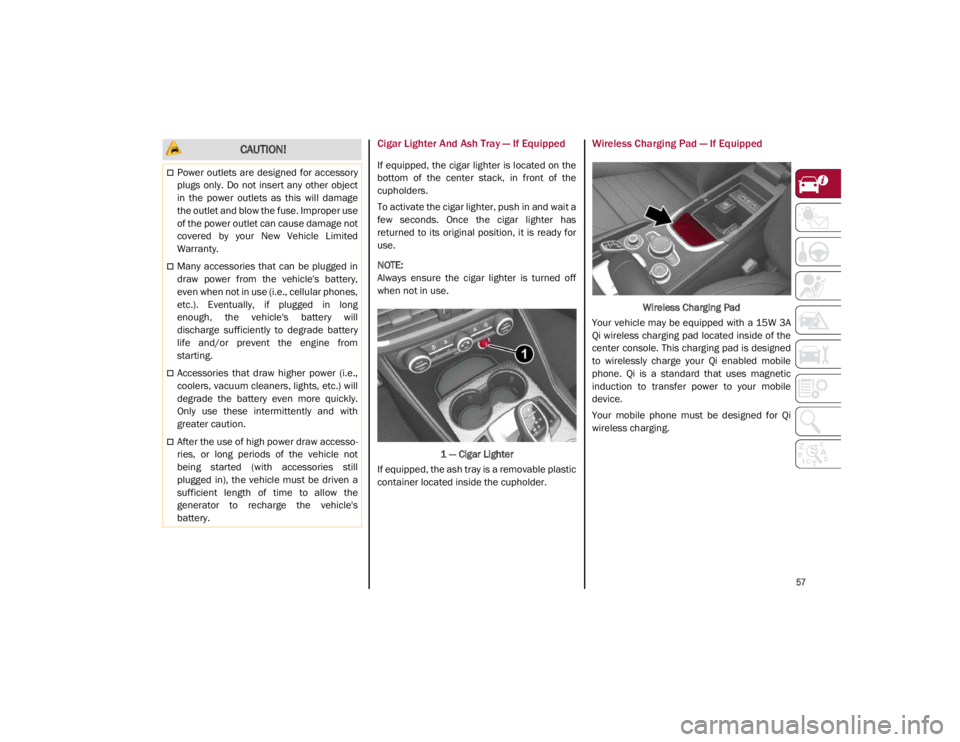
If equipped, the cigar lighter is located on the
bottom of the center stack, in front of the
cupholders.
To activate the cigar lighter, push in and wait a
few seconds. Once the cigar lighter has
returned to its original position, it is ready for
use.
NOTE:
Always ensure the cigar lighter is turned off
when not in use.1 — Cigar Lighter
If equipped, the ash tray is a removable plastic
container located inside the cupholder.
Wireless Charging Pad — If Equipped
Wireless Charging Pad
Your vehicle may be equipped with a 15W 3A
Qi wireless charging pad located inside of the
center console. This charging pad is designed
to wirelessly charge your Qi enabled mobile
phone. Qi is a standard that uses magnetic
induction to transfer power to your mobile
device.
Your mobile phone must be designed for Qi
wireless charging.
CAUTION!
Power outlets are designed for accessory
plugs only. Do not insert any other object
in the power outlets as this will damage
the outlet and blow the fuse. Improper use
of the power outlet can cause damage not
covered by your New Vehicle Limited
Warranty.
Many accessories that can be plugged in
draw power from the vehicle's battery,
even when not in use (i.e., cellular phones,
etc.). Eventually, if plugged in long
enough, the vehicle's battery will
discharge sufficiently to degrade battery
life and/or prevent the engine from
starting.
Accessories that draw higher power (i.e.,
coolers, vacuum cleaners, lights, etc.) will
degrade the battery even more quickly.
Only use these intermittently and with
greater caution.
After the use of high power draw accesso -
ries, or long periods of the vehicle not
being started (with accessories still
plugged in), the vehicle must be driven a
sufficient length of time to allow the
generator to recharge the vehicle's
battery.
21_GA_OM_EN_USC_t.book Page 57
Page 64 of 284
GETTING TO KNOW YOUR VEHICLE
62
HOOD
Opening
To open the hood, two latches must be
released.
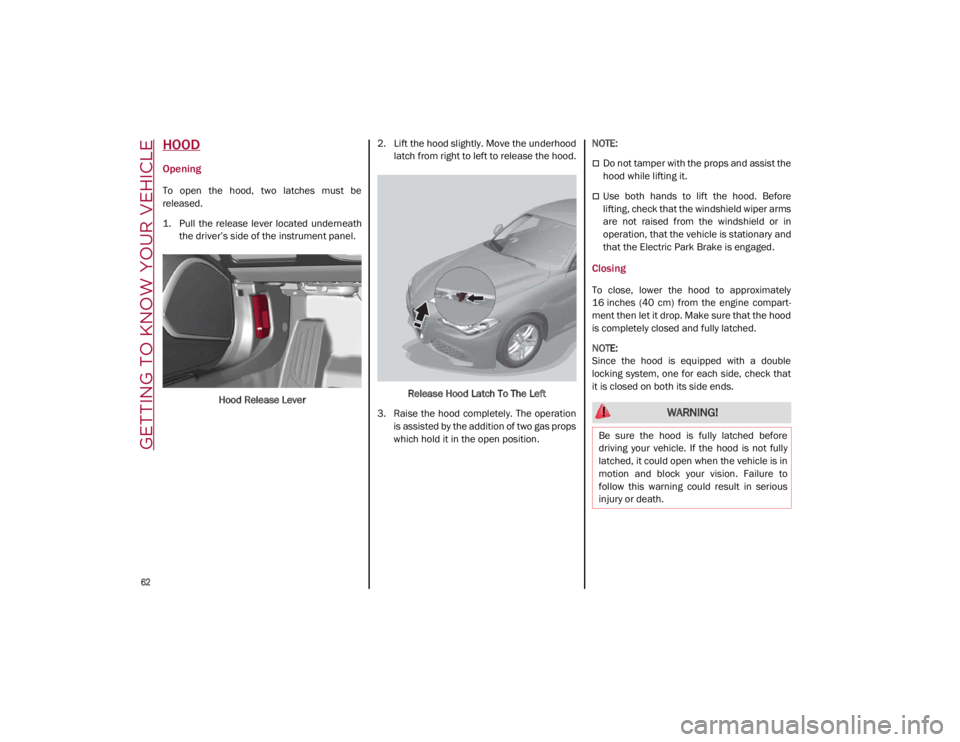
1. Pull the release lever located underneaththe driver’s side of the instrument panel.
Hood Release Lever 2. Lift the hood slightly. Move the underhood
latch from right to left to release the hood.
Release Hood Latch To The Left
3. Raise the hood completely. The operation is assisted by the addition of two gas props
which hold it in the open position.
NOTE:
Do not tamper with the props and assist the
hood while lifting it.
Use both hands to lift the hood. Before
lifting, check that the windshield wiper arms
are not raised from the windshield or in
operation, that the vehicle is stationary and
that the Electric Park Brake is engaged.
Closing
To close, lower the hood to approximately
16 inches (40 cm) from the engine compart
-
ment then let it drop. Make sure that the hood
is completely closed and fully latched.
NOTE:
Since the hood is equipped with a double
locking system, one for each side, check that
it is closed on both its side ends.
WARNING!
Be sure the hood is fully latched before
driving your vehicle. If the hood is not fully
latched, it could open when the vehicle is in
motion and block your vision. Failure to
follow this warning could result in serious
injury or death.
21_GA_OM_EN_USC_t.book Page 62
Page 65 of 284
63
TRUNK
The trunk unlocking is electrically operated and
is deactivated when the vehicle is in motion.
Opening
Opening From The Outside
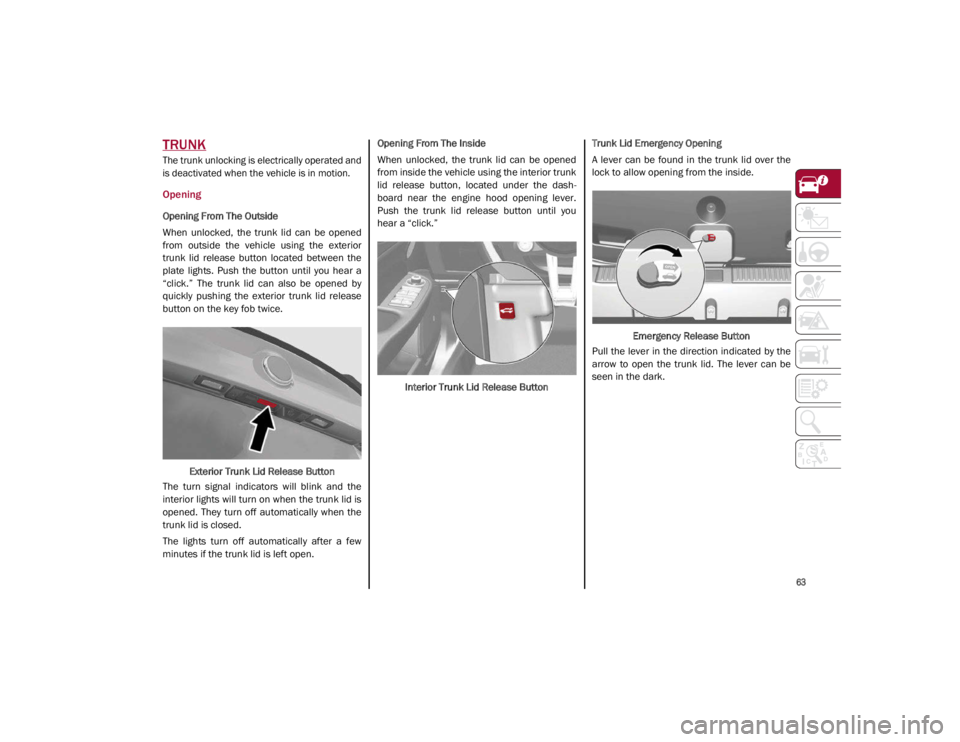
When unlocked, the trunk lid can be opened
from outside the vehicle using the exterior
trunk lid release button located between the
plate lights. Push the button until you hear a
“click.” The trunk lid can also be opened by
quickly pushing the exterior trunk lid release
button on the key fob twice.Exterior Trunk Lid Release Button
The turn signal indicators will blink and the
interior lights will turn on when the trunk lid is
opened. They turn off automatically when the
trunk lid is closed.
The lights turn off automatically after a few
minutes if the trunk lid is left open. Opening From The Inside
When unlocked, the trunk lid can be opened
from inside the vehicle using the interior trunk
lid release button, located under the dash
-
board near the engine hood opening lever.
Push the trunk lid release button until you
hear a “click.”
Interior Trunk Lid Release Button Trunk Lid Emergency Opening
A lever can be found in the trunk lid over the
lock to allow opening from the inside.
Emergency Release Button
Pull the lever in the direction indicated by the
arrow to open the trunk lid. The lever can be
seen in the dark.
21_GA_OM_EN_USC_t.book Page 63
Page 67 of 284

65
ENVIRONMENTAL PROTECTION
SYSTEMS
The following systems are used for reducing
engine emissions:
Catalytic Converter
Oxygen Sensors
Evaporation Control System
ACTIVE AERODYNAMIC SPOILER
(QUADRIFOGLIO VEHICLES)
Carbon Fiber Active Aero Front Spoiler
This is an automatic device working at the
vehicle speed to regulate air flow in the lower
part of the vehicle. It allows higher reactivity at
average speeds and higher vehicle stability at
high speeds.
NOTE:
The Active Aero Spoiler is active in the
Dynamic or RACE mode of the Alfa DNA Pro
Selector; it is not active in any mode when
external temperatures are near or below zero.Front Fascia
If there is a fault, a generic failure icon will light
up on the instrument panel display, along with
a message that will identify the type of
malfunction. See an authorized dealer if a
fault occurs.
21_GA_OM_EN_USC_t.book Page 65
Page 69 of 284

67
Quadrifoglio Instrument Cluster
1. Tachometer
2. Digital Engine Oil Temperature Gauge With Overheating Warning Light
3. Driver Interactive Display
4. Digital Fuel Level Gauge (The triangle on the left side of the symbol indicates that
the Fuel Door Location is on the left side of
the vehicle)
5. Speedometer (Speed Indicator)
Tachometer
The Tachometer indicates the engine Revolu -
tions Per Minute (Giri).
Adjusting Instrument Panel Lighting (Bright -
ness Sensor)
Inside the Tachometer there is a light sensor
capable of detecting light and adjusting the
brightness of the instrument panel and the
Information and Entertainment System display.
Engine Oil Temperature Gauge
The digital indicator monitors the temperature
of the engine oil and starts supplying indica -
tions when the oil temperature reaches
approximately 122°F (50°C).
Under normal usage, the temperature should
remain around the middle of the digital scale
according to the working conditions.
21_GA_OM_EN_USC_t.book Page 67
Page 70 of 284

GETTING TO KNOW YOUR INSTRUMENT PANEL
68
The Engine Oil Temperature warning light
will turn on to signal the excessive increase of
the engine oil temperature.
In the event of excessive engine oil tempera-
ture, stop the engine immediately and contact
an authorized dealer.
Fuel Level Gauge
The digital fuel gauge monitors the amount of
fuel in the tank.
When the Fuel Level warning light turns on,
a message is displayed, and a chime will
sound when 2.3 Gallons (9.0 L) of fuel are left
in the tank.
Proceeding further, the second white notch
will go off and the last one will become red,
together with the indication "E" present at the
bottom of the tank.
Fuel Level Gauge
NOTE:
If the low fuel warning light turns on, refuel the
vehicle at your nearest fuel station.
Speedometer
The speedometer shows the vehicle speed in
miles per hour and/or kilometers per hour
(mph/km/h).
INSTRUMENT CLUSTER
DISPLAY
Instrument Cluster Display Description
This vehicle is equipped with a driver interac
-
tive display that is located in the instrument
cluster.
When one or more of the doors have been
opened or closed and the ignition is in the OFF
position, the instrument cluster will display the
vehicle mileage for a few seconds.
Reconfigurable Instrument Cluster Display
During operation, the instrument cluster
display is divided into multiple sections which
show driving data, warnings and failure indica -
tions.
Instrument Cluster Display
Reconfigurable Display Items
1. External Lights (Low Beam/High Beam)Display
2. Front, Side Anti-Collision Systems, Cruise Control Change Information
3. Speed Limiter Display
4. Driving Assistance Systems (Forward Colli -
sion Warning (FCW), Lane Departure
Warning (LDW), Highway Assist System
(HAS)) Information Display
5. Active Cruise Control (ACC) / Cruise Control (CC) Information Display
CAUTION!
Do not travel with the fuel tank almost
empty: any gaps in fuel supply could
damage the catalytic converter.
21_GA_OM_EN_USC_t.book Page 68
Page 73 of 284

71
Alternative Performance
The displayed parameters vary depending
on the active mode. The modes can be se-
lected through the “Alfa DNA™” system
and are as follows:
Normal and Advanced Efficiency
The display graphically shows the values of:
○ instantaneous consumption
○ average fuel consumption (based on “Trip A”);
Below a certain speed value, when the ac -
celerator pedal is not pressed or in the
event of failure, dashes are displayed in
place of the consumption value ("– –. –").
Normal and Advanced Efficiency Dynamic
The display graphically shows the values of:
○ accelerator pedal position (expressed in percentage);
○ brake pedal position (expressed in percentage);
○ engine coolant temperature (H = hot C = cold).
Dynamic
Race (If Equipped)
The display graphically shows the values of:
○ engine torque;
○ turbocharger pressure;
○ engine oil pressure (L = low pressure/H= high pres -
sure).
NOTE:
The engine torque and turbocharger pressure
values vary according to the engine type.
Race
Dynamic
Acceleration Gauge
The displayed parameters are related to
vehicle stability, the graphs illustrate the
trend of the longitudinal/lateral accelera -
tions (G-meter information), considering
gravity acceleration as a reference unit.
Lateral acceleration peaks are also indi -
cated.
21_GA_OM_EN_USC_t.book Page 71