Page 28 of 418

28
For more information on the Lighting control stalk, refer to the corresponding section.
Warning / indicator lampStateCauseAction / Observations
Front foglampsfixed.The front foglamps are switched on using the ring on the lighting control stalk.
Turn the ring on the lighting control stalk rear ward once to switch off the front foglamps.
Sidelampsfixed.The lighting stalk is in the "Sidelamps" position.
Left-hand direction indicator
flashing with buzzer.The lighting stalk has been pushed down.
Right-hand direction indicator
flashing with buzzer.The lighting stalk has been pushed up.
Dipped beam headlampsfixed.The lighting stalk is in the "Dipped beam headlamps" position.
Main beam headlampsfixed.The lighting stalk has been pulled towards you.Pull the stalk to return to dipped beam headlamps.
Lane Depar ture Alertfixed.The Lane Departure Alert has been activated.The Lane Departure Alert is on.For more information on the Lane Departure Alert, refer to the corresponding section.
Instruments
Page 37 of 418
37
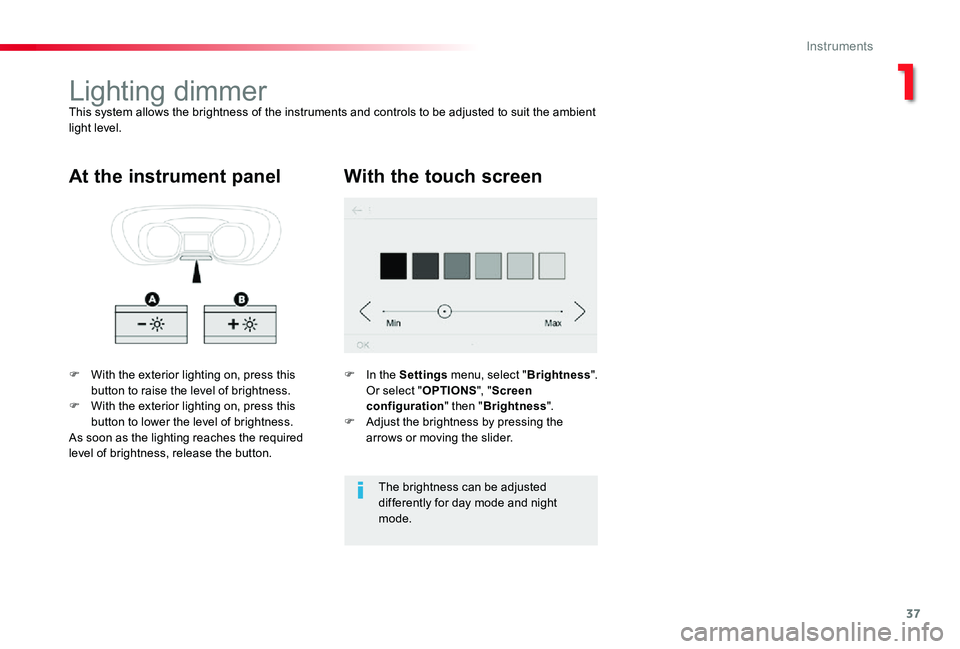
Lighting dimmerThis system allows the brightness of the instruments and controls to be adjusted to suit the ambient light level.
F With the exterior lighting on, press this button to raise the level of brightness.F With the exterior lighting on, press this button to lower the level of brightness.As soon as the lighting reaches the required
level of brightness, release the button.
At the instrument panelWith the touch screen
F In the Settings menu, select "Brightness". Or select "OPTIONS", "Screen configuration" then "Brightness".F Adjust the brightness by pressing the arrows or moving the slider.
The brightness can be adjusted differently for day mode and night mode.
1
Instruments
Page 49 of 418

49
Electronic engine immobiliser
The remote control contains an electronic chip which has a special code. When the ignition is switched on, this code must be recognised in order for starting to be possible.This electronic engine immobiliser locks the engine management system a few moments after the ignition is switched off and prevents
starting of the engine by anyone who does not have the key.
F Press this button
Locating your vehicle
This function allows you to identify your vehicle from a distance, particularly in poor light. Your vehicle must have been locked for more than five seconds.
This switches on the courtesy lamps and the
direction indicators flash for about ten seconds.
Remote operation of lighting
A short press on this button switches on the lighting remotely (sidelamps, dipped beam headlamps and number plate lamps).
A second press on this button before the end of the timed period cancels the remote lighting.
Anti-theft protection
In the event of a fault, you are informed by illumination of this warning lamp, an audible signal and a message in the screen.
Keep safely, away from your vehicle, the label attached to the keys given to you on acquisition of the vehicle.
In this case, your vehicle will not start; contact an authorized Toyota dealer or repairer, or another duly qualified and equipped professional as soon as possible.
If fitted to your vehicle.
2
Access
Page 51 of 418
51
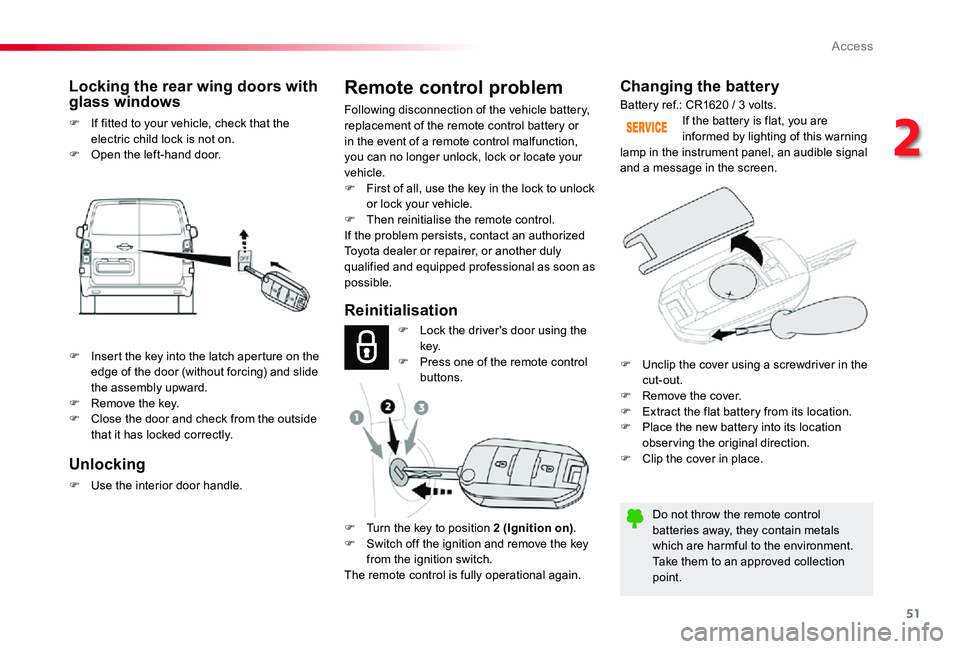
Changing the battery
Do not throw the remote control batteries away, they contain metals which are harmful to the environment.Take them to an approved collection point.
If the battery is flat, you are informed by lighting of this warning lamp in the instrument panel, an audible signal and a message in the screen.
Reinitialisation
Locking the rear wing doors with glass windows
F If fitted to your vehicle, check that the electric child lock is not on.F Open the left-hand door.
Battery ref.: CR1620 / 3 volts.
F Lock the driver's door using the key.F Press one of the remote control buttons.
F Turn the key to position 2 (Ignition on).F Switch off the ignition and remove the key from the ignition switch.The remote control is fully operational again.
Unlocking
F Use the interior door handle.
Remote control problem
Following disconnection of the vehicle battery, replacement of the remote control battery or in the event of a remote control malfunction, you can no longer unlock, lock or locate your vehicle.F First of all, use the key in the lock to unlock or lock your vehicle.F Then reinitialise the remote control.If the problem persists, contact an authorized
Toyota dealer or repairer, or another duly qualified and equipped professional as soon as possible.
F Insert the key into the latch aperture on the edge of the door (without forcing) and slide the assembly upward.F Remove the key.F Close the door and check from the outside that it has locked correctly.
F Unclip the cover using a screwdriver in the cut-out.F Remove the cover.F Extract the flat battery from its location.F Place the new battery into its location obser ving the original direction.F Clip the cover in place.
2
Access
Page 59 of 418

59
If your vehicle is not fitted with an alarm, deadlocking is confirmed by fixed illumination of the direction indicators for about two seconds.
With a rear tailgate
F To lock the vehicle, with the remote control in the recognition zone A, press the rear tailgate locking control.F To deadlock the vehicle, press the control again within five seconds.
Locating your vehicle
This function allows you to identify your vehicle from a distance, particularly in poor light. Your vehicle must have been locked for more than five seconds.
F Press this button
This switches on the courtesy lamps and the
direction indicators flash for about ten seconds.
Remote operation of lighting
If fitted to your vehicle.
A short press on this button switches on the lighting remotely (sidelamps, dipped beam headlamps and number plate lamps).
A second press on this button before the end of the timed period cancels the remote lighting.
Anti-theft protection
Electronic engine immobiliser
The remote control contains an electronic chip which has a special code. When the ignition is switched on, this code must be recognised in order for starting to be possible.This electronic engine immobiliser locks the engine management system a few moments after the ignition is switched off and prevents starting of the engine by anyone who does not have the key.
In the event of a fault, you are informed by illumination of this warning lamp, an audible signal and a message in the screen.In this case, your vehicle will not start; contact an authorized Toyota dealer or repairer, or another duly qualified and equipped professional as soon as possible.
Keep safely, away from your vehicle, the label attached to the keys given to you on acquisition of the vehicle.
2
Access
Page 121 of 418
121
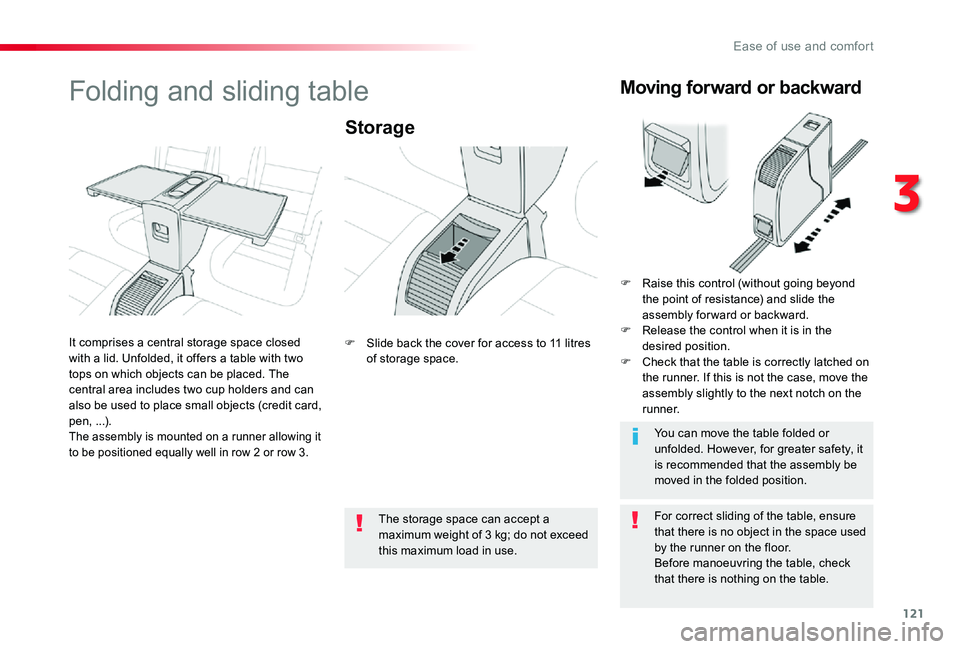
Folding and sliding table
Storage
For correct sliding of the table, ensure that there is no object in the space used by the runner on the floor.Before manoeuvring the table, check that there is nothing on the table.
The storage space can accept a maximum weight of 3 kg; do not exceed
this maximum load in use.
You can move the table folded or unfolded. However, for greater safety, it is recommended that the assembly be moved in the folded position.
It comprises a central storage space closed with a lid. Unfolded, it offers a table with two tops on which objects can be placed. The central area includes two cup holders and can also be used to place small objects (credit card, pen, ...).The assembly is mounted on a runner allowing it
to be positioned equally well in row 2 or row 3.
F Slide back the cover for access to 11 litres of storage space.
Moving forward or backward
F Raise this control (without going beyond the point of resistance) and slide the assembly for ward or backward.F Release the control when it is in the desired position.F Check that the table is correctly latched on the runner. If this is not the case, move the assembly slightly to the next notch on the r u n n e r.
3
Ease of use and comfort
Page 125 of 418
125
The air conditioning system only operates with the engine running.
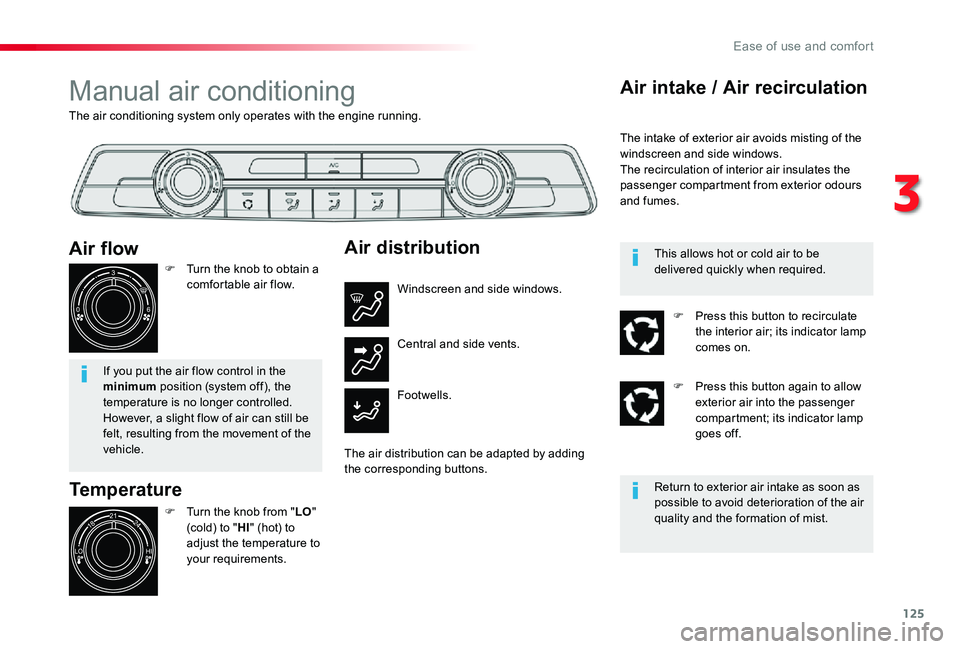
Manual air conditioning
Temperature
F Turn the knob from "LO" (cold) to "HI" (hot) to adjust the temperature to your requirements.
Air flow
F Turn the knob to obtain a comfortable air flow.
If you put the air flow control in the minimum position (system off), the temperature is no longer controlled. However, a slight flow of air can still be felt, resulting from the movement of the vehicle.
Air distribution
Windscreen and side windows.
Footwells.
Central and side vents.
The air distribution can be adapted by adding the corresponding buttons.
Air intake / Air recirculation
The intake of exterior air avoids misting of the windscreen and side windows.The recirculation of interior air insulates the passenger compartment from exterior odours and fumes.
Return to exterior air intake as soon as possible to avoid deterioration of the air quality and the formation of mist.
This allows hot or cold air to be delivered quickly when required.
F Press this button to recirculate the interior air; its indicator lamp comes on.
F Press this button again to allow exterior air into the passenger compartment; its indicator lamp goes off.
3
Ease of use and comfort
Page 130 of 418
130
Switching the system off
F Press this button until the fan symbol disappears.
This action switches off all of the functions of the system.The temperature is no longer controlled. A slight flow of air, resulting from the movement of the vehicle, remains perceptible however.
Avoid driving for too long with the system switched off (risk of misting and of deterioration of the air quality).
Air intake / Air recirculation
The intake of exterior air avoids misting of the windscreen and side windows.The recirculation of interior air insulates the passenger compartment from exterior odours and smoke.
Return to exterior air intake as soon as possible to avoid deterioration of the air quality and the formation of mist.
This allows hot or cold air to be delivered quickly when required.
F Press this button to recirculate the interior air; the symbol appears.
F Press this button again to allow exterior air into the passenger compartment; the symbol disappears.
F Press this button to switch the system on again.
Ease of use and comfort