Page 148 of 418
148
Temporarily keeping the dipped beam headlamps on after the vehicle's ignition has been switched off makes the driver's exit easier when the light is poor.
Manual guide-me-home
lighting
F With the ignition off, "flash" the headlamps using the lighting stalk.
F A further "headlamp flash" switches the function off.
Switching off
The manual guide-me-home lighting switches off automatically after a set time.
Automatic guide-me-home
lighting
When the automatic illumination of headlamps function is activated, under low ambient light the dipped beam headlamps come on automatically when the ignition is switched off.
Programming
Switching on
With audio system or touch screen
The activation, deactivation and duration of guide-me-home lighting are set in the vehicle configuration menu.
Lighting and visibility
Page 149 of 418
149
Exterior welcome lighting
The remote switching on of the lighting makes your approach to the vehicle easier in poor light. It is activated when the lighting control is in the "AUTO" position and the level of light detected by the sunshine sensor is low.
Switching on
F Press the open padlock on the remote control or one of the front door handles with Smart Entry & Start System.
Switching off
The exterior welcome lighting switches off automatically after a set time, when the ignition is switched on or on locking the vehicle.
Programming
The dipped beam headlamps and sidelamps come on; your vehicle is also unlocked.
With audio system or touch screen
The activation, deactivation and duration of the welcome lighting can be set via the vehicle configuration menu.
4
Lighting and visibility
Page 150 of 418
150
ProgrammingCornering lighting
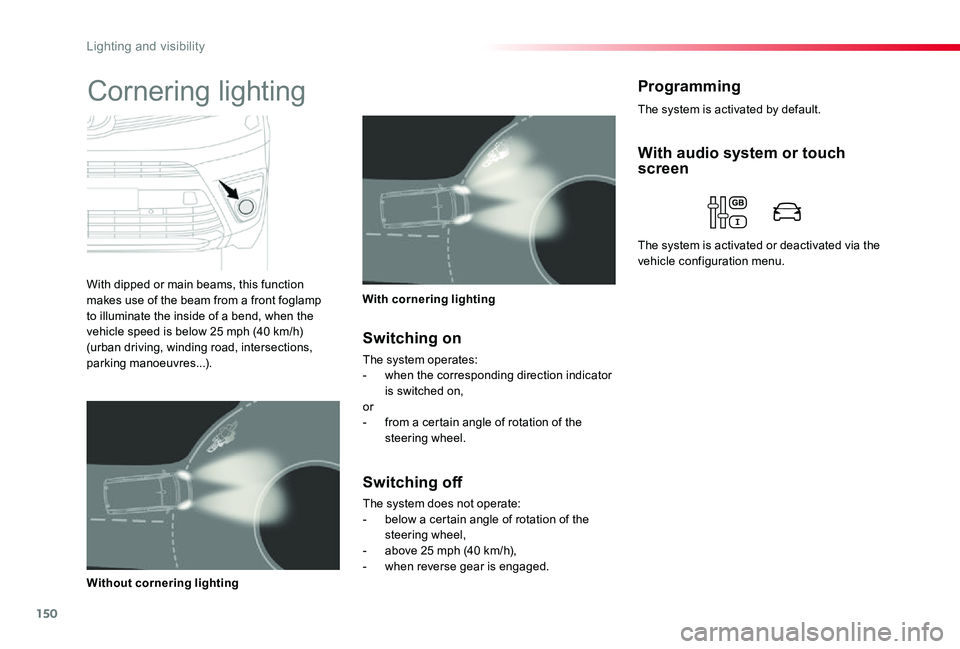
With dipped or main beams, this function makes use of the beam from a front foglamp to illuminate the inside of a bend, when the vehicle speed is below 25 mph (40 km/h) (urban driving, winding road, intersections, parking manoeuvres...).
With cornering lighting
Without cornering lighting
Switching on
The system operates:- when the corresponding direction indicator is switched on,or- from a certain angle of rotation of the steering wheel.
Switching off
The system does not operate:- below a certain angle of rotation of the steering wheel,- above 25 mph (40 km/h),- when reverse gear is engaged.
With audio system or touch screen
The system is activated or deactivated via the vehicle configuration menu.
The system is activated by default.
Lighting and visibility
Page 151 of 418

151
Automatic headlamp dipping
System which automatically changes between dipped and main beam according to the ambient light level and the driving conditions, using a camera located at the top of the windscreen.
Activation / deactivation
F Put the lighting control stalk ring in the "AUTO" or dipped/main beam position.
This automatic headlamp dipping system is a driving aid.The driver remains responsible for the vehicle's lighting and for adapting its settings to the levels of brightness and visibility and the traffic conditions.
The system will be operational as soon
as you have exceeded 15 mph (25 km/h).If the speed drops below 9 mph (15 km/h), the system no longer operates.
F Flash the headlamps (going beyond the stiff point) to activate the function.
F Flashing the headlamps again pauses the function and the lighting system
changes to "automatic illumination of headlamps".
Pause
The driver can inter vene at any time if the situation requires a change in the state of the headlamps.
The driver can inter vene at any time if the circumstances dictate by pulling on the lighting control stalk to switch between main and dipped beam.
Flashing the headlamps does not deactivate the system.The state of the system stays in memory when the ignition is switched off.
4
Lighting and visibility
Page 152 of 418
152
The system may suffer interference or not work correctly:- under conditions of poor visibility (for example, snowfall, heavy rain or thick fog, ...),- if the windscreen is dirty, misted or obscured (by a sticker, ...) in front of the camera,- if the vehicle is facing highly reflective signs.If the fog is too dense, the system is automatically deactivated.
The system is not able to detect:- road users that do not have their own lighting, such as pedestrians,- road users whose lighting is obscured, such as vehicles running behind a safety barrier (on a motor way, for example),- road users at the top or bottom of
a steep slope, on twisty roads, on crossroads.With the touch screen
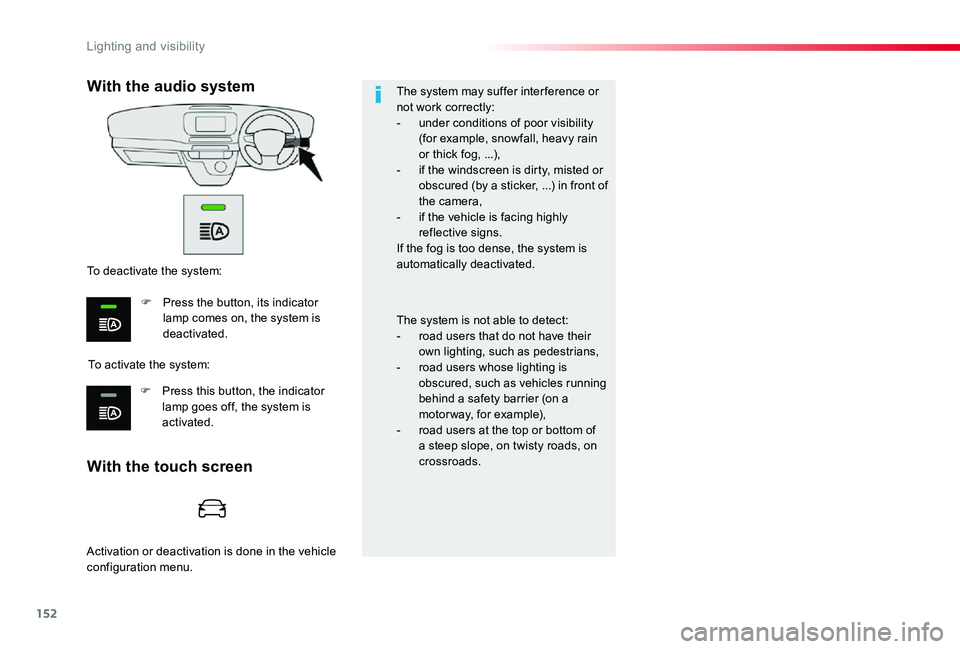
With the audio system
To activate the system:
To deactivate the system:
F Press the button, its indicator lamp comes on, the system is deactivated.
F Press this button, the indicator lamp goes off, the system is activated.
Activation or deactivation is done in the vehicle configuration menu.
Lighting and visibility
Page 153 of 418
153
Programming
Interior mood
lighting
The dimmed passenger compartment lighting improves visibility in the vehicle when the light is poor.
At night, the front roof lighting and skyview® lighting (if fitted to your vehicle) come on automatically when the sidelamps are switched on.The interior mood lighting switches off automatically when the sidelamps are switched off.
Switching on
To avoid causing a nuisance to other road users, the beams of the halogen headlamps should be adjusted according to the load in the vehicle.
0 - 1 or 2 people in the front seats.1 - 5 people.2 - 6 to 9 people.3 - Driver + maximum authorised loads.
The initial setting is position "0".
Manual headlamp beam
height adjustment
With audio system or touch screen
The activation, deactivation and brightness of the mood lighting can be set via the vehicle configuration menu.
4
Lighting and visibility
Page 154 of 418
154
Wiper control stalk
Manual controls
The wipers are controlled directly by the driver.
Programming
Your vehicle may also include some functions that can be configured:- automatic rain sensitive windscreen wipers,- rear wiping on engaging reverse gear.
Windscreen wipers
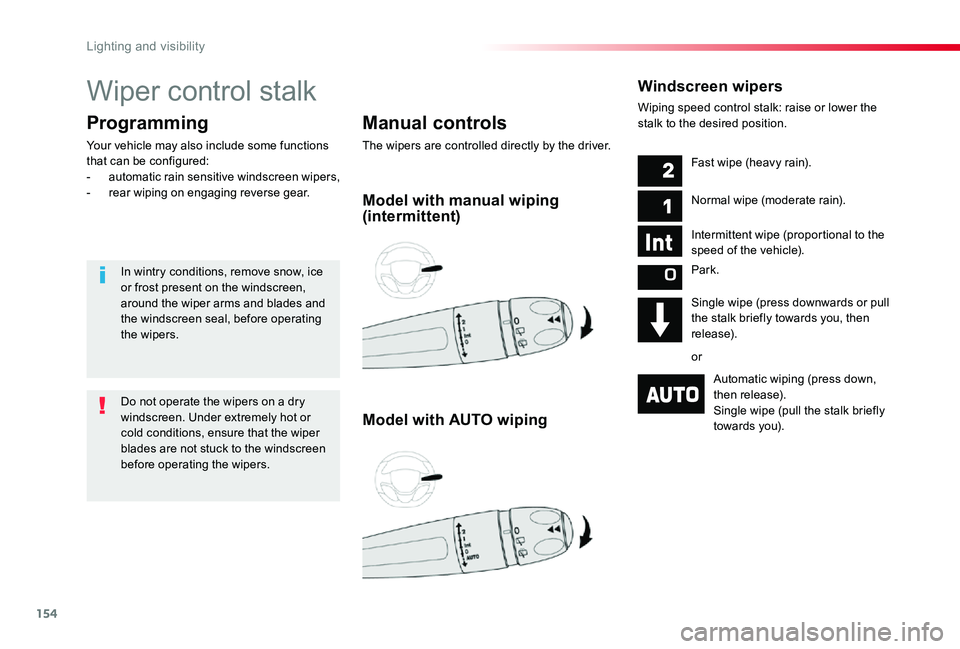
Wiping speed control stalk: raise or lower the stalk to the desired position.
Model with manual wiping (intermittent)
Model with AUTO wiping
Fast wipe (heavy rain).
Normal wipe (moderate rain).
Intermittent wipe (proportional to the
speed of the vehicle).
Park.
Single wipe (press downwards or pull the stalk briefly towards you, then release).
or
Automatic wiping (press down, then release).Single wipe (pull the stalk briefly towards you).
Do not operate the wipers on a dry windscreen. Under extremely hot or cold conditions, ensure that the wiper blades are not stuck to the windscreen before operating the wipers.
In wintry conditions, remove snow, ice or frost present on the windscreen, around the wiper arms and blades and the windscreen seal, before operating the wipers.
Lighting and visibility
Page 155 of 418

155
Automatic rain sensitive windscreen wipers
Switching on
Briefly push the control stalk downwards.A wiping cycle confirms that the instruction has been accepted.This warning lamp comes on in the instrument panel and a message is displayed.
Briefly push the control stalk downwards again, or place the control stalk in another position (Int, 1 or 2).This warning lamp goes off in the instrument panel and a message is displayed.
Switching off
The automatic rain sensitive windscreen wipers must be reactivated by pushing the control stalk downwards, if the ignition has been off for more than one minute.
The windscreen wipers operate automatically, without any action on the part of the driver, if rain is detected (sensor behind the rear view mirror), adapting their speed to the intensity of the rainfall.
Do not cover the rain sensor, linked with the sunshine sensor and located in the top of the windscreen behind the rear view m i r r o r.Switch off the automatic rain sensitive wipers when using an automatic car wash.In winter, it is advisable to wait until the windscreen is completely clear of ice before activating the automatic rain sensitive wipers.
Operating fault
If a fault occurs with the automatic rain sensitive wipers, the wipers will operate in intermittent mode.Have it checked by an authorized Toyota dealer or repairer, or another duly qualified and
equipped professional.
Park.
Intermittent wipe.
Wash-wipe (set duration).
Rear wiper
4
Lighting and visibility