2020 TOYOTA PROACE VERSO engine
[x] Cancel search: enginePage 215 of 418

215
Going into engine
START mode
START mode is invoked automatically in certain temporary conditions (examples: battery charge, engine temperature, braking assistance, air conditioning setting) to assure correct operation of the system and mainly when:- you open the driver's door,- you open a sliding side door,- you unfasten the driver's seat belt,- the speed of the vehicle exceeds 15 mph (25 km/h) or 2 mph (3 km/h) (depending on the engine) with a manual gearbox,- the speed of the vehicle exceeds 2 mph (3 km/h) with an automatic gearbox.
Special cases: START invoked automatically
In this case the "ECO" warning lamp flashes for a few seconds, then goes of f.
This operation is perfectly normal.
If your vehicle has a manual gearbox, the "ECO" indicator lamp goes off in the instrument panel and the engine restarts automatically when you fully depress the clutch pedal.
If your vehicle has an automatic gearbox, the "ECO" lamp goes off in the instrument panel
and the engine restarts automatically when:- you release the brake pedal with the gear selector in position D or M,- you are in position N with the brake pedal released and you move the gear selector to position D or M,- you engage reverse.
If your vehicle has an electronic gearbox, the "ECO" lamp goes off in the instrument panel and the engine restarts automatically when:- you release the brake pedal with the gear selector in position A ou M,- you are in position N with the brake pedal released and you move the gear selector to position A or M,- you enegage reverse.
Special cases: STOP mode not available
STOP mode is not invoked in certain temporary conditions (examples: battery charge, engine temperature, braking assistance, ambient temperature) to assure correct operation of the system and mainly when:- the vehicle is on a steep slope (rising or falling),- the driver's door is open,- a sliding side door is open,- the driver's seat belt is not fastened,- the vehicle has not exceeded 6 mph (10 km/h) since the last engine start by the driver,- the electric parking brake is applied or being applied,- the engine is needed to maintain a comfortable temperature in the passenger compartment,- demisting is active.
In this case, the "ECO" warning lamp flashes for a few seconds then goes of f.
This operation is perfectly normal.
6
Driving
Page 216 of 418

216
Deactivation / Activation
With the audio system
F Press the button, its indicator lamp comes on, the system is deactivated.
F Press this button, the indicator lamp goes off, the system is activated.
To deactivate the system:
With the touch screen
The system is reactivated automatically every time the engine is started by the driver.
If the system has been deactivated in STOP mode, the engine restarts immediately.
Opening the bonnetBefore doing anything under the bonnet, deactivate the Stop & Start system to avoid the risk of injury related to an automatic change to S TA R T m o d e .
Driving on flooded roads
Before driving through a flooded road, it is strongly recommended that you deactivate the Stop & Start system.For more information on Driving
advice, particularly on flooded roads, refer to the corresponding section.
To activate the system:
The system is activated and deactivated via the vehicle configuration menu.
Driving
Page 217 of 418

217
Operating fault
Depending on your vehicle's equipment:
Have it checked by an authorized Toyota dealer or repairer, or another duly qualified and equipped professional.In the event of a fault in STOP mode, the vehicle may stall.All of the instrument panel warning lamps come on.Depending on version, an alert message may also be displayed, asking you to place the gear lever in position N and put your foot on the brake pedal.With the vehicle stationary, you must switch off the ignition and then start the engine again.
The Stop & Start system requires a 12 V battery with a special specification and technology.
The warning lamp in this button flashes and a message appears, accompanied by an audible signal.
In the event of a fault with the system, this warning lamp flashes in the instrument panel.All work on this type of battery must be done by an authorized Toyota dealer or repairer, or another duly qualified and equipped professional.
For more information on the 12 V battery, refer to the corresponding section.
6
Driving
Page 218 of 418
218
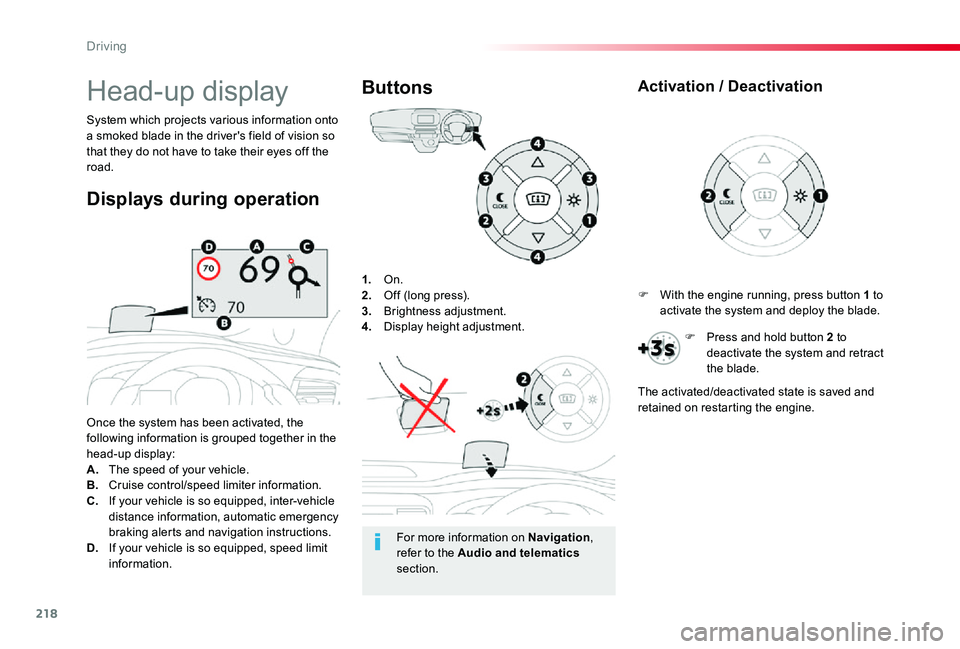
1. On.2. Off (long press).3. Brightness adjustment.4. Display height adjustment.
Once the system has been activated, the following information is grouped together in the head-up display:A. The speed of your vehicle.B. Cruise control/speed limiter information.C. If your vehicle is so equipped, inter-vehicle distance information, automatic emergency braking alerts and navigation instructions.D. If your vehicle is so equipped, speed limit information.
System which projects various information onto a smoked blade in the driver's field of vision so that they do not have to take their eyes off the road.
Buttons
Displays during operation
Head-up display
For more information on Navigation, refer to the Audio and telematics section.
F With the engine running, press button 1 to activate the system and deploy the blade.
Activation / Deactivation
F Press and hold button 2 to deactivate the system and retract the blade.
The activated/deactivated state is saved and retained on restarting the engine.
Driving
Page 219 of 418
219
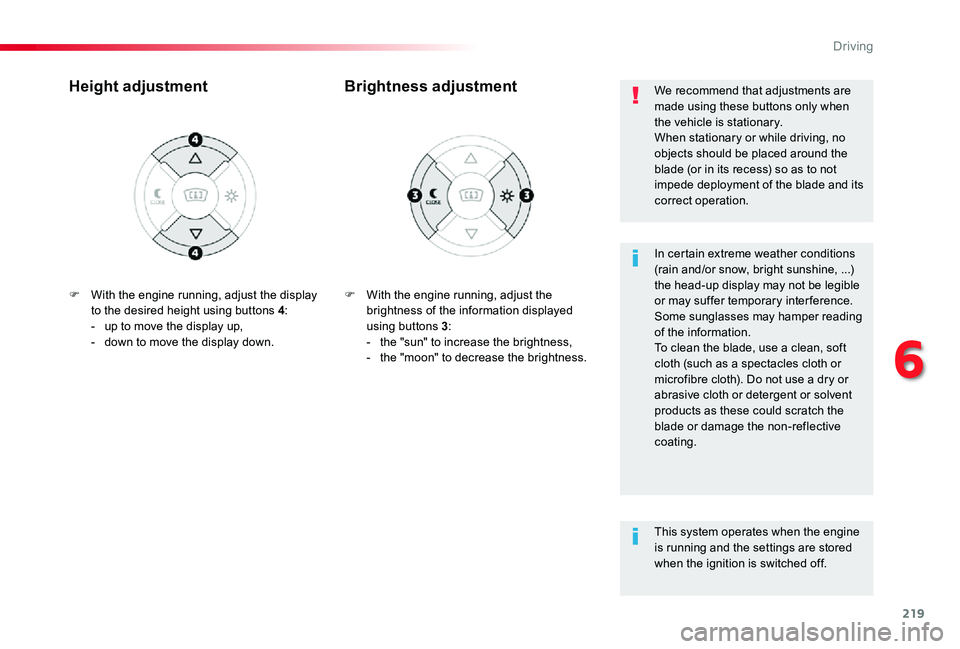
F With the engine running, adjust the brightness of the information displayed using buttons 3:- the "sun" to increase the brightness,- the "moon" to decrease the brightness.
Brightness adjustmentHeight adjustment
In certain extreme weather conditions (rain and/or snow, bright sunshine, ...) the head-up display may not be legible or may suffer temporary inter ference.Some sunglasses may hamper reading of the information.To clean the blade, use a clean, soft cloth (such as a spectacles cloth or microfibre cloth). Do not use a dry or abrasive cloth or detergent or solvent products as these could scratch the blade or damage the non-reflective coating.
We recommend that adjustments are made using these buttons only when the vehicle is stationary.When stationary or while driving, no objects should be placed around the blade (or in its recess) so as to not impede deployment of the blade and its correct operation.
This system operates when the engine
is running and the settings are stored when the ignition is switched off.
F With the engine running, adjust the display to the desired height using buttons 4:- up to move the display up,- down to move the display down.
6
Driving
Page 234 of 418
234
MEM
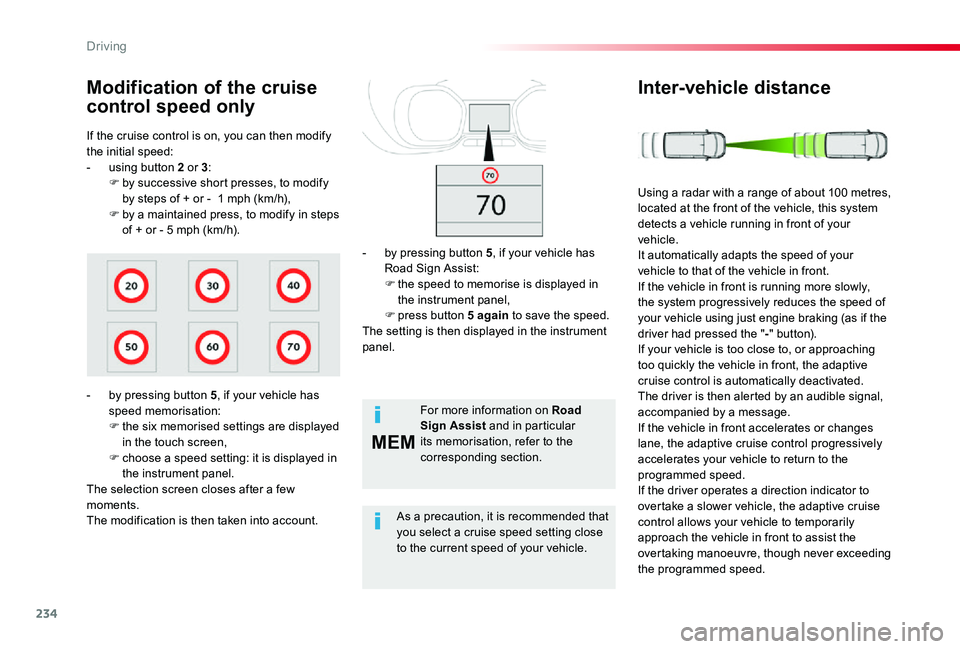
If the cruise control is on, you can then modify the initial speed:- using button 2 or 3:F by successive short presses, to modify by steps of + or - 1 mph (km/h),F by a maintained press, to modify in steps of + or - 5 mph (km/h).
Modification of the cruise
control speed only
- by pressing button 5, if your vehicle has speed memorisation:F the six memorised settings are displayed in the touch screen,F choose a speed setting: it is displayed in the instrument panel.The selection screen closes after a few moments.The modification is then taken into account.
For more information on Road Sign Assist and in particular its memorisation, refer to the corresponding section.
As a precaution, it is recommended that you select a cruise speed setting close
to the current speed of your vehicle.
- by pressing button 5, if your vehicle has Road Sign Assist:F the speed to memorise is displayed in the instrument panel,F press button 5 again to save the speed.The setting is then displayed in the instrument panel.
Inter-vehicle distance
Using a radar with a range of about 100 metres, located at the front of the vehicle, this system detects a vehicle running in front of your vehicle.It automatically adapts the speed of your vehicle to that of the vehicle in front.If the vehicle in front is running more slowly, the system progressively reduces the speed of your vehicle using just engine braking (as if the driver had pressed the "-" button).If your vehicle is too close to, or approaching too quickly the vehicle in front, the adaptive cruise control is automatically deactivated. The driver is then alerted by an audible signal, accompanied by a message.If the vehicle in front accelerates or changes lane, the adaptive cruise control progressively accelerates your vehicle to return to the programmed speed.If the driver operates a direction indicator to overtake a slower vehicle, the adaptive cruise control allows your vehicle to temporarily approach the vehicle in front to assist the overtaking manoeuvre, though never exceeding the programmed speed.
Driving
Page 236 of 418

236
The following table describes the alerts and the messages displayed for the different driving situations.The display of these alerts is not sequential.
Driving situations and associated alerts
SymbolAssociated messageComments
No vehicle detected: the system operates as a standard cruise control.
Detection of a vehicle, at the limit of the range of the radar: the system operates as a standard cruise control.
"SPEED ADJUSTED"Detection of a vehicle that is too close or running at a speed lower than your vehicle's cruise speed setting.The system uses engine braking to slow your vehicle (within a limit of 20 mph (30 km/h)) and then hold it at the speed of the vehicle in front so as to obser ve the programmed inter-vehicle time.When automatically slowing down behind a vehicle, your true speed may be higher than the "adjusted speed" displayed.
"SPEED ADJUSTED"When the adjusted speed reaches the limit of regulation (speed setting less than 20 mph (30 km/h)), the adjusted speed flashes together with the speed setting to signal that automatic deactivation of the system is imminent.
"Cruise control paused"If the system exceeds the limit of speed adjustment possible by the system and in the absence of any reaction by the driver (operation of the direction indicator, change of lane, reduction of the speed of the vehicle), the system is automatically paused.The display of the deactivation message is accompanied by an audible signal.
Driving
Page 237 of 418
237
When the adaptive cruise control is automatically paused, it can only be reactivated when safe conditions are restored. The message "Activation not possible, conditions unsuitable" is displayed while reactivation is not possible.When the conditions allow, it is recommended that the function be reactivated by pressing button 2 ( S E T+) or 3 (SET-), which will make the current speed of your vehicle the new cruise speed setting, rather than by pressing button 4 (on/pause) which reactivates the cruise control using the old cruise speed setting, which may be very different from the current speed of your vehicle.
The speed regulation range is limited to a maximum difference of 20 mph (30 km/h) between the speed setting and the speed of the vehicle in front.Above this, the system goes into pause if the safe distance becomes too small.The adaptive cruise control uses only engine braking to slow the vehicle. Consequently the vehicle loses speed slowly, as when releasing the accelerator pedal.The system is paused automatically:- if the vehicle in front slows down too much or too suddenly, and the driver does not brake,- if a vehicle comes between your vehicle and the vehicle in front,- if the system does not slow the vehicle enough to continue to maintain a safe distance, for example when descending a steep hill.
Limits of operation
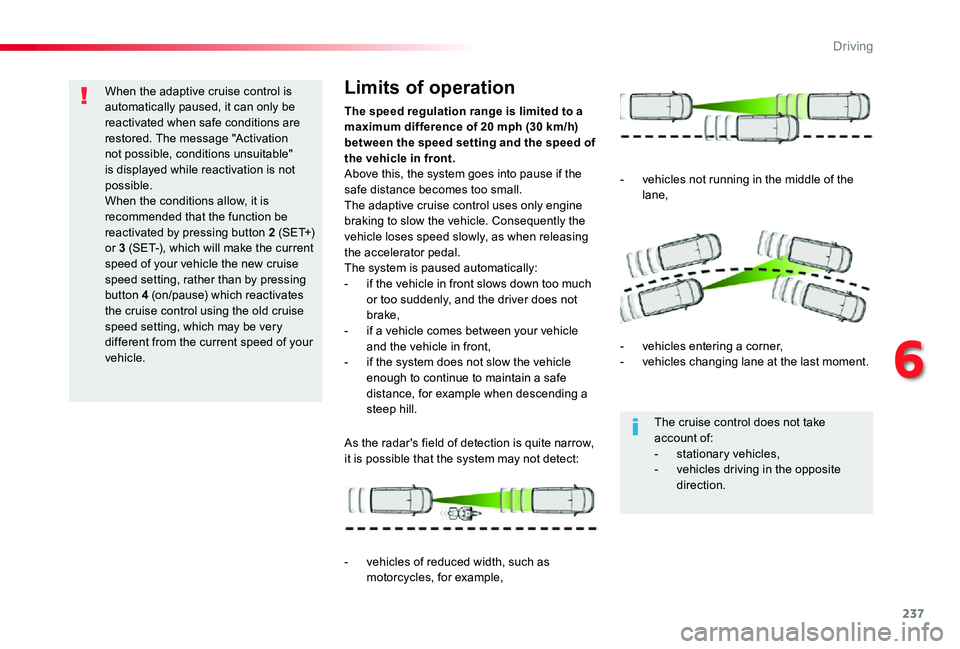
As the radar's field of detection is quite narrow, it is possible that the system may not detect:
- vehicles of reduced width, such as motorcycles, for example,
- vehicles not running in the middle of the lane,
- vehicles entering a corner,- vehicles changing lane at the last moment.
The cruise control does not take account of:- stationary vehicles,- vehicles driving in the opposite direction.
6
Driving