2020 Ram ProMaster City radio
[x] Cancel search: radioPage 320 of 350

MULTIMEDIA 317
STEERING WHEEL AUDIO CONTROLS — IF
EQUIPPED
The remote sound system controls are located on the back
surface of the steering wheel. Reach behind the wheel to
access the switches.Remote Sound System Controls(Back View Of Steering Wheel)
The right-hand control is a rocker type switch with a
push-button in the center. Pushing the top of the switch will
increase the volume, and pushing the bottom of the switch
will decrease the volume. The button located in the center of the right-hand control to
select the source (AM, FM, SiriusXM®, USB, AUX).
The left-hand control is a rocker type switch with a
push-button in the center. The function of the left hand
control is different depending on which mode you are in.
The following describes the left-hand control operation in
each mode.
Radio Operation
Pushing the top of the switch will “Seek” up for the next
listenable station and pushing the bottom of the switch will
“Seek” down for the next listenable station.
The button located in the center of the left-hand control will
tune to the next preset station that you have programmed in
the radio preset button.
Media Mode
Pushing the top of the switch once goes to the next track on
the selected media (AUX/USB/Bluetooth®). Pushing the
bottom of the switch once goes to the beginning of the
current track, or to the beginning of the previous track if it is
within eight seconds after the current track begins to play.9
2020_RAM_PROMASTER_CITY_OM_USA=GUID-7B6A7FCA-79B0-423F-95C5-ED2A949C3D13=1=en=.book Page 317
Page 322 of 350

MULTIMEDIA 319
• Manually enter the VIN(s) or upload a CSV file with yourVINs. A vehicle name is optional and can be added later.
Follow online instructions to complete your vehicle entry.
• Create a password and enter billing information. An email will be sent to you to complete the final step. After that,
you will be ready to log-in and access Verizon Connect
Fleet!
• You are good to go! You will receive an email confirming your vehicles are now online.
For more information, or to learn more, visit www.verizon-
connect.com/ram/ .
Ram Telematics General Information
Modification Statement
Magneti Marelli has not approved any changes or modifica -
tions to this device by the user. Any changes or modifications
could void the user’s authority to operate the equipment.
Magneti Marelli n'approuve aucune modification apportée à
l'appareil par l'utilisateur, quelle qu'en soit la nature. Tout
changement ou modification peuvent annuler le droit d'util -
isation de l'appareil par l'utilisateur. Interference Statement
This device complies with Part 15, 22, 24, and 27 of the FCC
and Industry Canada licence-exempt RSS standard(s). Oper
-
ation is subject to the following two conditions:(1) This
device may not cause interference, and(2) This device must
accept any interference, including interference that may
cause undesired operation of the device.
Le présent appareil est conforme aux CNR d'Industrie
Canada applicables aux appareils radio exempts de
licence.L'exploitation est autorisée aux deux conditions suiv -
antes:(1) l'appareil ne doit pas produire de brouillage, et(2)
l'utilisateur de l'appareil doit accepter tout brouillage
radioélectrique subi, même si le broulliage est susceptible
d'en compromettre le fonctionnement.
RF Exposure
This equipment complies with FCC and IC radiation expo -
sure limits set forth for an uncontrolled environment. The
antenna should be installed and operated with minimum
distance of 20 cm between the radiator and your body.
9
2020_RAM_PROMASTER_CITY_OM_USA=GUID-7B6A7FCA-79B0-423F-95C5-ED2A949C3D13=1=en=.book Page 319
Page 323 of 350

320 MULTIMEDIA
Cet appareil est conforme aux limites d'exposition aux
rayonnements de la IC pour environnement non contrôlé.
L'antenne doit être installé de façon à garder une distance
minmale de 20 centimètres entre la source de rayonnements
et votre corps.
RADIO OPERATION AND MOBILE PHONES
Under certain conditions, the mobile phone being on in your
vehicle can cause erratic or noisy performance from your
radio. This condition may be lessened or eliminated by relo-
cating the mobile phone. This condition is not harmful to the
radio. If your radio performance does not satisfactorily
“clear” by the repositioning of the phone, it is recommended
that the radio volume be turned down or off during mobile
phone operation when not using Uconnect (if equipped).
Regulatory And Safety Information
USA/CANADA
Exposure to Radio Frequency Radiation
The radiated output power of the internal wireless radio is
far below the FCC and IC radio frequency exposure limits.
Nevertheless, the wireless radio will be used in such a
manner that the radio is 8 in (20 cm) or further from the
human body. The internal wireless radio operates within guidelines found
in radio frequency safety standards and recommendations,
which reflect the consensus of the scientific community.
The radio manufacturer believes the internal wireless radio
is safe for use by consumers. The level of energy emitted is
far less than the electromagnetic energy emitted by wireless
devices such as mobile phones. However, the use of wireless
radios may be restricted in some situations or environments,
such as aboard airplanes. If you are unsure of restrictions,
you are encouraged to ask for authorization before turning
on the wireless radio.
The following regulatory statement applies to all Radio
Frequency (RF) devices equipped in this vehicle:
This device complies with Part 15 of the FCC Rules and with
Innovation, Science, and Economic Development Canada
license-exempt RSS standard(s). Operation is subject to the
following two conditions:
1. This device may not cause harmful interference.
2. This device must accept any interference received,
including interference that may cause undesired opera -
tion.
2020_RAM_PROMASTER_CITY_OM_USA=GUID-7B6A7FCA-79B0-423F-95C5-ED2A949C3D13=1=en=.book Page 320
Page 324 of 350

MULTIMEDIA 321
Le présent appareil est conforme aux CNR d`Innovation,
Science and Economic Development applicables aux appar-
eils radio exempts de licence. L'exploitation est autorisée aux
deux conditions suivantes:
1. l'appareil ne doit pas produire de brouillage, et
2. l'utilisateur de l'appareil doit accepter tout brouillage radioélectrique subi, même si le brouillage est susceptible
d'en compromettre le fonctionnement.
La operación de este equipo está sujeta a las siguientes dos
condiciones:
1. es posible que este equipo o dispositivo no cause interfer -
encia perjudicial y
2. este equipo o dispositivo debe aceptar cualquier interfer- encia, incluyendo la que pueda causar su operación no
deseada.
NOTE:
Changes or modifications not expressly approved by the
party responsible for compliance could void the user’s
authority to operate the equipment. NOTE:
• This equipment has been tested and found to comply with
the limits for a Class B digital device, pursuant to Part 15
of the FCC Rules. These limits are designed to provide
reasonable protection against harmful interference in a
residential installation. This equipment generates, uses
and can radiate radio frequency energy and, if not
installed and used in accordance with the instructions,
may cause harmful interference to radio communications.
However, there is no guarantee that interference will not
occur in a particular installation.
• If this equipment does cause harmful interference to radio or television reception, which can be determined by
turning the equipment off and on, the user is encouraged
to try to correct the interference by one or more of the
following measures:
1. Increase the separation between the equipment and receiver.
2. Consult an authorized dealer or an experienced radio technician for help.
9
2020_RAM_PROMASTER_CITY_OM_USA=GUID-7B6A7FCA-79B0-423F-95C5-ED2A949C3D13=1=en=.book Page 321
Page 327 of 350

324 MULTIMEDIA
Radio
Use your voice to quickly get to the AM, FM or SiriusXM®
Satellite Radio stations you would like to hear. (Subscription
or included SiriusXM® Satellite Radio trial required.)
Push the VR button . After the beep, say:
• “Tune to ninety-five-point-five FM”
• “Tune to Satellite Channel Hits 1”
TIP:
At any time, if you are not sure of what to say or want to
learn a Voice Command, push the VR button and say
Help . The system provides you with a list of commands. Uconnect 3/3 NAV Radio
2020_RAM_PROMASTER_CITY_OM_USA=GUID-7B6A7FCA-79B0-423F-95C5-ED2A949C3D13=1=en=.book Page 324
Page 330 of 350
MULTIMEDIA 327
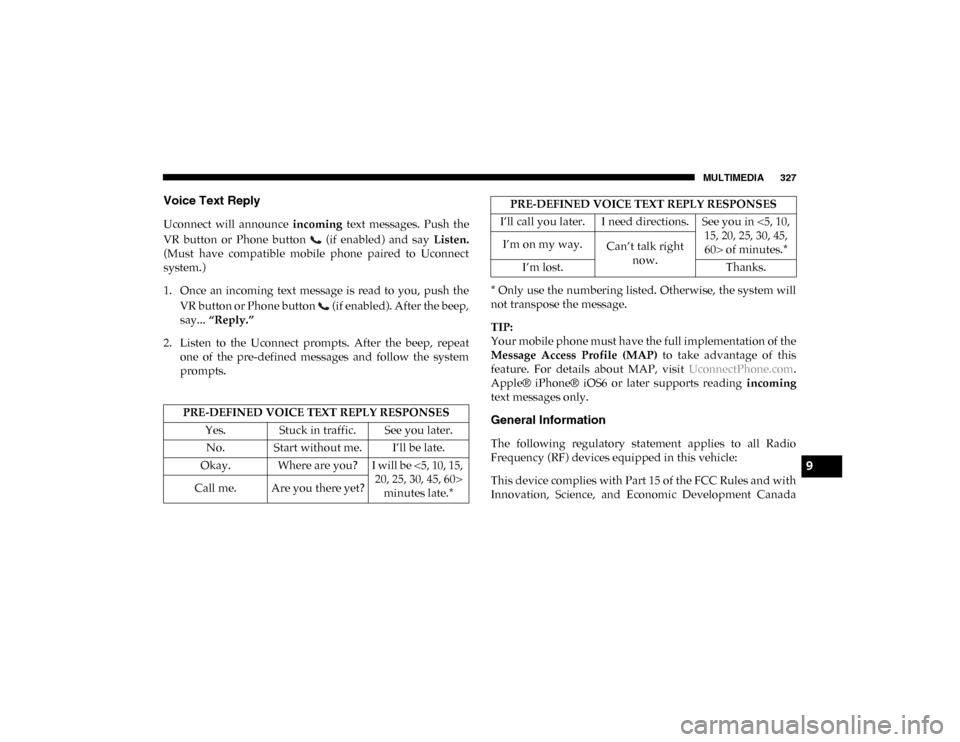
Voice Text Reply
Uconnect will announce incoming text messages. Push the
VR button or Phone button (if enabled) and say Listen.
(Must have compatible mobile phone paired to Uconnect
system.)
1. Once an incoming text message is read to you, push the
VR button or Phone button (if enabled). After the beep,
say... “Reply.”
2. Listen to the Uconnect prompts. After the beep, repeat one of the pre-defined messages and follow the system
prompts. * Only use the numbering listed. Otherwise, the system will
not transpose the message.
TIP:
Your mobile phone must have the full implementation of the
Message Access Profile (MAP)
to take advantage of this
feature. For details about MAP, visit UconnectPhone.com.
Apple® iPhone® iOS6 or later supports reading incoming
text messages only.
General Information
The following regulatory statement applies to all Radio
Frequency (RF) devices equipped in this vehicle:
This device complies with Part 15 of the FCC Rules and with
Innovation, Science, and Economic Development Canada
PRE-DEFINED VOICE TEXT REPLY RESPONSES
Yes. Stuck in traffic. See you later.No. Start without me. I’ll be late.
Okay. Where are you? I will be <5, 10, 15, 20, 25, 30, 45, 60> minutes late.*
Call me. Are you there yet?
I’ll call you later. I need directions. See you in <5, 10,
15, 20, 25, 30, 45, 60> of minutes.*
I’m on my way.
Can’t talk right
now.
I’m lost. Thanks.
PRE-DEFINED VOICE TEXT REPLY RESPONSES
9
2020_RAM_PROMASTER_CITY_OM_USA=GUID-7B6A7FCA-79B0-423F-95C5-ED2A949C3D13=1=en=.book Page 327
Page 331 of 350

328 MULTIMEDIA
license-exempt RSS standard(s). Operation is subject to the
following two conditions:
1. This device may not cause harmful interference.
2. This device must accept any interference received,including interference that may cause undesired opera -
tion.
Le présent appareil est conforme aux CNR d`Innovation,
Science and Economic Development applicables aux appar -
eils radio exempts de licence. L'exploitation est autorisée aux
deux conditions suivantes:
1. l'appareil ne doit pas produire de brouillage, et
2. l'utilisateur de l'appareil doit accepter tout brouillage radioélectrique subi, même si le brouillage est susceptible
d'en compromettre le fonctionnement.
La operación de este equipo está sujeta a las siguientes dos
condiciones:
1. es posible que este equipo o dispositivo no cause interfer -
encia perjudicial y
2. este equipo o dispositivo debe aceptar cualquier interfer- encia, incluyendo la que pueda causar su operación no
deseada. NOTE:
Changes or modifications not expressly approved by the
party responsible for compliance could void the user’s
authority to operate the equipment.
Additional Information
© 2019 FCA US LLC. All rights reserved. Mopar and Ucon
-
nect are registered trademarks and Mopar Owner Connect is
a trademark of FCA US LLC. Android™ is a trademark of
Google Inc. SiriusXM® and all related marks and logos are
trademarks of SiriusXM® Radio Inc.
Uconnect System Support:
• US residents visit DriveUconnect.com or call:
1-877-855-8400 (24 hours a day 7 days a week)
• Canadian residents visit DriveUconnect.ca or call:
1-800-465-2001 (English) or 1-800-387-9983 (French)
Mon. – Fri., 8:00 am – 8:00 pm, ET
Sat., 9:00 am – 5:00 pm, ET
Sun., Closed
2020_RAM_PROMASTER_CITY_OM_USA=GUID-7B6A7FCA-79B0-423F-95C5-ED2A949C3D13=1=en=.book Page 328
Page 338 of 350

335
INDEX
A
Adding Engine Coolant (Antifreeze) ................................... 256
Additives, Fuel ........................................................................ 299
Air Bag Air Bag Operation ............................................................... 124Driver Knee Air Bag ........................................................... 125
Enhanced Accident Response ................................... 131, 240
Event Data Recorder (EDR) ............................................... 240
Front Air Bag ....................................................................... 122If Deployment Occurs ........................................................ 130
Knee Impact Bolsters .......................................................... 124Maintaining Your Air Bag System.................................... 132
Maintenance......................................................................... 132
Transporting Pets ................................................................ 153
Air Bag Light ..................................................................... 84, 154
Air Cleaner, Engine (Engine Air Cleaner Filter) ................ 250
Air Conditioner Maintenance ............................................... 251
Air Conditioner Refrigerant .................................................. 251
Air Conditioner System ......................................................... 251
Air Conditioning Filter ............................................................ 59
Air Conditioning, Operating Tips .................................... 57, 59 Air Filter ................................................................................... 250 Air Pressure
Tires .......................................................................................277
Alarm Security Alarm .......................................................................21
Alterations/Modifications Vehicle.....................................................................................12
Antifreeze (Engine Coolant) ..........................................256, 301 Disposal ................................................................................258
Anti-Lock Brake System (ABS) ...............................................97 Anti-Lock Warning Light.........................................................88
Assist, Hill Start .......................................................................101
Audio Systems (Radio)........................................................... 305
Auto Down Power Windows ..................................................61
Auto Up Power Windows .......................................................61Automatic Transmission ................................................163, 164 Adding Fluid................................................................263, 304
Fluid And Filter Change ....................................................263
Fluid Change........................................................................263Fluid Level Check........................................................261, 262
Fluid Type ....................................................................261, 304
Special Additives .................................................................262
Auxiliary Electrical Outlet (Power Outlet) ............................70
Axle Fluid .................................................................................304
11
2020_RAM_PROMASTER_CITY_OM_USA=GUID-7B6A7FCA-79B0-423F-95C5-ED2A949C3D13=1=en=.book Page 335