2020 AUDI TT COUPE transmission
[x] Cancel search: transmissionPage 218 of 280

Wheels
Glossary of tire and loading
terminology
Accessory weight
means the combined weight (in
excess of those standard items
which may be replaced) of auto-
matic transmission, power steer-
ing, power brakes, power win-
dows, power seats, radio, and
heater, to the extent that these
items are available as factory-in-
stalled equipment (whether in-
stalled or not).
Aspect ratio
means the ratio of the height to
the width of the tire in percent.
Numbers of 55 or lower indicate a
low sidewall for improved steer-
ing response and better overall
handling on dry pavement.
Bead
means the part of the tire that is
made of steel wires, wrapped or
reinforced by ply cords and that is
shaped to fit the rim.
Bead separation
means a breakdown of the bond
between components in the bead.
216
Cord
means the strands forming the
plies in the tire.
Cold tire inflation pressure
means the tire pressure recom-
mended by the vehicle manufac-
turer for a tire of a designated
size that has not been driven for
more than a couple of miles (kilo-
meters) at low speeds in the three
hour period before the tire pres-
sure is measured or adjusted.
Curb weight
means the weight of a motor ve-
hicle with standard equipment in-
cluding the maximum capacity of
fuel, oil, and coolant, air condi-
tioning and additional weight of
optional equipment.
Extra load tire
means a tire designed to operate
at higher loads and at higher in-
flation pressures than the corre-
sponding standard tire. Extra load
tires may be identified as “XL”,
“xl”, “EXTRA LOAD”, or “RF” on
the sidewall.
Page 251 of 280

8S1012721BB
Emergency assistance
4. Attach the other end of the negative cable
(black) to the jump start connection @) on
the vehicle.
Starting the engine
> Start the engine in the vehicle giving the charge
and let it run at idle.
> Now start the engine in your vehicle, which has
the
drained battery.
> If the engine does not start: Stop the starting
procedure after 10 seconds and then repeat it
after approximately 30 seconds.
> Turn on the rear window defogger in your vehi-
cle in order to reduce any voltage peaks that
may occur when disconnecting the jump start
cables. The headlights must be switched off.
> With the engines running, remove the cables in
reverse order of the way they were installed.
> Close the red cover on the positive terminal.
Z\ WARNING
— Never connect the jump start cable directly
to your vehicle battery. Only use the connec-
tions in the engine compartment.
— Do not touch the non-insulated parts of the
terminal clamps. The cable must also not
come into contact with vehicle components
that conduct electricity when it is connected
to the positive vehicle battery terminal. This
can cause a short circuit.
— The locking bolts on the battery cells must
be tightened securely.
— Keep ignition sources (open flames, burning
cigarettes, etc.) away from the vehicle bat-
teries to reduce the risk of an explosion.
— Route the jump start cables so they cannot
get caught in the moving parts in the other
vehicle's engine compartment.
@) Note
Please note that the connecting process previ-
ously described for the jump start cables is in-
tended for when your vehicle is being jump
started.
@) Tips
Make sure that the connected jump start ca-
bles have sufficient contact with metal.
Towing
General information
You should only perform the steps that follow if
you have the necessary tools and technical ex-
pertise.
Towing requires a certain amount of practice.
Audi recommends contacting a towing company
to have the vehicle transported.
You should only have your vehicle towed by an-
other vehicle when disabled in exceptional cir-
cumstances. Inexperienced drivers should not
tow.
Notes on towing
When the engine is stopped, the transmission
will not be sufficiently lubricated if traveling at
high speeds and long distances:
— The maximum permitted towing speed is 30
mph (50 km/h).
— The maximum permitted towing distance is 30
miles (50 km).
Additional information on towing with a tow
truck
The vehicle may only be towed with the front axle
raised. Do not wrap any chains or cables around
the brake lines.
If the vehicle should be towed with the axle
raised, then the ignition must be switched off to
reduce the risk of damage to the drivetrain.
Tow bar and towing cable
The vehicle can be towed with a tow bar or tow-
ing cable. Both drivers should be familiar with
the special considerations when towing, especial-
ly when using a towing cable.
Always make sure the traction force does not ex-
ceed the permitted level and there are no shock
loading conditions. There is always the risk of the >
249
Page 252 of 280

Emergency assistance
coupling becoming overloaded when driving off-
road.
For the most safety and security, drive with a tow
bar. You should use a towing cable only if a tow
bar is not available. Use a towing cable made of
synthetic elastic cable similar elastic material.
ZX WARNING
— Towing highly increases the risk of an acci-
dent, for example from colliding with the
towing vehicle.
— To reduce the risk of an accident, do not al-
low anyone to remain inside the vehicle
when it is being transported by a tow truck
or a special transporter.
@) Note
— If normal towing is not possible, for exam-
ple if the transmission is faulty or if the
towing distance is greater than 30 miles
(50 km), then transport the vehicle on a
special carrier.
— If the vehicle is towed by a tow truck at the
axle that is not permitted, this can cause se-
vere damage to the transmission.
— The vehicle must not be tow started for
technical reasons.
@) Tips
— If there is a power failure, the selector lever
will not move out of the "P" position. The
parking lock must be released using the
emergency release before towing the vehi-
cle > page 86.
— Follow the local legal regulations for tow-
ing.
Read and follow the important information under
=> page 249.
Preparations
> Only secure the towing cable or tow bar at the
designated towing loops > page 250,
=>page 251.
250
>» Make sure the towing cable is not twisted. Oth-
erwise it could disconnect from the towing loop
while towing.
> Switch the emergency flashers on in both
vehicles > page 38. However, do not do this if it
prohibited by law.
Towing vehicle (front)
> Only start to drive when the towing cable is
taut.
> Be especially careful when accelerating.
» Avoid sudden braking or driving maneuvers.
Vehicle being towed (rear)
> Make sure the ignition is switched on so that
the steering wheel is not locked and so that you
can use the turn signals, the horn, and the
windshield wipers if needed > /A\.
> Switching it off before the vehicle has stopped
may impair the function of the brake booster
and power steering. You would then need to
use more force to steer and brake the vehicle.
> Release the parking brake > page 77.
> Select the “N” selector lever position.
> Make sure the towing cable is always taut.
ZA WARNING
Never tow a vehicle using a tow bar or towing
cable if the vehicle does not have electrical
power.
Front towing loop
BFV-0309
Fig. 196 Front bumper: installing the towing loop
The threaded opening for the towing loop is lo-
cated on the right side of the front bumper.
> Remove the towing loop from the vehicle tool
kit > page 241.
Page 255 of 280
8S1012721BB
Fuses and bulbs
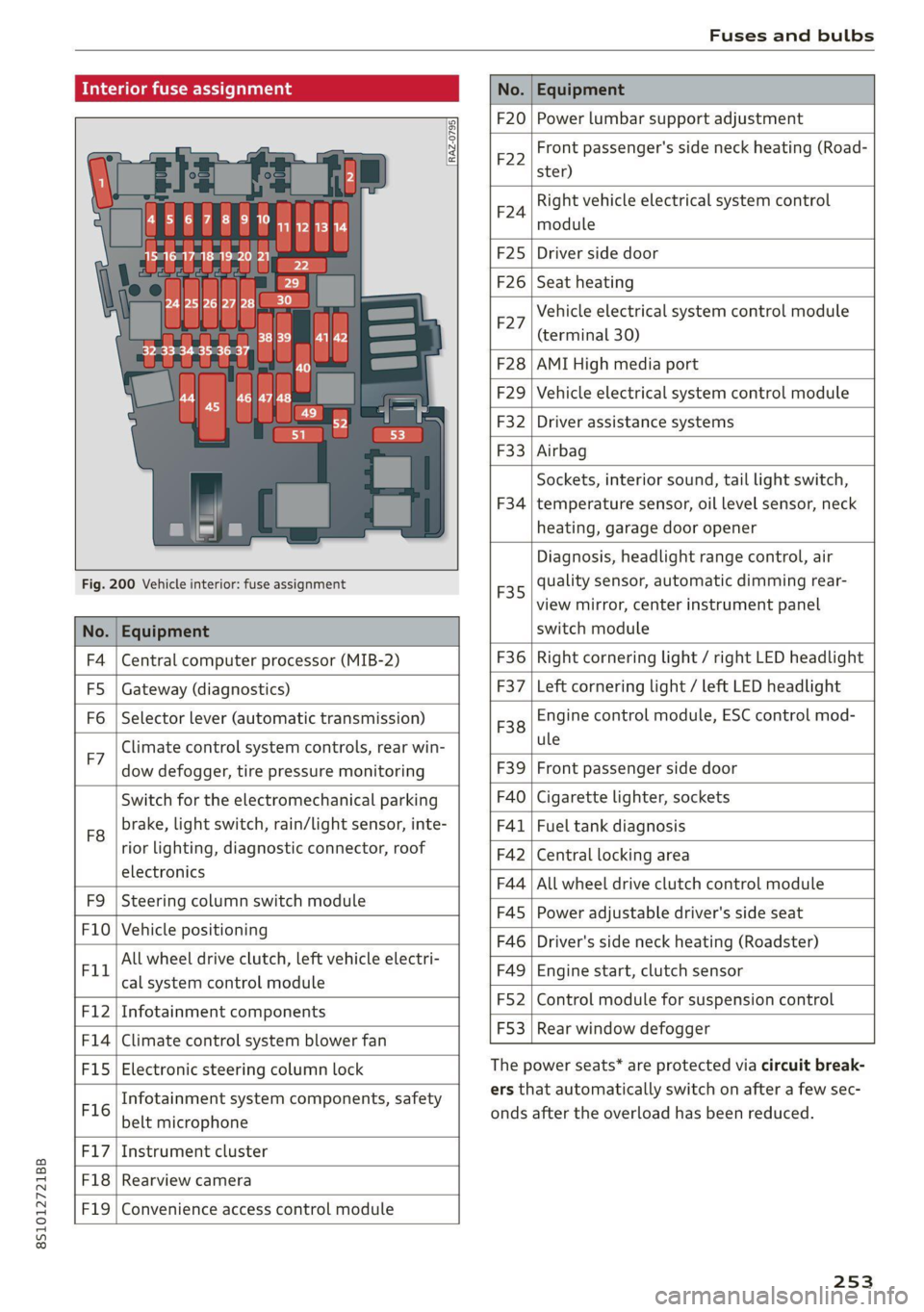
fuse assignme
No. | Equipment
RAZ-0795)
PO ee
15°16°17-18 19 20 21
Pr ily ip y ips :}
3839 |4142
32°33:34 35:36 37
40 49
74
F20 | Power lumbar support adjustment
Front passenger's side neck heating (Road-
F22
ster)
Right vehicle electrical system control
F24
module
F25 | Driver side door
F26 | Seat heating
Vehicle electrical system control module
bad (terminal 30)
F28 | AMI High media port
F29 | Vehicle electrical system control module
F32 | Driver assistance systems
F33 | Airbag
Sockets, interior sound, tail light switch,
F34 | temperature sensor, oil level sensor, neck
heating, garage door opener
Fig. 200 Vehicle interior: fuse assignment
No. Equipment
Diagnosis, headlight range control, air
quality sensor, automatic dimming rear-
view mirror, center instrument panel
switch module
F35
F4 Central computer processor (MIB-2) F36 | Right cornering light / right LED headlight
FS: Gateway (diagnostics) F37 | Left cornering light / left LED headlight
Fo Selector lever (automatic transmission)
F7
Climate control system controls, rear win-
dow defogger, tire pressure monitoring
Engine control module, ESC control mod-
F38
ule
F39 | Front passenger side door
F8
Switch for the electromechanical parking
brake, light switch, rain/light sensor, inte-
rior lighting, diagnostic connector, roof
electronics F40
| Cigarette lighter, sockets
F41 | Fuel tank diagnosis
F42 | Central locking area
FQ Steering column switch module
F44 | All wheel drive clutch control module
F10 Vehicle positioning
F45 | Power adjustable driver's side seat
Fil
All wheel drive clutch, left vehicle electri-
cal system control module
F46 | Driver's side neck heating (Roadster)
F49 | Engine start, clutch sensor
FI2 Infotainment components
F52 | Control module for suspension control
F1l4 Climate control system blower fan
F53 | Rear window defogger
Fis Electronic steering column lock
F16
Infotainment system components, safety
belt microphone
PL? Instrument cluster
F18 Rearview camera
F19
Convenience access control module
The power seats* are protected via circuit break-
ers that automatically switch on after a few sec-
onds after the overload has been reduced.
253
Page 256 of 280
Fuses and bulbs
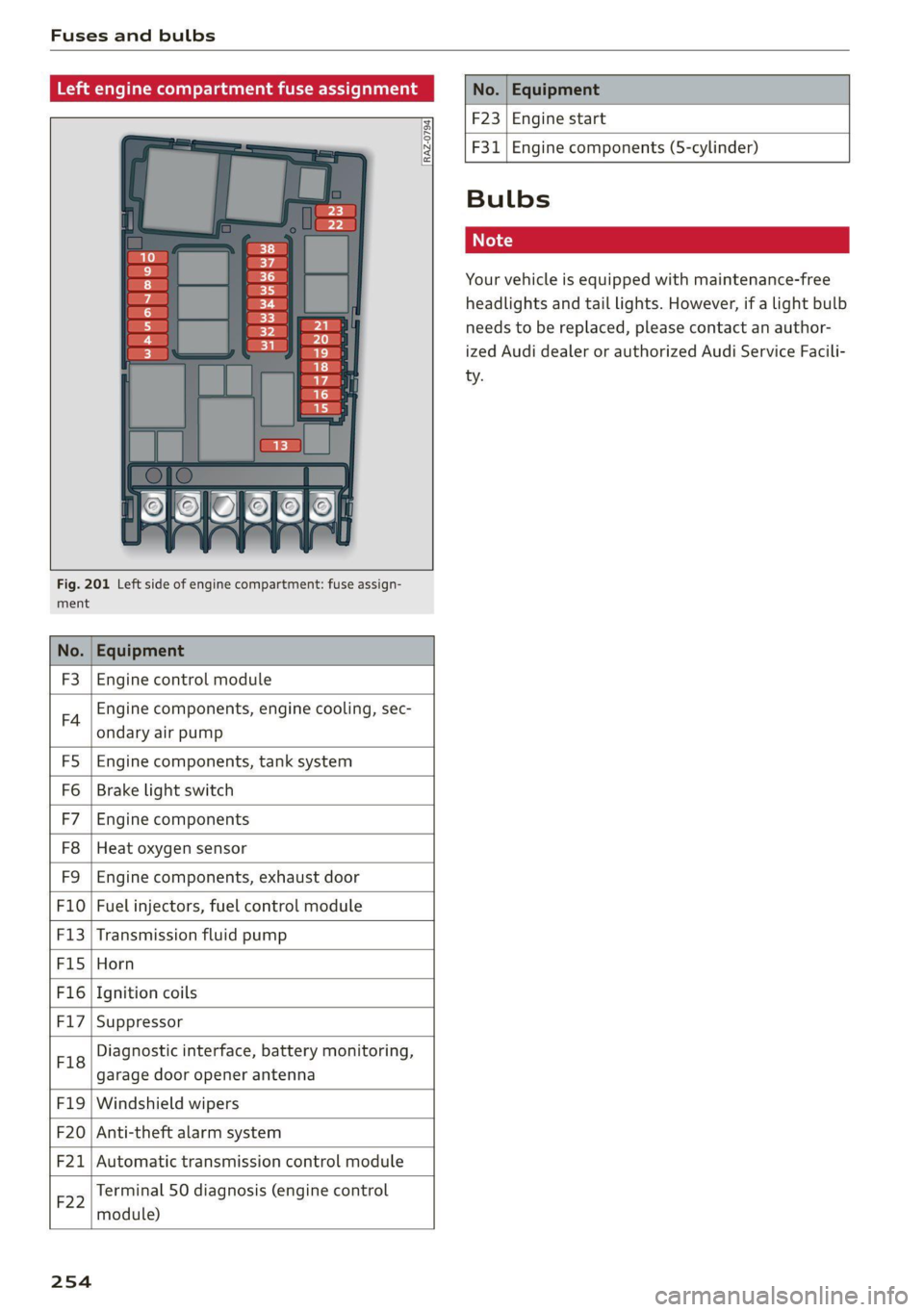
Left engine compartment fuse assignment
=
3
3}
7
6
Ly
vy
<1
RAZ-0794)
ment
F3
Fig. 201 Left side of engine compartment: fuse assign-
Engine control module
F4
Engine components, engine cooling, sec-
ondary air pump
FS Engine components, tank system
Fo Brake light switch
F7 Engine components
F8 Heat oxygen sensor
F9 Engine components, exhaust door
F10 Fuel injectors, fuel control module
F13 Transmission fluid pump
F15 Horn
F16 Ignition coils
F17 Suppressor
F18
Diagnostic interface, battery monitoring,
garage door opener antenna
F19 Windshield wipers
F20 Anti-theft alarm system
F201: Automatic transmission control module
F22
Terminal 50 diagnosis (engine control
module)
254
F23 Engine start
F31
Engine components (5-cylinder)
Bulbs
Your vehicle is equipped with maintenance-free
headlights and tail lights. However, if a light bulb
needs to be replaced, please contact an author-
ized Audi dealer or authorized Audi Service Facili-
ty.
Page 258 of 280
![AUDI TT COUPE 2020 Owners Manual Data privacy
Transmitted information
Privacy settings
Applies to: vehicles with Audi connect
> Select: [MENU] button > Audi connect > right
control button > Privacy.
Requirement: th](/manual-img/6/57658/w960_57658-257.png "AUDI TT COUPE 2020 Owners Manual Data privacy
Transmitted information
Privacy settings
Applies to: vehicles with Audi connect
> Select: [MENU] button > Audi connect > right
control button > Privacy.
Requirement: th")
Data privacy
Transmitted information
Privacy settings
Applies to: vehicles with Audi connect
> Select: [MENU] button > Audi connect > right
control button > Privacy.
Requirement: the ignition must be switched on.
Location, vehicle, and personal data are transmit-
ted when using Audi connect services.
Allowing sending of data
— Select and confirm Activate data connection.
The data module for the use of all Audi connect
services will be active.
Restricting sending of data
— Select and confirm Activate privacy. The data
connection is limited or deactivated depending
on the equipment. The majority of Audi connect
services will not be available.
The following interfaces are not affected by this
setting: Bluetooth, Bluetooth Low Energy (BLE),
Wi-Fi connection, Audi smartphone interface
(ASI), Near Field Communication (NFC), charging
communication (high-voltage system), Electronic
Toll Collect (ETC), On-Board Diagnostic System
(OBD), if equipped.
@) Note
You are responsible for all precautions taken
for data protection, anti-virus protection, and
protection against loss of data on mobile de-
vices that are used to access the Internet
through the Wi-Fi hotspot.
G) Tips
If the transmission of data is limited, data
will still be transmitted to verify subscrip-
tions.
Applies to: vehicles with Audi connect Infotainment
AUDI AG collects, uses, stores and shares your
personal information, such as contact data, vehi-
cle data, usage data, driving data and precise ge-
olocation, in order to provide you with the prod-
256
ucts and services you have purchased or request-
ed, and for a number of other purposes, for ex-
ample, to track quality issues, to performance
and safety, to meet our internal compliance or le-
gal requirements and to market to customers
and potential customers. For a more complete
list of the data we collect, how we use it and with
whom we share it, please visit your Audi nation-
al/sales region website at www.audi.com.
The collection, use and sharing may vary depend-
ing on your model and model year, your subscrip-
tion status, or the service offering. For example,
collection, use and sharing may vary between
Audi connect services, if you have designated a
key user, or if you are driving a model equipped
with persistent data logging. Please review the
complete Privacy Statement to understand our
data handling practices with respect to a particu-
lar service.
You can find additional information about our da-
ta privacy practices in your MMI.
> Select: [MENU] button > Audi connect > right
control button > About Audi connect.
Information about our privacy practices in con-
junction with the mobile Audi connect applica-
tion can be found in the Application’s Privacy
Statement.
For additional information about the privacy
practices relating to Audi connect, myAudi, or
other websites, applications or online services as
well as your obligations with respect to using
these services, and for additional information re-
garding Audi connect terms and conditions,
please visit your Audi national/sales region web-
site at www.audi.com.
Page 264 of 280
![AUDI TT COUPE 2020 Owners Manual Technical data
Technical data
Identification data
Vehicle identification label
—S>SSESESES>S>S>E>E>>—s FA
WOOK X-XOK KKK)
(Hae osccn XX x XXKKKNKK
Fim = YXX XXX
27] XX XXXXXXX XX. X.](/manual-img/6/57658/w960_57658-263.png "AUDI TT COUPE 2020 Owners Manual Technical data
Technical data
Identification data
Vehicle identification label
—S>SSESESES>S>S>E>E>>—s FA
WOOK X-XOK KKK)
(Hae osccn XX x XXKKKNKK
Fim = YXX XXX
27] XX XXXXXXX XX. X.")
Technical data
Technical data
Identification data
Vehicle identification label
—S>SSESESES>S>S>E>E>>—s FA
WOOK X-XOK KKK)
(Hae osccn XX x XXKKKNKK
Fim = YXX XXX
27] XX XXXXXXX XX. X.X XX
XXX KW x
(3)—-Wwoee / GER. 1B
ENG. CODE / TRANS. CODE
XX
XXXX XXX XXX
@ i XK XKNK XK XX
EOA 7D5
2EH JOZ
3FC
FOA
TL6 = 3KA
1XW
716 CV7
3L4
1SA
4UB
1LB
6XM 5SG 1AS
SMU 7X1
0G7 OYH OJF
U1A X9B QZ7
9Q8
824 D2D
4X3 2K2
3Y0 413
QIA
SRW
1BA
9G3
8EH
8Q3
7KO
AKC 7GB
6)
5D2
4GQ
et
Fig. 203 Vehicle identification label
The vehicle identification label > fig. 203 is locat-
ed in the luggage compartment under the cargo
floor cover.
The vehicle identification label information can
also be found in the Warranty & Maintenance
booklet.
Vehicle data
The sticker contains the following vehicle data:
@ Vehicle Identification Number (VIN)
@ Vehicle type, engine output, transmission
@® Engine and transmission codes
@ Paint and interior codes
© Optional equipment numbers
Vehicle identification number (VIN)
The VIN is located in the following areas:
MENU — Select: button > left control button >
Service & checks > Vehicle information.
— On the vehicle identification label
— At the front behind the windshield*
— On the right side of the engine compartment
under a cover
Notes about technical data
The values may vary based on special equipment
as well as market-specific equipment and meas-
uring methods.
Please note that the specifications listed in the
vehicle documentation always take precedence.
@ Tips
Any technical data that is missing was not
available at the time of printing.
Length (in (mm)) Width (in (mm)) Width across the
mirrors (in (mm))
Height at curb
weight (in (mm))
TT Coupe 165.0 (4,191) 72.1 (1,832) 77.4 (1,966) 53.3 (1,353)
TTS Coupe 165.0 (4,191) 72.1.(1,832) 77.4 (1,966) 53,3 (1,353)
TT Roadster 165.0 (4,191) 72.1.(1,832) 77.4 (1,966) 53.4 (1,355)
262
Page 266 of 280

Index
A
A/C (climate control system) .............. 70
ACCESSOFIES .. 0... eee 63, 259
Active lame'assistyes « . serie so sucesso emmice 2 0 89
Activating vibration warning............. 91
Adjusting steering time................. 91
Cleaning the camera area.............. 236
Indicator light.......... 2.0.00 ee eee eee 90
M@SSAGES eeews » « sous & 5 see Y & ewe e Bees 90
Switching ON/OFF. « essere so ana + vor ve ow 90
Adaptive light « eis: . sisin as nae a 6 came oo as 96
Adjusting the additional display........... 14
Adjusting the air distribution............. 70
Adjusting the center console lighting....... 39
Adjusting the sound..............-..00- 193
Adjusting the temperature............... 70
Adjusting the vents..............--.000- 71
Airbag system... .. eee eee eee 52
Alarm system
refer to Anti-theft alarm system.......... 24
Alignment pin (tire change) .............. 241
All-weather lights.................00000- 36
ALL:S@aSON TNeS iiss so comers oe veausin & asennes a e ae 228
All Whee lOrive soon so ioe « a asus ¥ & amines 109
Alternative
routes . cscs scan ei cae ee bere 156
AMbISntliGhting!s « = sess = = mews ov sows « 2 ee 39
AMI
refer to Audi music interface........... 176
Android Auto
refer to Audi smartphone interface...... 187
Announcements (settings)
refer to Voice guidance. ...........0005 157
Anti-freeze
Windshield washer system............. 211
Anti-lock braking system (ABS)........... 105
Anti-Slip Regulation.................05. 105
Anti-theft alarm system............000008 24
Anti-theft wheel bolts.................. 244
Apple CarPlay
refer to Audi smartphone interface...... 187
APIMIROSE. csconere « 0 ccusece 0 © sonsee a 0 anesera «oi miaeern « » 47
Aspect ratio (Video) ...... 6... cece eee eee 181
ASR
refer to Anti-Slip Regulation............ 105
264
Audi connect
refer toconnect....... 0. eee eee eee eee 142
Audi connect Infotainment
Personal hotspot.............e0ee cece 143
Services overview. ............0000005 145
Audi magnetic ride
refer to Suspension control.............. 96
Audi music interface. .............0000- 176
Audi music stream
refer to Wi-Fi...............00 ee 147,174
Audiosiles, coves «x suncaws x x sane w a ctayave « erenene 178
Audio player
Bluetooth audio player................ 173
Wi-Fi audio players.: ss esses eesse specs 174
Audio track. ...... 0. cece eee eee eee 181
Audi phone box.............-.000 eee 131
Audi smartphone interface.......... 187,191
Audi virtual cockpit
refer to Instrument cluster.............. 10
AUTO
Automatic climate control system........ 70
Automatic headlights.................. 36
Auto Lock (central locking) ............... 18
Automatic climate control system
refer to Climate control system (automatic) . 70
Automatic post-collision braking system... 105
Automatic transmission............-...5- 79
Driving tips..... 6... 0. cee eee eee eee 81
Emergency mode............-...000005 85
Hilldeseent control spews x 2 cxwn 2 a wows « was 83
KKIGKSG OWN sczssis 0 oncies «a openius « syescem 2 cnerte 84
Malfunction... 0.0... 0... eee e eee 81
Selector lever emergency release......... 86
Selector: lever LOK scazee + x sesinae + 6 sevens a 6 ssn 81
Selector lever positions................. 79
ShIPEING MANUALLY’: asus « ¢ neues a e eee & ex 83
Steering wheel with shift paddles........ 83
tiptronic.. 2... eee eee eee 83
Automatic wiper/washer system........... 41
Automatic zoom (navigation) ............ 160
AUXANPUE « swcsinn o ceswae ¥ eames as eM ao auDe 176
Average fuel consumption..............05 15
Average speed .... cs ec ccc eee cc eens ees 15
B
BACK button ; « exes s news s + Baws =v eee 9 ve 111